Amazon affiliate links - we earn a commission.Affiliate disclosure

Buying guide · 12 min read · Updated 2026-11-07

Best 18mm Label Printers (2026)

Five label printers that print 18mm (3/4 inch) tape compared on connectivity, industrial features, memory and tape supply, for offices, shops and cable work.

James MillerBy James MillerLead Machine Editor5 machines comparedSpec-sheet verified
Best 18mm Label Printers

At a glance

Our top picks

Three quarter inch tape is the size where a label maker stops being a home gadget and starts being a business tool. It carries two lines of readable text, wraps cables cleanly and sticks to panels, bins and equipment, and the machines that print it range from keyboard units to industrial handhelds. Think about where the label will live and who will read it before you choose a model.

This guide explains the difference between office and industrial label printers, why tape type and connectivity decide daily use, and what the numbers on a spec sheet really promise. Check the picks above for a short list, then read the reviews to match one to your trade.

Before you buy

6 Criteria to Look For Before Buying a 18mm Label Printer

  1. 01

    Office versus industrial tape

    Office printers like the PT-D610BT and D410 use TZe laminated tape, which resists water and sun. Industrial models like the PT-E310BT and Epson LW-PX300 use tapes built for heat, chemicals and cable wraps. If you label cables or machinery, buy industrial. Tape cassettes are interchangeable across the Brother office range, so one stock of spares serves several printers.

  2. 02

    Connectivity

    The D410 connects by USB only, the D460BT by Bluetooth and the D610BT by both. The E310BT adds USB-C. Several users sharing one printer benefit from Bluetooth or a network, while a single desk needs only USB. If a team shares the machine, a printer with both USB and Bluetooth avoids a single failure point.

  3. 03

    Maximum tape width

    Eighteen millimeters is three quarters of an inch. The PT-D610BT can also print wider tape up to 24mm, while the D410 tops out near 18mm. If you may need wider labels later, buy the printer with headroom. Wider tapes cost more per label, so choose the narrowest width that stays readable at your viewing distance.

  4. 04

    Memory and templates

    The PT-D610BT stores 90 labels, and the PT-E310BT stores databases and templates. Memory matters when you reprint the same labels often, such as asset tags or panel lists. A saved template library also keeps labels consistent when different people print them.

  5. 05

    Power options

    The Epson LW-PX300 needs six AA cells and ships without an adapter. Industrial users often prefer rechargeable packs. Check what comes in the box. Rechargeable packs cost more up front but save a stock of AA cells over several years.

  6. 06

    Running cost of tape

    Tape is the real expense. Brother TZe cassettes are widely sold by compatible makers, which helps. Industrial tapes are more costly per label. Colored tapes help you sort by category, but test the contrast under your actual lighting.

Detailed reviews

The 5 best 18mm label printers, explained

01
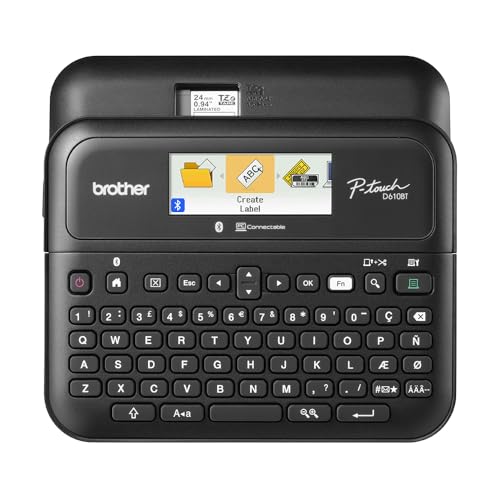
Brother P-Touch PT-D610BT Business Professional Label Maker
Bluetooth and USB17 fonts900 symbolsStores 90 labels
Check price on Amazon
Best for: A small business or busy home office where several people share one printer.

The PT-D610BT is the best all-round machine here because it connects by both Bluetooth and USB, which means several people can design labels and send them to the same printer. The listing counts 17 fonts and 17 styles, 160 frames and 900 symbols, plenty of range for signage-style labels, and its built-in memory stores up to 90 frequently used labels for quick reprinting.

It prints Brother TZe tape, a laminated tape sold in many widths up to 24mm, so 18mm tape is a middle size rather than the limit. That headroom matters, because most users eventually want a narrower or wider label than they planned. Against the PT-D410, the D610BT adds Bluetooth, a larger library and memory for repeated labels, which is what justifies the higher price.

In use, the automatic cutter keeps edges square and the backlit screen helps in dim storerooms. Ownership is simple: keep a spare cassette of each tape you use, clean the print head with a swab and isopropyl alcohol when streaks appear, and update the desktop software when your operating system changes. A practical workflow is to build a template for each recurring label type, such as asset tags or shelf bins, and save it in memory so a reprint takes seconds. When you change tape color or width in the cassette bay, the printer detects it, so check that the preview still matches before sending a long batch.

What works

  • Bluetooth and USB connectivity
  • 17 fonts, 160 frames and 900 symbols
  • Memory stores 90 frequent labels
  • Automatic cutter with laminated TZe tape

Watch out for

  • Higher price than the D410
  • Desktop software needs periodic updating

Spec sheet

Connectivity
Bluetooth and USB
Fonts and styles
17 fonts, 17 styles
Frames and symbols
160 frames, 900 symbols
Memory
Stores up to 90 labels
Cutter
Automatic
02
Brother P-Touch PT-D410 Advanced Label Maker USB 18mm
Up to 18mm tapeUSB to PC or MacDesign toolsTZe tape
Check price on Amazon
Best for: A computer desk where the printer stays plugged in and labels are designed on screen.

The PT-D410 is the straightforward desk machine for 18mm work. It connects by USB to a PC or Mac, where built-in design tools let you lay out labels, and it prints on Brother TZe laminated tape up to about three quarters of an inch. The listing positions it for small business and home organization, filing and workspace labels.

What it lacks is wireless connectivity. If you prefer to design on a phone, the Bluetooth D460BT or D610BT is the better fit. If you already sit at a computer and want robust, repeatable labels, the D410 is cheaper and does the job. It shares the TZe tape ecosystem of the other Brother models, so you are not locked into a single supplier for the consumable.

As with every thermal label maker, the running cost is tape. Buy compatible cassettes carefully and keep one spare. Keep the cable and driver on hand, and run a test print after any operating system update to confirm the driver still works. Keep the driver installer on a shared drive so a replacement computer can be set up in minutes.

What works

  • USB connection to PC or Mac
  • Prints durable laminated TZe tape
  • Built-in design tools
  • Lower cost than Bluetooth models

Watch out for

  • No wireless connectivity
  • Needs a computer for full features

Spec sheet

Max tape width
About 3/4 inch (18mm)
Connectivity
USB to PC or Mac
Design
Built-in design tools
Tape
Brother TZe laminated
Use
Small business and home organizing
03
Brother P-Touch PT-D460BT Business Expert Connected Label Maker
Bluetooth18mm TZeApp designBusiness model
Check price on Amazon
Best for: A small shop that designs on a phone and wants Brother tape without the top-tier price.

The PT-D460BT is Brother's Bluetooth step between the entry D410 and the full-featured D610BT. The listing describes connecting and creating via Bluetooth on TZe label tapes, and it is positioned as a business expert model. At about 3.25 pounds in the package, it is a compact desk unit, easily moved between desks.

What separates it from the D610BT is mostly library size and memory, which the visible listing does not detail. For a small shop that designs labels on a phone and prints occasionally, the D460BT is a sensible middle choice. It shares the TZe ecosystem, so replacement tape is easy to find.

Treat its Bluetooth link like any app-dependent feature: keep the app updated, pair once and keep the USB option in mind if the manual lists it. A spare tape cassette and a print head swab complete the kit. Pair it with one device, name it clearly, and keep the pairing instructions with the box so a phone upgrade does not leave you stranded. If labels print slightly off center, feed a few inches of tape and cut before the next job.

What works

  • Bluetooth connection for phone design
  • TZe laminated tape up to 18mm
  • Compact desk unit
  • Brother brand support

Watch out for

  • Feature detail is sparse in the listing
  • Fewer fonts and memory than the D610BT

Spec sheet

Connectivity
Bluetooth to phone or PC
Tape
Brother TZe up to 18mm
Positioning
Business expert tier
Design
App and built-in tools
Shipping weight
About 3.25 pounds
04
Epson LABELWORKS LW-PX300 Industrial Handheld Label Maker
Industrial handheld6 AA batteriesPrint previewBarcode labels
Check price on Amazon
Best for: A workshop or facilities job where a rugged handheld with barcode support is needed.

Epson positions the LW-PX300 for workplace jobs: custom barcodes, wire markers and equipment tags, and the listing mentions durable PET tape. It has a large print preview screen so you see the label before it prints, which saves tape. It requires six AA batteries, and the AC adapter is not included, a detail worth noting before you buy.

Industrial label makers are built for rough handling and print on tapes designed to withstand heat, chemicals and abrasion. The LW-PX300 sits at the entry of that class. Against the Brother E310BT, it lacks Bluetooth and USB-C but costs less and is simpler to learn.

The missing adapter means you will either rely on batteries or buy a compatible AC adapter separately. Keep spare AA cells in your toolbox, and store spare tape cassettes in a closed bag to keep dust off the adhesive. For wire markers, check the diameter range printed on the tape box, because the label should wrap fully without overlapping. Buy an AC adapter and a small battery stock at the outset so the unit is never unusable mid-job.

What works

  • Industrial handheld build
  • Large print preview screen
  • Supports barcodes and wire markers
  • Durable PET tape options

Watch out for

  • AC adapter not included
  • No Bluetooth or USB-C

Spec sheet

Type
Industrial handheld
Power
6 AA, adapter not included
Screen
Large print preview
Applications
Barcodes, wire markers
Media
PET tape in 18mm among sizes
05
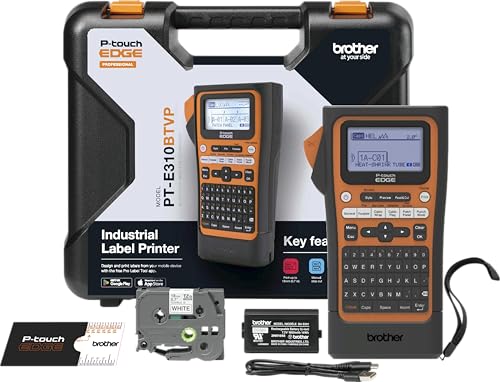
Brother PT-E310BT Industrial Label Printer Bluetooth USB-C
Industrial handheldBluetooth and USB-CApplication keysStores databases
Check price on Amazon
Best for: Network and electrical installers who label cables and panels all day.

The PT-E310BT is aimed at electricians and network installers, and its quick application keys show it: dedicated shortcuts exist for cable wrap, cable flag, patch panel, punch block and faceplate labels. The listing says it connects by Bluetooth and USB-C and stores databases and templates, so you can print from existing work files.

Those application keys cut keystrokes on repetitive jobs, such as labeling forty patch panel ports in order. Industrial labels also use tapes designed for heat and chemicals, which stand up better in a rack closet than office tape. Compared with the Epson LW-PX300, the Brother adds wireless and USB-C and a larger tape ecosystem.

It is overkill for labeling a pantry. For cable work it is a clear win. Charge it before a job, keep a stock of cable flag and wrap tapes and update the app when your phone upgrades. Before a cabling job, build the port list as a spreadsheet and import it, so the labels print in installation order and you avoid mislabeled ports. Keep the cutter blade clean, since adhesive on the blade makes ragged edges on flag labels.

What works

  • Quick keys for cable wrap, flag and patch panel
  • Bluetooth and USB-C connections
  • Stores databases and templates
  • Industrial tape options

Watch out for

  • Overkill and pricey for home use
  • Industrial tapes cost more per label

Spec sheet

Type
Portable industrial label printer
Connectivity
Bluetooth and USB-C
Quick keys
Cable wrap, flag, patch panel, punch block, faceplate
Storage
Databases and templates
Use
Mid-size labeling jobs

Spec sheet decoder

What the numbers on the box really mean

The specs manufacturers lead with, translated into what they tell you about real-world performance.

18mm tape

About three quarters of an inch. It carries two lines of text comfortably. It is a good choice for labels read from arm's length.

Watch forThe D610BT can also print up to 24mm.

TZe

Brother's laminated tape standard used by many models. Print is sealed between films. The laminate layer is what makes the print last.

Watch forOffice models use it, industrial models also accept special variants.

Application keys

Shortcuts for common label formats such as cable wrap and flag. They cut keystrokes on repetitive jobs. Application keys pay off on jobs with dozens of similar labels.

Watch forOnly the PT-E310BT lists them.

Print preview

A screen that shows the label before it prints. It saves tape. Preview screens are most useful with expensive industrial tape.

Watch forThe Epson LW-PX300 lists a large preview.

Memory

Stored labels or templates for quick reprint. It saves time on repeat jobs. Memory is useful only if you reprint the same text.

Watch forThe D610BT stores 90 labels.

Methodology

How We Evaluated These 18mm Label Printers

Tape type and supply

We compared TZe, PET and industrial tapes and who sells them. The Brother models share a broad tape ecosystem. Standard tape ecosystems scored higher than closed ones.

Connectivity

We counted USB, Bluetooth and USB-C. The D610BT covers two and the E310BT covers two, based on the spec sheet. Having both wired and wireless links counted as a plus.

Workflow features

We looked at memory, templates and application keys. The E310BT's keys and the D610BT's memory stand out. Features had to save real time on repeat jobs to count.

Power and portability

We checked batteries and adapters. The Epson's missing adapter cost it points. Missing power accessories were counted against a listing.

Support and value

We weighed brand history and price tier, judged against owner feedback patterns. We evaluated each pick against the same checklist. Longer-lived brands received a modest trust credit.

Decision guide

How to Choose the Right 18mm Label Printers

By Trade

SituationPickWhy
Small office or shopBrother PT-D610BTBluetooth, USB and memory
Single computer deskBrother PT-D410USB at lower cost
Phone-first designerBrother PT-D460BTBluetooth design
Facilities and wire markingEpson LW-PX300Industrial handheld
Network cablingBrother PT-E310BTQuick application keys
Warehouse shelf and bin labelsBrother PT-D610BTMemory and wide tape range

By Budget

TierPickWhy
LowestBrother PT-D410USB desk unit
Lower midBrother PT-D460BTBluetooth step-up
MidEpson LW-PX300Industrial entry
Upper midBrother PT-D610BTFull office feature set
HigherBrother PT-E310BTIndustrial with wireless

Office vs Industrial

Office

The D410, D460BT and D610BT print TZe tape on a desk. They suit files, bins and signs.

Industrial

The LW-PX300 and E310BT are handhelds with rugged tapes. They suit cabling, panels and equipment.

Choose office for indoor labels, industrial for anything that gets hot, wet or handled. Either way, keep one spare cassette of each width you use.

Wired vs Wireless

PreferencePickWhy
USB only, cheapestBrother PT-D410Driver and PC
Bluetooth onlyBrother PT-D460BTPhone design
BothBrother PT-D610BTUSB and Bluetooth
Rugged wirelessBrother PT-E310BTBluetooth and USB-C

For Cable and Panel Labeling Specifically

Look for

Quick keys for cable wrap and flag, a tape rated for heat, and a database import so you can print from a spreadsheet.

In this comparison

The Brother PT-E310BT is built for it, and the Epson LW-PX300 covers wire markers with a preview screen.

When to Spend More

Spend more if

You label daily or need rugged tape. The E310BT and D610BT earn it.

Save if

You label a few shelves a month. The D410 covers it.

Ownership

Maintenance schedule

The upkeep that decides whether this machine lasts two seasons or ten.

TaskIntervalWhy it matters
Clean the print headEvery few monthsDust and adhesive cause streaks. A swab with isopropyl alcohol clears it. Use a cotton swab and let it dry for a minute before printing.
Replace the tape cassetteWhen it runs lowA nearly empty cassette prints faintly and may jam. Keep a spare. Keep one spare of each width you use.
Update drivers and appsAfter system updatesOperating system changes break drivers. Test a print after each update. Keep an installer copy on a shared drive.
Charge or replace batteriesAs neededWeak cells print lightly. Industrial units benefit from a spare pack. Carry a spare pack on site.
Store tape out of sunOngoingHeat and humidity weaken adhesive. Keep spare tape in a closed bag. Seal opened cassettes in a zip bag.

FAQ

Frequently Asked Questions

Is 18mm the right width?

For two lines of text and cable wraps, yes. It is a middle size between 12mm home labels and 24mm signs. Pick a printer that can go wider if your needs may grow. For labels viewed from across a room, 18mm tape allows larger text than 12mm, which helps in warehouses and shared offices.

Do I need an industrial printer?

Only for cable, panel or machinery labeling. Office models cover shelves, files and bins. Industrial models use tapes that resist heat and chemicals. A mixed approach is common: an office printer on the desk and a rugged handheld in the toolbox.

Can I use third-party tape?

On a TZe printer, yes, many makers sell compatible cassettes. Check the manual for warranty terms. Cheap tape can jam or fade. Quality compatible tape from reputable makers works well, but test a short roll before buying a case.

How does Bluetooth compare with USB?

Bluetooth is convenient for phones but depends on an app. USB is stable on a desk. The D610BT offers both. If you must pick one, USB is the more stable choice for a fixed desk and Bluetooth the more flexible for a mobile team.

What does the memory do?

It stores common labels so you can reprint without retyping. The D610BT holds 90, which suits asset tags and recurring lists. Memory is most useful when your labels repeat, such as room names or serial ranges.

How long do the labels last?

Laminated tape lasts for years indoors and outdoors. Sun and abrasion shorten it. Industrial tapes last longer in tough conditions. Plan to replace labels in harsh sites every few years, since sun and chemicals still age them.

Bottom line

The short version

Browse more 18mm label printerson Amazon →
James Miller, Lead Machine Editor

About the author

James Miller

Lead Machine Editor, MachineFanatic

James Miller leads MachineFanatic's buying guides, turning spec sheets, manuals and owner feedback into clear verdicts on power tools, outdoor power equipment, shop machines and kitchen machines.

More from James →

Keep reading

Related guides