Amazon affiliate links - we earn a commission.Affiliate disclosure

Buying guide · 14 min read · Updated 2026-11-07

Best 2 Color 3D Printers (2026)

Six multicolor FDM 3D printers that handle two-color prints and more, compared on purge waste, enclosure, speed claims and ecosystem for first-time buyers.

James MillerBy James MillerLead Machine Editor6 machines comparedSpec-sheet verified
Best 2 Color 3D Printers

At a glance

Our top picks

Side by side

Spec comparison

A two-color 3D printer is really a multicolor printer used at a modest scale. The hardware that swaps filament between two colors can nearly always handle more, so the useful question is how much waste, noise and fuss each system adds to every color change.

This guide explains how multicolor feeding works, why purge waste decides running cost, and what an enclosure changes. Check the picks above for a short list, then read the reviews to match a printer to your space, your filaments and your patience.

Before you buy

6 Criteria to Look For Before Buying a 2 Color 3D Printer

  1. 01

    How the machine swaps colors

    Multicolor printers feed several spools through a hub and purge the old color before the new one. The Bambu AMS and AMS lite, the Creality CFS and the Kobra X's native system all hold four spools. For a two-color print you use two slots, and the other two give room for a spare or a support material. A test print with two sharply different colors reveals bleed quickly.

  2. 02

    Purge waste per change

    Every color change throws away a little filament, and on a detailed print that waste can exceed the part itself. The Kobra X claims an 81.25 percent shorter filament change path. Lower waste saves filament cost, so ask how much flush each change needs. Consider how many failed prints a month you can tolerate in wasted plastic.

  3. 03

    Enclosed or open frame

    The P1S is fully enclosed, which holds heat and noise and lets you print tougher filaments. The A1 Combo is open, so drafts and room temperature affect prints. For PLA either works, and for ABS or ASA the enclosure matters. A printer in a bedroom needs a quieter, enclosed machine.

  4. 04

    Rated speed versus real speed

    The listings quote 500 to 600 mm/s, but acceleration of 20,000 mm/s2 means short moves never reach those speeds. Reaching 600 mm/s takes several millimeters of travel. Quality at speed depends on frame rigidity and cooling, not the headline number. Compare printed examples of speed-mode quality, not just the headline figure.

  5. 05

    Software and ecosystem

    A color workflow lives in the slicer and model library. Bambu's MakerWorld library and slicer are the most polished, while Creality and Flashforge offer more open settings. Choose the ecosystem you will actually use each week. Check that the slicer supports the filament profiles you buy.

  6. 06

    Running costs and parts

    Budget for filament, nozzles, build plates and purge waste. Brass 0.4 mm nozzles are cheap consumables, while the 300 C AD5X nozzle path suits harder materials. Check that spare parts are sold in your country. Buy a spare nozzle with the machine so a clog never stops a project.

Detailed reviews

The 6 best 2 color 3d printers, explained

01
Bambu Lab P1S Combo 3D Printer with AMS Multi-Color
Up to 16 colors500 mm/sFully enclosedAuto bed leveling
Check price on Amazon
Best for: A first multicolor printer that also handles tougher filaments inside an enclosed body.

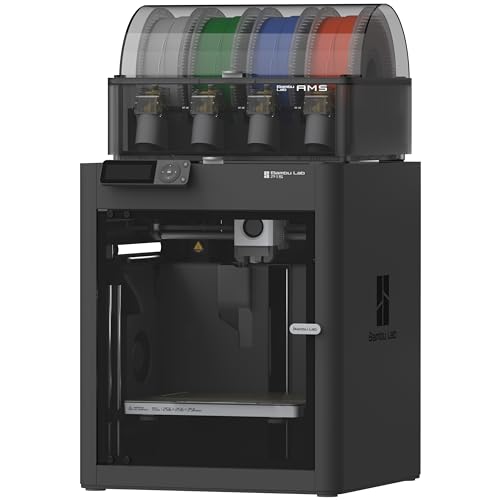
The P1S Combo is the safest pick for a first multicolor machine because everything you need arrives in one box: an enclosed CoreXY printer and a four-spool AMS feeder. The enclosure keeps drafts off the part and holds in noise and fumes, which helps when you move beyond plain PLA. The listing quotes 500 mm/s and 20,000 mm/s2 acceleration, and automatic bed leveling takes the most common first-layer failure off your list.

The headline speed is a ceiling, not a cruising rate. Reaching 500 mm/s needs several millimeters of travel at that acceleration, so short moves and corners never get there. What matters for two-color work is the AMS: it holds four spools, so a two-color print leaves two slots free for a backup spool or a support material. Against the A1 Combo, the P1S costs more and gives you the enclosure and a sturdier frame.

Ownership is mostly about the AMS. Keep spools dry, check the filament path for bends and clean the nozzle wiper area. The ecosystem around the model library and slicer is the other reason to pick it, since a color-change workflow lives or dies on software. Print a small two-color calibration piece first, because a good first result tells you the purge setting and spool path are sane.

What works

  • Enclosed body keeps drafts and noise in
  • AMS holds four spools for two-color jobs plus spares
  • Automatic bed leveling removes first-layer fuss
  • Large model library and slicer ecosystem

Watch out for

  • Costs more than open-frame multicolor options
  • AMS filament path needs periodic cleaning

Spec sheet

Multicolor system
AMS, up to 16 colors
Rated speed
500 mm/s
Acceleration
20,000 mm/s2
Body
Fully enclosed
Leveling
Automatic
02
Bambu Lab A1 Combo with AMS lite Multi-Color
AMS liteOpen frameMulti-colorLED lamp kit
Check price on Amazon
Best for: A household that prints mostly PLA toys and gifts and wants multicolor at a lower cost.

The A1 Combo pairs an open-frame printer with the AMS lite, a lighter four-spool feeder. Open frame means the bed moves under the print, a layout sometimes called a bed-slinger, which is simple and quick but means big flat parts shake the bed at high speed. The listing frames it as a beginner-friendly machine and ships it with an LED lamp kit for illuminated projects.

The tradeoff against the P1S is enclosure. Without walls, drafts and room temperature affect the print, noise is louder and tougher filaments such as ABS are a poor fit. For PLA in a heated house, the open frame is fine and the AMS lite gives you the same four-color capability for a lower price.

Treat it as the family printer for colorful PLA and toys. Keep it away from open windows, put it on a heavy desk to dampen vibration and expect to tighten belts after months of use. The AMS lite sits above the machine, so allow headroom in a shelf. The AMS lite sits on top of the frame, so allow a few extra inches of clearance above it on a shelf. If a spool tangles, the feeder will stall the print, so wind spools neatly before loading.

What works

  • Four-color AMS lite included in the bundle
  • Beginner-friendly setup and ecosystem
  • Lower cost than the enclosed P1S
  • LED lamp kit supports lamp projects

Watch out for

  • Open frame suffers from drafts and noise
  • Poor fit for ABS and other warping filaments

Spec sheet

Multicolor system
AMS lite
Frame
Open, bed-slinger
Bundle
Includes LED lamp kit
Target user
Beginners and kids
Ecosystem
MakerWorld library
03
Bambu Lab P2S Combo with AMS 2 Pro Multi-Color
600 mm/sAMS 2 Pro15 minute setupAI failure detection
Check price on Amazon
Best for: A buyer who wants the latest Bambu platform with a newer feeder and detection features.

The P2S Combo is the newest design in this list, pairing a 600 mm/s rated printer with the AMS 2 Pro feeder. The listing promises setup in about 15 minutes and AI failure detection that watches the print. Against the P1S it raises the speed claim by 100 mm/s, and the AMS 2 Pro is described as enabling seamless multicolor and multi-material work.

The speed claim is again a ceiling. Real printing time depends on acceleration, cooling and flow rate more than top speed, so the gain over the P1S in everyday prints is smaller than 20 percent. The real reasons to choose it are the updated feeder and detection features, which cut the number of failed prints that waste filament.

It costs more than the P1S, and the premium is only worth paying if you value the newer feeder and want the latest platform. Keep spools dry, update firmware thoughtfully and keep the build plate clean. For a buyer who wants the longest runway before the next hardware refresh, the P2S makes the most sense. A newer platform means newer firmware, and early firmware can change behaviors, so read release notes before updating during a long job. Register the machine and keep the box for any warranty claim.

What works

  • AMS 2 Pro feeder for multicolor and multi-material
  • 600 mm/s rated speed
  • AI failure detection watches prints
  • Quick advertised setup

Watch out for

  • Highest price in the Bambu line-up here
  • Speed claim overstates the real time saving

Spec sheet

Multicolor system
AMS 2 Pro
Rated speed
600 mm/s
Setup
About 15 minutes
Safety
AI failure detection
Ecosystem
MakerWorld library
04
Creality K2 Combo (A) with CFS Multicolor System
CFS multicolor600 mm/sQuiet mode95% pre-assembled
Check price on Amazon
Best for: A buyer who likes a large community and tinkering with settings.

Creality's K2 Combo uses its own filament system called CFS, and the listing says up to four CFS units can be linked for sixteen colors. It is 95 percent pre-assembled, has a Silent mode and a 600 mm/s speed claim. The company has a long record in consumer printers, so parts and community help are easy to find.

The CFS is the equivalent of the AMS, and for two-color prints you use only two slots. A silent mode matters in a living space, though the noise reduction comes from limiting acceleration, which also slows the print. Compared with the Bambu P1S, the K2 is a more open ecosystem with more third-party modifications and a slicer that is less polished according to owner discussion.

If you like to tinker, the K2 gives you room. If you want the smoothest first week, the Bambu printers are easier. Keep the CFS tubes short and straight and run it in a room with steady temperature. Mount the printer on a rigid, level surface and let the machine settle before the first long print. The CFS tubes should leave the unit in a gentle curve instead of a tight bend.

What works

  • CFS expands to sixteen colors with four units
  • Silent mode for living spaces
  • Mostly pre-assembled out of the box
  • Established brand with wide parts support

Watch out for

  • Silent mode lowers real speed
  • Software less polished than the Bambu stack

Spec sheet

Multicolor system
CFS, up to 16 colors with 4 units
Rated speed
600 mm/s
Assembly
95 percent pre-assembled
Noise
Silent mode
Software
Smart features
05
FLASHFORGE AD5X Multi-Color CoreXY 3D Printer
Up to 4 colors600 mm/s300 C direct drive1-click leveling
Check price on Amazon
Best for: A buyer who wants direct drive and a 300 C nozzle plus multicolor.

The AD5X is a CoreXY printer with a 300 C direct drive extruder and four-color support. Direct drive puts the extruder on the toolhead, which helps with flexible filaments such as TPU and makes retraction shorter. The listing quotes 600 mm/s and 20,000 mm/s2 acceleration along with one-click auto leveling.

That 300 C nozzle ceiling opens up tougher filaments than a basic 260 C machine can handle, so it widens your material options beyond PLA. The multicolor system supports up to four colors, which is the same count as the Bambu AMS or the A1's AMS lite. Compared with the Creality K2, the AD5X is a smaller step in the Flashforge lineup.

Expect to calibrate the multicolor path carefully, since feeder alignment decides color change reliability. Dry your filament and keep spare nozzles on hand. It suits a buyer who wants direct drive and higher temperatures with multicolor on top. Because the nozzle can run hotter than usual, check the fan shroud for wear and replace silicone socks on the hotend when they harden. Test a TPU spool early to confirm the direct drive path is clean.

What works

  • 300 C direct drive extruder
  • Supports four colors
  • One-click auto leveling
  • CoreXY frame for speed

Watch out for

  • Smaller ecosystem than Bambu
  • Multicolor path needs careful calibration

Spec sheet

Multicolor
Supports up to 4 colors
Rated speed
600 mm/s
Acceleration
20,000 mm/s2
Extruder
300 C direct drive
Leveling
1-click auto
06
ANYCUBIC Kobra X Native 4-Color 3D Printer
Native 4-color600 mm/s45 dB81% less purge
Check price on Amazon
Best for: A buyer who wants to limit purge waste and likes a native multicolor design.

Anycubic builds the Kobra X around native four-color printing, with expansion to nineteen colors using extra ACE units. The listing claims that it shortens the filament change path by 81.25 percent, which in principle cuts purge waste, the plastic you throw away at each color swap. It is pre-assembled, quotes 600 mm/s and gives a noise figure of 45 dB.

Purge waste is the hidden cost of multicolor, so a lower purge claim is worth attention. Treat the 81.25 percent as a manufacturer figure compared with its own earlier design, not a lab comparison with a Bambu. A 45 dB rating is a useful number to compare, though real noise rises with speed.

The listing has several variants and bundles, so check which one includes the ACE and spool holder. Keep filament dry, keep the purge tower enabled and watch the first few multicolor prints for stringing. It suits buyers who care about waste and want a native feeder in the body. Check which kit you are ordering, since the listing covers variants with and without the extra feeder, and confirm the spool holder is in the box. A short test with two contrasting colors shows how clean the transitions are.

What works

  • Claims 81.25 percent shorter filament change path
  • Native four-color without an add-on
  • Quoted 45 dB noise figure
  • Pre-assembled out of the box

Watch out for

  • Waste claim is the maker's own figure
  • Several bundle variants can confuse

Spec sheet

Multicolor
Native 4-color, up to 19 with ACE
Rated speed
600 mm/s
Noise
45 dB
Purge
Filament change path cut 81.25 percent
Setup
Pre-assembled

Spec sheet decoder

What the numbers on the box really mean

The specs manufacturers lead with, translated into what they tell you about real-world performance.

mm/s speed rating

The maximum toolhead speed. Real speeds are lower on short moves and curves. Test prints at those speeds usually show ringing on corners.

Watch forP1S lists 500 mm/s and the P2S, K2, AD5X and Kobra X list 600.

Acceleration mm/s2

How quickly the toolhead reaches speed. Higher acceleration shortens real print time but increases ringing.

Watch forThe P1S and AD5X list 20,000 mm/s2.

Direct drive

An extruder mounted on the toolhead. It handles flexible filament better than a long Bowden tube.

Watch forThe AD5X names a 300 C direct drive extruder.

Purge reduction

Less filament flushed per color swap. It lowers cost on multicolor prints. Purge towers can be shrunk in the slicer settings.

Watch forThe Kobra X claims 81.25 percent, a maker figure.

Noise dB

Sound level during printing. It rises with speed and acceleration.

Watch forThe Kobra X lists 45 dB and the K2 has a Silent mode.

Methodology

How We Evaluated These 2 Color 3D Printers

Multicolor design

We looked at how each machine feeds colors. The AMS, AMS lite, CFS and native Kobra X systems all hold four colors, with differences in waste and enclosure.

Waste and running cost

We compared purge claims and filament costs. The Kobra X's 81.25 percent claim stands out, though we treated it as a maker's figure.

Build and enclosure

We checked frame type and walls. The P1S is fully enclosed, while the A1 is open frame, based on the spec sheet.

Speed realism

We read 500 and 600 mm/s ratings against acceleration. Real print time depends on more than top speed.

Ecosystem and support

We weighed slicer, library and parts availability, judged against owner feedback patterns. We evaluated every pick against the same checklist.

Decision guide

How to Choose the Right 2 Color 3D Printers

By Experience

SituationPickWhy
First printer, wants it to workBambu Lab P1S ComboEnclosed and polished ecosystem
Family PLA projectsBambu Lab A1 ComboAMS lite at a lower cost
Wants the newest platformBambu Lab P2S ComboAMS 2 Pro and failure detection
Tinkerer who likes communityCreality K2 ComboOpen ecosystem and CFS
Flexible filament and 300 CFLASHFORGE AD5XDirect drive extruder
School or club with kidsBambu Lab P1S ComboEnclosure keeps hands away from the hot parts

By Budget

TierPickWhy
LowerBambu Lab A1 ComboOpen frame multicolor
Lower midFLASHFORGE AD5XDirect drive with four colors
MidANYCUBIC Kobra XNative feeder and waste claim
Upper midBambu Lab P1S ComboEnclosed with AMS
HigherBambu Lab P2S ComboNewest feeder and features

Enclosed vs Open Frame

Enclosed

The P1S and P2S hold heat and noise, resist drafts and allow tougher filaments. They suit a shared living space.

Open frame

The A1 Combo is cheaper and easy to reach, but drafts and noise are bigger. It suits PLA in a stable room.

Pick enclosed if you will print anything beyond PLA, open frame if budget matters most. Either way, place the printer where noise will not disturb sleep.

Bambu Ecosystem vs Open Ecosystem

PreferencePickWhy
Polished slicer and libraryBambu Lab P1S ComboMakerWorld and AMS
Open settingsCreality K2 ComboWider community mods
Lowest waste claimANYCUBIC Kobra XShortened change path
High-temp direct driveFLASHFORGE AD5X300 C nozzle ceiling

For Two-Color Prints Specifically

Look for

Low purge waste, reliable color changes and spare slots for supports. Two-color prints use two spools, so a four-slot system gives headroom.

In this comparison

The Kobra X targets waste, the P1S offers the most polished flow, and the A1 Combo is the cheapest way in.

When to Spend More

Spend more if

You want an enclosure, tougher filaments or the newest feeder. The P1S and P2S justify the premium.

Save if

You will print mostly PLA in a calm room. The A1 Combo or the Kobra X covers it.

Ownership

Maintenance schedule

The upkeep that decides whether this machine lasts two seasons or ten.

TaskIntervalWhy it matters
Dry the filamentBefore each long printWet filament causes stringing and weak layers. Store spools in sealed boxes with desiccant. Reuse desiccant by baking it as the packet directs.
Clean the build plateEvery few printsFinger oils are the top cause of failed first layers. Wash with soap or isopropyl alcohol.
Check the feeder pathMonthlyBends and dust in the filament path cause color-change jams. Keep tubes short and straight. A drop of cleaning alcohol on a cloth clears dust from the sensors.
Replace the nozzleEvery few monthsBrass nozzles wear and clog. They are cheap consumables.
Lubricate rails and tighten beltsEvery 3 to 6 monthsBelts stretch and rails dry out. A quick service keeps print quality steady.

FAQ

Frequently Asked Questions

Do I need a four-color printer for two colors?

No, but the hardware is the same. A four-slot system uses two slots for the print and leaves two free for spares or supports. Buying a dedicated two-color machine saves little. Extra slots give you room for support material or a backup spool when one runs out.

How much filament does a color change waste?

It varies by machine and print. Purge towers and flushing volumes take filament at every swap. The Kobra X claims an 81.25 percent shorter change path, though that is the maker's figure. Larger towers and small objects make the percentage waste worse.

Is an enclosure necessary?

Not for PLA. For ABS, ASA and similar filaments it helps a great deal. The P1S and P2S are enclosed and the A1 is not. Drafts alone can lift PLA corners on tall prints.

Are the speed ratings real?

They are ceilings. Short moves and corners never reach 500 or 600 mm/s. Acceleration and cooling decide real print time.

Which is best for kids?

An enclosed machine keeps hands away from the hot parts. The P1S is the safest pick here, while the A1 is cheaper but open. Supervise young children either way. Keep fingers away from the moving toolhead and hot bed.

What running costs should I plan for?

Filament, nozzles, build plates and purge waste. Multicolor prints use more filament than single-color ones. Keep spare nozzles on hand. Dry boxes for filament pay for themselves in fewer failures.

Bottom line

The short version

Browse more 2 color 3d printerson Amazon →
James Miller, Lead Machine Editor

About the author

James Miller

Lead Machine Editor, MachineFanatic

James Miller leads MachineFanatic's buying guides, turning spec sheets, manuals and owner feedback into clear verdicts on power tools, outdoor power equipment, shop machines and kitchen machines.

More from James →

Keep reading

Related guides