
Amazon affiliate links - we earn a commission.Affiliate disclosure

Buying guide · 12 min read · Updated 2026-11-13

Best AirPrint Printers (2026)

Five wireless printers that print from iPhone and iPad without drivers, compared on setup, ink system, paper handling and what AirPrint cannot do.

James MillerBy James MillerLead Machine Editor6 machines comparedSpec-sheet verified
Best AirPrint Printers

At a glance

Our top picks

Side by side

Spec comparison

MachineFunctionsBest useFeeder
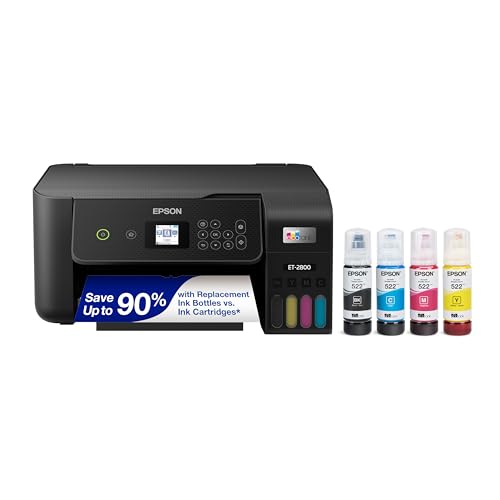
Epson EcoTank ET-2800 wireless supertank all-in-oneBest for Frequent PrintingEpson EcoTank ET-2800 wireless supertank all-in-onePrint, scan, copyWeekly home printingn/a
Canon PIXMA TS5320 wireless all-in-one with AirPrintBest Compact PickCanon PIXMA TS5320 wireless all-in-one with AirPrintPrint, scan, copyOccasional home printingn/a
Canon PIXMA TR4720 all-in-one with feeder and faxBest for DocumentsCanon PIXMA TR4720 all-in-one with feeder and faxPrint, copy, scan, faxHome office paperworkAutomatic document feeder
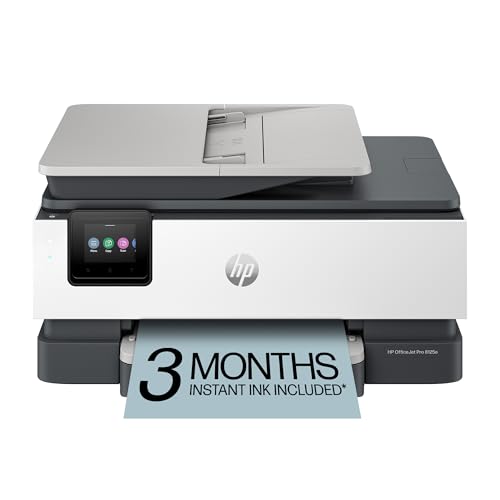
HP OfficeJet Pro 8125e wireless all-in-one with duplex and ADFBest for Duplex Office WorkHP OfficeJet Pro 8125e wireless all-in-one with duplex and ADFPrint, scan, copyDaily home-office printingAutomatic document feeder
Canon PIXMA TS702a print-only wireless printer, 350-sheet capacityBest Print-Only OptionCanon PIXMA TS702a print-only wireless printer, 350-sheet capacityPrint onlyPhoto and document printing, no scanningn/a
Brother Work Smart 1360 wireless all-in-one with duplexBest Compact DuplexBrother Work Smart 1360 wireless all-in-one with duplexPrint, scan, copySmall home office20-sheet automatic document feeder

AirPrint is a driverless printing method built into iPhone, iPad and Mac. The device finds a compatible printer on the same network and sends the job directly, so there is no app to install and no driver to update.

That convenience is only as good as the printer behind it. The useful comparison is the ink system, how the paper path handles real documents, and whether the machine keeps working after months of sitting idle.

Before you buy

6 Criteria to Look For Before Buying an AirPrint Printer

  1. 01

    Know what AirPrint covers

    AirPrint finds printers by Bonjour on the same network and sends jobs without a driver. It handles printing, not scanning or ink-level checks on every model. If your router isolates guests or separates subnets, an iPhone on the guest network will not see the printer. Keep both on one network and check the printer supports AirPrint by name.

  2. 02

    Cartridge versus tank economics

    The ET-2800 uses refillable tanks, while the Canon TS5320, TR4720 and TS702a and the HP 8125e use cartridges. Cartridge machines cost less to buy and more per page. If you print weekly, the tank system repays the higher price. For a few pages a month, the cheaper machine is fine, as long as you accept the cost of ink.

  3. 03

    Choose a feeder only if you need it

    The TR4720 and HP 8125e have automatic document feeders, and the TS5320, TS702a and ET-2800 do not. A feeder saves time on multi-page scans and copies, and it adds size and cost. If you scan single receipts, a flatbed or your phone is enough.

  4. 04

    Watch idle clogging

    Inkjet nozzles dry out when unused. A printer left for months may waste ink on cleaning cycles or fail to print. Print one color page every two weeks, and leave the printer plugged in so it can run its own maintenance. A laser avoids this entirely, though it falls outside this guide.

  5. 05

    Read the ink program terms

    Some printers, including HP's e-series models like the 8125e, are tied to subscription programs and may restrict cartridge choices or require an account. This affects what you can use and how long the printer stays useful. Read the terms on the listing and the box before you buy.

  6. 06

    Mind paper capacity and path

    The TS702a holds 350 sheets and the HP 8125e has a 225-sheet tray, while compact models hold far less. A small tray means more refills. Also check whether the machine duplexes automatically, because manual two-sided printing is slow and frustrating.

Detailed reviews

The 6 best airprint printers, explained

01
Epson EcoTank ET-2800 wireless supertank all-in-one
Refillable ink tanksPrint, scan, copyWi-FiCartridge-free
Check price on Amazon
Best for: Households that print every week and want low running cost.

The ET-2800 swaps cartridges for refillable tanks filled from ink bottles, which removes the mechanism that makes most home inkjets expensive to run. The listing highlights cartridge-free printing and a generous starter supply, and the tank design means cost per page falls sharply once you buy bottles instead of cartridges.

It prints, scans and copies, with a flatbed scanner rather than a document feeder, so it suits single pages and photos instead of stacks. AirPrint support lets an iPhone find it over the network without a driver, which is the whole point of this guide, and the setup is a matter of joining the printer to your Wi-Fi.

Compared with the Canon TS5320, the ET-2800 costs more to buy and runs far cheaper per page, which pays off for a household that prints weekly. Keep it powered and run a page now and then, because any inkjet can clog a nozzle when left idle for months, and fill each tank carefully from the matching bottle, which is keyed to avoid mix-ups.

What works

  • Refillable tanks cut ink cost per page
  • Generous starter ink supply
  • AirPrint works without a driver
  • Simple flatbed scanning

Watch out for

  • No automatic document feeder
  • Higher purchase price than cartridge models
  • Nozzles can clog if left unused for months

Spec sheet

Ink system
Refillable EcoTank bottles
Functions
Print, scan, copy
Connectivity
Wi-Fi with AirPrint
Scanner
Flatbed
Best use
Weekly home printing
02
Canon PIXMA TS5320 wireless all-in-one with AirPrint
Print, scan, copy1.44 in OLED2 FINE cartridgesAirPrint
Check price on Amazon
Best for: Students and light home users who print from a phone.

The TS5320 is a compact household all-in-one with a small OLED display and an LED status bar that shows when it needs attention. It is one of the few listings here that names AirPrint in its title, and it uses two FINE cartridges, one for black and one for color, which keeps replacement simple.

Two-cartridge systems are easy to understand but have a known drawback: when the single color cartridge runs out of one ink, you replace the whole thing. For light printing that is acceptable, since a typical family prints a few pages a week of documents and the occasional photo.

Compared with the TR4720, it drops the document feeder but gains a brighter control display. Compared with the ET-2800, it is cheaper to buy and costlier to run. Treat it as the machine for a student or a small household, and print something every few weeks to keep the nozzles clear.

What works

  • AirPrint named in the listing title
  • Compact footprint
  • OLED display with status bar
  • Simple two-cartridge system

Watch out for

  • Cartridges cost more per page
  • No automatic document feeder
  • Combined color cartridge wastes ink

Spec sheet

Functions
Print, scan, copy
Display
1.44 in OLED with LED status bar
Cartridges
Two FINE cartridges
Connectivity
Wi-Fi with AirPrint
Best use
Occasional home printing
03
Canon PIXMA TR4720 all-in-one with feeder and fax
Auto document feederPrint, copy, scan, faxMobile printing7W use
Check price on Amazon
Best for: Home offices that scan multi-page paperwork.

The TR4720 adds an automatic document feeder and a built-in fax to the basic all-in-one, which makes it the paperwork machine of this group. If you scan multi-page forms, tax documents or contracts, a feeder saves you from lifting the lid for every sheet.

It lists a 4 x 6 inch borderless photo in about 65 seconds and a power draw of 7 W while working and 0.8 W on standby. Those are the kind of facts that help you compare, because photo speed and standby power matter more over years than the maximum print resolution.

Compared with the TS5320, it gives up the OLED display and keeps the simple cartridge system, so running cost is similar. If you never fax and rarely scan more than a page, the feeder is wasted; if you work from home and handle forms, it is the feature that justifies the model.

What works

  • Automatic document feeder for multi-page scans
  • Built-in fax for the rare need
  • Low standby power draw
  • Mobile printing support

Watch out for

  • Cartridge running costs apply
  • Fax is of little use to many buyers
  • Slower for borderless photos

Spec sheet

Functions
Print, copy, scan, fax
Feeder
Automatic document feeder
4x6 photo
About 65 seconds
Power use
7 W, 0.8 W standby
Best use
Home office paperwork
04
HP OfficeJet Pro 8125e wireless all-in-one with duplex and ADF
Auto duplexDocument feeder225-sheet inputWi-Fi
Check price on Amazon
Best for: Home offices that print daily and want duplex and a large tray.

The OfficeJet Pro 8125e is built more like a small-office machine: automatic two-sided printing, an automatic document feeder and a 225-sheet input tray, so you can load a stack and walk away. The listing also mentions HP software that formats web pages and emails for printing.

For AirPrint use, it joins the network like the others and appears in the print dialog without an app. The caveat is the ecosystem: HP's e-series models are sold into the company's subscription ink program, so read the terms on cartridge use and account requirements before you buy, since those policies can restrict third-party ink.

Compared with the TR4720, it prints faster, holds far more paper and duplexes automatically, at a higher price. Compared with the ET-2800, its per-page cost is higher, but its paper handling is far better. Choose it if you print documents daily and value hands-off duplexing.

What works

  • Automatic duplex printing
  • 225-sheet input tray
  • Automatic document feeder
  • Quick print speeds for documents

Watch out for

  • Ink program terms need checking
  • Higher purchase price
  • Cartridges cost more per page than tanks

Spec sheet

Functions
Print, scan, copy
Duplex
Automatic 2-sided printing
Feeder
Automatic document feeder
Input tray
225 sheets
Best use
Daily home-office printing
05
Canon PIXMA TS702a print-only wireless printer, 350-sheet capacity
Print only350-sheet capacityAirPrintBorderless photos
Check price on Amazon
Best for: Phone-first printing of documents and photos with no scanning.

The TS702a is the only single-function printer in this guide: no scanner, no copier, no fax. That simplification buys a 350-sheet plain paper capacity, so you refill the tray rarely, and the listing names AirPrint mobile printing alongside borderless photo support on various paper types and sizes.

For someone who prints from an iPhone and never scans, that makes sense. A scanner adds cost, a lid and a mechanism that can fail, and phone scanning apps now handle most single-page needs. The trade is obvious: if you ever need a copy, you will do it through a phone.

Compared with the TS5320, it carries more paper and drops the scanner. Compared with the ET-2800, it uses cartridges and costs more per page. Keep it in a place where it sees a page now and then, since idle inkjets clog, and use the printer's cleaning cycle sparingly because each cycle consumes ink.

What works

  • Large 350-sheet paper capacity
  • AirPrint named on the listing
  • Borderless photo printing
  • Simpler machine with no scanner to fail

Watch out for

  • No scanning or copying
  • Cartridge cost per page
  • Cleaning cycles consume ink

Spec sheet

Functions
Print only
Paper capacity
350 sheets plain paper
Mobile printing
AirPrint
Photos
Borderless supported
Best use
Photo and document printing, no scanning
06
Brother Work Smart 1360 wireless all-in-one with duplex
Auto duplex20-sheet feederCloud app linksWi-Fi
Check price on Amazon
Best for: Small home offices that want duplex without a large machine.

The Work Smart 1360 is the compact way to get automatic duplex and a document feeder, with a 20-sheet feeder that handles short stacks of forms. It also prints from and scans to cloud apps such as Google Drive and Dropbox, which is handy if you work on a laptop and a phone at once.

Brother printers support AirPrint, so an iPhone finds it on the home network without a driver, and the same machine works with the maker's own app for scanning. It is smaller than the HP 8125e and holds less paper, which is the trade for the lower price and tidier footprint.

Compared with the TR4720, it duplexes automatically instead of needing manual flips, and compared with the ET-2800, it uses cartridges and costs more per page. Print a page every couple of weeks to keep the head clear, and keep a spare black cartridge on hand because documents use it fastest.

What works

  • Automatic duplex printing
  • 20-sheet document feeder
  • Print from and scan to cloud apps
  • Compact for a feeder model

Watch out for

  • Smaller tray than office models
  • Cartridge cost per page
  • Feeder holds only short stacks

Spec sheet

Functions
Print, scan, copy
Duplex
Automatic 2-sided printing
Feeder
20-sheet automatic document feeder
Cloud
Print from and scan to cloud apps
Best use
Small home office

Spec sheet decoder

What the numbers on the box really mean

The specs manufacturers lead with, translated into what they tell you about real-world performance.

AirPrint

Apple's driverless printing protocol. The device finds the printer over the network and sends the job directly.

Watch forIt needs both devices on the same network, so guest networks often fail.

EcoTank

Epson's refillable-tank ink system. You fill the tanks from bottles instead of replacing cartridges.

Watch forThe ET-2800 uses it, so fill each tank only with its matching bottle.

ADF

An automatic document feeder that pulls pages through the scanner without lifting the lid.

Watch forThe TR4720 and HP 8125e have one; the others do not.

Duplex

Automatic printing on both sides of the page, using a paper path that flips the sheet.

Watch forThe HP 8125e lists it; check whether other models need manual flipping.

Standby power

The electricity a printer draws while idle but ready. Over years it adds up.

Watch forThe TR4720 lists 0.8 W standby, which is a useful comparison point.

Methodology

How We Evaluated These AirPrint Printers

AirPrint support

We looked for listings that name AirPrint or driverless mobile printing, such as the TS5320 and TS702a titles. Models from the same manufacturer families that support it were included.

Ink system and running cost

We compared tank against cartridge designs. The ET-2800 stands apart with refillable tanks, and the Canon and HP models use cartridges with higher cost per page.

Paper handling

We compared tray capacity and duplexing. The TS702a holds 350 sheets and the HP 8125e has a 225-sheet tray with automatic duplex, which suit heavy use. The Brother Work Smart 1360 duplexes automatically with a smaller tray, which places it between the Canon models and the HP.

Scanner features

We looked at flatbed versus feeder scanners and print-only designs. The TR4720 and HP 8125e have feeders, while the TS702a has no scanner at all.

Ownership and idle behavior

We considered how each machine copes with months of low use and how its ink program works. Tanks and standby draw figures like the TR4720's 0.8 W mattered here.

Decision guide

How to Choose the Right AirPrint Printers

By How Often You Print

SituationPickWhy
A few pages a monthCanon PIXMA TS5320Low purchase price for light use
Weekly printing for the householdEpson EcoTank ET-2800Refillable tanks cut cost per page
Daily home-office printingHP OfficeJet Pro 8125eDuplex, ADF and a 225-sheet tray
Mostly paperwork scansCanon PIXMA TR4720Automatic document feeder
Photos and documents, never scanningCanon PIXMA TS702a350-sheet capacity and no scanner to maintain
Compact duplex office useBrother Work Smart 1360Duplex and feeder in a smaller body

By Budget

TierPickWhy
Lowest outlayCanon PIXMA TS5320Compact all-in-one with simple cartridges
Low-to-mid tierCanon PIXMA TR4720Adds feeder and fax
Mid tierCanon PIXMA TS702aPrint-only with large capacity
Mid-to-upper tierBrother Work Smart 1360Adds duplex and a feeder
Upper tierEpson EcoTank ET-2800Higher price, lower running cost
Top tierHP OfficeJet Pro 8125eOffice-grade paper handling

Tank vs Cartridge

Tank

The Epson ET-2800 uses refillable tanks and bottles. Purchase price is higher but cost per page is much lower. It suits households that print weekly and want to stop buying cartridges.

Cartridge

The Canon models and the HP 8125e use cartridges. They cost less to buy, are easy to swap and suit occasional use, but each page costs more.

Weekly printers should choose tanks; occasional printers should choose cartridges.

Flatbed vs Feeder Scanning

PreferencePickWhy
I scan single pages and photosEpson EcoTank ET-2800Flatbed handles photos well
I scan stacks of formsCanon PIXMA TR4720Automatic document feeder
I scan and print duplex all dayHP OfficeJet Pro 8125eFeeder and duplex together
I never scanCanon PIXMA TS702aPrint-only machine

For iPhone and iPad Users Specifically

Look for

AirPrint named by the maker, a model that joins your Wi-Fi band and a driverless setup. Confirm your phone and printer share a network, and avoid guest isolation.

In this comparison

The Canon TS5320 and TS702a name AirPrint in their listing titles. The Epson ET-2800 and HP 8125e also work by AirPrint on a shared network.

When to Spend More

Spend more if

You print weekly or work from home. The Epson ET-2800 saves on ink and the HP OfficeJet Pro 8125e saves time through duplex and its feeder.

Save if

You print rarely. The Canon TS5320 or TS702a cost little, but remember that cartridges are the long-term expense.

Ownership

Maintenance schedule

The upkeep that decides whether this machine lasts two seasons or ten.

TaskIntervalWhy it matters
Print a test pageEvery 2 weeksRegular use keeps nozzles from drying out. A single color page is enough. Choose a page with color blocks, which exercises every nozzle.
Leave the printer poweredAlwaysMany printers run self-maintenance when plugged in. Cutting the power at the wall can leave the print head uncapped.
Fill tanks carefullyAs ink runs low, tank modelsEach bottle matches one tank. Fill slowly and wipe any drips before closing the cap.
Clean the scanner glassEvery few monthsDust and fingerprints show as marks on copies. A dry microfiber cloth is enough.
Check network settingsAfter router changesA new router or network name can drop the printer. Re-join it so AirPrint can find it again.

FAQ

Frequently Asked Questions

Do I need an app to use AirPrint?

No. AirPrint is built into iOS and macOS. Choose Print from the share menu and select the printer, which appears when both are on the same network. Some makers offer apps for extra features like scanning.

Why can't my iPhone see the printer?

The most common cause is a network mismatch, such as the phone on a guest network or a different band. Put both devices on one network, restart the printer and try again.

Is a tank printer worth it for light use?

Usually not on price alone, since the higher purchase cost takes years to repay. It is worth it if you print weekly or if you are tired of cartridges drying out. A middle path is a cartridge model with high-yield cartridges, which narrows the cost gap without the tank price.

Can I use third-party ink?

It depends on the model. Some printers accept compatible cartridges and some restrict them through firmware or program terms. Read the listing and the maker's policy before you buy.

Do I need a scanner with a feeder?

Only if you scan multi-page documents often. A flatbed handles single pages and photos well, and phone scanning apps cover most one-off needs.

How do I stop the ink from drying out?

Print a color page every couple of weeks and keep the printer plugged in. If a nozzle clogs, run one cleaning cycle and wait, because repeated cycles waste ink.

Bottom line

The short version

Browse more airprint printerson Amazon →
James Miller, Lead Machine Editor

About the author

James Miller

Lead Machine Editor, MachineFanatic

James Miller leads MachineFanatic's buying guides, turning spec sheets, manuals and owner feedback into clear verdicts on power tools, outdoor power equipment, shop machines and kitchen machines.

More from James →

Keep reading

Related guides