
Amazon affiliate links - we earn a commission.Affiliate disclosure

Buying guide · 13 min read · Updated 2026-11-07

Best Digital Podcast Mixers (2026)

Six digital podcast mixers compared on touchscreens, processing, preamps, channel count and app control, from compact creator boards to full consoles.

James MillerBy James MillerLead Machine Editor6 machines comparedSpec-sheet verified
Best Digital Podcast Mixers

At a glance

Our top picks

Side by side

Spec comparison

A digital mixer converts every input to data, which lets it apply compression, equalization and gating inside the box and save the settings as scenes. For a podcast that means a consistent voice from one episode to the next without hunting for knob positions.

That power has a price in menus and screens, and the cheaper boards that advertise digital effects are not the same thing as a true digital console. Telling those apart is the main job when shopping this category.

Before you buy

6 Criteria to Look For Before Buying a Digital Podcast Mixer

  1. 01

    Real digital mixer or digital effects

    A true digital mixer such as the Mackie DLZ Creator, the PreSonus Series III SE 16 or the Behringer X18 converts inputs and processes them in software, with scenes and routing. A board that merely adds digital reverb, such as the XTUGA CT60, is an analog style mixer with effects. Pay for the first only if you will use the scenes and processing.

  2. 02

    Touchscreen versus app control

    The DLZ Creator XS carries a seven inch touchscreen on the unit, while the Behringer X18 relies on a tablet. A built in screen means one device to set up and nothing to charge. A tablet frees desk space but adds a battery and a wireless link that can fail.

  3. 03

    Preamp count

    The X18 offers sixteen programmable preamps and the PreSonus console sixteen channels, while the XS has six channels in total. Count the microphones you need at once and add a margin. Running out of preamps mid season is the most expensive mistake.

  4. 04

    Processing built for speech

    Compression, gating and equalization shape voices, and Mackie positions its adaptive processing for podcasting. General purpose consoles offer more tools but require more knowledge. Choose speech specific automation if you want a good sound without engineering skills.

  5. 05

    Physical controls

    Faders and knobs let you react quickly. The PreSonus console has a full surface, the DLZ Creator offers a mix of screen and controls, and the X18 has none. If you ride levels live, avoid a faderless unit.

  6. 06

    Recording and software

    The PreSonus console includes Fender Studio Pro, and USB interfaces on the Mackie and MAONO boards send audio to your editor. Check whether tracks arrive separately or as a stereo mix, because separate tracks make repair much easier. A cough from one guest can be reduced on its own track, while the same cough in a stereo mix stays baked in with every other voice.

Detailed reviews

The 6 best digital podcast mixers, explained

01
Mackie DLZ Creator XS compact 6 channel digital mixer
6 channels7 inch touchscreenUSBBluetooth
Check price on Amazon
Best for: Small shows that want digital processing, a touchscreen and USB in a compact box.

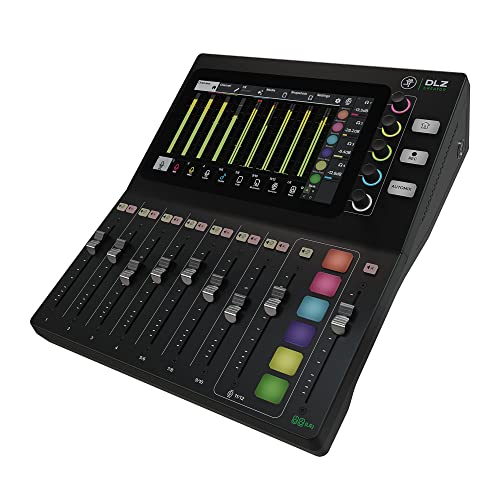
Mackie built the Creator XS for the spoken word rather than for a band, and the difference shows in the layout. A seven inch touchscreen shows channel levels and processing at a glance, USB carries the mix to a computer, and Bluetooth takes a phone caller. The adaptive processing is meant to tune itself to the voices instead of making the host dial in a chain.

It is compact, which means compromises. Six channels is a ceiling for a table of hosts, and not every channel is a microphone input, so a larger show may run out of preamps. Beside the larger DLZ Creator it trades channel count for desk space and a lower price tier.

Once configured, daily use is quick. Scenes store a favorite setup, the touchscreen lets you check gain at a glance, and firmware updates arrive through Mackie's tools. Keep the USB cable short, label the microphone positions and save a scene for solo and guest episodes so a change of format is one tap. Run a short test recording after every firmware update, because routing defaults can change quietly. A pop filter on each microphone and a habit of checking meters during the first minute of every session catch most problems before they reach the edit, and a written scene list taped to the desk saves guessing when a guest host sits in.

What works

  • Touchscreen shows levels at a glance
  • Adaptive processing aimed at speech
  • USB and Bluetooth in one chassis
  • Compact body for a desk

Watch out for

  • Six channels cap the number of hosts
  • Menus replace some physical controls

Spec sheet

Channels
6
Display
7 inch touchscreen
Computer link
USB
Wireless
Bluetooth
Positioning
Adaptive digital mixer for podcasting
02
Mackie DLZ Creator adaptive digital mixer for podcasting
Adaptive digitalTouchscreenPodcast focusUSB audio
Check price on Amazon
Best for: Shows with several hosts or guests that need more surface than a compact board.

The full size DLZ Creator is the board for a podcast that has outgrown a compact unit. It follows the same philosophy as the XS, with adaptive digital processing built for speech and a screen based workflow, but with more room for inputs and controls.

That extra size is a real advantage for a table of guests. You get more physical controls and a bigger working surface than the XS, so level changes during a lively conversation are easier. The tradeoff is a higher price tier and a larger footprint, which is only worthwhile if you actually use the additional capacity.

Treat it as a long term studio centerpiece. Save scenes for the regular lineup, keep the firmware current and give the board a stable surface with room for cabling. Because it follows the same design as the XS, a producer can start on the smaller unit and move up with familiar workflows.

What works

  • More controls than the compact version
  • Adaptive digital processing for speech
  • USB audio to a computer
  • Familiar workflow from the DLZ family

Watch out for

  • Higher price tier than compact boards
  • Takes more desk space

Spec sheet

Type
Adaptive digital mixer
Target
Podcasting
Computer link
USB audio
Brand
Mackie DLZ series
Control
Touchscreen with hardware controls
03
PreSonus StudioLive Series III SE 16 digital console
16 channelsDigital consoleFender Studio ProScene recall
Check price on Amazon
Best for: Studios that record large panels and want a full digital console.

The StudioLive Series III SE 16 is a real digital console, the kind used for live sound and studio tracking, and it brings that depth to a podcast with many voices. Sixteen channels cover a large panel, a few music beds and a phone line, and the bundled Fender Studio Pro software gives a path to multitrack recording.

It is far more mixer than most podcasts need. The learning curve is real, the footprint is large and the price tier sits well above creator boards. Against the Mackie DLZ Creator it offers more channels and deeper routing, but less of the speech specific automation.

Ownership suits a studio that records often. Scenes recall a roundtable setup in seconds, the processing is extensive and firmware updates are supported over time. Plan for a rack or a large desk and a clear labeling system.

What works

  • Sixteen channels for large panels
  • Deep digital routing and processing
  • Fender Studio Pro included
  • Scene recall for repeat setups

Watch out for

  • Far more mixer than most shows need
  • Large footprint and steep learning curve

Spec sheet

Channels
16
Type
Digital console mixer
Software
Fender Studio Pro
Series
StudioLive Series III SE
Control
Hardware surface
04
Behringer X AIR X18 18 channel digital mixer
18 channels12 busesTablet control16 preamps
Check price on Amazon
Best for: Large podcasts and live events that can run the mix from a tablet.

The X18 turns a tablet into the mixing surface. Eighteen channels and twelve buses sit inside a small rack style box, sixteen programmable preamps handle microphones and the mix is controlled entirely from an iPad or Android tablet. That design gives console level capacity at a modest price tier.

The tradeoff is that there are no physical faders. Everything happens on a screen, which suits a producer who sets levels and leaves them but frustrates a host who wants to ride a fader live. Next to the DLZ Creator XS it offers far more channels, though without the speech tuned automation.

Ownership is about network discipline. The mixer creates its own wireless connection, so keep the tablet charged, place the box where signals reach, and save scenes before each session. A router and a wired connection add reliability for important shows.

What works

  • Sixteen preamps and eighteen channels
  • Twelve buses for flexible routing
  • Tablet control saves desk space
  • Low price tier for the capacity

Watch out for

  • No physical faders
  • Needs a tablet and a stable connection

Spec sheet

Channels
18
Buses
12
Control
iPad or Android tablet
Preamps
16 programmable
Surface
No faders, app only
05
MAONO E2 Gen2 dual XLR podcast interface mixer
2 XLR inputsLoopbackBluetooth8 effects
Check price on Amazon
Best for: Two person shows that want digital features at an entry price.

The E2 Gen2 uses digital processing to deliver two XLR preamps, loopback, Bluetooth and eight sound effects in a small desk box. It presents as a sound card and is aimed at two person shows that edit on a computer.

It is the budget answer to a digital mixer rather than a console. There are no scenes or deep routing, and the processing is simpler than Mackie's. Compared with the DLZ Creator XS it is far cheaper but offers fewer controls and no touchscreen.

The unit is easy to live with. Keep it on a dedicated USB port, use balanced cables and test the loopback routing with your recording software before a first interview.

What works

  • Dual XLR with loopback
  • Bluetooth for phone callers
  • Eight sound effects at a tap
  • Compact and easy to set up

Watch out for

  • No scenes or deep routing
  • No touchscreen

Spec sheet

Mic inputs
Dual XLR
Routing
Loopback
Wireless
Bluetooth
Effects
8 sound effects
Type
Digital USB interface mixer
06
XTUGA CT60 6 channel digital effects mixer
6 channelsDigital effects48V phantomSound board
Check price on Amazon
Best for: Budget shows that want digital effects on a simple six channel board.

XTUGA's CT60 is a six channel board with digital effects and 48V phantom power. It is not a digital console in the sense of scenes and routing, but it brings digital reverb and delay to a basic analog style surface.

Preamp details are thin, so treat it as a starter board. Beside the E2 Gen2 it has more channels but a simpler connection story. Use it if you want knobs and effects rather than a touchscreen.

Learn the gain control first and keep effects light, because a heavy reverb on a podcast voice blurs consonants. Expect the effect menu to be a toy for the first week and then settle on one or two programs for occasional segments. A good microphone and a pop filter improve the recording more than any digital effect.

What works

  • Six channels with digital effects
  • 48V phantom for condensers
  • Hands on knobs
  • Low price tier

Watch out for

  • Digital in name only, no scenes
  • Thin preamp documentation

Spec sheet

Channels
6
Effects
Digital effects
Phantom
48V
Type
Professional sound board
Use
Mixing and recording

Spec sheet decoder

What the numbers on the box really mean

The specs manufacturers lead with, translated into what they tell you about real-world performance.

Scene recall

Saved mixer settings that restore levels, EQ and routing with a tap.

Watch forThe DLZ Creator, PreSonus and X18 offer scenes; the XTUGA does not.

Bus

A path that groups channels together for routing or monitoring mixes.

Watch forThe X18 lists twelve buses, which suits complex routing.

Programmable preamp

A mic preamp whose gain and settings are adjusted digitally.

Watch forThe X18 lists sixteen programmable preamps.

Loopback

A USB mode that sends computer audio back into the mix.

Watch forThe MAONO E2 Gen2 lists it.

Touchscreen

A screen on the unit used for mixing and settings.

Watch forThe DLZ Creator XS has seven inches.

Methodology

How We Evaluated These Digital Podcast Mixers

Digital depth

We separated true digital mixers with scenes and routing from boards that add digital effects. The Mackie, PreSonus and Behringer units fall in the first group while the XTUGA belongs to the second. This distinction matters because it changes what the product does for you after the first week, and listings often blur it.

Speech processing

We looked at how well each unit helps a voice sound good without expertise. Mackie's adaptive processing is aimed at that goal, while PreSonus and Behringer offer broad toolsets that reward experience. A broad toolset is not automatically better, because a host who cannot set a compressor correctly may end up with worse sound than a simple preset would give.

Control surface

We compared touchscreens, faders and tablet control, noting the X18's lack of faders and the PreSonus's full surface. We also considered how fast a host can mute a microphone or fix a level in the middle of a conversation, because a slow interface turns a small mistake into a visible edit.

Capacity

We counted channels and preamps, from six on the XS to eighteen on the X18. Capacity only counts when the inputs are real microphone preamps, so we separated mic channels from line and stereo channels wherever the listing allowed it and flagged the cases where it did not.

Value

We compared price tiers, with the XTUGA and MAONO at the low end and the PreSonus console at the top. Value was judged against the features a typical show would use, so the capacity of a large console counted for little if the show never has more than two microphones.

Decision guide

How to Choose the Right Digital Podcast Mixers

By Show Size

SituationPickWhy
Two hosts on a budgetMAONO E2 Gen2Dual XLR with loopback
Small panel, digital polishMackie DLZ Creator XSTouchscreen and adaptive processing
Larger panelMackie DLZ CreatorMore controls and capacity
Very large panel or live eventsBehringer X AIR X18Sixteen preamps and twelve buses
Studio with many sourcesPreSonus StudioLive SE 16Full console with software
Basic effects boardXTUGA CT60Six channels with digital effects

By Budget

TierPickWhy
LowestXTUGA CT60Basic effects board
LowMAONO E2 Gen2Digital USB desk
Low to midBehringer X AIR X18Capacity per dollar
MidMackie DLZ Creator XSCompact digital
Mid to highMackie DLZ CreatorLarger digital
HighestPreSonus StudioLive SE 16Full console

Screen vs Tablet Control

Screen on the unit

The DLZ Creator XS and DLZ Creator keep everything on one device, which is faster to set up and has fewer failure points.

Tablet control

The X18 uses a tablet for a bigger view and lower unit cost, at the price of a wireless link and a battery.

Pick on unit controls for simplicity and a tablet if you need maximum channels for the money.

By Technical Comfort

SkillPickWhy
BeginnerMackie DLZ Creator XSSpeech tuned processing
IntermediateMAONO E2 Gen2Simple controls
ExperiencedPreSonus StudioLive SE 16Deep routing
Tablet fluentBehringer X AIR X18App based workflow

For Remote Guests Specifically

Look for

USB loopback or a dedicated return so a remote caller hears everything except their own voice.

In this comparison

The MAONO E2 Gen2 lists loopback, the Mackie boards route over USB and Bluetooth, and the consoles offer flexible bus routing.

When to Spend More

Spend more if

You record large panels or want consistent processing. The DLZ Creator or the PreSonus console deliver.

Save if

You host one or two people. The E2 Gen2 does the job.

Ownership

Maintenance schedule

The upkeep that decides whether this machine lasts two seasons or ten.

TaskIntervalWhy it matters
Update firmwareEvery few monthsDigital mixers receive bug fixes and occasional new features. Back up scenes before each update, because a firmware change can reset settings, and read the release notes for changes to routing.
Clean the screenMonthlyFingerprints and dust affect touch accuracy.
Back up scenesAfter setup changesA saved copy restores your mix if memory is lost or a unit is replaced. Keep one copy on the computer and another in cloud storage so a drive failure does not take your presets with it.
Check cablesQuarterlyXLR and USB plugs wear. Replace crackling ones.
Test the network linkBefore sessionsTablet controlled mixers depend on a stable connection, and interference from a crowded wireless channel can cause control lag. Test the link at the position you will actually sit.

FAQ

Frequently Asked Questions

Is a digital mixer better for podcasts?

It can be, because it saves scenes and processes voices consistently, so a Tuesday episode sounds like last week's without touching a knob. The cost is menus and screens, which some hosts find slower than a row of faders. An analog board suits hosts who prefer physical controls, and a digital board suits producers who value repeatability and recall.

Do I need a touchscreen?

A touchscreen makes setup faster and shows levels and processing at a glance, but it is optional. Many hosts do well with knobs and a simple meter. The screen earns its keep when several people use the mixer and each needs a different scene, since recalling a setup is quicker than turning controls to remembered positions.

Which is easiest for beginners?

The Mackie DLZ Creator XS is tuned for speech and simple to learn, and its adaptive approach spares a newcomer from building a compressor and equalizer chain from scratch. If your budget is tighter, the MAONO E2 Gen2 offers a gentler entry, with fewer features but also fewer menus to understand.

Can I run a mixer from a tablet?

The Behringer X18 is designed for it, and it has no faders at all, so the tablet is the only control surface. Keep the tablet charged and the connection stable, and consider a wired router for important shows. A spare tablet or a phone with the same app is cheap insurance for a long recording.

Are digital effects boards real digital mixers?

No. They are analog style boards with digital reverb. A true digital mixer has scenes, routing and processing for every channel, which is a different class of product. Check the manual for scene recall and per channel compression before paying for the word digital.

How many channels do I need?

Count your microphones and add a margin. Six is fine for small shows, while panels need more, and a board with spare inputs also handles a phone line and a music source. Buying one size up costs little compared with replacing a mixer after a format change.

Bottom line

The short version

Browse more digital podcast mixerson Amazon →
James Miller, Lead Machine Editor

About the author

James Miller

Lead Machine Editor, MachineFanatic

James Miller leads MachineFanatic's buying guides, turning spec sheets, manuals and owner feedback into clear verdicts on power tools, outdoor power equipment, shop machines and kitchen machines.

More from James →

Keep reading

Related guides