
Amazon affiliate links - we earn a commission.Affiliate disclosure

Buying guide · 13 min read · Updated 2026-11-19

Best Duplex Printers for Home Offices (2026)

Six automatic duplex printers for home offices compared on two-sided print, two-sided scanning, tray size and running cost, with laser and inkjet picks.

James MillerBy James MillerLead Machine Editor6 machines comparedSpec-sheet verified
Best Duplex Printers for Home Offices

At a glance

Our top picks

Side by side

Spec comparison

MachineTypeInput trayDuplex
Brother INKvestment 5010 Wireless Duplex All-in-One InkjetBest OverallBrother INKvestment 5010 Wireless Duplex All-in-One InkjetColor inkjet all-in-one with tank system250 sheetsAutomatic print, copy and scan
Epson Workforce Pro WF-4930 Wireless Duplex All-in-OneBest for SpeedEpson Workforce Pro WF-4930 Wireless Duplex All-in-OnePigment inkjet all-in-onen/aAutomatic two-sided print
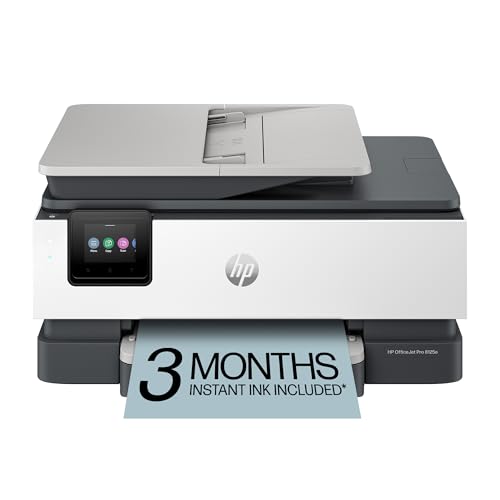
HP OfficeJet Pro 8125e Duplex All-in-One InkjetBest Mid-Range OfficeHP OfficeJet Pro 8125e Duplex All-in-One InkjetColor inkjet all-in-one225 sheetsAutomatic two-sided printing
Brother DCP-L2640DW Duplex Mono Laser All-in-OneBest Mono LaserBrother DCP-L2640DW Duplex Mono Laser All-in-OneMonochrome laser multifunctionn/aAutomatic two-sided printing
HP Envy 6155 Wireless Duplex All-in-One InkjetBest ValueHP Envy 6155 Wireless Duplex All-in-One InkjetCartridge inkjet all-in-one100 sheetsAutomatic two-sided printing
HP Color LaserJet Pro MFP 3301sdw Duplex Color LaserBest Color Laser DuplexHP Color LaserJet Pro MFP 3301sdw Duplex Color LaserColor laser multifunctionn/aAutomatic two-sided

Automatic duplex printing means the machine prints one side, pulls the sheet back through a reversing path and prints the second side without you touching it. It cuts paper use and keeps long documents in order, which is why it is the feature that most often justifies a step up in price.

Duplex is more than a checkbox, though. The mechanism adds rollers and a longer paper path, speed on the second side varies and the machine may or may not scan both sides of an original in one pass. This guide separates those layers so you buy the version of duplex you will actually use.

Before you buy

6 Criteria to Look For Before Buying a Duplex Printer for Home Offices

  1. 01

    Duplex print versus duplex scan

    Automatic duplex printing flips the sheet for the second side, while duplex scanning reads both sides of an original in one pass. The Brother INKvestment 5010 has single-pass duplex scanning on a 50-page feeder, while the HP OfficeJet Pro 8125e and Brother DCP-L2640DW print two-sided but scan one side at a time. Decide which you need before you buy.

  2. 02

    Ink drying and smearing

    Duplex asks the sheet to re-enter the printer with a wet first side if the ink has not dried. Pigment ink such as the Epson WF-4930's DURABrite Ultra dries quickly, and toner on the lasers is dry on exit. Dye inkjets can smear on heavy color coverage.

  3. 03

    Paper weight and type

    Duplex paths work best with plain paper in the stated weight range. Glossy photo paper, labels and heavy stock should be printed single-sided, because they can jam or mark on the second pass. Check the paper limits in the manual before a special job.

  4. 04

    Tray size and speed

    A 250-sheet tray on the Brother INKvestment 5010 or a 225-sheet tray on the HP OfficeJet Pro 8125e lets a long duplex run go unattended. Speed on the second side is often slower, so compare ISO figures, such as the WF-4930's 25 black and 12 color pages per minute.

  5. 05

    Laser or inkjet

    A laser like the Brother DCP-L2640DW prints dry pages and tolerates idle weeks, while an inkjet handles color and photos. Color laser, as on the HP 3301sdw, costs more but avoids smearing. Match the technology to your document mix.

  6. 06

    Running cost

    Duplex saves paper, but ink or toner is still the bigger cost. Tank-style systems like Brother's INKvestment cut the cost per page, while cartridge printers such as the HP Envy 6155 cost more to run. Estimate monthly pages and compare.

Detailed reviews

The 6 best duplex printers for home offices, explained

01
Brother INKvestment 5010 Wireless Duplex All-in-One Inkjet
Inkjet250-sheet trayDuplex ADFAuto 2-sided
Check price on Amazon
Best for: Small offices that copy and scan two-sided originals as well as print.

Brother's INKvestment 5010 is the most complete duplex machine here: it prints on both sides automatically, and its 50-page automatic document feeder scans both sides of an original in a single pass. A 250-sheet tray means a long run does not stall, and the listing highlights security features aimed at small businesses.

The tradeoff is scale and tier. It is the biggest body and the highest tier in the lineup, which is overkill if you print a few two-sided pages a week. Set against the HP Envy 6155, you pay for the feeder and the tray, not for better print quality.

Brother's tank-style INKvestment system keeps ink in an internal reservoir that front-loading cartridges refill, which lowers the cost per page against a typical cartridge inkjet. Ownership still needs weekly printing so the head does not dry. The PerfectPrint Auto Detection system is Brother's approach to catching paper and print problems, and it is worth testing on glossy stock before a big job.

What works

  • Single-pass duplex scanning on a 50-page feeder
  • 250-sheet tray handles long runs
  • Tank-style ink system lowers cost per page
  • Security features suit business use

Watch out for

  • Largest body and highest tier in the lineup
  • Overbuilt for a few pages a week
  • Needs weekly printing to keep the head clear

Spec sheet

Type
Color inkjet all-in-one with tank system
Input tray
250 sheets
Feeder
50-page single-pass duplex ADF
Duplex
Automatic print, copy and scan
Feature
PerfectPrint Auto Detection
02
Epson Workforce Pro WF-4930 Wireless Duplex All-in-One
Inkjet25 ppm black12 ppm colorPigment ink
Check price on Amazon
Best for: Busy home offices that print a lot of two-sided color documents.

Epson's WF-4930 uses a PrecisionCore heat-free print head and DURABrite Ultra pigment inks, which is why the listing quotes 25 ISO pages per minute in black and 12 in color. Pigment ink dries almost at once, which matters for duplex because a wet first side can smear when the sheet re-enters.

Its weak point is that it is a cartridge-based business inkjet, so replacement ink costs more per page than the tank options. Against the Brother INKvestment 5010 it offers speed and quick drying but a less generous feeder in the listing. The color speed of 12 pages per minute is respectable for an inkjet.

Ownership is simple for an office that prints every day, because a head that is used stays healthy. Heat-free printing avoids the thermal stress that some heads suffer, and Epson pitches it as reliable for high volume. If your printing comes in bursts with long gaps, expect the usual inkjet maintenance.

What works

  • 25 pages per minute in black and 12 in color
  • Instant-dry pigment ink suits duplex
  • Heat-free head is built for volume
  • Automatic two-sided printing

Watch out for

  • Cartridge ink is pricier per page than tanks
  • Needs daily or weekly use to stay healthy
  • Heavier than compact home inkjets

Spec sheet

Type
Pigment inkjet all-in-one
Speed
25 black / 12 color ISO ppm
Duplex
Automatic two-sided print
Head
PrecisionCore heat-free
Ink
DURABrite Ultra instant-dry pigment
03
HP OfficeJet Pro 8125e Duplex All-in-One Inkjet
InkjetAuto duplexADF225-sheet tray
Check price on Amazon
Best for: Home offices that want duplex, a feeder and an app in one inkjet.

HP's OfficeJet Pro 8125e is the middle of the office range, with automatic two-sided printing, a feeder and a 225-sheet tray. HP's app includes AI print formatting that trims web pages and emails so a two-sided print does not waste a second sheet on a footer.

The limit is a lower-capacity feeder than the Brother INKvestment 5010 and the HP ecosystem's account requirements. The Instant Ink option bills by page count, so read the terms. For a home office that prints color documents and scans a few pages, it is the practical step up.

Ownership follows the inkjet routine: weekly use, a spare cartridge set and updates through the app. Use plain paper of the stated weight for duplex, since heavy or glossy stock can jam on the second pass. Since the tray holds 225 sheets, you can load a short ream and walk away. If a job needs to be perfect, print one test copy first so you can see whether the second side lines up with the first before you commit forty pages.

What works

  • Duplex, feeder and 225-sheet tray together
  • AI formatting trims wasted pages
  • Color printing for handouts
  • App-based setup

Watch out for

  • Feeder is not the single-pass duplex type
  • Instant Ink subscription needs reading
  • Cartridge ink raises cost per page

Spec sheet

Type
Color inkjet all-in-one
Duplex
Automatic two-sided printing
Feeder
Automatic document feeder
Input tray
225 sheets
App
HP app with AI formatting
04
Brother DCP-L2640DW Duplex Mono Laser All-in-One
Mono laser36 ppmAuto duplexPrint scan copy
Check price on Amazon
Best for: Offices that print long black and white documents two-sided.

Brother's DCP-L2640DW is the laser answer to duplex: a monochrome machine rated at up to 36 pages per minute that flips the sheet automatically. Toner is fused with heat, so the second side never smears, which is a quiet advantage over inkjets.

The tradeoff is color, which this machine cannot print. If you need color charts or photos, the HP OfficeJet Pro 8125e is the better fit. Scanning is basic, with a flatbed rather than the single-pass duplex scanning on the Brother INKvestment 5010.

Ownership is calm: toner survives idle weeks and the paper path is straightforward. Standard and high-yield toner sizes exist, and the high-yield cartridge keeps cost per page low in a duplex-heavy office. Keep paper flat and sealed and the duplex unit will rarely cause trouble.

What works

  • 36 pages per minute with automatic duplex
  • Heat-fused toner never smears on the second pass
  • Toner does not dry out between jobs
  • Scan and copy included

Watch out for

  • No color printing
  • Flatbed scanner without a duplex feeder
  • Toner firmware policy needs checking

Spec sheet

Type
Monochrome laser multifunction
Speed
Up to 36 pages per minute
Duplex
Automatic two-sided printing
Functions
Print, scan, copy
Wireless
Wi-Fi and mobile printing
05
HP Envy 6155 Wireless Duplex All-in-One Inkjet
InkjetAuto duplex100-sheet trayPrint scan copy
Check price on Amazon
Best for: Students and families that print two-sided schoolwork.

The Envy 6155 is the entry point to duplex on the HP side, offering automatic two-sided printing in a small body with a 100-sheet tray. It is aimed at homes that print school documents and family paperwork.

The difference from the HP OfficeJet Pro 8125e is that there is no feeder and the tray is smaller. It is still a cartridge inkjet, so ink per page is high, and the Instant Ink trial leads to a subscription you must read first.

Ownership is the routine of weekly printing and dry paper. For two-sided documents, use plain paper at the recommended weight and let the first side dry before the second if you see smearing. For a student or a family desk it is the lowest-fuss duplex route here.

What works

  • Lowest-cost automatic duplex from HP
  • 100-sheet tray for homework runs
  • Small body for a shelf
  • Print, scan and copy included

Watch out for

  • No feeder for stack scanning
  • Cartridge ink costs more per page
  • Instant Ink trial becomes a subscription

Spec sheet

Type
Cartridge inkjet all-in-one
Duplex
Automatic two-sided printing
Input tray
100 sheets
Functions
Print, scan, copy
Ink plan
Three month Instant Ink trial
06
HP Color LaserJet Pro MFP 3301sdw Duplex Color Laser
Color laserAuto duplexPrint scan copy218X toner
Check price on Amazon
Best for: Offices that need duplex color documents and prefer laser reliability.

HP's Color LaserJet Pro MFP 3301sdw brings duplex to color laser, using HP's TerraJet toner and a 218A standard or 218X high-yield cartridge family. Because toner is fused by heat, a duplex color page is dry and smear-free when it lands in the tray.

The tradeoff is cost and size. It is the biggest tier jump in this lineup, and color toner costs more than mono toner. Against the Brother DCP-L2640DW you pay for color, and against the Brother INKvestment 5010 you pay for laser durability rather than a single-pass duplex scanner.

Ownership is toner and space. Choose the 218X high-yield cartridge for volume, check HP's firmware policy before buying third-party toner and give the machine room to breathe. It rewards a home office that prints a lot of color documents and does not want to worry about idle clogging. Leave clearance behind and above the machine, since the duplex path and the toner cartridges need room to open, and expect a heavier unit to lift than any inkjet in this guide.

What works

  • Duplex color laser with smear-free pages
  • High-yield 218X toner option for volume
  • Toner survives idle weeks
  • Scan and copy included

Watch out for

  • Highest tier and largest body here
  • Color toner costs more than mono
  • HP firmware policy on third-party toner

Spec sheet

Type
Color laser multifunction
Duplex
Automatic two-sided
Toner
HP 218A standard and 218X high yield
Technology
TerraJet toner
Wireless
Wi-Fi

Spec sheet decoder

What the numbers on the box really mean

The specs manufacturers lead with, translated into what they tell you about real-world performance.

Single-pass duplex ADF

The feeder scans both sides of an original in one trip through the scanner. This is far faster than flipping each page.

Watch forThe Brother INKvestment 5010 lists a 50-page single-pass duplex ADF.

ISO ppm

ISO pages per minute is a standardized test speed that excludes the first page. Color is slower than black on inkjets.

Watch forThe Epson WF-4930 lists 25 black and 12 color.

Pigment vs dye ink

Pigment ink sits on the paper surface and dries fast and resists water. Dye ink soaks in and gives vivid color but takes longer to dry.

Watch forThe WF-4930 uses DURABrite Ultra pigment ink.

Input tray sheets

Tray size is the paper loaded at once. Bigger trays mean fewer refills.

Watch forThe Brother INKvestment 5010 lists 250 sheets and the HP Envy 6155 lists 100.

Toner yield

Toner cartridges come in standard and high-yield sizes. The high-yield size lowers cost per page.

Watch forThe HP 3301sdw uses 218A standard and 218X high-yield cartridges.

Methodology

How We Evaluated These Duplex Printers for Home Offices

Duplex depth

We separated duplex printing from duplex scanning and credited the Brother INKvestment 5010's single-pass feeder. Print-only duplex models were judged on paper handling. Reliability on the second pass was considered.

Drying and smear risk

We compared ink and toner behavior, from the Epson WF-4930's instant-dry pigment ink to the dry toner on the lasers. Smearing on duplex jobs is a real failure mode for dye inkjets. Spec notes and owner feedback patterns informed the call.

Paper capacity

We looked at tray sizes from 100 sheets on the HP Envy 6155 to 250 on the Brother INKvestment 5010. Feeder presence was counted. Bigger trays earned credit for long runs.

Speed

We compared rated speeds, including the 36 pages per minute of the Brother DCP-L2640DW and the 25 and 12 of the Epson WF-4930. Duplex speed was noted as a separate question. Headline speed was weighed against first-page time.

Running cost

We considered ink and toner economics, such as tank-style ink on the INKvestment and 218X toner on the HP 3301sdw. Subscription terms were flagged. Cost per page over three years was the guide.

Decision guide

How to Choose the Right Duplex Printers for Home Offices

By Work Type

SituationPickWhy
Copy and scan two-sided originalsBrother INKvestment 5010Single-pass duplex ADF
Fast two-sided color dailyEpson Workforce Pro WF-493025 black and 12 color ppm
Color office with a feederHP OfficeJet Pro 8125eDuplex, ADF and 225-sheet tray
Long black text reportsBrother DCP-L2640DW36 ppm laser
Student schoolworkHP Envy 6155Lowest-cost duplex
Color laser duplexHP Color LaserJet Pro MFP 3301sdwSmear-free color pages

By Budget

TierPickWhy
Lowest tierHP Envy 6155Cheapest duplex here
Lower mid tierHP OfficeJet Pro 8125eAdds a feeder and larger tray
Mid tierEpson Workforce Pro WF-4930Adds speed and pigment ink
Upper mid tierBrother DCP-L2640DWLaser with 36 ppm
Upper tierBrother INKvestment 5010Adds duplex scanning
Top tierHP Color LaserJet Pro MFP 3301sdwColor laser duplex

Laser vs Inkjet Duplex

Laser

A laser like the Brother DCP-L2640DW or HP 3301sdw delivers dry pages that never smear and tolerates idle weeks. The cost is a higher entry price and, for the HP, color toner.

Inkjet

An inkjet like the Epson WF-4930 or HP Envy 6155 prints color and photos at a lower entry cost. The cost is higher ink per page and the need for weekly use.

Pick laser for steady document work; pick inkjet for color variety.

Duplex Scanning

PreferencePickWhy
Scan both sides in one passBrother INKvestment 501050-page single-pass duplex ADF
Feeder, one-sided scanningHP OfficeJet Pro 8125eAutomatic document feeder
Flatbed onlyBrother DCP-L2640DWSimple scan and copy
No feederHP Envy 6155Flatbed scanning

For Schoolwork Specifically

Look for

Look for automatic duplex, a tray of at least 100 sheets and low cost per page. Schoolwork is mostly plain text and the odd color chart, so speed matters less than paper handling.

In this comparison

The HP Envy 6155 and Brother DCP-L2640DW fit best, one for color and the other for cheap text. Both avoid features a student will not use.

When to Spend More

Spend more if

Spend more if you scan two-sided originals, where the Brother INKvestment 5010 saves real time, or if you print daily in color and want laser reliability from the HP 3301sdw.

Save if

Save if duplex is only for paper savings, where the HP Envy 6155 gives it at the lowest tier.

Ownership

Maintenance schedule

The upkeep that decides whether this machine lasts two seasons or ten.

TaskIntervalWhy it matters
Use the right paper weightEvery jobHeavy or glossy stock jams on the duplex pass. Check the limits in the manual.
Clean pickup and duplex rollersEvery six monthsDust makes the sheet slip on re-entry. A damp lint-free cloth restores grip.
Print weekly on inkjetsWeeklyKeeps nozzles wet and prevents streaks on the second side.
Clear jams gentlyWhen they occurPulling a sheet against the feed can damage the duplex rollers. Open the rear cover and pull along the path.
Store paper flatAlwaysCurled paper is the top cause of duplex jams. Keep it sealed until use.

FAQ

Frequently Asked Questions

Is duplex worth the extra cost?

If you print more than a few multi-page documents a week, yes. It halves paper and keeps pages in order. For single pages it adds cost you will not use, so match the feature to your habits. A household that prints two-sided homework weekly will earn back the difference in paper over a year or two.

Does duplex slow printing?

Usually, because the sheet must reverse and re-enter. The second side is slower than the first, so compare rated duplex speeds, not only the headline figure. On an inkjet, the printer may also pause to let the first side dry, which adds a few seconds per sheet on dense color jobs.

Can all paper go through a duplex unit?

No. Plain paper in the stated weight range is safe, but glossy photo paper, labels and heavy stock should be printed single-sided.

Do lasers or inkjets handle duplex better?

Lasers fuse toner dry, so the second pass never smears. Pigment inkjets such as the Epson WF-4930 dry fast, while dye inkjets can smear on heavy coverage.

What is the difference between duplex printing and duplex scanning?

Duplex printing flips the sheet to print both sides. Duplex scanning reads both sides of an original in one pass, which the Brother INKvestment 5010 offers on its feeder.

How do I reduce duplex jams?

Use fresh, flat, correct-weight paper, do not overfill the tray and clean the rollers twice a year. Avoid printing a very wet first side, and if a particular job keeps jamming, reduce the ink coverage or print it single-sided. Fan the ream before loading to separate sheets that have clung together.

Bottom line

The short version

Browse more duplex printers for home officeson Amazon →
James Miller, Lead Machine Editor

About the author

James Miller

Lead Machine Editor, MachineFanatic

James Miller leads MachineFanatic's buying guides, turning spec sheets, manuals and owner feedback into clear verdicts on power tools, outdoor power equipment, shop machines and kitchen machines.

More from James →

Keep reading

Related guides