
Amazon affiliate links - we earn a commission.Affiliate disclosure

Buying guide · 13 min read · Updated 2026-11-07

Best Fanless Mini PCs (2026)

Six fanless mini PCs compared on passive cooling design, processor class, display outputs and storage, from N150 desktops to an industrial i7 and a PC stick.

James MillerBy James MillerLead Machine Editor6 machines comparedSpec-sheet verified
Best Fanless Mini PCs

At a glance

Our top picks

Side by side

Spec comparison

MachineProcessorMemoryStorageDisplay
MINIX Z150-0dB Fanless Mini PC Intel N150 16GB 512GBBest OverallMINIX Z150-0dB Fanless Mini PC Intel N150 16GB 512GBIntel N150, up to 3.6 GHz class16GB DDR4512GB PCIe Gen3 x4 SSD4K dual display
MeLE Quieter 4C N150 Fanless Mini PC with Windows 11 ProBest ValueMeLE Quieter 4C N150 Fanless Mini PC with Windows 11 ProIntel N15016GB DDR4512GB SSDThree 4K outputs (2x HDMI 2.0 and USB-C)
MeLE Cyber X1 Fanless Mini PC N150 with Copper HeatsinkBest Copper HeatsinkMeLE Cyber X1 Fanless Mini PC N150 with Copper HeatsinkIntel N150 (Twin Lake)16GB DDR4512GB SSDTriple 4K
MINIX NEO Z300-0dB Fanless Mini PC Intel i3-N300Best Processor ClassMINIX NEO Z300-0dB Fanless Mini PC Intel i3-N300Intel Core i3-N300, 8 cores16GB DDR4512GB PCIe SSD4K at 60Hz dual
KINGDEL Fanless Industrial Mini PC Core i7 8th Gen 16GB 512GBBest Industrial BuildKINGDEL Fanless Industrial Mini PC Core i7 8th Gen 16GB 512GBCore i7, 4 cores, up to 4.6 GHz turbo16GB DDR4512GB NVMe SSDn/a
MeLE PCG02 Pro Fanless PC Stick N5100 8GB 256GBBest PC StickMeLE PCG02 Pro Fanless PC Stick N5100 8GB 256GBCeleron N5100, up to 2.8 GHz burst8GB DDR4 2933MHz256GB eMMCn/a

A fanless mini computer has no moving parts to wear out or collect dust, and it makes no sound at all. The price of that silence is thermal headroom, since the whole case has to act as a heatsink and the processor must run within what the metal can shed on its own.

That makes the category a good fit for quiet desks, home servers, digital signage and light office work, and a poor fit for long sessions of heavy computing. Matching the chip, the case and your workload is more important than comparing raw benchmark scores.

Before you buy

6 Criteria to Look For Before Buying a Fanless Mini PC

  1. 01

    Processor class and passive limits

    A fanless chassis can only shed so much heat. Low-power chips like the N150 in the MINIX Z150-0dB and MeLE Cyber X1 run at roughly 10 to 15 watts and suit passive cooling. The eight-core i3-N300 in the NEO Z300-0dB and the i7 in the KINGDEL generate more heat and may throttle under sustained load.

  2. 02

    Case design and heatsink

    The metal case is the heatsink, so fins, thickness and material matter. The MeLE Cyber X1 uses a copper heatsink with a textured surface, while the KINGDEL uses a full metal industrial shell. A plastic case or a tiny stick, like the PCG02 Pro, sheds heat poorly.

  3. 03

    Workload and duty cycle

    Fanless boxes suit bursty and light work such as browsing, office, video playback and server duty. They are poor for hours of video encoding or gaming, where the chip throttles. Match the load to the cooling. A useful test is to ask whether the work is bursty or sustained: opening a spreadsheet, loading a web page or serving a file is bursty, and the chip returns to idle between bursts, which lets a passive case cool. Encoding a long video or compiling a large project is sustained, and the case saturates with heat and the chip slows. Light virtual machines and a media server sit between the two, so check the temperature under your real load before you commit the box to a job.

  4. 04

    Memory and storage

    16GB of RAM and an NVMe SSD, as in the MINIX Z150-0dB, give a snappy desktop. A stick with 8GB and eMMC storage, as in the PCG02 Pro, feels slower. Check whether RAM and storage can be upgraded. A box with soldered memory is fixed for life, so 16GB at purchase is safer than 8GB for anyone who keeps many browser tabs open. A spare M.2 or SATA slot adds room for a second drive, which helps if you plan to use the machine as a small file server.

  5. 05

    Display and port count

    The MeLE Quieter 4C and Cyber X1 support three 4K displays, the MINIX boxes support two, and sticks support one. Count the monitors you need and the USB, Ethernet and USB-C ports. A 2.5G network port helps with fast file transfers.

  6. 06

    Placement and room temperature

    Passive cooling depends on ambient air. A warm room or an enclosed cabinet cuts performance, so leave space around the case and avoid stacking items on it. A VESA mount behind a monitor can trap heat. Orient the box so the fins run vertically if the design allows, since warm air rises along vertical fins and leaves more freely than it does across a flat surface. In a summer room without air conditioning, expect lower sustained speeds than the same box delivers in winter, and plan around it for any always-on job.

Detailed reviews

The 6 best fanless mini pcs, explained

01
MINIX Z150-0dB Fanless Mini PC Intel N150 16GB 512GB
Intel N15016GB DDR4512GB NVMe2.5G LAN
Check price on Amazon
Best for: A silent desktop, home server or kiosk with light to moderate workloads.

The Z150-0dB uses an Intel N150 processor, an efficient entry-level chip suited to passive cooling, with 16GB of DDR4 memory and a 512GB PCIe Gen3 x4 SSD. The case acts as the heatsink, and the maker positions it for noise reduction, dust-free reliability and low maintenance. It supports 4K dual displays and a 2.5G network port.

The tradeoff is performance ceiling. The N150 is a four-core chip tuned for efficiency, so it handles browsing, office work, video playback and light server duty, but it is not a machine for sustained heavy loads. Against the MINIX NEO Z300-0dB, you get a lower core count with a simpler thermal job.

In ownership, a fanless case needs air around it, so keep it out of an enclosed cabinet and away from heat sources. Update the BIOS, check the activation state of Windows and consider adding a second drive if the case allows. The maker states a design that keeps the memory cool, though that is a manufacturer claim rather than independent testing.

What works

  • Fully passive case with no fan noise
  • 16GB RAM and a fast NVMe SSD
  • 2.5G LAN for quick network transfers
  • 4K dual display output

Watch out for

  • Four-core chip has limited headroom
  • Needs open airflow around the case
  • Sustained heavy loads can throttle

Spec sheet

Processor
Intel N150, up to 3.6 GHz class
Memory
16GB DDR4
Storage
512GB PCIe Gen3 x4 SSD
Network
2.5G LAN
Display
4K dual display
02
MeLE Quieter 4C N150 Fanless Mini PC with Windows 11 Pro
N15016GB DDR4512GB SSDTriple display
Check price on Amazon
Best for: A multi-monitor office desk that must stay silent.

The Quieter 4C pairs an N150 processor with 16GB of RAM and a 512GB SSD in a fanless business-grade case with Windows 11 Pro. It can drive three independent 4K displays through two HDMI 2.0 ports and a USB-C port, which is the feature that sets it apart from most small boxes.

The compromise is the same as any N150 machine: it is quiet and capable for office work, but the chip is tuned for efficiency, not for speed. Compared with the MINIX Z150-0dB, it offers more display outputs and a business-oriented bundle, while the MINIX offers a faster network port.

Treat it as an office workhorse. Place it where air can reach the finned case, and check that the supplied Windows is activated. Triple displays suit a trader, a spreadsheet user or a support desk, where several windows stay open all day without needing heavy graphics. The business-grade label signals a plain, durable design rather than a gaming style, which is the right mood for an office.

What works

  • Three independent 4K display outputs
  • Windows 11 Pro preinstalled
  • 16GB RAM and 512GB SSD
  • Fully fanless

Watch out for

  • Efficiency-tuned N150 chip
  • Limited headroom for heavy tasks
  • Needs open airflow

Spec sheet

Processor
Intel N150
Memory
16GB DDR4
Storage
512GB SSD
Display
Three 4K outputs (2x HDMI 2.0 and USB-C)
OS
Windows 11 Pro
03
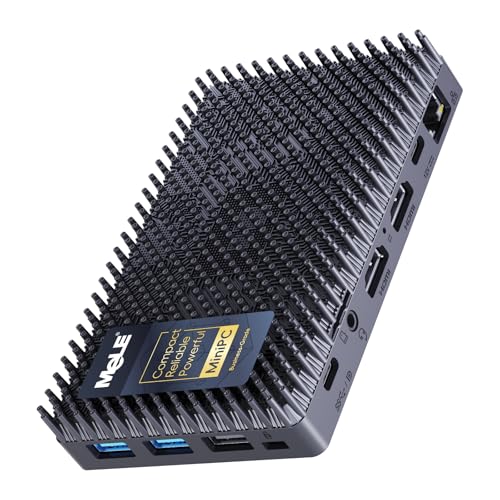
MeLE Cyber X1 Fanless Mini PC N150 with Copper Heatsink
N15016GB DDR4512GB SSDCopper heatsink
Check price on Amazon
Best for: A silent desktop where better passive cooling is a priority.

The Cyber X1 uses an N150 chip with a pure copper heatsink and a textured surface designed to increase the area that sheds heat. The maker describes the surface as a unique tetrahedral pattern, a design claim that is meant to improve passive cooling. It also supports three 4K displays through two HDMI ports and USB-C.

The tradeoff is that the specifications sit close to the Quieter 4C, so the difference is mostly the thermal design and styling. Copper conducts heat better than aluminum, which can help the chip hold its speed, but the benefit depends on how well the whole case sheds heat to the air.

Ownership is simple. Place the box on a desk with space around it, update drivers and check the temperature under a long load to see how it behaves in your room. It is a sensible pick for someone who wants a quiet machine and is willing to pay a little more for the thermal design.

What works

  • Copper heatsink and textured surface
  • N150 with 16GB RAM and 512GB SSD
  • Triple 4K display support
  • Windows 11 Pro

Watch out for

  • Close to the Quieter 4C in specifications
  • Thermal benefit depends on the room
  • Still limited for sustained heavy work

Spec sheet

Processor
Intel N150 (Twin Lake)
Memory
16GB DDR4
Storage
512GB SSD
Cooling
Pure copper heatsink, textured surface
Display
Triple 4K
04
MINIX NEO Z300-0dB Fanless Mini PC Intel i3-N300
i3-N300 octa-core16GB DDR4512GB NVMe2.5G LAN
Check price on Amazon
Best for: Users who want an eight-core silent PC for multitasking or light server work.

The NEO Z300-0dB uses the Intel Core i3-N300, an eight-core Alder Lake-N processor, with 16GB of DDR4 and a 512GB PCIe SSD. It is designed for 24/7 operation, and a fanless passive design keeps it silent. The VESA mount and 2.5G LAN suit it for office and light server use.

The compromise is thermal. Eight cores generate more heat than four, so the passive case has more to shed, and sustained all-core loads may drop clock speeds. For bursty tasks such as web apps, virtual machines and file serving, the extra cores help.

Ownership requires attention to placement. Give it open air, use the VESA mount carefully and monitor the temperature under your usual workload. It is the pick for someone who wants more multi-thread capability than an N150 and accepts a hotter chassis.

What works

  • Eight-core Core i3-N300
  • 24/7 operation design
  • 2.5G LAN and 4K dual display
  • VESA mountable

Watch out for

  • More heat to shed passively
  • Higher cost than N150 boxes
  • Sustained loads may throttle

Spec sheet

Processor
Intel Core i3-N300, 8 cores
Memory
16GB DDR4
Storage
512GB PCIe SSD
Display
4K at 60Hz dual
Network
2.5G LAN
05
KINGDEL Fanless Industrial Mini PC Core i7 8th Gen 16GB 512GB
Core i716GB DDR4512GB NVMeIndustrial case
Check price on Amazon
Best for: Industrial, kiosk or workstation use that needs more single-thread power.

The KINGDEL is an industrial-style fanless PC with an eighth-generation Core i7 processor, four cores with a base clock of 1.8 GHz and a turbo up to 4.6 GHz. It carries 16GB of DDR4 and a 512GB NVMe SSD, with Intel UHD Graphics 620 and 4K output. The metal case works as a large heatsink.

The tradeoff is age and size. An eighth-generation U-series chip is older and less efficient than recent low-power parts, and industrial boxes are bulkier. Against the N150 machines, it offers stronger single-thread performance but is more demanding on the passive cooling.

It suits a factory, a kiosk or a quiet workstation where ruggedness matters. Mount it where air can pass over the fins, and check that the case does not get uncomfortably hot under a sustained load. Verify the operating system and activation before relying on it for work.

What works

  • Core i7 for stronger single-thread speed
  • Full metal fanless case
  • 16GB RAM and NVMe SSD
  • Wide I/O for industrial use

Watch out for

  • Older eighth-generation processor
  • Bulkier than modern minis
  • Runs hot under sustained load

Spec sheet

Processor
Core i7, 4 cores, up to 4.6 GHz turbo
Memory
16GB DDR4
Storage
512GB NVMe SSD
Graphics
UHD Graphics 620, 4K
Case
Full metal fanless
06
MeLE PCG02 Pro Fanless PC Stick N5100 8GB 256GB
N51008GB DDR4256GB eMMCUSB PD 3.0
Check price on Amazon
Best for: Portable computing on a TV or monitor, and digital signage.

The PCG02 Pro is a PC stick that plugs into an HDMI port, with a Celeron N5100 quad-core processor that bursts up to 2.8 GHz, 8GB of DDR4 and 256GB of eMMC storage. It is claimed to be the first stick with USB PD 3.0, so it can be powered from a compatible power bank or charger.

The compromise is speed and storage. The N5100 is slower than the N150, and eMMC storage is slower than an NVMe drive, so multitasking is limited. A stick also has the least surface area to shed heat, so it suits light tasks.

It is useful as a portable computer for a hotel TV, a signage screen or a presentation. Keep expectations modest, use a small peripheral hub if you need extra ports and avoid heavy tasks.

What works

  • Plugs straight into an HDMI port
  • Powered by USB PD 3.0
  • Silent and compact
  • 8GB RAM and 256GB storage

Watch out for

  • Slower N5100 chip
  • eMMC storage is slow
  • Limited ports and cooling

Spec sheet

Processor
Celeron N5100, up to 2.8 GHz burst
Memory
8GB DDR4 2933MHz
Storage
256GB eMMC
Power
USB PD 3.0
Form
HDMI stick

Spec sheet decoder

What the numbers on the box really mean

The specs manufacturers lead with, translated into what they tell you about real-world performance.

Thermal design power (TDP)

The amount of heat a chip is designed to produce under typical load, in watts. Lower TDP suits passive cooling.

Watch forThe N150 in the Z150-0dB has a low TDP, while the i7 in the KINGDEL produces more heat.

Throttling

A chip slows itself to cut heat when it gets too hot. In a fanless box, it happens sooner under sustained loads.

Watch forThe NEO Z300-0dB with eight cores may throttle in long all-core tasks.

NVMe versus eMMC

NVMe SSDs are fast and sit on a PCIe link, and eMMC is a slow soldered flash used in sticks.

Watch forThe Z150-0dB uses NVMe, and the PCG02 Pro uses eMMC.

2.5G LAN

A network port that runs up to 2.5 gigabit per second, faster than standard gigabit Ethernet.

Watch forThe MINIX Z150-0dB and NEO Z300-0dB list 2.5G LAN.

USB PD 3.0

A USB power delivery standard that lets a device draw power from a charger or power bank.

Watch forThe PCG02 Pro uses it to power the stick.

Methodology

How We Evaluated These Fanless Mini PCs

Passive cooling fit

We compared the processor class and case design. Low-power N150 machines with finned or copper cases ranked highest. This follows the spec sheet and established thermal knowledge.

Performance per watt

We considered how much speed each chip offers within its thermal budget. The i3-N300 offers eight cores and the i7 offers high turbo clocks, but both run hotter than the N150.

Memory and storage

We looked at RAM and drive type. NVMe and 16GB machines such as the MINIX Z150-0dB scored higher than eMMC sticks.

Display and ports

We counted outputs and network speed. The MeLE models with three displays and the MINIX models with 2.5G LAN scored higher.

Reliability

We weighed the absence of a fan, the metal build and typical 24/7 duty. Owner feedback patterns mention silence and dust-free operation as the main reasons to buy.

Decision guide

How to Choose the Right Fanless Mini PCs

By Workload

SituationPickWhy
Silent office desktopMINIX Z150-0dBN150 with 16GB and NVMe
Three-monitor deskMeLE Quieter 4CTriple 4K outputs
Cooler passive designMeLE Cyber X1Copper heatsink
Multitasking and light serverMINIX NEO Z300-0dBEight cores and 2.5G LAN
Industrial or kiosk useKINGDEL fanless i7Metal industrial case

By Budget

TierPickWhy
LowestMeLE PCG02 Pro stickPortable stick
LowMeLE Quieter 4CN150 business bundle
MiddleMINIX Z150-0dBN150 with 2.5G LAN
Upper middleMeLE Cyber X1Copper heatsink
HighMINIX NEO Z300-0dBEight-core i3
HighestKINGDEL fanless i7Industrial Core i7

Fanless vs Active Cooling

Fanless

The MINIX, MeLE and KINGDEL boxes are silent and dust-free with no fan to fail. They suit light and bursty work and need airflow around the case.

Active

A fan-cooled mini PC holds higher speeds under long loads. It makes noise and collects dust, which is why fanless is for quiet desks.

Quiet and light means fanless, and heavy and sustained means a fan.

Chip Class

PreferencePickWhy
Efficient four-coreMINIX Z150-0dBN150
More coresMINIX NEO Z300-0dBEight-core i3-N300
Stronger single-threadKINGDEL fanless i7Core i7 turbo
Lowest powerMeLE PCG02 Pro stickCeleron N5100

For a Home Server Specifically

Look for

Look for a low-power chip, a fast network port, a case with fins and open placement. A 24/7 box should run cool and stay silent.

In this comparison

The MINIX Z150-0dB and NEO Z300-0dB are the best matches, with 2.5G LAN and 24/7 operation design.

When to Spend More

Spend more if

Spend more if you need more cores or industrial ruggedness, which points to the MINIX NEO Z300-0dB or the KINGDEL i7.

Save if

Save if you only need a silent office box, where the MeLE Quieter 4C or the MINIX Z150-0dB is enough.

Ownership

Maintenance schedule

The upkeep that decides whether this machine lasts two seasons or ten.

TaskIntervalWhy it matters
Check temperaturesAfter setup and each seasonPassive cooling depends on room temperature. A monitoring tool shows if the chip approaches throttling.
Keep airflow clearAlwaysBlocked fins reduce cooling. Leave space around the case and do not stack items on top.
Dust the finsTwice a yearFanless boxes collect less dust, but a dusty case sheds heat more slowly. A soft brush or compressed air helps.
Update BIOS and driversEvery few monthsUpdates improve stability and power management.
Back up storageRegularlyCompact boxes use a single drive. A backup protects against drive failure.

FAQ

Frequently Asked Questions

Is a fanless mini PC good for everyday use?

Yes, for browsing, office work and video playback. The MINIX Z150-0dB and MeLE models handle these tasks silently.

Will it overheat?

Passive cases are designed to run within their thermal limit and throttle if they get too hot. Give the box airflow and avoid long heavy loads.

What is the difference between N100 and N150?

The N150 is a modest step up, with a slightly higher boost clock. Real-world performance is close, so choose on the rest of the spec, such as ports, memory, storage type and the network speed. A cheaper N100 box with 16GB of RAM and an NVMe drive will often feel quicker than an N150 box with less memory and slow flash storage.

Can I upgrade RAM and storage?

It depends on the model. Check whether RAM and the drive are upgradeable before buying.

Is a PC stick a real computer?

Yes, but it is slower and has less cooling. The MeLE PCG02 Pro suits light tasks and portability.

Do fanless PCs last longer?

They avoid fan failure and dust ingestion, which helps reliability. Other parts still wear, so back up your data.

Bottom line

The short version

Browse more fanless mini pcson Amazon →
James Miller, Lead Machine Editor

About the author

James Miller

Lead Machine Editor, MachineFanatic

James Miller leads MachineFanatic's buying guides, turning spec sheets, manuals and owner feedback into clear verdicts on power tools, outdoor power equipment, shop machines and kitchen machines.

More from James →