

Amazon affiliate links - we earn a commission.Affiliate disclosure

Buying guide · 15 min read · Updated 2026-11-07

Best Industrial 3D Printers (2026)

Enclosed, large format and multi-toolhead 3D printers for small shops and prototyping compared on chamber heat, build volume, speed and material support.

James MillerBy James MillerLead Machine Editor7 machines comparedSpec-sheet verified
Best Industrial 3D Printers

At a glance

Our top picks

Industrial in the 3D printing world usually means one or more of four things: a large build volume, a heated chamber for engineering plastics, multiple toolheads for multi-material work, and the durability to run for long jobs day after day. At the desktop price tier, that mostly translates to enclosed CoreXY machines built for small shops, labs and product studios.

Judging them means looking past speed claims toward chamber temperature, nozzle rating, frame stiffness and how the machine copes with a week of continuous printing. Multi-material systems add complexity and waste, and a larger plate adds time and failure risk. The machines below sit at the serious end of consumer FDM.

Before you buy

6 Criteria to Look For Before Buying an Industrial 3D Printer

  1. 01

    Build volume versus failure cost

    A large plate lets you print big parts in one piece, but a failure at hour 40 wastes far more filament than at hour 4. The QIDI Max4 offers 390 by 390 by 340 millimeters and the Prusa XL is larger still. The Bambu Lab P1S is smaller but faster. Pick volume for the biggest part you actually print, not the biggest the machine allows.

  2. 02

    Chamber heat and engineering plastics

    Materials such as ABS, ASA, nylon and carbon fiber blends warp without a warm chamber. The QIDI Max4 and FlashForge Creator 5 Pro hold about 65 degrees Celsius, while the P1S and K2 are passive enclosures. If you print only PLA and PETG, chamber heat is unnecessary and can even soften PLA parts.

  3. 03

    Multi-material approach

    A filament changer on one nozzle, like the Bambu AMS or Creality CFS, wastes filament at every change. Independent toolheads, like the Prusa XL's five or the Creator 5 Pro's four, avoid that waste but add nozzles to maintain. Choose by how often you really mix materials.

  4. 04

    Hotend rating and nozzle wear

    A 370 degree hotend with a hardened steel nozzle, as on the Max4, handles abrasive filled filaments. A brass nozzle wears out quickly with carbon fiber. Check the maximum temperature and the nozzle material, because filled filaments wear soft nozzles in a few kilograms.

  5. 05

    Speed ceilings versus reality

    The P1S quotes 500 millimeters per second and the K2 and P2S 600. These are ceilings that short moves never reach, and acceleration at 20000 millimeters per second squared sets typical time. Do not compare machines by headline speed alone.

  6. 06

    Service and spares

    A shop machine runs for years, and parts supply decides downtime. Prusa and Bambu have large communities and spare parts. Smaller brands may have thinner supply. Check nozzle, belt and hotend availability before committing.

Detailed reviews

The 7 best industrial 3d printers, explained

01
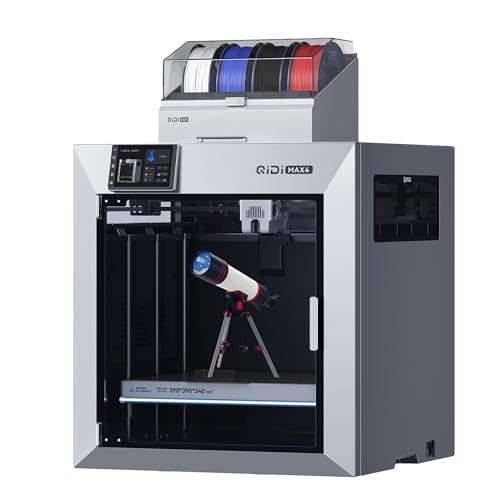
QIDI Max4 Combo, 390x390x340 mm, 65 C chamber, 370 C nozzle
390x390x340 mm65 C chamber370 C nozzle40 mm3/s hotend
Check price on Amazon
Best for: Shops printing large engineering plastic parts.

The Max4 offers a 390 by 390 by 340 millimeter build area, which the maker says is 55 percent larger than its predecessor. A heated chamber holds about 65 degrees Celsius and the hotend reaches 370 degrees with a hardened steel nozzle, so it can print ABS, ASA, nylon and carbon fiber filled filaments. Closed-loop motors on the X and Y axes and dual Z lead screws are the stiffness features that keep a large plate accurate.

The tradeoff is size and noise. It is a workshop machine, and the heated chamber needs a warm-up before a technical print. Against the Bambu Lab P2S, it prints larger parts and handles engineering materials, but its software and community are smaller than Bambu's.

Ownership is mostly consumables and filament handling. Hardened steel nozzles are worn by abrasive filaments but last longer than brass, and filaments such as nylon must be dried before use. The combo version includes a multi-filament system, and a large plate means you should calibrate the first layer carefully because a small error across 390 millimeters is easy to see.

What works

  • 390x390x340 mm volume suits big parts
  • Heated 65 C chamber and 370 C nozzle
  • Closed-loop XY motors and dual Z screws
  • 40 mm3/s flow keeps large prints moving

Watch out for

  • Large and loud for a desk
  • Nylon and carbon fiber need dry filament
  • Smaller software ecosystem than Bambu

Spec sheet

Build volume
390x390x340 mm
Chamber
Heated to 65 C
Nozzle
370 C hardened steel
Flow
40 mm3/s
Z axis
Dual lead screws
02
Bambu Lab P1S Combo with AMS, enclosed CoreXY 3D printer
500 mm/s20000 mm/s2Enclosed bodyUp to 16 colors
Check price on Amazon
Best for: Small shops that need reliable enclosed PLA and PETG production.

The P1S is a fully enclosed CoreXY printer with 500 millimeter per second travel speed and 20000 millimeters per second squared acceleration, plus an AMS unit for multi-color work. The enclosure improves results with advanced filaments, and automatic bed leveling takes care of the first layer. The accompanying software and model library make it the easiest machine here to start with.

The tradeoff is that it is a passive enclosure without a heated chamber, so ABS and ASA work but nylon and polycarbonate are harder than on a QIDI Max4. Its build volume is a 256 millimeter class cube, which is smaller than the Max4. For small parts in PLA, PETG and TPU, it is a very reliable tool.

Ownership is easy because spare parts and nozzles are widely sold and the community is large. The AMS adds filament waste on every color change, so plan multicolor prints with that in mind. Keep the filament path clean, and replace the carbon filter in the exhaust path when it saturates.

What works

  • Fully enclosed body suits advanced filaments
  • 500 mm/s and 20000 mm/s2 speed ceiling
  • Large community and spare parts supply
  • AMS supports up to 16 colors

Watch out for

  • No active chamber heating
  • Smaller volume than large-format machines
  • AMS color changes waste filament

Spec sheet

Speed
500 mm/s
Acceleration
20000 mm/s2
Body
Fully enclosed
Colors
Up to 16 with AMS units
Leveling
Automatic
03
Bambu Lab P2S Combo with AMS 2 Pro, 600 mm/s class
600 mm/sAMS 2 ProAI failure detection15-minute setup
Check price on Amazon
Best for: Product studios that want fast, polished multicolor prints.

The P2S prints up to 600 millimeters per second while keeping accuracy, and the maker says you can set it up and start printing in about 15 minutes. AI failure detection watches for common errors, and the AMS 2 Pro handles multi-color and multi-material jobs. The MakerWorld library gives a large pool of ready-to-print models.

The tradeoff against the P1S is cost and newness, as the P2S sits higher in the range and its long-term reliability data is shorter. Against the Max4, it lacks the large volume and heated chamber, so it is a faster small-part machine rather than an engineering printer.

In ownership, the tool is meant to be plug and play. Keep the AMS filament dry, update the firmware through the app and replace nozzles on schedule. As with any cloud-linked printer, confirm that local printing options exist in case you want to run it offline.

What works

  • 600 mm/s ceiling with accurate motion
  • AMS 2 Pro for multicolor and multi-material
  • AI failure detection watches for errors
  • Large MakerWorld model library

Watch out for

  • Passive enclosure without chamber heat
  • Smaller volume than large-format machines
  • Cloud features need a local fallback plan

Spec sheet

Speed
Up to 600 mm/s
Multicolor
AMS 2 Pro
Setup
Ready in about 15 minutes
Monitoring
AI failure detection
Ecosystem
MakerWorld model library
04
FlashForge Creator 5 Pro industrial, 65 C chamber, HEPA13, 4 extruders
65 C chamberHEPA13 filter4 extrudersIndustrial class
Check price on Amazon
Best for: Labs printing multi-material engineering parts in a heated chamber.

The Creator 5 Pro combines an actively heated chamber near 65 degrees Celsius, a HEPA13 air system with outside-in airflow and four independent extruders. That mix targets engineering materials and multi-material parts without the cross-contamination of a single shared nozzle. The enclosed design is meant for a workshop or lab.

The tradeoff is complexity and cost. Four extruders mean four nozzles to align, and the machine is larger and louder than a typical desktop unit. Against the QIDI Max4, it adds multi-material capability while the Max4 offers a larger plate.

Ownership requires discipline. Replace the HEPA13 filter on schedule, dry engineering filaments and recalibrate toolhead offsets after any nozzle change. Treat the heated chamber as a heat source and avoid storing flammables nearby.

What works

  • Active 65 C chamber for ABS and nylon
  • HEPA13 filtration cleans exhaust air
  • Four independent extruders cut contamination
  • Industrial-class frame for continuous use

Watch out for

  • Four nozzles to align and maintain
  • Large, loud and heavy for a desk
  • Filter replacement is a recurring cost

Spec sheet

Chamber
Active heating to 65 C
Filtration
HEPA13 outside-in
Extruders
4 independent
Materials
Multi-color and multi-material
Class
Industrial
05
Creality K2 Combo with CFS, 600 mm/s, 95 percent pre-assembled
4 CFS for 16 colors600 mm/sSilent mode95% pre-assembled
Check price on Amazon
Best for: Offices and studios that want quiet multicolor prints.

The K2 Combo links up to four CFS filament units for up to 16 colors and prints at a 600 millimeters per second ceiling. A silent mode lowers noise, and the machine ships 95 percent pre-assembled so it is ready within minutes. It sits at the friendly end of the multicolor market.

The tradeoff is that its enclosure and chamber are modest compared with the Max4 or Creator 5 Pro, so it is a PLA, PETG and light engineering printer rather than a nylon machine. Against the Bambu P1S, it offers a larger multicolor system but a smaller community.

Ownership centers on the CFS path. Keep filament dry and clean the feed regularly, since a four-unit chain has more places to jam. Use silent mode for office or home use and normal mode for production runs.

What works

  • Four CFS units for up to 16 colors
  • Silent mode suits office use
  • Arrives 95 percent pre-assembled
  • 600 mm/s class motion

Watch out for

  • Modest chamber for engineering plastics
  • Long CFS chains add jam risk
  • Smaller community than Bambu

Spec sheet

Multicolor
4 CFS units, up to 16 colors
Speed
600 mm/s
Noise
Silent mode
Assembly
95 percent pre-assembled
Leveling
Automatic
06
Creality K2 Plus Combo with CFS, large format, 600 mm/s
Large formatFOC step-servo motors600 mm/sCFS multicolor
Check price on Amazon
Best for: Studios that print large multicolor parts.

The K2 Plus is the larger sibling of the K2, with a bigger build area than the K2 and K2 Pro and a multicolor CFS system. Its XYZ axes use industry-grade FOC step-servo motors, which keep position accurate at a 600 millimeters per second ceiling. Full automatic leveling handles the first layer on the larger plate.

The tradeoff is bulk and cost. A large plate takes up a full bench, and big multicolor prints use a lot of filament. Against the QIDI Max4, it has multicolor capability but a less specialized engineering-material setup.

Ownership requires planning. Calibrate the plate regularly, since a large bed shows warp easily, and keep spare nozzles and filament spools on hand. The step-servo motors are quiet and strong, but they are newer technology with less long-term data.

What works

  • Large build volume for full-size parts
  • FOC step-servo motors for accurate motion
  • CFS multicolor system
  • Full automatic leveling on a large plate

Watch out for

  • Takes a full bench and a lot of filament
  • Step-servo motors have limited long-term data
  • Less specialized for engineering plastics

Spec sheet

Motors
FOC step-servo XYZ
Speed
600 mm/s
Multicolor
CFS system
Volume
Larger than K2 and K2 Pro
Leveling
Full automatic
07
Original Prusa XL 5-toolhead large-format CoreXY 3D printer
5 toolheadsLarge formatCoreXYMulti-material
Check price on Amazon
Best for: Prototyping shops that need five materials in one job.

The Original Prusa XL with five toolheads prints up to five materials or colors in a single job, which is the most flexible configuration in this guide. It is a large-format CoreXY machine designed for professional environments that need combinations of material and color for functional prototypes and full-color visual models. The maker states that it keeps speed and precision even with frequent tool changes.

The tradeoff is cost and complexity. Five toolheads are five nozzles to maintain, and the machine is heavy and requires planning for space. Against the Creator 5 Pro, it offers more toolheads and a larger plate but no heated-chamber headline in the data.

Ownership benefits from the maker's long record of spare parts and documentation, which matters for a printer that may run a shop for years. Keep the toolhead mounts clean, dry the filament and plan your material pairings carefully, since not every combination bonds well.

What works

  • Up to five materials or colors per job
  • Large-format CoreXY frame
  • Fast tool changes with precision kept
  • Strong documentation and spare parts record

Watch out for

  • Five toolheads to maintain
  • Heavy and space hungry
  • Highest cost in this guide

Spec sheet

Toolheads
Up to 5
Format
Large
Motion
CoreXY
Use
Functional prototypes, full color
Tool changes
Fast with precision kept

Spec sheet decoder

What the numbers on the box really mean

The specs manufacturers lead with, translated into what they tell you about real-world performance.

Active chamber

A heater that raises air temperature inside the enclosure. It prevents warping on engineering plastics.

Watch forThe Max4 and Creator 5 Pro list 65 C.

Hardened nozzle

A steel nozzle that resists abrasion from filled filaments. Brass wears quickly with carbon fiber.

Watch forThe Max4 lists a hardened steel nozzle.

Volumetric flow

How much plastic the hotend can melt per second. It sets usable speed on big layers.

Watch forThe Max4 lists 40 mm3/s.

Toolhead

A separate printing head. More toolheads avoid purge waste but need alignment.

Watch forThe Prusa XL offers five, the Creator 5 Pro four.

Step-servo motor

A motor that combines stepper strength with servo feedback. It improves position accuracy.

Watch forThe K2 Plus uses FOC step-servo motors.

Methodology

How We Evaluated These Industrial 3D Printers

Capability

We looked at build volume, chamber heat and nozzle rating. The Max4 and Creator 5 Pro lead for engineering plastics. The P1S and K2 are better for PLA and PETG.

Multi-material design

We compared filament changers with independent toolheads. The Prusa XL and Creator 5 Pro reduce waste, while AMS and CFS systems cost less. We scored waste and complexity together.

Speed and motion

We reviewed the listed speed and acceleration ceilings and the motion hardware. The K2 Plus's step-servo motors and the Max4's closed-loop XY motors stood out. Speed claims were treated as ceilings.

Service and ecosystem

We considered spare parts, software and community. Bambu and Prusa scored well. Smaller brands scored lower on supply but often compete on volume.

Cost and fit

We weighed purchase cost against capability. The P1S is the value core, while the Prusa XL is the premium option. We marked down machines that charge for features a shop will not use.

Decision guide

How to Choose the Right Industrial 3D Printers

By Shop Need

SituationPickWhy
Large engineering partsQIDI Max4390x390x340 mm and 65 C chamber
Reliable PLA and PETG productionBambu Lab P1SEnclosed and well supported
Fast polished multicolorBambu Lab P2S600 mm/s with AMS 2 Pro
Multi-material engineeringFlashForge Creator 5 Pro4 extruders, 65 C chamber
Quiet office multicolorCreality K2 ComboSilent mode
Large multicolor partsCreality K2 PlusLarge format with CFS
Five materials in one jobOriginal Prusa XLFive toolheads

By Budget

Budget tierPickWhy
Lowest costBambu Lab P1SEnclosed value core
Low to midCreality K2 ComboMulticolor at a mid price
Mid rangeQIDI Max4Large volume and chamber
Upper midBambu Lab P2SNewer speed and AI
UpperCreality K2 PlusLarge format multicolor
UpperFlashForge Creator 5 ProHeated multi-toolhead
HighestOriginal Prusa XLFive toolhead platform

Filament Changer vs Toolheads

Filament changers (AMS, CFS)

The Bambu P1S, P2S and Creality K2 machines use a shared nozzle with a feeder. They cost less and are easy, but each color change purges plastic and slows the print.

Independent toolheads

The Prusa XL and FlashForge Creator 5 Pro keep separate nozzles loaded. Waste is low and materials do not cross-contaminate, but you align and maintain several nozzles.

Changers suit casual color; toolheads suit frequent multi-material work.

Open vs Heated Chamber

PreferencePickWhy
PLA and PETGBambu Lab P1SNo chamber heat needed
ABS and ASAQIDI Max465 C chamber
Nylon and carbon fiberQIDI Max4Hardened 370 C nozzle
Clean exhaustFlashForge Creator 5 ProHEPA13 filtration
Quiet runningCreality K2 ComboSilent mode

For Prototyping Specifically

Look for

Accuracy across the plate, a stable chamber and filament options that match your final materials. Prototypes often need multiple materials, so check toolhead or changer support.

In this comparison

The Original Prusa XL is the pick for multi-material prototypes, while the QIDI Max4 suits large single-material parts.

When to Spend More

Spend more if

You print engineering plastics, large parts or several materials per job. The QIDI Max4, Prusa XL and Creator 5 Pro justify their cost.

Save if

You print PLA and PETG. The Bambu Lab P1S covers that work reliably at a much lower cost.

Ownership

Maintenance schedule

The upkeep that decides whether this machine lasts two seasons or ten.

TaskIntervalWhy it matters
Replace the nozzleEvery few months or on wearAbrasive filaments wear the bore and reduce quality. Keep spares on hand.
Dry the filamentBefore each long jobNylon and PETG absorb moisture and cause stringing. Dry them in a dedicated box.
Lubricate rails and screwsEvery few monthsDry rails cause noise and ringing. Use the grease the maker recommends.
Replace filtersPer maker scheduleCarbon and HEPA filters saturate over time. Old filters stop capturing fumes.
Check belt tensionEvery few monthsLoose belts cause layer shifts. Retension to the maker's guide.

FAQ

Frequently Asked Questions

Are these printers truly industrial?

They are prosumer and small-shop FDM machines. They offer features such as heated chambers and multiple toolheads, but they do not match factory-class equipment. For metal or high-volume work you need different technology.

How much should I budget for an industrial desktop printer?

Machines here range from the lower-cost Bambu Lab P1S to the premium Prusa XL. Add filament, spare nozzles, filters and a dry box. A shop machine also needs bench space and ventilation.

How long do these machines last?

With basic maintenance, frames last for years. Nozzles, belts and filters wear and need replacing. Heated chambers age plastic parts faster than open frames.

Is a heated chamber necessary?

Only for materials such as ABS, ASA and nylon. PLA and PETG print fine in a passive enclosure. The QIDI Max4 and FlashForge Creator 5 Pro offer active heat.

What is the difference between AMS and toolheads?

A filament changer feeds several spools through one nozzle, which wastes plastic on swaps. Toolheads keep separate nozzles loaded. The Prusa XL and Creator 5 Pro use toolheads.

Can I print metal with these?

Not directly. These are plastic FDM printers. Metal needs specialized processes such as sintering. Some filaments contain metal powder but still need processing.

Bottom line

The short version

Browse more industrial 3d printerson Amazon →
James Miller, Lead Machine Editor

About the author

James Miller

Lead Machine Editor, MachineFanatic

James Miller leads MachineFanatic's buying guides, turning spec sheets, manuals and owner feedback into clear verdicts on power tools, outdoor power equipment, shop machines and kitchen machines.

More from James →

Keep reading

Related guides