
Amazon affiliate links - we earn a commission.Affiliate disclosure

Buying guide · 12 min read · Updated 2026-11-07

Best Mackie Podcast Mixers (2026)

Six Mackie mixers compared for podcasting, from DLZ Creator digital consoles with AutoMix to ProFX USB analog boards, with real preamp and input counts.

James MillerBy James MillerLead Machine Editor6 machines comparedSpec-sheet verified
Best Mackie Podcast Mixers

At a glance

Our top picks

Side by side

Spec comparison

Mixers for podcasting fall into two camps. One is the new adaptive digital console that automates the boring parts of a show, and the other is the classic analog desk that gives you a fader and a knob for everything.

Which camp suits you depends on whether you want the machine to manage levels or prefer to ride them yourself. Count the microphones, decide whether you need a USB recording path, and think about how much learning you want to do.

Before you buy

6 Criteria to Look For Before Buying a Mackie Podcast Mixer

  1. 01

    Automatic versus manual mixing

    The DLZ Creator's AutoMix manages levels for up to four microphones, quieting the ones that are not speaking. The ProFX and Mix desks leave every fader to you. Automation saves effort for a panel show, but a host who likes to ride levels may prefer physical faders. Automation is a helper, not a replacement for good microphone technique, so hosts should still sit at a consistent distance from the capsule.

  2. 02

    Real microphone inputs

    The ProFX6v3 has two Onyx preamps, the Mix12FX has four mic or line inputs, and the DLZ Creator handles up to four microphones. Count the voices that will talk at once and add a spare. Stereo line channels cannot take a microphone, so a high channel count can mislead. A good habit is to label each channel strip with the host's name so a guest host can sit down and run the show.

  3. 03

    USB audio path

    The ProFX6v3 has a 2x4 USB interface at up to 24-bit/192 kHz, and the DLZ Creator XS connects over USB-C. The Mix12FX has none, so it needs a separate interface. If you record to a computer, confirm the USB path before choosing.

  4. 04

    Touchscreen versus faders

    The DLZ Creator and XS use 10.1 and 7 inch touchscreens, while the ProFX range uses physical controls. A touchscreen is flexible and easy to update, but a fader gives instant, blind control. Choose the style you will actually use on air. Many owners start in the simplest control mode and move up only when they hit a real limit.

  5. 05

    Preamp gain and noise

    Onyx preamps on the ProFX6v3 offer up to 60 dB of gain with very low noise. Dynamic broadcast microphones need that range, so a weak preamp forces you to boost in software. Check the gain figure before you buy.

  6. 06

    Size and desk space

    The DLZ Creator and ProFX12v3+ need a stable table, while the XS and ProFX6v3 fit a small desk. Measure your space and plan for cable bends. A cramped mixer is often set up poorly. Leave a few inches behind the unit for cables, because bent plugs cause intermittent crackle.

Detailed reviews

The 6 best mackie podcast mixers, explained

01
Mackie DLZ Creator adaptive digital mixer for podcasting
10.1 inch touchscreenAutoMix 4 mics3 control modesUSB and XLR
Check price on Amazon
Best for: Three or four person podcasts that want automatic level management.

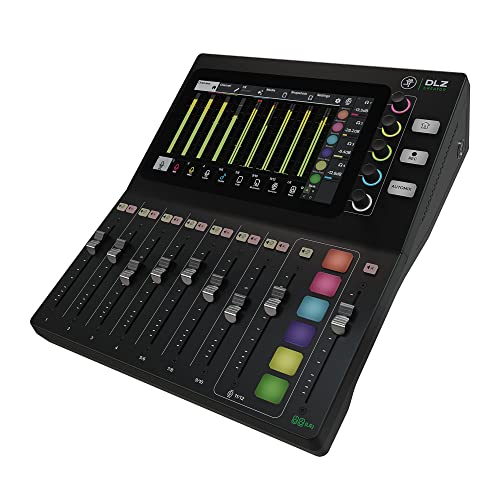
The DLZ Creator is a digital mixer that adapts to the person using it. A 10.1 inch touchscreen offers three control modes, Easy, Enhanced and Pro, so a beginner sees a few large controls while an experienced engineer can open the full set of processing. AutoMix manages levels for up to four microphones, turning down the ones that are not speaking so room noise and crosstalk do not build up when everyone talks at once.

The tradeoff is the learning of a digital system and the dependence on a screen. Compared with the analog ProFX range, you lose the physical faders for every channel, and compared with the XS you gain a bigger display and more capacity. For a three or four person panel, AutoMix is a real time saver because it does the riding of faders that a human would otherwise do.

In ownership terms the main concern is firmware and a screen that needs to stay clean. Keep the software updated, protect the display from drinks, and start in Easy mode before moving to Pro. A written scene list for each show keeps recalls fast.

What works

  • AutoMix manages levels for up to four microphones
  • Three control modes grow with your skill
  • Large 10.1 inch touchscreen shows every setting
  • Built for podcasting and streaming workflows

Watch out for

  • A digital screen workflow is slower than physical faders
  • More mixer than a one or two person show needs

Spec sheet

Display
10.1 inch touchscreen
Control modes
Easy, Enhanced, Pro
AutoMix
Manages up to 4 mics
Type
Adaptive digital mixer
Use
Podcasting and streaming
02
Mackie DLZ Creator XS compact adaptive digital mixer
7 inch touchscreenUSB-CXLR and Bluetooth3 control modes
Check price on Amazon
Best for: A host and guest on a small desk who want a touchscreen and Bluetooth.

The XS is the compact edition of the same idea. It keeps the three control modes and adaptive design in a smaller body with a 7 inch touchscreen, and offers universal connectivity: USB-C to a PC or Mac, XLR for professional microphones and Bluetooth for a mobile device. It is aimed at the host and guest scenario that makes up most podcasts.

Its limitation is capacity. Six channels suit two or three voices, and there is less room for music beds or extra sources than on the DLZ Creator. Next to the ProFX6v3, it adds the touchscreen, modes and Bluetooth, but gives up the tactile faders that analog fans prefer. For a small desk, it is the more modern choice.

Ownership is simple as long as you keep the software current. The screen is smaller, so watch fingerprints, and keep a short USB-C cable that is rated for data. Save a scene for your standard show so a power cut does not cost you your settings.

What works

  • USB-C, XLR and Bluetooth in one compact unit
  • Three control modes for any skill level
  • 7 inch touchscreen keeps the layout simple
  • Smaller footprint than the full DLZ Creator

Watch out for

  • Six channels leave little room for extra sources
  • Smaller screen than the DLZ Creator

Spec sheet

Display
7 inch touchscreen
Control modes
Easy, Enhanced, Pro
Connectivity
USB-C, XLR, Bluetooth
Channels
6
Use
Podcasting and streaming
03
Mackie ProFX6v3 6-channel analog mixer with USB
2 Onyx preamps60 dB gain24-bit/192 kHz2x4 USB I/O
Check price on Amazon
Best for: A host plus one guest who prefer physical faders and a simple desk.

The ProFX6v3 is a small analog desk with two Onyx microphone preamps that offer up to 60 dB of gain and very low noise. A 2x4 USB interface records at up to 24-bit/192 kHz, which is far beyond what speech needs, but it means the converters are never the limiting factor. A GigFX effects engine adds reverb and delay, though a podcaster will mostly use the EQ and the low cut.

The compromise is the two microphone preamps. A show with a host and a guest is well served, but a third voice has to come through a stereo line channel. Compared with the DLZ Creator XS, it lacks Bluetooth and a touchscreen, and compared with the ProFX10v3, it has fewer channels but a lower tier. If you like physical controls and a plain layout, it is a good fit.

It is a low-maintenance board. Dust is the main enemy of its faders, so cover it when idle. Use short balanced cables, keep the USB cable away from power leads and set the gain with the same test sentence each week. Its plain layout means a guest host can learn it in a single session.

What works

  • Two Onyx preamps with up to 60 dB of gain
  • 2x4 USB interface at up to 24-bit/192 kHz
  • Simple analog layout with no menus
  • Lowest tier of the Mackie desks here

Watch out for

  • Only two microphone preamps
  • No Bluetooth or touchscreen

Spec sheet

Channels
6
Mic preamps
2 Onyx, up to 60 dB gain
USB audio
2x4 I/O, 24-bit/192 kHz
Effects
GigFX engine
Use
Streaming, recording, live sound
04
Mackie ProFX10v3 10-channel mixer with USB recording
10 channelsOnyx preampsUSB recordingGigFX effects
Check price on Amazon
Best for: A three or four person show that wants real faders and USB recording.

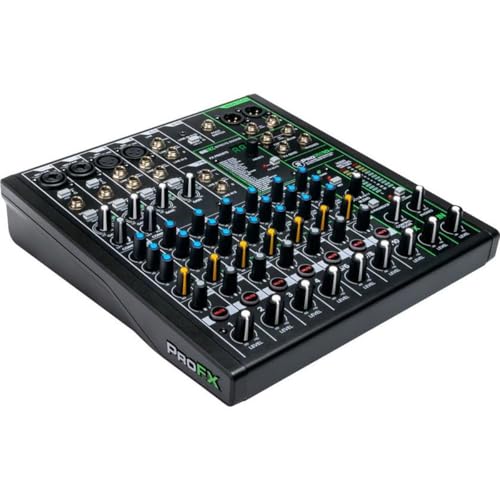
The ProFX10v3 is the house-band workhorse of the family, and it translates well to a four-person podcast. Every mic input carries an Onyx preamp with studio-grade gain, and the 10 channels cover microphones, a phone and a playback source. USB recording sends the mix to a computer and GigFX effects add polish for music segments.

The tradeoff is that it was designed for rehearsal rooms. It is bigger than the ProFX6v3, it does not include the automation of the DLZ line, and USB carries a mix rather than separate tracks. If you want to ride each voice with a real fader, it gives you that control, and it is more affordable than a digital panel.

Expect a permanent home on the desk. Keep it covered, clean the faders twice a year and use balanced cables for every connection. A rack shelf or a table with some depth makes the knobs easy to reach. A short written channel list taped to the desk helps a rotating team.

What works

  • Onyx preamps on every microphone input
  • Ten channels cover mics, phone and music
  • USB recording sends the mix to a computer
  • Physical faders for every voice

Watch out for

  • USB carries a mix instead of separate tracks
  • Bigger than a pure podcast desk

Spec sheet

Channels
10
Preamps
Onyx on every mic input
USB
Recording interface
Effects
GigFX
Use
Small gigs, rehearsals, streams
05
Mackie ProFX12v3+ 12-channel mixer with Bluetooth and USB
12 channelsBluetoothUSB recordingGigFX+
Check price on Amazon
Best for: A hybrid show with microphones, music and a phone caller.

The ProFX12v3+ is the 12-channel version of the streaming-era ProFX. It adds Bluetooth for wireless playback, multi-mode USB recording and an updated GigFX+ effects engine, and it works out of the box with microphones, instruments, phones and computers. That makes it a sensible home for a show that has both microphones and a musical element.

The tradeoff is size and the lack of podcast-specific automation. Compared with the DLZ Creator, you manage levels yourself, and compared with the ProFX10v3 you gain Bluetooth and extra inputs at a higher tier. It rewards someone who likes manual control and wants room to grow.

Plan a stable table and a clean cable route. Faders and knobs are replaceable, but regular cleaning keeps them smooth. Keep Bluetooth off during recording unless you are using it as a feed.

What works

  • Twelve channels with room to grow
  • Bluetooth plus multi-mode USB recording
  • Updated GigFX+ effects engine
  • Works with microphones, instruments and phones

Watch out for

  • No automatic level management
  • Large footprint for a small desk

Spec sheet

Channels
12
Wireless
Bluetooth playback
USB
Multi-mode recording
Effects
GigFX+
Use
Streamers and small bands
06
Mackie Mix12FX 12-channel compact mixer with effects
12 channels4 mic/line inputs75 Hz low cut3-band EQ
Check price on Amazon
Best for: A show that already has a recorder or interface and wants simple analog control.

The Mix12FX is a compact analog mixer with 12 channels, four of them mic or line inputs, and four stereo line channels. It offers a 3-band EQ and a 75 Hz low cut filter on the channels, plus onboard effects, and its high-headroom, low-noise design keeps the signal clean. It has no USB, so audio leaves through the outputs to a recorder or interface.

Its compromise is the lack of USB. A podcaster must add an interface or recorder, which adds a box and a cable, but gains an analog path that never needs a driver. Compared with the ProFX10v3, it is simpler and costs less, but you give up the USB and Onyx preamps. It is a good partner for a dedicated recorder.

Ownership is easy. There is no firmware, so it can last for decades with basic cleaning. Use balanced cables and a powered headphone amplifier if multiple hosts want separate levels. Pair it with a small recorder and the whole rig stays easy to repair.

What works

  • Four mic or line inputs with a 75 Hz low cut
  • Four stereo line inputs for phones and music
  • High headroom and low-noise design
  • No firmware or drivers to maintain

Watch out for

  • No USB audio, so an interface is required
  • Fewer microphone preamps than the larger ProFX desks

Spec sheet

Channels
12
Mic/line inputs
4
Line inputs
4 stereo
EQ
3-band with 75 Hz low cut
USB
No

Spec sheet decoder

What the numbers on the box really mean

The specs manufacturers lead with, translated into what they tell you about real-world performance.

AutoMix

An automatic mixing algorithm that lowers the level of microphones that are not speaking. It cuts noise build-up with several open microphones.

Watch forThe DLZ Creator manages up to four microphones, and the ProFX range has no equivalent.

Onyx preamp

A studio-grade microphone preamp design with low noise and high gain. It is the core of the ProFX sound. Gain headroom matters most with quiet dynamic microphones.

Watch forThe ProFX6v3 has two with up to 60 dB of gain.

2x4 USB I/O

Two channels in and four out over USB. It lets a computer record the mix and play back audio.

Watch forThe ProFX6v3 offers it and the Mix12FX does not offer USB at all.

Low cut filter

A filter that removes low-frequency rumble, often at 75 Hz. It cleans up desk bumps and air noise.

Watch forThe Mix12FX has a 75 Hz low cut on its channels.

Control modes

Easy, Enhanced and Pro modes change how much of the mixer you see. A beginner sees less and an expert sees everything. A single dial change can be the difference between a calm beginner screen and a full engineer view.

Watch forThe DLZ Creator and XS both offer three modes.

Methodology

How We Evaluated These Mackie Podcast Mixers

Microphone path

We compared real microphone inputs and preamp quality. The ProFX6v3 has two Onyx preamps and the DLZ Creator manages four microphones. Mic quality set the first scores.

Automation and control

We looked at AutoMix, control modes and physical faders. The DLZ Creator has three modes and AutoMix, while the ProFX desks are manual. Ease of use for a panel show raised scores. We also counted headphone outputs for monitoring.

Recording connection

We checked USB support and whether a separate interface is needed. The ProFX6v3 has a 2x4 USB path and the Mix12FX has none. A direct path scored higher.

Size and layout

We compared footprint and screen or fader layout. The XS has a 7 inch screen and the DLZ Creator has a 10.1 inch screen. Layout mattered for small desks. We noted which units suit a small table.

Longevity

We weighed analog simplicity against software support. Owner feedback patterns on faders and firmware informed the scores. Fewer failure points scored higher.

Decision guide

How to Choose the Right Mackie Podcast Mixers

By Number of Voices

SituationPickWhy
Host plus one guest, analogProFX6v3Two Onyx preamps and USB
Host plus one guest, touchscreenDLZ Creator XSCompact with USB-C and Bluetooth
Three or four voices, automaticDLZ CreatorAutoMix manages four microphones
Four voices, manual fadersProFX10v3Onyx preamps on every mic input
Voices plus musicProFX12v3+Twelve channels with Bluetooth

By Budget

SituationPickWhy
Lowest tierMix12FXSimple analog without USB
Entry USB deskProFX6v3Two preamps and a USB interface
Mid tier analogProFX10v3Ten channels and USB
Upper tier compact digitalDLZ Creator XSTouchscreen and Bluetooth
Premium digitalDLZ CreatorAutoMix and 10.1 inch display

Digital Console vs Analog Desk

Digital console

The DLZ Creator and XS offer AutoMix, control modes and a touchscreen. They adapt to your skill and reduce manual riding, but depend on a screen and software.

Analog desk

The ProFX and Mix12FX offer physical faders and no menus. They are simple and long-lived, but need you to manage every level.

Panel shows should pick digital, and solo or duo shows should pick analog.

Recording Path

SituationPickWhy
Record directly to a computerProFX6v32x4 USB I/O at up to 24-bit/192 kHz
USB-C with BluetoothDLZ Creator XSUniversal connectivity
Existing interface or recorderMix12FXAnalog outputs only
Multi-mode USB recordingProFX12v3+Bluetooth plus USB

For Panel Shows Specifically

Look for

Look for automatic level management or enough preamps and faders for each voice. Several open microphones create crosstalk, so a gate or AutoMix helps. Headphone outputs for every host also matter.

In this comparison

The DLZ Creator is the clear fit with AutoMix for four microphones. The ProFX10v3 handles a panel manually, and the XS suits a smaller group.

When to Spend More

Spend more if

Spend more if you have three or more voices and want the mixer to manage levels. The DLZ Creator saves hours of manual riding.

Save if

Save if you record one or two microphones. The ProFX6v3 and Mix12FX cover that need with simple controls.

Ownership

Maintenance schedule

The upkeep that decides whether this machine lasts two seasons or ten.

TaskIntervalWhy it matters
Clean faders and knobsTwice a yearDust makes analog faders scratchy. A short burst of contact cleaner restores smooth travel. Cover the desk after use to slow dust from returning.
Update firmwareTwice a yearDigital models receive updates that add features and fix bugs. Install between shows.
Wipe the touchscreenMonthlyFingerprints and oil reduce touch accuracy. Use a dry microfibre cloth.
Check cablesEvery few monthsA failing cable adds crackle. Swap cables before blaming the preamp. Replace any cable that crackles when wiggled.
Cover the desk when idleDailyA dust cover protects the controls and costs very little.

FAQ

Frequently Asked Questions

Which Mackie mixer is best for podcasting?

The DLZ Creator is the best overall because AutoMix manages up to four microphones. The ProFX6v3 is the better choice for a simple two-microphone desk.

Do I need a digital mixer?

Not necessarily. A digital console saves effort on panel shows, but an analog desk is simpler and lasts longer for one or two voices. A common compromise is a compact digital unit for the show and an analog desk if you add a band.

Can these record to a computer?

Yes, except the Mix12FX, which has no USB. The ProFX6v3 has a 2x4 interface and the DLZ Creator XS uses USB-C. If you do not need a computer connection, the analog desk may be all you need with a separate recorder.

Is Bluetooth useful?

Bluetooth is handy for a phone call or music, but quality is lower than USB. Use it for convenience rather than for the final recording.

How long will a Mackie mixer last?

Analog desks last many years with cleaning, and the wear items are faders and knobs. Digital models depend on firmware support. Choose a model with a firmware update path if you want it to age gracefully.

Do I need phantom power?

Only for condenser microphones. Dynamic microphones do not need it, and these mixers supply it on microphone inputs. Check the microphone's specification first, since only condensers need it.

Bottom line

The short version

Browse more mackie podcast mixerson Amazon →
James Miller, Lead Machine Editor

About the author

James Miller

Lead Machine Editor, MachineFanatic

James Miller leads MachineFanatic's buying guides, turning spec sheets, manuals and owner feedback into clear verdicts on power tools, outdoor power equipment, shop machines and kitchen machines.

More from James →

Keep reading

Related guides