
Amazon affiliate links - we earn a commission.Affiliate disclosure

Buying guide · 13 min read · Updated 2026-11-07

Best Microwaves with Large Buttons (2026)

Six microwaves with big dials, labeled one-touch keys and easy controls compared on readability, door release, power and cavity size for easier daily use.

James MillerBy James MillerLead Machine Editor6 machines comparedSpec-sheet verified
Best Microwaves with Large Buttons

At a glance

Our top picks

Side by side

Spec comparison

MachineOutput powerCapacityControlsPower levelsPresets
Sharp R-21LCFS 1.0 cu ft 1000W commercial dial microwaveBest OverallSharp R-21LCFS 1.0 cu ft 1000W commercial dial microwave1000 W1.0 cu ftDial timer, 10 seconds to 6 minutesn/an/a
Commercial Chef CHM660B 0.6 cu ft 700W mechanical dial microwaveBest Value DialCommercial Chef CHM660B 0.6 cu ft 700W mechanical dial microwave700 W0.6 cu ftDial, 30 seconds to 30 minutes6n/a
700W 0.7 cu ft white mechanical dial microwave with 6 power levelsBest Two-Dial Design700W 0.7 cu ft white mechanical dial microwave with 6 power levels700 W0.7 cu ftMechanical dials6n/a
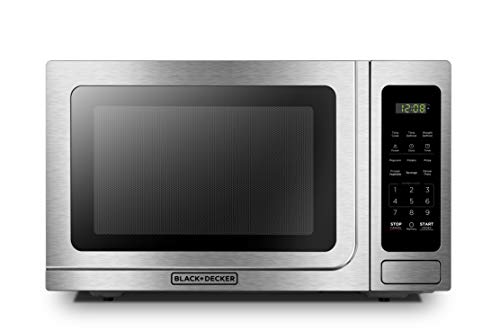
Black+Decker 1.4 cu ft 1000W push-button microwave with large LED displayBest Labeled KeysBlack+Decker 1.4 cu ft 1000W push-button microwave with large LED display1000 W1.4 cu ftn/an/a6 labeled one-touch
Nostalgia Retro 0.9 cu ft 800W microwave with 12 presets and LED clockBest Retro KeypadNostalgia Retro 0.9 cu ft 800W microwave with 12 presets and LED clock800 W0.9 cu ftn/an/a12 pre-programmed settings
Chefman 0.9 cu ft 900W digital microwave with 6 presetsBest Simple DigitalChefman 0.9 cu ft 900W digital microwave with 6 presets900 W0.9 cu ftDigital with express start106 one-touch

Control layout is the most common complaint about microwaves, and it shows up as tiny touch pads, crowded keypads and menus that need a manual. Large, well-spaced controls are a real feature, whether they are dials, labeled keys or a single start button.

Listings rarely publish button dimensions, so this guide judges layouts from the control descriptions in the product data: dial timers, labeled one-touch presets, large displays and push-button doors. Where a size is not stated, we say so rather than guess.

Before you buy

6 Criteria to Look For Before Buying a Microwave with Large Buttons

  1. 01

    Dial versus keypad

    A dial, as on the Sharp, Commercial Chef and white mechanical model, is the largest control on the front and shows the setting you chose. A keypad adds presets but also more keys, and the keys on most compact ovens are small. Dials suit people with limited dexterity or vision. If you choose a keypad, pick one with presets labeled in words, such as the Black+Decker. Plain words on a key remove the need to memorize a chart or keep a manual in the drawer. A glossy flat panel with tiny icons is the layout to avoid.

  2. 02

    What the listing does not say

    Product pages rarely publish button dimensions, so size claims are often marketing. We judged layouts from control descriptions such as dial timers, labeled presets and large displays. Look at the product photos and count keys on the front. A cleaner panel with fewer keys is usually easier to use than a larger panel crowded with tiny ones. Reviews from owners with arthritis or low vision are more telling than the spec sheet. Search them for words like dial, door and display.

  3. 03

    Display readability

    The Black+Decker lists a large LED digital display, the Nostalgia highlights its LED clock, and the Sharp uses bright LED run indicators. High contrast and large digits matter more than screen size. Avoid glare, and place the oven where daylight does not wash out the panel. Amber or white digits on a dark field read better than gray on silver. A clock that stays lit gives a useful sign that the oven has power.

  4. 04

    Door release

    A push-button door, as on the Black+Decker and Commercial Chef, opens with a press, not a pull. Strong springs and stiff latches defeat otherwise good controls. Check how the door opens in photos or reviews, because an oven that is hard to open stays unused. Pull handles can be awkward at shoulder height, while a push button works at any height. A door that rebounds slowly is also easier on the wrist than one that slams open.

  5. 05

    Wattage and speed

    The Sharp runs at 1000 watts, the Black+Decker at 1000, the Chefman at 900, the Nostalgia at 800 and the dial units at 700. Faster ovens shorten waits but overshoot small portions, so use short times. A slower oven suits light use and small circuits. Package directions assume 1000 to 1200 watts, so a 700 watt unit needs about a third more time. Dial models make that easy because you simply turn the knob a little further.

  6. 06

    Cavity and tray fit

    The Sharp fits a 13.5 inch platter, and the Black+Decker uses a 12.4 inch tray. The Commercial Chef is the smallest at 0.6 cubic feet. Measure your plates before you buy. A control layout you love is no help if the plate will not turn. Also check the height of tall bowls and mugs against the cavity. A tray that catches on the wall stalls and leaves cold spots.

Detailed reviews

The 6 best microwaves with large buttons, explained

01
Sharp R-21LCFS 1.0 cu ft 1000W commercial dial microwave
1000W1.0 cu ftDial timerAuto-cancel
Check price on Amazon
Best for: Anyone who wants one big dial and no menus.

Sharp designed this oven for foodservice staff who need to start it without reading anything. A classic dial sets the time anywhere from 10 seconds to 6 minutes, and bright LED indicators show the oven is running. A door-open auto-cancel clears the remaining time, so no one restarts a half-finished cycle by accident.

The dial is the largest control on the front, which makes it the easiest design in this guide to operate with limited dexterity. Output is a full 1000 watts, and the 1.0 cubic foot interior fits a 13.5 inch platter. There are no presets and no power-level choices, so every cycle runs at full power.

That simplicity is the tradeoff. A six minute dial limit works for reheating but not for long defrosts, and the commercial build is heavier than a home compact. Compared with the Commercial Chef, it is faster and larger. Wipe the cavity, wash the tray and leave space behind for airflow. The auto-cancel feature is a quiet safety gain, because opening the door to stir resets the oven instead of leaving a timer to restart later.

What works

  • Large dial timer is easy to set
  • 1000 W with a 13.5 in platter fit
  • Door-open auto-cancel clears the timer
  • Bright LED run indicators

Watch out for

  • No presets or power levels
  • Six minute dial maximum
  • Heavier than home compact ovens

Spec sheet

Output power
1000 W
Capacity
1.0 cu ft
Controls
Dial timer, 10 seconds to 6 minutes
Platter fit
13.5 in platter
Indicators
Bright LED
02
Commercial Chef CHM660B 0.6 cu ft 700W mechanical dial microwave
700W0.6 cu ftMechanical dial6 levels
Check price on Amazon
Best for: Small counters where a dial and a push-button door are the priority.

Commercial Chef offers a mechanical dial in a light, small cabinet. The timer runs from 30 seconds to 30 minutes, and six power levels cover defrost to full heat. A push-button door and a weight of about 23 pounds make it easy to place and open.

Mechanical dials have little to fail and no menus to read, which is why the design suits people who dislike touch pads. The 0.6 cubic foot cavity is the smallest here, so measure your plates. At 700 watts it cooks more slowly than the Sharp.

A 30 minute range is an advantage for long defrosts because you do not need to restart. Dial precision is coarser than a digital keypad. Wipe the cavity and keep the vents clear. It suits small counters and anyone who wants a dial at a low cost. The tradeoff is that precise times such as 45 seconds are a matter of eye and feel.

What works

  • Mechanical dial has few parts to fail
  • 30 minute range suits long defrosts
  • Push-button door release
  • Light at about 23 pounds

Watch out for

  • Small 0.6 cu ft cavity
  • 700 W is slow for full plates
  • Dial timing is less exact

Spec sheet

Output power
700 W
Capacity
0.6 cu ft
Controls
Dial, 30 seconds to 30 minutes
Power levels
6
Door
Push-button release
03
700W 0.7 cu ft white mechanical dial microwave with 6 power levels
700W0.7 cu ftMechanical dials6 levels
Check price on Amazon
Best for: Buyers who want separate time and power dials on a white cabinet.

This white countertop microwave uses mechanical dials, with six power levels and a 0.7 cubic foot cavity. It is rated at 700 watts on standard 120 volt power. The white finish gives good contrast for dial markings.

Two separate dials, one for time and one for power, make each choice explicit and visible from across the room. That layout suits people who dislike beeps and menus. The cavity is slightly larger than the Commercial Chef.

The listing carries few features and the brand is not widely known, so check warranty terms. White plastic can stain over time, so wipe the front regularly. It is a plain, low-cost route to a dial interface. Because the maker is little known, keep the receipt and photograph the rating label. Spare parts may be hard to source, so plan to replace rather than repair.

What works

  • Separate dials for time and power
  • Six power levels
  • White finish with clear markings
  • 0.7 cu ft cavity

Watch out for

  • Limited brand support
  • 700 W is slow
  • White finish can stain

Spec sheet

Output power
700 W
Capacity
0.7 cu ft
Controls
Mechanical dials
Power levels
6
Voltage
120 V at 60 Hz
04
Black+Decker 1.4 cu ft 1000W push-button microwave with large LED display
1000W1.4 cu ftLarge LEDPush-button door
Check price on Amazon
Best for: People who prefer a keypad with words on every preset and a big display.

Black+Decker labels each preset with the food it cooks: popcorn, potato, pizza, frozen vegetable, beverage and dinner plate. A large LED display and an easy-to-read control panel sit above them, and a thirty second express key handles quick jobs. A push-button door opens without a hard pull.

Ten power settings are available behind the presets for cooks who want control. The 1.4 cubic foot cavity and 12.4 inch removable tray fit a dinner plate, and a child safety lock and interior light are included. Output is 1000 watts.

The listing does not publish key dimensions, so judge the layout from photos. Compared with the dial models, there are more keys but each is labeled in words. Wipe the cavity and wash the tray weekly. It is the right choice for people who prefer a keypad that explains itself. The child safety lock helps in homes with visiting grandchildren.

What works

  • Presets labeled with the food name
  • Large LED digital display
  • Push-button door release
  • 12.4 in tray fits dinner plates

Watch out for

  • More keys than a dial oven
  • Key sizes are not published
  • No sensor cooking

Spec sheet

Output power
1000 W
Capacity
1.4 cu ft
Tray
12.4 in removable glass
Display
Large LED digital
Presets
6 labeled one-touch
05
Nostalgia Retro 0.9 cu ft 800W microwave with 12 presets and LED clock
800W0.9 cu ft12 presetsLED clock
Check price on Amazon
Best for: Buyers who want a readable LED clock and many presets in a retro cabinet.

Nostalgia pairs a retro cabinet with an LED display that is meant to be easy to read. Twelve pre-programmed settings, a delay timer and express cooking cover common tasks. The clock lights up and highlights the time so you do not squint.

The controls are a standard digital layout, so there is no dial. Twelve presets is a long list, which helps people who like to press a food name and walk away, but it also means more keys to find. A 0.9 cubic foot cavity and 800 watts suit small kitchens.

Compared with the Black+Decker, you gain a retro look and lose a push-button door. Wipe the cavity and wash the tray. It suits shoppers who want large, clear lettering and a design that doubles as decoration. Plan to test each preset against a clock on first use, since fixed times vary with portion size. The delay timer is a handy extra for starting a defrost before you leave the room.

What works

  • LED display highlights the clock
  • Twelve presets and a delay timer
  • Retro cabinet
  • Express cooking key

Watch out for

  • No dial option
  • 800 W is slower than 1000 W
  • Many presets mean more keys

Spec sheet

Output power
800 W
Capacity
0.9 cu ft
Presets
12 pre-programmed settings
Timer
Delay timer and express cooking
Display
Easy-to-read LED
06
Chefman 0.9 cu ft 900W digital microwave with 6 presets
900W0.9 cu ft6 presets10 levels
Check price on Amazon
Best for: Buyers who want a short, uncluttered keypad at a low cost.

Chefman keeps its digital layout simple: six one-touch presets for popcorn, pizza, beverages and vegetables, and an express start that adds thirty seconds. Ten power levels sit behind them. The panel is uncluttered, with few keys competing for attention.

At 900 watts in a 0.9 cubic foot cabinet, it is faster than the 700 watt dial units and smaller than the Black+Decker. It has no sensor or mute, so expect beeps and manual timing. The build is light, and the price is the lowest among the keypad models.

The listing does not publish key sizes, so the choice rests on the short key list. Wipe the cavity after use and keep the vent clear. It suits buyers who want a basic keypad without a long preset list. Next to the Black+Decker, it gives up the push-button door and larger cavity. It is a fine second microwave for a garage or guest room.

What works

  • Six one-touch presets
  • Express start adds thirty seconds
  • Ten power levels
  • Low cost among keypad models

Watch out for

  • No sensor or mute function
  • Key sizes are not published
  • Light build

Spec sheet

Output power
900 W
Capacity
0.9 cu ft
Power levels
10
Presets
6 one-touch
Controls
Digital with express start

Spec sheet decoder

What the numbers on the box really mean

The specs manufacturers lead with, translated into what they tell you about real-world performance.

Dial timer

A knob sets the time directly. It shows the setting you chose without menus.

Watch forThe Sharp runs 10 seconds to 6 minutes, and the Commercial Chef runs 30 seconds to 30 minutes.

Labeled one-touch presets

Each key names the food it cooks. It replaces a manual lookup.

Watch forThe Black+Decker labels six, and the Nostalgia lists twelve.

Push-button door

A button releases the door so you do not pull a latch.

Watch forThe Black+Decker and Commercial Chef list it.

Auto-cancel

The remaining time clears when the door opens. It prevents a restart.

Watch forThe Sharp lists it.

Large LED display

Big, high-contrast digits that read at a distance. They help with low vision.

Watch forThe Black+Decker lists it, and the Nostalgia highlights its clock.

Methodology

How We Evaluated These Microwaves with Large Buttons

Control layout

We compared dials, labeled presets and key counts from listing descriptions. The Sharp, Commercial Chef and white dial model use dials, and the Black+Decker labels six presets. Fewer steps scored higher.

Honest sizing

We did not credit large buttons unless the listing described them. Button dimensions are not published for these models. Layout and labels were judged instead.

Door and display

We checked door release and display descriptions. The Black+Decker and Commercial Chef list push-button doors, and the Black+Decker lists a large LED. Weak grip and low vision were considered.

Cavity and power

We checked cubic feet and watts. The Sharp is 1.0 cu ft at 1000 W, and the Commercial Chef is 0.6 cu ft at 700 W. Plate fit weighed above volume.

Ownership signals

Complaints from owners cluster around touch pads, latches and magnetrons as wear points. Dials avoid the touch pad.

Decision guide

How to Choose the Right Microwaves with Large Buttons

By Control Preference

SituationPickWhy
One big dial onlySharp R-21LCFSDial timer and 1000 W
Small dial unitCommercial Chef CHM660B30 minute dial
Separate time and power dials700 W white mechanical dialTwo dials
Labeled preset keysBlack+Decker 1.4 cu ftFood names on keys
Many presets and a clockNostalgia Retro 0.9 cu ftTwelve presets

By Budget

TierPickWhy
Lowest700 W white mechanical dialBasic dial
LowChefman 0.9 cu ftSimple keypad
Low to midCommercial Chef CHM660BDial and push-button door
MidNostalgia Retro 0.9 cu ftRetro and 12 presets
HighestSharp R-21LCFSCommercial dial and 1000 W

Dial vs Keypad

Dial

The Sharp, Commercial Chef and white mechanical model are operated by turning a knob. They need no menus. They offer few presets.

Keypad

The Black+Decker, Nostalgia and Chefman use presets and a display. They are quicker for set foods. They have more keys.

Pick a dial for the least confusion. Pick a keypad for presets.

By Physical Needs

PreferencePickWhy
Weak gripBlack+Decker 1.4 cu ftPush-button door
Low visionNostalgia Retro 0.9 cu ftLED clock that lights up
LightweightCommercial Chef CHM660BAbout 23 pounds
Large platesSharp R-21LCFS13.5 in platter
Few keysChefman 0.9 cu ftSix presets

For Easy Daily Use Specifically

Look for

Easy daily use needs a front panel with few controls, high-contrast digits, a door that opens simply and a start sequence of two steps.

In this comparison

The Sharp is the simplest, and the Black+Decker is the clearest keypad. The Chefman is the budget keypad.

When to Spend More

Spend more if

You want a commercial dial and 1000 W. The Sharp earns its cost.

Save if

You only reheat drinks and snacks. The white dial model or Chefman cover the basics.

Ownership

Maintenance schedule

The upkeep that decides whether this machine lasts two seasons or ten.

TaskIntervalWhy it matters
Wipe the cavityAfter spattersBaked-on splatter drinks up energy and bakes on. Wipe while warm.
Wash the trayWeeklyGrease smokes when heated. Dry it fully.
Keep the door seal cleanMonthlyFood film stops the door closing. Use mild soap.
Wipe the controlsWeeklyGrease dulls labels and display. Use a dry microfiber cloth.
Clear the ventsQuarterlyBlocked vents trap heat. Vacuum dust from slots.

FAQ

Frequently Asked Questions

Which microwaves have the biggest buttons?

Listings rarely publish button sizes. Dial models like the Sharp and Commercial Chef use large knobs, and the Black+Decker labels presets with words. Judge by photos.

Is a dial microwave better than a keypad?

A dial is clearer for many people because the setting is visible and there are no menus. A keypad offers presets. Choose by comfort.

Are labeled presets better than numbered ones?

Words on keys are quicker to read than numbers that need a chart. The Black+Decker labels six foods. Fixed times still ignore portion size.

Do dial microwaves cook at full power only?

The Sharp runs at full power. The Commercial Chef and white dial model offer six power levels. Check the listing.

Does a larger display help?

Yes, for low vision. Large high-contrast digits reduce mistakes. Avoid glare from windows, and test the readability in your own kitchen light before you remove the packaging.

How long do these microwaves last?

Longevity reports cover several years, with touch pads, latches and magnetrons as common failures. Dial designs avoid the touch pad, which is the part that fails most often on budget ovens. Replacing a basic oven is cheap, so do not hold onto a failing unit or one with a sticky door latch.

Bottom line

The short version

Browse more microwaves with large buttonson Amazon →
James Miller, Lead Machine Editor

About the author

James Miller

Lead Machine Editor, MachineFanatic

James Miller leads MachineFanatic's buying guides, turning spec sheets, manuals and owner feedback into clear verdicts on power tools, outdoor power equipment, shop machines and kitchen machines.

More from James →

Keep reading

Related guides