
Amazon affiliate links - we earn a commission.Affiliate disclosure

Buying guide · 13 min read · Updated 2026-11-19

Best Photo Printers for Home Use (2026)

Six photo printers for home use compared by technology: dye sublimation 4x6 printers, five-color inkjets and ink tank all-in-ones, with picks for each habit.

James MillerBy James MillerLead Machine Editor6 machines comparedSpec-sheet verified
Best Photo Printers for Home Use

At a glance

Our top picks

Side by side

Spec comparison

MachineTypeWirelessFunctions
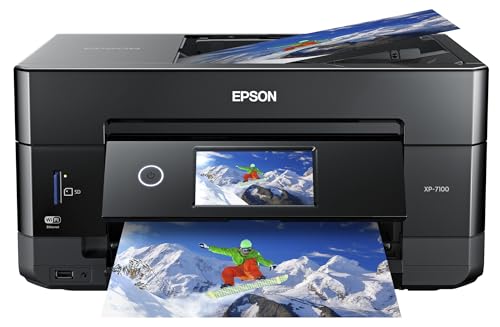
Epson Expression Premium XP-7100 5-Color Photo All-in-OneBest OverallEpson Expression Premium XP-7100 5-Color Photo All-in-OneFive-color inkjet all-in-oneWi-Fi with mobile printingPrint, scan, copy
HP Envy Photo 7975 Wireless Photo All-in-OneBest Modern InkjetHP Envy Photo 7975 Wireless Photo All-in-OneCartridge inkjet all-in-oneWi-Fi and mobile printingPrint, scan, copy
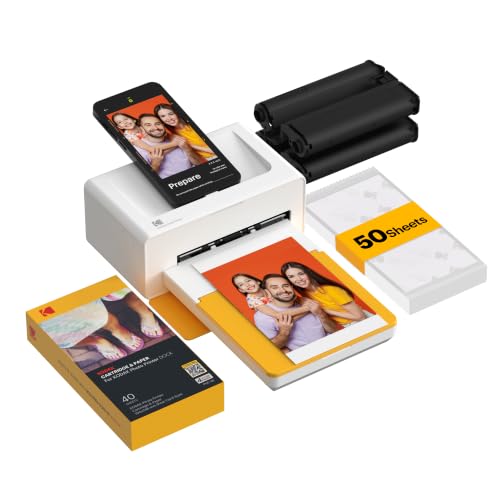
KODAK Dock Plus 4x6 Dye Sublimation Photo PrinterBest Phone DockKODAK Dock Plus 4x6 Dye Sublimation Photo PrinterDye sublimation 4x6 printern/an/a
HPRT CP4100 4x6 Dye Sublimation Photo PrinterMost Paper in the BoxHPRT CP4100 4x6 Dye Sublimation Photo PrinterDye sublimation 4x6 printern/an/a
Canon PIXMA TS6520 Wireless Inkjet All-in-OneBest Budget Photo InkjetCanon PIXMA TS6520 Wireless Inkjet All-in-OneCartridge inkjet all-in-oneWi-Fin/a
Canon MegaTank G3270 Wireless Ink Tank All-in-OneBest High-Volume PhotosCanon MegaTank G3270 Wireless Ink Tank All-in-OneRefillable ink tank all-in-oneWi-FiPrint, copy, scan

Home photo printers come in two families. Compact dye sublimation printers lay down color in layers on a special sheet and finish with a clear coat, producing dry, durable prints in a small size. Inkjets spray liquid ink and can print larger sheets as well as everyday documents.

The right choice depends on print size, volume and how much you care about documents. The sections below explain what each technology does well, what the paper and ink really cost over time and which machine suits each kind of photo habit.

Before you buy

6 Criteria to Look For Before Buying a Photo Printer for Home Use

  1. 01

    Technology: dye sublimation or inkjet

    Dye sublimation prints lay down color in layers and add a clear coat, giving dry, durable 4x6 prints with no nozzles to clog. An inkjet prints larger sizes and documents but uses liquid ink. The Kodak Dock Plus and HPRT CP4100 are dye sublimation, while the Epson XP-7100 and HP Envy Photo 7975 are inkjets.

  2. 02

    Print size you really need

    Compact dye sublimation printers make 4x6 inch prints only, which covers snapshots and scrapbooks. If you want letter-size or larger prints, you need an inkjet such as the Epson XP-7100. Buyers often forget that a compact printer cannot print an 8x10.

  3. 03

    Cost per print

    Dye sublimation packs price the paper and ribbon together, so each print costs a fixed amount regardless of image. Inkjet photo cost depends on coverage and cartridge price. A tank like the Canon G3270 brings the lowest ink cost per page if you print a lot.

  4. 04

    Ink channels and tonal range

    More ink channels give smoother gradients, so the five-color Epson XP-7100 beats the tri-color Canon TS6520 for faces and skies. The extra channel is not a luxury if you frame prints. For casual snapshots it matters less.

  5. 05

    Idle behavior

    Inkjet heads dry out between uses, while dye sublimation printers have no nozzles. If you print photos only at holidays, a Kodak Dock Plus or HPRT CP4100 is a calmer fit than any inkjet. A weekly test page is the rule for inkjets.

  6. 06

    Paper and ribbon supply

    Dye sublimation printers rely on proprietary paper and ribbon packs, so supply matters. Kodak is widely stocked, while the HPRT CP4100 ships with 108 sheets and two ribbons to start. Check refill availability before you buy.

Detailed reviews

The 6 best photo printers for home use, explained

01
Epson Expression Premium XP-7100 5-Color Photo All-in-One
5-color inkjetPhoto and docs30-sheet ADFWireless
Check price on Amazon
Best for: Families who print photos and paperwork on one machine.

Epson's XP-7100 is a five-color inkjet all-in-one built for people who want a single machine that handles both pictures and paperwork. The listing highlights its five-color system and creative versatility, which lets you print on photo paper as well as plain sheets, and a 30-page feeder covers copying.

The tradeoff against a dedicated 4x6 dye sublimation printer is cost per print and speed. Each photo uses liquid ink from cartridges, which is pricier per print than a compact printer's pack of paper and ribbon. In return you get larger prints and a scanner, so it replaces two devices at the cost of ink cartridges.

Ownership is about keeping the head wet and using genuine photo paper that matches the printer's profile. Print a page every week, store photo paper flat in its bag and let prints dry before stacking. Since the unit is older in the lineup, check current ink availability for its cartridge set before you buy.

What works

  • Five-color system adds depth to photo prints
  • Handles photos, documents and copying
  • Wi-Fi printing from phones and laptops
  • 30-page feeder helps copy stacks

Watch out for

  • Cartridge ink is costly per photo
  • Older design, so check ink availability
  • Larger body than a compact photo printer

Spec sheet

Type
Five-color inkjet all-in-one
Strength
Photos and documents on one machine
Feeder
30-page document feeder
Wireless
Wi-Fi with mobile printing
Functions
Print, scan, copy
02
HP Envy Photo 7975 Wireless Photo All-in-One
InkjetBorderless photosPrint scan copyWireless
Check price on Amazon
Best for: Households that want borderless photos with phone-first setup.

HP's Envy Photo 7975 is the more current inkjet in this roundup, aimed at households that want borderless photo prints that match the screen along with scanning and copying. The listing stresses true-to-screen color and easy setup from a phone.

A drawback here is that it remains a cartridge inkjet, so ink for photos costs more per print than for text, and the Instant Ink trial is a subscription to read carefully. Against the Epson XP-7100, which advertises a five-color system, the HP leans on convenience and app-based printing rather than an extra ink channel.

Ownership centers on paper choice and idle time. Use HP photo paper for best results, print weekly and keep the cartridge cover closed. For a household that prints holiday cards, school photos and the odd document, it keeps things tidy without extras.

What works

  • Borderless photo printing with true-to-screen color
  • Scan and copy in the same body
  • Easy phone setup and mobile printing
  • Instant Ink trial included

Watch out for

  • Cartridge ink raises cost per photo
  • Instant Ink is a subscription to read first
  • Photo quality depends on paper choice

Spec sheet

Type
Cartridge inkjet all-in-one
Photos
Borderless true-to-screen prints
Functions
Print, scan, copy
Wireless
Wi-Fi and mobile printing
Ink plan
Three month Instant Ink trial
03
KODAK Dock Plus 4x6 Dye Sublimation Photo Printer
Dye sublimation4x6 printsPhone dockBluetooth
Check price on Amazon
Best for: Phone owners who want quick 4x6 prints with no clogging risk.

Kodak's Dock Plus uses dye sublimation, a process in which a heated ribbon transfers yellow, magenta and cyan in separate passes, followed by a clear overcoat. Kodak calls the process 4PASS, and the result is a dry, fingerprint-resistant 4x6 print with smooth tones.

The tradeoff is scope. It prints one size only, cannot handle documents and needs proprietary cartridge and paper packs, so each print costs a fixed amount regardless of coverage. Against an inkjet like the HP Envy Photo 7975 it is far more limited but cleaner for one task: turning phone pictures into snapshots.

Ownership is easy. There are no nozzles to clog, so the printer can sit for months and still print, and the dock design lets a phone charge and connect directly. The costs are the paper-and-ribbon packs, which you buy in sets. For photo-only use, that predictability is the draw.

What works

  • Dye sublimation prints are dry and smudge-resistant
  • No printhead to clog during idle months
  • Phone dock and Bluetooth connection
  • Includes 50 sheets of paper to start

Watch out for

  • Prints 4x6 inch only
  • Cannot print documents
  • Proprietary paper and ribbon packs are required

Spec sheet

Type
Dye sublimation 4x6 printer
Process
4PASS three color layers plus clear coat
Connection
Bluetooth and dock
Paper
50 sheets included
Size
4x6 inch prints only
04
HPRT CP4100 4x6 Dye Sublimation Photo Printer
Dye sublimation4x6 prints108 sheets2 ribbons
Check price on Amazon
Best for: Party and scrapbook use with a large starter pack of paper.

HPRT's CP4100 is a compact dye sublimation printer that ships with a bigger starter pack than most, 108 sheets and two ribbons, which supports the listing's pitch of instant pictures from a phone. The process is the same layered transfer as other dye sub printers, with a protective finish.

The tradeoff is brand reach and supplies. HPRT is a smaller name than Kodak or Canon, so after the starter pack you rely on its proprietary refills, and availability matters. It also prints 4x6 only, so it is a snapshot tool rather than a general photo printer.

Ownership resembles the Kodak: no clogging, a small footprint and a set cost per print. Keep paper clean and dust-free, since a speck can mark a print, and store ribbons in their cases. For parties and scrapbooks the large starter set lowers the first outlay.

What works

  • 108 sheets and two ribbons in the box
  • Dye sublimation prints dry instantly
  • No nozzles to clog between uses
  • Compact body fits a shelf

Watch out for

  • 4x6 prints only
  • Smaller brand, so refill availability needs checking
  • Phone-only workflow without a scanner

Spec sheet

Type
Dye sublimation 4x6 printer
Included
108 sheets and 2 ribbons
Process
Dye sublimation
Connection
Phone printing for iOS and Android
Size
4x6 inch prints
05
Canon PIXMA TS6520 Wireless Inkjet All-in-One
Inkjet2-cartridgeOLED displayPrint scan copy
Check price on Amazon
Best for: Budget buyers who need documents plus the occasional snapshot.

Canon pitches the TS6520 as affordable versatility, with crisp prints for documents and photos from a two-cartridge system. The small OLED display helps with setup and status, and Wi-Fi puts it on a phone network.

The tradeoff is photo depth. A single tri-color cartridge limits tonal range compared with the Epson XP-7100's five-color approach, so photos are decent rather than refined. It is cheaper to buy, but ink per photo is still costly.

Ownership is simple: replace cartridges on the display prompt, print weekly and use Canon photo paper for best results. For a family that prints a handful of snapshots and mostly documents, it is a sensible all-rounder at a modest tier.

What works

  • Handles photos and documents at a lower tier
  • OLED display for setup and status
  • Wi-Fi printing from phones
  • Simple two-cartridge replacement

Watch out for

  • Tri-color cartridge limits photo tonal range
  • Ink per photo is still costly
  • No automatic duplex in the listing

Spec sheet

Type
Cartridge inkjet all-in-one
Cartridges
Two (black and color)
Display
1.42 inch OLED
Photos
Photo and document printing
Wireless
Wi-Fi
06
Canon MegaTank G3270 Wireless Ink Tank All-in-One
Ink tank7,700 color pages2 years of inkWi-Fi
Check price on Amazon
Best for: Families printing many snapshots and projects every month.

Canon's MegaTank G3270 lists up to 7,700 color pages from a set of ink and up to two years of ink in the box, which makes it the cheapest way in this roundup to print a lot of photos. It is a refillable tank design, so bottles replace cartridges.

The tradeoff is quality ceiling. A standard tank uses a four-ink set, which suits snapshots and projects but lacks the extra channels a dedicated photo printer uses for smoother gradients. For prints you plan to frame, the Epson XP-7100 or a six-ink photo model is a better fit.

Ownership requires weekly use to keep nozzles wet. The upside is ink cost per print far below a cartridge inkjet, so a family that prints a lot of school and holiday photos saves over time. For rare photo prints it is the wrong tool.

What works

  • Up to 7,700 color pages from one ink set
  • Two years of ink in the box
  • Low ink cost per photo over time
  • Print, scan and copy included

Watch out for

  • Four-ink set limits tonal depth
  • Needs regular use against clogging
  • Slower than dye sublimation for one print

Spec sheet

Type
Refillable ink tank all-in-one
Color yield
Up to 7,700 pages per set
Ink in box
Up to two years of ink
Functions
Print, copy, scan
Wireless
Wi-Fi

Spec sheet decoder

What the numbers on the box really mean

The specs manufacturers lead with, translated into what they tell you about real-world performance.

4PASS dye sublimation

The printer lays yellow, magenta and cyan in separate passes and then a clear overcoat. The result is a dry print that resists fingerprints.

Watch forThe Kodak Dock Plus lists this process, and the HPRT CP4100 uses dye sublimation as well.

Five-color ink

An extra ink channel adds range for gradients and skin tones. Running it costs more than a tri-color set.

Watch forThe Epson XP-7100 uses five colors while the Canon TS6520 uses two cartridges.

Borderless

Borderless printing lets the image run to the edge of the paper. The printer overspray is handled in a waste pad.

Watch forThe HP Envy Photo 7975 advertises borderless prints.

Pages of ink

Yield is the number of pages a set of ink produces at standard coverage. Photos use more ink than text.

Watch forThe Canon G3270 lists up to 7,700 color pages.

Starter pack

The paper and ribbon shipped with a dye sublimation printer set the first outlay. Refill sets are bought later.

Watch forThe HPRT CP4100 ships with 108 sheets, the Kodak Dock Plus with 50.

Methodology

How We Evaluated These Photo Printers for Home Use

Photo method

We looked at the technology behind each printer, from the layered dye sublimation process on the Kodak Dock Plus to the five-color inkjet system on the Epson XP-7100. The method sets the ceiling on tonal range and durability. We judged by the spec sheet and owner feedback patterns.

Size and versatility

We compared fixed 4x6 printers with larger-format inkjets. Models that also handle documents earned credit for versatility. Single-purpose machines were judged on how well they do the one job.

Cost per print

We considered paper-and-ribbon packs against cartridge and tank ink. The Canon G3270's yield of up to 7,700 color pages sets the low end for ink cost. Hidden costs such as proprietary supplies were noted.

Ownership

We weighed clogging risk, idle behavior and supply availability. Dye sublimation printers lose nothing when left unused, while inkjets need weekly use. Refill supply for smaller brands was flagged.

Setup and apps

We checked phone printing, docks and Wi-Fi, including the Kodak Dock Plus and HP Envy Photo 7975 app flows. Ease of setup counted for casual users. Complex editing apps were not required.

Decision guide

How to Choose the Right Photo Printers for Home Use

By Photo Habit

SituationPickWhy
Prints photos and paperworkEpson Expression Premium XP-7100Five colors plus a document feeder
Wants borderless phone printsHP Envy Photo 7975True-to-screen color and app setup
Quick 4x6 from a phone dockKODAK Dock PlusDock, Bluetooth and dry prints
Parties and scrapbooksHPRT CP4100108 sheets and two ribbons included
Photos on a budget with documentsCanon PIXMA TS6520Simple cartridges and a display
Lots of photos every monthCanon MegaTank G3270Up to 7,700 color pages per set

By Budget

TierPickWhy
Lowest tierCanon PIXMA TS6520Cheapest route to color photos
Low tierHPRT CP4100Dye sub with a big starter pack
Mid tierKODAK Dock PlusBranded dock and Bluetooth
Upper mid tierHP Envy Photo 7975Borderless inkjet with scanner
Upper tierCanon MegaTank G3270Tank design for heavy use
Top tierEpson Expression Premium XP-7100Five-color photo and document machine

Dye Sublimation vs Inkjet

Dye sublimation

The Kodak Dock Plus and HPRT CP4100 print dry 4x6 images with no nozzles to clog. The cost is a fixed price per print and a single size.

Inkjet

The Epson XP-7100 and HP Envy Photo 7975 print larger sheets and documents, but ink is costlier per photo and the head needs weekly use.

Pick dye sublimation for snapshots and low upkeep; pick an inkjet for size and versatility.

Cartridge vs Tank for Photos

PreferencePickWhy
Low volume, cartridge easeCanon PIXMA TS6520Replace two cartridges
High volume, low ink costCanon MegaTank G3270Large tank and yield
Better tonal rangeEpson Expression Premium XP-7100Extra ink channel
Phone-first easeHP Envy Photo 7975App setup

For Phone Photos Specifically

Look for

Look for Bluetooth or a dock, a small footprint and a fixed cost per print. A dye sublimation printer fits because phone pictures are almost always snapshot sizes.

In this comparison

The Kodak Dock Plus fits best with its dock and 50 sheets, while the HPRT CP4100 offers a larger starter pack. Both avoid the clogging that hurts occasional inkjet users.

When to Spend More

Spend more if

Spend more if you frame prints or need larger sizes, where the Epson XP-7100 gives a fuller tonal range. Also spend more if volume is high, where the Canon G3270 cuts ink cost.

Save if

Save if you print snapshots occasionally, where the Canon TS6520 or a dye sublimation printer fits.

Ownership

Maintenance schedule

The upkeep that decides whether this machine lasts two seasons or ten.

TaskIntervalWhy it matters
Print a color page on inkjetsWeeklyKeeps nozzles wet and prevents clogs. A quick color page is enough.
Store photo paper flatAlwaysCurled or damp paper causes streaks and jams. Keep it sealed in its bag.
Keep dye sublimation paper dust-freeEach print sessionA speck on the sheet leaves a mark in the print. Wipe the path with a dry cloth.
Let prints dry before stackingEach printInkjet photos can smear if stacked wet. Give them a few minutes.
Replace ribbons or ink on promptAs promptedRunning empty can ruin a sheet. Keep a spare pack.

FAQ

Frequently Asked Questions

Is a dedicated photo printer worth it?

Only if you print photos regularly. A compact 4x6 printer gives dry prints with no clogging, while an all-in-one inkjet covers documents too. For rare prints a retail kiosk is cheaper, because you pay only for the pictures you order and own no machine that can sit and decay.

What is dye sublimation?

It is a process where a heated ribbon transfers color layers onto a coated sheet, followed by a clear overcoat. The result is a dry, smudge-resistant print, and because no liquid ink is involved, the printer has no nozzles that can dry out. The trade is a fixed print size and proprietary supplies.

How much does each photo cost?

Dye sublimation packs set a fixed cost per print, while inkjet cost depends on coverage and cartridge price. A tank like the Canon G3270 lowers the ink cost for heavy use.

Can I print large photos on a compact printer?

No. The Kodak Dock Plus and HPRT CP4100 print 4x6 inch prints only, because the paper and ribbon are sold as matched packs. For larger sizes you need an inkjet such as the Epson XP-7100, which accepts bigger photo paper through its tray.

Will photo prints fade?

All prints fade over time with light, but dye sublimation with a clear overcoat resists fingerprints and moisture well. Inkjet photos last longest on the paper the maker specifies. Keep prints out of direct sun in either case, and store spares in an album sleeve or a closed box.

Do photo inkjets clog if I print rarely?

Yes, inkjet heads dry if idle for weeks. A weekly test page prevents it, or choose a dye sublimation printer that has no nozzles.

Bottom line

The short version

Browse more photo printers for home useon Amazon →
James Miller, Lead Machine Editor

About the author

James Miller

Lead Machine Editor, MachineFanatic

James Miller leads MachineFanatic's buying guides, turning spec sheets, manuals and owner feedback into clear verdicts on power tools, outdoor power equipment, shop machines and kitchen machines.

More from James →

Keep reading

Related guides