
Amazon affiliate links - we earn a commission.Affiliate disclosure

Buying guide · 12 min read · Updated 2026-11-07

Best Podcast Mixers (2026)

Six podcast mixers compared on XLR inputs, preamp gain, USB routing and recording options, so you can match the board to your show size.

James MillerBy James MillerLead Machine Editor6 machines comparedSpec-sheet verified
Best Podcast Mixers

At a glance

Our top picks

Side by side

Spec comparison

A podcast mixer earns its place by solving three jobs at once: feeding clean power and gain to every microphone, giving each voice a fader you can ride by hand, and sending a tidy mix to the computer or recorder. Boards that do all three well are far fewer than the product listings suggest.

Most buyers end up choosing between a standalone recorder that works without a laptop and a USB mixer that depends on one. The right answer comes from how many voices you record, whether guests dial in remotely, and how much editing you plan to do afterward.

Before you buy

6 Criteria to Look For Before Buying a Podcast Mixer

  1. 01

    Count XLR inputs first

    Channel count on a box is marketing; the number of mic preamps is what lets four hosts talk at once. The RØDECaster Pro II and Zoom PodTrak P4next each carry four XLR inputs, the Duo and MAONO E2 Gen2 carry two, and the Elgato Wave XLR MK.2 carries one. A four channel label such as the Kaschun's does not promise four microphones, so confirm before buying.

  2. 02

    Phantom power per channel

    Condenser microphones need 48V phantom power over XLR, and some budget boards supply it to only the first channels or switch it on globally. Dynamic microphones do not need it but should never be hurt by it, so a global switch is fine for dynamics. The Kaschun and MAONO boards list phantom support, so read the manual for which inputs receive it.

  3. 03

    Preamp gain for dynamic mics

    Broadcast dynamic microphones are low output and want about 60 to 70 dB of clean gain. The Elgato Wave XLR MK.2 provides 80 dB and the P4next provides 70 dB, so both can run an SM7B style mic. A weak preamp forces you to crank gain until it hisses, then fix it in software, which never sounds as clean as getting level right at the source.

  4. 04

    Mix minus for remote guests

    Mix minus feeds a remote caller everything except their own voice, which prevents echo. The Zoom PodTrak P4next has a phone input built for this, and the RØDECaster boards handle it through routing. Loopback boards such as the MAONO E2 Gen2 send computer audio into the recording, but they need software or careful routing to avoid echo.

  5. 05

    Recording location

    A mixer that records to an SD card keeps working if the laptop freezes, while a USB mixer depends entirely on the computer. The RØDECaster Pro II and PodTrak P4next record standalone with separate tracks, which makes editing cleaner. A stereo only USB mix is fixed once recorded, so a loud laugh on one mic cannot be reduced later.

  6. 06

    Faders versus knobs

    Faders give live level control by feel, which is the main reason to buy a mixer instead of a bare interface. The RØDECaster Duo carries four, the Pro II carries one per input, and cheaper boards use rotary knobs. Rotary knobs are fine for set and forget levels, but a fast moving conversation rewards faders.

Detailed reviews

The 6 best podcast mixers, explained

01
RØDECaster Pro II 4 preamp podcast studio
4 XLR preampsAphex processingStandalone recordingSMART pads
Check price on Amazon
Best for: Three or four person shows that want broadcast processing and recording with no laptop in the chain.

This is the board that treats a podcast as a production line. Four studio preamps feed an Aphex based voice chain that applies compression, noise gating and tone shaping per channel, and the results can be recorded as separate tracks to a computer, a microSD card or a USB drive. Eight programmable SMART pads hold jingles, bumpers and sound effects, so a solo host can run a full show without a second person on the board.

The tradeoff is size and weight of the learning curve. The touchscreen menu has real depth, and a first session spent mapping pads and routing a phone caller feels like configuring a small broadcast desk. Against the RØDECaster Duo, which carries two combo inputs and four faders, the Pro II doubles the number of microphones you can feed, and that matters the day a third host or a studio guest shows up.

Ownership is easy once the setup is saved. Firmware updates arrive through the unit itself, the pads and presets stay stored on board, and because it records without a computer a crashed laptop does not end an episode. Allow desk space for a console that is much larger than a USB box, and budget for four boom arms and balanced cables, since a deck this capable shows every weak link around it.

What works

  • Four preamps with per channel voice processing
  • Records standalone to microSD or USB drive
  • Eight pads for jingles and effects
  • Multitrack output simplifies later editing

Watch out for

  • Large and heavy next to USB mixers
  • Menu depth takes a few sessions to learn
  • Overbuilt for a solo, one mic show

Spec sheet

Mic inputs
4 studio preamps
Processing
Aphex voice chain
Recording
Multitrack to computer, microSD or USB drive
Pads
8 SMART pads
Computer needed
No, runs standalone
02
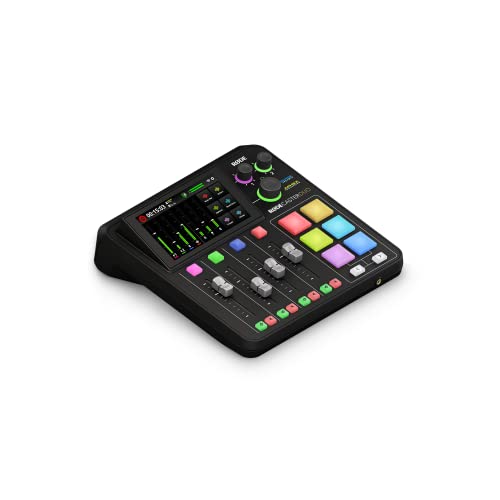
RØDECaster Duo compact studio, two combo inputs
2 combo inputs4 fadersTouchscreen6 SMART pads
Check price on Amazon
Best for: Two hosts or a host plus guest who want faders and a touchscreen on a small desk.

The Duo shrinks the same philosophy into a unit that fits beside a monitor. Two Neutrik combo jacks take microphones or instruments through low noise, high gain preamps, four faders cover the two mics plus computer and phone feeds, and a touchscreen with haptic feedback handles routing. Six SMART pads with bank switching mean the sound library does not shrink as much as the pad count suggests.

It is the better choice for a pair of hosts, and the worse choice for anyone who expects growth. Two mic inputs is the hard ceiling, so adding a third voice means buying a different console. Next to the E2 Gen2 it adds real faders and onboard processing, but it also sits several steps higher in the price ladder, so the case rests on faders and recording depth rather than raw input count.

Day to day it behaves like a polished instrument: the touch controls respond immediately, the layout is readable at arm's length, and the finish stays free of the creaks that show up in cheaper boards. Keep the supplied USB cable tidy and avoid leaving it on a power strip with noisy switching adapters.

What works

  • Four faders on a very small footprint
  • Haptic touchscreen reads clearly at a glance
  • Bank switching expands six pads further
  • Quiet preamps handle dynamic mics well

Watch out for

  • Only two mic inputs
  • Costs well above entry level USB mixers

Spec sheet

Mic inputs
2 Neutrik combo jacks
Faders
4 broadcast faders
Display
Touchscreen with haptic feedback
Pads
6 SMART pads with bank switching
Use
Podcasting, streaming, music
03
Zoom PodTrak P4next 4 input recorder with AI tools
4 XLR inputs+70 dB gainAI noise reduction4 headphone outs
Check price on Amazon
Best for: Four person shows that record to a card and edit afterward on a modest budget.

Zoom built the P4next around a single idea: a table with four people and a recorder in the middle of it. Four XLR inputs deliver up to 70 dB of gain, enough for quiet dynamic microphones, and four separate headphone outputs with their own volume knobs mean nobody shares a splitter. AI noise reduction, tone enhancement and a compressor take the first pass at cleanup so the raw recording sounds closer to finished.

It behaves like a recorder with mixer manners rather than a mixer with recording added. The faders are short and the controls are button and pad driven, which suits a fixed setup but feels less hands on than the RØDECaster Pro II when you want to ride levels live. For four voices on a tight budget it still beats any USB board in this group, because each host gets a dedicated preamp and a headphone feed.

Plan for memory cards and a reliable power source. Recordings are only as safe as the card, so format it in the unit before an important session and keep a spare. Because four people share one box, check each headphone level before you hit record rather than adjusting during the interview.

What works

  • Four XLR inputs and four headphone feeds
  • 70 dB of gain suits quiet dynamic mics
  • AI cleanup shortens editing time
  • Phone and USB inputs support remote guests

Watch out for

  • Short faders limit live level riding
  • Menu driven controls feel less direct than a desk

Spec sheet

Mic inputs
4 XLR with phantom
Gain
Up to 70 dB
Headphones
4 outputs
Processing
AI noise reduction, tone enhancement, compression
Extras
Sound pads, phone and USB input
04
MAONO E2 Gen2 dual XLR mixer with loopback
2 XLR inputsLoopbackBluetooth8 sound effects
Check price on Amazon
Best for: Two hosts on a desk who need loopback, Bluetooth and effects at the lowest sensible entry price.

The E2 Gen2 is aimed squarely at the first podcast set up: two XLR preamps, loopback so computer audio reaches the recording, Bluetooth for phone calls, and eight customizable sound effects at the touch of a button. It presents itself to a computer as a sound card, so a Windows or Mac session usually starts without a driver hunt.

What you give up is depth. There is no multitrack recording from the unit itself, the processing is simpler than Rode's, and the controls favor knobs and buttons over faders. Beside the Elgato Wave XLR MK.2 it adds a second microphone input, which is the whole reason to prefer it for two hosts, while the Elgato offers a more polished single voice chain.

It is easy to live with. Cable runs are short, the desk footprint is small, and the sound effect buttons are handy for a quick bumper. Keep it on its own USB port rather than a crowded hub, and use balanced XLR cables so the preamps are not asked to fight hum.

What works

  • Two XLR inputs with phantom ready preamps
  • Loopback sends computer audio to the stream
  • Bluetooth input takes phone calls
  • Compact enough for a crowded desk

Watch out for

  • No multitrack recording from the unit
  • Gain is modest for demanding dynamic mics

Spec sheet

Mic inputs
Dual XLR
Routing
Loopback for computer audio
Wireless
Bluetooth input
Effects
8 customizable sound effects
Preamps
Low noise, two channel
05
Elgato Wave XLR MK.2 USB interface and DSP mixer
80 dB gainDSP voice chainLED level meterLow latency
Check price on Amazon
Best for: A solo host who wants a clean, high gain, low latency chain for a hungry dynamic microphone.

Where the cheaper boards chase channel count, the Wave XLR MK.2 chases one clean voice. Eighty decibels of gain is enough for a power hungry dynamic mic without a booster, the onboard DSP applies a voice enhancer, compressor and EQ before the signal reaches the computer, and LED level feedback shows clipping before it ruins a take.

It does not try to be a table mixer. There is one voice channel, which makes it the right pick for a solo host and the wrong one for a pair. Its processing is tidier than the E2 Gen2's, and its monitoring path adds almost no delay, so you hear yourself without the echo that plagues software monitoring.

Setup is quick and the driver software is polished, though you are tied to a computer for settings. Keep the cable short and give the mic its own boom arm so the interface does not pick up desk thumps.

What works

  • 80 dB gain drives hungry dynamic mics
  • Onboard voice chain cuts editing
  • Very low latency headphone monitoring
  • LED meter flags clipping instantly

Watch out for

  • One voice channel limits it to solo shows
  • Settings depend on companion software

Spec sheet

Gain
80 dB
Processing
Voice enhancer, compressor, EQ
Monitoring
Ultra low latency
Feedback
LED level display
Connection
USB to computer
06
Kaschun 4 channel Bluetooth mixer with XLR and USB
4 channels48V phantom99 DSP effects7 band EQ
Check price on Amazon
Best for: A first board that needs XLR phantom power, Bluetooth and EQ on a tight budget.

The Kaschun looks like a small studio console and behaves like one at a fraction of the cost: four channels, +48V phantom power, a seven band EQ and a library of 99 DSP effects, plus Bluetooth and a USB audio interface for the computer. For a first board it covers a lot of connection types.

The warning is about how it counts. A four channel label does not guarantee four XLR microphone inputs, so check which channels carry preamps before planning a multi host show. Against the Dejasound FX-6usb it is smaller and simpler, and it stays closer to a pocket board than a true desk.

Ownership is mostly about noise discipline. Cheap switching power supplies can add hiss, so use a clean outlet, keep gain staged properly and treat the DSP effects as seasoning rather than a fix for a weak microphone.

What works

  • Phantom power for condenser microphones
  • Seven band EQ for shaping voices
  • Bluetooth and USB both included
  • Hands on knobs instead of menus

Watch out for

  • Channel count overstates XLR inputs
  • No standalone recording

Spec sheet

Channels
4
Phantom
+48V
Effects
99 DSP effects
EQ
7 band
Connections
XLR, USB audio interface, Bluetooth

Spec sheet decoder

What the numbers on the box really mean

The specs manufacturers lead with, translated into what they tell you about real-world performance.

Preamp gain (dB)

How much the preamp can amplify a quiet microphone before noise appears. Dynamic broadcast mics want around 60 to 70 dB.

Watch forThe Elgato Wave XLR MK.2 lists 80 dB while the P4next lists 70 dB, which is a real difference for a hungry mic.

Phantom power (+48V)

A DC voltage sent down the XLR cable to power condenser microphones. Dynamic mics ignore it.

Watch forCheck whether the board powers every channel; the Kaschun lists +48V but you should confirm the channel map.

Loopback

A USB mode that returns computer audio into the recording without creating feedback, so you can capture a caller or music alongside your mic.

Watch forThe MAONO E2 Gen2 lists loopback; boards without it need extra software to route a remote guest.

Multitrack recording

Each microphone is saved as its own file, so levels can be fixed after the interview.

Watch forThe RØDECaster Pro II and P4next record multitrack; the E2 Gen2 sends a mix to the computer.

Channel count

The number of input strips on the surface, mixing mono mic channels and stereo line channels.

Watch forDo not treat the Kaschun's four channels as four microphone inputs.

Methodology

How We Evaluated These Podcast Mixers

Microphone capacity

We counted the true XLR mic preamps on each board rather than the advertised channel total. The lineup ranges from one XLR input on the Elgato Wave XLR MK.2 to four on the RØDECaster Pro II and PodTrak P4next. This decides how many hosts can sit at the same table.

Gain and noise

We compared stated gain ceilings against what a quiet dynamic mic needs, using the 70 dB and 80 dB figures on the P4next and Wave XLR MK.2 as the high end. Boards without a published gain figure were treated cautiously. Clean gain at the source is worth more than any software fix.

Recording and routing

We looked at whether each unit records on its own, supports loopback or phone input, and keeps tracks separate. A standalone multitrack recorder and a USB only mixer solve different problems, and we scored them on fit for the show described.

Controls and workflow

We weighed faders, knobs, pads and touchscreens by how fast a host can fix a level mid conversation. Rode's touchscreen desks and Zoom's pad based recorder sit near the top, with simple USB boxes below.

Value and ownership

We considered relative price tier, desk footprint, power supply quality and how well a unit scales if the show grows. Boards that lock you into two voices lose points if your plans include a third host.

Decision guide

How to Choose the Right Podcast Mixers

By Number of Hosts

SituationPickWhy
Solo host with one dynamic micElgato Wave XLR MK.280 dB gain and a clean DSP chain for one voice
Two hosts at a deskRØDECaster DuoTwo combo inputs with four faders and a touchscreen
Two hosts on a tight budgetMAONO E2 Gen2Dual XLR with loopback and Bluetooth
Three or four hosts around a tableRØDECaster Pro IIFour preamps with full voice processing
Four hosts recording to a cardZoom PodTrak P4nextFour XLR inputs and four headphone feeds

By Budget

Budget tierPickWhy
Lowest entryKaschun 4 channel boardPhantom power, EQ and Bluetooth in one cheap board
Entry to midMAONO E2 Gen2Two XLR inputs and loopback for a modest outlay
Mid rangeZoom PodTrak P4nextFour inputs with standalone recording
Higher midElgato Wave XLR MK.2Polished chain for a single voice
PremiumRØDECaster Pro IIA full broadcast desk with pads and processing

Standalone Recorder vs USB Mixer

Standalone recorder

The RØDECaster Pro II and Zoom PodTrak P4next record without a computer, so a crashed laptop cannot end a session. They suit in person shows where a table of hosts and a card save multitrack files.

USB mixer

The MAONO E2 Gen2, Kaschun and Elgato Wave XLR MK.2 depend on a computer for recording. They suit a desk where you already edit in software and stream or call remote guests.

Pick a standalone recorder for in person shows and a USB board if your recording software is already part of the setup.

Remote Guest Handling

NeedPickWhy
Dial in by phoneZoom PodTrak P4nextPhone input built into the recorder
Software call with computer audioMAONO E2 Gen2Loopback returns the call into the recording
Full routing controlRØDECaster Pro IIFlexible routing for calls and pads
Single voice with software mixElgato Wave XLR MK.2Companion software handles the mix

For Quiet Dynamic Mics Specifically

Look for

Quiet broadcast dynamic microphones need 60 to 70 dB of clean preamp gain. A board with weak gain forces you to boost in software, which raises the noise floor along with the voice.

In this comparison

The Elgato Wave XLR MK.2 at 80 dB and the Zoom PodTrak P4next at 70 dB give the most headroom. The RØDECaster Pro II also drives these mics, while the MAONO E2 Gen2 suits more forgiving microphones.

When to Spend More

Spend more if

You record three or more voices, want pads and processing, or plan to grow. The RØDECaster Pro II holds up through all of that, while the Duo suits two hosts who value faders.

Save if

You record one or two voices and edit afterward. The MAONO E2 Gen2 or Kaschun covers the basics, and a better microphone and boom arm will improve the recording more than a pricier mixer.

Ownership

Maintenance schedule

The upkeep that decides whether this machine lasts two seasons or ten.

TaskIntervalWhy it matters
Dust the faders and knobsMonthlyDust and skin oil collect around moving parts. Use compressed air and a dry brush, never spray cleaner into the controls.
Reformat the recording cardBefore each important sessionA freshly formatted card avoids file system errors. Always format in the recorder, not on a computer.
Check cables and connectorsQuarterlyXLR and USB cables wear at the plug. Replace any that crackle when moved, since intermittent noise ruins a take.
Update firmwareEvery few monthsUpdates fix bugs and sometimes add routing features. Back up presets first so settings are not lost.
Test phantom power and levelsBefore each recordingA quick test confirms that condenser mics are powered and gain is set correctly. It takes a minute and saves a lost episode.

FAQ

Frequently Asked Questions

Do I need a mixer or an audio interface for a podcast?

A mixer helps when you have two or more hosts or want to ride levels by hand. A single channel interface such as the Elgato Wave XLR MK.2 is simpler for a solo host. If you only ever record one voice, skip the mixer.

Which is the best podcast mixer for beginners?

The MAONO E2 Gen2 is easy to use and has two XLR inputs, loopback and Bluetooth. It presents as a sound card, so setup is quick. If you expect more hosts, step up to a four input unit.

How much should I spend on a podcast mixer?

Match the spend to the number of voices and your editing needs. A modest board handles one or two hosts, while a four input standalone recorder costs more but saves editing time. A good microphone and boom arm often matter more.

Does more channels mean better sound?

No. Channel count is a measure of inputs, not quality. The number of true XLR preamps and the quality of their gain matter far more. A four channel board can have only one XLR input.

What is mix minus and do I need it?

Mix minus sends a remote caller everything except their own voice so they do not hear an echo. You need it if you interview guests by phone or video call. Not every mixer supports it, so check before you buy.

Can I record without a computer?

Yes, with a standalone recorder such as the RØDECaster Pro II or Zoom PodTrak P4next, which save to a card. USB mixers like the MAONO E2 Gen2 need a computer or phone to record.

Bottom line

The short version

Browse more podcast mixerson Amazon →
James Miller, Lead Machine Editor

About the author

James Miller

Lead Machine Editor, MachineFanatic

James Miller leads MachineFanatic's buying guides, turning spec sheets, manuals and owner feedback into clear verdicts on power tools, outdoor power equipment, shop machines and kitchen machines.

More from James →

Keep reading

Related guides