
Amazon affiliate links - we earn a commission.Affiliate disclosure

Buying guide · 13 min read · Updated 2026-11-07

Best Podcast Mixers for Video Podcasts (2026)

Six video podcast mixers and kits compared on audio preamps, HDMI inputs, scene switching and recording, for shows that film as well as talk.

James MillerBy James MillerLead Machine Editor6 machines comparedSpec-sheet verified
Best Podcast Mixers for Video Podcasts

At a glance

Our top picks

A video podcast adds a second job to the audio one: choosing which camera the audience sees while keeping the sound clean and in sync. A mixer for this work either combines audio and video in a single console or switches video while a separate interface handles the microphones.

That split drives the whole decision. The audio side wants real preamps and clean gain, the video side wants enough inputs and a reliable way to record or stream, and the products that do both well are rarer than the packaging suggests.

Before you buy

6 Criteria to Look For Before Buying a Podcast Mixer for Video Podcasts

  1. 01

    Audio and video in one or two boxes

    The RØDECaster Video S combines two studio preamps with a four input video switcher, while the osee GoStream units and the CINETREAK Mixer Plus switch video only. A video only switcher needs a separate audio mixer or interface, which adds cost and cables. Decide early whether one console or two boxes suits your desk.

  2. 02

    Camera inputs

    Count the cameras you will use plus a laptop or graphics source. The Video S offers three HDMI and one USB, and the osee Deck Pro and CINETREAK Mixer Plus offer four HDMI. A show with two cameras and a screen share needs at least four inputs to avoid constant cable swaps.

  3. 03

    Microphone preamp quality

    Video podcasters often lose sound quality to a weak interface. The Video S carries Revolution preamps, and the Movo bundle includes a phantom USB interface. Without a clean preamp, a good camera cannot save poor audio. Dynamic microphones need plenty of clean gain, so check the preamp figures before pairing a quiet broadcast microphone with a bare switcher.

  4. 04

    Recording and streaming outputs

    The osee Deck Pro records to an SD card and streams over Ethernet to up to three platforms, while the CINETREAK is mainly a switcher. Check whether you need hardware recording as a backup or if your computer will handle it.

  5. 05

    Scene and overlay tools

    The Video S offers five multi source scenes, overlays and chroma keying, which make a show look produced. Basic switchers cut between cameras but leave layouts to software. Scenes save time on every episode.

  6. 06

    Portability and setup

    The Duet Kit weighs about five kilograms and includes a screen, which suits a mobile show. A compact unit like the Mixer Plus fits a desk. Think about whether your studio is permanent or travels.

Detailed reviews

The 6 best podcast mixers for video podcasts, explained

01
RØDECaster Video S podcast video switcher and audio interface
2 combo preamps4 video inputs5 scenesChroma keying
Check price on Amazon
Best for: Two person video podcasts that want clean preamps and scene switching in one box.

The Video S is the rare console that treats audio and video as equals. Two Neutrik combo jacks with high gain Revolution preamps capture the voices, while three HDMI inputs and one USB input feed up to four cameras or sources into five customizable multi source scenes. Graphic overlays, automatic chroma keying, transitions and media playback live in the same unit.

That integration is the reason to pay for it, and the limit is scale. Two microphone inputs fit a host and a guest, but a larger table will need extra gear, and the scene system takes an evening to learn. Next to the osee GoStream Deck Pro it carries real studio preamps, which the osee lacks, but it offers less in the way of hardware streaming outputs.

Once built, a show is repeatable. Scenes save camera layouts, so a two camera interview becomes a single touch, and the audio chain stays consistent from week to week. Keep the cameras on matching settings and use balanced microphone cables, because the console exposes both video and audio flaws quickly.

What works

  • Two studio preamps with high gain
  • Four video inputs with five scenes
  • Overlays and chroma keying built in
  • One console for audio and video

Watch out for

  • Two microphone inputs limit larger tables
  • Scene setup takes time to learn

Spec sheet

Mic inputs
2 Neutrik combo jacks, Revolution preamps
Video inputs
3 HDMI and 1 USB
Scenes
5 customizable multi source scenes
Graphics
Overlays, chroma keying, media playback
Role
Video switcher and audio interface
02
osee GoStream Deck Pro 4 channel HDMI video mixer
4 HDMI inputsSD recordingEthernet streamingUSB camera input
Check price on Amazon
Best for: Multi camera shows that want hardware recording and streaming outputs.

The Deck Pro behaves like a small broadcast switcher. It accepts four HDMI sources plus a USB camera, records high bitrate MP4 straight to an SD card while sending a USB feed to OBS or Zoom, and a hardware encoder can stream over Ethernet to up to three platforms without a computer.

What it lacks is a real microphone path. There are audio buttons and knobs, but the unit is a video device, so a podcast needs a separate audio mixer or interface ahead of it. Compared with the RØDECaster Video S it handles more video inputs and has a direct streaming encoder, but you must add your own preamps.

Ownership is best when you already have a camera collection. Label the HDMI cables, match the cameras' frame rates, and keep the SD card formatted in the unit before a long recording.

What works

  • Four HDMI inputs plus a USB camera
  • Records to SD card while streaming
  • Hardware encoder streams to three platforms
  • Works with OBS and Zoom over USB

Watch out for

  • No studio grade microphone preamps
  • Needs a separate audio mixer for a podcast

Spec sheet

Video inputs
4 HDMI plus a USB camera
Recording
Direct to SD card
Streaming
Ethernet to up to 3 platforms
Output
USB to OBS or Zoom
Role
Video switcher
03
osee GoStream Duet Kit all in one video mixer with screen
4 HDMI and SDI inputs14 inch screen2 HDMI outputsRecorder
Check price on Amazon
Best for: Mobile video podcasts that need a switcher, screen and recorder in a carry kit.

The Duet Kit ships as a complete portable switcher: the Duet unit, a 14 inch portrait style screen, a silent fan and cheese plates for mounting. Four HDMI or SDI inputs and two HDMI outputs give flexibility to send a program feed while keeping a monitor view.

Its weight of about five kilograms and its all in one design make it a studio you can carry, but it still does not solve audio. Like the Deck Pro, it expects separate microphone gear. It costs more than the Deck Pro because of the screen and kit, so it is for shows that move between locations or need a clear multiview.

Plan the desk space carefully. The large screen and cheese plates mount neatly on a stand, and the silent fan keeps the unit cool without adding noise to the recording.

What works

  • Complete kit with a 14 inch screen
  • Four HDMI or SDI inputs
  • Two HDMI outputs for program and monitor
  • Silent fan keeps the room quiet

Watch out for

  • No dedicated mic preamps
  • Heavier and costlier than a basic switcher

Spec sheet

Inputs
4 HDMI or SDI
Outputs
2 HDMI and 2 USB ports
Display
14 inch 1080 by 1920 screen
Weight
About 5 kg
Kit
Silent fan and cheese plates
04
CINETREAK Mixer Plus 4 HDMI switcher with 4 inch screen
4 HDMI inputs4 inch screen30 transitionsPTZ control
Check price on Amazon
Best for: Small studios with up to four cameras and PTZ control.

The Mixer Plus is an ultra compact four input switcher with a four inch screen, zero latency switching and thirty customizable transitions. It can also control up to four PTZ cameras over VISCA IP with four presets each.

It is the small and affordable end of the switcher range. The screen is helpful but small, and like the osee units it is not an audio mixer. Next to the Deck Pro it offers PTZ control and a built in screen, while the Deck Pro adds a hardware streaming encoder.

It suits a modest studio with a few cameras. Keep the firmware updated, label the inputs and test the PTZ presets before a live session.

What works

  • Four HDMI inputs with built in screen
  • PTZ camera control over VISCA IP
  • Thirty customizable transitions
  • Compact and portable

Watch out for

  • Not an audio mixer
  • Screen is small for complex scenes

Spec sheet

Inputs
Up to 4 HDMI
Screen
4 inch built in
Transitions
30 customizable
Camera control
PTZ over VISCA IP, 4 cameras
Form
Portable switcher
05
Movo video podcast bundle with USB interface and 2 cameras
USB audio interface2 XLR dynamic mics2 4K camerasDesk stands
Check price on Amazon
Best for: Two person shows that want a complete audio and video starter kit.

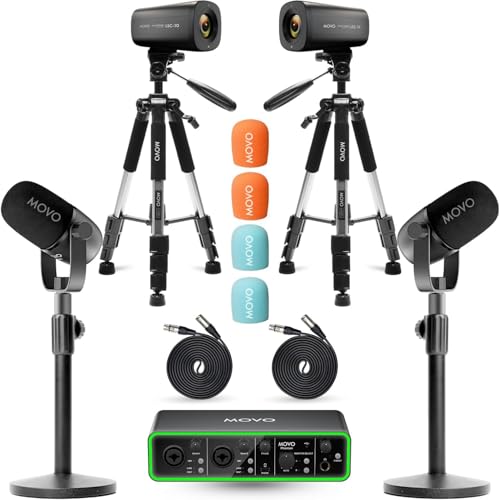
Movo's bundle is a ready made video podcast for two: a USB audio interface, two XLR dynamic microphones, two 4K UHD cameras and desk stands. It is the only item here that arrives with both audio and picture covered.

It is a kit rather than a switcher, so there is no multi source scene control and cameras connect through the computer. That keeps it simple but limits advanced layouts. Compared with the RØDECaster Video S it offers fewer production tools but includes the cameras and microphones.

It works best for a duo who want to start filming quickly. Position the cameras at eye level, use the dynamic microphones close to the mouth and monitor audio with headphones.

What works

  • Interface, mics and cameras included
  • XLR dynamic microphones
  • Two 4K cameras for two angles
  • Desk stands included

Watch out for

  • No scene switching hardware
  • Components are entry level

Spec sheet

Audio
Phantom USB audio interface
Microphones
2 XLR dynamic
Cameras
2 4K UHD
Stands
2 desk stands
Target
Video podcast for 2
06
NearStream PodKit Duo modular dual camera podcast kit
2 4K cameras10X optical zoom2 tripodsModular kit
Check price on Amazon
Best for: Video podcasts that want better cameras and optical zoom.

The PodKit Duo centers on two VM20 Pro cameras with a half inch CMOS sensor and ten times optical zoom, mounted on ST30 tripods for wide and close angles. It is aimed at filming rather than audio, with the kit built around the cameras.

The optical zoom is a real advantage over fixed webcams, because it lets you frame a tight shot without digital cropping. It still needs audio gear, since the kit is camera centered, and the switching happens in software. Next to the Movo bundle it puts more into the camera side and less into audio.

Plan your lighting, because larger sensors reveal poor light. Pair it with a proper audio interface or mixer for the microphones.

What works

  • Two cameras with half inch sensors
  • 10X optical zoom for tight framing
  • Tripods included
  • Modular dual angle setup

Watch out for

  • Audio gear is not the focus
  • Switching happens in software

Spec sheet

Cameras
2 VM20 Pro 4K
Sensor
1/2 inch CMOS
Zoom
10X optical
Stands
2 ST30 tripods
Format
Modular dual camera kit

Spec sheet decoder

What the numbers on the box really mean

The specs manufacturers lead with, translated into what they tell you about real-world performance.

HDMI input

A digital video input that accepts cameras and laptops.

Watch forThe Video S has three HDMI, the osee Deck Pro has four.

Multi source scene

A saved layout that combines several video sources on screen.

Watch forThe Video S offers five scenes.

PTZ control

Remote pan, tilt and zoom control of a camera.

Watch forThe CINETREAK Mixer Plus controls up to four PTZ cameras.

Hardware encoder

A built in processor that streams without a computer.

Watch forThe osee Deck Pro includes one.

Chroma keying

Removing a green background to place a subject over another image.

Watch forThe Video S does it automatically.

Methodology

How We Evaluated These Podcast Mixers for Video Podcasts

Audio path

We checked for real microphone preamps and audio interfaces, valuing the Video S's Revolution preamps and the Movo's interface. Video only switchers scored lower for a podcast use because they need extra audio gear. A video podcast is still a podcast, so a unit that sounds poor cannot be rescued by sharp pictures.

Video inputs

We counted cameras and sources each unit accepts, from three HDMI on the Video S to four on the osee and CINETREAK units. We also considered whether a laptop for slides or a USB camera has a place, since a guest who wants to share a screen is common and a switcher with no spare input forces a cable swap during the show.

Recording and streaming

We looked at SD recording, Ethernet streaming and USB output, noting the osee Deck Pro's hardware encoder. A unit that records locally while it streams gives you a clean master if the network stumbles, which is a major comfort for a show with a live audience and no chance to repeat.

Production tools

We weighed scenes, overlays and PTZ control, which add polish to a show. Saved scenes matter most because they make a two camera layout repeatable, and PTZ presets matter when a single operator runs several robotic cameras without a crew.

Value

We compared price tiers, with the CINETREAK and Movo at the lower end and the Video S and Duet Kit higher.

Decision guide

How to Choose the Right Podcast Mixers for Video Podcasts

By Show Setup

SituationPickWhy
Two people, polished lookRØDECaster Video SPreamps and scenes in one box
Many cameras and streamingosee GoStream Deck ProHardware encoder and four HDMI inputs
Mobile studioosee GoStream Duet KitScreen and kit in one carry set
Small desk with PTZCINETREAK Mixer PlusBuilt in screen and PTZ control
Starter kit for twoMovo video podcast bundleInterface, mics and cameras
Better camerasNearStream PodKit DuoOptical zoom and tripods

By Budget

TierPickWhy
LowestCINETREAK Mixer PlusBasic switcher with screen
Low to midMovo video podcast bundleComplete kit for two
MidNearStream PodKit DuoTwo good cameras
Mid to highosee GoStream Deck ProStreaming switcher
HigherRØDECaster Video SAudio and video console
Highestosee GoStream Duet KitFull portable studio

All in One vs Separate Gear

All in one

The RØDECaster Video S puts preamps and video switching together, which simplifies cabling and keeps audio and video in sync.

Separate gear

The osee and CINETREAK switchers pair with an audio mixer of your choice, giving more freedom but more cables.

Choose all in one for simplicity and separate gear for flexibility with existing audio equipment.

By Camera Count

CamerasPickWhy
One or twoMovo video podcast bundleTwo included
Two with zoomNearStream PodKit DuoOptical zoom
Three to fourRØDECaster Video SFour inputs with scenes
Four plus PTZCINETREAK Mixer PlusVISCA control

For Streaming Specifically

Look for

A hardware encoder or reliable USB output so a computer crash does not end the stream.

In this comparison

The osee GoStream Deck Pro streams over Ethernet to three platforms, and the Video S feeds a computer over USB.

When to Spend More

Spend more if

You want a polished multi camera show with clean audio. The Video S or Duet Kit deliver.

Save if

You film with one or two cameras. The CINETREAK or Movo kit is enough.

Ownership

Maintenance schedule

The upkeep that decides whether this machine lasts two seasons or ten.

TaskIntervalWhy it matters
Clean the lens and screenMonthlyDust and fingerprints affect image quality and make autofocus hunt. Use a soft cloth and a blower, and never press hard on a lens element.
Check HDMI cablesQuarterlyLoose connectors drop video and cause black screens during a live cut. Replace worn cables, and use locking HDMI connectors or cable clips where a lens or desk is often bumped.
Update firmwareEvery few monthsUpdates fix bugs and add features. Note scene settings first.
Format the SD cardBefore long shootsA freshly formatted card avoids dropped frames.
Check audio syncBefore recordingCamera and audio paths can drift. Clap test a short clip.

FAQ

Frequently Asked Questions

Do I need a video mixer for a video podcast?

Only for more than one camera. A single camera can plug straight into a computer, and the recording software can add simple titles. A switcher earns its place when you want to cut between a wide shot and close shots live, or add a screen share, because doing that in software on a busy laptop increases the chance of a crash mid episode.

Which gives the best sound?

The RØDECaster Video S has real preamps, with two Neutrik combo jacks and high gain Revolution preamps. Video only switchers such as the osee GoStream units and the CINETREAK Mixer Plus need a separate audio interface or mixer. Viewers forgive soft video faster than muddy audio, so spend on the microphone path first.

Can I stream without a computer?

The osee GoStream Deck Pro has a hardware encoder that streams over Ethernet to up to three platforms at once. A wired connection is steadier than Wi-Fi, so run a cable to the unit if the stream matters. Even so, record a local copy to the SD card as a backup in case the network drops.

How many cameras do I need?

Two cameras give a wide and a close shot, which is enough to keep a conversation visually interesting. A third source allows a screen share or a graphic. More cameras raise the cabling, lighting and editing workload, so add them only when the show format truly needs them.

Is a bundle worth it?

It saves research and gives a complete start, but components are entry level. A kit such as the Movo bundle makes sense when you want one purchase that works together, and the NearStream camera kit suits a show that already has audio sorted. Plan to upgrade the weakest piece, usually the microphones or the lighting, after a few episodes.

What about audio sync?

Camera delay can drift from audio, so do a clap test and adjust in your software. Record a short clip with a sharp clap, then look at the waveform and the frame where the hands meet. A difference of more than one or two frames is visible to viewers, and most editors let you nudge the audio track to match.

Bottom line

The short version

Browse more podcast mixers for video podcastson Amazon →
James Miller, Lead Machine Editor

About the author

James Miller

Lead Machine Editor, MachineFanatic

James Miller leads MachineFanatic's buying guides, turning spec sheets, manuals and owner feedback into clear verdicts on power tools, outdoor power equipment, shop machines and kitchen machines.

More from James →

Keep reading

Related guides