
Amazon affiliate links - we earn a commission.Affiliate disclosure

Buying guide · 11 min read · Updated 2026-11-14

Best Privacy-Focused Robot Vacuums (2026)

Six robot vacuums with no camera in their listings, from remote-only models to laser-mapped docks, ranked by how little data and lens exposure they bring.

James MillerBy James MillerLead Machine Editor6 machines comparedSpec-sheet verified
Best Privacy-Focused Robot Vacuums

At a glance

Our top picks

Side by side

Spec comparison

MachineControlRuntimeSuctionNavigationCleaning
ILIFE V2, remote control, no Wi-Fi needed, 2.99 in slimBest OverallILIFE V2, remote control, no Wi-Fi needed, 2.99 in slimPhysical remote120 minn/an/an/a
eufy 11S MAX, 2.85 in profile, BoostIQ suction, 100 minute runtimeBest Quiet Offline-Styleeufy 11S MAX, 2.85 in profile, BoostIQ suction, 100 minute runtimen/a100 min on hardwoodBoostIQ, 1.5 s responsen/an/a
iRobot Roomba 105 Vac, 7,000 Pa, ClearView LiDAR, vacuum onlyBest Value LaseriRobot Roomba 105 Vac, 7,000 Pa, ClearView LiDAR, vacuum onlyApp scheduling and room targetingn/a7,000 PaClearView LiDARVacuum only
Roborock Q7 L5 vacuum and mop, 8,000 Pa, LiDAR, anti-tangleBest Mapping and MopRoborock Q7 L5 vacuum and mop, 8,000 Pa, LiDAR, anti-tanglen/an/a8,000 PaLaser mappingVacuum and mop
Tikom G8000 Max vacuum and mop, 5,000 Pa, app and remote, 150 minutesBest Budget App and RemoteTikom G8000 Max vacuum and mop, 5,000 Pa, app and remote, 150 minutesApp and remote150 min max5,000 Pan/aVacuum and mop
ILIFE A30s Plus, 10,000 Pa max, LiDAR, self-emptying stationBest Hands-Free DryILIFE A30s Plus, 10,000 Pa max, LiDAR, self-emptying stationn/a150 min10,000 Pa in spot modeLiDARVacuum only

Privacy in a robot vacuum has two separate halves. One is the lens: whether the machine carries a camera that can see your rooms. The other is the data: whether it creates an account, uploads a floor plan to a cloud service and keeps running on a server you do not control.

A robot can fix one half and not the other, so the useful question is which half bothers you. This guide ranks six machines whose listings describe no camera, and sorts them by how much they ask of your network, your phone and your trust.

Before you buy

6 Criteria to Look For Before Buying a Privacy-Focused Robot Vacuum

  1. 01

    Lens versus data

    Removing the camera solves the lens problem and nothing else. A laser robot such as the Roomba 105 Vac still stores a floor plan in an app account. If the data bothers you more than the lens, choose the ILIFE V2, which needs no Wi-Fi, or run the Tikom G8000 Max from its remote.

  2. 02

    Account requirements

    Most app-controlled robots ask for an email and a cloud login before they will map or schedule. Read the setup flow before buying and see whether the robot works without an account. The ILIFE V2 and the remote on the Tikom G8000 Max avoid the question.

  3. 03

    Mapping versus pattern

    A laser map lets you pick rooms and set zones, and it is stored somewhere. A pattern robot like the eufy 11S MAX stores nothing. Decide whether the convenience of room control is worth a stored floor plan.

  4. 04

    What the dock holds

    A self-empty dock like the ILIFE A30s Plus keeps dust in a bag you must replace. It adds no new data, but it adds a parts bill. Weigh the convenience against the bag cost.

  5. 05

    Listing evidence

    A listing that says no camera is a claim, not proof. Cameras are usually advertised loudly, so a silent listing is a good sign, and the maker page and manual are the next check. Avoid models whose titles mention vSLAM, AI recognition or live video.

  6. 06

    Update behaviour

    Connected robots receive firmware updates that can change features and permissions over time. A remote-only robot never changes. If you value stability, the offline models keep behaving the same for years.

Detailed reviews

The 6 best privacy-focused robot vacuums, explained

01
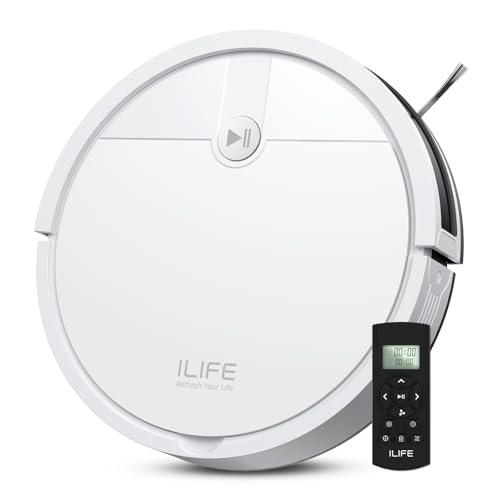
ILIFE V2, remote control, no Wi-Fi needed, 2.99 in slim
No Wi-FiRemote control2.99 in tall120 min
Check price on Amazon
Best for: Bedrooms and flats where no account and no camera is the rule.

The V2 is the only machine in this guide that works completely offline. Its listing states that a physical remote runs it and that no Wi-Fi connection is needed, which means no account, no cloud map and no app permissions to review. It navigates with sensors rather than a laser, so there is no map to store anywhere. The only data it ever holds is a timer, and that stays inside the robot.

That simplicity is the privacy feature, and it is also the limit. There is no room selection, no no-go zones and no resume-after-recharge logic, so it covers the floor by pattern and sometimes twice. It costs the least here and stands 2.99 in tall, which suits a bedroom where a camera would feel wrong. Compared with the eufy 11S MAX it adds a remote and a tangle-free port.

Maintenance is plain: empty the small bin often, rinse the filter, clear the suction port and swap the side brush when it flattens. With nothing to update, the machine stays the same for years, which is a quiet advantage in privacy terms because no firmware change can add a feature you did not ask for.

What works

  • Works from a remote with no Wi-Fi
  • No account or cloud map exists to leak
  • Low 2.99 in body fits under beds
  • Lowest price tier in the guide

Watch out for

  • No map, zones or room selection
  • Coverage follows a pattern and repeats
  • Small bin needs frequent emptying

Spec sheet

Control
Physical remote
Network
No Wi-Fi connection needed
Height
2.99 in
Runtime
120 min
Scheduling
On the robot
02
eufy 11S MAX, 2.85 in profile, BoostIQ suction, 100 minute runtime
2.85 in tallBoostIQ100 minQuiet
Check price on Amazon
Best for: Small flats that want quiet, basic cleaning from a known brand.

The 11S MAX is a plain, thin robot whose listing mentions neither a camera nor a mapping system. It uses sensors to move around and BoostIQ to raise suction within about 1.5 seconds on carpet. Because the listing leaves out any app feature, it fits a buyer who wants the least connected machine from a known brand.

It runs up to 100 minutes on hardwood and handles hard floors up to medium-pile carpet, and it sits slightly lower than the ILIFE V2 at 2.85 in. The trade is that it has no map and no dock, so coverage is by pattern and the bin is yours to empty. Choose it over the V2 if you want a quieter motor and a name you recognise.

Care is the old routine: empty the bin after each run, rinse the filter, snip hair from the roller and replace the side brush. There are no bags and no water parts, so running costs stay low. Confirm on the maker page exactly how it is controlled before you buy, since control options differ between listings.

What works

  • Listing describes no camera or app features
  • 2.85 in body slips under low furniture
  • BoostIQ lifts suction on carpet
  • No bags or water parts to buy

Watch out for

  • No mapping or room control
  • Bin is emptied by hand
  • 100 minute runtime limits larger homes

Spec sheet

Height
2.85 in
Runtime
100 min on hardwood
Suction
BoostIQ, 1.5 s response
Floors
Hard to medium-pile
Listing features
No camera or app mentioned
03
iRobot Roomba 105 Vac, 7,000 Pa, ClearView LiDAR, vacuum only
7,000 PaClearView LiDARVacuum onlySelf-charging
Check price on Amazon
Best for: Buyers who accept an app but refuse a camera.

The Roomba 105 Vac gives you a laser map from a large, established maker without a camera in the listing. ClearView LiDAR draws the rooms so you can schedule and target single rooms from the app. The data question remains, because maps and schedules live in the maker's cloud account, but the lens question is settled by the laser.

Priced above the remote-only robots and below the Roomba docks. At 7,000 Pa it is a modest machine, and with no dock you empty the bin yourself, which keeps bag spending at zero. If you accept an app and want a map, this is the cleanest balance of price and brand history.

Upkeep is short: empty the bin, tap out the filter, snip hair from the brush and replace the side brush when its bristles flatten. Spare parts are widely listed, so a worn brush is a five minute fix rather than a reason to retire the machine. Review the app permissions once at setup and consider turning off optional cloud features. If your router supports a guest network, putting the robot on it keeps it away from laptops and phones.

What works

  • Laser mapping with room targeting
  • No camera in the listing
  • No bag costs since the bin is emptied by hand
  • Established brand with a long support record

Watch out for

  • Map and schedule live in a cloud account
  • Bin must be emptied after most runs
  • No mop and no self-empty base

Spec sheet

Suction
7,000 Pa
Navigation
ClearView LiDAR
Cleaning
Vacuum only
Control
App scheduling and room targeting
Dock
Charge only
04
Roborock Q7 L5 vacuum and mop, 8,000 Pa, LiDAR, anti-tangle
8,000 PaLiDARDual anti-tangleMop combo
Check price on Amazon
Best for: Buyers who want a laser map and light mopping with no lens.

The Q7 L5 adds a mop and brushes to the laser-only formula. Its 360 degree laser scans the room, so the machine sees shapes and distances, not pictures. Dual anti-tangle brushes keep hair from stalling the route, and the mop attachment handles light wet work.

It carries 8,000 Pa against 7,000 Pa on the Roomba 105 Vac and adds a mop for a similar price tier. It still needs an app for map features, so the data caveat applies. Choose it over the Roomba if you want wet cleaning in the same machine and are comfortable with the brand's cloud service.

Wipe the laser window monthly, empty the bin after most runs and rinse the mop cloth after each wet pass. The charging base is a plain dock, so there is no bag to buy and no water path to descale. If you do connect the app, create the account with an address you use only for devices.

What works

  • Laser mapping with no camera listed
  • Anti-tangle brushes for hair
  • Includes a mop attachment
  • Plain charging base with no consumables

Watch out for

  • Map features rely on an app account
  • Mop is a light-duty attachment
  • Bin is emptied by hand

Spec sheet

Suction
8,000 Pa
Navigation
Laser mapping
Brushes
Anti-tangle main and side
Cleaning
Vacuum and mop
Lens
None in listing
05
Tikom G8000 Max vacuum and mop, 5,000 Pa, app and remote, 150 minutes
5,000 PaApp and remote150 min450 ml bin
Check price on Amazon
Best for: Hard-floor flats that want an offline remote option and a mop.

The G8000 Max lets you choose your own privacy trade. It ships with both an app and a physical remote, so you can skip the app entirely and run it from the remote. The listing mentions no camera and describes a 450 ml dustbin with a mop tank, and it can run up to 150 minutes.

With 5,000 Pa of suction against the Roborock Q7 L5's 8,000 Pa, it also costs less. Because it has no laser listed, it navigates by simpler means and covers the floor less efficiently. That makes it a decent offline-capable pick for a hard-floor flat, with a mop thrown in.

Wash the mop cloth, rinse the tank and empty the bin after each run. Decide at setup whether you will ever connect the app, and if you will not, do not create the account. A remote that works without a network is the cleanest way to keep the robot out of your data entirely.

What works

  • Remote lets you skip the app entirely
  • 150 minute maximum runtime
  • Mop included in the package
  • Low price tier

Watch out for

  • Only 5,000 Pa
  • No laser mapping listed
  • Mop is a basic attachment

Spec sheet

Suction
5,000 Pa
Runtime
150 min max
Control
App and remote
Dustbin
450 ml
Cleaning
Vacuum and mop
06
ILIFE A30s Plus, 10,000 Pa max, LiDAR, self-emptying station
10,000 Pa maxLiDARSelf-empty150 min
Check price on Amazon
Best for: Dry-floor homes that want a dock and no mop hardware.

The A30s Plus is a vacuum-only laser robot with a 2.2 L self-empty station, and its listing quotes up to 250 days of hands-free use. It maps with LiDAR and offers an app, so it sits on the connected side of the privacy line, though no camera is listed. Its 10,000 Pa figure applies in spot mode only.

The lack of a mop is a privacy plus in practice, because there is no water path to leave damp. It is a higher price tier than the plain robots and the best fit for owners who want a dock with fewer features to manage. The Roomba 105 Vac lacks the self-empty station that this model adds.

Bag swaps are the running cost. Check the station filter every few weeks, wipe the laser window and trim the brushes. The 250 day figure is a best case, so look at the bag at the two-month mark. The station also keeps dust out of the air when it empties, which suits allergy-prone households.

What works

  • Self-empty station with a quoted 250 day interval
  • LiDAR mapping with no camera listed
  • Vacuum-only design has no water parts
  • 150 minute runtime

Watch out for

  • Peak suction applies only in spot mode
  • App and cloud map still apply
  • Bags are a running cost

Spec sheet

Suction
10,000 Pa in spot mode
Navigation
LiDAR
Station
2.2 L self-empty
Runtime
150 min
Cleaning
Vacuum only

Spec sheet decoder

What the numbers on the box really mean

The specs manufacturers lead with, translated into what they tell you about real-world performance.

No Wi-Fi needed

The robot runs from a remote or buttons and never joins your network. It cannot upload anything.

Watch forThe ILIFE V2 states this, while most laser robots in this guide expect an app.

LiDAR

A spinning laser measures distances to build a map. It captures no pictures.

Watch forThe Roomba 105 Vac, Roborock Q7 L5 and ILIFE A30s Plus use it, and each stores a map via an app.

App and remote

A model that offers both lets you pick your own level of connection. The remote works without an account.

Watch forThe Tikom G8000 Max ships with both.

Self-empty station

A dock that sucks the bin into a bag. It adds hands-free emptying and a consumable.

Watch forThe ILIFE A30s Plus quotes up to 250 days, a best-case figure.

Suction in Pa

A peak motor claim that differs by maker. It says nothing about privacy.

Watch forThe Roomba 105 Vac lists 7,000 Pa and the Tikom G8000 Max lists 5,000 Pa.

Methodology

How We Evaluated These Privacy-Focused Robot Vacuums

Lens exposure

We read each listing for any camera, vision or AI recognition wording. Robots whose listings were silent or specified a laser were kept. We caution that a listing is not a teardown.

Network dependence

We ranked models by how much they ask of your network. The ILIFE V2 needs none and the Tikom G8000 Max offers a remote. Laser robots with app accounts ranked lower.

Stored data

We considered whether a robot keeps a floor plan or schedule in a cloud account. Pattern robots store nothing. Established brands earned credit for clearer privacy documentation.

Cleaning capability

We compared mapping, mop and dock features so privacy did not mean uselessness. The Roborock Q7 L5 and ILIFE A30s Plus lead on features. The offline models scored on simplicity.

Owner feedback patterns

We reviewed repeated owner reports on account setup, app failures and unwanted permissions. Patterns outweighed single remarks. Models that work fully without the app were noted. A robot that locks basic cleaning behind a login was marked down, because it forces the data trade.

Decision guide

How to Choose the Right Privacy-Focused Robot Vacuums

By Privacy Level

SituationPickWhy
No Wi-Fi and no account at allILIFE V2Runs from a remote
App optional, remote availableTikom G8000 MaxShips with app and remote
No camera but a stored map is fineRoomba 105 VacLaser mapping from an established brand
No camera, with mop and mapRoborock Q7 L5Laser, anti-tangle brushes and mop

By Budget

SituationPickWhy
Lowest tierILIFE V2Remote only and nothing to subscribe to
Lower mid tierTikom G8000 MaxApp, remote and a mop
Mid tier with laserRoomba 105 VacLaser mapping and no mop
Upper tier with dockILIFE A30s PlusSelf-empty station and LiDAR

Offline vs Connected

Offline

The ILIFE V2 and eufy 11S MAX never need a cloud account. They give up maps and room control.

Connected

The Roomba 105 Vac, Roborock Q7 L5 and ILIFE A30s Plus map your home and store it in an app. They are more capable and share more.

Pick offline if the data worries you, and connected if you want room control without a lens.

Dock Choice

SituationPickWhy
Dock with the longest quoted intervalILIFE A30s PlusQuotes up to 250 days
No dock and no bag costRoomba 105 VacEmpty the bin yourself
Plain charging base and a mopRoborock Q7 L5No consumables beyond pads
Skip every accessoryeufy 11S MAXCharge and go

For Bedrooms Specifically

Look for

No lens on the body, a way to run without an app and a body low enough to fit under the bed. Check that the schedule can be set on the robot itself.

In this comparison

The ILIFE V2 at 2.99 in and the eufy 11S MAX at 2.85 in both fit under beds and need no map. The V2 is the one that needs no network.

When to Spend More

Spend more if

You want a map, a mop or a dock without a camera. The Roborock Q7 L5 and ILIFE A30s Plus add those.

Save if

A plain daily run is enough. The ILIFE V2 or eufy 11S MAX offers the lowest exposure at the lowest tier.

Ownership

Maintenance schedule

The upkeep that decides whether this machine lasts two seasons or ten.

TaskIntervalWhy it matters
Review app permissionsAfter each app updateUpdates can add permissions or features. Open the settings and turn off anything you do not use.
Empty the binAfter most runsRobots without docks fill their bins quickly. A full bin cuts suction and clogs the filter.
Wipe the laser windowMonthlyDust on the turret blurs mapping and causes drift. Use a dry cloth.
Replace the dock bagEvery 2 to 8 monthsThe ILIFE A30s Plus quotes up to 250 days as a best case. Replace sooner with pets.
Delete old mapsAfter moving or remodelingStored maps hold your floor plan. Delete them in the app when they are no longer needed.

FAQ

Frequently Asked Questions

Does no camera mean no data collection?

No. A laser robot still stores a floor plan and schedule in an app account. The ILIFE V2 is the clearest exception because it needs no Wi-Fi. Read the maker's privacy page before you connect any robot.

Can I use an app robot without connecting it?

Some models run basic cleaning from buttons or a remote without setup. Others lock mapping and scheduling behind the app. The Tikom G8000 Max ships with a remote for this reason.

Is a laser safer than a camera for privacy?

The laser records distances, not images, so it cannot show your rooms to anyone. The map it creates is still personal data. A laser removes the lens concern, not the data concern.

How can I check a robot has no camera?

Read the title and bullets for camera, vision or AI recognition wording, then check the maker's spec page. Cameras are usually advertised. If unsure, ask the seller in writing.

Will these robots avoid cables?

A laser or bumper senses obstacles but cannot identify them. Cables and socks may tangle the brush. Tidy the floor or set no-go zones where supported.

What if the robot needs a firmware update?

Offline robots never update. Connected ones may prompt for updates that change features. Review the permissions after each update.

Bottom line

The short version

Browse more privacy-focused robot vacuumson Amazon →
James Miller, Lead Machine Editor

About the author

James Miller

Lead Machine Editor, MachineFanatic

James Miller leads MachineFanatic's buying guides, turning spec sheets, manuals and owner feedback into clear verdicts on power tools, outdoor power equipment, shop machines and kitchen machines.

More from James →

Keep reading

Related guides