
Amazon affiliate links - we earn a commission.Affiliate disclosure

Buying guide · 13 min read · Updated 2026-11-19

Best Quiet Printers for Home Offices (2026)

Six quieter printers for home offices compared by how they make noise: tank inkjets, cartridge inkjets and compact lasers, with tips for calls and shared rooms.

James MillerBy James MillerLead Machine Editor6 machines comparedSpec-sheet verified
Best Quiet Printers for Home Offices

At a glance

Our top picks

Side by side

Spec comparison

MachineTypeFunctionsWirelessDuplex
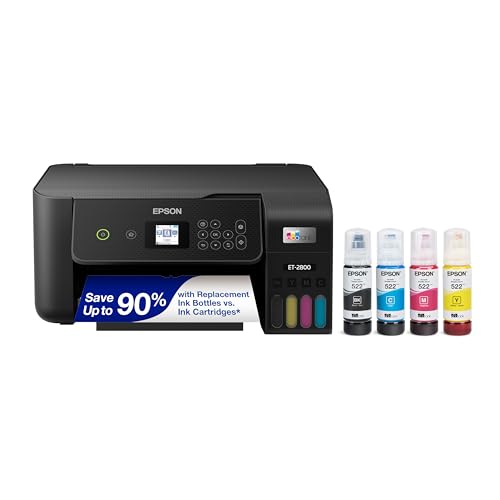
Epson EcoTank ET-2800 Wireless Ink Tank All-in-OneBest OverallEpson EcoTank ET-2800 Wireless Ink Tank All-in-OneRefillable ink tank all-in-onePrint, scan, copyWi-Fin/a
Epson EcoTank ET-4800 Wireless Supertank All-in-OneBest Quiet Tank With FeederEpson EcoTank ET-4800 Wireless Supertank All-in-OneInk tank multifunctionPrint, scan, copy, faxn/an/a
Brother Work Smart 1360 Wireless Duplex InkjetBest Duplex InkjetBrother Work Smart 1360 Wireless Duplex InkjetCartridge inkjet multifunctionPrint, scan, copyn/aAutomatic two-sided
Canon PIXMA TR4720 4-in-1 Wireless Inkjet with ADFBest StandbyCanon PIXMA TR4720 4-in-1 Wireless Inkjet with ADFCartridge inkjet multifunctionPrint, copy, scan, faxn/an/a
Brother HL-L2405W Compact Wireless Mono LaserBest Quiet LaserBrother HL-L2405W Compact Wireless Mono LaserMonochrome laser, print onlyn/aWi-Fi with Brother Mobile ConnectManual only
Brother DCP-L2640DW Duplex Mono Laser All-in-OneBest Fast LaserBrother DCP-L2640DW Duplex Mono Laser All-in-OneMonochrome laser multifunctionPrint, scan, copyWi-Fi with mobile printingAutomatic two-sided

Printer noise comes from a few distinct sources: the paper pickup, the carriage or drum motor, the warm-up of a heated fuser and the cooling fan. A home office worker on a call hears the first seconds of a job most, when pickup and warm-up happen together.

Quiet is relative and rarely documented well in a listing, so this guide ranks by mechanism and by the controls that reduce noise, and it names the trade each choice carries. Always compare the maker's sound figure on the spec sheet before buying if silence matters.

Before you buy

6 Criteria to Look For Before Buying a Quiet Printer for Home Offices

  1. 01

    Noise source and duration

    Noise comes from pickup, motors, the carriage and, on lasers, the fuser and fan. Tank inkjets like the Epson ET-2800 are quiet but slow, so the sound lasts longer. A laser like the Brother DCP-L2640DW is louder but finishes sooner.

  2. 02

    Spec sheet sound figure

    Makers publish a sound power or pressure level in decibels, but listings often omit it. If silence matters, find the figure on the manufacturer's spec sheet and compare like with like, because pressure and power figures differ. Do not trust a quiet claim without a number.

  3. 03

    Quiet mode trade

    Many printers offer a quiet or low-noise mode that slows the mechanism to cut sound. The cost is slower printing, so a long job takes longer. Enable it for evenings and call hours.

  4. 04

    Placement and vibration

    A printer on a hollow desk amplifies its own noise. A stable shelf, a rubber mat or a closet with ventilation can cut perceived sound more than any model change. Heat needs airflow, so do not enclose a laser.

  5. 05

    Duplex and feeder motors

    Each extra motor adds noise. The Brother Work Smart 1360 and DCP-L2640DW have duplex, while the Epson ET-2800 has no duplex or feeder. Pay for these features only if you use them.

  6. 06

    Print length

    A short job finishes before it bothers you, while a long job in a quiet printer can last longer than a loud, fast one. Match the printer to your job length, not only to a sound figure.

Detailed reviews

The 6 best quiet printers for home offices, explained

01
Epson EcoTank ET-2800 Wireless Ink Tank All-in-One
Ink tankHeat-free headCompactWi-Fi
Check price on Amazon
Best for: Home offices that print a few pages between calls.

An inkjet makes noise mainly from its carriage and paper feed, and it has no heated fuser or large cooling fan, so there is no warm-up roar when a job starts. The ET-2800 is a compact tank inkjet that prints at a modest pace, which keeps the carriage sound low and brief.

The downside is that slow printing means a longer job, so a long document keeps making its steady sound for minutes. Against a laser, the sound is lower in pitch but lasts longer. It has no feeder or duplex in the listing, which also removes the motors those parts would add.

Ownership is about placement and habit. Put the printer on a stable surface so vibration does not amplify the noise, use draft or quiet modes if the menu offers them and print weekly to keep the head clear. For a home office that prints a few pages between calls, this is the quietest sensible choice. Queue jobs from your phone or laptop and let them print while you are on mute, then collect the pages afterward. The front tank window also saves you from opening menus that beep.

What works

  • No fuser, so no warm-up noise
  • Modest pace keeps the carriage sound low
  • No feeder or duplex motors to add noise
  • Compact body for a desk

Watch out for

  • Long jobs keep making sound for minutes
  • Slower than a laser
  • Needs weekly use to avoid clogs

Spec sheet

Type
Refillable ink tank all-in-one
Print method
Inkjet, no fuser
Functions
Print, scan, copy
Wireless
Wi-Fi
Class
Entry EcoTank
02
Epson EcoTank ET-4800 Wireless Supertank All-in-One
Ink tank15.5 ppm blackFeederFax
Check price on Amazon
Best for: Home offices that need a feeder without a loud laser.

The ET-4800 uses Epson's Micro Piezo heat-free head and prints at 15.5 pages per minute in black, a pace that avoids the high-speed motor noise of a fast laser. It adds a feeder and fax to the tank design, so it covers office needs while staying in the quiet class.

A drawback here is that a feeder adds motor and roller noise when you scan stacks. The color speed of 8.5 pages per minute means long color jobs run for a while. If you scan rarely, the Epson ET-2800 is the simpler and quieter machine.

Ownership favors weekly printing and a level surface. Keep the tray guides snug so paper does not rattle, run quiet modes where available and give the machine a shelf rather than a hollow desk. That placement suits an office where the printer sits in the same room as the worker. Avoid running the feeder during a meeting, and scan stacks in one batch when the room is empty.

What works

  • Heat-free head without a fuser
  • Relaxed 15.5 ppm pace in black
  • Feeder and fax for office tasks
  • Cartridge-free tank design

Watch out for

  • Feeder adds noise when scanning stacks
  • Color speed of 8.5 ppm is slow
  • Larger body than the ET-2800

Spec sheet

Type
Ink tank multifunction
Speed
15.5 black / 8.5 color ppm
Head
Micro Piezo heat-free
Functions
Print, scan, copy, fax
Resolution
4800 x 1200
03
Brother Work Smart 1360 Wireless Duplex Inkjet
InkjetAuto duplex20-sheet ADFCloud apps
Check price on Amazon
Best for: Offices that want duplex and a feeder without a laser's fan.

Brother's Work Smart 1360 is an inkjet, so it avoids the warm-up heat and fan of a laser, and it adds duplex and a 20-sheet feeder. The motors for those features add some sound, but they run briefly rather than continuously.

Its weak point is that duplex and feeder motors make this the busiest-sounding inkjet in the lineup, with a reversing pass for each two-sided sheet. Against the Epson ET-2800, it is a bit louder in exchange for more features. It is also a cartridge printer, so running cost is higher than a tank.

Daily life follows the inkjet routine of weekly printing and a spare cartridge set. For a quieter duplex job, print a long document in one batch rather than many short ones so the machine warms and sleeps less often. Cloud scanning is useful for sending a form without opening a laptop. If you share the room with a sleeping child or a roommate, schedule long jobs for the daytime and keep short ones for the evening.

What works

  • No fuser or large cooling fan
  • Automatic duplex and a 20-sheet feeder
  • Cloud scan and print from the unit
  • Straightforward Brother drivers

Watch out for

  • Duplex and feeder motors add sound
  • Cartridge ink costs more per page
  • Louder than the simpler Epson tanks

Spec sheet

Type
Cartridge inkjet multifunction
Duplex
Automatic two-sided
Feeder
20-sheet automatic feeder
Cloud
Google Drive and Dropbox links
Functions
Print, scan, copy
04
Canon PIXMA TR4720 4-in-1 Wireless Inkjet with ADF
Inkjet0.8 W standbyFeederWi-Fi
Check price on Amazon
Best for: Home workers who want a low-power machine that stays quiet when idle.

The TR4720 draws just 7 watts in use and 0.8 watts in standby, and low power usually pairs with low heat and no fan noise. As a cartridge inkjet it has no fuser, so the main sound is the carriage and paper feed.

A real limit is that the feeder motor makes noise on stack scans, and the printer has no quiet-mode switch in the listing. Against the Epson ET-2800 it is similar in sound but adds a feeder. Ink cost is the weak point for frequent printers.

Ownership is tidy habits and a stable shelf. Put a rubber mat under the feet to reduce vibration, print weekly and keep paper sealed. For a home worker who scans occasionally and wants a modest machine that stays quiet while idle, it is a reasonable pick. Check the paper tray for loose sheets that buzz against the guide, since a rattling tray often sounds louder than the mechanism itself.

What works

  • 0.8 W standby means no idle hum
  • No fuser or cooling fan
  • Feeder for stack scanning
  • Light body fits a shelf

Watch out for

  • Feeder motor is audible on stack scans
  • No quiet-mode switch in the listing
  • Cartridge ink adds running cost

Spec sheet

Type
Cartridge inkjet multifunction
Power
7 W active, 0.8 W standby
Feeder
Automatic document feeder
Functions
Print, copy, scan, fax
Setup
Canon PRINT app
05
Brother HL-L2405W Compact Wireless Mono Laser
Mono laserCompactWi-FiMobile app
Check price on Amazon
Best for: People who print short black jobs and want the sound over quickly.

A laser's noise is concentrated: a short burst at warm-up and a steady whir while the fuser runs. The HL-L2405W is a compact laser with no scanner and no duplex motor, which keeps the burst brief, and a one-page job finishes before the sound becomes a nuisance.

One limit to weigh is that the warm-up is audible and the fuser needs time, so a call that overlaps the first page will hear it. Against the tank inkjets it is faster to finish, so total noise time is shorter. It prints black only.

Ownership is easy: toner survives idle weeks, so the printer can sit silent until needed. Place it away from your microphone, print in batches and use the Brother Mobile Connect app to send jobs without sitting at the desk. For short documents it is the quietest laser option here. The absence of a scanner means no glass lid to rattle or feeder to whine, and the plastic body is light, so put it on a solid surface to stop it buzzing against a table.

What works

  • Short burst of noise then silence
  • No duplex or scanner motors
  • Toner survives idle weeks
  • Mobile app sends jobs from a phone

Watch out for

  • Warm-up is audible on the first page
  • Black and white only
  • Manual duplex only

Spec sheet

Type
Monochrome laser, print only
Wireless
Wi-Fi with Brother Mobile Connect
Duplex
Manual only
Wired
USB
Use
Short document jobs
06
Brother DCP-L2640DW Duplex Mono Laser All-in-One
Mono laser36 ppmAuto duplexPrint scan copy
Check price on Amazon
Best for: Offices where the printer can sit away from calls.

The DCP-L2640DW is a laser, so it has a fuser and fan, but at up to 36 pages per minute it finishes a job fast, which shrinks the time the noise lasts. Fast printing reduces total exposure for a long document compared with a slow tank.

The main concession is that it is the loudest machine here during a job, with fuser and duplex sounds. Against the Brother HL-L2405W it adds duplex and scanning, both of which add motors. For an office where the printer can sit in the next room, speed beats quiet.

Ownership favors placement. Put it in a hallway or a closet shelf with ventilation, use the wireless link to send jobs and print in batches. If it must stay on your desk, expect noise bursts and plan calls around them. Because toner is dry, the printer can sit powered off between jobs, which means no idle sound at all while you work.

What works

  • 36 pages per minute shortens noise time
  • Automatic duplex built in
  • Scan and copy included
  • Toner survives idle weeks

Watch out for

  • Loudest machine here during a job
  • Fuser and duplex add sound
  • Needs ventilated placement

Spec sheet

Type
Monochrome laser multifunction
Speed
Up to 36 pages per minute
Duplex
Automatic two-sided
Functions
Print, scan, copy
Wireless
Wi-Fi with mobile printing

Spec sheet decoder

What the numbers on the box really mean

The specs manufacturers lead with, translated into what they tell you about real-world performance.

Sound level in dB

Decibels measure sound pressure or power. Power and pressure figures are not interchangeable.

Watch forThe listings here do not give a figure, so check each maker's spec sheet.

Pages per minute

Faster printing shortens the time noise lasts. Slower printing is often quieter but longer.

Watch forThe Epson ET-4800 lists 15.5 black, the Brother DCP-L2640DW lists up to 36.

Heat-free head

A heat-free inkjet head uses piezo pressure instead of heat. It avoids thermal parts but still has a carriage motor.

Watch forEpson lists a Micro Piezo heat-free head on the ET-4800.

Standby power

Low standby watts suggest the printer idles without a fan or heater running.

Watch forThe Canon TR4720 lists 0.8 watts in standby.

Duplex

Duplex adds a reversing path and motor that add sound on two-sided jobs.

Watch forThe Brother Work Smart 1360 and DCP-L2640DW have automatic duplex.

Methodology

How We Evaluated These Quiet Printers for Home Offices

Mechanism noise

We looked at how each machine makes noise, from the fuserless Epson ET-2800 to the fused Brother lasers. The presence of fans and fusers set the baseline. No sound figures were invented.

Job length

We weighed speed against noise duration, from the Epson ET-4800's 15.5 pages per minute to the Brother DCP-L2640DW's 36. Short and long jobs were treated separately. Total noise time mattered.

Extra motors

We counted duplex and feeder motors, since each adds sound. The Epson ET-2800 has neither, the Brother Work Smart 1360 has both. Needs were matched to features.

Idle behavior

We considered standby noise and power, with the Canon TR4720's 0.8 watts as a benchmark. Quiet idle matters in a shared room. Wake-up behavior was noted.

Placement flexibility

We weighed wireless printing, since a printer in another room solves noise. Mobile apps and cloud features counted. Ventilation needs of lasers were flagged.

Decision guide

How to Choose the Right Quiet Printers for Home Offices

By Situation

SituationPickWhy
Calls with the printer on the deskEpson EcoTank ET-2800No fuser or warm-up noise
Quiet office with a feederEpson EcoTank ET-4800Relaxed pace, heat-free head
Duplex and feeder, inkjetBrother Work Smart 1360No fuser, adds features
Low-power idle roomCanon PIXMA TR47200.8 W standby
Short black jobsBrother HL-L2405WBrief noise burst
Printer in another roomBrother DCP-L2640DWFast laser with duplex

By Budget

TierPickWhy
Lowest tierEpson EcoTank ET-2800Cheapest quiet pick
Low tierBrother HL-L2405WCompact laser
Lower mid tierCanon PIXMA TR4720Adds a feeder
Mid tierEpson EcoTank ET-4800Adds a tank feeder and fax
Upper mid tierBrother Work Smart 1360Adds duplex
Top tierBrother DCP-L2640DWFast laser with scanning

Laser vs Inkjet Noise

Laser

A laser like the Brother HL-L2405W makes a short warm-up burst and a steady fuser whir. The fast ones such as the DCP-L2640DW finish sooner, which cuts total exposure.

Inkjet or tank

An inkjet like the Epson ET-2800 has no fuser and a lower-pitched carriage sound, but it prints slowly so the noise lasts longer.

Pick an inkjet if you want a low sound during calls; pick a fast laser and put it in another room if you want jobs done quickly.

Placement

PreferencePickWhy
On the deskEpson EcoTank ET-2800Quiet mechanism
On a shelfCanon PIXMA TR4720Low standby noise
In a closet with airflowBrother DCP-L2640DWFast laser away from you
Hallway printerBrother HL-L2405WCompact laser

For Video Calls Specifically

Look for

Look for no fuser, a slow gentle carriage, a quiet mode and a way to print from another room. Schedule jobs between calls.

In this comparison

The Epson ET-2800 and ET-4800 fit best, one as the simplest and one with a feeder. The Brother DCP-L2640DW works if it can live in another room.

When to Spend More

Spend more if

Spend more if you need duplex and a feeder, where the Brother Work Smart 1360 or Epson ET-4800 adds features, or if you want laser speed from the Brother DCP-L2640DW.

Save if

Save if you print a few pages between calls, where the Epson ET-2800 or Brother HL-L2405W does the job.

Ownership

Maintenance schedule

The upkeep that decides whether this machine lasts two seasons or ten.

TaskIntervalWhy it matters
Level the printerOnceA rocking printer rattles and amplifies noise. Use a flat shelf or a rubber mat.
Keep paper guides snugEvery loadLoose paper rattles in the tray. Press guides lightly against the stack.
Clean pickup rollersEvery six monthsGlazed rollers slip and grind. Wipe with a damp lint-free cloth.
Dust the ventsQuarterlyDust makes fans work harder and louder. A soft brush clears vents.
Print weekly on inkjetsWeeklyDry heads cause cleaning cycles that make noise. A short page keeps nozzles wet.

FAQ

Frequently Asked Questions

Is any printer truly silent?

No. Every printer has motors and a paper path that make sound. Place it away from where you take calls if silence matters, or choose a wireless model so you can send jobs from another room. A closed door and a shelf of books between you and the machine does more than most spec changes.

Are inkjets quieter than lasers?

Usually in pitch and in the lack of a fuser, but they print slower so the noise lasts longer. A laser is louder but finishes sooner, so for a long document the laser may expose you to less total noise. The right answer depends on whether short bursts or long hums bother you more.

Does a quiet mode really help?

It slows the mechanism, which lowers noise at the cost of speed. Use it at night or during calls, and switch it off for rush jobs. The reduction varies by model, so treat it as a modest gain, not a silent mode.

How do I find a printer's noise level?

Check the maker's spec sheet for a decibel figure and see whether it is sound power or pressure. Listings often omit it.

Does placement change noise?

Yes. A printer on a hollow desk vibrates and sounds louder. A stable shelf or a closet with airflow cuts perceived noise.

Does duplex make a printer louder?

Yes, because the sheet reverses and re-enters with extra motors. Skip duplex if you do not use it, and note that the reversing pass adds a second sound burst for every two-sided sheet. For long reports, the paper savings may be worth the extra noise.

Bottom line

The short version

Browse more quiet printers for home officeson Amazon →
James Miller, Lead Machine Editor

About the author

James Miller

Lead Machine Editor, MachineFanatic

James Miller leads MachineFanatic's buying guides, turning spec sheets, manuals and owner feedback into clear verdicts on power tools, outdoor power equipment, shop machines and kitchen machines.

More from James →

Keep reading

Related guides