
Amazon affiliate links - we earn a commission.Affiliate disclosure

Buying guide · 11 min read · Updated 2026-11-14

Best Robot Vacuums for Seniors (2026)

Six robot vacuums that suit older owners, ranked on simple starting, no-bend emptying, quiet running and how little setup each one asks of you.

James MillerBy James MillerLead Machine Editor6 machines comparedSpec-sheet verified
Best Robot Vacuums for Seniors

At a glance

Our top picks

Side by side

Spec comparison

The best robot for an older owner is rarely the cleverest one. What matters is how it behaves on an ordinary Tuesday: whether it starts with one press, whether anyone has to bend to the floor to empty it, and whether the noise is tolerable at home all day.

Setup is the other hurdle. Some robots ask for an account, a phone app and a map before they run at all, while others work from a remote or a button out of the box. This guide ranks six machines by how little effort they demand after day one.

Before you buy

6 Criteria to Look For Before Buying a Robot Vacuum for Seniors

  1. 01

    How it starts

    The simplest robot starts from a button on its body or a remote. The Roomba 105 Vac and eufy 11S MAX start from the robot, and the ILIFE V2 comes with a remote. An app-only start adds a step you will repeat every day, so check the controls before you buy.

  2. 02

    Emptying without bending

    A dock like the Roomba 105 Vac AutoEmpty at up to 75 days means no daily bending. A bin robot such as the ILIFE V2 needs lifting and tipping after each run. If bending is difficult, a dock is worth the extra cost.

  3. 03

    Noise level

    A vacuum running in the next room all afternoon wears on anyone. The eufy 11S MAX leads with quiet operation, and most robots have a quiet mode. Avoid boost modes except on carpet. Boost raises both noise and battery use, so leave the robot on standard unless a rug needs it.

  4. 04

    Setup effort

    Laser robots need an app, an account and a mapping run. Remote robots need nothing. Ask a family member to do the first setup, and then keep the daily routine to a single button. Write the Wi-Fi password and the robot name on a card kept near the dock, so anyone can reconnect it after a router change.

  5. 05

    Weight and handling

    You will lift the robot to clear a stuck wheel or empty a bin. A light slim robot like the ILIFE V2 is easy to handle, while docks and heavy flagships are not. Pick up the robot in the shop if you can. If you order online, check the product weight on the listing and compare it with something you lift daily.

  6. 06

    Support and parts

    A long-standing brand such as iRobot has a larger support network and a wider supply of bags and brushes. Newer brands can be good value but ask more of you when a part runs out. Keep the manual and a spare brush. A support line that picks up the phone is worth more to a first-time owner than an extra 1,000 Pa.

Detailed reviews

The 6 best robot vacuums for seniors, explained

01
iRobot Roomba 105 Vac with AutoEmpty dock, 7,000 Pa, ClearView LiDAR
7,000 PaAutoEmpty dock75 daysClearView LiDAR
Check price on Amazon
Best for: Owners who want to avoid bending and who accept a short app setup.

The AutoEmpty version of the 105 Vac removes the chore most people dread. The robot returns to its dock, a bag inside takes the dirt and the listing says that lasts up to 75 days. ClearView LiDAR maps the home so it can clean room by room, and a button on the robot starts a run without touching a phone.

Between the dock-free 105 Vac and the washing-dock flagships in price, the 7,000 Pa motor is plenty for ordinary floors. The one real drawback for a first-time user is the app, which is needed for rooms and schedules but not for basic cleaning. Compared with the ILIFE V2 it adds the dock and a map.

The routine is gentle. Replace the bag when the app says it is full, which is a standing-height task, and wipe the dock intake now and then. Take a minute to clear hair from the brush, and the rest of the machine looks after itself. If the robot ever loses its way, a single press of the dock button on the robot sends it home, which is worth showing to every member of the household.

What works

  • Dock empties the bin for up to 75 days
  • One button on the robot starts a run
  • ClearView LiDAR maps rooms
  • Established brand with wide support

Watch out for

  • Rooms and schedules need the app
  • Bags are a running cost
  • No mop

Spec sheet

Suction
7,000 Pa
Dock
AutoEmpty, up to 75 days
Navigation
ClearView LiDAR
Control
App and robot button
Cleaning
Vacuum only
02
iRobot Roomba 105 Vac, 7,000 Pa, ClearView LiDAR, self-charging
7,000 PaClearView LiDARSelf-chargingVacuum only
Check price on Amazon
Best for: Small homes where a dock would take too much space.

The plain 105 Vac gives you the same laser-guided cleaning without a bulky dock. It finds its own way back to a small charging base, and a button on the robot starts it, so the daily routine involves no phone. The 7,000 Pa motor and three-stage cleaning handle most floors.

The cost of skipping the dock is that you empty the bin yourself, which means lifting the robot and tipping it into the trash. That is a short job, but it does involve bending. Against the AutoEmpty version it saves money and wall space. For a small home it is a sensible, low-fuss choice. It is also lighter than the docked version, which makes the occasional rescue from under a chair easier.

Tap out the filter weekly, clear hair from the brush and empty the bin after each run. Replacing the side brush twice a year keeps edges clean. A spare side brush costs little and takes seconds to clip on, so keep one in the drawer.

What works

  • Starts from a button on the robot
  • Laser mapping with a small charging base
  • Established brand with support
  • Low running cost with no bags

Watch out for

  • Bin must be emptied by hand
  • No dock means more bending
  • No mop

Spec sheet

Suction
7,000 Pa
Navigation
ClearView LiDAR
Cleaning
3-stage, vacuum only
Control
App and button
Dock
Charge only
03
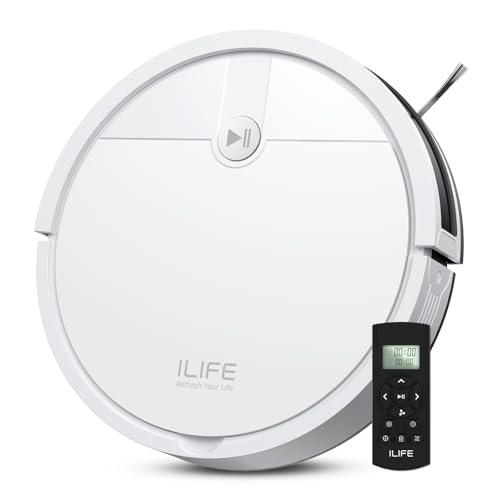
ILIFE V2, physical remote, no Wi-Fi needed, 2.99 in slim, 120 minutes
Remote controlNo Wi-Fi2.99 in tall120 min
Check price on Amazon
Best for: Owners who want no app and no account at all.

The V2 is the easiest machine here to understand. It ships with a physical remote, the listing states that no Wi-Fi is needed, and a schedule can be set on the robot itself. There is no account to create and no screen to read.

It navigates by sensors, so it covers floors by pattern and sometimes goes over the same strip twice, and it has no map or room selection. It is the cheapest option and 2.99 in tall, so it passes under most beds and chairs. Compared with the Roomba 105 Vac it asks for far less setup.

The bin is small, so empty it after each run, rinse the filter and clear the suction port. Because it is light, it is also easy to lift and carry. The remote has large, clearly labelled buttons for start, spot and return to charge, which is all most people use.

What works

  • Physical remote with no Wi-Fi
  • No account or app to learn
  • Low 2.99 in body
  • Lowest price tier

Watch out for

  • No map or room selection
  • Small bin needs frequent emptying
  • Pattern coverage repeats some strips

Spec sheet

Control
Physical remote
Network
No Wi-Fi connection needed
Height
2.99 in
Runtime
120 min
Brush
Tangle-free suction port
04
eufy 11S MAX, 2.85 in slim, BoostIQ, quiet running, 100 minutes
2.85 in tallQuietBoostIQ100 min
Check price on Amazon
Best for: Quiet homes and anyone sensitive to vacuum noise.

The 11S MAX is the gentle one. The listing leads with quiet operation and a 2.85 in profile, and BoostIQ raises suction automatically on carpet so you never touch a setting. It runs up to 100 minutes on hardwood and handles medium-pile carpet.

It has no map and no dock, which is the point: there is nothing to configure and nothing to refill. Next to the ILIFE V2 it runs quieter and comes from a better-known brand, at a slightly higher tier. A person at home through the day will appreciate the lower noise. It is also a good second robot for a bedroom, where a loud motor would be unwelcome.

Each run ends with the same short routine: empty the bin, rinse the filter and snip hair from the roller. With no bags and no water parts, upkeep is the lightest of the group. The roller is easy to pull out, so a weekly check takes about a minute.

What works

  • Quiet operation
  • BoostIQ adjusts suction on carpet
  • 2.85 in body fits under furniture
  • No bags or water parts

Watch out for

  • No map or room control
  • Bin is emptied by hand
  • 100 minute runtime

Spec sheet

Height
2.85 in
Noise
Quiet operation
Suction
BoostIQ, 1.5 s response
Runtime
100 min on hardwood
Floors
Hard to medium-pile
05
Roborock Q7 M5+, 10,000 Pa, 2.7 L sealed bag, 7 to 9 weeks, mop pad
10,000 Pa2.7 L bag7 to 9 weeksMop pad
Check price on Amazon
Best for: Owners who also want light mopping and a sealed bag.

The Q7 M5+ suits an older owner who also wants a mop. A sealed 2.7 L bag lasts 7 to 9 weeks, so emptying is a twice-a-quarter job, and dual anti-tangle brushes cut the amount of hair you have to cut out. A vibrating pad does light mopping.

It asks more of you than the Roombas, because the app is the main control and the pad and tank need rinsing. In return it offers 10,000 Pa and a sealed bag that keeps dust off your hands. Beside the Roomba 105 Vac it adds a mop for a similar tier.

Change the sealed bag when full, empty the tank after each wet run and rinse the pad. Keep the brush clear, and use the app only for the first setup. After that, a scheduled run each morning means the floors are done before you are.

What works

  • Sealed bag lasts 7 to 9 weeks
  • Anti-tangle brushes cut upkeep
  • Mop pad for light damp work
  • LiDAR mapping

Watch out for

  • App is the main control
  • Pad and tank need rinsing
  • Bags are brand-specific

Spec sheet

Suction
10,000 Pa
Dock bag
2.7 L, 7 to 9 weeks
Navigation
LiDAR
Brushes
Dual anti-tangle
Mop
Vibrating pad
06
Tikom L8000 Plus, 6,000 Pa, LiDAR, 3 L bag, up to 90 days
6,000 PaLiDAR3 L bag90 days
Check price on Amazon
Best for: Light-use homes that want the rarest dock visits.

The L8000 Plus has the longest quoted gap between bag changes in this guide, up to 90 days from a 3 L bag. That means the dock needs attention about four times a year. LiDAR maps the home and a mop plate adds damp wiping.

Its 6,000 Pa is the lowest here, and the quoted interval is a best case, so check the bag at two months. The Roomba AutoEmpty costs more than this model. The brand is newer, so write down the model and keep the manual handy.

Swap the bag when the app asks, wipe the dock port and rinse the mop pad. Keep the manual and a spare bag pack within reach. Because the dock is quiet, it can sit in a hallway without bothering anyone when it empties.

What works

  • Up to 90 days between bag changes
  • LiDAR mapping
  • Mop plate included
  • Mid price tier

Watch out for

  • Only 6,000 Pa
  • Interval is a best case
  • Newer brand with less support history

Spec sheet

Suction
6,000 Pa
Dock bag
3 L, up to 90 days
Navigation
LiDAR
Cleaning
Vacuum and mop
Dock
Self-emptying

Spec sheet decoder

What the numbers on the box really mean

The specs manufacturers lead with, translated into what they tell you about real-world performance.

AutoEmpty dock

A base that sucks the dirt out of the robot into a bag. It removes daily bin emptying.

Watch forThe Roomba 105 Vac with AutoEmpty quotes up to 75 days.

No Wi-Fi needed

The robot works from a remote or buttons with no phone app. It needs no account.

Watch forThe ILIFE V2 states this in its listing.

BoostIQ

A feature that raises suction on carpet without you changing a setting. It keeps controls simple.

Watch forThe eufy 11S MAX reacts in about 1.5 seconds.

Sealed bag

A dock bag that closes as it fills so dust does not escape when you throw it away. It protects people with allergies.

Watch forThe Roborock Q7 M5+ quotes 7 to 9 weeks from 2.7 L.

Peak suction

The Pa number is a maximum motor rating. Bare floors rarely need it.

Watch forThe Roborock Q7 M5+ lists 10,000 Pa and the Tikom L8000 Plus lists 6,000 Pa.

Methodology

How We Evaluated These Robot Vacuums for Seniors

Ease of starting

We looked at buttons, remotes and app dependence. The Roomba 105 Vac, eufy 11S MAX and ILIFE V2 all start without a phone. Models that require the app for every run scored lower.

Emptying effort

We compared docks and bins by how often you have to bend. The Roomba AutoEmpty at up to 75 days and Tikom at up to 90 days lead. Bin robots were judged on bin size.

Noise and handling

We noted quiet operation and weight. The eufy 11S MAX and ILIFE V2 are light and quiet. Flagship docks scored lower for weight.

Setup burden

We scored accounts, apps and mapping runs as effort. Remote robots scored highest. Laser robots were credited when setup is a one-off. The best arrangement is a one-time app setup by a relative, followed by a button-only routine.

Owner feedback patterns

We reviewed repeated owner reports on confusing apps, stuck robots and bag availability. Patterns outweighed single complaints. Models that need frequent rescuing were marked down. A robot that parks itself under a chair and calls for help every week fails the brief, whatever its specification says.

Decision guide

How to Choose the Right Robot Vacuums for Seniors

By Control Preference

SituationPickWhy
No app at allILIFE V2Physical remote and on-robot schedule
Button start with an optional appRoomba 105 VacStarts from the robot
Quiet and simpleeufy 11S MAXNo setup and low noise
App is fine, wants a mopRoborock Q7 M5+LiDAR and a mop pad

By Budget

SituationPickWhy
Lowest tierILIFE V2No dock and no app
Lower mid tiereufy 11S MAXQuiet basic robot
Mid tier with dockTikom L8000 Plus90 day bag quote
Upper mid tier with brand dockRoomba 105 Vac with AutoEmpty75 day dock from a known brand

Dock vs No Dock

Dock

The Roomba AutoEmpty, Roborock Q7 M5+ and Tikom L8000 Plus empty themselves for weeks. They cost more and need bags.

No dock

The Roomba 105 Vac, ILIFE V2 and eufy 11S MAX need a bin trip after most runs. They cost less and take no wall space.

Choose a dock if bending is hard, and no dock if space and budget matter more.

Noise and Schedule

SituationPickWhy
Home all dayeufy 11S MAXQuiet operation
Out in the morningRoomba 105 VacSchedule from the app or button
Nap time protectionILIFE V2Schedule on the robot
Light dust dailyRoborock Q7 M5+Quiet mode and a sealed bag

For First-Time Users Specifically

Look for

A start button on the robot, a clear remote or app and a brand with a phone support line. Ask a relative to do the first setup.

In this comparison

The ILIFE V2 needs no setup and the Roomba 105 Vac has a robot button and an optional app.

When to Spend More

Spend more if

Bending is difficult or you dislike chores. The Roomba AutoEmpty and Tikom docks cut emptying to a few times a year.

Save if

You do not mind a short bin trip. The ILIFE V2 or eufy 11S MAX cost much less.

Ownership

Maintenance schedule

The upkeep that decides whether this machine lasts two seasons or ten.

TaskIntervalWhy it matters
Empty the bin or replace the bagAfter runs or every 2 to 3 monthsA full bin lowers suction. Docks cut this to a few times a year.
Clear hair from the brushEvery 1 to 2 weeksWrapped hair slows the roller and can stop the robot. Cut it along the groove.
Tap out the filterWeeklyA clogged filter cuts airflow. Tap it into the bin and let it dry.
Clear the floor before runsEach runCables, socks and slippers stop robots. A quick pick-up saves rescuing it.
Wipe the charging contactsMonthlyDust stops the robot docking. A dry cloth fixes it.

FAQ

Frequently Asked Questions

Do I need a smartphone to use a robot vacuum?

Not for every model. The ILIFE V2 comes with a remote and needs no Wi-Fi, and the Roomba 105 Vac and eufy 11S MAX start from a button. The app adds schedules and rooms.

Which robot is quietest?

The eufy 11S MAX leads with quiet operation. Quiet mode on the others lowers noise. Avoid boost except on carpet.

Is a self-emptying dock worth the money?

If bending is difficult, yes. A dock like the Roomba AutoEmpty cuts emptying to a few times a year. Bags are a running cost. Buy bags in a multipack with the robot so the first change is not a scramble.

Will a robot stop at stairs?

Cliff sensors stop the robot at an edge. Dust can fool them, so wipe the sensors monthly. Use a barrier at open stairs.

How do I stop it getting stuck on cables?

Pick up cables, socks and slippers before each run. A robot cannot reliably avoid them. Use the remote to rescue it. If it is wedged under furniture, switch it off at the side before lifting it so the wheels are not spinning.

Can a family member set it up for me?

Yes, and that is wise. They can do the app and the map once. After that, the daily routine can be a single button.

Bottom line

The short version

Browse more robot vacuums for seniorson Amazon →
James Miller, Lead Machine Editor

About the author

James Miller

Lead Machine Editor, MachineFanatic

James Miller leads MachineFanatic's buying guides, turning spec sheets, manuals and owner feedback into clear verdicts on power tools, outdoor power equipment, shop machines and kitchen machines.

More from James →

Keep reading

Related guides