
Amazon affiliate links - we earn a commission.Affiliate disclosure

Buying guide · 11 min read · Updated 2026-11-14

Best Robot Vacuums Without Apps (2026)

Robot vacuums you can run from a remote or the top button, no phone, account or Wi-Fi required, plus honest notes on what you give up.

James MillerBy James MillerLead Machine Editor6 machines comparedSpec-sheet verified
Best Robot Vacuums Without Apps

At a glance

Our top picks

Side by side

Spec comparison

A robot vacuum that does not demand a phone is a real niche. Some households have no smartphone to spare, some dislike account sign-ups, and some simply want a machine that starts when a button is pressed and stops when the bin is full.

The catch is that a smart map and a remote control rarely come together at the same tier. Choosing well means deciding which features you can live without, then picking the model whose remaining controls are comfortable. This guide ranks six that fit that thinking.

Before you buy

6 Criteria to Look For Before Buying a Robot Vacuum Without Apps

  1. 01

    What you give up without an app

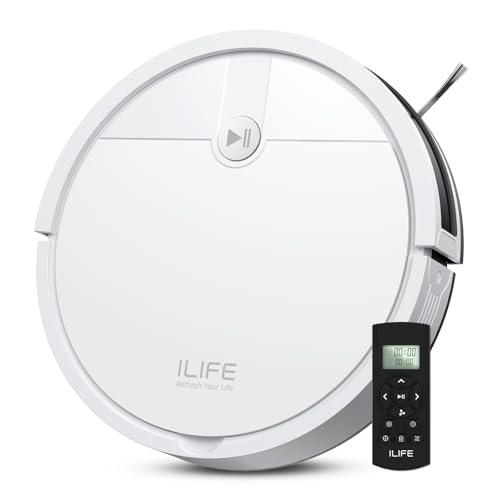
    Most robots keep their best features in the app: room selection, no-go zones, multi-floor maps and cleaning history. A remote or button-only machine, such as the ILIFE V2, gives you start, stop and a schedule and little else. Decide whether those three are enough before you rule out smart models.

  2. 02

    Remote versus onboard button

    A physical remote, like the one on the ILIFE V2 or Tikom G8000 Max, lets you schedule and steer without Wi-Fi. A robot with only a top button, like the Roomba 105 Vac, starts a clean but cannot set a timetable. If you want a schedule without a phone, only the remote models deliver it.

  3. 03

    Navigation method

    Without an app, a map is only useful if the robot uses it by itself. The Roomba 105 Vac and Shark Navigator use LiDAR to clean in rows even when you never open the app, while the ILIFE V2 and eufy 11S MAX use sensors and cover the floor by overlap. For floors above roughly 600 square feet, rows save real time.

  4. 04

    Height and diameter

    Under-furniture clearance decides whether the robot can reach the dust. The eufy 11S MAX is 2.85 inches tall, the ILIFE V2 is 2.99 inches, and the Lefant M210 is 11 inches across. A LiDAR turret adds height, so measure your sofa gap before buying a mapped model.

  5. 05

    Runtime against floor size

    Stated runtimes assume the quietest mode on hard floor. The Tikom reaches up to 150 minutes, ILIFE V2 and Lefant M210 120 minutes, and eufy 11S MAX up to 100. On carpet, expect noticeably less, and plan for a robot that returns to charge and resumes.

  6. 06

    Dock and bin burden

    Without an app you will not get a prompt that the bin is full, so the dock matters more. The Shark Navigator base holds up to 60 days, while the others use small onboard bins you must check by eye. A forgotten full bin is the commonest reason a simple robot seems to stop cleaning.

Detailed reviews

The 6 best robot vacuums without apps, explained

01
ILIFE V2 Tangle-Free Robot Vacuum With Remote
Physical remoteNo Wi-Fi needed2.99-inch tall120 min runtime
Check price on Amazon
Best for: Anyone who wants a robot with no phone, no account and no cloud.

The V2 is the clearest fit for the brief. It ships with a physical remote and, per the listing, needs no Wi-Fi connection at all, so there is no account, no pairing and no firmware prompt. You set a schedule with the remote, press clean, and the robot goes.

At 2.99 inches tall it slides under most beds and sofas, and its tangle-free suction port is aimed at hair on hard floors. It navigates by bump and sensor rather than a laser map, so expect a pattern that overlaps itself rather than tidy rows, and expect it to need a retry in a large open-plan room. Compared with the eufy 11S MAX it runs longer, 120 minutes against up to 100 on hardwood.

The bin is small, so empty it after each run. Pull hair off the brush axle weekly and keep the remote's batteries fresh, because a dead remote leaves you with only the single top button.

What works

  • Physical remote works without Wi-Fi or an account
  • Slim 2.99-inch body fits under low furniture
  • 120 minutes of runtime covers a typical flat
  • Tangle-free port suits pet hair on hard floors

Watch out for

  • No map, so no room selection or no-go zones
  • Random-style coverage overlaps and misses in big rooms

Spec sheet

Control
Physical remote, no Wi-Fi
Height
2.99 in
Runtime
120 minutes
Brush design
Tangle-free suction port
Scheduling
Built in
02
eufy 11S MAX Super-Thin Quiet Robot Vacuum
2.85-inch tallBoostIQ suctionUp to 100 minQuiet running
Check price on Amazon
Best for: Quiet apartments with a mix of hardwood and low rugs.

The 11S MAX is a simple machine by design, and that is its appeal here. It is only 2.85 inches tall, runs quietly, and uses BoostIQ to raise suction within about 1.5 seconds when it detects it has moved onto carpet or heavier debris. There is no map to build and nothing to configure.

It cleans hard floors up to medium-pile carpet, which is its honest limit: thick rugs are beyond it. Against the ILIFE V2 it is the quieter and lower machine but has a shorter 100 minute ceiling, and it trades the V2's tangle-free port for an adaptive suction approach that is stronger on mixed floors.

The filter and brush are the only service points. Tap the filter clean every week or two and cut hair from the roller, and the motor stays happy. It is an older design, so check stock of brushes and filters before you commit.

What works

  • Only 2.85 inches tall for sofa and bed clearance
  • BoostIQ raises suction within about 1.5 seconds
  • Quiet enough to run during a call or a nap
  • Handles medium-pile carpet as well as hardwood

Watch out for

  • Older design with limited brush and filter availability
  • No map or room control of any kind

Spec sheet

Height
2.85 in
Runtime
Up to 100 min on hardwood
Suction control
BoostIQ, adjusts in 1.5 s
Floor range
Hard floor to medium pile
Navigation
Sensor-based, no map
03
iRobot Roomba 105 Vac LiDAR Robot Vacuum
7,000PaClearView LiDARTop-button start3-stage cleaning
Check price on Amazon
Best for: Larger homes where orderly coverage matters more than avoiding a phone entirely.

The Roomba 105 Vac is the compromise pick. It builds a LiDAR map with ClearView so it travels in orderly lines rather than bouncing around, and the robot has a clean button on its top surface, so you can start a run without opening an app. The app adds room targeting and schedules when you want it, but is not needed for a basic clean.

That optional-app design puts it ahead of the eufy 11S MAX for coverage in a larger home, at a clearly higher tier. The 7,000Pa figure is a peak rating, and the three-stage brush and suction design is what does the real work on hair and crumbs.

LiDAR robots still need the sensors kept clean: wipe the turret window and cliff sensors every few weeks. Replace the filter and brush on iRobot's schedule, since parts are easy to find, which is a genuine plus for a machine you plan to keep for years.

What works

  • LiDAR map gives orderly rows instead of random bouncing
  • Onboard button starts a clean with no app
  • 3-stage brush and suction design suits hair
  • Parts are widely available for years of ownership

Watch out for

  • Room selection and schedules still need the app
  • Vacuum only, with no mopping function

Spec sheet

Suction rating
7,000Pa
Navigation
ClearView LiDAR
Cleaning stages
3-stage
Control
Onboard button, app optional
Mop
None, vacuum only
04
Shark Navigator RV2120AE Self-Empty Robot Vacuum
60-day bagless baseSmartPath LiDARObject avoidanceCarpet and hard floor
Check price on Amazon
Best for: Owners who want the fewest chores and will use the app rarely or never.

If the reason you avoid apps is that you want fewer things to manage, this is the machine that cuts the most chores. SmartPath navigation uses a spot LiDAR to map and clean in rows, and the bagless base holds up to 60 days of dirt, so you may handle it less often than any other robot here. It also detects and avoids objects, which lowers the number of rescues.

Its limit is that mapping, scheduling and room control are app features, so a no-phone owner will mostly use the onboard button and run it as a simple scheduled sweeper. Compared with the Roomba 105 Vac it offers a larger dock and an avoidance feature, though with no mop.

Bagless bases mean you empty a bin and clean a filter rather than buying bags. Do that monthly, wipe the sensors, and clear the side brush. Treat the base as a fixed appliance and give it clear space on both sides so the robot docks squarely.

What works

  • Bagless base holds up to 60 days of dirt
  • Spot LiDAR cleans in orderly rows
  • Detects and avoids objects on the floor
  • No ongoing cost for dust bags

Watch out for

  • Best features need the app and a Wi-Fi connection
  • Dock footprint is bigger than a plain charging stand

Spec sheet

Navigation
SmartPath spot LiDAR
Base capacity
60 days, bagless
Object handling
Detects and avoids
Floor types
Carpet and hard floor
Mop
None
05
Tikom G8000 Max 5000Pa Vacuum and Mop With Remote
5000Pa450ml bin, 300ml tankUp to 150 minRemote included
Check price on Amazon
Best for: Hard-floor homes that want vacuuming and mopping from a remote.

The G8000 Max lets you vacuum and mop in one go with a 450ml bin and a 300ml tank, and it accepts a remote as well as the app. That remote is the reason it is on this list: you can drive it entirely from the handset if you prefer, and run it on up to 150 minutes in quiet mode.

Its 5000Pa rating is lower than the Roomba 105 Vac's 7,000Pa on paper, but this tier is built for hard floors and pet hair rather than deep carpet. The longer runtime beats the ILIFE V2's 120 minutes and suits bigger single-level homes, while the mop adds a function the other app-light picks lack.

A wet mop pad needs routine care: rinse the pad and tank after each use and let both dry, or mildew forms. Keep it off carpet and sealed away from unfinished wood, then wipe the sensors monthly.

What works

  • Remote handset can run it without the app
  • Up to 150 minutes in quiet mode
  • 450ml bin and 300ml tank allow longer runs
  • Mop function the plain remote models lack

Watch out for

  • Wet pad needs rinsing and drying to avoid odor
  • Lower suction rating than the Roomba 105 Vac

Spec sheet

Suction rating
5000Pa
Dust bin
450ml
Water tank
300ml
Runtime
Up to 150 min, quiet mode
Control
Remote and app
06
Lefant M210 Slim Robot Vacuum, 120 Min
11-inch body120 min runtimeSlim low-noiseSelf-charging
Check price on Amazon
Best for: Small hard-floor spaces on the tightest budget.

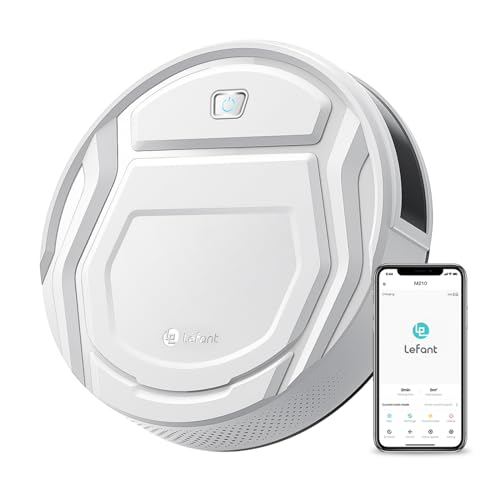
The M210 is the cheapest machine in the lineup and the smallest at 11 inches across, which helps it reach under furniture that larger bodies refuse. It returns to charge on its own and runs for up to 120 minutes, and the app and Alexa links are available but not mandatory for a basic run.

It is built for pet-owning households on hard floors, but with no LiDAR and a modest motor it is a light-duty machine. Next to the ILIFE V2 it has the same runtime and a similar slim idea, but the V2 includes a physical remote, so the M210 is more app-reliant for scheduling.

Small bins fill fast with pets, so empty after each run and clear the brush weekly. Pair it with a tidy floor, because compact robots lack the clearance and power to cope with clutter.

What works

  • 11-inch body fits where bigger robots cannot
  • Auto-return to the charger after each run
  • 120 minutes of runtime at the lowest tier
  • Low-noise running suits shared homes

Watch out for

  • No remote handset, so scheduling leans on the app
  • Light motor struggles with thick carpet or clutter

Spec sheet

Diameter
11 in
Runtime
120 minutes
Noise
Low-noise design
Charging
Automatic self-charging
Smart control
Wi-Fi, app and Alexa, optional

Spec sheet decoder

What the numbers on the box really mean

The specs manufacturers lead with, translated into what they tell you about real-world performance.

Pa suction rating

This is a peak pressure figure measured at the motor, not a measure of floor pickup. Brush design and seal decide most of what gets cleaned.

Watch forRoomba 105 Vac lists 7,000Pa and Tikom 5000Pa, but both are tuned for hard floors.

Runtime in minutes

The figure applies to the quietest mode on bare floor. Higher power and carpet shorten it, sometimes by a third or more.

Watch forThe Tikom's 150 minutes is quiet mode only.

BoostIQ

Eufy's term for a sensor-driven suction increase when the robot meets carpet or heavy dirt. It switches automatically with no setup.

Watch forCheck it exists on the eufy 11S MAX before assuming other slim robots do it.

Spot LiDAR

A fixed or spot laser ranging system that maps the room for row-by-row cleaning. It works in the dark.

Watch forThe Shark Navigator uses it, but full map features still need the app.

Bin and tank volume

Bin size sets how much dirt fits before the robot stops, and tank size sets mopping range. A larger volume means fewer interruptions.

Watch forTikom lists 450ml for the bin and 300ml for the tank.

Methodology

How We Evaluated These Robot Vacuums Without Apps

Control without a phone

We checked what each listing says about running the robot with no app. A physical remote counts for more than an onboard button, and an app-only schedule counts least. The ILIFE V2 leads here because the listing states no Wi-Fi is needed.

What remains when the app is ignored

We asked how much of the machine still works with no phone connected. LiDAR row cleaning on the Roomba 105 Vac survives, but room selection does not. The more value that stays after you uninstall the app, the higher the rank.

Hair and floor handling

Brush design and suction behaviour were judged from stated mechanisms, such as the tangle-free port on the ILIFE V2 and BoostIQ on the eufy 11S MAX. Owner feedback patterns on hair and thick rugs supported the ordering.

Dock burden

Without an app notification, a dock that holds weeks of dirt is a safeguard. The Shark Navigator base holds up to 60 days, while the simple models rely on a visible bin. This changes how often you must remember the machine.

Value across tiers

Relative tiers run from the Lefant M210 and ILIFE V2 at the bottom to the Shark Navigator at the top. A higher tier had to buy something you actually use without the app, such as LiDAR rows or self-emptying.

Decision guide

How to Choose the Right Robot Vacuums Without Apps

By Your Phone Habits

SituationPickWhy
No smartphone or no Wi-FiILIFE V2Physical remote works without Wi-Fi
Use the app once a monthRoomba 105 VacMap plus onboard start button
Want a remote and a mopTikom G8000 MaxRemote handset plus 300ml tank
Refuse accounts but want quieteufy 11S MAXSensor-based, nothing to configure
Want almost no choresShark Navigator RV2120AE60-day bagless base

By Budget

TierPickWhy
Lowest tierLefant M210Smallest body and 120 minute runtime
Low tierILIFE V2Remote and schedule with no Wi-Fi
Lower-middle tierTikom G8000 MaxMop and remote together
Middle tierRoomba 105 VacLiDAR rows and spare-parts support
Upper tierShark Navigator RV2120AESelf-empty base and avoidance

Mapped vs Sensor-Only

Mapped robots

The Roomba 105 Vac and Shark Navigator travel in rows, so they cover big floors faster and with fewer misses. They give most of that benefit even if you leave the app alone. They cost more and stand taller because of the sensor turret.

Sensor-only robots

The ILIFE V2, eufy 11S MAX and Lefant M210 wander and overlap, so they need more time to cover a room. They are lower, cheaper and simpler. Expect to run them twice in a big space.

Go mapped above roughly one large room; go sensor-only for studios and small flats.

Floor Type

FloorPickWhy
Hardwood and tileTikom G8000 MaxMop function and long runtime
Mixed hard floor and low rugseufy 11S MAXBoostIQ adapts to medium pile
Pet hair on hard floorILIFE V2Tangle-free suction port
Carpet and hard floorShark Navigator RV2120AEBuilt for both floor types

For Older Adults Specifically

Look for

A big, labeled remote or one onboard button, no pairing steps and no account. Light weight helps, and so does a quiet motor. Avoid anything that needs firmware updates to work.

In this comparison

The ILIFE V2 is the simplest to operate because the remote handles scheduling. The Roomba 105 Vac is a good second choice, since its top button starts a clean without the app.

When to Spend More

Spend more if

Your floor is large or cluttered and you want orderly coverage and fewer emptying chores. The Roomba 105 Vac and Shark Navigator are the upgrades that matter.

Save if

You have one or two rooms and a tidy floor. The ILIFE V2 or Lefant M210 will do the daily sweep perfectly well.

Ownership

Maintenance schedule

The upkeep that decides whether this machine lasts two seasons or ten.

TaskIntervalWhy it matters
Empty the binAfter each run for small-bin modelsSmall bins fill in a single pass in pet homes. An overfull bin cuts airflow and the robot seems weak.
Clear brush and axle of hairWeeklyHair wraps the axle ends and stalls the roller. Cut it free with scissors rather than pulling.
Clean the filterEvery 1 to 2 weeksTap it out rather than washing unless the maker allows it. A clogged filter lowers suction and overheats the motor.
Wipe sensors and charging contactsMonthlyDust on cliff sensors causes false drops and stops. Dirty contacts cause failed charging.
Replace the remote batteriesTwice a year or when response lagsA weak remote makes the robot seem unresponsive. Keep spares since there is no app fallback.

FAQ

Frequently Asked Questions

Can a robot vacuum really work without Wi-Fi?

Yes. The ILIFE V2 listing states a physical remote means no Wi-Fi connection is required. Others start from a top button, but you lose scheduling or room control without an app.

Do I lose the map if I skip the app?

The robot still maps and plans its route on its own, as the Roomba 105 Vac does with LiDAR. What you lose is the ability to see, edit or label the map.

Is an app-free robot more private?

Generally yes, because no account or cloud sync is needed. If privacy is the reason, keep the robot off your Wi-Fi rather than relying on a setting.

Is a remote better than an app for older users?

Often. A handset with big buttons is easier than navigating screens, and it does not depend on a phone update breaking the connection.

How long will a simple robot last?

The motor and body can run for years, while the battery usually fades in three to four. Check that replacement batteries and brushes exist for your model.

Can I schedule cleanings with no phone?

Only on models with a remote or onboard scheduling, such as the ILIFE V2. A button-only robot runs when you press it.

Bottom line

The short version

Browse more robot vacuums without appson Amazon →
James Miller, Lead Machine Editor

About the author

James Miller

Lead Machine Editor, MachineFanatic

James Miller leads MachineFanatic's buying guides, turning spec sheets, manuals and owner feedback into clear verdicts on power tools, outdoor power equipment, shop machines and kitchen machines.

More from James →

Keep reading

Related guides