
Amazon affiliate links - we earn a commission.Affiliate disclosure

Buying guide · 12 min read · Updated 2026-11-07

Best Rode Podcast Mixers (2026)

Four RODECaster production consoles compared for podcasts: the Duo, Pro II, Video and Video S, with preamps, pads, multitrack recording and video switching.

James MillerBy James MillerLead Machine Editor4 machines comparedSpec-sheet verified
Best Rode Podcast Mixers

At a glance

Our top picks

Side by side

Spec comparison

MachineMic inputsUseVideo inputsScenesAudio
RODECaster Pro II 4-preamp audio production studioBest OverallRODECaster Pro II 4-preamp audio production studio4 XLR studio preampsn/an/an/an/a
RODECaster Duo compact audio production studioBest ValueRODECaster Duo compact audio production studio2 Neutrik combo jacksPodcasts, streaming, musicn/an/an/a
RODECaster Video S 4-input video switcher and interfaceBest for Video PodcastsRODECaster Video S 4-input video switcher and interfacen/aVideo podcasts4 (3 HDMI, 1 USB)5 customisable multi-source2 Neutrik combo jacks, Revolution preamps
RODECaster Video 6-input switcher and audio interfaceBest for Multi-Camera ShowsRODECaster Video 6-input switcher and audio interfacen/aMulti-camera video production6 (4 HDMI, 2 USB)7 customisable multi-source2 Neutrik combo jacks, Revolution preamps

An all-in-one production console takes the place of a mixer, a recorder, an interface and a sound pad controller. It sits on the desk, takes the microphones and records or streams without needing a computer to be involved in every step.

The key question is whether your show is audio only or also needs video switching. After that, count the microphones, decide whether you will record standalone or into a computer, and think about how many remote guests you expect.

Before you buy

6 Criteria to Look For Before Buying a Rode Podcast Mixer

  1. 01

    Audio only or video too

    The Pro II and Duo are audio consoles, while the Video S and Video add camera switching. If your show is audio-only, the video models add cost and a longer setup for features you will not use. If you stream on camera, choosing an audio console means you need a separate switcher. A middle path is to buy the audio console now and add a separate camera switcher later, which keeps the microphone side strong while you decide whether video is a long-term part of the show.

  2. 02

    Real microphone inputs

    The Pro II provides four XLR studio preamps, while the Duo, Video S and Video each provide two combo jacks. Count how many people talk at the same time and add a spare input. A two-input console cannot grow to a four-person panel without extra equipment. A common workaround for a two-input unit is a small external mixer feeding one line input, but that sacrifices individual tracks and adds noise, so it is better to size the console correctly the first time.

  3. 03

    Voice processing quality

    The Pro II uses APHEX processing presets to give voices broadcast-style compression, enhancement and de-essing from a single tap. Consoles with built-in processing cut editing time because the voice is already shaped. If you edit heavily, you can also record clean and process later. Presets are a starting point rather than a final answer, and a quiet voice may still benefit from a touch more gain before the processing stage.

  4. 04

    Recording method

    These consoles can record standalone to microSD or a USB drive, or send multitrack audio to a computer. Standalone recording avoids a computer crash ruining an episode. Choose the method that matches how you edit, and use fast storage. Whichever method you choose, record a short test file at the start of every session and play it back before the guest arrives.

  5. 05

    Pads and bed music

    The Pro II has eight SMART pads and the Duo has six with bank switching. Pads trigger intros, stingers and effects without a computer. If your show uses lots of sound design, count the pads you really need. Remember that pad audio is only useful if the files are loaded in advance, so keep a tidy folder of jingles and name them clearly.

  6. 06

    Desk space and cables

    The video consoles bring several HDMI and USB connections, so cable planning matters. The Duo is the most compact of the group. Measure your desk and plan cable routes before you buy. A tidy desk also protects the touchscreen, since cables dragged across the glass are a frequent cause of scratches.

Detailed reviews

The 4 best rode podcast mixers, explained

01
RODECaster Pro II 4-preamp audio production studio
4 XLR preamps8 SMART padsAPHEX processingStandalone
Check price on Amazon
Best for: Three or four person podcasts that want broadcast processing and pads.

The Pro II is the flagship audio console in this family, and its real strength is the preamp and processing chain. Four XLR inputs with studio preamps feed an APHEX voice processing stage that applies compression, de-essing and enhancement from one-tap presets, so voices sound broadcast-ready without a plugin chain. Eight SMART pads trigger jingles, effects and bed music, and every source can be routed to its own track.

The tradeoff is complexity and size. It is a deep device with a touchscreen workflow, and a person who only needs a simple two-person recorder will not use a fraction of it. Compared with the Duo, it adds two more microphones and the larger pad bank, while the video consoles give up two microphone inputs but add camera switching. For a podcast of three or four people, it is the logical centre.

It records standalone to microSD or a USB drive, or sends multitrack audio to a computer, so ownership is flexible. Keep storage fast and dedicated, label each fader, and save your pad layouts as projects. Firmware updates arrive regularly, and installing them between seasons rather than mid-series prevents surprises.

What works

  • Four XLR studio preamps handle most dynamic mics
  • APHEX presets give broadcast-ready voices in one tap
  • Eight SMART pads for jingles, effects and beds
  • Records standalone or multitrack to a computer

Watch out for

  • Deep menu system takes time to learn
  • More console than a two-person show needs

Spec sheet

Mic inputs
4 XLR studio preamps
Voice processing
APHEX presets
Sound pads
8 SMART pads
Recording
Multitrack to computer, microSD or USB drive
Operation
Standalone, no computer needed
02
RODECaster Duo compact audio production studio
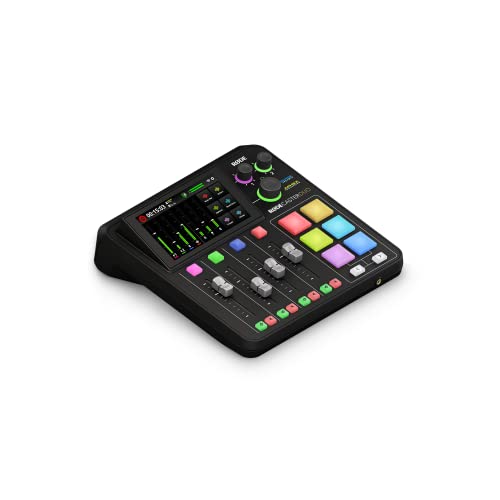
2 combo inputs4 fadersTouchscreen6 SMART pads
Check price on Amazon
Best for: A host plus one guest who wants faders, pads and a touchscreen on a small desk.

The Duo shrinks the same idea to a desk-friendly size. Two Neutrik combo jacks take microphones or instruments through ultra-low-noise, high-gain preamps, four broadcast-quality faders give tactile level control, and a high-resolution touchscreen with haptic feedback replaces most buttons. Six SMART pads with bank switching mean sound effects stay within reach.

The limit is the two microphone inputs, which restrict it to a host and a guest unless you add line-level devices. Against the Pro II, you give up two preamps and some pad capacity but gain a smaller footprint and a lower tier. It also doubles as a music tool, because the combo jacks accept instruments, which suits a show with a guitarist or a musician on the mic.

It is a low-maintenance box. Keep the touchscreen clean, store files on a fast drive, and update firmware between sessions. If your show grows to three speakers, plan to step up to the Pro II rather than patching extra gear into the Duo. Because its faders are physical, a host can ride a quiet guest's level while looking at them rather than the screen.

What works

  • Two combo jacks with ultra-low-noise, high-gain preamps
  • Four broadcast-quality faders for tactile control
  • Touchscreen with haptic feedback is quick to learn
  • Compact enough for a crowded desk

Watch out for

  • Only two microphone inputs
  • Fewer pads than the Pro II

Spec sheet

Mic inputs
2 Neutrik combo jacks
Faders
4 broadcast-quality
Display
Touchscreen with haptic feedback
Pads
6 SMART pads with bank switching
Use
Podcasts, streaming, music
03
RODECaster Video S 4-input video switcher and interface
4 video inputs2 combo jacks5 scenesChroma keying
Check price on Amazon
Best for: A two-person video podcast with several cameras.

The Video S adds a video switcher to the audio console. It accepts up to four video sources, three over HDMI and one over USB, and stores five customisable multi-source scenes so a single press can change the camera layout. Two Neutrik combo jacks with Revolution preamps handle the microphones, and graphic overlays, automatic chroma keying and media playback live in the same interface.

The compromise is audio capacity. With two combo jacks, it is a two-microphone device, so a four-person video show needs extra routing. Compared with the Pro II, it is stronger on video and weaker on pure audio, and compared with the larger Video model it has fewer video inputs and fewer scenes. For a host and guest on camera, it is a tidy solution.

Setup is the real work. Camera cabling, scene layouts and overlay graphics take time to design, but once a show format is stored, the day-to-day workload is light. Keep HDMI cables short and secure, and label every input so a guest host can run the show. Pair it with a second camera on a short HDMI lead and the scenes are quick to build.

What works

  • Switches four video sources and five scenes
  • Revolution preamps on two combo jacks
  • Overlays, chroma keying and media playback built in
  • Audio and video handled by one desk unit

Watch out for

  • Only two microphone inputs for a video show
  • Setup time is long for camera layouts

Spec sheet

Video inputs
4 (3 HDMI, 1 USB)
Scenes
5 customisable multi-source
Audio
2 Neutrik combo jacks, Revolution preamps
Extras
Overlays, chroma keying, media playback
Use
Video podcasts
04
RODECaster Video 6-input switcher and audio interface
6 video inputs2 combo jacks7 scenesChroma keying
Check price on Amazon
Best for: A multi-camera show or panel that needs seven scene layouts.

The Video model scales the idea up. It switches six video sources, four over HDMI and two over USB, and offers seven fully customisable multi-source scenes with transitions, overlays and automatic chroma keying. It carries the same two Neutrik combo jacks with Revolution preamps as the Video S, so the audio side is unchanged.

Its tradeoff is cost and complexity for a show that does not need six cameras. A two-person talk show is well served by the Video S, and a audio-only podcast is better off with the Pro II. This model makes sense when you run a multi-angle set, a panel with a wide shot and close-ups, or a stream that mixes slides and media.

Plan for a production space with a rack of cables, a quality computer to receive the output and a person who learns the scene layouts. Treat the audio inputs as a limit, and add an external mixer for extra microphones if the panel grows. If you only have two cameras, the smaller Video S already covers you.

What works

  • Switches six video sources with seven scenes
  • Same Revolution preamps as the Video S
  • Transitions, overlays and chroma keying built in
  • One box replaces a separate switcher and interface

Watch out for

  • Overkill for a simple two-camera show
  • Only two microphone inputs, so large panels need extra audio gear

Spec sheet

Video inputs
6 (4 HDMI, 2 USB)
Scenes
7 customisable multi-source
Audio
2 Neutrik combo jacks, Revolution preamps
Extras
Overlays, chroma keying, transitions
Use
Multi-camera video production

Spec sheet decoder

What the numbers on the box really mean

The specs manufacturers lead with, translated into what they tell you about real-world performance.

Neutrik combo jack

A combination socket that accepts both an XLR plug and a quarter inch jack. It lets you connect microphones or instruments to the same input. In practice this means a condenser, a dynamic microphone and a guitar can share the same socket type.

Watch forThe Duo, Video S and Video each have two, while the Pro II has four XLR inputs.

APHEX processing

A voice processing chain that applies compression, enhancement and de-essing. It is aimed at making voices sound polished with minimal setting changes. It is a helpful shortcut, though a skilled editor may still prefer to process the raw files later.

Watch forThe Pro II is the model in this guide that advertises APHEX presets.

SMART pads

Programmable pads that trigger sounds, effects or actions. They can be banked into several layers. Banks let one set of pads hold several sets of sounds, which suits a show with many segments.

Watch forThe Pro II has eight, and the Duo has six with bank switching.

Scene

A saved layout of video sources, overlays and audio levels that can be recalled at once. It speeds up a live show. Think of a scene as a saved camera layout for a segment, such as a wide shot or a side-by-side view.

Watch forThe Video S stores five scenes and the Video stores seven.

Chroma keying

Automatic removal of a background color so a person can be placed over other graphics. It requires even lighting to look clean. A green screen with soft, even light removes most of the problem.

Watch forBoth video consoles offer it, but poor lighting spoils the result.

Methodology

How We Evaluated These Rode Podcast Mixers

Audio input design

We compared microphone input counts and preamp type. The Pro II offers four XLR studio preamps and the others offer two combo jacks. Capacity mattered for panel shows. We noted which consoles can take both microphones and instruments on the same input.

Processing and polish

We looked at how much voice shaping is built in. The Pro II's APHEX presets lead the lineup. Less editing time scored higher. We also looked at how obvious the presets are for a first-time user.

Video capability

We compared video input counts and scene storage. The Video offers six inputs and seven scenes while the Video S offers four and five. Video features mattered only for on-camera shows. We counted how many scenes a producer can store for different segments.

Recording flexibility

We checked whether each console can record without a computer. Standalone recording to microSD or USB scored higher. Multitrack output to a computer was also considered. We noted which models keep working without a computer attached.

Ownership

We weighed setup effort, firmware support and physical size. Owner feedback patterns on touchscreen reliability informed the scores. Simpler units scored higher for home rooms. We also considered how often firmware is mentioned in owner feedback patterns.

Decision guide

How to Choose the Right Rode Podcast Mixers

By Number of Microphones

SituationPickWhy
Host plus one guestRODECaster DuoTwo combo jacks and four faders
Three or four voicesRODECaster Pro IIFour XLR studio preamps
Two voices on cameraRODECaster Video STwo combo jacks plus four video inputs
Two voices, multi-cameraRODECaster VideoSix video inputs and seven scenes

By Budget

SituationPickWhy
Lowest tier of the fourRODECaster DuoCompact audio console
Mid tier for videoRODECaster Video SFour video inputs with scenes
Upper tier for audioRODECaster Pro IIFour preamps and APHEX
Top tier for camerasRODECaster VideoSix video inputs

Audio Console vs Video Switcher

Audio console

The Pro II and Duo focus on microphones, pads and processing. They are easier to learn and better for audio-only shows.

Video switcher

The Video S and Video add camera inputs, scenes and overlays. They suit on-camera shows but still offer only two microphone jacks.

Audio podcasters should pick the Pro II or Duo, and video podcasters should pick the Video S or Video.

Recording Workflow

SituationPickWhy
Standalone, no computerRODECaster Pro IIRecords to microSD or a USB drive
Multitrack to a computerRODECaster Pro IISeparate tracks for editing
Stream with camera scenesRODECaster Video SScenes and overlays built in
Large camera productionRODECaster VideoSix sources and transitions

For Multi-Host Podcasts Specifically

Look for

Look for as many true microphone preamps as hosts, individual headphone control and per-voice tracks. A console with only two inputs forces extra gear. Processing presets save time when voices vary.

In this comparison

The RODECaster Pro II is the clear match, with four XLR preamps and APHEX processing. The Duo covers a pair, and the Video models are better when cameras are in play.

When to Spend More

Spend more if

Spend more if your show has three or more regular voices or uses video. The Pro II gives audio headroom and the Video models give camera control.

Save if

Save if you only record a host and one guest on audio. The Duo covers that need with fewer controls to learn.

Ownership

Maintenance schedule

The upkeep that decides whether this machine lasts two seasons or ten.

TaskIntervalWhy it matters
Update firmwareTwice a yearUpdates add features and fix bugs on these consoles. Install between seasons, not mid-series. Read the release notes first so a changed workflow does not surprise you before a live show.
Use fast, dedicated storageAlwaysA slow microSD card or drive can drop tracks. Keep the storage reserved for the console. Format the card or drive in the console itself to avoid file errors.
Clean the touchscreenMonthlyFingerprints reduce haptic accuracy. Use a dry microfibre cloth. Switch the console off first so a stray touch cannot trigger a pad.
Check HDMI and USB cablesEvery few monthsA loose cable makes a camera blink out of a scene. Re-seat and label connections. A short, labelled cable is easier to trace when something goes wrong.
Save projects and pad layoutsAfter each changeA saved layout restores a show quickly after a reset. It also lets a guest host reproduce your settings. Back up the project to a computer once a month for peace of mind.

FAQ

Frequently Asked Questions

Which RODECaster is best for a podcast?

The Pro II is the best for a podcast with several hosts because of its four XLR preamps and processing. The Duo suits a two-person show. If your show may grow, the extra preamps in the Pro II will save you from buying again.

Do I need the video models?

Only if you stream or record on camera. The Video S and Video add camera inputs and scenes, but they still have two microphone jacks. For a mixed show, many creators record the Pro II to a computer while also using a separate camera setup.

Can I record without a computer?

Yes. These consoles can record standalone to microSD or a USB drive, which keeps a computer crash from ending an episode. A quick test with your own storage and a ten minute recording will show whether it keeps up.

What is the cheapest way in?

The Duo is the lowest tier in this group and fits a host with one guest. Step up to the Pro II if you plan to have more voices. Always confirm the exact number of preamps in the listing, since bundles can add microphones and headphones without changing the console.

Do the preamps handle quiet dynamic mics?

The Revolution preamps and studio preamps are high-gain and low-noise, which suits most broadcast dynamic microphones. Check the mic's sensitivity before assuming it will work without a booster. If voices are very quiet, an inline booster can help, but try the console's own gain first.

How long will they last?

The electronics are solid state and the wear items are the touchscreen, faders and cables. A careful owner can expect many years of service. Keep dust off the faders and the console should last a very long time.

Bottom line

The short version

Browse more rode podcast mixerson Amazon →
James Miller, Lead Machine Editor

About the author

James Miller

Lead Machine Editor, MachineFanatic

James Miller leads MachineFanatic's buying guides, turning spec sheets, manuals and owner feedback into clear verdicts on power tools, outdoor power equipment, shop machines and kitchen machines.

More from James →

Keep reading

Related guides