

Amazon affiliate links - we earn a commission.Affiliate disclosure

Buying guide · 14 min read · Updated 2026-11-07

Best Sewing and Embroidery Machine Combos (2026)

Six sewing and embroidery combination machines compared on hoop area, design count, screens and file transfer, plus the trade-offs of one machine for both.

James MillerBy James MillerLead Machine Editor6 machines comparedSpec-sheet verified
Best Sewing and Embroidery Machine Combos

At a glance

Our top picks

A combination machine sews with its normal arm and stitches embroidery with a removable unit that moves a hoop beneath the needle. One body does both jobs, which saves space and money but forces compromises: every time you switch, you attach or remove the embroidery unit.

The things to compare are the embroidery area, the number and quality of built-in designs, the screen you use to edit them and how files arrive. A combo with a tiny hoop or a clumsy screen will frustrate you long before the sewing side does.

Before you buy

6 Criteria to Look For Before Buying a Sewing and Embroidery Machine Combo

  1. 01

    Embroidery area

    Combos tend to have smaller hoops than embroidery-only machines. The design area decides what you can stitch in one pass. Check the hoop size listed for your model and compare it with the projects you want, such as a chest logo or a pillow panel. Many combos list a field close to the 4 by 4 to 5 by 7 inch class, which suits monograms and small motifs but forces larger designs to be split into sections that must align. If you plan jacket backs or table runners, look at an embroidery-only machine with an 8 by 12 inch or larger area instead.

  2. 02

    Design library and fonts

    The Brother SE2000 lists over 190 designs and 13 fonts, the Janome Memory Craft 1000 lists 241 designs, and the Caydo ES200 lists 168 designs and eight fonts. A big library helps early on, but you will download or digitize most designs eventually. What matters more is how clean the built-in files are: a well-digitized design stitches smoothly with few trims, while a rushed one jumps and thickens. Stitch a few built-in designs on scrap before you commit, and note the ones that run without thread breaks.

  3. 03

    Screen and editing

    A combo is only pleasant if you can place and edit a design easily. The Brother NQ3550W has a 3.67 inch color touch LCD and the Caydo ES200 has a 4.3 inch touchscreen. A small or clumsy screen turns a design change into a chore.

  4. 04

    File transfer

    The Brother SE700 and SE2000 use wireless LAN and the Artspira app. A combo without simple file transfer limits custom work. Make sure you can load designs from a computer or phone.

  5. 05

    Hooping system

    Hooping quality causes more embroidery failures than machine faults. The Janome Memory Craft 1000 has a lever-based two-stage hoop system, and the Brother NQ3550W bundle includes a magnetic frame. Better hooping saves fabric.

  6. 06

    Switching effort

    A combo makes you attach and remove the embroidery unit. If you switch daily this becomes tedious. If you embroider mostly, a dedicated embroidery machine and a cheap sewing machine may be a better arrangement. Think about the unit swap as a habit: if embroidery jobs run for hours, a combo ties up your sewing capability for the whole run. A second small sewing machine beside the combo is cheap insurance that you can still hem a pair of trousers while a design stitches out.

Detailed reviews

The 6 best sewing and embroidery machine combos, explained

01
Brother SE2000 sewing and embroidery machine, 190+ designs
190+ designs50 downloadableWireless LAN13 fonts
Check price on Amazon
Best for: A household that both sews and monograms regularly.

The SE2000 offers the broadest embroidery library in this guide among Brother machines, with over 190 built-in designs, 50 downloadable ones and 13 embroidery fonts. It also sews, so one machine covers garment construction and monograms.

Wireless LAN transfers files from a computer, and the Artspira app lets you draw or customize designs on a phone. Against the SE700 it adds designs and fonts, and against the Brother NQ3550W it keeps a simpler interface and fewer accessories in the box.

Because it does two jobs, treat the embroidery unit with care. Remove it only with the machine off, store it in its case, keep the carriage clear and clean the bobbin area after every design. Sewing and embroidery use different feet and needles, so label a small box for each. Lint from dense fills collects faster than lint from sewing. When you finish an embroidery session, trim jump threads with curved scissors, remove the stabilizer carefully and press the back of the design from the wrong side, because steam from the front flattens the stitches. Set the machine up near good light and a table large enough to support the hoop arm, as a hoop that bumps a wall mid-design ruins the garment.

What works

  • Over 190 built-in embroidery designs
  • Fifty downloadable designs and 13 fonts
  • Wireless transfer and Artspira app
  • Brand support for both sewing and embroidery

Watch out for

  • Embroidery unit must be attached and removed
  • Compromise on hoop size compared with embroidery-only machines

Spec sheet

Type
Computerized combo
Built-in embroidery designs
190+
Downloadable designs
50
File transfer
Wireless LAN
App
Artspira
02
Brother SE700 sewing and embroidery machine, wireless
Sewing and embroideryWireless LAN8 feetArtspira
Check price on Amazon
Best for: First-time embroidery buyers who also want to sew.

The SE700 is the entry combo from Brother, aimed at both beginners and more advanced users. It includes eight sewing feet, wireless LAN file transfer and Artspira app support for drawing custom designs on a mobile device.

It sits lower in the price tiers than the SE2000 and gives up some of the design library and fonts. For many households that is a fair trade: the machine does both crafts, and the Artspira app extends the library with downloads.

Ownership is simple when you build a routine. Keep the embroidery unit in its case between uses, clean the bobbin area after a design and use fresh needles for embroidery. Learn to hoop fabric flat with stabilizer, because most early disappointments come from hooping rather than from the machine. Practice with a plain cotton square and a medium cutaway stabilizer, test one built-in design and a short lettering sample, and only then move to a real garment. Note which thread brand runs cleanly through your needle, since some metallic and polyester threads shred if the needle eye is too small, and write the needle size on the thread spool so you do not guess next time.

What works

  • Lower price tier than the SE2000
  • Wireless LAN transfer
  • Eight sewing feet included
  • Artspira app for custom designs

Watch out for

  • Smaller design library than the SE2000
  • Embroidery unit switching adds steps

Spec sheet

Type
Combo
Presser feet
8
File transfer
Wireless LAN
App
Artspira customization
Audience
Beginner and advanced
03
Brother Innov-is NQ3550W sewing and embroidery, 258 stitches
258 stitches3.67 inch touch LCDDigitizing softwareMagnetic frame
Check price on Amazon
Best for: Sewists who want to digitize and stitch their own designs.

The NQ3550W is the premium Brother, with a 3.67 inch color touch LCD and 258 sewing stitches. Its bonus bundle includes Stitch Express digitizing software and a magnetic frame, which are real extras for a person who wants to make their own designs.

The touch screen is the day-to-day difference from the SE2000: you can see designs, edit them and choose settings without a cramped menu. Compared with the Janome Memory Craft 1000, it brings the digitizing software and frame into the package.

A magnetic frame speeds hooping and is gentler on delicate fabric, but magnets need care. Keep them away from the LCD, phones and cards, and clean the frame between jobs. Treat this as a machine for someone who will use it weekly, since the price tier and the learning curve are higher than the entry combos. The 258 sewing stitches are a bonus, but the daily value is the screen and software: being able to resize, rotate and combine designs on the machine, then send a file to it wirelessly, is what shortens the path from idea to stitched item. A digitizing program takes weeks to learn, so budget the time as well as the money, and start with simple shapes and a single color.

What works

  • Color touch LCD for editing designs
  • 258 sewing stitches
  • Digitizing software and magnetic frame in the bundle
  • Brand support

Watch out for

  • Top tier among the combos here
  • Magnetic frame needs careful handling around electronics

Spec sheet

Type
Computerized combo
Display
3.67 inch color touch LCD
Sewing stitches
258
Bonus bundle
Digitizing software and magnetic frame
Position
Top tier here
04
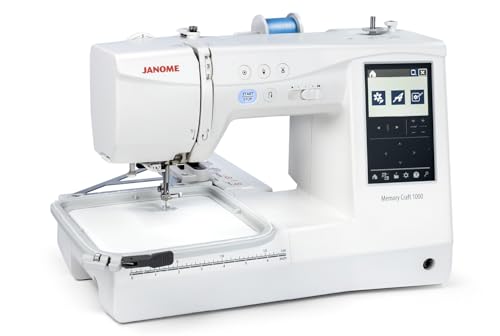
Janome Memory Craft 1000 combo, 300 stitches, 241 designs
300 stitches241 designsLever hoopOn-screen editing
Check price on Amazon
Best for: Sewists who want more designs and better hooping control.

The Memory Craft 1000 pairs 300 sewing stitches with 241 built-in embroidery designs, and the designs can be edited on the machine. Its lever-based two-stage hoop tightening system helps you center and secure fabric.

The hoop system is what stands out, since poor hooping is the leading cause of embroidery puckering and a lever that tightens in two stages gives more control. Compared with the Brother SE2000 it has more designs, 241 against 190, and a bigger sewing library.

Care follows the usual combo routine, with the embroidery unit stored in its case and the bobbin area cleaned frequently. Confirm service options with Janome, since a combo has more parts to go wrong, and keep a stock of stabilizer so you can practice hooping on scrap before real projects. Two-stage tightening works by letting you seat the fabric loosely, center the design, then lock it down so the weave is not distorted. After each long run, check the hoop edges for fabric that has crept, because a drifted hoop shows up as a gap between outline and fill. Rotate between a small and a large hoop depending on the design so the fabric stays taut.

What works

  • 241 built-in embroidery designs
  • 300 sewing stitches
  • Lever-based hoop tightening system
  • On-machine design editing

Watch out for

  • Fewer wireless features listed than the Brothers
  • Embroidery unit adds storage needs

Spec sheet

Type
Computerized combo
Built-in stitches
300
Built-in embroidery designs
241
Hoop system
Lever-based two-stage
Editing
On machine
05
Caydo ES200 2-in-1 machine, 207 stitches, 168 designs
207 stitches168 designs4.3 inch touchscreen8 fonts
Check price on Amazon
Best for: Buyers who want both crafts at a lower tier.

The Caydo ES200 combines 207 sewing stitches, 168 embroidery designs, eight fonts and a 4.3 inch touchscreen in a machine from a less established brand. It lists a fabric capacity of up to seven layers.

Compared with the Brother SE700 it offers more on paper, a bigger screen and more built-in designs, but a shorter service history. That makes the warranty and the seller return policy matter more than usual.

If you buy it, test both functions in the first week and keep the packaging. Use stabilizer, change the needle often and clean the bobbin area frequently. Keep expectations tied to its tier: it can produce monograms and simple designs, but it is not a substitute for a premium machine with strong support. A seven-layer fabric rating is a number to treat gently: it suggests a stack of lightweight cotton or a couple of denim layers, not a quilt sandwich with thick batting. If the screen or touch response drifts after a few months, contact the seller within the return window, because a touchscreen fault on a combo can stop both sewing and embroidery.

What works

  • 207 sewing stitches and 168 designs
  • 4.3 inch touchscreen
  • Eight embroidery fonts
  • Lower position in price tiers

Watch out for

  • Newer brand with less service history
  • Embroidery unit still needs attaching

Spec sheet

Type
2-in-1 combo
Sewing stitches
207
Embroidery designs
168
Fonts
8
Display
4.3 inch touchscreen
06
Singer Smart HD 9120, 200+ stitches, optional 900E embroidery
200+ stitchesApp control900E sold separatelyHeavy duty
Check price on Amazon
Best for: Sewists who want strong sewing and a path to embroidery.

The Smart HD 9120 is a sewing machine first, with embroidery as an add-on. The 900E embroidery attachment is sold separately, so the combo cost is the machine plus the unit.

It offers more than 200 stitches and phone control, and it is a heavy-duty class machine, which sets it apart from the Brother combos in sewing strength. Compared with the SE2000, it favors sewing capability over a built-in embroidery library.

Buy it if you sew thick fabrics and want embroidery as a later option. Keep the app updated, store the attachment safely and confirm that sewing works without the phone. Because the embroidery unit is a separate purchase, price the full setup before you decide: machine, attachment, hoops, stabilizer and thread add up, and the total sometimes lands near the cost of a dedicated combo. Check that the hoop size of the attachment suits the designs you want, since the add-on field is typically smaller than a native combo field.

What works

  • More than 200 stitches
  • Heavy duty class sewing
  • App control
  • Optional embroidery attachment

Watch out for

  • Embroidery attachment is sold separately
  • New release with limited track record

Spec sheet

Type
Sewing machine with embroidery option
Stitches
200+
Control
Mobile app
Embroidery
900E attachment sold separately
Class
Smart Heavy Duty

Spec sheet decoder

What the numbers on the box really mean

The specs manufacturers lead with, translated into what they tell you about real-world performance.

Embroidery designs built in

Stored designs you can stitch without a computer.

Watch forThe Janome lists 241, the Brother SE2000 lists 190+, the Caydo lists 168.

Sewing stitches

Stitches available when the machine is used for sewing.

Watch forThe NQ3550W lists 258, the Janome lists 300 and the Caydo lists 207.

Wireless LAN

Transfers design files from a computer without a USB drive.

Watch forListed on the Brother SE700 and SE2000.

Magnetic frame

A hoop held by magnets that clamps fabric quickly.

Watch forIncluded in the NQ3550W bundle.

Digitizing software

Software that converts artwork into stitch files.

Watch forThe NQ3550W bundle includes Stitch Express.

Methodology

How We Evaluated These Sewing and Embroidery Machine Combos

Embroidery capability

We compared built-in design counts, 241 on the Janome, 190 plus on the SE2000 and 168 on the Caydo, and weighed them against hoop and editing options.

Sewing capability

We looked at sewing stitches and class: 258 on the NQ3550W, 300 on the Janome and heavy duty on the Singer 9120.

Interface

We compared screens: the 3.67 inch touch LCD, the 4.3 inch touchscreen and app control on the Singer.

File and software support

We noted wireless LAN, Artspira and bundled software, giving credit to machines that make custom designs practical.

Ownership

We considered brand support and how often you switch between sewing and embroidery. Newer brands were rated cautiously.

Decision guide

How to Choose the Right Sewing and Embroidery Machine Combos

By Priority

SituationPickWhy
Balanced sewing and embroideryBrother SE2000190+ designs and wireless
Lower-cost entryBrother SE700Wireless and eight feet
Digitizing your own designsBrother NQ3550WSoftware and magnetic frame
Most built-in designsJanome Memory Craft 1000241 designs
Lowest tierCaydo ES200168 designs
Heavy sewing firstSinger Smart HD 9120Optional embroidery

By Budget

TierPickWhy
Low tierSinger Smart HD 9120Sewing with option
Low-middle tierBrother SE700Entry combo
Middle tierCaydo ES200Touchscreen
Upper-middle tierJanome Memory Craft 1000241 designs
Upper tierBrother SE2000Wide library
Top tierBrother NQ3550WSoftware bundle

Combo vs Separate Machines

Combo

One footprint and one cost. The Brother SE2000 and SE700 do both jobs but you attach and remove the embroidery unit.

Separate machines

A dedicated embroidery machine and a basic sewing machine let you stitch while sewing, at the cost of space and a larger total outlay.

Pick a combo if space is tight and you do both crafts occasionally; pick separate machines if you embroider often.

Interface

PreferencePickWhy
Large touch screenCaydo ES2004.3 inch
Color touch LCDBrother NQ3550W3.67 inch
Phone appBrother SE700Artspira
On-machine editingJanome Memory Craft 1000Edits designs on screen

For Monogramming Specifically

Look for

Built-in fonts, an easy hoop and a design area big enough for names.

In this comparison

The Brother SE2000 lists 13 fonts and the Caydo ES200 lists eight, while the Janome adds a lever hoop for accurate placement.

When to Spend More

Spend more if

You will digitize, edit designs on a larger screen or embroider weekly: the NQ3550W or Janome.

Save if

You want to try embroidery. The SE700 or Caydo ES200 covers the basics.

Ownership

Maintenance schedule

The upkeep that decides whether this machine lasts two seasons or ten.

TaskIntervalWhy it matters
Store the embroidery unit in its caseAfter each useThe unit carries precise moving parts. Dust and knocks harm it.
Clean the bobbin areaAfter each designDense stitching sheds lint. It builds quickly in a combo.
Use fresh needlesEvery few projectsEmbroidery and sewing use different needles. A dull one causes breaks.
Keep magnets away from electronicsAlwaysMagnetic frames can disturb cards and phones.
Keep software updatedAs releasedApp and wireless features rely on current software.

FAQ

Frequently Asked Questions

Is a combo machine as good as two separate machines?

For most households, yes, but you accept a smaller hoop and the effort of attaching the embroidery unit.

Which combo is best for beginners?

The Brother SE700 is the entry route, and the SE2000 adds designs and fonts.

Do I need digitizing software?

Not initially. Built-in designs and apps give plenty to start. For custom logos, software becomes useful.

Can I sell items I embroider with a combo?

You can, but combos are slower than multi-needle machines and have smaller hoops.

Why does embroidery pucker?

Usually slack hooping or the wrong stabilizer. Hoop firmly and match backing to the fabric. Stretchy knits want cutaway backing and a lighter design, while firm woven cotton tolerates tearaway. If puckering continues, reduce the design density if your machine allows it and check the needle is fresh and the right size for the thread you are using.

How long does a typical design take?

It depends on stitch count and hoop size. A small monogram may run in a few minutes, while a dense chest logo can take half an hour or more. Combos stitch at moderate speeds, and the Brother and Janome units are far slower than a multi-needle production machine, so plan batches accordingly. One more note on the Singer: the Smart HD 9120 does not include embroidery in the box, because the 900E attachment is sold separately, so count it as a sewing machine with an option and price the full setup before you buy it.

Bottom line

The short version

Browse more sewing and embroidery machine comboson Amazon →
James Miller, Lead Machine Editor

About the author

James Miller

Lead Machine Editor, MachineFanatic

James Miller leads MachineFanatic's buying guides, turning spec sheets, manuals and owner feedback into clear verdicts on power tools, outdoor power equipment, shop machines and kitchen machines.

More from James →

Keep reading

Related guides