Amazon affiliate links - we earn a commission.Affiliate disclosure

Buying guide · 12 min read · Updated 2026-11-07

Best 300mm 3D Printers (2026)

Four 3D printers in the 300 mm build class compared on frame, chamber, multicolor systems and upkeep, so you pick a size that fits your parts and desk.

James MillerBy James MillerLead Machine Editor5 machines comparedSpec-sheet verified
Best 300mm 3D Printers

At a glance

Our top picks

A bed around 300 millimeters on a side is the practical middle ground for hobby printing. It holds helmets, large enclosures and trays of small parts that a compact bed cannot, without the footprint, weight and failure cost of a truly large machine.

Size alone does not decide the choice. Frame rigidity, chamber heat and the multicolor system all change what the machine can do at that size. This guide compares four 300 mm-class printers on those points, and on the upkeep that a bigger bed adds.

Before you buy

6 Criteria to Look For Before Buying a 300mm 3D Printer

  1. 01

    Real build volume

    A 300 mm class label hides real differences. The QIDI Plus5 is 320 by 320 by 300 mm, while others list around 300 mm per side. Check height as well, since tall parts need Z travel. A bigger bed also heats slower and costs more filament when a print fails.

  2. 02

    CoreXY frame and rigidity

    On a big bed, a heavy moving bed would limit speed. CoreXY machines like the K1 Max and K2 Pro keep the bed still and move a light head. Frame rigidity matters more than the top speed claim, since a flexing frame rings at acceleration.

  3. 03

    Chamber and nozzle temperature

    PLA and PETG print well in a passive enclosure. ABS, ASA and nylon need a warm chamber and a hotter nozzle. The QIDI Plus5 heats its chamber to 65 degrees Celsius and its nozzle to 370 degrees, while the Creality machines are aimed at lower-temperature materials.

  4. 04

    Multicolor system

    A multicolor feeder swaps filaments on one nozzle and wastes plastic in purge towers. The K2 Pro Combo's CFS supports up to 16 colors and the Kobra X's ACE 2 Pro expands up to 19. Buy it only if you will print color often, since single-color printing is simpler and cheaper.

  5. 05

    Failure detection

    A failure on a 300 mm bed can waste hundreds of grams of filament. Camera-based detection on the K2 Pro Combo can pause a failing job. For long prints, this feature has real value.

  6. 06

    Footprint and weight

    A 300 mm machine needs a sturdy bench and space for filament storage and door clearance. Measure your desk, check the weight, and leave room for ventilation around the enclosure.

Detailed reviews

The 5 best 300mm 3d printers, explained

01
Creality K2 Pro Combo 300 mm CoreXY with CFS and dual AI cameras
300 mm buildEnclosed CoreXYCFS multicolorAI cameras
Check price on Amazon
Best for: Makers who want a 300 mm enclosed machine with multicolor and monitoring.

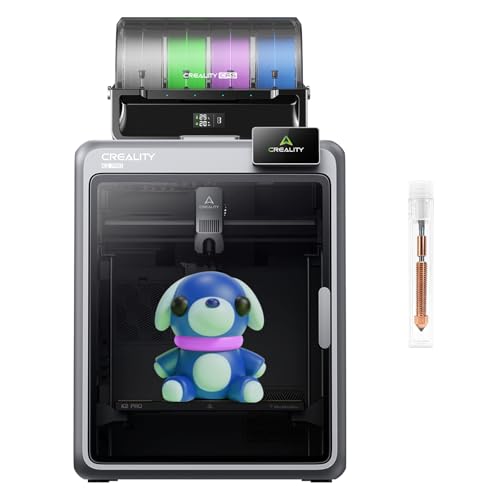
The K2 Pro Combo is an enclosed CoreXY machine in the 300 mm class, bundled with the CFS filament system for up to 16 colors. A CoreXY layout keeps the bed still in X and Y and moves a light head on belts, which holds accuracy better at speed than a moving bed of the same size. The enclosure keeps drafts off tall prints and softens noise.

The pair of AI cameras watches for failures such as spaghetti or detached prints, which matters more on a large bed where one failure wastes a lot of filament. Compared with the K1 Max in this guide, the K2 Pro adds a multicolor system and a more modern chamber, but costs more. Against the QIDI Plus5, it does not offer a heated chamber for engineering filaments.

Ownership means managing a bigger machine. Keep the CFS spools dry, wipe rails and clean the plate before large prints, and make sure the table can hold the weight. Large beds also take longer to heat, so allow time before a long job. Soak the bed for several minutes before the first layer so the plate reaches an even temperature across its whole surface.

What works

  • Enclosed CoreXY frame in a 300 mm bed
  • CFS supports up to 16 colors
  • Dual AI cameras watch for failed prints
  • 600 mm/s class motion for faster batches

Watch out for

  • No active heated chamber for ABS or nylon
  • Large footprint needs a sturdy bench
  • CFS spools need dry storage

Spec sheet

Build class
300 mm
Top speed
600 mm/s
Multicolor
CFS, up to 16 colors
Monitoring
Dual AI cameras
Frame
Enclosed CoreXY
02
Creality K1 Max 300 mm CoreXY printer with dual cooling
300 mm build600 mm/sDual coolingAI function
Check price on Amazon
Best for: Buyers who want a fast 300 mm printer for PLA and PETG without extras.

The K1 Max is a 300 mm-class CoreXY printer with a listed top speed of 600 mm/s and dual cooling. Cooling is the underrated spec at speed, because fast prints lay down plastic faster than a weak fan can set it, and overhangs and bridges suffer. Automatic leveling handles bed setup.

Against the K2 Pro it lacks the CFS multicolor system and the dual cameras, so it is a single-material workhorse, which is why it ranks as the value pick. Compared with the QIDI Plus5, it does not offer a heated chamber but is simpler to run and covers PLA and PETG well.

For ownership, expect routine belt checks, rail lubrication and nozzle replacement. Larger beds make the first layer more sensitive to a dirty or slightly warped plate, so clean it and check leveling before long jobs. A higher-speed machine benefits from regular fan checks, because a clogged or slowing part-cooling fan quietly degrades bridges and overhangs long before it fails outright. Dust the fan ducts every few months and listen for changes in pitch.

What works

  • 300 mm class bed at a lower tier than the K2 Pro
  • Dual cooling helps overhangs at speed
  • Automatic leveling simplifies setup
  • CoreXY motion with 600 mm/s headline

Watch out for

  • No built-in multicolor system
  • No heated chamber
  • Older platform than the K2 series

Spec sheet

Build class
300 mm
Top speed
600 mm/s
Cooling
Dual fans
Leveling
Automatic
Smart features
AI function
03
QIDI Plus5 320 x 320 x 300 mm printer with 65 C chamber heating
320 x 320 x 300370 C nozzle65 C chamberLinear rails
Check price on Amazon
Best for: Hobbyists printing ABS, ASA or nylon parts at a large size.

The Plus5 is built for materials that a passive enclosure cannot handle. A chamber heated to 65 degrees Celsius reduces warping on ABS, ASA and nylon, and a 370 degree nozzle opens up high-temperature filaments. The 320 by 320 by 300 mm volume is the largest of the 300 mm class here.

The motion system uses linear guide rails and a wide 9 mm belt, which stiffens the machine and holds accuracy at a heavy gantry. Compared with the K2 Pro, it trades camera smarts and a simple ecosystem for engineering capability. A combo version adds multicolor, so the choice depends on how much you value color.

Ownership means managing heat. A hot chamber ages fans and plastic parts faster, ABS needs ventilation, and engineering filaments absorb moisture, so budget for a filament dryer. Check parts supply before buying, and remember that engineering filaments are less forgiving than PLA: a nylon spool left out overnight can print badly the next morning, so dry it just before the job.

What works

  • Heated chamber to 65 C reduces warping
  • 370 C nozzle opens engineering filaments
  • Linear rails and wide belt stiffen the frame
  • Largest 300 mm-class volume in the lineup

Watch out for

  • More complex than a PLA-only printer
  • Needs ventilation and filament drying
  • Hot chamber ages some parts faster

Spec sheet

Build volume
320 x 320 x 300 mm
Nozzle limit
370 C
Chamber
Heated to 65 C
Motion
Linear guide rails
Belt
9 mm 1.5GT
04
ANYCUBIC Kobra X Fast native 4-color printer with ACE 2 Pro
Native 4-colorUp to 19 colorsPre-assembledAuto leveling
Check price on Amazon
Best for: Buyers who want multicolor from the start with minimal setup.

The Kobra X is built around native four-color printing, and the ACE 2 Pro feeder system can expand to a listed maximum of 19 colors. It arrives pre-assembled with a modular design, which shortens setup for a family or a first-time buyer. Automatic leveling handles the bed.

Its position in the 300 mm class depends on the listing, so confirm the exact build volume against your parts before buying. Against the K2 Pro Combo, it focuses more on multicolor ease than on camera monitoring, while the K2 offers a more rigid enclosed frame. Compared with the K1 Max, it adds the color system.

Ownership centers on the feeder. Keep spools dry, plan for purge waste on color changes, and check that the feeder's filament paths stay clear. A multicolor machine uses more plastic per object, so factor in running costs.

What works

  • Native four-color with room to expand
  • Pre-assembled modular design
  • Automatic leveling reduces setup
  • High-speed class motion

Watch out for

  • Exact build volume needs checking against the listing
  • Multicolor wastes filament in purge towers
  • Feeder adds upkeep and dry-storage needs

Spec sheet

Colors
4 native, up to 19
Feeder
ACE 2 Pro
Top speed
600 mm/s class
Leveling
Automatic
Assembly
Pre-assembled, modular
05
Creality K2 Combo (A) CFS multicolor printer, 95% pre-assembled
CFS multicolor600 mm/s95% pre-builtSilent mode
Check price on Amazon
Best for: Buyers who want Creality multicolor in a slightly smaller, cheaper package.

The K2 Combo (A) is the smaller, lower-priced sibling in Creality's K2 family, shipping 95 percent pre-assembled with a CFS multicolor unit. Four CFS units chained together reach up to 16 colors, and a silent mode lowers noise for a shared room. It is enclosed, which keeps drafts off the print and muffles the machine.

The point of including it in a 300 mm guide is the step-down option. Its bed is a little smaller than the K2 Pro and K1 Max, so check your largest part before choosing it, but it keeps the multicolor system and costs less than the Pro. Against the Kobra X, it offers a more established enclosed frame, while against the QIDI Plus5 it does not offer chamber heating.

Ownership follows the other Creality machines: keep CFS spools dry, clean the plate before long jobs, and check belts and rails on a schedule. The quiet mode trades some speed for lower noise, which suits apartments.

What works

  • CFS multicolor included in the Combo
  • Arrives 95 percent pre-assembled
  • Silent mode suits shared rooms
  • Enclosed frame softens noise and drafts

Watch out for

  • Bed is smaller than the Pro and K1 Max
  • No active heated chamber
  • Multicolor purge adds filament waste

Spec sheet

Multicolor
CFS, up to 16 colors
Top speed
600 mm/s
Assembly
95% pre-assembled
Noise
Silent mode
Frame
Enclosed CoreXY

Spec sheet decoder

What the numbers on the box really mean

The specs manufacturers lead with, translated into what they tell you about real-world performance.

Build volume

The largest part the bed and Z travel allow, given as X, Y and Z.

Watch forThe Plus5 lists 320 x 320 x 300 mm; verify height for tall parts.

CoreXY

A motion layout that moves a light head on belts while the bed only moves in Z.

Watch forThe K1 Max and K2 Pro use it; confirm rigidity of the frame rather than the speed claim.

Chamber temperature

The heated air temperature inside the enclosure, which helps materials that warp.

Watch forOnly the Plus5 lists active chamber heating at 65 C.

Multicolor colors

The number of filaments the feeder system can manage.

Watch forThe K2 Pro Combo lists up to 16 and the Kobra X lists up to 19.

Linear rail

A precision guide that carries the gantry with low play.

Watch forThe Plus5 lists linear guide rails, which help accuracy on heavy gantries.

Methodology

How We Evaluated These 300mm 3D Printers

Size-class fit

We checked listed build volumes against the 300 mm class and flagged any that needed verifying. The Plus5 offers the most volume while the K1 Max and K2 Pro sit at the class size.

Frame and motion

We compared CoreXY layouts, rails and belt widths. The Plus5's linear rails and wide belt stood out.

Material range

We compared chamber and nozzle limits. The Plus5 reaches the widest range, with Creality machines aimed at standard filaments.

Software and monitoring

We weighed camera monitoring, apps and multicolor management. The K2 Pro Combo led on monitoring.

Ownership cost

We considered consumables, drying needs and parts support. Larger machines scored lower on footprint and filament waste.

Decision guide

How to Choose the Right 300mm 3D Printers

By Use

SituationPickWhy
Large PLA and PETG parts at speedCreality K1 MaxFast CoreXY at a lower tier
Large multicolor propsCreality K2 Pro ComboCFS and enclosed frame
Functional ABS, ASA or nylon partsQIDI Plus5Heated chamber and 370 C nozzle
Family or first-time multicolorANYCUBIC Kobra XPre-assembled, native four-color

By Budget

TierPickWhy
Lowest hereCreality K1 MaxSingle-material 300 mm
MiddleANYCUBIC Kobra XMulticolor included
UpperCreality K2 Pro ComboCamera monitoring and CFS
HighestQIDI Plus5Engineering capability and volume

Single Color vs Multicolor

Single color

The K1 Max and Plus5 print one filament at a time. They are simpler, waste less plastic and suit functional parts, which is why most engineers and repair users stay with single-material machines.

Multicolor

The K2 Pro Combo and Kobra X manage several filaments. They are better for display pieces but use more plastic and need dry spools.

Choose single color for tools and brackets. Choose multicolor for models and gifts.

Open Material Range

PreferencePickWhy
PLA and PETG onlyCreality K1 MaxSimple and fast
Occasional ABSCreality K2 Pro ComboEnclosed frame holds some heat
Frequent ABS or nylonQIDI Plus5Active chamber heating

For Big Batches Specifically

Look for

Even bed heat, reliable leveling and failure detection, since a large tray of parts is a large loss when one fails.

In this comparison

The K2 Pro Combo pairs cameras with an enclosed frame. The K1 Max is the cheaper way to fill a tray with PLA parts.

When to Spend More

Spend more if

You print engineering materials or large display pieces. The Plus5 and K2 Pro Combo earn their price in those jobs.

Save if

You print PLA parts that fit a 300 mm bed. The K1 Max does that without paying for extras.

Ownership

Maintenance schedule

The upkeep that decides whether this machine lasts two seasons or ten.

TaskIntervalWhy it matters
Clean and level the bedBefore large printsA big bed magnifies first-layer problems. A clean plate and fresh leveling prevent them.
Check belt tensionEvery 3 monthsWide belts still stretch. A loose belt shows up as ghosting on long edges.
Lubricate railsEvery 3 to 6 monthsLinear rails and Z screws need light lubrication. Wipe old grease first.
Dry filamentBefore every long printMoist filament ruins a large job. Use a dryer or sealed storage.
Replace nozzleWhen wornHigh flow wears nozzles faster. A worn nozzle causes under-extrusion on big parts.

FAQ

Frequently Asked Questions

Is 300 mm big enough for helmets?

Many adult helmets can be printed in sections at this size. A single-piece helmet usually needs a larger bed. Check your model's dimensions against the bed, including the height, and remember that supports or a brim need a few extra millimeters around the part.

Do I need a heated chamber?

Only for ABS, ASA and nylon. PLA and PETG print well in an enclosed machine without active heating.

Is a bigger bed slower to print on?

It takes longer to heat, and large parts take longer to print, but speed per layer is the same. Failures cost more material, so use failure detection.

Do multicolor systems work on 300 mm printers?

Yes, the K2 Pro Combo and Kobra X both do. Expect purge waste and a need for dry spools, and budget extra filament for the color changes.

How much desk space do I need?

Measure the printer's footprint and add clearance for the door and filament spool. Allow extra space behind the machine for cables and for any air that the chamber fan exhausts. Large enclosed machines can need a dedicated bench.

Can I print on a 300 mm machine without a camera?

Yes, but cameras help catch failures on long prints. They are useful but not essential, and a simple habit of checking the first ten layers and then the first hour catches most failures before they waste material.

Bottom line

The short version

Browse more 300mm 3d printerson Amazon →
James Miller, Lead Machine Editor

About the author

James Miller

Lead Machine Editor, MachineFanatic

James Miller leads MachineFanatic's buying guides, turning spec sheets, manuals and owner feedback into clear verdicts on power tools, outdoor power equipment, shop machines and kitchen machines.

More from James →

Keep reading

Related guides