Amazon affiliate links - we earn a commission.Affiliate disclosure

Buying guide · 12 min read · Updated 2026-11-07

Best 500mm/s 3D Printers (2026)

Five fast CoreXY 3D printers in the 500 mm/s class compared on real throughput, cooling, multicolor options and upkeep, so speed claims do not mislead you.

James MillerBy James MillerLead Machine Editor5 machines comparedSpec-sheet verified
Best 500mm/s 3D Printers

At a glance

Our top picks

Side by side

Spec comparison

In this guide the number five hundred refers to speed, the head velocity in millimeters per second that makers print on the box. It has become the standard marketing figure for modern enclosed CoreXY machines, and it says little on its own about how quickly a real part finishes.

Real throughput depends on how much plastic the hotend can melt, how quickly the head accelerates, and how well the part cools. This guide ranks five machines in this speed class on those underlying limits and on the upkeep that fast printing brings.

Before you buy

6 Criteria to Look For Before Buying a 500mm/s 3D Printer

  1. 01

    Acceleration over top speed

    A machine needs distance to reach its top speed, and reaching 500 mm/s at 20,000 mm/s2 takes roughly 6 mm of travel. Most real printing involves short segments and corners, so acceleration decides throughput more than the top speed. The P1S and Adventurer 5M both list 20,000 mm/s2.

  2. 02

    Volumetric flow

    Flow in cubic millimeters per second is how much plastic the hotend can melt, and it caps real speed on thick layers. The Adventurer 5M lists 32 mm3/s. A machine with a high speed claim but a low flow ceiling will not print faster in practice.

  3. 03

    Cooling capacity

    Fast printing lays plastic down quicker than a weak fan can set it, so bridges and overhangs droop. Look for a multi-fan setup and a chamber that vents or controls heat for PLA. Heat trapped in a closed chamber can soften PLA near the nozzle and cause jams, so a printer that lets you open a lid or vent when printing PLA avoids a common enclosed-machine failure.

  4. 04

    Frame rigidity

    High acceleration shakes light frames, causing ringing or ghosting on the surface. Metal frames and enclosed CoreXY layouts help. Input shaping software can also reduce the effect by measuring the frame's resonance and compensating, but it cannot fully hide a flimsy build, so judge the weight and bracing of the machine too.

  5. 05

    Nozzle temperature limit

    The Centauri Carbon lists 320 degrees Celsius, which opens nylon blends and polycarbonate. The P1S and Adventurer 5M are aimed at standard materials. Choose according to your intended filaments, not the speed claim. Printing nylon, polycarbonate or filled materials at 500 mm/s is rarely practical anyway, because those filaments need slower, hotter and drier conditions to print well.

  6. 06

    Multicolor trade-offs

    The P1S Combo, Centauri 2 Combo and K2 SE 4C all offer four-color printing. Color changes waste plastic and add mechanisms to maintain. Buy a multicolor machine only if color is a regular need.

Detailed reviews

The 5 best 500mm/s 3d printers, explained

01
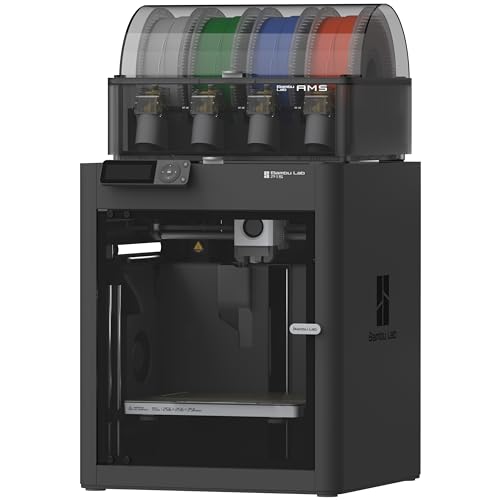
Bambu Lab P1S Combo enclosed CoreXY with AMS, 500 mm/s
500 mm/s20,000 mm/s2Enclosed CoreXYAMS included
Check price on Amazon
Best for: Buyers who want fast prints with the fewest surprises.

The P1S pairs a 500 mm/s top speed with 20,000 mm/s2 acceleration, and the acceleration figure is the number that matters more. A CoreXY layout keeps the moving mass low, so the head can change direction quickly without shaking the frame. The full enclosure holds heat and softens noise.

The Combo adds the AMS, which feeds up to four spools and chains to higher color counts. Against the Centauri Carbon, it has a more mature software and model ecosystem, but a lower nozzle temperature limit. Against the Adventurer 5M in this guide, it is slower on paper but delivers consistent results with less tuning.

Ownership is where this machine earns trust. Parts are widely stocked, community settings are plentiful, and owner feedback patterns suggest few mystery failures after first-layer tuning. Wipe the carbon rods, check belt tension, and keep the AMS spools dry, as the feeder does not dry filament itself. Expect to replace the nozzle and the build plate surface on a schedule, and consider placing the printer where its fan noise will not disturb a living space.

What works

  • 20,000 mm/s2 acceleration on a low-mass head
  • Enclosed frame holds heat and cuts noise
  • AMS included for multicolor
  • Mature slicer and parts supply

Watch out for

  • AMS does not dry filament
  • Noisy at full speed
  • Repairs follow the maker's ecosystem

Spec sheet

Top speed
500 mm/s
Acceleration
20,000 mm/s2
Frame
Enclosed CoreXY
Multicolor
AMS, up to 16 colors
Leveling
Automatic
02
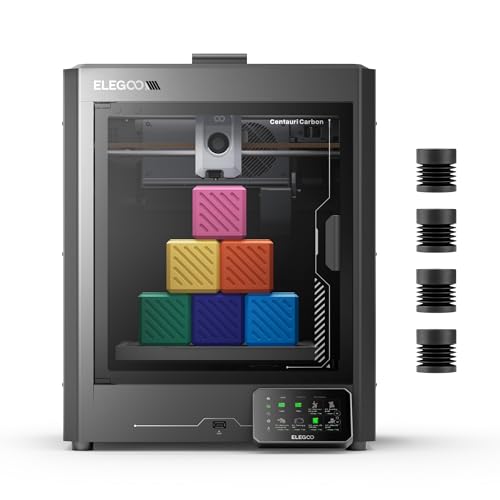
ELEGOO Centauri Carbon CoreXY, 500 mm/s with 320 C nozzle
500 mm/s320 C nozzleCoreXYAuto calibration
Check price on Amazon
Best for: Buyers who want a fast, hot-nozzle machine at a lower tier.

The Centauri Carbon is a CoreXY machine with a listed 500 mm/s speed, automatic calibration and a nozzle rated to 320 degrees Celsius. That temperature ceiling reaches filaments such as nylon blends and polycarbonate that a 260 or 280 degree hotend cannot. The maker positions it as ready to print out of the box, and that makes it a good fit for owners who dislike tuning.

It is a single-filament printer, so there is no feeder to manage and less purge waste. Against the P1S Combo, the Centauri offers a hotter nozzle at a lower tier, but it has a smaller community and fewer proven settings. Against the Centauri 2 Combo, it leaves out the multicolor system, which means fewer parts that can jam and a simpler path for the filament.

For ownership, expect the usual CoreXY care: belt checks, rail lubrication and nozzle replacement. Because the brand is newer to this class, confirm parts availability and warranty terms before buying. A hotend that reaches 320 degrees also deserves a hardened or tungsten-class nozzle if you plan to print filled materials, and a dry box matters because nylon absorbs water within hours. Treat the high temperature as an option you may use a few times a year, not a reason to buy on its own.

What works

  • 320 C nozzle opens high-temperature filaments
  • Automatic calibration reduces setup
  • Single filament path keeps waste low
  • CoreXY motion at 500 mm/s

Watch out for

  • Smaller community than the market leaders
  • No built-in multicolor
  • Newer platform with less proven upkeep history

Spec sheet

Top speed
500 mm/s
Nozzle limit
320 C
Frame
CoreXY
Calibration
Automatic
Setup
Print out of the box
03
ELEGOO Centauri 2 Combo with CANVAS 4-color system, 500 mm/s
500 mm/sCANVAS 4-colorCoreXYBeginner-friendly
Check price on Amazon
Best for: Beginners who want four-color printing at 500 mm/s.

The Centauri 2 Combo takes the Centauri platform and adds the CANVAS system for four-color printing. It remains a 500 mm/s CoreXY machine, and the maker pitches it as beginner-friendly. The bundle makes multicolor part of the experience from day one.

Multicolor means purge waste and an extra mechanism to maintain. Against the P1S Combo, it matches the four-color pitch but trades the larger ecosystem for a lower price tier. Compared with the K2 SE 4C, it is a more recent platform with a dedicated multicolor module, so ask which of the two has better parts availability where you live. Against the Centauri Carbon, it adds colors at the cost of more complexity, and a four-color print can use far more plastic and time than a one-color print of the same size.

Ownership centers on CANVAS: keep spools dry, watch for filament path jams, and plan for the extra plastic. Check the warranty and the availability of replacement parts. Beginner-friendly machines still need a clean plate and dry filament, so do not assume the multicolor system removes the usual first-layer care. Many owners print single-color parts for weeks before they trust the color changes, and that is a sensible way to learn the machine.

What works

  • Four-color CANVAS bundle included
  • CoreXY motion at 500 mm/s
  • Beginner-friendly positioning
  • Familiar maker with parts support

Watch out for

  • Purge waste adds filament cost
  • Extra mechanism to maintain
  • Newer ecosystem than the market leaders

Spec sheet

Top speed
500 mm/s
Multicolor
CANVAS, 4 colors
Frame
CoreXY
Target
Beginner-friendly
Version
Combo bundle
04
Creality K2 SE 4C four-color printer, 500 mm/s with heated bed
500 mm/s4-colorHeated bedBeginner-friendly
Check price on Amazon
Best for: Budget buyers who want four-color printing.

The K2 SE 4C offers four-color printing at 500 mm/s with a heated bed, aimed at beginners who want color without a large outlay. It sits below the K2 Pro and K2 Plus in the maker's lineup, so expect fewer luxuries such as camera monitoring, a smaller range of materials and a simpler enclosure story. For first-time color printers that is an acceptable bargain. Its heated bed supports PLA and PETG adhesion.

Against the Centauri 2 Combo, it competes for the same four-color buyer. Against the P1S Combo, it lacks a mature ecosystem but costs less. The tradeoff is simply fewer refinements for a lower price. Buyers who want built-in cameras, quiet modes or an actively vented chamber should look at the higher K2 models or the P1S Combo, since those conveniences are what the lower price leaves out.

Ownership is similar to other Creality printers: parts are common, community advice is plentiful and the usual belts-and-rails upkeep applies. Keep multicolor spools dry and expect purge waste. Ask how many spare parts the maker sells for the color mechanism, because that is where an entry-tier machine is most likely to need attention in year two, and compare the warranty length against rivals before deciding.

What works

  • Four-color capability at an entry tier
  • 500 mm/s class CoreXY
  • Heated bed for PLA and PETG
  • Maker with wide community support

Watch out for

  • Fewer extras than higher K2 models
  • Purge waste on color changes
  • Enclosure details vary by listing

Spec sheet

Top speed
500 mm/s
Multicolor
4-color
Bed
Heated
Setup
Ready-to-use positioning
Maker
Creality
05
FLASHFORGE Adventurer 5M enclosed CoreXY, 600 mm/s
600 mm/s20,000 mm/s232 mm3/s flowQuick-swap nozzle
Check price on Amazon
Best for: Buyers who want the lowest-cost enclosed fast CoreXY.

The Adventurer 5M is included as the next step up in speed, with a listed 600 mm/s and the same 20,000 mm/s2 acceleration as the P1S. Its more useful number is the 32 mm3/s nozzle flow, which shows how much plastic the hotend can actually melt. A 35-second warm-up shortens the wait for each job.

The extra 100 mm/s on paper rarely shortens real prints much, because short moves and corners never reach the ceiling. Nozzle flow, not the headline, is the true limit, and thick layers at high speed can starve the melt zone and cause weak layers if the setting exceeds what the hotend can supply. Against the P1S Combo, it is cheaper, but it prints a single filament and has a less polished ecosystem.

For ownership, the three-second nozzle swap helps with maintenance, and belts, rails and plate care follow the same rules as other CoreXY printers. Treat it as the speed-per-outlay choice: it gives up the large ecosystem of the leader, but nothing about its motion system is a compromise, and owners who like tuning slicer profiles often prefer that freedom.

What works

  • 600 mm/s ceiling with 20,000 mm/s2 acceleration
  • 32 mm3/s nozzle flow supports speed claims
  • Tool-free three-second nozzle swap
  • Enclosed frame with auto leveling

Watch out for

  • Single filament only
  • Smaller ecosystem than the market leader
  • Extra speed rarely shortens real prints

Spec sheet

Top speed
600 mm/s
Acceleration
20,000 mm/s2
Nozzle flow
32 mm3/s
Warm-up
About 35 seconds
Nozzle change
About 3 seconds

Spec sheet decoder

What the numbers on the box really mean

The specs manufacturers lead with, translated into what they tell you about real-world performance.

Print speed (mm/s)

The head's top velocity, not the average over a print.

Watch forThe P1S, Centauri and K2 SE list 500 mm/s, while the Adventurer 5M lists 600.

Acceleration (mm/s2)

How fast the head can change speed, which sets how often it reaches the top number.

Watch forBoth the P1S and Adventurer 5M list 20,000 mm/s2.

Volumetric flow (mm3/s)

The plastic volume the hotend melts per second.

Watch forThe Adventurer 5M lists 32 mm3/s, so use that as a comparison point.

Nozzle limit

The highest nozzle temperature the hotend is rated for.

Watch forThe Centauri Carbon lists 320 C, higher than the others here.

Multicolor colors

How many filaments a feeder system manages.

Watch forThe CANVAS system and AMS both feed four colors at a time.

Methodology

How We Evaluated These 500mm/s 3D Printers

Real throughput

We compared acceleration, flow and cooling rather than the top speed alone. The Adventurer 5M's 32 mm3/s flow gave it a measurable edge on paper.

Frame and enclosure

We looked at frame type and enclosure, since rigidity controls ringing at speed. Enclosed CoreXY machines scored highest.

Material range

We compared nozzle limits and chamber design. The Centauri Carbon's 320 C nozzle led.

Ecosystem

We weighed software maturity, parts supply and community. The P1S Combo led here.

Multicolor handling

We considered purge waste and maintenance burden for the feeders in this lineup.

Decision guide

How to Choose the Right 500mm/s 3D Printers

By Priority

SituationPickWhy
Fewest surprisesBambu Lab P1S ComboMature ecosystem
Highest nozzle temperatureELEGOO Centauri Carbon320 C nozzle
Four-color beginnerELEGOO Centauri 2 ComboCANVAS bundled
Cheapest four-colorCreality K2 SE 4CEntry-tier multicolor
Lowest-cost enclosed fastFLASHFORGE Adventurer 5MQuick-swap nozzle

By Budget

TierPickWhy
Lowest hereFLASHFORGE Adventurer 5MEnclosed CoreXY value
Lower-middleELEGOO Centauri CarbonHot nozzle, single filament
MiddleCreality K2 SE 4CFour-color entry
Upper-middleELEGOO Centauri 2 ComboCANVAS bundle
HighestBambu Lab P1S ComboEcosystem and AMS

Single Filament vs Four-Color

Single filament

The Centauri Carbon and Adventurer 5M avoid purge waste and extra mechanisms. They suit functional parts and single-color models.

Four-color

The P1S Combo, Centauri 2 Combo and K2 SE 4C make colored prints easy. They cost more plastic and need dry spools.

Pick single filament for tools and prototypes. Pick four-color for models and gifts.

Speed Priority

PreferencePickWhy
Highest flow ratingFLASHFORGE Adventurer 5M32 mm3/s
Balanced speed and reliabilityBambu Lab P1S Combo20,000 mm/s2 and mature tuning
Speed with hot materialsELEGOO Centauri Carbon320 C nozzle

For Batch Production Specifically

Look for

Reliable bed adhesion, quick nozzle changes and flow that matches the speed. Failures cost more when you print many parts.

In this comparison

The Adventurer 5M and P1S Combo lead for batches. The Centauri Carbon adds hotter materials.

When to Spend More

Spend more if

You value a polished ecosystem and long-term support. The P1S Combo is the safe choice.

Save if

You print simple parts and accept a smaller community. The Adventurer 5M or Centauri Carbon save money.

Ownership

Maintenance schedule

The upkeep that decides whether this machine lasts two seasons or ten.

TaskIntervalWhy it matters
Check belt tensionEvery 3 monthsHigh acceleration stretches belts. Loose belts cause ghosting.
Clean carbon rods or railsEvery 3 monthsDust increases wear and noise. Wipe, then lightly lubricate.
Replace nozzleWhen wornHigh flow wears nozzles faster. A worn orifice causes under-extrusion.
Dry filamentBefore fast printsMoist filament fails at speed. Use a dryer or sealed storage.
Clean the build plateBefore each printOils ruin first layers. Soap or isopropyl alcohol fixes it.

FAQ

Frequently Asked Questions

Does 500 mm/s mean my prints finish twice as fast?

No. Short moves and corners rarely reach the top speed. Real print time depends on acceleration, flow and cooling. A calibration cube or small figure will barely approach the headline speed, while a large, simple vase gets closest, so the number matters most for big, plain parts.

Is faster printing lower quality?

It can be if the frame is light or cooling is weak. Good machines keep quality with input shaping and strong cooling.

Do I need an enclosure for fast printing?

It is not required for PLA, but it helps noise and drafts. Enclosures are important for ABS.

Are four-color machines wasteful?

They purge plastic at each color change. A small figure may waste more plastic than it uses.

Which has the best ecosystem?

The P1S Combo has the largest software and community. Others are newer, so check that firmware updates and spare parts are actually available before you count on them.

How loud are fast printers?

They get loud at full speed, and the noise is mostly fan and motor sound that a closed door or a dedicated shelf reduces. Use quiet modes or place the machine in a separate room. Noise comes mostly from fans and motors at high acceleration, so a lower acceleration setting can cut the sound with little change in total print time.

Bottom line

The short version

Browse more 500mm/s 3d printerson Amazon →
James Miller, Lead Machine Editor

About the author

James Miller

Lead Machine Editor, MachineFanatic

James Miller leads MachineFanatic's buying guides, turning spec sheets, manuals and owner feedback into clear verdicts on power tools, outdoor power equipment, shop machines and kitchen machines.

More from James →

Keep reading

Related guides