Amazon affiliate links - we earn a commission.Affiliate disclosure

Buying guide · 12 min read · Updated 2026-11-07

Best 3D Printers (2026)

Five FDM 3D printers compared on motion system, enclosure, multicolor options and upkeep, so you can pick one that still runs well in year three.

James MillerBy James MillerLead Machine Editor5 machines comparedSpec-sheet verified
Best 3D Printers

At a glance

Our top picks

Side by side

Spec comparison

A desktop 3D printer is a small automated hot-glue workshop. It melts plastic filament, lays it down in thin layers, and builds a part from the bottom up. The machine itself is only half the story, because slicing software, filament quality and bed adhesion decide whether a print succeeds.

Most buyers now choose between open-frame and enclosed machines, between single-color and multicolor, and between a cheap starter and a faster CoreXY design. This guide explains what each choice changes in daily use, then ranks five printers on how they behave once the novelty wears off.

Before you buy

6 Criteria to Look For Before Buying a 3D Printer

  1. 01

    Open frame or enclosed

    An enclosed frame holds heat around the print, which reduces warping on ABS and ASA and also muffles noise. PLA does not need an enclosure, and PLA is what most beginners print. The Bambu A1 is open and fine for PLA, PETG and TPU, while the P1S and QIDI Max4 enclose the chamber. The common mistake is paying for an enclosure and then printing only PLA with the door open.

  2. 02

    CoreXY versus bed slinger

    A CoreXY machine keeps the bed still in X and Y and moves a light head on belts, so it can accelerate hard without shaking the part. A bed slinger moves the whole bed, which limits speed on heavy parts. The Adventurer 5M, P1S, K2 Plus and Max4 are CoreXY; the A1 is a bed slinger. Pick CoreXY if you value speed on tall prints.

  3. 03

    Real speed versus headline speed

    The 500 or 600 mm/s on the box is a ceiling that short moves and corners never reach. Real throughput depends on the hotend's volumetric flow, such as the 32 mm3/s listed for the Adventurer 5M, plus acceleration and cooling. Roughly 9 mm of travel is needed to reach 600 mm/s at 20,000 mm/s2. Judge a machine by flow and acceleration, not the top number.

  4. 04

    Multicolor systems

    A multicolor feeder swaps filaments on one nozzle, which wastes plastic in purge towers. The AMS in the P1S Combo and the CFS in the K2 Plus Combo both feed four spools. The A1 needs the AMS lite add-on. Decide whether you actually print in color, because the extra filament waste and spool management add real running cost.

  5. 05

    Direct drive or Bowden extruder

    A direct-drive extruder sits on the toolhead, so the filament path is short and flexible TPU feeds reliably. Bowden setups are lighter on the gantry but struggle with soft filament. The Adventurer 5M advertises a direct extruder. If you plan to print phone cases, gaskets or other flexible parts, a short filament path matters more than a faster top speed.

  6. 06

    Ecosystem and support

    The slicer, model library and spare-parts supply decide your weekly experience. The Bambu machines have the largest community, so settings, fixes and parts are easy to find. Cheaper unbranded machines often lack firmware updates and documentation. Also confirm that local file printing works in case a cloud service changes, because a printer that only runs through a vendor app can become a paperweight.

Detailed reviews

The 5 best 3d printers, explained

01
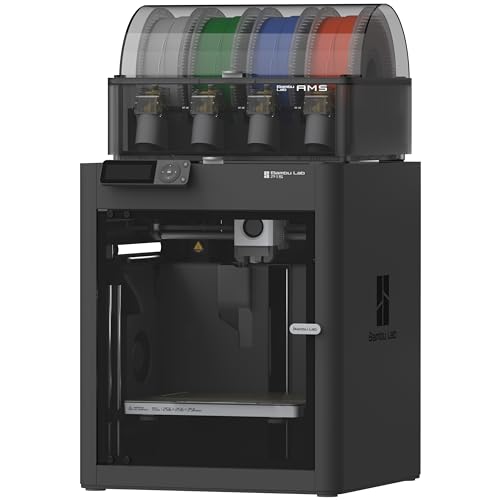
Bambu Lab P1S Combo enclosed CoreXY with AMS
Enclosed CoreXY500 mm/sAMS includedUp to 16 colors
Check price on Amazon
Best for: Buyers who want one enclosed, well-supported printer that grows with them.

The P1S is a CoreXY machine, meaning the print head moves on a belt system while the bed only moves up and down. That keeps the moving mass low and lets the listed 20,000 mm/s2 acceleration work without shaking the part. The full enclosure holds heat around the print, which helps materials that warp in a draft and also cuts fan noise reaching the room.

The Combo bundles the AMS, a four-spool feeder that swaps filament automatically, so multicolor and support-material prints are possible out of the box. Compared with the open-frame A1 in this lineup, the P1S gives up some easy access to the bed but gains a draft-free chamber and a more rigid frame. The printer is not a quiet one at full speed, and the speed figure is a ceiling that short moves rarely reach.

Ownership is where this model earns its place. Parts, nozzles and replacement belts are widely stocked, the slicer and model library are actively maintained, and owner feedback patterns show few mystery failures once the first layer is dialed in. Plan a periodic wipe of the carbon rods and a check of belt tension, and keep the AMS spools dry, since it does not dry filament by itself.

What works

  • Enclosed CoreXY frame keeps drafts off the print
  • AMS feeder included for multicolor jobs
  • Large parts and accessory ecosystem
  • Automatic bed leveling cuts setup work

Watch out for

  • AMS does not dry filament, so humid rooms cause stringing
  • Fan and motion noise is clearly audible at full speed
  • Proprietary parts mean repairs follow the maker's ecosystem

Spec sheet

Frame
Enclosed CoreXY
Top speed
500 mm/s
Acceleration
20,000 mm/s2
Multicolor
AMS, up to 16 colors
Leveling
Automatic
02
FLASHFORGE Adventurer 5M CoreXY auto-leveling printer
CoreXY600 mm/sDirect extruderQuick-swap nozzle
Check price on Amazon
Best for: Budget-minded first buyers who still want a fast, enclosed CoreXY.

The Adventurer 5M uses a CoreXY layout with a direct-drive extruder, so the filament is pushed a few centimeters from the nozzle instead of through a long tube. That helps retraction and makes flexible filament more manageable. The listed 32 mm3/s nozzle flow tells you more than the 600 mm/s headline, because flow is what limits real print speed.

It is the cheapest enclosed CoreXY in this lineup, which is the reason it ranks as the value pick. The trade is a smaller build area than the K2 Plus and no built-in multicolor system, so it prints one filament at a time. Against the Bambu P1S, it asks for a bit more patience with its slicer and has a smaller community library to draw settings from.

Day to day, the tool-free nozzle swap is the feature that matters, because nozzles clog and wear and a three-second change is genuinely useful. Keep the build plate clean with soap or isopropyl alcohol, since finger oil is the usual cause of failed first layers. Expect to tighten belts and lubricate rails on a schedule, as with any machine of this class.

What works

  • CoreXY motion with 20,000 mm/s2 acceleration
  • Direct extruder handles flexible filament better
  • Tool-free quick-swap nozzle saves time
  • Fully automatic bed leveling at setup

Watch out for

  • Single-filament only, no multicolor feeder
  • Smaller community support than the market leader

Spec sheet

Frame
Enclosed CoreXY
Top speed
600 mm/s
Acceleration
20,000 mm/s2
Max nozzle flow
32 mm3/s
Warm-up
About 35 seconds
03
Bambu Lab A1 open-frame printer, AMS lite compatible
Open frameBed slingerAMS lite readyAuto leveling
Check price on Amazon
Best for: First-time owners who want an approachable printer without an enclosure.

The A1 is a bed-slinger: the bed moves front to back while the head moves side to side and up. That design is simple and cheap to build, and the open frame makes it easy to reach the print. It handles PLA, PETG and TPU comfortably, but the lack of an enclosure rules out materials that need a warm, draft-free chamber.

Compared with the P1S, the A1 is lighter, less costly and quieter in the home, yet it cannot match the CoreXY frame for high-speed rigidity on tall prints. A moving bed also means heavy parts can ring at speed, so the machine rewards sensible acceleration settings. The AMS lite option adds four-color capability for those who want it later.

For a first printer the appeal is the short path to a good print. Auto leveling, a calibrated hotend and a mature slicer cover most early mistakes. Keep an eye on the open frame in a dusty room, because dust and pets reach the rails and the bed quickly, and wipe the rails before lubricating them.

What works

  • Open frame gives easy access to parts
  • Short setup with automatic calibration
  • Multicolor possible by adding AMS lite
  • Lighter and quieter than most CoreXY machines

Watch out for

  • No enclosure, so warping materials are off the table
  • Moving bed limits speed on heavy or tall parts
  • Dust and pets reach the rails more easily

Spec sheet

Frame
Open, moving bed
Multicolor
AMS lite compatible
Leveling
Automatic
Setup
Mostly assembled
Enclosure
None
04
Creality K2 Plus Combo with CFS multicolor system
Large build area600 mm/sCFS multicolorEnclosed
Check price on Amazon
Best for: Makers who regularly outgrow a standard bed.

The K2 Plus is Creality's large-format enclosed machine, and the bigger bed is the headline. It uses FOC step-servo motors on the XYZ axes, which are closed-loop and can reduce missed steps at speed. The Combo adds the CFS filament system for multicolor work.

Build volume is the reason to pick this over the P1S, since it lets you print cosplay armor, enclosures and batches of parts that smaller beds cannot hold. The trade is footprint and weight, and a larger machine needs a sturdy table and more clearance. It also costs noticeably more than the Adventurer 5M and the A1, so it only makes sense if you will use the volume.

Ownership shifts with size: bigger beds take longer to heat, long prints stress filament storage, and failed large parts waste more material. Keep spare nozzles, wipe the plate often and plan a dry storage box for the CFS spools. If your parts always fit a mid-size bed, you are paying for volume you will not use.

What works

  • Large build volume for oversized parts
  • Closed-loop FOC servo motors reduce missed steps
  • CFS adds multicolor printing
  • Enclosed chamber keeps drafts out

Watch out for

  • Big footprint and weight need a stout bench
  • Premium price that only pays off with big prints
  • Long prints waste more filament when they fail

Spec sheet

Frame
Enclosed CoreXY
Top speed
600 mm/s
Multicolor
CFS system
Motors
Step-servo FOC
Positioning
Large-format bed
05
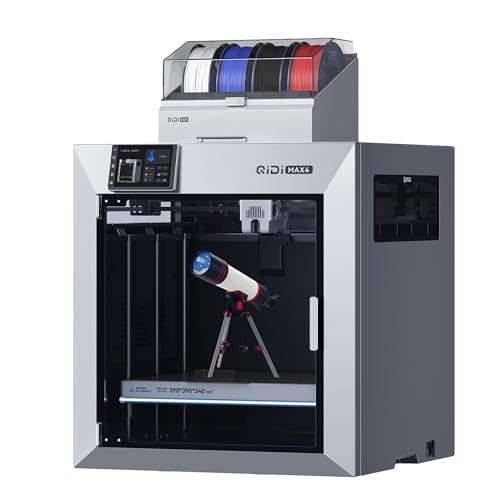
QIDI Max4 Combo heated-chamber printer, 390 x 390 x 340 mm
Heated chamber370 C nozzle390 x 390 x 340Closed-loop motors
Check price on Amazon
Best for: Hobbyists who need to print ABS, ASA or nylon parts.

The Max4 is built for materials that fight back. A heated chamber at 65 degrees Celsius reduces warping on ABS, ASA and nylon, and a 370 degree nozzle opens up high-temperature filaments that most hobby machines cannot melt. The dual Z lead screws keep a wide gantry level.

This is not a beginner pick. It costs more than any other machine here except the K2 Plus and demands more attention to filament drying and ventilation. Its build volume beats every other lineup option, so it suits functional parts, jigs and large engineering prototypes instead of casual figurines.

Ownership means managing heat. Hot chambers age plastic parts and fans faster, ABS gives off fumes that need ventilation, and engineering filaments absorb moisture quickly. Budget for a filament dryer and a dedicated space, and check the maker's replacement-part support before you commit.

What works

  • Heated chamber reaches 65 C for stable ABS
  • 370 C nozzle opens high-temperature filaments
  • Largest build volume in this lineup
  • Dual Z screws keep a wide gantry square

Watch out for

  • Not an easy first machine for new users
  • Demands filament drying and good ventilation
  • High price compared with PLA-focused models

Spec sheet

Build volume
390 x 390 x 340 mm
Chamber
Heated to 65 C
Nozzle limit
370 C
Z axis
Dual lead screws
Motors
Closed-loop

Spec sheet decoder

What the numbers on the box really mean

The specs manufacturers lead with, translated into what they tell you about real-world performance.

Print speed (mm/s)

The fastest the nozzle is allowed to move. It is a software and motion ceiling, not what a part prints at on average.

Watch forA 600 mm/s claim on the K2 Plus or Adventurer 5M still depends on hotend flow.

Acceleration (mm/s2)

How quickly the head changes speed. Higher acceleration shortens print time on parts with many corners but increases noise and ringing.

Watch forBoth the P1S and Adventurer 5M list 20,000 mm/s2, so compare frame rigidity instead.

Volumetric flow (mm3/s)

How much plastic the hotend can melt per second. It sets the real limit on fast, thick-layer prints.

Watch forLook for the flow figure, such as the 32 mm3/s on the Adventurer 5M, before trusting a speed claim.

Build volume

The largest part the bed can hold in X, Y and Z. A bigger bed also heats slower and costs more filament when a print fails.

Watch forThe Max4 gives 390 x 390 x 340 mm; do not buy that size if your parts fit a smaller bed.

Chamber temperature

Heated chambers hold warmth for materials that shrink as they cool. Passive enclosures only trap the bed's heat.

Watch forOnly the Max4 here lists an actively heated 65 C chamber.

Methodology

How We Evaluated These 3D Printers

Motion system and rigidity

We compared frame type, drive layout and listed acceleration for each machine. CoreXY designs such as the P1S and Adventurer 5M scored higher for speed stability than the bed-slinging A1. We treated headline speed as a ceiling, not a result.

Setup and calibration

We looked at how much assembly, leveling and tuning each printer asks for before the first good print. Automatic bed leveling and mostly assembled frames raised a score. A machine that needs manual work before every job lost points.

Material range

We checked enclosure, nozzle temperature and extruder type to see which filaments each machine can realistically print. The Max4 reached the widest range with a 370 C nozzle and a heated chamber, while the open-frame A1 stayed in PLA, PETG and TPU territory.

Ecosystem and ownership

We weighed slicer maturity, parts supply, and the habit of keeping local file printing available. Owner feedback patterns shaped how we ranked long-term upkeep. Machines with clear maintenance tasks and widely stocked nozzles scored higher.

Value within the lineup

We compared what each printer adds over the cheapest enclosed option, the Adventurer 5M. The K2 Plus adds volume, the P1S adds a mature multicolor system, and the Max4 adds a heated chamber. Value meant paying only for features the buyer will use.

Decision guide

How to Choose the Right 3D Printers

By Experience Level

SituationPickWhy
First printer, wants quick resultsBambu Lab A1Short setup, automatic calibration, easy bed access
First printer, wants an enclosureFLASHFORGE Adventurer 5MEnclosed CoreXY at the lowest price here
Comfortable with tuning and big projectsCreality K2 Plus ComboLarge bed and closed-loop motors reward tinkering
Wants a printer that just works with an ecosystemBambu Lab P1S ComboMature slicer and widely stocked parts

By Budget

TierPickWhy
Lowest cost hereFLASHFORGE Adventurer 5MCoreXY speed without a multicolor feeder
Lower-middleBambu Lab A1Open frame keeps cost and noise down
MiddleBambu Lab P1S ComboEnclosure plus AMS in one package
PremiumCreality K2 Plus ComboPay for build volume and CFS
HighestQIDI Max4 ComboHeated chamber and 370 C nozzle

Open Frame vs Enclosed

Open frame

Easy access, lower cost and less heat buildup. The Bambu A1 is the example here. It suits PLA, PETG and TPU, but drafts and room temperature can spoil tall or warping prints.

Enclosed

Holds heat, mutes noise and keeps dust off. The P1S, Adventurer 5M, K2 Plus and Max4 are enclosed. The cost is higher price and less access to the bed.

Pick the A1 if you print PLA and want the lowest friction. Pick any enclosed model if ABS, noise or kids and pets matter.

Single Color vs Multicolor

PreferencePickWhy
One color at a time is fineFLASHFORGE Adventurer 5MSimplest filament path and lowest running cost
Occasional color changesBambu Lab A1Add AMS lite later if needed
Frequent four-color printsBambu Lab P1S ComboAMS included in the bundle
Multicolor with big partsCreality K2 Plus ComboCFS plus a large bed

For Functional Parts Specifically

Look for

A direct-drive extruder, an enclosure and a nozzle that can reach higher temperatures. Parts that bear load need stable chamber conditions and filament that is kept dry.

In this comparison

The QIDI Max4 Combo is the clear pick, with a 65 C chamber and a 370 C nozzle. The Adventurer 5M is a cheaper step up for PETG brackets and similar parts.

When to Spend More

Spend more if

You print large parts, run a small side business, or need ABS, ASA or nylon. The K2 Plus and Max4 earn their price only under those conditions.

Save if

You print small PLA models and gadgets. The Adventurer 5M or the A1 will cover those needs, and the extra money is better spent on quality filament.

Ownership

Maintenance schedule

The upkeep that decides whether this machine lasts two seasons or ten.

TaskIntervalWhy it matters
Clean the build plateBefore each printFinger oils are the most common cause of failed first layers. Wash with soap or isopropyl alcohol and avoid touching the printing surface.
Check belts and tightenEvery 3 to 6 monthsBelts stretch and loosen over time, which shows up as ghosting or layer shifts. A quick tension check keeps CoreXY machines accurate.
Lubricate rails and lead screwsEvery 3 to 6 monthsDry rails wear faster and add noise. Wipe off old grease first so dust does not turn it into paste.
Replace the nozzleWhen clogged or wornBrass nozzles are cheap consumables. A worn or partially clogged nozzle causes under-extrusion and rough surfaces.
Dry filamentBefore humid printsFilament absorbs moisture and prints with strings and pops. Store spools in a sealed box with desiccant or use a dryer.

FAQ

Frequently Asked Questions

Should my first 3D printer be enclosed?

Not necessarily. PLA prints well on an open machine like the Bambu A1, and an enclosure only becomes important for ABS, noise and households with children or pets. If those matter, the Adventurer 5M is the cheapest enclosed option here.

How much should I budget beyond the printer itself?

Plan for filament, spare nozzles, build plates and cleaning supplies. Filament is the largest running cost, and multicolor systems add purge waste. A basic roll of PLA is a small expense compared with the first month's experimenting.

How long do 3D printers last?

Most FDM machines keep running for years if the nozzle, belts and rails are maintained. Parts that wear, such as nozzles and plates, are cheap. Check that the maker sells replacements before you buy.

Does a faster listed speed mean a faster print?

Not by itself. Real speed depends on hotend flow, acceleration, cooling and how many corners the part has. A machine listing 600 mm/s can print at a fraction of that on small detailed parts.

Are resin printers better?

Resin gives finer detail on small parts but needs gloves, ventilation, washing and curing, and the fluid waste is a chore. FDM is simpler for larger and more durable parts, so it is the usual first machine.

Is multicolor worth it?

Only if you will use it. Systems such as the AMS and CFS make colored models easy but waste filament in purge towers and need dry spool storage. Many owners find single-color prints plus painting is enough.

Bottom line

The short version

Browse more 3d printerson Amazon →
James Miller, Lead Machine Editor

About the author

James Miller

Lead Machine Editor, MachineFanatic

James Miller leads MachineFanatic's buying guides, turning spec sheets, manuals and owner feedback into clear verdicts on power tools, outdoor power equipment, shop machines and kitchen machines.

More from James →

Keep reading

Related guides