Amazon affiliate links - we earn a commission.Affiliate disclosure

Buying guide · 12 min read · Updated 2026-11-07

Best 3D Printers for Jewelry (2026)

Five resin 3D printers compared for jewelry patterns, from screen resolution and pixel size to castable resin, cleanup and upkeep, so rings come out crisp.

James MillerBy James MillerLead Machine Editor5 machines comparedSpec-sheet verified
Best 3D Printers for Jewelry

At a glance

Our top picks

Side by side

Spec comparison

Jewelry makers do not print the final piece. They print a pattern in castable resin, then burn it out of a plaster mold and pour metal into the cavity, the same lost-wax process jewelers have used for centuries. The printer only has to produce a clean, precise pattern.

That makes resolution and surface quality far more important than speed or build volume. This guide ranks five resin machines on the screen, light source, tank and cleanup that decide whether a thin prong survives, and explains the upkeep a resin printer demands.

Before you buy

6 Criteria to Look For Before Buying a 3D Printer for Jewelry

  1. 01

    Screen resolution and pixel size

    Resin printers cure a layer through an LCD, so pixel size sets the smallest detail. A 4K panel on the Mars 5 has larger pixels than the 9K Mars 5 Ultra, 10K Photon Mono 4 or 16K Saturn 4 Ultra. For rings with prongs and fine stone seats, choose a 9K or higher panel. The 2K screen on the S100 suits charms.

  2. 02

    Castable resin compatibility

    Jewelry patterns use castable resin that burns out cleanly in a kiln, leaving little ash. Standard resin leaves residue and can crack the mold. Check that the printer's exposure profiles or community settings support castable resin, and buy a trial bottle before committing to a large order.

  3. 03

    Even light exposure

    Uneven ultraviolet output makes some features cure more than others, which hurts thin parts. The Photon Mono 4 uses a matrix light source for this reason. If you print many rings at once on a large plate, even exposure matters more than raw resolution.

  4. 04

    Automatic leveling versus manual

    A badly leveled plate ruins the first layers and traps you in a mess of resin. Auto leveling on the Mars 5, Mars 5 Ultra and S100 simplifies this step. The Photon Mono 4 uses a manual paper-shim method, which works but demands patience.

  5. 05

    Tank heating

    Resin gets thick and fails to print well below roughly 20 degrees Celsius. The Saturn 4 Ultra heats the tank to 30 C, which helps in a cold garage or basement. In a warm room the benefit is smaller.

  6. 06

    Cleanup and safety

    Uncured resin irritates skin and its fumes need ventilation. Budget for nitrile gloves, isopropyl alcohol, a wash station, a curing light and a plan for waste. These costs and chores are part of the real price of resin printing.

Detailed reviews

The 5 best 3d printers for jewelry, explained

01
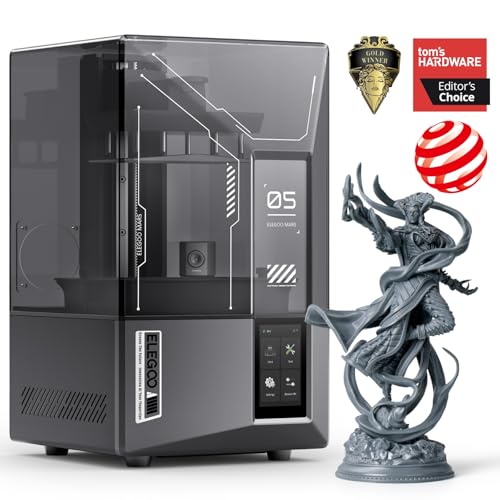
ELEGOO Saturn 4 Ultra 16K resin printer with heated tank
16K mono LCD10-inch screenHeated tankFlip-up lid
Check price on Amazon
Best for: Jewelers who want the finest detail in a hobby-priced machine.

The Saturn 4 Ultra uses an MSLA design: an ultraviolet light passes through a monochrome LCD that masks each layer, curing resin in the shape of the slice. A higher-resolution screen puts more pixels per square millimeter on the plate, and for jewelry that means smoother curves on thin bands and sharper detail on small settings. The 16K panel is the finest in this lineup.

The heated tank keeps resin at about 30 degrees Celsius, which matters because cold resin is thicker and prints less reliably in winter garages. Against the Mars 5 Ultra, the Saturn has a larger screen and a finer panel, but it costs more and offers a build area larger than most jewelry needs. The flip-up lid is a small convenience for tank access.

Ownership is where resin shows its character. The FEP film or tank liner wears and needs periodic replacement, gloves and isopropyl alcohol are required for cleanup, and uncured resin must be handled as chemical waste. Plan a dedicated, ventilated work area and a wash and cure routine before you buy.

What works

  • 16K screen gives the finest pixel pitch here
  • Heated tank keeps resin consistent in cold rooms
  • Large screen allows batch printing of rings
  • Flip-up lid eases tank access

Watch out for

  • Priciest resin printer in this lineup
  • Large build area is more than most rings need
  • Resin handling still needs gloves and ventilation

Spec sheet

Resolution
16K mono LCD
Screen
10 inch
Resin tank
Heated to 30 C
Lid
Flip-up
Type
MSLA resin
02
ELEGOO Mars 5 Ultra 9K resin printer with auto leveling
9K mono LCD7-inch screen18 um XYAuto leveling
Check price on Amazon
Best for: Hobbyist jewelers who want fine detail without a large machine.

The Mars 5 Ultra pairs a 7-inch 9K mono LCD with an 18 micron XY resolution, a figure that reflects the size of each pixel on the screen. That is more than fine enough for ring shanks, small stone seats and delicate filigree. Smart automatic leveling spares you the paper-shim step that confuses new resin users.

Compared with the Saturn 4 Ultra, the Mars 5 Ultra trades panel size and resolution for a smaller footprint and lower cost, but it still prints several rings at once. Against the standard Mars 5 in this lineup, it adds auto leveling, a mechanical sensor and a camera for monitoring.

For ownership, plan to replace the tank film every so often and to wash parts in isopropyl alcohol before curing. Wipe the screen carefully, and keep the printer out of direct sunlight, which can cure resin in the tank.

What works

  • 18 um XY resolution suits fine settings
  • Auto leveling removes a messy first step
  • Compact footprint for a small bench
  • Wi-Fi monitoring simplifies overnight jobs

Watch out for

  • Smaller panel than the Saturn 4 Ultra
  • Costs more than the standard Mars 5
  • Tank film is a recurring consumable

Spec sheet

Resolution
9K mono LCD
Screen
7 inch
XY resolution
18 um
Leveling
Automatic
Connectivity
Wi-Fi
03
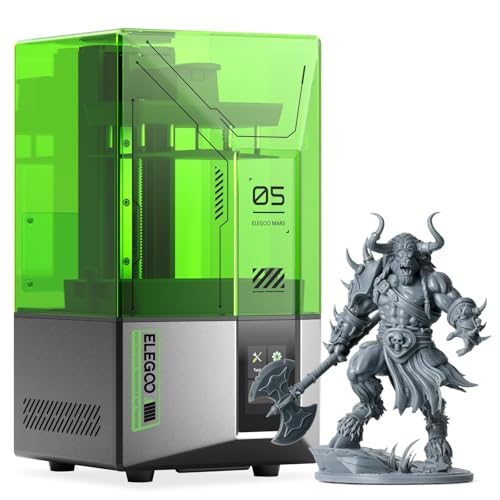
ELEGOO Mars 5 4K mono LCD resin printer
4K mono LCDAuto levelingDesktop sizeEntry resin
Check price on Amazon
Best for: First-time resin buyers making simple rings and charms.

The Mars 5 is the entry point to this lineup, with a 4K mono LCD and automatic leveling. At that resolution, pixel size is larger than on the Mars 5 Ultra or Saturn 4 Ultra, which shows up as faintly stepped surfaces on tiny curves. For pendants, simple bands and charms the detail is adequate, and sanding or polishing the cast metal hides it.

The tradeoff is detail on very fine work such as thin prongs or lettering that must stay legible. Against the Photon Mono 4, it has lower resolution but easier setup, while the cost stays modest. It is a sensible machine for a first resin purchase.

Ownership matches other resin printers: gloves, alcohol, a curing station and film replacement. Keep a spare tank film and a plastic scraper that will not scratch the screen.

What works

  • Lowest price among the ELEGOO resin models here
  • Auto leveling simplifies setup
  • 4K screen is adequate for pendants and bands
  • Wi-Fi control for remote starts

Watch out for

  • Lower resolution blurs the finest prongs
  • Smaller community around castable settings
  • Tank film needs periodic replacement

Spec sheet

Resolution
4K mono LCD
Leveling
Automatic
Size class
Desktop
Type
MSLA resin
Connectivity
Wi-Fi
04
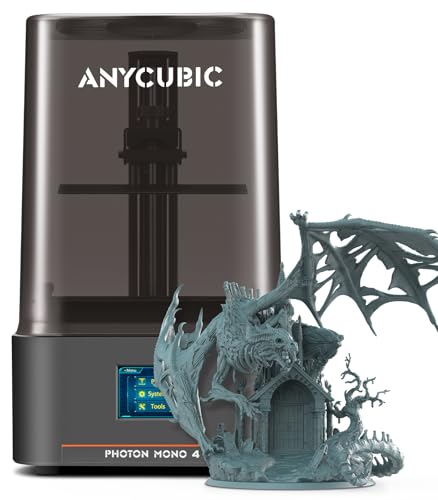
ANYCUBIC Photon Mono 4 10K resin printer with LighTurbo
10K mono LCD7-inch screenLighTurboPower-off resume
Check price on Amazon
Best for: Jewelers who value even light exposure and manual control.

The Photon Mono 4 uses a 7-inch, 10K mono LCD with a 9024 by 5120 pixel grid and a matrix light source designed to spread ultraviolet light evenly. Even exposure matters for jewelry because uneven curing leads to inconsistent thin features across the plate. Power-off resume is a practical feature for overnight jobs.

Compared with the Mars 5 Ultra, it offers a similar panel class but lacks automatic leveling, so setup needs the traditional paper-shim step. Against the Saturn 4 Ultra, it is smaller and finer in pixel size terms than the Mars 5 but not as high-resolution overall.

For ownership, the standard resin routine applies: gloves, alcohol, film replacement and a post-cure station. Keep the plate leveled and check exposure settings when you change resin brands, because castable resins differ.

What works

  • Matrix light source supports even curing
  • 10K panel provides fine pixel pitch
  • Power-off resume protects long jobs
  • Established brand with common spare parts

Watch out for

  • Manual leveling needed unlike the ELEGOO models
  • Castable resin profiles require user tuning
  • Smaller panel than the Saturn 4 Ultra

Spec sheet

Resolution
10K mono LCD
Screen
7 inch
Pixel grid
9024 x 5120
Light source
LighTurbo matrix
Recovery
Power-off resume
05
MALYAN S100 mini resin printer with 5.5-inch 2K LCD
5.5-inch 2K LCDAuto levelingMini size2560 x 1440
Check price on Amazon
Best for: Curious beginners who want to try resin for charms and pendants.

The S100 uses a 5.5-inch, 2560 by 1440 pixel LCD, an older and lower resolution class than any other machine here. It levels itself and is small enough for a desk drawer, which makes it the entry point for anyone curious about resin. The lower pixel count means visible stepping on curved surfaces.

The tradeoff is detail. Fine prongs, thin bands and engraved text will not match what the 9K and 16K models produce, so this is a pendant and charm machine more than a ring machine. Against the Mars 5, it costs less but delivers less detail and a smaller user community.

Ownership is similar to other resin printers, but spare parts and settings are harder to find for lesser-known brands. Check the maker's support before buying, and keep spare film and gloves on hand.

What works

  • Lowest cost in the lineup
  • Compact size suits a small desk
  • Auto leveling reduces setup steps
  • Light and easy to store

Watch out for

  • Lower resolution shows stepping on curves
  • Poor fit for thin prongs and fine text
  • Thinner support and parts ecosystem

Spec sheet

Screen
5.5 inch 2K LCD
Pixels
2560 x 1440
Leveling
Automatic
Size class
Mini
Type
LCD resin

Spec sheet decoder

What the numbers on the box really mean

The specs manufacturers lead with, translated into what they tell you about real-world performance.

K rating (4K, 9K, 10K, 16K)

The approximate horizontal pixel count of the LCD. More pixels over the same area gives smaller pixels.

Watch forCompare pixel size, not just K, since a bigger screen can have larger pixels at the same K.

XY resolution (um)

The size of each pixel in micrometers, which sets the finest horizontal detail.

Watch forThe Mars 5 Ultra lists 18 um XY, a useful number to compare.

Mono LCD

A monochrome screen passes more ultraviolet light than an RGB one, which cuts exposure time and extends screen life.

Watch forEvery model except the S100 in this lineup lists a mono screen.

Heated tank

A warmed resin vat that keeps viscosity consistent in cold rooms.

Watch forOnly the Saturn 4 Ultra lists tank heating at 30 C.

Power-off resume

The printer saves progress so a job can restart after a brief outage.

Watch forThe Photon Mono 4 lists it; check others before long overnight prints.

Methodology

How We Evaluated These 3D Printers for Jewelry

Detail capability

We compared screen resolution, pixel size and light source, since those define how thin a prong or band can be. The Saturn 4 Ultra 16K scored highest. The S100 at 2K scored lowest.

Casting suitability

We looked at support for castable resin and how easily settings can be tuned. A printer with a large community of shared profiles scores better than an obscure model.

Setup and ease

We considered automatic leveling, camera or sensor aids and Wi-Fi control. Machines with auto leveling saved the user a messy early step.

Cleanup and upkeep

We counted the chores: film replacement, washing, curing and waste handling. We also checked whether replacement tanks and films are easy to find.

Value within the lineup

We weighed price tier against resolution, so a machine that adds real pixel density for the extra money ranked higher than one that adds only size.

Decision guide

How to Choose the Right 3D Printers for Jewelry

By Piece Type

SituationPickWhy
Rings with thin prongs and fine stone seatsELEGOO Saturn 4 Ultra 16KFinest pixels in the lineup
General rings and pendantsELEGOO Mars 5 UltraFine 18 um XY detail in a small machine
Simple bands and charmsELEGOO Mars 5Adequate detail at lower cost
Evenly cured batches of ringsANYCUBIC Photon Mono 4Matrix light source
Pendants and test pieces onlyMALYAN S100Low cost entry

By Budget

TierPickWhy
Lowest cost hereMALYAN S100Entry-level resin
Lower-middleELEGOO Mars 5Good starter with auto leveling
MiddleANYCUBIC Photon Mono 410K panel with strong light source
Upper-middleELEGOO Mars 5 UltraFine detail with extra features
HighestELEGOO Saturn 4 Ultra 16KMaximum detail and heated tank

Higher K vs Lower K

Higher resolution

The Saturn 4 Ultra 16K, Mars 5 Ultra 9K and Photon Mono 4 10K cure finer features. They suit rings with delicate prongs and stone seats.

Lower resolution

The Mars 5 4K and S100 2K are cheaper and fine for pendants and charms. Surface stepping is visible at close range.

Choose high resolution for rings. Choose low resolution only if your pieces are simple and will be polished after casting.

Auto vs Manual Leveling

PreferencePickWhy
Wants no leveling stepELEGOO Mars 5 UltraSmart automatic leveling
Wants a simple budget pathELEGOO Mars 5Automatic leveling at low cost
Comfortable with manual setupANYCUBIC Photon Mono 4Paper-shim leveling works well once learned

For Ring Casting Specifically

Look for

High resolution, even light exposure and castable resin support. Printing a ring needs fine thin walls that must survive the wash and cure steps.

In this comparison

The Saturn 4 Ultra 16K leads on detail, and the Photon Mono 4 leads on exposure evenness. The Mars 5 Ultra balances both in a smaller body.

When to Spend More

Spend more if

You cast rings for sale or need crisp prongs and engraved text. The Saturn 4 Ultra saves reprints.

Save if

You make simple charms and pendants. The Mars 5 or S100 covers those at lower cost.

Ownership

Maintenance schedule

The upkeep that decides whether this machine lasts two seasons or ten.

TaskIntervalWhy it matters
Replace tank filmEvery few hundred hoursThe film clouds and tears with use. A damaged film leaks resin onto the screen.
Wash prints in isopropyl alcoholAfter every printUncured resin leaves a tacky film. Washing before curing keeps details crisp.
Filter or strain resinAfter failed printsCured chips left in the tank can scratch the film and ruin the next print.
Clean the screenAs neededResin on the screen causes blurry layers. Use a soft cloth and a scraper that will not scratch.
Cover the tank when idleAfter each sessionSunlight and room light cure resin in the tank. Keep it covered and out of the sun.

FAQ

Frequently Asked Questions

Can I print jewelry directly in metal?

No. Home resin printers make patterns in castable resin. You burn out the pattern in a mold and cast metal into the cavity, or send it to a casting service. Many hobbyists print the pattern at home and pay a local caster for the metal pour, which avoids buying a kiln and a centrifuge or vacuum caster.

Do I need castable resin?

Yes for lost-wax casting. Standard resin burns out poorly and can crack the mold. Use castable resin and follow its burnout schedule exactly, because heating too fast cracks the investment and leaves flaws in the metal.

Does a higher K rating always mean finer detail?

Not alone. Pixel size depends on screen size too. Compare XY resolution in micrometers, such as the 18 um on the Mars 5 Ultra.

Is resin printing safe at home?

It is manageable with gloves, ventilation and care. Uncured resin irritates skin and its fumes need airflow. Never pour it down a drain; cure leftover liquid in sunlight or a curing lamp until solid, then dispose of it as household waste where local rules allow.

Why is my first layer failing?

Usually the plate is not leveled, or the resin is cold. Level carefully, warm the resin and clean the tank film.

How long do the consumables last?

Tank films wear over time and need replacement. LCD screens also have a finite life, so a mono panel with a good light path helps. Keep spares on hand, and buy replacement film from the same maker where possible, since third-party film varies in thickness and release behavior.

Bottom line

The short version

Browse more 3d printers for jewelryon Amazon →
James Miller, Lead Machine Editor

About the author

James Miller

Lead Machine Editor, MachineFanatic

James Miller leads MachineFanatic's buying guides, turning spec sheets, manuals and owner feedback into clear verdicts on power tools, outdoor power equipment, shop machines and kitchen machines.

More from James →

Keep reading

Related guides