
Amazon affiliate links - we earn a commission.Affiliate disclosure

Buying guide · 13 min read · Updated 2026-11-07

Best 3D Printers for Miniatures (2026)

Four 3D printers for tabletop miniatures compared on screen resolution, leveling, build plate and cleanup, from ELEGOO and Anycubic resin to Bambu FDM.

James MillerBy James MillerLead Machine Editor4 machines comparedSpec-sheet verified
Best 3D Printers for Miniatures

At a glance

Our top picks

Side by side

Spec comparison

MachineScreenLevelingTechnologyMaker
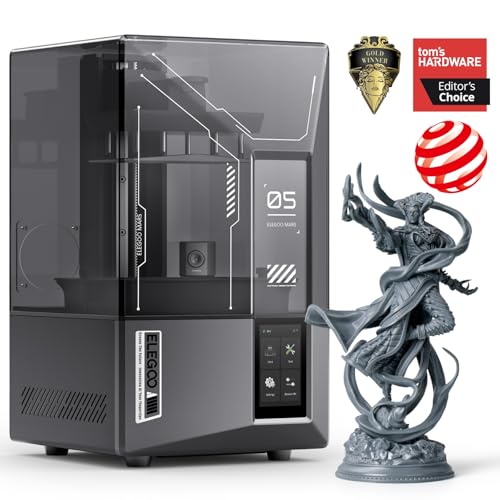
ELEGOO Mars 5 Ultra 9K Resin 3D PrinterBest OverallELEGOO Mars 5 Ultra 9K Resin 3D Printer7 inch 9K mono LCDSmart automatic levelingMSLA resinELEGOO
ANYCUBIC Photon Mono 4 10K Resin 3D PrinterBest ValueANYCUBIC Photon Mono 4 10K Resin 3D Printer7 inch 10K mono LCDn/aMSLA resinn/a
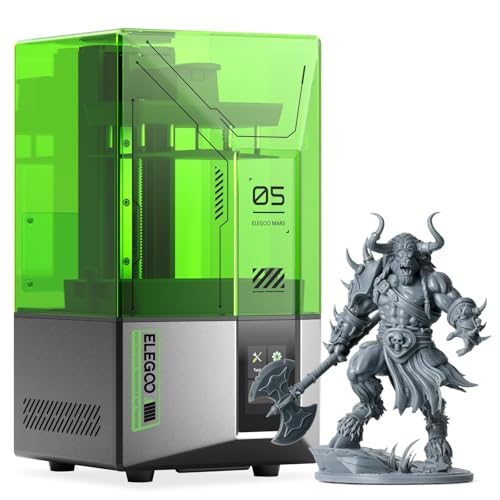
ELEGOO Mars 5 4K Mono LCD Resin 3D PrinterBest Beginner ResinELEGOO Mars 5 4K Mono LCD Resin 3D Printer4K mono LCDAutomatic levelingMSLA resinELEGOO
Bambu Lab A1 mini FDM 3D Printer With LED Lamp KitBest FDM AlternativeBambu Lab A1 mini FDM 3D Printer With LED Lamp Kitn/an/aFDM filamentn/a

Tabletop miniatures are small, detailed and unforgiving. A one-inch figure may have eyes, buckles and fingers that are a fraction of a millimeter across, and that level of detail is where resin printers pull ahead of filament machines.

The tradeoff is workflow. Resin printing means gloves, ventilation, a wash step and a cure step, and every print leaves a little mess. This guide explains which machines capture detail best and which are easiest to live with at a gaming table.

Before you buy

6 Criteria to Look For Before Buying a 3D Printer for Miniatures

  1. 01

    Screen resolution and pixel size

    Resin detail depends on how small each XY pixel is. The ELEGOO Mars 5 Ultra quotes an 18 micron XY resolution on a 9K screen, the Photon Mono 4 uses a 10K panel, and the Mars 5 uses 4K. For a 28 mm figure, anything above 4K is already good, but a 9K or 10K panel reduces visible stair-stepping on curved armor and faces. Do not pay for resolution beyond what your paint job will reveal. A figure that will sit on a table at arm's length rarely benefits from more than 4K, while a painted bust you plan to photograph up close shows every improvement. Remember also that Z layer height, typically set between 0.03 and 0.05 mm, controls the vertical detail, and no screen can improve a poor orientation.

  2. 02

    Leveling system

    Resin printers fail on the first layers if the build plate is not square to the screen. The Mars 5 and Mars 5 Ultra level automatically, while the Photon Mono 4 leans on manual leveling. A beginner who loses a vat of resin to a bad first layer will quickly appreciate automatic leveling, which costs a little more but saves wasted resin. If you do level by hand, the paper method works: loosen the plate, place a sheet of paper on the screen, press down, tighten the screws and set the zero position. Repeat the check after moving the printer or replacing the vat, because a plate that is slightly out of square will show as a failed first layer or a stuck print.

  3. 03

    Build area for the scale you print

    A 28 mm figure takes up very little room, but a squad of twenty on a single plate needs width. Seven-inch screens like those on the Mars 5 Ultra and Photon Mono 4 fit a dozen standard minis at once. Larger monsters and vehicles may need a bigger plate than any of these provide, in which case you split them into parts. Packing figures tightly saves time, because a resin print takes about as long for one figure as for twelve when they share a plate, since the layer exposure is the same. Leave a few millimeters between models so supports and cleanup remain manageable, and avoid placing tall models next to short ones, which wastes plate height.

  4. 04

    Supports and orientation

    Printing miniatures on resin means tilting each figure about 30 to 45 degrees and adding fine supports to hold overhangs. Supports leave small marks that you must sand or hide under paint. Machines with strong, even light sources, such as the Photon Mono 4's LighTurbo, reduce failed supports and make thinner supports practical. Tilting a figure so that the face points away from the plate keeps support marks off the part that people look at, and placing support contact points on the back of a cloak or the underside of a base hides the scars. Test one figure before committing a full plate, since orientation mistakes show only after the print finishes.

  5. 05

    Cleanup and safety

    Uncured resin irritates skin and should never go down a drain. Wear nitrile gloves, work with ventilation, wash prints in isopropyl alcohol and cure them under UV. Plan a dedicated corner of the workshop or garage, with a shelf at eye level so you can inspect the vat without leaning over it, plus paper towels, a sealed waste container and a way to keep the printer out of reach of pets and children. Leftover resin can be cured in sunlight or under a UV lamp until it is solid and then thrown out with ordinary waste in many areas, though local rules vary and are worth checking. Never wash resin parts or tools in a kitchen sink.

  6. 06

    Resin versus filament for your needs

    Resin captures faces and buckles but needs a wash and cure workflow. FDM machines like the Bambu Lab A1 mini print terrain and large monsters cleanly but show layer lines on small figures. Many players buy one of each, using resin for characters and filament for tiles, walls and dungeon scenery. Filament terrain also benefits from the A1 mini's ready-to-run setup, since walls and floor tiles do not need support-heavy orientation and can print flat with high success rates.

Detailed reviews

The 4 best 3d printers for miniatures, explained

01
ELEGOO Mars 5 Ultra 9K Resin 3D Printer
7 inch 9K mono LCD18 micron XYAuto levelingResin
Check price on Amazon
Best for: Painters who want the finest detail with minimal setup.

The Mars 5 Ultra uses a seven-inch 9K monochrome LCD with an 18 micron XY resolution, which means each pixel on the screen corresponds to a very small patch of resin. For miniatures that is the specification that matters: sharper edges on armor trim, crisper facial detail and cleaner text on bases. A mono screen also passes more UV than older color screens, so exposure times are short and the screen lasts longer.

Smart automatic leveling removes the fiddly part of resin setup. A miscalibrated build plate is the most common reason a new owner loses a first print, and a machine that measures it for you shortens that learning curve. Against the Anycubic Photon Mono 4, the Ultra costs more but adds more convenience features and a finer pixel pitch. Against the plain Mars 5, it adds a higher resolution screen and a more advanced set of automatic features.

In ownership, the work is routine. Resin vats need occasional filtering, the FEP film at the bottom is a consumable that wears out, and the build plate must be wiped before each job. Wear gloves, work with ventilation and wash prints in isopropyl alcohol before curing. For a hobbyist painting an army, this is the machine to buy.

What works

  • 9K screen with 18 micron XY resolution for fine detail
  • Automatic leveling reduces first-print failures
  • Mono LCD gives short exposure times
  • Compact desktop footprint

Watch out for

  • Resin cleanup needs gloves and ventilation
  • FEP film and vat are consumables
  • Small build area limits large figures

Spec sheet

Screen
7 inch 9K mono LCD
XY resolution
18 micron
Leveling
Smart automatic leveling
Technology
MSLA resin
Maker
ELEGOO
02
ANYCUBIC Photon Mono 4 10K Resin 3D Printer
7 inch 10K mono LCDLighTurbo lightPower-off resumeResin
Check price on Amazon
Best for: Budget-conscious painters comfortable with manual setup.

The Photon Mono 4 carries a seven-inch 10K monochrome screen, and the maker claims a 105% increase in print precision compared with the Mono 2. Its LighTurbo light source is designed to spread UV evenly across the screen, which matters because uneven light shows up as soft detail on one side of a build plate. That combination makes it a capable miniature printer at a lower cost than newer designs.

Feature-wise it stays simple. There is no automatic leveling in the same class as the Mars 5 Ultra, so the first setup requires more careful manual plate leveling, but a power-off resume feature will restart a print after an outage rather than leaving you with a dead resin vat. That is worth having for prints that run overnight.

For ownership, the routine matches any MSLA resin printer: a filtered vat, a wiped plate and a rinse in isopropyl alcohol. Spare FEP film and a spare vat are cheap insurance. If you are comfortable leveling by hand and want strong detail for the price, the Mono 4 is a sensible pick.

What works

  • 10K mono screen captures fine sculpt detail
  • LighTurbo light source evens out exposure
  • Power-off resume protects long prints
  • Lower cost than newer resin machines

Watch out for

  • Manual plate leveling takes patience
  • Older platform than the Mars 5 Ultra
  • Resin handling and cleanup remain messy

Spec sheet

Screen
7 inch 10K mono LCD
Light source
LighTurbo
Precision claim
105% up on Mono 2
Safety feature
Power-off resume
Technology
MSLA resin
03
ELEGOO Mars 5 4K Mono LCD Resin 3D Printer
4K mono LCDAuto levelingDesktopResin
Check price on Amazon
Best for: First-time resin owners printing tabletop gaming figures.

The Mars 5 is the entry in the Mars line, with a 4K mono screen and automatic leveling. Four-K resolution is plenty for 28 mm gaming figures, though it shows layer texture sooner than the 9K and 10K panels on a larger or closely examined model. The automatic leveling is the standout, since it takes the guesswork out of the first print.

Against the Mars 5 Ultra, the Mars 5 is slower to resolve fine facial detail and costs less. Against the Photon Mono 4, it trades screen resolution for easier setup. For a first resin machine used on gaming figures, many owners find that trade perfectly acceptable, since the paint job hides layer texture on small models.

As with all resin machines, the real work is after the print: wash in isopropyl alcohol, cure under UV and sand off support marks. Keep nitrile gloves, paper towels and a sealed container for waste resin close at hand.

What works

  • Automatic leveling simplifies setup
  • 4K mono screen handles standard gaming figures
  • Lower cost than higher resolution models
  • Familiar ELEGOO software and profiles

Watch out for

  • Shows layer texture sooner than 9K or 10K panels
  • Smaller detail headroom for display-grade pieces
  • Resin cleanup remains messy

Spec sheet

Screen
4K mono LCD
Leveling
Automatic leveling
Technology
MSLA resin
Use
Desktop miniatures and models
Maker
ELEGOO
04
Bambu Lab A1 mini FDM 3D Printer With LED Lamp Kit
FDM filamentCompactBeginner readyLED lamp kit
Check price on Amazon
Best for: Gamers printing terrain, bases and large monsters.

The A1 mini is the one FDM machine on this list, and it earns its place for terrain, bases, scatter and large figures rather than for a squad of fine 28 mm minis. Filament printing has visible layer lines and cannot match resin on face-level detail, but it is cleaner, cheaper to run and avoids chemicals entirely. Many gaming tables use both: resin for characters and FDM for buildings and dungeon tiles.

Its compact frame and beginner-ready setup keep the footprint small. The included LED lamp kit is aimed at light projects, such as glowing crystal terrain. Against the resin machines, it prints larger single pieces and tolerates a dirty workshop, because there are no vats to pour or fumes to vent.

Ownership is simpler than resin. Keep the plate clean, use small nozzles for finer detail and expect to sand and prime more. If you only print scenery and a few chunky monsters, this is the practical choice.

What works

  • No resin fumes, wash or cure steps
  • Prints larger terrain and props in one piece
  • Compact, beginner-ready setup
  • LED lamp kit suits glowing scenery

Watch out for

  • Visible layer lines on small figures
  • Cannot match resin on face-level detail
  • Needs more sanding before painting

Spec sheet

Technology
FDM filament
Audience
Beginners
Extras
LED lamp kit
Best use
Terrain, bases and large figures
Footprint
Compact desktop

Spec sheet decoder

What the numbers on the box really mean

The specs manufacturers lead with, translated into what they tell you about real-world performance.

9K and 10K mono LCD

The number approximates horizontal pixels on the screen. More pixels on the same seven inches means a smaller pixel and finer detail.

Watch forResolution beyond what your paint job shows is wasted money.

18 micron XY resolution

The size of each pixel at the resin surface on the Mars 5 Ultra, in millionths of a metre.

Watch forZ layer height is a separate setting, usually 0.03 to 0.05 mm for miniatures.

Automatic leveling

The machine measures the plate against the screen so you do not need to level it by hand.

Watch forIt still needs a clean plate and a flat vat.

LighTurbo light source

Anycubic's UV array designed to spread light evenly across the screen.

Watch forUneven light shows as soft detail on one side of the plate.

Power-off resume

The Photon Mono 4 can restart a print after a power cut.

Watch forIt cannot save a print that has been left unattended for hours.

Methodology

How We Evaluated These 3D Printers for Miniatures

Detail capability

We evaluated screen resolution and light uniformity, comparing the Mars 5 Ultra's 9K and 18 micron XY pixels with the Photon Mono 4's 10K panel and the Mars 5's 4K screen. Detail on faces and trim carried the most weight. We also weighed how the finished print looks under primer, since a clean surface with fine detail needs less filler and less time at the workbench.

Setup friction

We looked at how quickly a beginner gets a good first print. Automatic leveling on the Mars 5 and Mars 5 Ultra scored higher than the manual routine on the Photon Mono 4.

Workflow and cleanup

We considered the wash and cure steps, resin handling and waste. The FDM A1 mini was credited for avoiding all of it.

Failure protection

Features such as power-off resume on the Photon Mono 4 and automatic checks reduce wasted prints. Resin is expensive, so each failed print counts. A machine that stops safely and restarts cleanly saves both money and the frustration of cleaning a ruined vat.

Ownership burden

Based on owner feedback patterns, FEP film and vat replacement are the main running costs. Machines with simple, accessible vats scored better. We also noted that the screen is a wear part, so models with a mono LCD that passes more UV and needs shorter exposures tend to last longer between replacements.

Decision guide

How to Choose the Right 3D Printers for Miniatures

By Figure Type

SituationPickWhy
Heroes and detailed facesELEGOO Mars 5 Ultra9K screen and 18 micron XY pixels
Standard gaming squadsANYCUBIC Photon Mono 410K detail at a lower cost
Terrain and large monstersBambu Lab A1 miniFDM prints bigger pieces cleanly

By Budget

Budget tierPickWhy
Lowest outlayELEGOO Mars 5Entry resin with automatic leveling
Middle groundANYCUBIC Photon Mono 410K screen without premium features
Highest outlayELEGOO Mars 5 UltraFinest detail with smart leveling

Resin vs Filament

Resin

The Mars 5, Mars 5 Ultra and Photon Mono 4 capture faces, buckles and tiny rivets. They require gloves, ventilation, a wash and a cure, and a small build area.

Filament

The A1 mini prints terrain and large pieces without chemicals. Layer lines are visible and detail is coarser, so figures need more sanding.

Pick resin for characters and busts where the face is the point; pick filament for scenery, bases and large monsters where size and cost matter more than microscopic detail. If your budget allows, owning one of each is the most common arrangement among regular players.

Manual vs Automatic Setup

PreferencePickWhy
I want it to level itselfELEGOO Mars 5 UltraSmart automatic leveling
I will level by hand to save moneyANYCUBIC Photon Mono 4Cheaper with power-off resume
Simple start on a tight budgetELEGOO Mars 5Automatic leveling on a 4K screen

For Painters Specifically

Look for

A screen of at least 4K, even light and good support behavior. Print at thin layers for faces and keep a stock of fine files and primer for finishing.

In this comparison

The Mars 5 Ultra gives the cleanest detail, the Photon Mono 4 is the practical value and the A1 mini covers terrain without the resin chores.

When to Spend More

Spend more if

You paint display pieces or sell prints. The Mars 5 Ultra's finer pixels and automatic leveling reduce failed prints.

Save if

You print squads for gaming. The Photon Mono 4 or Mars 5 delivers paint-ready detail for less.

Ownership

Maintenance schedule

The upkeep that decides whether this machine lasts two seasons or ten.

TaskIntervalWhy it matters
Filter the resinAfter each printCured bits in the vat tear the FEP film. Pour through a fine filter into a clean bottle, and shake the bottle before the next print so pigment does not settle.
Replace the FEP filmEvery 3 to 6 monthsFilm clouds and sags with use, causing failed prints. A new sheet is cheap and quick.
Clean the build plateAfter each printCured resin on the plate causes poor adhesion. Wipe with isopropyl alcohol.
Check the screenMonthlyA dirty or stained screen shows as blurry patches. Clean the glass gently.
Change isopropyl alcoholWhen cloudySaturated alcohol leaves sticky residue. Use fresh alcohol for the final rinse.

FAQ

Frequently Asked Questions

Is resin better than filament for miniatures?

For faces, buckles and fine trim, yes. Resin captures detail that filament cannot. Filament is better for terrain and large pieces because it is cleaner and cheaper. If you can only afford one machine and mostly play skirmish games with small squads, resin is the better first purchase, while a group that builds large dungeons will get more use from filament.

How high a resolution do I need?

For 28 mm gaming figures, 4K is already workable. A 9K or 10K screen adds sharper edges, which helps with display pieces and larger heroes.

Is resin printing safe at home?

With care. Wear nitrile gloves, ventilate the room and keep uncured resin away from pets and children. Never pour waste down the drain.

What does power-off resume do?

The Photon Mono 4 can restart a print after a power cut. It helps with short outages but cannot rescue a print abandoned for hours.

Do I need a wash and cure station?

You need a way to wash in isopropyl alcohol and cure under UV. A basic tub and a UV lamp work, though dedicated stations are cleaner. Wash for a few minutes in fresh alcohol, dry the print completely and cure in short bursts, because over-curing makes thin parts brittle and snap-prone.

Can I print terrain on a resin printer?

Yes, but the small build area limits size and the resin cost is high. An FDM machine like the A1 mini is the better tool for scenery.

Bottom line

The short version

Browse more 3d printers for miniatureson Amazon →
James Miller, Lead Machine Editor

About the author

James Miller

Lead Machine Editor, MachineFanatic

James Miller leads MachineFanatic's buying guides, turning spec sheets, manuals and owner feedback into clear verdicts on power tools, outdoor power equipment, shop machines and kitchen machines.

More from James →

Keep reading

Related guides