

Amazon affiliate links - we earn a commission.Affiliate disclosure

Buying guide · 14 min read · Updated 2026-11-28

Best 3D Printers Under $1000 (2026)

Six 3D printers at or under $1000 compared on enclosure, multi-color, build volume and resin detail to show what a bigger budget buys over entry models.

James MillerBy James MillerLead Machine Editor6 machines comparedSpec-sheet verified
Best 3D Printers Under $1000

At a glance

Our top picks

Side by side

Spec comparison

Spending up to $1000 on a 3D printer buys things that cheaper machines leave out: an enclosure, a multi-color system, a larger build volume or a resin screen with real detail. Prices move, and the cap here reflects listing prices when this guide was updated.

The question at this budget is not whether the printer works, since most of them do, but which capability you will use. This guide explains what the extra spend actually delivers, how to choose between filament and resin, and ranks six machines by who they suit.

Before you buy

6 Criteria to Look For Before Buying a 3D Printer Under $1000

  1. 01

    What the bigger budget buys

    Beyond the entry price band, the extra money goes to four things: an enclosure, a built-in multi-color system, a larger build volume or a resin screen with fine detail. The Bambu P1S Combo gives the first two, the Sovol SV08 MAX gives volume and the Photon Mono 4 gives detail. Decide which of the four matters before you compare prices, because a machine strong in one is rarely strong in all. Buying the most expensive machine for a use you will not repeat is the most common mistake at this budget. Look at your last five wished-for prints and sort them: if most are small figures, resin wins, if most are useful parts, filament wins, and if one is a full-size helmet, volume wins. That simple list is a better guide than any review, because it ties the spec sheet to the things you will really make.

  2. 02

    Filament versus resin

    Filament machines make larger, tougher parts with cheap PLA and no chemicals, while resin printers give fine detail on small parts but need gloves, ventilation, alcohol washing, curing and disposal of liquid waste. The Anycubic Photon Mono 4 is a resin machine with 17 micron pixels, and the others are filament machines. If you print useful objects, brackets and cosplay, choose filament. If you paint miniatures, choose resin and plan a safe workspace. Resin is a skin irritant before it cures, so wear nitrile gloves, keep it off benches and out of drains, and cure the leftovers in sunlight before throwing them away. Filament has no such steps, which is why it is the easier first machine for families, and why a resin printer is best treated as a second machine for detail work.

  3. 03

    Enclosure and materials

    An enclosure keeps the print warm and stable, which matters for ABS and ASA, and it contains noise and fumes. PLA does not need one. The Bambu P1S Combo is enclosed while the A1, AD5X, Kobra X and SV08 MAX are open. If you plan to print engineering materials or live with the printer in a bedroom, the enclosure is worth paying for. Some filaments release fumes when printed, and an enclosure with a filter or a vented spot in a garage keeps those away from the people in the room. Heat stability matters too: an open printer in a cold garage can warp a large ABS part before it finishes, a problem that disappears once the chamber holds its temperature.

  4. 04

    Multi-color systems

    The P1S Combo's AMS supports up to sixteen colors, the AD5X includes four and the Kobra X expands to nineteen. Every color change purges filament, so multi-color prints use more material and take longer. If color matters mostly for accents, a paused filament change at a chosen layer can give two colors without any system. Buy multi-color hardware only if you will use it weekly. Also check how the system handles a runout or a tangle, because a four-spool feeder that stops cleanly and tells you what to fix saves overnight prints, while a poor one wastes a day. Some owners find that a single well-tuned color machine plus a pause-and-swap habit covers eighty percent of what they actually want.

  5. 05

    Build volume

    The Sovol SV08 MAX offers about 19.7 inches in every direction, which is far larger than the Bambu machines. Large volume lets you print helmets, furniture parts and long brackets in one piece, but a bigger machine needs more space, more filament and longer print times. If your parts fit in a 10 inch cube, a smaller machine is faster and easier to live with. Large beds also magnify small leveling errors, so check how the machine measures the whole surface, and expect longer warm-up times and higher power draw. Splitting a big object into two or three glued parts is often the practical route even on a large printer, because a single 30 hour print is a long time to risk on one clogged nozzle.

  6. 06

    Software and support

    The slicer and app ecosystem decides the weekly experience. Bambu's model library and profiles shorten the path from idea to print, while the Sovol rewards users who like to tune firmware. Confirm that local file printing works, so the printer keeps running if a cloud service changes. A strong community is a hidden spec because it supplies profiles, mods and quick answers when something fails.

Detailed reviews

The 6 best 3d printers under $1000, explained

01
Bambu Lab P1S Combo Enclosed 3D Printer With AMS Multi-Color
Enclosed CoreXYAMS includedUp to 16 colors500mm/s
Check price on Amazon
Best for: Buyers who want an enclosed multi-color machine that works out of the box.

The Bambu Lab P1S Combo bundles the enclosed P1S with an AMS multi-color unit, so a first print in four colors needs no extra purchase. The enclosure contains noise and drafts and helps advanced filaments such as ABS and ASA, and the machine reaches 500 mm/s with 20000 mm/s2 acceleration. A connected model library gives you something to print on day one.

The tradeoff is price relative to the cap and the waste from multi-color printing, since every color change purges filament. Compared with the open-frame A1 it adds an enclosure and a higher-grade frame, and compared with the Sovol SV08 MAX it has a much smaller build volume.

Keep the plate clean, update firmware and keep local printing available if cloud features change. Dry filament in a sealed box for the best multi-color results. Over a few years the parts you replace are nozzles, build plates and the purge chute, all cheap, and the machine's closed ecosystem means official parts are easy to find, which is a real advantage over lesser-known brands when a printer is the tool you rely on every week.

What works

  • Enclosed body for advanced filaments
  • AMS multi-color included
  • 20000 mm/s2 acceleration
  • Polished software ecosystem

Watch out for

  • Upper end of the budget
  • Purge waste in multi-color prints
  • Smaller build volume than large-format machines

Spec sheet

Body
Fully enclosed
Multi-color
AMS, up to 16 colors
Max speed
500 mm/s
Acceleration
20000 mm/s2
Leveling
Automatic
02
Bambu Lab A1 3D Printer Ready-to-Use With AMS Lite Option
Open-frame bedslingerFull-auto calibrationAMS lite optionBeginner friendly
Check price on Amazon
Best for: Beginners who want the ecosystem without paying for an enclosure.

The Bambu Lab A1 is an open-frame printer with full-auto calibration, support for the AMS lite multi-color unit and a beginner-friendly software ecosystem. It does most of what the P1S does for PLA printing at a lower cost, with no enclosure.

The tradeoff is the open frame. Without an enclosure it is louder, exposed to drafts and not suited to ABS or ASA, and its moving bed limits very fast printing of tall parts. Compared with the P1S Combo it is cheaper and lighter but less capable with advanced materials.

Calibration is automatic, but clean the plate before each print. Keep it away from drafts and pets.

What works

  • Full-auto calibration
  • Multi-color option with AMS lite
  • Strong software ecosystem
  • Lower cost than the P1S

Watch out for

  • No enclosure
  • Louder than enclosed machines
  • Not suited to ABS or ASA

Spec sheet

Design
Open-frame
Calibration
Full-auto
Multi-color
AMS lite supported
Audience
Beginners and kids
Ecosystem
MakerWorld library
03
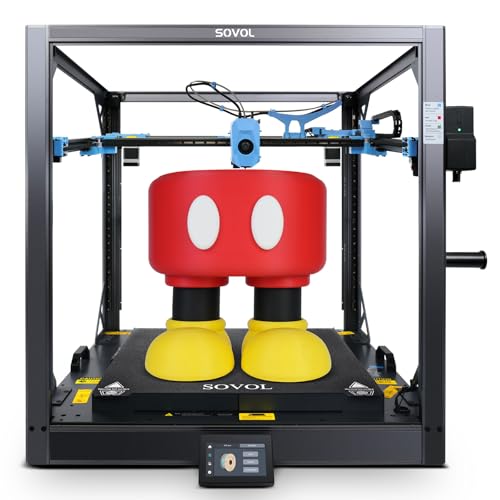
Sovol SV08 MAX CoreXY 3D Printer 700mm/s Large Build Volume
19.7 in cubeCoreXY700mm/sEddy current leveling
Check price on Amazon
Best for: Makers who print large parts, cosplay armor and furniture-sized pieces.

The Sovol SV08 MAX is a large-format CoreXY printer based on the Voron 2.4 design, with a build volume of about 19.7 inches in every direction and a 700 mm/s top speed. An eddy current sensor provides contactless bed leveling, and a CoreXY frame lets a large bed move only vertically.

The tradeoff is complexity and space. A machine this size needs a big table, long prints take a long time and an open frame is no help for temperature-sensitive materials. Compared with the Bambu machines it offers far more volume but less polish.

Expect to tune and maintain it more than a Bambu. Keep rails lubricated and the bed clean and learn the firmware settings. A machine of this size is also a commitment: the heated bed draws a lot of power, a long print needs a stable supply and a fire-aware setup, and you should never leave a large printer running in an unattended room without a smoke alarm nearby and a plan for a power cut halfway through.

What works

  • Huge 19.7 inch build volume
  • CoreXY with 700 mm/s claim
  • Eddy current leveling
  • Voron-based design

Watch out for

  • Needs space and tuning
  • Open frame
  • Less polished than Bambu

Spec sheet

Build volume
19.7 x 19.7 x 19.7 inches
Motion
CoreXY
Max speed
700 mm/s
Leveling
Eddy current sensor
Design
Open frame, Voron-based
04
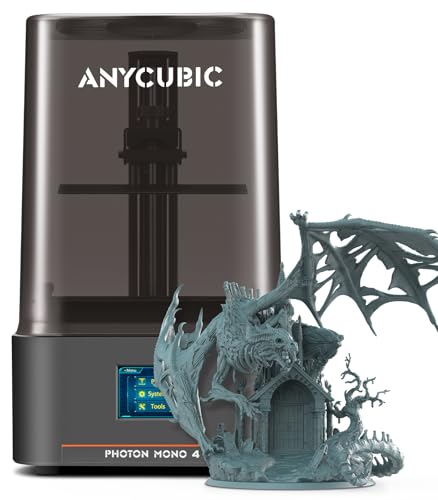
Anycubic Photon Mono 4 10K Resin 3D Printer 7 Inch Mono LCD
10K mono LCD7 in screen17 micron pixelsPower-off resume
Check price on Amazon
Best for: Miniatures and fine-detail parts where surface quality matters.

The Anycubic Photon Mono 4 is a resin printer with a 7 inch 10K mono LCD, 17 micron pixels and a matrix light source for even curing. Resin gives detail that filament cannot match on small parts, such as miniatures and jewelry masters, and the machine claims over twice the detail of the Mono 2.

The tradeoff is process and safety. Resin printing requires gloves, ventilation, isopropyl alcohol washing and curing, and liquid waste disposal, and build volume is small. Compared with the filament machines here it is a different workflow rather than a faster one.

Wear nitrile gloves, work in a ventilated space and filter resin after failed prints. Keep the screen and vat clean.

What works

  • 10K screen with 17 micron pixels
  • Matrix light source
  • Power-off resume
  • Fine detail on small parts

Watch out for

  • Gloves, washing and curing needed
  • Small build volume
  • Resin fumes and waste

Spec sheet

Technology
Resin MSLA
Screen
7 inch 10K mono LCD
Pixel size
About 17 x 17 microns
Light source
LighTurbo matrix
Feature
Power-off resume
05
Flashforge AD5X Multi-Color CoreXY 3D Printer Built-In IFS
4-color IFSCoreXY600mm/s300 C nozzle
Check price on Amazon
Best for: Buyers who want multi-color on a tighter budget.

The Flashforge AD5X is the least expensive multi-color machine here, with a built-in four-color filament system, CoreXY motion and a nozzle that reaches 300 degrees C. For buyers who want color and do not need an enclosure, it is the cheapest route.

The tradeoff is polish and enclosure. It is open in practice and the software ecosystem is smaller than Bambu's. Compared with the P1S Combo it costs less but gives less of the surrounding system.

Keep filament paths clean and store spools dry. Purge waste raises running cost.

What works

  • Built-in four-color system
  • CoreXY frame
  • 300 C nozzle
  • Lower cost than the P1S Combo

Watch out for

  • No enclosure
  • Smaller ecosystem
  • Purge waste

Spec sheet

Multi-color
Built-in 4-color IFS
Motion
CoreXY
Max speed
600 mm/s
Nozzle
300 C
Leveling
1-click automatic
06
Anycubic Kobra X Multicolor 3D Printer 600mm/s LeviQ 3.0
4 colors19 colors with extras600mm/sLeviQ 3.0
Check price on Amazon
Best for: Users who may want a growing color setup.

The Anycubic Kobra X supports four colors out of the box and can expand to nineteen with extra units, with 600 mm/s class speed and LeviQ 3.0 automatic leveling. The maker pitches about fifteen minutes from the box to a first project.

The tradeoff is that expansion costs money and the speed claim is a ceiling. Compared with the AD5X it offers growth but less track record.

Keep the plate clean and watch purge waste. At this budget the Kobra X is the answer to a specific question: do you want to start with four colors and grow later? If so, the expansion path is the reason to buy it, and if not, a simpler machine saves money. Because the leveling system probes the bed on every job, a quick glance at the first layer is all the supervision a typical print needs.

What works

  • 4 colors standard, 19 expandable
  • LeviQ 3.0 leveling
  • Quick setup
  • 600 mm/s class

Watch out for

  • Expansion costs extra
  • Speed claim is a ceiling
  • Purge waste

Spec sheet

Colors
4 standard, up to 19 expanded
Max speed
600 mm/s
Leveling
LeviQ 3.0
Setup
About 15 minutes
Type
High-speed FDM

Spec sheet decoder

What the numbers on the box really mean

The specs manufacturers lead with, translated into what they tell you about real-world performance.

Build volume

The largest object the printer can make in one piece.

Watch forThe Sovol SV08 MAX lists 19.7 inches in each direction.

Enclosure

A body around the print area for temperature, noise and safety.

Watch forThe Bambu P1S Combo is enclosed.

AMS

A multi-spool system that feeds several filaments for color printing.

Watch forThe P1S Combo supports up to 16 colors.

Pixel size

The size of a resin printer's screen pixel, which limits fine detail.

Watch forThe Photon Mono 4 lists about 17 microns.

Eddy current sensor

A contactless bed probe that scans the bed quickly.

Watch forThe Sovol SV08 MAX uses one.

Methodology

How We Evaluated These 3D Printers Under $1000

Capability for the money

We compared what each machine adds beyond an entry model: enclosure, color, volume or detail. The P1S Combo and SV08 MAX each add a clear capability. Features that few users need scored lower.

Print quality potential

We looked at motion systems, acceleration, resin pixel size and leveling methods. CoreXY machines with 20000 mm/s2 acceleration and the 10K resin screen scored highest in their classes. Quality claims are maker claims.

Ease of ownership

We considered calibration, setup time and software. Full-auto calibration and a polished ecosystem scored higher. Machines that need tuning scored lower for beginners.

Running cost and waste

We noted purge waste in multi-color systems and consumables such as resin, nozzles and plates. Resin and multi-color printing cost more per part than single-color filament.

Safety and space

We considered enclosure, fumes and footprint. Enclosed machines and a safe resin workflow scored well. Large open machines lost points for space.

Decision guide

How to Choose the Right 3D Printers Under $1000

By What You Print

SituationPickWhy
General parts and giftsBambu Lab A1Easy open-frame machine
Engineering materialsBambu Lab P1S ComboEnclosed
Large partsSovol SV08 MAX19.7 inch cube
Miniatures and fine detailAnycubic Photon Mono 410K resin screen
Colorful figures on a budgetFlashforge AD5XBuilt-in four colors
Growing color setupAnycubic Kobra XExpandable to 19

By Budget Within the Cap

TierPickWhy
Lowest tierAnycubic Photon Mono 4Resin entry
Low tierBambu Lab A1Open-frame value
Low-mid tierFlashforge AD5XMulti-color CoreXY
Mid tierAnycubic Kobra XExpandable color
Upper mid tierBambu Lab P1S ComboEnclosed and AMS
Highest tierSovol SV08 MAXLarge format

Enclosed vs Open Frame

Enclosed

The Bambu P1S Combo keeps heat in, noise down and hands out. It supports ABS and ASA and suits living spaces.

Open frame

The A1, AD5X, Kobra X and SV08 MAX are cheaper and easier to reach but louder and affected by drafts.

Choose enclosed for materials and noise, open for cost and access.

By Workspace

WorkspacePickWhy
Bedroom or living roomBambu Lab P1S ComboEnclosed
Garage or shopSovol SV08 MAXLarge open machine
Desk with limited spaceBambu Lab A1Compact
Ventilated hobby roomAnycubic Photon Mono 4Resin needs ventilation
Classroom or maker spaceFlashforge AD5XMulti-color with CoreXY

For Cosplay and Large Props Specifically

Look for

Look for a large build volume, a rigid CoreXY frame and reliable leveling across a big bed. Plan for long prints and a lot of filament, and split large pieces into parts when possible.

In this comparison

The Sovol SV08 MAX is the clear match with its 19.7 inch cube. The Bambu P1S Combo is the choice for smaller props that need color and materials.

When to Spend More

Spend more if

Spend more if you print daily or need enclosure and multi-color, where the P1S Combo earns its cost. Also spend more for the SV08 MAX if size is your bottleneck.

Save if

Save if you print PLA objects occasionally. The A1 or AD5X is enough.

Ownership

Maintenance schedule

The upkeep that decides whether this machine lasts two seasons or ten.

TaskIntervalWhy it matters
Clean the build plateBefore each printFinger oils cause failed first layers. Wash with soap or isopropyl alcohol and dry.
Replace nozzlesWhen clogged or wornBrass nozzles are cheap consumables. Wear causes uneven extrusion.
Lubricate rails and lead screwsPer manualDry rails wear and add noise. Use the lubricant specified.
Filter and store resin (resin printer)After failed printsCured bits in the vat ruin the next print. Filter and cap bottles.
Dry filamentAs neededWet filament strings and pops. Keep spools in sealed boxes with desiccant.

FAQ

Frequently Asked Questions

Is $1000 enough for a good 3D printer?

Yes. It buys an enclosed multi-color machine, a large-format printer or a high-detail resin unit. Prices move, and the cap reflects listing prices when this guide was updated.

Should I buy resin or filament?

Buy filament for useful parts and larger objects. Buy resin for small, detailed miniatures. Resin needs gloves, ventilation and washing.

Do I need an enclosure?

Not for PLA. It helps for ABS, ASA, noise and safety. The Bambu P1S Combo is the enclosed option here.

Is multi-color worth it?

If you print colorful models, yes. It wastes filament and slows prints. A single-color machine is cheaper to run.

Why choose a large format printer?

For helmets, props and long parts in one piece. It needs more space and time. A smaller machine is faster for small parts.

Do I need to tune the printer?

Bambu machines need little. The Sovol rewards tuning. Keep the plate clean either way.

Bottom line

The short version

Browse more 3d printers under $1000on Amazon →
James Miller, Lead Machine Editor

About the author

James Miller

Lead Machine Editor, MachineFanatic

James Miller leads MachineFanatic's buying guides, turning spec sheets, manuals and owner feedback into clear verdicts on power tools, outdoor power equipment, shop machines and kitchen machines.

More from James →

Keep reading

Related guides