Amazon affiliate links - we earn a commission.Affiliate disclosure

Buying guide · 13 min read · Updated 2026-11-07

Best 3D Printers with AMS (2026)

Five multicolor 3D printers built around the AMS filament system, plus one rival feeder, compared on ecosystem, purge waste, compatibility and upkeep.

James MillerBy James MillerLead Machine Editor5 machines comparedSpec-sheet verified
Best 3D Printers with AMS

At a glance

Our top picks

Side by side

Spec comparison

A filament feeder with several spools turns a single-nozzle printer into a multicolor machine. It loads, retracts and swaps filament automatically, so a print can change color or material mid-job without anyone standing at the machine.

That convenience has a hidden bill in wasted plastic, dry-storage chores and ecosystem lock-in. This guide looks at printers that ship with the AMS feeder as a system, asks which pairing suits which kind of owner, and compares one rival feeder so you can see what the extra complexity buys.

Before you buy

6 Criteria to Look For Before Buying a 3D Printer with AMS

  1. 01

    AMS versus AMS lite

    The full AMS sits on the P1S and P2S and chains up to 16 colors. The AMS lite on the A1 and A1 Mini is slimmer and cheaper but holds four spools without chaining. If you want more than four colors, choose a printer that takes the full unit.

  2. 02

    Purge waste

    Every color change pushes some old filament through the nozzle, and the nozzle must be cleared completely or the next color looks muddy. A model with many changes can waste more plastic than it uses, especially on small parts. Slicers let you reduce waste by lowering the number of color changes or the purge volume, but never to zero. Choosing models designed for multicolor, with big flat color regions, is the best way to cut waste, and some slicers can print the purge into an infill block so it is not entirely lost.

  3. 03

    Filament dryness

    The feeder holds spools in open air, and moist filament pops, strings and weakens. Humid rooms demand sealed boxes or a dryer. Treat dry storage as part of the system price. A sealed box with desiccant is cheap, a dryer is better, and a reliable habit of drying a spool the night before a color job prevents the pops and strings that spoil long prints.

  4. 04

    Enclosure and materials

    The P1S and P2S are enclosed and handle more materials. The A1 machines are open and suit PLA, PETG and TPU. Match the frame to the filaments you plan to print, not to the feeder, since an open machine with a fancy feeder still cannot print ABS well.

  5. 05

    Ecosystem and profiles

    The AMS has a large body of tuned profiles and community help. A rival feeder such as the CFS can match the hardware but has fewer shared settings. Ecosystem size is a real day-to-day factor, because most problems have already been solved by someone else and posted online. That matters most in the first month, when small questions about purge settings and filament profiles decide whether the machine feels easy or frustrating.

  6. 06

    Jam risk and upkeep

    Feeder paths can kink or jam, especially with soft or brittle filament. Keep tubes straight, use spools that unwind freely and clear the paths when a job fails. Spools with rough edges or tangled winding are the usual cause of mid-job pauses, so rewind or replace a suspect spool rather than fighting it every print.

Detailed reviews

The 5 best 3d printers with ams, explained

01
Bambu Lab P1S Combo enclosed CoreXY with AMS, up to 16 colors
AMS includedUp to 16 colorsEnclosed CoreXY500 mm/s
Check price on Amazon
Best for: Owners who want the most mature AMS pairing in an enclosure.

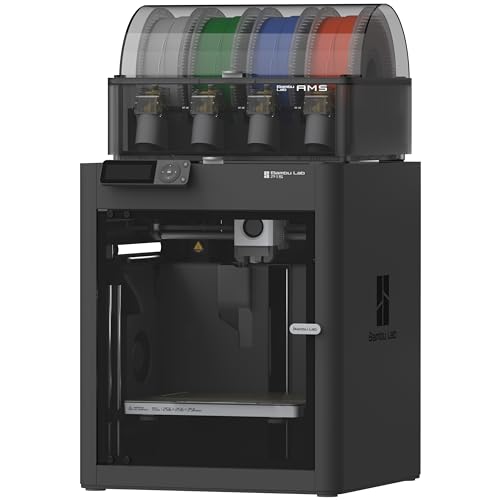
The P1S Combo pairs the AMS with an enclosed CoreXY printer, and the pairing is what makes it work. The feeder sits on top and feeds a four-way hub into the toolhead, and chaining units reaches the listed 16 colors. The enclosure holds heat and softens noise, while the 20,000 mm/s2 acceleration keeps color jobs from taking all day.

The system handles color changes by retracting one filament and loading the next, then purging a little through the nozzle. Waste depends on how many changes a model has and how large the purge tower is. Against the A1 Combo, the P1S gives a more rigid frame and an enclosure; against the P2S Combo, it is the older, cheaper platform.

Ownership is mostly about filament. The AMS does not dry spools, so keep them in a sealed box in humid rooms. Clean the feeder paths with a brush, wipe the carbon rods and replace the PTFE tubes when they discolor. Parts are widely stocked, which is a real advantage as the machine ages. A good habit is to print the first few color jobs with a small test model and note how much purge material the slicer reports, because that number tells you what a large job will really cost.

What works

  • AMS designed with the printer as one system
  • Chain units for up to 16 colors
  • Enclosed frame holds heat and cuts noise
  • Widely stocked parts and settings

Watch out for

  • AMS does not dry filament
  • Purge waste on every color change
  • Feeder adds paths that can jam

Spec sheet

Feeder
AMS, 4 spools per unit
Max colors
Up to 16 with four units
Frame
Enclosed CoreXY
Top speed
500 mm/s
Acceleration
20,000 mm/s2
02
Bambu Lab P2S Combo with AMS 2 Pro, up to 600 mm/s
AMS 2 Pro600 mm/sAI failure detection15-minute setup
Check price on Amazon
Best for: Buyers who want the newest feeder and fast, monitored printing.

The P2S Combo ships with the AMS 2 Pro, the newer generation of the feeder, and prints up to 600 mm/s. The maker quotes about 15 minutes to a first print, and AI failure detection watches for spaghetti and stops a bad job, which matters because color prints are long and plastic-hungry.

It costs more than the P1S Combo, and the benefit is the refined feeder and faster platform. Against the K2 Combo, it relies on a single-maker ecosystem with tuned profiles. Against the A1 Mini Combo, it is a very different class in size and price.

For ownership, the model is new, so check parts and warranty position. Keep spools dry, update firmware deliberately, and note that the newer feeder is not interchangeable with older units in every case, so confirm compatibility before mixing generations. Early adopters also tend to meet firmware changes, so keep your tuned profiles backed up and read release notes before updating a printer that is mid-project.

What works

  • Newer AMS 2 Pro generation
  • AI failure detection saves plastic
  • Setup in about 15 minutes
  • Tuned slicer profiles and library

Watch out for

  • Highest tier among the AMS machines
  • New platform, parts history is short
  • Feeder generations may not mix

Spec sheet

Feeder
AMS 2 Pro
Top speed
600 mm/s
Monitoring
AI failure detection
Setup
About 15 minutes
Library
MakerWorld
03
Bambu Lab A1 Combo with AMS lite and LED lamp kit
AMS liteOpen frameAuto levelingLED lamp kit
Check price on Amazon
Best for: Beginners who want AMS color on an open, approachable printer.

The A1 Combo uses the AMS lite, a slimmer feeder that sits beside the printer and feeds the toolhead through a tube. The lite design trades the enclosed hub for a lighter, cheaper build. The bundle includes an LED lamp kit, a first project that shows off color changes.

The open frame means no enclosure, so drafts and dust reach the print, and a bed-slinger cannot match the P1S for speed on tall parts. Against the P1S Combo, it costs less and is quieter, but it only suits PLA, PETG and TPU. Against the A1 Mini Combo, it offers a bigger bed.

Ownership centers on the open design. Wipe dust from the rails, keep spools in dry storage, and watch the feeder tube path for kinks. The lite feeder holds four spools and does not chain the way the full unit does. If you outgrow four colors, the upgrade path is a different printer, not an accessory, so decide up front how many colors your projects need.

What works

  • AMS lite keeps cost and size down
  • Auto leveling simplifies setup
  • LED lamp kit gives a first color project
  • Quieter than most CoreXY machines

Watch out for

  • No enclosure, so no ABS
  • AMS lite does not chain like the full unit
  • Bed-slinger limits speed on tall parts

Spec sheet

Feeder
AMS lite
Frame
Open, moving bed
Leveling
Automatic
Extras
LED lamp kit
Role
Mid-size open printer
04
Bambu Lab A1 Mini Combo with AMS lite
AMS liteCompact bedOpen frameAuto leveling
Check price on Amazon
Best for: Small desks and hobbyists printing small multicolor items.

The A1 Mini Combo is the smallest way into the AMS ecosystem, pairing the AMS lite with a compact open-frame printer. The small bed limits part size, but figurines, keychains and desk items fit well and print with multiple colors. Automatic leveling and the maker's software make the first print short.

Purge waste hurts more here, because small models with many color changes can waste more plastic than they use. Against the A1 Combo, it gives up bed size for desk space and cost. Against the P1S Combo, it gives up enclosure and speed.

Ownership is simple but plastic-hungry. Keep spools dry, wipe the plate, and consider slicing models with fewer color changes to cut waste. The compact frame is easy to store when not in use. Because purge waste is fixed per change, a tiny model with six colors can be mostly waste, so plan designs with large color regions and few swaps, and keep a bin for purge scraps that can be reused as test material.

What works

  • Smallest AMS-compatible printer here
  • Automatic leveling
  • Same ecosystem as larger models
  • Easy to store and move

Watch out for

  • Small bed limits part size
  • Purge waste is large relative to small parts
  • Open frame lets drafts in

Spec sheet

Feeder
AMS lite
Frame
Open, compact
Leveling
Automatic
Footprint
Small desktop
Use
Small multicolor parts
05
Creality K2 Combo (A) with CFS, expandable to 16 colors
CFS feederUp to 16 colors600 mm/sSilent mode
Check price on Amazon
Best for: Buyers who want a non-AMS feeder from a different maker.

The K2 Combo (A) is here as the main rival to the AMS approach, using Creality's CFS to feed up to 16 colors on an enclosed, 95 percent pre-assembled machine. A silent mode lowers noise for shared rooms. It shows that the single-nozzle feeder idea is not unique to one maker.

The difference is ecosystem. The AMS has the larger community and more tuned profiles, while the CFS gives a similar experience on a different platform. Against the P1S Combo, it lists higher speed but relies on a smaller body of shared settings. The purge-waste issue is identical.

Ownership follows the same rules: dry spools, clear filament paths and a clean plate. Choose it if you prefer the maker's printers or want a quiet mode. Check that the slicer profiles for your favorite filaments exist, since a feeder only works well when the retraction and purge settings are right, and ask whether spare feeder parts are sold separately.

What works

  • CFS feeds up to 16 colors
  • Enclosed 600 mm/s class frame
  • Silent mode for shared rooms
  • Arrives mostly assembled

Watch out for

  • Smaller shared-settings community
  • Same purge waste as any single-nozzle feeder
  • Separate ecosystem from the AMS

Spec sheet

Feeder
CFS, 4 units max
Max colors
16
Top speed
600 mm/s
Assembly
95% pre-assembled
Noise
Silent mode

Spec sheet decoder

What the numbers on the box really mean

The specs manufacturers lead with, translated into what they tell you about real-world performance.

AMS

Bambu Lab's automatic material system that holds four spools and feeds a single nozzle.

Watch forThe P1S and P2S take full units; the A1 machines take the lite version.

AMS lite

A lighter feeder with four spools and no chaining.

Watch forThe A1 and A1 Mini bundles use it.

Up to 16 colors

Four feeder units chained, four spools each.

Watch forEach extra unit costs more and needs dry storage.

CFS

Creality's filament system, a rival to the AMS.

Watch forThe K2 Combo (A) uses it.

Purge tower

Extra material printed to clear the nozzle between colors.

Watch forTower size changes with the number of color changes.

Methodology

How We Evaluated These 3D Printers with AMS

Feeder design

We compared full AMS, AMS lite and the rival CFS on capacity and chaining. The full AMS scored highest.

Waste behaviour

We considered how purge waste scales with part size. Small printers scored lower because waste dominates small models.

Printer pairing

We looked at frame, enclosure and speed relative to the feeder. The P1S and P2S are fully enclosed pairings.

Ecosystem

We weighed profile libraries and parts supply. The AMS machines lead, because shared settings for hundreds of filaments reduce the tuning a new owner must do.

Upkeep

We counted chores such as drying, path cleaning and tube replacement, and favored machines whose parts are easy to buy and replace.

Decision guide

How to Choose the Right 3D Printers with AMS

By Printer Size

SituationPickWhy
Small desk, small partsBambu Lab A1 Mini ComboCompact AMS lite
Mid-size open printerBambu Lab A1 ComboBigger bed, LED kit
Enclosed and matureBambu Lab P1S ComboFull AMS, enclosure
Newest generationBambu Lab P2S ComboAMS 2 Pro and monitoring
Rival ecosystemCreality K2 Combo (A)CFS and silent mode

By Budget

TierPickWhy
LowestBambu Lab A1 Mini ComboEntry AMS lite
Lower-middleBambu Lab A1 ComboLarger bed
MiddleCreality K2 Combo (A)Enclosed rival
Upper-middleBambu Lab P1S ComboEnclosed AMS
HighestBambu Lab P2S ComboNewest platform

Full AMS vs AMS lite

Full AMS

The P1S and P2S Combos take full units that chain to 16 colors and sit on an enclosed frame.

AMS lite

The A1 and A1 Mini Combos use a slimmer feeder with four spools. It costs less but does not chain.

Choose the full AMS if you may want more than four colors. Choose the lite for four colors on a budget.

Waste Strategy

PreferencePickWhy
Bigger parts, less relative wasteBambu Lab P1S ComboLarger prints amortize purge
Small models, accept wasteBambu Lab A1 Mini ComboCompact and cheap
Reduce waste with fewer swapsBambu Lab A1 ComboSlice with few color changes

For Gift and Display Prints Specifically

Look for

Easy color assignment in the slicer, a tidy purge tower and a quiet machine. Gift prints are small and colorful.

In this comparison

The A1 Combo's LED lamp kit is a ready-made project. The P2S Combo adds failure detection for long jobs.

When to Spend More

Spend more if

You print larger color parts or want an enclosure. The P1S or P2S Combo pay back.

Save if

You print small desk items. The A1 Mini Combo covers it.

Ownership

Maintenance schedule

The upkeep that decides whether this machine lasts two seasons or ten.

TaskIntervalWhy it matters
Dry spoolsBefore each color jobThe feeder leaves spools exposed. Moist filament strings and snaps.
Clean feeder pathsEvery few spoolsDust and shavings cause jams, and filament shavings gather where the gears bite. A soft brush clears them, and a few seconds after each spool change keeps the path clean.
Replace PTFE tubesWhen discoloredHeat and wear degrade tubes. A rough tube snags filament.
Wipe rods and railsEvery 3 monthsDust adds wear and noise.
Update firmware deliberatelyAs neededUpdates can change feeder behaviour. Read release notes first.

FAQ

Frequently Asked Questions

Does the AMS dry filament?

No. It stores spools but does not heat them. Use a dryer or sealed box in humid rooms, and consider drying a spool before loading it if it has sat open for weeks.

Is the AMS lite a downgrade?

It is lighter and cheaper but holds four spools and does not chain. For four colors it is fine.

How much plastic does color printing waste?

It depends on the model. Small, many-color parts waste the most. Slicer settings can reduce it.

Can I use third-party spools?

Generally yes if they unwind freely and fit the holders. Test one before relying on it.

Do I need the Combo?

Only if you want color. The printer alone saves money and you can add the feeder later, though buying the Combo is usually cheaper than buying the parts separately, so decide based on whether you will use color within the first few months.

Does the AMS work with flexible filament?

Soft filament often jams in feeders because it buckles in long tubes. Print it from an external spool path if the maker recommends so, and keep multicolor jobs to PLA and PETG where the feeder is happiest.

Bottom line

The short version

Browse more 3d printers with amson Amazon →
James Miller, Lead Machine Editor

About the author

James Miller

Lead Machine Editor, MachineFanatic

James Miller leads MachineFanatic's buying guides, turning spec sheets, manuals and owner feedback into clear verdicts on power tools, outdoor power equipment, shop machines and kitchen machines.

More from James →

Keep reading

Related guides