
Amazon affiliate links - we earn a commission.Affiliate disclosure

Buying guide · 12 min read · Updated 2026-11-19

Best Color Laser Printers for Home Offices (2026)

Six color laser printers for home offices compared on duplex, speed, toner cost and scanning, with a clear pick for freelancers, small teams and shared desks.

James MillerBy James MillerLead Machine Editor6 machines comparedSpec-sheet verified
Best Color Laser Printers for Home Offices

At a glance

Our top picks

Side by side

Spec comparison

MachineTypeFunctionsDuplexWirelessSpeed
Canon Color imageCLASS MF753Cdw II 4-in-1 Duplex LaserBest OverallCanon Color imageCLASS MF753Cdw II 4-in-1 Duplex LaserColor laser multifunctionPrint, scan, copy, faxAutomatic two-sidedWi-Fin/a
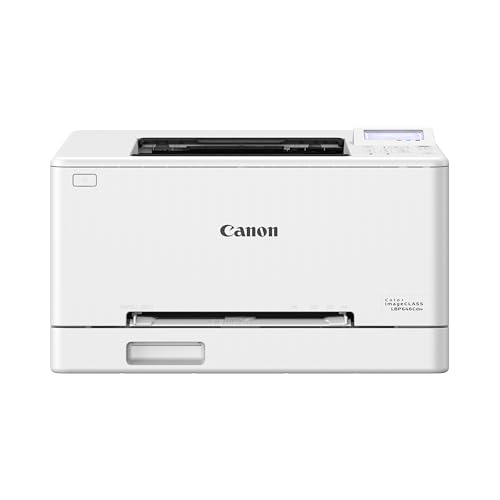
Canon Color imageCLASS LBP646Cdw Wireless Duplex LaserBest Print-Only CanonCanon Color imageCLASS LBP646Cdw Wireless Duplex LaserColor laser, print onlyNo scan, copy or faxAutomatic two-sidedWi-Fi with simple setupUp to 26 ppm color and mono
HP Color LaserJet Pro 3201dw Wireless Duplex Color LaserBest ValueHP Color LaserJet Pro 3201dw Wireless Duplex Color LaserColor laser, print onlyn/aAutomatic two-sidedWi-Fin/a
Xerox C245 Wireless Color Laser All-in-OneBest Compact Color MFPXerox C245 Wireless Color Laser All-in-OneColor laser multifunctionPrint, scan, copyn/aDual-band Wi-Fin/a
Canon Color imageCLASS MF652Cw 3-in-1 Wireless LaserBest Starter MFPCanon Color imageCLASS MF652Cw 3-in-1 Wireless LaserColor laser multifunctionn/aManual onlyn/aUp to 22 ppm color and mono
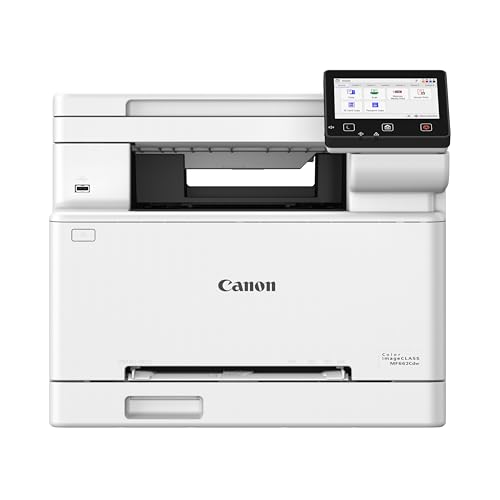
Canon Color imageCLASS MF662Cdw 3-in-1 Duplex LaserBest Mid-Range MFPCanon Color imageCLASS MF662Cdw 3-in-1 Duplex LaserColor laser multifunctionPrint, scan, copyAutomatic two-sidedn/aUp to 26 ppm color and mono

A color laser fuses powder toner to the page with heat, which gives documents that dry instantly, resist smudging and hold up to a highlighter. For proposals, invoices, flyers and school handouts that is a better fit than any inkjet, and the machine does not clog when it sits idle between busy weeks.

The trade is cost and scope. Four toner cartridges, a belt and drum assemblies make a color laser a bigger purchase than an inkjet, and gradients in photographs look flatter. The useful questions are speed, duplex, scanning, tray size and how much each color page will cost over the life of the machine.

Before you buy

6 Criteria to Look For Before Buying a Color Laser Printer for Home Offices

  1. 01

    Toner cost across four colors

    A color laser uses cyan, magenta, yellow and black cartridges, and the starter set shipped in the box is a partial fill. The real cost per page comes from the replacement high-yield cartridges, so check their rated yields before you buy. A cheap body like the Canon MF652Cw can cost more over time than a higher tier machine if the toner is expensive.

  2. 02

    Speed that matches your jobs

    The Canon LBP646Cdw and MF662Cdw are rated up to 26 pages per minute in color, while the Canon MF652Cw is rated up to 22. That spread only matters on jobs over ten pages. For one or two page color documents, the first-page-out time matters more than the headline figure.

  3. 03

    Scanner and fax need

    A scanner adds a flatbed, a feeder and a panel, and the Canon MF753Cdw II adds fax as well. If a phone app handles your scanning, a print-only machine like the HP Color LaserJet Pro 3201dw saves money and desk space. Buyers who skip this question end up paying for features they do not touch.

  4. 04

    Tray size and duplex

    A 250-sheet tray, as on the HP 3201dw, holds a short ream and cuts the refill trips that cause overfilling. Automatic duplex halves paper for proposals and handouts, but manual duplex on the Canon MF652Cw means flipping stacks yourself. Pick the paper handling that matches your longest regular job.

  5. 05

    Photo expectations

    Color laser toner is a powder fused with heat, so it excels at flat color and text but renders smooth gradients and skin tones less well than a photo inkjet. Gloss on plain paper can look waxy. If you print family pictures, add a small ink tank or photo printer rather than trying to stretch a laser.

  6. 06

    Warranty and toner policy

    Color laser machines are a larger purchase, so the support term matters. The Canon MF662Cdw lists a three year limited warranty, which is long for the category. Also check whether firmware can lock out third-party toner, because that choice affects cost over three years.

Detailed reviews

The 6 best color laser printers for home offices, explained

01
Canon Color imageCLASS MF753Cdw II 4-in-1 Duplex Laser
Color laser4-in-1Auto duplexWireless
Check price on Amazon
Best for: Freelancers and small teams who want printing, scanning and fax in one machine.

Canon's flagship home office color laser is a four-in-one that prints, scans, copies and faxes, with automatic duplex. The engine uses four separate toner cartridges, so you replace only the color that runs out, and fusing the powder with heat keeps text crisp on ordinary office paper.

The tradeoff is size and entry cost. It sits at the top of this lineup by price tier, well above the HP Color LaserJet Pro 3201dw, and the extra money buys scanning and fax rather than faster printing, since Canon's 26 page per minute class is shared with cheaper models like the LBP646Cdw. If you never scan or fax, you are paying for hardware you will not use.

For ownership, plan on a body that wants desk space and a few inches of clearance for the paper path. Genuine toner is the route Canon supports, and the extended warranty tier is what most buyers of this class look for. Dust the scanner glass and keep the feeder rollers clean, and the machine rewards you with consistent office-grade output for years.

What works

  • Four-in-one body replaces separate scanner and fax
  • Automatic duplex handles two-sided handouts
  • Separate toner colors waste nothing
  • Heat-fused toner resists smudging and highlighters

Watch out for

  • Highest price tier in this lineup
  • Large body needs real desk or shelf space
  • Fax features go unused by most households

Spec sheet

Type
Color laser multifunction
Functions
Print, scan, copy, fax
Duplex
Automatic two-sided
Wireless
Wi-Fi
Class
Home office all-in-one
02
Canon Color imageCLASS LBP646Cdw Wireless Duplex Laser
Color laser26 ppmAuto duplexPrint only
Check price on Amazon
Best for: Desks that already scan with a phone and only need fast color output.

This is the print-only member of Canon's family, and it states its focus plainly: no scanning, copying or faxing. What you get is a fast engine rated at up to 26 pages per minute in both color and black, so a color flyer prints as quickly as a text page, which is unusual in a printer at this tier.

The compromise against the multifunction Canon MF662Cdw is that you save money by dropping the scanner and feeder, but you lose the ability to copy a document. It makes sense when a phone app already handles scanning and the office just needs a dependable output device. Speed parity with the all-in-one means you give up nothing in printing.

A single-function machine has fewer parts to wear, and the printer has no scanner glass to scratch or dust. Toner cartridges come in standard and high-capacity sizes, and the high-capacity cartridge is the sensible choice for steady use. Position it near the router or use the wireless setup to avoid cable runs.

What works

  • 26 pages per minute in color and black
  • Print-only design means fewer parts to fail
  • Automatic duplex built in
  • Simple wireless setup in a few steps

Watch out for

  • No scanning or copying at all
  • Toner costs more than mono laser per page
  • Toner cartridges are an ongoing expense

Spec sheet

Type
Color laser, print only
Speed
Up to 26 ppm color and mono
Duplex
Automatic two-sided
Wireless
Wi-Fi with simple setup
Functions
No scan, copy or fax
03
HP Color LaserJet Pro 3201dw Wireless Duplex Color Laser
Color laserAuto duplex250-sheet trayWireless
Check price on Amazon
Best for: Print-heavy home offices that want a big tray without a scanner.

HP's 3201dw puts fast color printing, automatic two-sided output and a 250-sheet input tray into a body aimed at small teams. The next-generation TerraJet toner is what HP points to for sharp text and rich color, and the larger tray means you can load a short ream and walk away from a long job.

The tradeoff is scope. This is a print-only machine, so a team that scans receipts or contracts needs a second device or a phone, and the cost of that missing flatbed is why it sits lower in the price tiers than the Canon MF753Cdw II. The HP Color LaserJet Pro MFP 3301sdw is the sibling that adds the scanner if you want the same engine with more functions.

In ownership, toner is the cost driver, and HP supports standard and high-yield cartridges, so choose the high-yield size for volume. Firmware updates can affect third-party toner behavior, which is worth checking before buying an off-brand replacement. For desks that print on a schedule the large tray cuts refill trips.

What works

  • 250-sheet tray cuts refills on long jobs
  • Automatic duplex reduces paper use
  • Print-only body is quick to set up
  • Standard and high-yield toner options exist

Watch out for

  • No scanner or copier in the box
  • Toner firmware policy needs checking first
  • Larger than inkjet printers in the same class

Spec sheet

Type
Color laser, print only
Duplex
Automatic two-sided
Input tray
250 sheets
Toner
TerraJet toner
Wireless
Wi-Fi
04
Xerox C245 Wireless Color Laser All-in-One
Color laser3-in-1Dual-band Wi-FiAirPrint
Check price on Amazon
Best for: Small desks that need color laser plus scanning in a compact body.

Xerox pitches the C245 as a compact color multifunction that fits a small desk, and the listing backs that with dual-band Wi-Fi, Apple AirPrint and Mopria support. AirPrint and Mopria matter because they let iPhones and Android phones print without installing a vendor driver, which removes the most common setup failure in a home office.

The limit is brand reach and track record. Xerox is a longtime office name, but this is a newer consumer-class listing, so the parts and toner supply chain is less proven than HP or Canon in the home market. It is also an Amazon exclusive configuration, which can complicate warranty comparisons. If you want a more mainstream parts ecosystem, the Canon MF652Cw is the safer neighbor.

Ownership centers on compact size and toner cost. Four toner cartridges feed the engine, and a small chassis means less room for a large tray, so expect to reload sooner than with the HP 3201dw. Keep the paper flat and the vents clear, and the printer stays reliable on a bookshelf.

What works

  • Compact multifunction body saves desk space
  • Dual-band Wi-Fi improves network reliability
  • AirPrint and Mopria print without drivers
  • Scan and copy included in one unit

Watch out for

  • Newer listing with a shorter service track record
  • Smaller paper capacity than larger office models
  • Amazon exclusive configuration limits comparison

Spec sheet

Type
Color laser multifunction
Functions
Print, scan, copy
Wireless
Dual-band Wi-Fi
Mobile
AirPrint and Mopria
Design
Compact desk fit
05
Canon Color imageCLASS MF652Cw 3-in-1 Wireless Laser
Color laser22 ppm3-in-1Wireless
Check price on Amazon
Best for: Light home offices that want color laser plus scanning at a lower tier.

The MF652Cw is the slower, simpler sibling of Canon's duplex models. It prints up to 22 pages per minute in color and black, with the first page out in about 10.3 seconds, and it scans and copies as well, which makes it a true three-in-one at an easier price.

The tradeoff is that the w in its name signals no automatic duplex, so two-sided jobs are manual, unlike the d models such as the Canon MF662Cdw. Speed is also four pages per minute behind the 26 page per minute machines. If you run long documents, those two gaps add up, but for a few color pages a day the difference is invisible.

Toner uses Canon's 067 family, with a high-capacity option for lower cost per page. Since the engine is the same class as the pricier Canon models, parts and service coverage are well understood. Treat it as the entry ticket to color laser with a scanner, not a long-run office workhorse.

What works

  • Prints, scans and copies in one body
  • First page out in about 10.3 seconds
  • High-capacity 067 toner lowers page cost
  • Lower tier than the duplex Canon models

Watch out for

  • No automatic duplex, two-sided is manual
  • 22 pages per minute trails the 26 ppm class
  • Smaller office feature set than the 'd' models

Spec sheet

Type
Color laser multifunction
Speed
Up to 22 ppm color and mono
First print
About 10.3 seconds
Toner
Canon 067 and high capacity
Duplex
Manual only
06
Canon Color imageCLASS MF662Cdw 3-in-1 Duplex Laser
Color laser26 ppm3-in-1Auto duplex
Check price on Amazon
Best for: Home offices that want the Canon engine and scanning without paying for fax.

Canon's MF662Cdw sits in the middle of its home office color range: it prints, scans and copies, runs at up to 26 pages per minute in color and black and turns pages over automatically for duplex. The three year limited warranty in the listing is long for a color laser, which tells you the maker expects the engine to keep working.

The tradeoff against the flagship MF753Cdw II is the missing fax and a lower tier price, and against the print-only LBP646Cdw it is the scanner you pay for. For most home offices the fax is the feature to drop, and this is the model that drops it while keeping duplex and speed. If scanning stacks of paper is routine, check how the feeder suits your documents before ordering.

Ownership follows Canon's cartridge system, with standard and high-capacity toner. Spend on the high-capacity cartridges if you print more than a few color pages a day, and keep the feeder rollers and glass clean. A long warranty plus an engine shared with other Canon models makes service and parts easier to find than on a newer brand.

What works

  • Three year limited warranty adds confidence
  • 26 pages per minute in color and black
  • Automatic duplex and a scanner together
  • Skips fax to hold the price down

Watch out for

  • Costs more than the print-only Canon sibling
  • Color toner raises cost per page over mono
  • Needs space for a full multifunction body

Spec sheet

Type
Color laser multifunction
Speed
Up to 26 ppm color and mono
Functions
Print, scan, copy
Duplex
Automatic two-sided
Warranty
Three year limited

Spec sheet decoder

What the numbers on the box really mean

The specs manufacturers lead with, translated into what they tell you about real-world performance.

ppm color and mono

Pages per minute is measured on simple test pages once the printer is running. Many color lasers match color and black speed, but not all do.

Watch forThe Canon LBP646Cdw lists 26 ppm in both modes, while the Canon MF652Cw is rated at 22 ppm.

Duplex type

Automatic duplex turns the sheet inside the machine, while manual duplex asks you to re-feed it. Automatic saves time and prevents page-order mistakes.

Watch forThe Canon MF652Cw is manual, while the MF753Cdw II and HP 3201dw are automatic.

Toner yield

Yield is the number of pages a cartridge produces at a standard five percent coverage. Heavy color pages use toner faster than the rating implies.

Watch forCanon lists a standard 067 and a high capacity 067 for the MF652Cw.

Functions count

Print only, three-in-one and four-in-one describe whether a scanner, copier and fax are included. More functions mean a bigger body and more parts.

Watch forThe Canon MF753Cdw II is four-in-one, while the Xerox C245 is three-in-one.

Input tray sheets

This is how much paper you can load in one go. A bigger tray means fewer refills but a larger machine.

Watch forThe HP 3201dw lists a 250-sheet tray, a size that suits longer reports.

Methodology

How We Evaluated These Color Laser Printers for Home Offices

Print quality class

We evaluated each laser on how the engine handles flat color, charts and small text, based on the spec sheet and owner feedback patterns. We did not rate photo output highly because toner is a powder. We noted features such as HP's TerraJet toner that the listing highlights.

Speed and warm-up

We compared the 26 page per minute Canon models with the 22 ppm MF652Cw. First-page-out time, about 10.3 seconds on the MF652Cw, counted for short jobs. Fast headline speed was never the only measure.

Paper handling

We looked at duplex type, tray capacity and the presence of a document feeder. The 250-sheet trays on the HP 3201dw earned credit for long jobs. Simple paper paths were preferred.

Functions and connectivity

We compared print-only models like the Canon LBP646Cdw against all-in-ones such as the Canon MF753Cdw II. Dual-band Wi-Fi, AirPrint and Mopria on the Xerox C245 counted toward ease of setup. We favored machines that fit the described use without extras.

Running cost and support

We weighed toner availability, yield options and warranty length, including the three year limited warranty on the Canon MF662Cdw. Toner firmware policy was noted as a risk. Total cost of ownership mattered more than box price.

Decision guide

How to Choose the Right Color Laser Printers for Home Offices

By Office Setup

SituationPickWhy
Solo freelancer needing scan and faxCanon MF753Cdw IIFour-in-one with duplex
Team prints flyers all dayCanon LBP646Cdw26 ppm in color, print only
Long runs, no scanning neededHP Color LaserJet Pro 3201dw250-sheet tray and duplex
Tiny desk with scanningXerox C245Compact color all-in-one
Occasional color plus copyingCanon MF652CwLower tier three-in-one
Scanning, duplex and a long warrantyCanon MF662CdwThree year limited warranty at 26 ppm

By Budget

TierPickWhy
Lowest tier hereCanon MF652CwCheapest color laser with a scanner
Lower mid tierCanon LBP646CdwFast color without scanner costs
Mid tierHP Color LaserJet Pro 3201dwLarge tray and duplex
Upper mid tierXerox C245Compact multifunction convenience
Top tier hereCanon MF753Cdw IIFour-in-one with fax and duplex

Print-Only vs All-in-One

Print-only

A print-only color laser has no scanner glass, no feeder and fewer parts to maintain. The Canon LBP646Cdw and HP 3201dw are the examples, and they suit offices that scan with a phone.

All-in-one

An all-in-one adds scanning and copying in a larger body, as on the Canon MF753Cdw II, MF652Cw and Xerox C245. Choose it if you copy contracts or scan IDs more than a few times a month.

Pick print-only if you scan with a phone; pick an all-in-one if a flatbed saves real time.

Speed Class

PreferencePickWhy
Fastest rated, 26 ppmCanon LBP646CdwSame speed in color and black
Fast with scanningCanon MF753Cdw II26 ppm class plus four functions
Moderate, 22 ppmCanon MF652CwQuick first page at about 10.3 seconds
26 ppm with scanning, no faxCanon MF662CdwFast duplex multifunction

For Small Teams Specifically

Look for

Small teams need a sturdy tray, automatic duplex and a network connection that stays up. Dual-band Wi-Fi and driverless printing reduce support calls, and a long warranty term protects the purchase.

In this comparison

The HP Color LaserJet Pro 3201dw and Canon MF753Cdw II fit best, the first for its 250-sheet tray and the second for its all-in-one range. The Xerox C245 suits a two-person desk with phones printing over AirPrint.

When to Spend More

Spend more if

Spend more if you scan and fax regularly, where the Canon MF753Cdw II consolidates three devices. Also spend more if volume is high, since the 250-sheet tray on the HP 3201dw cuts refill chores.

Save if

Save if you only print occasionally, where the Canon MF652Cw covers color plus scanning at a lower tier. Save as well if you can live without duplex, since manual two-sided printing costs nothing.

Ownership

Maintenance schedule

The upkeep that decides whether this machine lasts two seasons or ten.

TaskIntervalWhy it matters
Replace the toner that warns firstAs promptedEach color wears at a different rate. Swapping only the empty cartridge wastes nothing and avoids streaks.
Clean the paper feed rollersEvery six monthsPaper dust glazes the rubber and causes misfeeds, especially in duplex. Use a lightly damp, lint-free cloth.
Wipe the scanner glassMonthly on multifunctionsDust and fingerprints create lines on scans and copies. A dry microfiber cloth is enough.
Keep vents and paper path clearQuarterlyColor lasers run warmer than mono, and blocked vents shorten fuser life. Do not stack items on the machine.
Run the calibration routineWhen colors look offColor registration can drift over time. The built-in routine realigns the four colors.

FAQ

Frequently Asked Questions

Is a color laser or an ink tank better for a home office?

A color laser suits documents, charts and flyers that must dry instantly and resist smudging. An ink tank has a lower cost per color page and better photos, but slower first page and smudge-prone text on plain paper.

How much does color toner really cost over time?

It depends on the model and the cartridge size you buy. Divide the replacement price by its rated yield, and remember yields are measured at five percent coverage, so dense color pages cost more.

Do color lasers last longer than inkjets?

They tend to cope better with long idle periods because toner does not dry out. Wear items such as drums and the fuser still age, so expect a steady lifespan rather than a promise of decades.

Does 26 pages per minute mean my job prints in that time?

Only once the printer is running a long job. Warm-up and first-page-out time dominate short jobs, so a machine with a quick first page can feel faster than a higher-rated one.

Can I print good photos on a color laser?

You can print acceptable images, but gradients and skin tones are flatter than on a photo inkjet. For family pictures an ink tank or photo printer is the better tool.

Is automatic duplex worth paying for?

Yes if you print more than a few multi-page documents a week, because it halves paper and avoids page-order errors. If you only print single pages, manual duplex on the Canon MF652Cw is enough.

Bottom line

The short version

Browse more color laser printers for home officeson Amazon →
James Miller, Lead Machine Editor

About the author

James Miller

Lead Machine Editor, MachineFanatic

James Miller leads MachineFanatic's buying guides, turning spec sheets, manuals and owner feedback into clear verdicts on power tools, outdoor power equipment, shop machines and kitchen machines.

More from James →

Keep reading

Related guides