
Amazon affiliate links - we earn a commission.Affiliate disclosure

Buying guide · 13 min read · Updated 2026-11-07

Best Desktop CNC Routers (2026)

Six desktop CNC routers compared by frame, spindle power, work area and motion system, from 3018 starters to 710W and 500W brushless machines for makers.

James MillerBy James MillerLead Machine Editor6 machines comparedSpec-sheet verified
Best Desktop CNC Routers

At a glance

Our top picks

Side by side

Spec comparison

A desktop CNC router moves a spinning cutter through wood, plastic and soft metals along three axes guided by a program. It turns a drawing into a part, which makes it the natural next step for makers who already own a 3D printer or a laser.

The numbers on the box mislead more than they help. Frame stiffness and Z axis play decide cut quality more than spindle wattage, so compare motion systems and work area first, then spindle and software.

Before you buy

6 Criteria to Look For Before Buying a Desktop CNC Router

  1. 01

    Rigidity beats spindle watts

    A stiff frame with lighter cuts outperforms a high wattage spindle on a flexible chassis. The 500 watt 3018 Pro Max and the 710 watt PROVerXL 4030S both depend on how little play their Z axis has. Check the spindle mount and Z axis for slop, since rigidity limits the power you can actually use. A quick check is to push the spindle sideways by hand with the power off; any visible play at the Z carriage will show up as chatter in the cut.

  2. 02

    Work area versus usable area

    The listed bed is larger than the usable cutting space once clamps, probes and spoilboard bolts take their share. A 4040 class machine offers about 400 by 400 millimeters, and the Masuter Pro MAX offers 6060 class. Choose a size for your largest regular part, and add margin. Remember that a router with a long bit also loses effective area at the edges, so keep a few centimeters of margin around every clamp.

  3. 03

    Lead screw versus belt drive

    Lead screws give better torque and repeatability than belts, which is why the 4040-PRO and PROVerXL use them. Belts are cheaper and faster but stretch and slip under load. For metals and accuracy, favor screws. If you run belts, check tension regularly because a stretched belt shows up first as dimensional drift on long cuts.

  4. 04

    Z axis height

    A 130 millimeter Z height, as on the PROVerXL 4030S, accepts thick stock and fixtures, while a 3018 offers far less. Insufficient Z height forces you to flip stock or limits tools. Check it against your tallest project. Tall stock also needs longer bits, which flex more, so use the shortest cutter that clears your material.

  5. 05

    Safety features

    Limit switches allow homing, which makes jobs repeatable, and an emergency stop gives you a physical cutoff. The 3018-PROVer V2 and the 3018 Pro Max include both. A machine without them is harder to run safely. Test the emergency stop and the limit switches every time you move the machine, because wiring faults are more common after transport.

  6. 06

    Software and workflow

    GRBL control is the common base, with CAD, CAM and sender software making up a real learning curve. An offline controller like the 3018-PRO's lets you run jobs without a laptop. Plan to spend time learning CAM before expecting great results. Free software chains exist for every stage, so a paid package is a convenience rather than a necessity.

Detailed reviews

The 6 best desktop cnc routers, explained

01
Genmitsu PROVerXL 4030S CNC router with 710W spindle
710W spindle130 mm Z heightLinear Z guideway3 axis
Check price on Amazon
Best for: Makers who want a stiff 3-axis machine for wood and light aluminum.

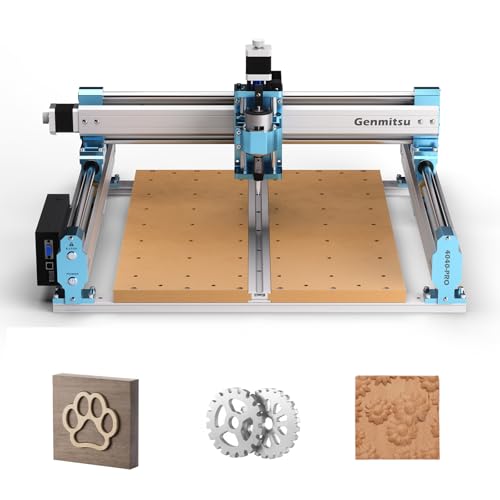
The PROVerXL 4030S aims at stiffness first. An upgraded linear guideway on the Z axis and a heavy-duty structure reduce the play that makes lightweight desktop machines chatter, and a 710 watt spindle supplies enough power for hardwood, acrylic and aluminum at light depths. The 130 millimeter Z height leaves room for thick stock and fixtures, which many small machines lack.

The tradeoff is size and learning curve. It takes more desk than a 3018, the controller and software demand patience, and a bigger machine means bigger mistakes if the stock moves. Compared with the 4040-PRO, it adds a stronger spindle and a better Z axis, and against the Masuter Pro MAX it has a smaller work area but a different spindle approach.

Keep the lead screws and rails clean and lubricated, check belt and coupler set screws regularly and run a dust shoe or vacuum, since chips and dust are the main enemy. Always secure the stock with clamps or a spoilboard and wear eye and ear protection.

What works

  • 710W spindle handles wood, acrylic and light metals
  • Upgraded linear Z axis cuts down on play
  • 130 mm Z height fits thick stock
  • Desktop-scale footprint

Watch out for

  • Needs more desk space than a 3018
  • Software setup takes patience

Spec sheet

Spindle
710W
Z height
130 mm
Z axis
Upgraded linear guideway
Axes
3
Class
Desktop milling machine
02
Genmitsu 3018-PRO desktop CNC router kit
3 axis GRBLOffline controllerCompactWood and plastics
Check price on Amazon
Best for: First-time CNC users who want a low-risk way to learn.

The 3018-PRO is the machine most people start with. It is a compact 3-axis desktop CNC with GRBL control and an offline controller, so after you load a file you can run a job without a computer attached. The small frame and light spindle keep the cost and risk low, and a large community means tutorials and fixes are easy to find.

The compromise is capacity and rigidity. Lightweight frames flex, spindles are low power and cuts must be shallow, so it handles wood, plastic and soft materials but not heavy aluminum. Compared with the 3018-PROVer V2, it is the older design without the updated Z axis and safety features, and against the LUNYEE 3018 Pro Max it has a lower-power spindle.

Ownership means regular tightening of fasteners, cleaning and lubricating the rails and screws, and replacing bits as they dull. Wear eye protection, secure stock firmly and run a shop vacuum nearby. Pair it with a decent set of clamps and a roll of double sided tape, and it covers most first projects.

What works

  • Compact 3-axis machine with GRBL control
  • Offline controller runs jobs without a PC
  • Large community and tutorials
  • Lowest cost of the desktop CNCs here

Watch out for

  • Lightweight frame flexes on harder materials
  • Small work area and low spindle power

Spec sheet

Control
GRBL with offline controller
Axes
3
Class
Mini milling machine
Designed for
Beginners and makers
Materials
Wood, plastic, soft materials
03
Genmitsu 3018-PROVer V2 CNC milling machine
Limit switchesEmergency stopUpgraded Z axisBeginner friendly
Check price on Amazon
Best for: Beginners who want homing, limit switches and an e-stop.

The PROVer V2 refines the 3018 formula with limit switches, an emergency stop and an upgraded Z axis, three changes that matter more than a bigger motor. Limit switches let the machine home itself, which makes jobs repeatable, and an emergency stop gives you a physical way to halt a bad cut. The result is a beginner machine that behaves more predictably.

The tradeoff is that it is still a small, light machine, so work area and rigidity remain limited. Compared with the 3018-PRO, it adds safety and repeatability, and against the 4040-PRO it is smaller and lighter but easier to start with. If you plan to cut aluminum regularly, step up to a stiffer frame.

Treat it as a learning platform. Check the gantry and spindle mount for play, keep the rails clean and lubricated, and use clamps. Practice on foam and plastic before expensive stock.

What works

  • Limit switches allow homing and repeatability
  • Emergency stop adds a physical safety cutoff
  • Upgraded Z axis improves stiffness
  • Easy setup for beginners

Watch out for

  • Small and light compared with the 4040 class
  • Low-power spindle limits metals

Spec sheet

Safety
Limit switches and emergency stop
Z axis
Upgraded
Class
Desktop CNC
Control
GRBL
Target user
Beginners
04
LUNYEE 3018 Pro Max 500W all-metal CNC router
500W spindleAll metalLimit switchesE-stop
Check price on Amazon
Best for: Makers who want more spindle power in a 3018-size footprint.

The 3018 Pro Max pairs the compact 3018 footprint with a 500 watt spindle and an all-metal structure, so it can take deeper cuts than the plain 3018-PRO. Limit switches on all three axes and an emergency stop make it behave like a larger machine, and the metal frame resists flex better than plastic parts.

The tradeoff is that a 500 watt spindle on a small frame still pushes the limits of a light machine, and it is louder and creates more chips than a hobby spindle. Compared with the Genmitsu 3018-PROVer V2, it has more power, and against the 4040-PRO it keeps the small footprint but has less work area.

Check set screws after the first hours, since vibration loosens them, and keep the spindle cooled by letting it rest between long cuts. Use proper bits and take light passes in harder materials. A small dust shoe turns an average first week into a clean one.

What works

  • 500W spindle for deeper cuts than a 3018-PRO
  • All-metal structure resists flex
  • Limit switches on three axes plus e-stop
  • Compact desktop footprint

Watch out for

  • Small work area limits project size
  • Louder spindle than hobby models

Spec sheet

Spindle
500W
Frame
All metal
Safety
3 axis limit switches and e-stop
Control
GRBL
Class
3018 desktop
05
Genmitsu 4040-PRO CNC router, lead screw, reinforced bed
400 x 400 classLead screw driveHybrid spoilboardGRBL
Check price on Amazon
Best for: Makers who want a bigger bed for signs, panels and small furniture parts.

The 4040-PRO steps up to a roughly 400 by 400 millimeter work area with a lead screw drive and a reinforced hybrid spoilboard that cuts down on bed flex. Lead screws give better torque and repeatability than belts, and the reinforced bed keeps stock flat through a cut.

The limit is spindle and Z rigidity. It is a stiffer machine than a 3018 but still a desktop design, and cutting metals demands light passes. Compared with the PROVerXL 4030S, it has a lower-tier spindle and Z axis, and against the 3018 family it offers much more area for signs and panels.

Keep the lead screws lubricated, check the bed fasteners and clean the rails regularly. Dust control and eye protection are essential, and the larger machine means stock needs solid clamps.

What works

  • 400 by 400 mm class work area
  • Lead screw drive for torque and accuracy
  • Reinforced hybrid spoilboard resists flex
  • Handles wood, acrylic and light metal

Watch out for

  • Not as rigid as a purpose-built mill
  • Needs more bench space than a 3018

Spec sheet

Work area
4040 class (about 400 by 400 mm)
Drive
Lead screw
Bed
Reinforced hybrid spoilboard
Control
GRBL
Materials
Wood, acrylic, metal
06
FoxAlien Masuter Pro MAX 500W brushless 6060 CNC
500W brushless6060 work area3 axis GRBLHeavy duty
Check price on Amazon
Best for: Larger sign work and panels that outgrow a 4040 bed.

The Masuter Pro MAX has the biggest bed of the desktop machines in this guide, a 6060 class area of about 600 by 600 millimeters, and a 500 watt brushless spindle built for continuous heavy-duty use. A brushless spindle runs cooler and quieter than a brushed one and does not wear out carbon brushes, which suits long jobs.

The tradeoff is that area is not rigidity. A large gantry spans more distance, so it flexes more than a small frame, and 500 watts is modest for the area. Compared with the PROVerXL 4030S, it covers more ground but cuts with less stiffness, and against the 4040-PRO it offers a bigger bed and a better spindle.

Plan for a sturdy table, since the machine is large, and a vacuum or dust shoe. Clean and lubricate the rails, check the belt or screw tension and keep the gantry square. Plan a sturdy table or stand, because the long gantry transmits vibration through a weak surface.

What works

  • Largest bed of the desktop group at 6060 class
  • 500W brushless spindle runs cooler and lasts
  • Built for continuous heavy-duty work
  • 3-axis GRBL control

Watch out for

  • Large gantry flexes more than a compact frame
  • Needs a big, sturdy table

Spec sheet

Spindle
500W brushless
Work area
6060 class (about 600 by 600 mm)
Control
GRBL, 3 axis
Duty
Continuous heavy duty
Class
Large desktop

Spec sheet decoder

What the numbers on the box really mean

The specs manufacturers lead with, translated into what they tell you about real-world performance.

Spindle wattage

The rated electrical power of the spindle. It sets maximum cutting force but not the stiffness of the machine. The machine's stiffness decides how much of that rated power can actually be used without chatter.

Watch forThe PROVerXL 4030S lists 710W, the Pro Max and Masuter list 500W.

Brushless spindle

A motor without carbon brushes, which runs cooler and quieter and lasts longer. Brushless motors also give more consistent speed under load.

Watch forThe Masuter Pro MAX uses a 500W brushless spindle.

GRBL

An open-source motion controller firmware for CNC machines that reads G-code. It is widely supported. Because GRBL is open, you can usually find a fix for an odd error with a short search.

Watch forAll of these machines use GRBL control.

Work area class

Numbers like 3018, 4040 or 6060 give the bed size in centimeters. Usable area is smaller. Always measure a machine's actual cutting travel before assuming the label is accurate.

Watch forA 3018 is about 300 by 180 mm and a 6060 is about 600 by 600 mm.

Limit switches

Switches that let the machine find its home position and stop at travel ends. They make repeat jobs consistent. A missing limit switch usually means you must zero the machine by hand each time.

Watch forThe PROVer V2 and the 3018 Pro Max include them.

Methodology

How We Evaluated These Desktop CNC Routers

Frame and motion

We compared structure, drive type and Z axis design. The PROVerXL 4030S has an upgraded linear Z guideway and the 4040-PRO has lead screws. Stiffer frames scored higher. We also noted whether the frame is aluminum extrusion or sheet metal.

Spindle and power

We looked at spindle wattage and type. The PROVerXL has 710W and the Masuter Pro MAX has 500W brushless. Power that the frame can actually use scored higher. We compared published wattage with the frame size it has to drive.

Work area

We compared bed size and Z height. The Masuter has 6060 class and the PROVerXL has 130 mm of Z. Practical size scored higher. We noted how thick a workpiece each machine can accept.

Safety and control

We checked limit switches, e-stops and offline control. The PROVer V2 and 3018 Pro Max include limit switches and e-stops. Safer machines scored higher. We also looked at wiring neatness and connector quality.

Ownership

We weighed assembly, upkeep and owner feedback patterns. Machines that held calibration scored higher. We checked how many setup steps each kit requires before the first cut.

Decision guide

How to Choose the Right Desktop CNC Routers

By Material and Project

SituationPickWhy
Learning on foam and woodGenmitsu 3018-PROLowest cost and community support
Beginner wanting safety featuresGenmitsu 3018-PROVer V2Limit switches and e-stop
More power, small bedLUNYEE 3018 Pro Max500W all-metal
Signs and furniture partsGenmitsu 4040-PRO400 mm class bed
Aluminum at light depthsGenmitsu PROVerXL 4030S710W and linear Z axis

By Budget

SituationPickWhy
Lowest tierGenmitsu 3018-PROEntry machine
Entry plus safetyGenmitsu 3018-PROVer V2Limit switches
Mid tier powerLUNYEE 3018 Pro Max500W spindle
Upper mid tierGenmitsu 4040-PROLarger bed
PremiumFoxAlien Masuter Pro MAXLargest bed and brushless

Compact vs Large Bed

Compact 3018 class

The 3018-PRO, PROVer V2 and Pro Max fit on a desk and are stiffer per size. They limit part size and depth.

Large 4040 and 6060

The 4040-PRO, 4030S and Masuter Pro MAX cover signs and panels. They need more space and have more gantry flex.

Small parts and limited space suit 3018, and signs and panels suit larger beds.

Spindle Type

SituationPickWhy
Continuous long jobsFoxAlien Masuter Pro MAX500W brushless
Hardwood and light metalGenmitsu PROVerXL 4030S710W spindle
Gentle wood and plasticGenmitsu 3018-PROLow-power spindle
Mid power on small bedLUNYEE 3018 Pro Max500W all-metal

For Woodworking and Signs Specifically

Look for

Look for a bed that fits your widest board, a rigid Z axis, dust control and a spoilboard you can resurface. Downcut or compression bits give cleaner edges in plywood.

In this comparison

The 4040-PRO and Masuter Pro MAX suit signs, and the PROVerXL 4030S suits harder work. The 3018 models suit small carvings.

When to Spend More

Spend more if

Spend more if you cut aluminum, make parts for sale or need a larger bed. The PROVerXL 4030S and Masuter Pro MAX reward serious use.

Save if

Save if you are learning. The 3018-PRO or PROVer V2 teaches the same workflow.

Ownership

Maintenance schedule

The upkeep that decides whether this machine lasts two seasons or ten.

TaskIntervalWhy it matters
Clean and lubricate rails and screwsEvery 20 hoursChips and dust cause wear and binding. A light lubricant keeps motion smooth. Use a light machine oil on rails and a lithium grease on lead screws.
Check set screws and couplersMonthlyVibration loosens fasteners and causes lost steps. Tighten them with thread locker.
Resurface the spoilboardAs neededA worn spoilboard has uneven depth. A shallow facing pass restores flatness. Surface with a flycutter or a wide bit rather than a small end mill.
Replace dull bitsPer material hoursDull bits heat, burn and strain the machine.
Empty dust collectionEach sessionChips accumulate and jam the work. Clean machines cut better. Brush chips off the rails before they get dragged into the bearings.

FAQ

Frequently Asked Questions

Can a desktop CNC cut aluminum?

Yes at light depths on a stiff machine like the PROVerXL 4030S. Use light passes, sharp bits and coolant or air blast. A smart workflow is to rough out with a larger bit and finish with a small one so the machine does less work per pass.

What size machine should I buy?

Buy for your largest regular part with margin. A 3018 suits small carvings, a 4040 suits signs, and a 6060 suits panels. Bring a printed template to the bed before cutting to confirm the part really fits.

Is a CNC router hard to learn?

There is a learning curve with CAD, CAM and G-code. Expect weeks to be comfortable and start with simple projects. Free tutorials cover most of the steps, and a simple first project builds confidence quickly.

Do I need a computer attached?

Not always. Offline controllers, such as on the 3018-PRO, allow running jobs without a laptop.

How much dust does it make?

A lot. Use a dust shoe and shop vacuum and wear eye, ear and lung protection. A small shop vacuum and a dust shoe cost less than the cleanup you will otherwise face.

How long do these machines last?

With cleaning and lubrication, many years. Belts, bits and spindle brushes are the wear items. Replace belts and bits as consumables and budget for a few extras up front.

Bottom line

The short version

Browse more desktop cnc routerson Amazon →
James Miller, Lead Machine Editor

About the author

James Miller

Lead Machine Editor, MachineFanatic

James Miller leads MachineFanatic's buying guides, turning spec sheets, manuals and owner feedback into clear verdicts on power tools, outdoor power equipment, shop machines and kitchen machines.

More from James →

Keep reading

Related guides