
Amazon affiliate links - we earn a commission.Affiliate disclosure

Buying guide · 13 min read · Updated 2026-11-07

Best Resin 3D Printers for Beginners (2026)

Five beginner resin 3D printers compared on screen resolution, auto leveling, vat design and cleanup effort, from ELEGOO Mars to Saturn and Anycubic Photon.

James MillerBy James MillerLead Machine Editor5 machines comparedSpec-sheet verified
Best Resin 3D Printers for Beginners

At a glance

Our top picks

Side by side

Spec comparison

MachineScreenLevelingTechnology
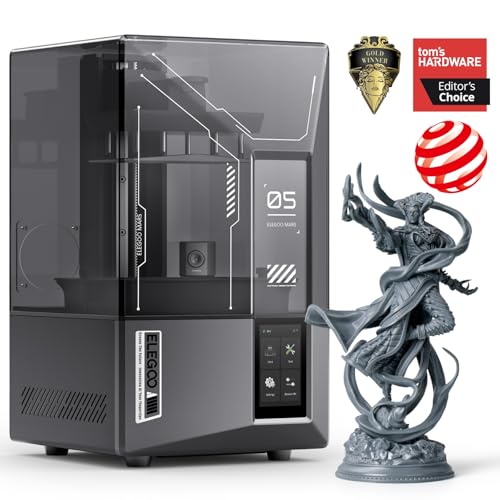
ELEGOO Mars 5 Ultra 9K Resin 3D PrinterBest OverallELEGOO Mars 5 Ultra 9K Resin 3D Printer7 inch 9K mono LCDSmart automaticMSLA resin
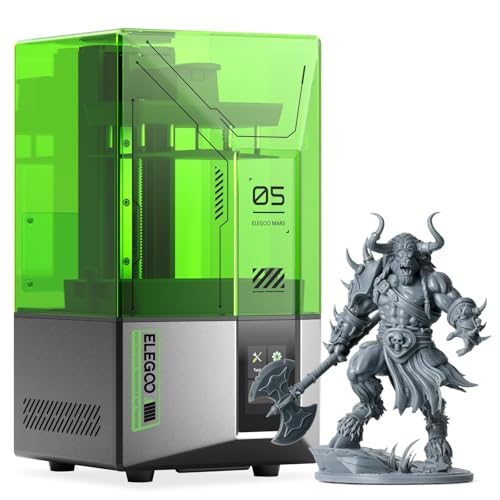
ELEGOO Mars 5 4K Mono LCD Resin 3D PrinterBest ValueELEGOO Mars 5 4K Mono LCD Resin 3D Printer4K mono LCDAutomaticMSLA resin
ANYCUBIC Photon Mono 4 10K Resin 3D PrinterBest 10K DetailANYCUBIC Photon Mono 4 10K Resin 3D Printer7 inch 10K mono LCDn/an/a
ELEGOO Saturn 4 Ultra 16K Resin 3D PrinterBest Large PlateELEGOO Saturn 4 Ultra 16K Resin 3D Printer10 inch 16K mono LCDn/aMSLA resin
ANYCUBIC Photon P1 Resin 3D PrinterBest Precision BuildANYCUBIC Photon P1 Resin 3D Printern/aAuto-leveling 3.0MSLA resin

Resin printing looks easy in a product video: the plate lowers, light cures a layer and a detailed part rises out of a vat. In a real home, the part is only half the story, and beginners are surprised by how much time goes into washing, curing and cleaning.

Choosing well means weighing how forgiving the machine is on day one. Automatic leveling, a tolerant vat and sensible safety features matter more to a first-timer than raw resolution, because a ruined first week costs money and confidence.

Before you buy

6 Criteria to Look For Before Buying a Resin 3D Printer for Beginners

  1. 01

    Automatic versus manual leveling

    The Mars 5 and Mars 5 Ultra level themselves, the Photon P1 uses auto-leveling 3.0 and the Photon Mono 4 relies on manual leveling. A plate that is out of square by a fraction of a millimeter causes a print to stick to the vat film instead of the plate, wasting resin and sometimes tearing the film. For a first machine, automatic leveling is the single most useful feature. Even with it, check that the plate screws are tight and that the vat is seated flat, since a loose vat or plate defeats the automatic routine. Re-run the leveling any time you move the printer, swap the vat or notice the first layers peeling.

  2. 02

    Screen resolution without overspending

    Four-K, 9K, 10K, 14K and 16K screens all produce paintable models. The Mars 5's 4K panel is plenty for toys and figures, while the Saturn 4 Ultra's 16K spread over ten inches gives more area at fine detail. Beginners rarely see the difference in their first months, so do not let resolution push you above your budget. A better use of money is a second vat, spare film and a decent wash tub, because those are what actually keep a beginner printing week after week. Exposure settings matter just as much as pixels, and starting from the resin maker's profile is wiser than guessing.

  3. 03

    Vat size and resin at risk

    A large vat like the Saturn 4 Ultra holds more resin that can be ruined by a failed print, while a compact vat limits the loss. If you are still learning, a smaller machine caps the cost of mistakes. You can always upgrade after you understand exposure, supports and cleanup. Many experienced users keep a small, cheap machine for tests and quick parts even after buying a larger one, because it is wasteful to fill a big vat for a single small print.

  4. 04

    Cleanup workflow

    Every resin print needs a wash in isopropyl alcohol and a UV cure. Plan a dedicated tub, nitrile gloves, paper towels and a sealed waste bottle, since uncured resin should never go down the drain. A machine with a flip-up lid, like the Saturn 4 Ultra, makes vat access easier, but the wash and cure steps are the same for all of them. Expect a typical print to need ten minutes of active cleanup, another ten to cure and a few minutes to trim supports, so a one-hour print is really an evening task for a beginner.

  5. 05

    Temperature and room conditions

    Resin thickens in cold rooms, which causes failed layers and weak supports. The Saturn 4 Ultra warms its tank, and on other machines you should keep the room near 20 to 25 C. A garage in winter is a common cause of mysterious failures for new owners. If the room is cold, move the bottle of resin to a warmer space for an hour before pouring, or place a small heater nearby, and avoid bright sunlight on the vat since stray UV can cure resin before you want it.

  6. 06

    Safety and ventilation

    Uncured resin irritates skin and its fumes can bother some people, so print in a ventilated space away from sleeping areas, food and pets. Keep the printer lid closed during printing and wear gloves when handling parts. Treat resin like a chemical, not a craft supply. Wash your hands after every session, keep spills wiped with paper towels and cure them in sunlight before disposal, and never let a child or a pet handle uncured parts. A low-cost respirator rated for organic vapors is a sensible addition if you print often.

Detailed reviews

The 5 best resin 3d printers for beginners, explained

01
ELEGOO Mars 5 Ultra 9K Resin 3D Printer
7 inch 9K mono LCD18 micron XYSmart levelingResin
Check price on Amazon
Best for: First-time resin owners who want automation and strong detail.

A beginner's biggest early risk is a first print that sticks to the vat instead of the plate, and the Mars 5 Ultra attacks that problem with smart automatic leveling and a set of intelligent checks before the job starts. Its seven-inch 9K mono LCD has an 18 micron XY resolution, which is a level of detail that rewards good technique without demanding perfect settings.

In practice, this machine behaves more like an appliance than a kit. You load resin, start the self-checks and let it level itself, which cuts the manual paper-method step that scares new owners. Against the Mars 5, the Ultra adds a sharper screen and more automation, and against the Anycubic Photon Mono 4 it replaces manual plate setup with a machine that measures for you.

The ownership routine is the same for any resin printer. Filter the vat after each job, wipe the plate, wash parts in isopropyl alcohol and cure them under UV. Keep nitrile gloves and a waste bottle near the printer, and print in a ventilated room. The extra cost over entry models buys fewer failed prints in the first month.

What works

  • Smart automatic leveling removes a major beginner hurdle
  • 9K screen with 18 micron XY gives sharp detail
  • Intelligent detection systems catch setup errors early
  • Appliance-like workflow for first-time users

Watch out for

  • Higher cost than entry resin machines
  • Resin handling and cleanup remain unavoidable
  • Vat film and screen are long-term consumables

Spec sheet

Screen
7 inch 9K mono LCD
XY resolution
18 micron
Leveling
Smart automatic
Feature
Intelligent detection systems
Technology
MSLA resin
02
ELEGOO Mars 5 4K Mono LCD Resin 3D Printer
4K mono LCDAuto levelingDesktopResin
Check price on Amazon
Best for: Beginners who want automatic leveling at the lowest resin cost.

The Mars 5 keeps the part that matters to a beginner, automatic leveling, and drops to a 4K mono screen to hold the price down. That is a sensible trade: a first-timer is more likely to fail at setup than to be limited by screen resolution, and 4K is more than enough for toys, chess pieces, small tools and gaming figures.

Against the Mars 5 Ultra, the Mars 5 shows layer texture sooner on large smooth surfaces, so a polished vase or helmet will reveal its steps more than the Ultra's output would. Against the Photon Mono 4, the screen is lower resolution but the setup is easier. Most beginners will not notice the difference in a first month of printing.

Care is the usual routine of filtering resin, replacing worn film and keeping the plate clean. A spare vat and film kit are cheap and prevent a day-long outage when a print fails and tears the film.

What works

  • Automatic leveling on a low-cost machine
  • 4K mono screen is enough for most beginner projects
  • Compact footprint fits a small workbench
  • Simple ELEGOO workflow and profiles

Watch out for

  • Layer texture shows sooner than on 9K screens
  • Less headroom for display-grade work
  • Cleanup and resin handling are still required

Spec sheet

Screen
4K mono LCD
Leveling
Automatic
Technology
MSLA resin
Format
Compact desktop
Maker
ELEGOO
03
ANYCUBIC Photon Mono 4 10K Resin 3D Printer
7 inch 10K mono LCDLighTurboPower-off resumeResin
Check price on Amazon
Best for: Learners who accept manual leveling in return for more detail.

The Photon Mono 4 puts a 10K screen, 9024 by 5120 pixels across seven inches, in a beginner price bracket. The maker claims a 105% precision gain over the Mono 2, and the LighTurbo light source aims to spread UV evenly so detail stays crisp from one corner of the plate to the other. Power-off resume adds a safety net for long prints.

The cost of that value is manual leveling. A beginner must set the plate by hand, and while the procedure is simple it is the step most likely to fail a first print. Against the Mars 5 and Mars 5 Ultra, which level themselves, the Photon asks for patience in return for sharper pixels per dollar.

It is a good fit for a learner who wants to understand the machine, and the community around Anycubic printers is large, so answers to most questions are easy to find. Keep spare film and a clean plate and you will get years of use.

What works

  • 10K screen delivers fine detail at a low price
  • LighTurbo light source evens out exposure
  • Power-off resume protects long prints
  • Large community and plentiful guidance

Watch out for

  • Manual plate leveling is a hurdle for beginners
  • Older platform than the Mars 5 Ultra
  • Resin handling remains messy

Spec sheet

Screen
7 inch 10K mono LCD
Pixel grid
9024 x 5120
Light source
LighTurbo
Precision claim
105% up on Mono 2
Safety
Power-off resume
04
ELEGOO Saturn 4 Ultra 16K Resin 3D Printer
10 inch 16K LCDFlip-up lidTank heatingResin
Check price on Amazon
Best for: Beginners who want large models or batches from day one.

The Saturn 4 Ultra is the largest machine here, with a ten-inch 16K mono LCD and a flip-up lid that gives easy access to the vat. Smart tank heating warms the resin before printing, which matters because cold resin is thick and cures unpredictably, a common cause of failed prints in a cool garage in winter. The large plate lets a beginner print bigger models or batches of figures.

For a first machine it is more machine than most need, and its price reflects that. Against the Mars 5 Ultra, the Saturn offers more room and a higher pixel count, but resin use is higher, the vat is larger to clean and a failed print wastes more. It suits beginners with a clear project need, such as large busts or batch runs.

Expect to dedicate bench space, a larger wash tub and more isopropyl alcohol. Keep the room warm and the lid closed during printing, and filter resin carefully because a larger vat holds more resin that can be reused.

What works

  • Ten-inch 16K screen for large, detailed prints
  • Flip-up lid gives easy vat access
  • Smart tank heating reduces cold-resin failures
  • Room for batches of small parts

Watch out for

  • Larger vat means more resin at risk in a failure
  • Takes more bench space and wash volume
  • Costs more than compact resin machines

Spec sheet

Screen
10 inch 16K mono LCD
Lid
Flip-up lid
Heating
Smart tank heating
Strength
Large plate, fine detail
Technology
MSLA resin
05
ANYCUBIC Photon P1 Resin 3D Printer
14K detailAuto-leveling 3.0LighTurbo 4.0Ball screws
Check price on Amazon
Best for: Beginners who want a rigid, precise machine that will last.

The Photon P1 is the engineering-minded option, with industrial-grade ball screws and precision guide rails for stable Z motion. Combined with auto-leveling 3.0 and the LighTurbo 4.0 light source, it targets consistent layers and a hands-off first print, aimed at a 14K detail level.

What that means for a beginner is fewer variables to chase. Layer lines come from the Z axis, and a stiffer motion system reduces the wobble and banding that can plague cheaper machines. Against the Photon Mono 4, the P1 adds automatic leveling and a much more rigid frame, and against the Saturn 4 Ultra it targets quality over size.

Ownership is similar to other resin printers, with the usual care for vat, film and plate. The extra build quality means it should age better, but it is a bigger commitment than a basic first machine.

What works

  • Ball screws and guide rails stabilize Z motion
  • Auto-leveling 3.0 simplifies the first print
  • LighTurbo 4.0 light source evens exposure
  • Built for long-term use

Watch out for

  • Higher cost than entry machines
  • More machine than a casual user needs
  • Resin cleanup remains unavoidable

Spec sheet

Resolution
14K class
Leveling
Auto-leveling 3.0
Light source
LighTurbo 4.0
Motion
Ball screws and guide rails
Technology
MSLA resin

Spec sheet decoder

What the numbers on the box really mean

The specs manufacturers lead with, translated into what they tell you about real-world performance.

MSLA

Masked stereolithography, where a UV light shines through an LCD mask to cure a whole layer at once.

Watch forThe LCD wears out and is replaceable, so avoid leaving it running with an empty vat.

4K to 16K screen

The pixel count of the monochrome LCD. A higher count at the same size gives smaller pixels and finer detail.

Watch forDetail also depends on layer height and exposure, not just pixel count.

Auto-leveling

Automatic setting of the build plate relative to the screen so the first layer sticks.

Watch forA dirty or warped plate still causes failures.

Tank heating

The Saturn 4 Ultra warms the resin vat so the liquid flows and cures consistently.

Watch forIt helps in cool rooms but is no substitute for a stable environment.

Ball screw

A precision drive that moves the plate in Z with less backlash, used on the Photon P1.

Watch forIt reduces banding but still depends on a clean, lubricated rail.

Methodology

How We Evaluated These Resin 3D Printers for Beginners

Beginner failure rate

We evaluated how likely each machine is to fail on a first print. Automatic leveling on the Mars 5, Mars 5 Ultra and Photon P1 scored higher than the manual routine on the Photon Mono 4.

Detail per dollar

We compared screen resolution against cost, from the Mars 5's 4K screen to the Saturn 4 Ultra's 16K. Detail was weighed against how much a beginner can actually use. A machine that out-resolves your skill is a waste, while one that lets you learn exposure and supports on a forgiving platform is the better teacher.

Workflow and cleanup

We looked at vat access, lid design and the wash and cure steps. The Saturn 4 Ultra's flip-up lid and heated tank were credited for convenience.

Build quality

The Photon P1's ball screws and guide rails indicate a stiffer machine. We considered how build quality affects long-term banding and reliability.

Ownership burden

Based on owner feedback patterns, FEP film, vat wear and screen life are the main running costs. We favored machines with accessible parts. A vat and film swap should take a few minutes with a screwdriver, not a service visit.

Decision guide

How to Choose the Right Resin 3D Printers for Beginners

By First Project

SituationPickWhy
Small figures and toysELEGOO Mars 54K is enough and leveling is automatic
Detailed busts and display piecesELEGOO Mars 5 Ultra9K screen with 18 micron XY pixels
Large models and batchesELEGOO Saturn 4 UltraTen-inch 16K screen and heated tank

By Budget

Budget tierPickWhy
Lowest outlayELEGOO Mars 5Automatic leveling at entry cost
Middle groundANYCUBIC Photon Mono 410K screen with manual leveling
Highest outlayELEGOO Saturn 4 UltraLarge plate and 16K detail

Manual vs Automatic Setup

Manual

The Photon Mono 4 expects you to level the plate by hand. It costs less per pixel and teaches the process, but a mistake can ruin a first print.

Automatic

The Mars 5, Mars 5 Ultra and Photon P1 measure the plate for you, reducing early failures. They cost a little more but save resin.

Beginners should choose automatic; tinkerers can save with manual.

Compact vs Large Plate

PreferencePickWhy
Small bench, low riskELEGOO Mars 5Compact vat limits wasted resin
Balanced size and detailELEGOO Mars 5 UltraSeven-inch 9K screen
Batches and big partsELEGOO Saturn 4 UltraTen-inch plate

For First-Time Resin Users Specifically

Look for

Automatic leveling, a power-off resume feature and easy vat access. Buy a wash tub, gloves and spare film with the printer.

In this comparison

The Mars 5 Ultra offers the best balance of automation and detail, the Mars 5 is the budget start and the Photon P1 suits learners who want a rigid, precise machine.

When to Spend More

Spend more if

You print weekly or sell prints. The Mars 5 Ultra, Saturn 4 Ultra and Photon P1 reduce failures and widen what you can print.

Save if

You want to test whether resin suits you. The Mars 5 or Photon Mono 4 is a low-risk way to start.

Ownership

Maintenance schedule

The upkeep that decides whether this machine lasts two seasons or ten.

TaskIntervalWhy it matters
Filter the resinAfter each printCured bits in the vat tear the film. Pour through a fine filter into a clean bottle.
Replace the vat filmEvery 3 to 6 monthsFilm clouds and sags, causing failed prints. A new sheet is cheap.
Clean the plateAfter each printCured resin on the plate ruins adhesion. Wipe with isopropyl alcohol.
Replace the alcoholWhen cloudyDirty alcohol leaves sticky residue on prints. Use fresh alcohol for a final rinse.
Check the screenMonthlyStains and pixel burnout show as blurry patches. Clean gently and replace if needed.

FAQ

Frequently Asked Questions

Is resin harder than filament for beginners?

It is messier but not harder to run. The challenges are cleanup, safety and resin cost, while filament printing needs less handling. If your goal is large functional parts or terrain, filament remains the more practical and economical tool, and resin is best added when you want fine detail.

What is the most important feature for a beginner?

Automatic leveling. A bad first layer is the commonest reason for a failed beginner print, and machines like the Mars 5 and Photon P1 remove that risk.

Do I need a wash and cure station?

You need a way to wash in isopropyl alcohol and cure under UV. A tub and a UV lamp work, though dedicated stations are tidier.

Is a higher resolution always better?

Not for beginners. Four-K is enough for most prints, and extra pixels matter only on large, smooth or very detailed models.

How much does resin printing cost to run?

Resin, alcohol, gloves and film add up. Plan a monthly budget, and remember that failed prints waste resin. A kilogram bottle goes a long way on small figures but disappears quickly on large solid models, so hollow large parts with drain holes to save material.

Can I print in a bedroom?

It is not ideal. Resin fumes can bother some people, so print in a ventilated room away from sleeping areas.

Bottom line

The short version

Browse more resin 3d printers for beginnerson Amazon →
James Miller, Lead Machine Editor

About the author

James Miller

Lead Machine Editor, MachineFanatic

James Miller leads MachineFanatic's buying guides, turning spec sheets, manuals and owner feedback into clear verdicts on power tools, outdoor power equipment, shop machines and kitchen machines.

More from James →

Keep reading

Related guides