
Amazon affiliate links - we earn a commission.Affiliate disclosure

Buying guide · 12 min read · Updated 2026-11-19

Best Streaming Mixers Under $300 (2026)

Six streaming mixers listed at or below $300, from a broadcast mixer to per source faders and larger consoles, compared on routing and inputs.

James MillerBy James MillerLead Machine Editor6 machines comparedSpec-sheet verified
Best Streaming Mixers Under $300

At a glance

Our top picks

At this cap the choice is between a broadcast mixer, a per source fader mixer and a larger console. Each solves routing in a different way.

This guide compares those styles and says who benefits from each. A streamer with a game, a mic and music needs different tools from one who only talks. Prices move, so the $300 cap reflects listing prices when this guide was updated.

Before you buy

6 Criteria to Look For Before Buying a Streaming Mixer Under $300

  1. 01

    Phantom power on every input

    Condenser mics need 48 V phantom power, and it travels only over XLR cables. Some budget boards put phantom on the first channel only, or supply a lower voltage than the standard, which leaves a condenser quiet and noisy. GoXLR Mini and MAONO G3 mixer are the picks to read the phantom line for. Dynamic mics do not need phantom, and some older ribbons can be damaged by it.

  2. 02

    Preamp gain for dynamic mics

    Broadcast dynamic mics are low output and want roughly 60 to 70 dB of clean gain. A weak preamp makes you turn the knob to the end, which adds hiss, or forces an inline booster. MAONO AME2 (10 channel, 48 V) and OZMI RGB mixer bundle (RGB mixer with mic and arm) sit at different points on that curve. Check the stated gain, and be wary of a listing that gives none.

  3. 03

    Bundles and the microphone question

    Many mixers in this range are sold as bundles with a mic, a stand and cables. The bundled mic is usually a small condenser that picks up room noise, so a dynamic mic on an XLR input is the better upgrade. GoXLR Mini and MAONO G3 mixer are the lineup examples of the bundle approach. Treat a bundle as a convenient start, not a final setup.

  4. 04

    USB loopback and routing

    Loopback lets you capture computer audio, such as a caller, music or game sound, alongside your mic without a feedback loop. Some mixers offer a full mix to USB, others give separate channels, and a few only a stereo pair. MAONO AME2 and OZMI RGB mixer bundle differ on this in the lineup. Choose the routing that matches how you edit: one mixed track is simple, separate tracks give room to fix mistakes.

  5. 05

    Noise, hiss and grounding

    Cheap mixers use small switch mode power sources that can add hiss or hum, and a USB ground loop can add a buzz that gain cannot fix. Balanced XLR cables, a short run and a separate power adapter help. MAONO AME2 and OZMI RGB mixer bundle are the picks to watch for noise complaints. Record a short test with the gain at your normal level before committing to a show.

  6. 06

    Effects you will actually use

    Many live sound cards advertise voice changers, reverb and sound pads, which suit streamers but rarely help a podcast. A noise gate and a compressor are the effects that matter for speech. GoXLR Mini and MAONO G3 mixer are the lineup examples to compare on extras. Do not pay for a long effects list you will switch off after the first week.

Detailed reviews

The 6 best streaming mixers under $300, explained

01
TC Helicon GoXLR MINI online broadcast mixer with Midas preamp
Midas preampFadersUSB
Check price on Amazon
Best for: Streamers who want broadcast routing

The GoXLR Mini is a broadcast mixer with a Midas preamp and USB based routing. It gives per source faders for game, chat and music. It is officially supported on Windows.

Its routing software is its strength and its learning curve. It suits streamers more than studio podcasts. Its Midas preamp and routing are above the G3's.

Install the driver first and set routing. Keep the faders clean. Before the first episode, record a two minute test with the GoXLR Mini at your normal speaking distance and listen for hiss, because gain set too low and boosted later is the most common cause of noisy audio.

What works

  • Midas preamp
  • Per source faders
  • USB based routing
  • Streamer focused

Watch out for

  • Needs a driver
  • Windows focused

Spec sheet

Preamp
Midas
Routing
USB based mixing
Controls
Per source faders
Software
Driver and app
Use
Online broadcasting
02
MAONO AME2 audio interface mixer with XLR, 48 V and Bluetooth
10 channel48 VBluetooth
Check price on Amazon
Best for: Podcasters who want room to grow

The MAONO AME2 is a 10 channel podcast mixer with XLR input, 48 V phantom power and Bluetooth. It offers 11 custom sound effects. It is a studio console in miniature.

Ten channels give room to grow. The listing counts line channels in that number. Its ten channels exceed the G3's four faders.

Use balanced cables and test levels. Treat the MAONO AME2 as a desk tool that wants a boom arm, a pop filter and a short balanced cable, since those cheap extras improve a recording more than any menu setting.

What works

  • 10 channels
  • 48 V phantom
  • Bluetooth
  • Sound effects

Watch out for

  • Real mic count is lower than ten
  • Large for a small desk

Spec sheet

Channels
10
Phantom
48 V
Wireless
Bluetooth
Sounds
11 custom sound effects
Use
Podcast studio console
03
MAONO G3 gaming audio mixer with 4 faders and 3 submixes
4 faders3 submixesDual PC
Check price on Amazon
Best for: PC streamers who want per source faders

The MAONO G3 is a desktop mixer and XLR interface with four faders and three submixes. It maps any audio source to a fader. It supports dual PC streaming.

Per source faders suit game, chat and music. It is aimed at Windows PC streamers. Its four faders and submixes suit a PC streamer.

Install the software and set routing first. Keep it clean. If you plan to add a guest later, ask whether the MAONO G3 mixer can grow with you, because a second voice is where input counts and monitoring start to matter.

What works

  • Four faders
  • Three submixes
  • Maps any source
  • Dual PC support

Watch out for

  • Windows focused
  • Learning curve for routing

Spec sheet

Faders
4
Submixes
3
Routing
Map any source
Connection
Dual PC
Use
PC streaming control
04
OZMI podcast bundle with RGB mixer, mic, headphones and arm
RGBMicHeadphones
Check price on Amazon
Best for: Beginners who want a complete desk kit

The OZMI bundle combines an RGB audio mixer, a streaming mic, headphones and a boom arm. It lists a voice changer. The bundle gives you a complete desk setup in one box.

A boom arm and headphones are what most starter kits leave out. The mic is a basic one. It adds a mic, headphones and an arm.

Mount the arm and keep the mic close. Keep it dust free. Keep a spare USB cable and the manual for the OZMI RGB mixer bundle, as drivers and routing options are the usual cause of a session that will not start.

What works

  • Mixer, mic, headphones and arm
  • RGB lighting
  • Voice changer
  • Complete setup

Watch out for

  • Bundled mic is basic
  • RGB is cosmetic

Spec sheet

Mixer
RGB audio mixer
Mic
Streaming mic
Extras
Headphones and boom arm
Effects
Voice changer
Use
Podcast and streaming
05
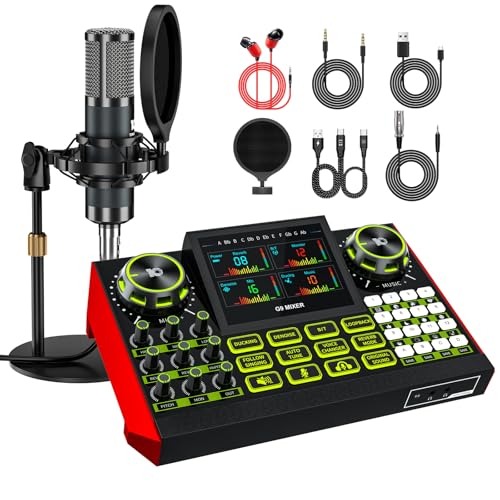
tenlamp G9 audio mixer bundle with microphone for streaming
G93.5 mm micKaraoke
Check price on Amazon
Best for: Creators who also sing

The tenlamp G9 bundle includes a mixer and a 3.5 mm condenser mic with noise reduction. It lists voice effects and karaoke use. It targets creators.

It overlaps with the G10 line. The mic is basic. It adds karaoke use at a lower level.

Test your levels and use a pop filter. Look at where the tenlamp G9 bundle will sit on the desk, because knobs and faders that you cannot reach comfortably get ignored and levels drift during a long recording.

What works

  • Mic included
  • Noise reduction
  • Karaoke use
  • Plug and play

Watch out for

  • Basic mic
  • Near twin listings

Spec sheet

Mixer
G9
Mic
3.5 mm condenser
Noise
Noise reduction
Effects
Voice effects
Use
Streaming, karaoke
06
Aveek 5 channel audio mixer with 3 XLR inputs and 48 V
5 channel3 XLR48 V
Check price on Amazon
Best for: Three person shows

The Aveek is a five channel mixer with three XLR line inputs, 48 V phantom power and a built in PC recording interface. It adds Bluetooth and USB playback. It is a mini mixing console.

Three XLR inputs is a rare figure at this price. It is the right choice for a small panel. It has three XLR inputs, unlike the G3.

Use balanced cables and test levels. Write down your gain and fader settings for the Aveek 5 channel mixer once they sound right, so a reset or a new cable never costs you a session.

What works

  • Three XLR inputs
  • 48 V phantom
  • PC recording interface
  • Bluetooth and USB playback

Watch out for

  • Cheap preamps
  • Small controls

Spec sheet

Channels
5
Mic inputs
3 XLR
Phantom
48 V
Connection
Recording interface, Bluetooth, USB
Use
Multi device

Spec sheet decoder

What the numbers on the box really mean

The specs manufacturers lead with, translated into what they tell you about real-world performance.

Bluetooth input

A wireless input for taking phone calls or music, at lower quality than USB or analog. It is a convenience, not a recording path.

Watch forCheck whether MAONO G3 mixer lets you mix a phone call into the stream.

Sample rate and bit depth

Most of these units record at 44.1 or 48 kHz and 16 or 24 bit, which is fine for speech. Higher numbers add file size, not clarity, for spoken word.

Watch forNote the stated rate for MAONO AME2.

Mix minus

A feed that sends a remote caller everything except their own voice. It prevents echo on remote interviews.

Watch forConfirm that GoXLR Mini offers it as a real output, not a software workaround.

DSP effects

Digital effects such as reverb, voice change and noise reduction built into the mixer. Useful ones for speech are the gate and the compressor.

Watch forLook at which effects GoXLR Mini offers beyond the novelty ones.

Channel count

The number of input strips, counting mono mic channels and stereo line channels differently. A larger number does not mean more microphones.

Watch forCount the XLR inputs on MAONO AME2 separately from the headline number.

Methodology

How We Evaluated These Streaming Mixers Under $300

Value inside the lineup

We ranked each mixer by what its inputs and features cost relative to the other picks. Aveek 5 channel mixer is the cheapest option and GoXLR Mini is the dearest, and we asked whether the premium buys a real upgrade.

Owner feedback patterns

Recurring themes in owner feedback mattered to us, not a single headline number. Repeated complaints about drivers, noise or build lowered a pick. Ratings and review tallies are deliberately absent, and they played no part in the order here.

Controls and ergonomics

We compared faders, knobs and any digital display, preferring controls you can reach without looking. MAONO AME2 and MAONO G3 mixer represent opposite approaches in the lineup.

Real mic input count

We counted XLR inputs separately from headline channel counts, since only XLR takes a proper microphone. We then compared that to how many voices a show needs. GoXLR Mini at broadcast mixer, Midas preamp and MAONO AME2 at 10 channel, 48 V were compared this way.

Noise and grounding

We read owner patterns about hiss, hum and USB buzz and treated repeated complaints as a lowered score. No single noise number is quoted. OZMI RGB mixer bundle was the example for this check.

Decision guide

How to Choose the Right Streaming Mixers Under $300

By Show Format

Before reading the table, decide whether your show lives on a desk or on a computer. A mixer with faders suits live level riding, while a plain interface suits a set and forget recording. Also decide who talks at once, since that sets the input count. The rows below map common situations to the picks in this lineup, with GoXLR Mini as one of the main reference points.

SituationPickWhy
You stream seriouslyGoXLR MiniBroadcast mixer
You want a larger consoleMAONO AME210 channels and phantom
You stream from a PCMAONO G3 mixerFaders and submixes
You want a complete desk kitOZMI RGB mixer bundleHeadphones and boom arm included
You stream and singtenlamp G9 bundleMic and effects
You host threeAveek 5 channel mixerThree XLR

Whichever you choose, record a short test with your real microphone and your usual speaking distance before you commit to a full season of episodes.

By Budget

Every pick here is listed at or below the $300 cap, so the tiers below are relative to each other, not to the cap.

Budget positionPickWhy
Spending the least this lineup allowsAveek 5 channel mixerAveek 5 channel mixer (5 channel, 3 XLR) costs the least in this lineup, so it suits a first show that needs the basics.
The middle of the lineupMAONO AME2MAONO AME2 (10 channel, 48 V) sits mid lineup on cost, balancing inputs and extras.
The top of the lineupGoXLR MiniGoXLR Mini (broadcast mixer, Midas preamp) costs the most in this lineup, so it needs to earn that premium on inputs, routing or build.

Treat the budget tiers as relative: the cheapest pick suits a first show, and the top of the lineup suits a show that has already outgrown a basic box.

XLR Microphone Input vs 3.5 mm Bundle Mic

XLR input and phantom power

The group of GoXLR Mini, MAONO AME2, MAONO G3 mixer, and Aveek 5 channel mixer offers an XLR input. It lets you use a real dynamic or condenser mic, which is the biggest quality step in the category. It suits hosts who plan to upgrade their mic.

3.5 mm or bundled mic

The group of OZMI RGB mixer bundle and tenlamp G9 bundle relies on a 3.5 mm input or a bundled mic. That is cheaper and simpler, but it limits mic choice and usually sounds thinner. It suits a first show or a phone based stream.

Pick the XLR route if you care about voice quality and expect to add a guest. Pick the bundle route if you want the cheapest complete start.

By Mixer Style

SituationPickWhy
You want mic, mixer and cables in one boxOZMI RGB mixer bundle and tenlamp G9 bundleA bundle saves research and cables, but the included mic and stand are usually the weakest part, so plan to upgrade the mic first.
You have an XLR mic and want phantom power and fadersMAONO AME2 and Aveek 5 channel mixerAn XLR capable mixer lets you use a real dynamic or condenser mic, which is the single biggest quality step in this category.
You stream and want routing and faders for each sourceGoXLR Mini and MAONO G3 mixerA broadcast mixer with software routing gives per source faders for game, chat and music, at the cost of a driver and a learning curve.

For Two Person Remote Shows Specifically

Look for

Look for two real XLR inputs with phantom power, clean gain for a dynamic mic, USB loopback and, if you take remote callers, a mix minus route. A headphone output for each host is a bonus. Those features matter more than effects or lighting.

In this comparison

GoXLR Mini is the pick that best matches those points here, with broadcast mixer, Midas preamp. MAONO AME2 and MAONO G3 mixer are the nearest alternatives if you want a different balance of inputs, controls and extras.

When to Spend More

Spend more if

Spend more if you record several people at once or take remote guests regularly. Stepping up to GoXLR Mini (broadcast mixer, Midas preamp) buys the inputs, routing or build that cheaper units lack.

Save if

Save if you are a solo host starting out. Aveek 5 channel mixer (5 channel, 3 XLR) covers the basics, and a small difference in features rarely justifies a larger premium.

Ownership

Maintenance schedule

The upkeep that decides whether this machine lasts two seasons or ten.

TaskIntervalWhy it matters
Use balanced XLR cablesWhen buying cablesBalanced cables reject hum over a short run. A cheap unbalanced adapter is the usual source of noise.
Update drivers or firmware if offeredTwice a yearSome mixers need a driver on certain systems and receive fixes from the maker. Check the support page before an important show.
Check the USB cable and portEach seasonA worn cable causes dropouts that sound like a fault in the mixer. Swap in a short, good cable before blaming the unit.
Cover the mixer when not in useAfter sessionsDust and spilled drinks are the main hazards on a desk. A simple cover protects the controls.
Clean the faders and knobsEvery few monthsDust and skin oils make controls scratchy. A short burst of air and a dry cloth keep them smooth, and no liquid should be sprayed inside.

FAQ

Frequently Asked Questions

Do I need a driver for a USB mixer?

Many class compliant units work without one on common systems, while broadcast mixers often ask for a driver. Check the support page for your system before buying. A driver can also add control software.

Is a bundle mic good enough?

Bundle mics are usually small condensers that pick up room noise, so a dynamic mic on XLR sounds cleaner in an untreated room. Use the bundle to start and upgrade the mic first. MAONO AME2 is a bundle style pick in this guide.

How many XLR inputs do I need?

One for each person who speaks at the same time, plus extras only if you plan to grow. A solo host needs one, and a two person show needs two. Count the real XLR inputs on OZMI RGB mixer bundle, not the channel total.

Why do I hear hiss from my mixer?

Hiss usually comes from too little gain at the mixer and too much in software, or from a noisy power adapter. Turn the gain up at the preamp, keep levels sensible and use balanced cables. A weak preamp, such as the one on a very cheap card, makes it worse.

Can I use a mixer for streaming and podcasting?

Yes, many units do both, with faders for game or chat and a USB mix for recording. The routing is the difference, so check loopback and separate tracks. MAONO G3 mixer is a lineup example that suits both uses.

Why does this guide stop at $300?

The $300 cap is the search keyword shoppers use, and every pick here was listed at or below it when this guide was updated. Aveek 5 channel mixer is the cheapest option in this lineup and GoXLR Mini is the dearest, so the spread inside the cap is real. Prices move, so check the listing before you buy.

Bottom line

The short version

Browse more streaming mixers under $300on Amazon →
James Miller, Lead Machine Editor

About the author

James Miller

Lead Machine Editor, MachineFanatic

James Miller leads MachineFanatic's buying guides, turning spec sheets, manuals and owner feedback into clear verdicts on power tools, outdoor power equipment, shop machines and kitchen machines.

More from James →

Keep reading

Related guides