Amazon affiliate links - we earn a commission.Affiliate disclosure

Buying guide · 12 min read · Updated 2026-11-07

Best 300 DPI Label Printers (2026)

Six 300 dpi label printers compared, from a pocket Bluetooth maker to Zebra desktop and industrial units, on media, connectivity, speed and upkeep.

James MillerBy James MillerLead Machine Editor6 machines comparedSpec-sheet verified
Best 300 DPI Label Printers

At a glance

Our top picks

Side by side

Spec comparison

Resolution on a label printer is measured in dots per inch, and higher numbers print finer detail. The extra density helps when labels are small, when text is tiny, or when a two-dimensional barcode has to scan reliably from a few square millimeters.

Higher resolution is not free, though. It narrows the choice of printers, raises media and ribbon costs, and slows some units. This guide compares six models on what the finer print buys, and when a standard-resolution printer would do the job just as well.

Before you buy

6 Criteria to Look For Before Buying a 300 DPI Label Printer

  1. 01

    203 dpi versus 300 dpi

    203 dpi is the standard for shipping labels and larger barcodes. 300 dpi gives sharper small text and lets tiny two-dimensional codes scan reliably. If your labels are 4x6 inches with standard barcodes, 203 dpi is enough; if they are small or carry compact QR codes, choose 300 dpi.

  2. 02

    Direct thermal versus thermal transfer

    Direct thermal prints on heat-reactive paper and needs no ribbon, but prints fade with heat and sunlight. Thermal transfer uses a ribbon for durable prints. The Zebra ZD621, ZD421 and GoDEX RT230i use ribbon; the Phomemo D530 Pro and NIIMBOT B1 Pro are direct thermal.

  3. 03

    Print width

    The ZD621 and ZD421 print up to 4 inches, the ZT411 up to 4.09 inches, the RT230i 2 inches and the B1 Pro narrow tapes. Match width to your labels, since a printer cannot print wider than its head.

  4. 04

    Connectivity and drivers

    Check that the printer works with your operating system and shipping platform. Zebra units use ZPL and EPL, which most software supports. Bluetooth models rely on apps, so look for USB or Ethernet as a fallback.

  5. 05

    Print speed and duty cycle

    Desktop printers run around 4 to 8 inches per second, and the ZT411 reaches 10. A small shop printing dozens of labels does not need industrial speed. A warehouse printing thousands needs the duty cycle, and the rated print head life, quoted in kilometers of print, is the number that tells you how long the unit runs before a service visit.

  6. 06

    Media and ribbon costs

    Ribbon printers add a consumable but produce lasting labels. Locked-media printers accept only the maker's rolls, which raises running costs. Check that third-party labels fit before you buy.

Detailed reviews

The 6 best 300 dpi label printers, explained

01
Zebra ZD621 thermal transfer desktop printer, 300 dpi, 4-inch width
300 dpi4-inch widthThermal transferEthernet and USB
Check price on Amazon
Best for: Small businesses needing durable 300 dpi labels with mature software.

The ZD621 is a desktop thermal transfer printer, meaning a heated head melts wax or resin from a ribbon onto the label. That produces a durable, smudge-resistant print compared with direct thermal paper, which darkens when heated. The 300 dpi head gives sharper small text and tiny two-dimensional codes than 203 dpi.

The printer connects to wired and wireless networks as well as directly to a PC, and it speaks the ZPL and EPL languages that most shipping and warehouse software expects. Against the ZD421 in this guide, it adds a color status display and more connectivity. Against the Phomemo D530 Pro, it costs more but delivers industrial driver support and easy media loading.

Ownership is simple. Wipe the print head with isopropyl alcohol periodically, replace the platen roller when it wears, and buy ribbons that match the label stock. Because it takes ribbons, running costs are higher than direct thermal, but labels last far longer in sunlight, heat and handling. Match the ribbon type to the label material: wax ribbons suit paper labels, while resin or wax-resin ribbons are needed for synthetic stock that must survive chemicals or abrasion, and a mismatch causes smearing that looks like a dirty head.

What works

  • 300 dpi head prints sharp small text and codes
  • Thermal transfer ribbon gives durable prints
  • Wired and wireless connectivity options
  • Industry-standard ZPL and EPL language support

Watch out for

  • Needs ribbons, which add running cost
  • Costs more than prosumer rivals
  • 4-inch width is overkill for tiny labels

Spec sheet

Resolution
300 dpi
Print width
4 inches
Method
Thermal transfer, ribbon
Connectivity
USB, Ethernet, wireless options
Interface
Status display
02
Zebra ZD421 thermal transfer desktop printer, 300 dpi, USB
300 dpi4-inch widthThermal transferUSB
Check price on Amazon
Best for: Single-station shops that want a Zebra at a lower tier.

The ZD421 is the simpler sibling of the ZD621, with the same 300 dpi resolution and 4-inch print width but a more basic interface and USB connectivity in this configuration. It requires thermal ribbon, as the listing notes, so it prints with ribbon on regular label stock. The ZPL and EPL languages that most shipping platforms expect are supported.

Against the ZD621, it leaves out the color display and some connectivity, which makes it cheaper. Against the GoDEX RT230i, it handles wider labels. Buyers who print from a single computer and do not need networking can happily skip the upgrade.

For ownership, expect routine head cleaning and ribbon changes. Check that your label stock is compatible with ribbon printing and that the core size fits the unit, and print a short test run before ordering a large roll. USB-only connection keeps setup simple but limits sharing across a network. If a second person needs to print from another computer, the cost of moving up to the ZD621 is usually less than the time lost to walking labels around or swapping cables. Also confirm that your shipping software can print raw ZPL or has a driver for the unit.

What works

  • 300 dpi with 4-inch width
  • Industry-standard Zebra ZPL support
  • Simple USB setup
  • Lower tier than the ZD621

Watch out for

  • Basic interface and USB-only connectivity here
  • Ribbon needed for every roll
  • No color display

Spec sheet

Resolution
300 dpi
Print width
4 inches
Method
Thermal transfer, ribbon
Connectivity
USB
Ribbon
Required
03
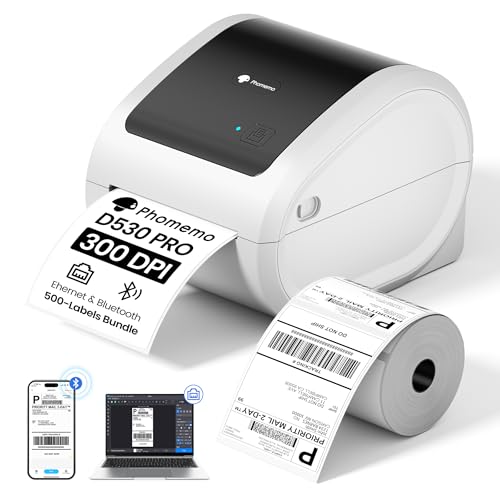
Phomemo D530 Pro 300 dpi shipping label printer with Ethernet and 500 labels
300 dpi4x6 labelsEthernetBluetooth
Check price on Amazon
Best for: Online sellers who want 300 dpi shipping labels at a lower price.

The D530 Pro is a direct thermal shipping printer, so it prints with a heated head on heat-reactive paper and needs no ribbon. Its 300 dpi resolution delivers sharper text and clearer barcodes than the 203 dpi found on most budget shipping printers. Connectivity covers Bluetooth for phones, USB and Ethernet.

Compared with the Zebra ZD621, it costs less and includes 500 starter labels, but it lacks the mature driver base and the ribbon-based durability. Direct thermal labels fade with heat and sunlight, so they suit shipping labels that live a few days, not long-term product marking.

Ownership is mainly about media. Buy compatible 4x6 rolls, wipe the head with isopropyl alcohol, and test the app before relying on it. Store spare rolls away from windows and hot cars, because a roll left in the sun can darken before it is ever used. If the maker's app changes, a USB or Ethernet driver provides a fallback. Test a sample of the labels you plan to use before ordering in bulk, because adhesive strength, liner type and core size vary between suppliers and a poor match causes jams or curling at the print head.

What works

  • 300 dpi resolution at a prosumer tier
  • Bluetooth, USB and Ethernet connectivity
  • 500 starter labels included
  • No ribbon needed

Watch out for

  • Direct thermal prints fade over time
  • Smaller driver ecosystem than Zebra
  • App dependence for phone printing

Spec sheet

Resolution
300 dpi
Label size
4x6 inch
Connectivity
Bluetooth, USB, Ethernet
Method
Direct thermal
Starter pack
500 labels included
04
NIIMBOT B1 Pro 300 dpi Bluetooth label maker with two-color printing
300 dpiBluetoothTwo-color printingPortable
Check price on Amazon
Best for: Home organizers and craft users printing small, sharp labels.

The B1 Pro is a small Bluetooth label maker with a 300 dpi head, aimed at home and small-office organizing. It supports red and black two-color printing from compatible media, and its app includes over 1,500 icons and borders. That makes it popular for jar labels, cable tags and small bins.

The 300 dpi head helps the tiny type that small labels require. Against the Zebra printers, it is a different category: narrow labels, battery power and phone app control rather than shipping-size media. Against the Phomemo, it targets small labels instead of shipping labels.

Ownership centers on the app. If the app changes or is dropped, features go with it, and thermal labels fade with heat and sunlight. Keep spare rolls, clean the head with a soft cloth and charge the battery regularly. Because small labels hold little text, design them with large, bold type and few words, and print one sample before running a full roll so you can check that the 300 dpi detail is actually readable at arm's length.

What works

  • 300 dpi suits tiny text and icons
  • Two-color printing from compatible media
  • Portable and battery powered
  • Large icon and border library

Watch out for

  • Small labels only
  • Depends on a phone app
  • Direct thermal prints can fade

Spec sheet

Resolution
300 dpi
Connectivity
Bluetooth
Color
Red and black printing
Method
Thermal
Icon library
1,500+ icons and borders
05
GoDEX RT230i 300 dpi thermal transfer label printer, 2-inch
300 dpi2-inch widthThermal transferUp to 7 ips
Check price on Amazon
Best for: Shops printing small product and inventory labels.

The RT230i is a compact 2-inch thermal transfer printer at 300 dpi, with a listed speed of up to 7 inches per second. The narrow width suits product labels, inventory tags and small barcodes where a 4-inch printer would be a waste of space. Thermal transfer gives durable prints.

Against the Zebra ZD421, it is smaller and cheaper but cannot do shipping-size labels. Against the NIIMBOT, it offers industrial-style speed and durability but no portability.

Ownership involves ribbons and label rolls matched to the printer. Check the core size and whether the printer accepts third-party media, and clean the head on a schedule. This printer does best as a dedicated station for repeat labels, such as product tags, where the same stock is loaded for months and the ribbon and media pair has been tuned once.

What works

  • 300 dpi at a 2-inch width
  • Up to 7 ips print speed
  • Thermal transfer durability
  • Compact desktop footprint

Watch out for

  • Cannot print 4x6 shipping labels
  • Needs ribbons and matched media
  • Smaller brand ecosystem than Zebra

Spec sheet

Resolution
300 dpi
Print width
2 inches
Speed
Up to 7 ips
Method
Thermal transfer
Setup
Plug and play
06
Zebra ZT411 industrial thermal transfer printer, 300 dpi, 4.09 inch
300 dpi4.09 inch widthUp to 10 ipsIndustrial
Check price on Amazon
Best for: High-volume warehouse and factory labeling.

The ZT411 is an industrial printer rated for up to 10 inches per second and a print width up to 4.09 inches at 300 dpi. It is built for continuous, high-volume work in warehouses and factories, with a metal-framed body and a heavier-duty mechanism than a desktop printer. Serial and USB connectivity suit older workflows.

The difference from the ZD621 is duty cycle and speed. For a home business, this is overkill; for a warehouse printing thousands of labels per day, it is the right tool. It costs far more than any other printer here.

Ownership means a proper media and ribbon supply, scheduled head cleaning and platen replacement. Industrial printers reward planned maintenance, and spare parts are widely available. Keep a spare print head and platen roller on the shelf, log the printed distance if your model reports it, and clean after every ribbon change so that downtime stays short when the line is busy.

What works

  • Up to 10 ips speed at 300 dpi
  • Industrial-grade frame and mechanism
  • Widely available parts and service
  • Serial and USB interfaces

Watch out for

  • Highest cost in this lineup
  • Overkill for small shops
  • Large and heavy

Spec sheet

Resolution
300 dpi
Print width
Up to 4.09 inches
Speed
Up to 10 ips
Method
Thermal transfer
Class
Industrial

Spec sheet decoder

What the numbers on the box really mean

The specs manufacturers lead with, translated into what they tell you about real-world performance.

300 dpi

The print head places 300 dots per inch, about 12 dots per millimeter.

Watch forCheck that your software and label design take advantage of the extra density.

Thermal transfer

A heated head melts ribbon ink onto the label for a durable print.

Watch forThe ZD621, ZD421, RT230i and ZT411 need ribbon.

Direct thermal

The head darkens heat-reactive paper, with no ribbon.

Watch forThe D530 Pro and B1 Pro use it; prints fade over time.

ips

Inches per second of print speed.

Watch forThe ZT411 lists up to 10 ips, the RT230i up to 7.

ZPL

The Zebra programming language that most label software understands.

Watch forZebra printers support it; check other brands.

Methodology

How We Evaluated These 300 DPI Label Printers

Print quality

We compared resolution, method and ribbon support. Thermal transfer printers scored higher for durability, while all six list 300 dpi.

Connectivity

We counted ports and wireless options. The D530 Pro and ZD621 lead for flexibility.

Media and running cost

We compared ribbon needs and media sources. Direct thermal avoids ribbon but fades over time.

Build and duty

We compared frame class and listed speed. The ZT411 is the clear industrial choice.

Software and support

We weighed driver ecosystems. Zebra's ZPL support is the benchmark, and it is the main reason shipping platforms list these units first.

Decision guide

How to Choose the Right 300 DPI Label Printers

By Label Size

SituationPickWhy
4x6 shipping labels, durableZebra ZD621300 dpi with ribbon and networking
4x6 shipping labels, lower costPhomemo D530 Pro300 dpi direct thermal
Small product labelsGoDEX RT230i2-inch width at 300 dpi
Tiny home labelsNIIMBOT B1 ProPortable and sharp
High-volume warehouseZebra ZT411Industrial speed

By Budget

TierPickWhy
LowestNIIMBOT B1 ProPortable maker
Lower-middlePhomemo D530 ProProsumer 4x6
MiddleZebra ZD421Entry Zebra
Upper-middleGoDEX RT230iCompact industrial
UpperZebra ZD621Mature desktop
HighestZebra ZT411Industrial

Direct Thermal vs Thermal Transfer

Direct thermal

The D530 Pro and B1 Pro need no ribbon, so they are simpler and cheaper to run. Labels fade with heat and sunlight.

Thermal transfer

The Zebra and GoDEX printers use ribbon for durable prints. They cost more to run but suit product marking.

Choose direct thermal for shipping labels that live for days. Choose transfer for labels that must last.

Connectivity Needs

PreferencePickWhy
Network sharingZebra ZD621Wired and wireless options
Phone printingNIIMBOT B1 ProBluetooth app
Mixed phone and PCPhomemo D530 ProBluetooth, USB and Ethernet

For Small Barcodes Specifically

Look for

300 dpi, good thermal transfer ribbon and a clean head. Compact two-dimensional codes need dense, sharp dots.

In this comparison

The RT230i and ZD421 suit small barcodes. The ZD621 adds networking.

When to Spend More

Spend more if

You print thousands of labels or need durability. The ZT411 or ZD621 pay back.

Save if

You print shipping labels for a small shop. The D530 Pro covers it.

Ownership

Maintenance schedule

The upkeep that decides whether this machine lasts two seasons or ten.

TaskIntervalWhy it matters
Clean the print headEvery roll or twoResidue causes streaks. Wipe with isopropyl alcohol.
Replace the platen rollerAs it wearsA worn roller causes uneven pressure and faint prints.
Match ribbon to mediaEach new stockWrong ribbon smears or fails to transfer.
Store labels coolAlwaysHeat and light fade direct thermal media.
Update driversYearlyOperating system changes can break old drivers.

FAQ

Frequently Asked Questions

Do I need 300 dpi for shipping labels?

Usually not. 203 dpi is standard and scans well. 300 dpi helps small text and compact codes.

Do labels from direct thermal printers last?

They fade with heat and sunlight, so they suit short-term labels. Use thermal transfer for lasting labels.

Can I use third-party labels?

Many printers accept them, but locked-media models do not. Check before buying.

Is Bluetooth enough?

It works for occasional printing, but app support can change. Prefer USB or Ethernet for a business.

How often should I clean the head?

Every roll or two for heavy use. A dirty head causes streaks.

What is the cheapest way to run one?

Direct thermal avoids ribbon cost. Buy labels in bulk from a reliable source.

Bottom line

The short version

Browse more 300 dpi label printerson Amazon →
James Miller, Lead Machine Editor

About the author

James Miller

Lead Machine Editor, MachineFanatic

James Miller leads MachineFanatic's buying guides, turning spec sheets, manuals and owner feedback into clear verdicts on power tools, outdoor power equipment, shop machines and kitchen machines.

More from James →

Keep reading

Related guides