Amazon affiliate links - we earn a commission.Affiliate disclosure

Buying guide · 12 min read · Updated 2026-11-07

Best 75mm Label Printers (2026)

Five 3-inch (about 75 mm) thermal label printers compared on width range, speed, battery and app or PC support, so the printer fits your labels and workflow.

James MillerBy James MillerLead Machine Editor5 machines comparedSpec-sheet verified
Best 75mm Label Printers

At a glance

Our top picks

Side by side

Spec comparison

A three-inch thermal label printer sits between the pocket label maker and the four-inch shipping printer. It handles price tags, product stickers, address labels and small parcel labels, and it uses heat-reactive paper, so there is no ink or ribbon to buy.

Width range, speed and software are what separate these models. Some print only from a phone app, some also work from a PC, and some stay in one fixed width. This guide compares five three-inch class machines on those points, and on the upkeep that a thermal printer needs.

Before you buy

6 Criteria to Look For Before Buying a 75mm Label Printer

  1. 01

    Label width range

    A three-inch class printer handles labels up to about 75 to 80 mm wide. The CT327D accepts 20 to 80 mm, the M260 half an inch to three inches, and the M220 3.14 inches. Check that your smallest and largest labels both fit the range, and remember the printable area is a few millimeters narrower than the paper, so a design that fills the whole label may be clipped.

  2. 02

    App-only versus PC support

    Many portable printers rely on a phone app. If the app is dropped, features go with it. The CT327D works over USB with Windows, and the B31 lists a Windows driver, which gives a fallback.

  3. 03

    Print speed

    The CT327D lists up to 152 mm/s at 203 dpi, and the B31 lists 80 mm/s. For a few labels a day the difference is invisible, but for price-tag runs of hundreds it adds up. A 100-label run at 152 mm/s finishes in a fraction of the time a slower portable printer needs, which matters when a stock change has to be priced before the shop opens.

  4. 04

    Battery versus desktop

    The M250 has a 2200 mAh battery for field use, while the CT327D is a desktop unit. Pick portable only if you really print away from a socket. A battery printer costs more per label in effort, since you must charge it, and many owners end up leaving it plugged in on a desk where a desktop unit would have been faster and cheaper.

  5. 05

    Locked versus open media

    Some printers accept only the maker's rolls or detect them with a chip. Open media printers are cheaper to run. Check whether third-party rolls work before buying a large supply, and buy one sample roll first, since adhesive strength, liner thickness and core size all affect how reliably the printer feeds.

  6. 06

    Direct thermal limits

    All five print with heat on heat-reactive paper. Labels fade in sun and heat and smear if rubbed. They suit shipping, shelf tags and short-term marking, not outdoor or long-term labels. If a label must survive a freezer, a garden or a year of sunlight, choose a ribbon-based printer or a laminated tape system instead.

Detailed reviews

The 5 best 75mm label printers, explained

01
CLABEL CT327D 3-inch thermal label printer, 20 to 80 mm labels
20 to 80 mm labels152 mm/sBluetooth and USB203 dpi
Check price on Amazon
Best for: Retail and small warehouses needing flexible widths and a wired option.

The CT327D is a desktop three-inch thermal printer that handles labels from 20 to 80 mm wide, so one machine covers price tags, product labels and SKU stickers. Its listed speed is up to 152 mm/s at 203 dpi, which is fast for the class and keeps up with repeated price runs. It connects to phones over Bluetooth through the maker's app or to a Windows PC over USB.

The USB path is what lifts it above app-only competitors, because a printer that works from a PC does not stop when a phone app changes. Against the NIIMBOT B31, it offers a wider size range and a desktop form. Against the Phomemo models, it targets retail and warehouse use more than portable crafts.

Ownership is simple. Wipe the print head with isopropyl alcohol when streaks appear, buy rolls that match the width settings, and keep paper out of sun and heat. Check which operating systems the driver supports before buying, and keep the app on a spare device. A desktop unit also rewards consistent media: stay with one roll supplier, set the label size once in the driver, and use the calibration routine whenever you change rolls, because a misread gap is the usual cause of labels that print half off the sticker.

What works

  • 20 to 80 mm width range on one machine
  • Up to 152 mm/s print speed
  • USB for Windows and Bluetooth for phones
  • Desktop form is stable for repeat work

Watch out for

  • Direct thermal prints fade over time
  • 203 dpi is fine for most but not tiny codes
  • Not designed for portable use

Spec sheet

Label width
20 to 80 mm
Speed
Up to 152 mm/s
Resolution
203 dpi
Connectivity
Bluetooth and USB
Platforms
iOS, Android, Windows
02
Phomemo M250 3-inch Bluetooth label maker with 2200 mAh battery
3-inch width2200 mAh batteryBluetooth3 rolls included
Check price on Amazon
Best for: Sellers who print labels away from a desk.

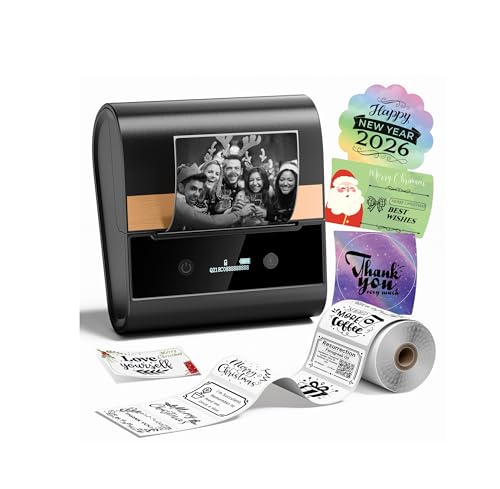
The M250 is a portable three-inch printer with a 2200 mAh rechargeable battery and Bluetooth connection to Android, iOS, iPad and macOS devices. The kit includes three rolls, so it is ready out of the box. The battery makes it useful at markets and warehouses where there is no socket.

It works through the Print Master app, which means the app is the single point of control. Against the CT327D, it lacks the USB path and the wide size range, but it is far more portable. Against the M220, it is the upgraded model with a larger battery and faster printing.

Ownership centers on the app and the battery. Keep the app updated, charge the battery regularly, and clean the head with a soft cloth. Direct thermal labels fade, so use them for short-term identification. The battery is the part that ages, so plan to charge it fully every month or two even when idle, and carry a short cable and power bank if you print a lot away from home.

What works

  • 2200 mAh battery for field use
  • Works with Android, iOS, iPad and macOS
  • Includes three label rolls
  • Portable three-inch width

Watch out for

  • Depends on the Print Master app
  • No wired option listed
  • Direct thermal labels fade

Spec sheet

Width
3 inches
Battery
2200 mAh rechargeable
Connectivity
Bluetooth
Platforms
Android, iOS, iPad, macOS
Bundle
3 label rolls
03
Phomemo M260 portable 3-inch label printer, 1/2 to 3 inch labels
1/2 to 3 inchesBluetoothPrint Master appPortable
Check price on Amazon
Best for: Small businesses printing both tiny tags and wider labels.

The M260 prints labels from one half inch to three inches wide, so it can switch between tiny tags and wider shipping stickers. It runs on the Print Master app, which edits text, barcodes and images from a smartphone or tablet. An updated image algorithm in the app improves how photos translate to thermal dots.

The wide size range makes it more flexible than the M220 or M250. Against the CT327D, it is portable but lacks USB. Against the NIIMBOT B31, it spans a wider range of small labels.

Ownership involves the app and media. Buy rolls in the widths you use, store them cool, and clean the head when prints weaken. App changes can affect features, so keep the app on a spare device. Because the width range is wide, calibrate the label gap each time you change roll size, and keep the roll guides snug, since a loose roll drifts sideways and prints off-center on narrow labels.

What works

  • One half inch to three inch width range
  • Portable and Bluetooth enabled
  • App edits text, barcodes and images
  • Good fit for mixed label sizes

Watch out for

  • App dependence
  • No wired option listed
  • Direct thermal labels fade

Spec sheet

Label width
1/2 to 3 inches
Connectivity
Bluetooth
App
Print Master
Type
Portable thermal
Use
Small business
04
NIIMBOT B31 3-inch Bluetooth label printer, 80 mm/s with PC driver
3-inch width80 mm/sBluetoothWindows driver
Check price on Amazon
Best for: Users upgrading from smaller NIIMBOT models.

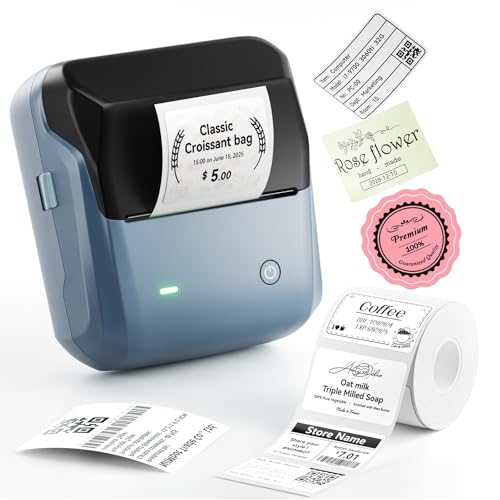
The B31 is a three-inch Bluetooth printer that prints at a listed 80 mm/s and supports Windows 7 and 10 through a driver as well as iOS and Android. The maker pitches it as the upgrade from the smaller B1 and B3S models, with wider labels and faster output. Thermal printing avoids ink and toner.

The Windows driver is useful because it adds a path outside the phone app. Against the CT327D, it is slower and offers a narrower size story. Against the Phomemo models, it has a stronger PC option.

Ownership involves the maker's roll ecosystem. Many NIIMBOT printers use locked or recognized media, so check whether third-party rolls work and how much the maker's rolls cost. Over a year of regular printing, roll cost can exceed the price of the printer, so work out your weekly label count and compare supply cost before you commit to an ecosystem.

What works

  • 80 mm/s listed speed
  • Windows driver plus phone apps
  • Three-inch label capacity
  • Familiar NIIMBOT app ecosystem

Watch out for

  • Media ecosystem may limit third-party rolls
  • Slower than the CT327D
  • Windows driver listing is older

Spec sheet

Width
3 inches
Speed
80 mm/s
Connectivity
Bluetooth and PC
Platforms
iOS, Android, Windows 7/10
Role
Upgrade from B1 and B3S
05
Phomemo M220 3.14-inch Bluetooth thermal label printer
3.14-inch widthBluetoothBarcode and addressiOS and Android
Check price on Amazon
Best for: Buyers who want an established three-inch portable printer.

The M220 is an earlier flagship in the maker's range, with a 3.14-inch print width and Bluetooth connection to iOS and Android. It prints barcodes, address labels and shipping stickers without ink, toner or ribbon. The Print Master app has a variety of built-in functions.

It sits below the M250 in battery and speed, and below the CT327D in size range and wired options. Because it has been on the market longer, community guides and accessories are easy to find.

Ownership follows the same rules as the other Phomemo models: keep the app current, store paper cool and clean the head. It is a sensible choice if you want a known printer and are happy to rely on the app. Because it is older, check that the app still lists it as supported and that your phone's operating system is on the compatibility list, since a model that falls out of support can lose features without any hardware fault.

What works

  • 3.14-inch width for wider labels
  • Prints barcodes and address labels
  • Established model with community support
  • Bluetooth for iOS and Android

Watch out for

  • App dependence
  • Older design than the M250
  • No wired option listed

Spec sheet

Width
3.14 inches
Connectivity
Bluetooth
Uses
Barcode, address, shipping
Platforms
iOS and Android
App
Print Master

Spec sheet decoder

What the numbers on the box really mean

The specs manufacturers lead with, translated into what they tell you about real-world performance.

3-inch / 75 mm

The nominal label width the printer accepts, with real printable width a little smaller.

Watch forThe M220 lists 3.14 inches, slightly wider than a strict 75 mm.

mm/s

Print speed in millimeters of paper per second.

Watch forThe CT327D lists up to 152 mm/s and the B31 lists 80 mm/s.

203 dpi

Dots per inch, the standard for shipping labels and common barcodes.

Watch forThe CT327D lists 203 dpi, adequate for most labels.

mAh

Battery capacity in milliamp-hours, which sets how many labels you can print per charge.

Watch forThe M250 lists 2200 mAh.

Print Master

Phomemo's app for editing and printing text, barcodes and images from a phone or tablet.

Watch forThe M220, M250 and M260 depend on it.

Methodology

How We Evaluated These 75mm Label Printers

Width range

We compared accepted label sizes, from the tiny tags to the widest shipping stickers. The CT327D and M260 lead on flexibility, while the M220 and M250 are tied to a single wide format.

Connectivity

We counted phone, PC and wired options, since a wired or driver path protects you if an app is retired. The CT327D and B31 offer Windows paths, and the Phomemo models rely mainly on their app.

Speed and throughput

We compared listed speeds and treated them as a guide, not a measurement. The CT327D at 152 mm/s led, followed by the B31 at 80 mm/s.

Portability

We compared battery capacity and body size. The M250 led with 2200 mAh, and the desktop CT327D scored lowest for portability but highest for stability.

Media and running cost

We considered locked media, roll prices and how easy it is to find compatible rolls. Open-media printers scored higher, and we flagged chip-locked ecosystems as a long-term cost risk.

Decision guide

How to Choose the Right 75mm Label Printers

By Use

SituationPickWhy
Retail price tags and SKUsCLABEL CT327D20 to 80 mm and USB
Market stallPhomemo M250Battery and kit
Mixed small and wide labelsPhomemo M2601/2 to 3 inch range
Upgrading a small NIIMBOTNIIMBOT B31Familiar app, Windows driver
Proven flagshipPhomemo M220Established model

By Budget

TierPickWhy
LowestPhomemo M220Established, lower tier
Lower-middlePhomemo M250Battery and bundle
MiddlePhomemo M260Wider range
Upper-middleNIIMBOT B31Speed and PC driver
HighestCLABEL CT327DDesktop with USB

Portable vs Desktop

Portable

The Phomemo models run on a battery and print from a phone. They suit stalls and trips.

Desktop

The CT327D stays on a counter and prints from a PC or phone. It is faster and more stable.

Choose portable for mobile work. Choose desktop for daily counter work.

App vs PC Workflow

PreferencePickWhy
Phone onlyPhomemo M250Simple app workflow
PC and phoneCLABEL CT327DUSB and Bluetooth
PC driver on WindowsNIIMBOT B31Driver listed

For Price Tags Specifically

Look for

Fast speed, small label support and a steady feed. Repeated runs need consistent alignment, so look for a printer with a reliable gap sensor and a way to calibrate it, and print a test strip of ten labels before a long run.

In this comparison

The CT327D leads, with 20 mm minimum width and 152 mm/s speed.

When to Spend More

Spend more if

You print daily and want a wired option. The CT327D saves time.

Save if

You print occasionally from a phone. The M220 or M250 covers it.

Ownership

Maintenance schedule

The upkeep that decides whether this machine lasts two seasons or ten.

TaskIntervalWhy it matters
Clean the print headEvery few rollsResidue causes streaks. Wipe with isopropyl alcohol.
Charge the batteryMonthlyIdle lithium cells degrade.
Store rolls coolAlwaysHeat darkens thermal paper, so keep spare rolls in a closed drawer.
Check roll alignmentEach rollMisaligned paper causes skewed prints.
Update the appAs neededPhone updates can break old apps.

FAQ

Frequently Asked Questions

Is 75 mm the same as 3 inches?

Three inches is about 76 mm. Most printers in this class accept labels up to 75 to 80 mm wide, so a label described as 75 mm will fit, but always check the printable width and the roll core size in the listing before you buy rolls in bulk.

Do these need ink?

No. They print with heat on thermal paper, so no ink, toner or ribbon is needed. The ongoing cost is the thermal label roll, which is why a printer that accepts any brand of roll is cheaper to own over several years.

Will the labels last?

Not in sun or heat. They suit short-term use such as shipping, shelf tags and temporary marking, and for anything that must last you should choose a ribbon printer or laminated tape. Store spare rolls in a drawer, not on a sunny shelf.

Can I print from a computer?

The CT327D and B31 list Windows support. Others rely on apps, which is fine for occasional use but risky for a business that prints every day, because an app update can interrupt work with no warning. A USB driver is the safer plan.

Which has the best battery?

The M250 lists 2200 mAh. Others vary, and real runtime depends on how dark the print setting is and how often you print, so treat any battery figure as a guide, not a promise.

Can I use third-party rolls?

Often yes, but some printers lock media or read a chip on the roll. Check first, and test one roll before buying a case, because a roll that nearly fits can still jam or print crooked.

Bottom line

The short version

Browse more 75mm label printerson Amazon →
James Miller, Lead Machine Editor

About the author

James Miller

Lead Machine Editor, MachineFanatic

James Miller leads MachineFanatic's buying guides, turning spec sheets, manuals and owner feedback into clear verdicts on power tools, outdoor power equipment, shop machines and kitchen machines.

More from James →

Keep reading

Related guides