Amazon affiliate links - we earn a commission.Affiliate disclosure

Buying guide · 13 min read · Updated 2026-11-07

Best 4-Color 3D Printers (2026)

Five four-color 3D printers compared by color-change cost, expansion path and workflow, so you know what a four-spool setup does and what it wastes.

James MillerBy James MillerLead Machine Editor5 machines comparedSpec-sheet verified
Best 4-Color 3D Printers

At a glance

Our top picks

Side by side

Spec comparison

Four colors is the sweet spot for hobby multicolor printing. It covers a character with skin, hair, clothes and an accent, a logo with a background, or a sign with two text colors and a border, without the clutter of a sixteen-spool rack.

How a machine swaps those four colors decides what you pay in time and plastic. This guide ranks five four-color printers on their color-change method, their expansion path and the real workflow of designing, slicing and finishing a multicolor print.

Before you buy

6 Criteria to Look For Before Buying a 4-Color 3D Printer

  1. 01

    Single nozzle versus toolchanger

    A single-nozzle four-color machine swaps filament through one nozzle and purges between colors. A toolchanger such as the Creator 5 swaps entire nozzles and wastes almost nothing. The first costs less and wastes plastic, the second costs more and saves it. Choose by how many color changes your typical model has, and be honest about it: a buyer who prints one color most days and a color figure monthly is better served by a cheaper machine and a bit of paint.

  2. 02

    Cost of a color change

    Each change takes time to retract, load, prime and purge. A model with hundreds of changes can print for hours longer and waste more plastic than the object weighs. Count color changes in the slicer before you print a model, which takes seconds, and design objects with large single-color regions. A rule of thumb many owners use is to look at the estimated filament total: if the purge and tower weight exceeds the part itself, redesign the model or paint the small details by hand. Layer-by-layer color changes, such as a gradient or text on every layer, are the worst case, while a single color change at one height is almost free.

  3. 03

    Expansion path

    The Kobra X expands from four to a listed 19 colors with extra units. The Centauri and AD5X bundles are fixed at four. If you expect to need more colors, an expandable system saves a second purchase; if not, it is an expense you never use. Remember too that slicer limits and tower size can cap how many colors a single model can sensibly use, whatever the hardware allows.

  4. 04

    Workflow and software

    A bundled system tends to have profiles and presets that make color assignment easy. The Centauri 2 Combo is pitched at beginners. Evaluate how the slicer handles painting regions and purge towers, because that workflow is where you spend your time. Look for a slicer that previews each color region, estimates waste and lets you shrink the tower or print the purge inside infill. The best hardware is frustrating if assigning a color takes ten clicks per region, and the worst slicer hides waste until the print is already running.

  5. 05

    Build volume

    The AD5X offers a 220 mm cube, enough for figurines and signs. Large multicolor props need bigger beds. Match the bed to your typical project, not your best-case dream. Four-color jobs are often small, so a compact bed is rarely the limit, but remember that the purge tower takes space on the plate, which reduces the usable area by a noticeable margin on a small bed.

  6. 06

    Filament storage and feed

    Four spools sit in open air unless the system dries them, and moist filament strings and jams. Plan for sealed storage or a dryer, and use spools that unwind freely. Spools in a feeder sit for days, so a model that waits a week between color jobs deserves a fresh drying cycle, and mixing a damp spool with three dry ones will spoil the whole print.

Detailed reviews

The 5 best 4-color 3d printers, explained

01
ELEGOO Centauri 2 Combo with CANVAS four-color system, 500 mm/s CoreXY
CANVAS 4-color500 mm/sCoreXYBeginner-friendly
Check price on Amazon
Best for: Newcomers who want a bundled, fast four-color workflow.

The Centauri 2 Combo bundles the CANVAS system, which holds four spools and feeds one nozzle, with a 500 mm/s CoreXY machine. Because the feeder is part of the package, setup is shorter than adding a feeder to a standalone printer. The maker pitches it at beginners, and the combined workflow is the main appeal.

A single-nozzle four-color machine swaps colors by retracting one filament and loading the next, then purging the nozzle clean. That swap takes time and plastic on every change, so a model with hundreds of changes prints slowly and wastes filament. Against the FLASHFORGE AD5X, it offers a faster headline speed and a newer platform. Against the Creator 5, it costs far less and wastes more.

Ownership centers on dry spools and clear filament paths. Check parts availability since the platform is newer, keep firmware updates deliberate, and buy filament with consistent diameter so the feeder does not jam.

What works

  • Four-spool CANVAS bundled with the printer
  • Fast CoreXY motion at 500 mm/s
  • Beginner-oriented software workflow
  • Enclosed-style platform from an established maker

Watch out for

  • Purge waste on every color change
  • Newer platform with a shorter parts history
  • Four colors is the ceiling in this bundle

Spec sheet

Colors
4 with CANVAS
Top speed
500 mm/s
Frame
CoreXY
Positioning
Beginner-friendly
Version
Combo bundle
02
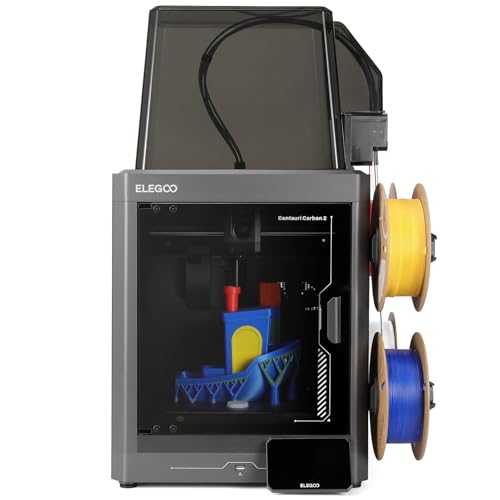
ELEGOO Centauri Carbon 2 Combo with CANVAS, multicolor 500 mm/s printer
CANVAS 4-color500 mm/s1-click levelingCoreXY
Check price on Amazon
Best for: Buyers comparing two listings of the same four-color platform.

The Centauri Carbon 2 Combo is a sibling listing in the same line, also with the CANVAS four-color system, 500 mm/s CoreXY motion and one-click automatic leveling. The Carbon branding points to a version aimed at stiffer, higher-temperature materials. The listing details overlap heavily with the Centauri 2 Combo, so compare the exact specifications on the page.

The workflow is the same: four spools, one nozzle, purge on every swap, with the same advice to slice for few changes and keep spools dry. Against the Centauri 2 Combo, the choice comes down to which listing offers the better price or feature set at purchase time. Against the AD5X, it is a faster, newer machine.

Ownership matches its sibling. Keep spools dry, clean the filament paths, and note that the maker's ecosystem is younger than the market leaders. Confirm warranty terms and spare parts before buying, and read the exact listing carefully, since similar names often hide differences in the feeder, nozzle or included accessories.

What works

  • CANVAS four-color system included
  • One-click leveling saves setup time
  • CoreXY frame at 500 mm/s
  • Close sibling to the top pick

Watch out for

  • Details overlap with the Centauri 2 Combo
  • Same purge waste as any single nozzle
  • Younger ecosystem than market leaders

Spec sheet

Colors
4 with CANVAS
Top speed
500 mm/s
Leveling
1-click automatic
Frame
CoreXY
Version
Combo bundle
03
FLASHFORGE AD5X four-color printer with IFS and 300 C direct drive
IFS 4-color600 mm/s300 C nozzle220 mm cube
Check price on Amazon
Best for: Buyers who want four colors at the lowest tier.

The AD5X uses the Intelligent Filament System to feed four spools into one direct-drive nozzle rated to 300 degrees Celsius. The 220 mm cube bed suits figurines, signs and small models, which are the typical four-color jobs. One-click leveling handles bed setup.

It is the lowest-cost route to four colors here, which is the case for it. The tradeoff is the compact build volume and the same purge waste as any single-nozzle system. Against the Centauri 2 Combo, it offers a higher headline speed and a hotter nozzle but a different software workflow.

Ownership is routine: dry spools, clean paths, spare nozzles and the usual belt and rail care. The tool-free nozzle swap on the platform makes clogs a minor event, and the printer is widely stocked.

What works

  • IFS four-color system included
  • 300 C nozzle widens material range
  • Direct drive suits flexible filament
  • Lowest-cost four-color route here

Watch out for

  • Compact 220 mm build volume
  • Purge waste on every swap
  • Fewer colors than expandable systems

Spec sheet

Colors
4 with IFS
Top speed
600 mm/s
Nozzle limit
300 C
Build size
220 x 220 x 220 mm
Leveling
1-click automatic
04
ANYCUBIC Kobra X Fast native four-color printer with ACE 2 Pro, up to 19 colors
Native 4-colorUp to 19 colorsAuto levelingPre-assembled
Check price on Amazon
Best for: Buyers who want to start at four colors and grow.

The Kobra X starts with native four-color printing and expands to a listed maximum of 19 colors with extra ACE 2 Pro units. That expansion path is the reason to choose it: you can start at four and grow without changing printers. It arrives pre-assembled with a modular design and automatic leveling.

Expansion has a price, since each unit adds cost, desk space and spools to dry. Against the AD5X, it offers a growth path but no hotter nozzle. Against the Creator 5, it keeps the single-nozzle system, so waste remains high.

Ownership is about keeping more spools in good condition. Store them dry, label slots clearly and watch tube paths as you add units. Many buyers never go past four, so decide whether you need the room before paying for it.

What works

  • Native four colors with expansion to 19
  • Pre-assembled modular design
  • Automatic leveling
  • High-speed class motion

Watch out for

  • Expansion units add cost and bench space
  • Same purge waste on every swap
  • More spools to dry as you grow

Spec sheet

Colors
4 native, up to 19
Feeder
ACE 2 Pro, expandable
Leveling
Automatic
Assembly
Pre-assembled, modular
Speed class
600 mm/s
05
FLASHFORGE Creator 5 four-toolhead changer, near-zero waste multicolor
4 toolheadsNear-zero wasteMulti-materialIndustrial class
Check price on Amazon
Best for: Color-heavy production where purge waste is the main cost.

The Creator 5 uses four independent toolheads that swap onto the carriage, so each color has its own nozzle and no purge is needed between changes. The listing calls it a near-zero waste system. It also handles true multi-material jobs, such as rigid plus flexible filament.

The cost is price and complexity, since four hotends mean four sets of parts to maintain and calibrate. Against the single-nozzle machines, it removes purge waste entirely, which can pay back on color-heavy production. Against the AD5X, it is a very different tier.

Ownership means calibrating nozzle offsets, keeping spares and handling a more complex machine. It suits workshops and small sellers, not casual owners. For a seller printing fifty identical multicolor keychains, the saved plastic and shorter job time add up quickly, while for a hobbyist printing one figure a month the savings never cover the extra cost of the machine.

What works

  • Four toolheads avoid purge waste
  • True multi-material capability
  • Fast toolhead swap
  • Industrial-class build

Watch out for

  • Highest cost in this lineup
  • Four hotends to calibrate and maintain
  • Overkill for casual color printing

Spec sheet

Toolheads
4 independent
Waste
Near-zero design
Capability
Multicolor and multi-material
Class
Industrial
Approach
Toolhead swap, no purge

Spec sheet decoder

What the numbers on the box really mean

The specs manufacturers lead with, translated into what they tell you about real-world performance.

CANVAS

ELEGOO's four-spool multicolor system feeding a single nozzle.

Watch forThe Centauri 2 Combo and Carbon 2 Combo bundle it.

IFS

FLASHFORGE's Intelligent Filament System with four spools.

Watch forThe AD5X uses it.

ACE 2 Pro

ANYCUBIC's feeder unit, expandable by adding units.

Watch forThe Kobra X lists up to 19 colors.

Toolchanger

A system with several nozzles that swap onto the carriage.

Watch forThe Creator 5 has four toolheads.

Purge

Plastic pushed through the nozzle to clear the previous color.

Watch forToolchangers avoid it, single-nozzle systems do not.

Methodology

How We Evaluated These 4-Color 3D Printers

Color-change method

We compared single-nozzle feeders and the toolchanger on waste and time per swap. The Creator 5 scored best on waste.

Expansion

We considered how far each system can grow. The Kobra X leads.

Workflow

We weighed bundling, presets and slicer support. Bundled combos scored higher because they ship with tuned profiles and a ready workflow, which matters more to a new color printer than raw speed.

Platform

We looked at speed, nozzle limits and build volume, treating headline speed as a ceiling and giving more weight to nozzle temperature and bed size.

Upkeep

We counted dry-storage and maintenance chores, and favored systems that are easy to service and whose parts are sold directly.

Decision guide

How to Choose the Right 4-Color 3D Printers

By Typical Project

SituationPickWhy
Figurines and signsFLASHFORGE AD5XFour colors at low cost
Beginner, bundled workflowELEGOO Centauri 2 ComboCombo with CANVAS
May need more than four colorsANYCUBIC Kobra XExpands to 19
Color-heavy productionFLASHFORGE Creator 5No purge waste
Comparing sibling listingsELEGOO Centauri Carbon 2 ComboSame platform

By Budget

TierPickWhy
LowestFLASHFORGE AD5XEntry four-color
Lower-middleELEGOO Centauri 2 ComboBundled value
MiddleELEGOO Centauri Carbon 2 ComboSibling listing
Upper-middleANYCUBIC Kobra XExpandable
HighestFLASHFORGE Creator 5Toolchanger

Feeder vs Toolchanger

Feeder

The Centauri, AD5X and Kobra X swap spools through one nozzle. They cost less and waste plastic on every change.

Toolchanger

The Creator 5 swaps nozzles. It wastes almost nothing but costs more and has more parts.

Choose a feeder for hobby color. Choose a toolchanger when waste is a business cost, such as when you sell dozens of identical multicolor items and every gram of filament counts toward profit.

Fixed vs Expandable

PreferencePickWhy
Four colors is enoughELEGOO Centauri 2 ComboFixed four with bundle
Might grow laterANYCUBIC Kobra XUp to 19
Cheapest fourFLASHFORGE AD5XFixed four

For Multicolor Signs and Logos Specifically

Look for

Large flat color regions, few swaps and a clean purge tower. Signs are ideal for four-color systems because the colors sit in layers: a base color, a raised text color and a border, so only a handful of swaps are needed across the whole print.

In this comparison

The AD5X suits small signs, and the Creator 5 suits runs of identical signs where waste adds up.

When to Spend More

Spend more if

You print many color parts or sell them. The Creator 5 pays back in saved plastic.

Save if

You print a few color models a month. The AD5X or Centauri covers it.

Ownership

Maintenance schedule

The upkeep that decides whether this machine lasts two seasons or ten.

TaskIntervalWhy it matters
Dry spoolsBefore color jobsFeeders leave spools exposed. Moist filament strings and snaps, which is especially painful mid-way through a long color print.
Clean filament pathsEvery few spoolsShavings cause jams, and a soft brush or compressed air clears them in seconds.
Calibrate toolhead offsetsAfter nozzle changesOnly on the toolchanger. Misaligned heads blur color edges, so print a small test pattern after any nozzle swap and adjust the offsets until the lines meet cleanly.
Check belts and railsEvery 3 monthsFast machines stretch belts and dry rails, and the extra swaps in a color job mean more motion per print, so keep to the schedule.
Replace nozzlesWhen wornFrequent swaps and flow wear tips, and a worn nozzle shows up first as softer detail at color boundaries.

FAQ

Frequently Asked Questions

Is four colors enough?

For most figurines, signs and logos, yes. More colors help with detailed art but multiply waste and storage, and many striking prints use just two or three colors with clever design, so try mastering four before paying for expansion.

How much plastic does a color change waste?

It varies by slicer settings and model. Many changes can waste more than the part uses, and the slicer's filament estimate usually shows the purge total before you start, so check it first and redesign if it looks excessive.

Can I print one color on these machines?

Yes. They print single-color jobs like any printer, using one slot, so the color system never gets in the way of ordinary functional parts.

Is a toolchanger worth it?

Only if waste or multi-material parts matter to you, which usually means production or engineering use rather than casual hobby printing.

Do I need to paint models instead?

Painting avoids purge waste and gives fine detail, but takes time and skill. Many owners combine both, printing the large color regions and painting eyes, text and small accents by hand.

Will the feeder jam?

It can with wet or tangled filament. Dry spools and clear paths prevent most jams, and a quick check of each spool's winding before a long job saves a lot of heartbreak.

Bottom line

The short version

Browse more 4-color 3d printerson Amazon →
James Miller, Lead Machine Editor

About the author

James Miller

Lead Machine Editor, MachineFanatic

James Miller leads MachineFanatic's buying guides, turning spec sheets, manuals and owner feedback into clear verdicts on power tools, outdoor power equipment, shop machines and kitchen machines.

More from James →

Keep reading

Related guides