
Amazon affiliate links - we earn a commission.Affiliate disclosure

Buying guide · 12 min read · Updated 2026-11-18

Best Argox Label Printers (2026)

Four Argox desktop label printers compared on dpi, print speed, ribbon capacity and connectivity, so you can match the right model to shipping or retail work.

James MillerBy James MillerLead Machine Editor4 machines comparedSpec-sheet verified
Best Argox Label Printers

At a glance

Our top picks

Side by side

Spec comparison

MachinePrint speedMaximum print widthInterfacesResolution
Argox CP-2140EX Pro 4 inch thermal transfer printer, 6 ipsBest OverallArgox CP-2140EX Pro 4 inch thermal transfer printer, 6 ipsUp to 6 ips4.25 inchesEthernet, USB, USB host, RS-232n/a
Argox P4-350 Pro 4 inch 300 dpi thermal transfer printerBest for Small CodesArgox P4-350 Pro 4 inch 300 dpi thermal transfer printern/an/aEthernet, USB host, USB device, RS-232300 dpi (12 dots/mm)
Argox OS-214plus Pro 4x6 thermal transfer printer, 4 ipsBest ValueArgox OS-214plus Pro 4x6 thermal transfer printer, 4 ipsUp to 4 ips4.16 inchesUSB, RS-232 serial203 dpi
Argox OS-2130D Pro 2.83 inch direct thermal printer with clockBest for Retail CountersArgox OS-2130D Pro 2.83 inch direct thermal printer with clockn/a2.83 inchesn/a203 dpi

Printers in this class sit on a packing bench for years: a sturdy mechanism, a ribbon carriage that can be switched off, and a language set that the big shipping and warehouse programs already understand. These machines are aimed at repeat work, not at casual home labeling.

The decisions that matter are print resolution, speed, ribbon capacity and how the unit connects to your network. A printer that looks identical in a photo can differ by 100 dpi or by two inches of print width, and those differences decide whether a label scans or gets rejected.

Before you buy

6 Criteria to Look For Before Buying an Argox Label Printer

  1. 01

    Resolution for your barcodes

    Resolution is dots per inch, and 203 dpi is the long-standing norm for shipping labels and standard barcodes. A 2D code such as QR or Data Matrix printed small needs more dots per cell, which is where the 300 dpi P4-350 earns its place over the 203 dpi CP-2140EX. Buyers often pay for 300 dpi and then print 4x6 parcel labels where it changes nothing, so match dpi to the smallest code you print.

  2. 02

    Print speed in realistic terms

    The ips figure is the head's maximum feed rate, not what you will see after data transfer and label cutting. The CP-2140EX is rated to 6 ips and the OS-214plus to 4 ips, which is a difference you notice on a run of 500 labels but not on 20. Complex graphics and network latency can pull sustained speed well below the headline number.

  3. 03

    Thermal transfer versus direct

    Direct thermal needs no ribbon but the label darkens with heat and sunlight, so it suits parcels that ship within days. Thermal transfer melts wax or resin from a ribbon onto the label and lasts years, which matters for asset tags and outdoor tags. The OS-214plus, CP-2140EX and P4-350 all support both, while the OS-2130D is direct only.

  4. 04

    Ribbon capacity and type

    A 300 meter ribbon, as accepted by the CP-2140EX and P4-350, runs roughly three times as long as the common 100 meter rolls before a change. Wax is cheapest and prints on paper, wax/resin handles scuffing, and full resin is for synthetic labels and chemical exposure. Pairing the wrong ribbon and label stock is the most common reason prints smear or flake.

  5. 05

    Connectivity and shared use

    Ethernet makes one printer available to several benches, which is how the CP-2140EX and P4-350 are meant to be used. USB works for one computer, and RS-232 serial is still needed by some warehouse and scale software. The OS-214plus offers only USB and serial, so a second user means moving cables or adding a print server.

  6. 06

    Label width and media range

    A printer's maximum print width limits label size: 4.16 inches on the OS-214plus, 4.25 on the CP-2140EX and only 2.83 on the OS-2130D. Check not just the label but also whether the stock is die-cut, continuous or fan-fold. Buying a 2.83 inch counter printer for parcel labels is a mistake that cannot be fixed with settings.

Detailed reviews

The 4 best argox label printers, explained

01
Argox CP-2140EX Pro 4 inch thermal transfer printer, 6 ips
6 ips4.25 inch width300 m ribbonEthernet
Check price on Amazon
Best for: Shared packing benches that print hundreds of 4x6 labels a day over a network.

Speed and a long ribbon are what separate the CP-2140EX from the other Argox units in this group. Its 6 ips rating is the highest here, and the carriage accepts wax, wax/resin and resin ribbons up to 300 meters, so a shift of shipping labels does not stop for a ribbon change every few hundred prints. The 4.25 inch print width leaves a little margin around a 4x6 label, which makes alignment forgiving when you swap stock.

The built-in Ethernet port is the feature that makes this the shared-bench printer. Two or three packing stations can send jobs to one fixed IP address instead of each running a USB cable, and the RS-232 serial port covers older warehouse software that still talks over a COM port. Against the 4 ips OS-214plus, the extra two inches per second is a 50 percent gain on long runs, though the real throughput also depends on how fast your software feeds data.

Ownership is routine but not zero. Wipe the print head with isopropyl alcohol every ribbon roll, vacuum the paper path when you switch between direct and ribbon modes, and keep spare platen rollers on a shelf because a worn roller causes faint stripes long before the head gives out. It is a 203 dpi class machine, so tiny QR codes on small tags are better served by the P4-350.

What works

  • Fastest engine here at up to 6 ips
  • 300 meter ribbon capacity cuts reloads
  • Ethernet plus USB and serial ports
  • Direct mode when ribbon is not needed

Watch out for

  • Larger and heavier than a hobby label maker
  • Needs a few minutes of setup for network use
  • Not sharp enough for very small 2D codes

Spec sheet

Print speed
Up to 6 ips
Maximum print width
4.25 inches
Ribbon capacity
Up to 300 meters
Interfaces
Ethernet, USB, USB host, RS-232
Print modes
Thermal transfer or direct thermal
02
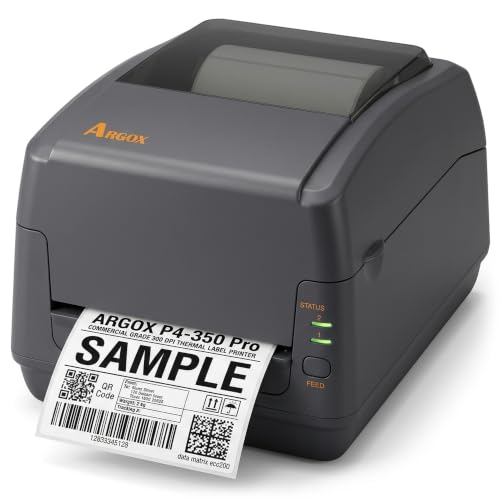
Argox P4-350 Pro 4 inch 300 dpi thermal transfer printer
300 dpi12 dots/mm300 m ribbonEthernet
Check price on Amazon
Best for: Labs and electronics shops printing small QR or Data Matrix codes.

Where the CP-2140EX chases speed, the P4-350 chases detail. A 300 dpi head puts 12 dots into every millimeter, which keeps Data Matrix and GS1 codes legible on labels the size of a postage stamp and prevents the broken-looking lettering that 203 dpi can show at 5 point type. If your labels carry specimen IDs, electronics part marks or lot codes in tiny print, this resolution is the reason to choose it.

The ribbon bay handles wax, wax/resin and resin rolls up to 300 meters and detects whether the ribbon is wound ink side in or out, which removes a classic setup mistake. A USB host port also lets you load formats or firmware from a thumb drive, a useful trick for a site with no network access. Compared with the OS-214plus, you are paying for density, not throughput, and the listing does not promise a faster sustained feed.

Plan on resin or wax/resin ribbon for anything that must survive chemicals or abrasion, because direct thermal stock at this density will still darken with heat. Clean the head gently, since the finer element pitch is more sensitive to adhesive residue from die-cut labels. Keep the label roll width matched to the guides so the print stays centered, and re-run the media calibration whenever you change stock.

What works

  • 300 dpi keeps tiny 2D codes readable
  • Detects ink-in or ink-out ribbon wind
  • USB drive storage for formats and updates
  • Four interfaces including Ethernet

Watch out for

  • Slower and fussier than a shipping-first model
  • Overkill if you only print 4x6 parcel labels
  • Fine print head needs careful cleaning

Spec sheet

Resolution
300 dpi (12 dots/mm)
Ribbon types
Wax, wax/resin, resin
Ribbon length
Up to 300 meters
Interfaces
Ethernet, USB host, USB device, RS-232
Class
Desktop 4 inch
03
Argox OS-214plus Pro 4x6 thermal transfer printer, 4 ips
203 dpi4 ips4.16 inch widthUSB + RS-232
Check price on Amazon
Best for: Single-station shippers who want a real 4x6 barcode printer without network extras.

The OS-214plus is the entry door to Argox's 4 inch family and it does the basic job without drama. It prints at 203 dpi at up to 4 ips across 4.16 inches, which is the standard recipe for shipping labels, warehouse bin tags and pallet tickets. Ribbon-free direct mode handles short-life parcel labels, and swapping in a wax or resin ribbon turns it into a thermal transfer printer for tags that must last.

It connects by USB and RS-232 only, so there is no built-in Ethernet. That is fine for one packing station and a limiting choice for a shared printer, where the CP-2140EX saves you a print server. The media handling is flexible, taking roll-fed, die-cut, continuous and fan-fold stock, so you are not locked into one label supplier.

Keep expectations realistic for year three. Direct thermal labels printed here will fade in a hot truck or a sunny window, so use ribbon for anything that sits outdoors. Replace the platen roller when you see light vertical streaks, and store ribbon rolls sealed because dust on the film shows up as white specks. A short test strip after each media change confirms the calibration before you commit to a full run.

What works

  • Standard 203 dpi, 4 ips shipping-label recipe
  • Ribbon-free direct mode or ribbon transfer
  • Accepts die-cut, continuous and fan-fold stock
  • Entry-level step into the 4 inch Argox line

Watch out for

  • No built-in Ethernet port
  • Slower than the CP-2140EX
  • Direct thermal prints fade in heat and sun

Spec sheet

Resolution
203 dpi
Print speed
Up to 4 ips
Maximum print width
4.16 inches
Interfaces
USB, RS-232 serial
Media
Roll, die-cut, continuous, fan-fold
04
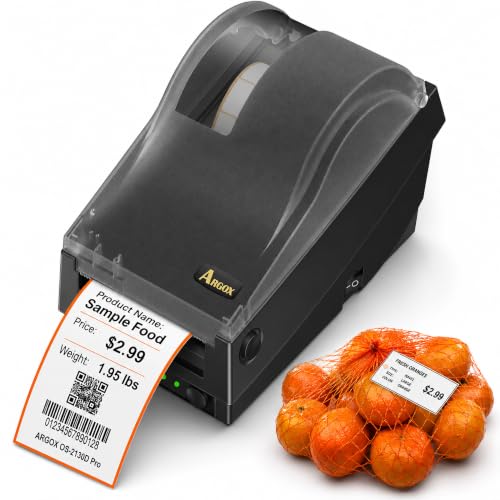
Argox OS-2130D Pro 2.83 inch direct thermal printer with clock
2.83 inch width203 dpiReal-time clockDirect thermal
Check price on Amazon
Best for: Delis, bakeries and small shops printing weight, price and date labels at the counter.

This is the odd one out in the group, and deliberately so. The OS-2130D is a narrow direct thermal printer built for delis, bakeries, butchers and produce counters, where the label is a price tag with weight, ingredients and an expiry date. Its 2.83 inch print width and 1 to 3.14 inch media range suit shelf and package labels rather than 4x6 shipping stock, and it has no ribbon at all.

A real-time clock lets it stamp the date and time on a label without a computer attached, and a buzzer sounds when the roll runs out, so a busy counter notices before a customer does. Those two details matter more at a deli than any extra ips would, which is why the 203 dpi, 4 ips rating is plenty. The listing positions it with scales and point-of-sale gear, so check that your scale software supports the Argox command language first.

Upkeep is simpler than on the ribbon models: clean the head with isopropyl alcohol and keep the roll guides snug. Because the labels are direct thermal, they will darken if stored near warm display cases. Buy stock that matches the media width range, and avoid anything wider than the printable area, since the unit cannot print the outer edge of a label.

What works

  • Built-in real-time clock for dated labels
  • Buzzer warns when media runs out
  • No ribbon, so supplies stay simple
  • Fits narrow 1 to 3.14 inch label stock

Watch out for

  • Cannot print 4x6 shipping labels
  • Direct thermal only, prints fade over time
  • Needs compatible scale or POS software

Spec sheet

Maximum print width
2.83 inches
Media width
1 to 3.14 inches
Resolution
203 dpi
Speed
Up to 4 ips
Extras
Real-time clock, out-of-media buzzer

Spec sheet decoder

What the numbers on the box really mean

The specs manufacturers lead with, translated into what they tell you about real-world performance.

dpi and dots per mm

Dots per inch counts how many heating elements sit across one inch of the print head. 203 dpi equals 8 dots per mm and 300 dpi equals 12 dots per mm.

Watch forThe P4-350 is the only 300 dpi unit here, so do not assume the others print finer text.

ips (inches per second)

This is the maximum rate the media moves while printing. It falls as graphics get heavier or when the printer has to wait for data.

Watch forThe CP-2140EX is rated 6 ips against 4 ips on the OS-214plus, so expect the gap to show on long batches only.

Maximum print width

This is the width of the head, not the label. Stock wider than the head will be cut off at the edge.

Watch forThe OS-2130D tops out at 2.83 inches, well below the 4.16 and 4.25 inch heads on the 4 inch models.

Ribbon capacity in meters

Maximum ribbon length that fits the carriage. Longer rolls mean fewer stops, but they also add weight to the spindles.

Watch forBoth the CP-2140EX and P4-350 list 300 meter ribbons, so confirm your supplier's core size matches.

Interface set

USB, Ethernet and RS-232 are different ways the host talks to the printer. Network use needs Ethernet or a separate print server.

Watch forThe OS-214plus lacks Ethernet while the other 4 inch models include it.

Methodology

How We Evaluated These Argox Label Printers

Resolution against use case

We read each spec sheet for dpi and matched it to the code sizes and label types the printer is meant for. The 300 dpi P4-350 was judged for small 2D codes, the 203 dpi models for shipping and counter work. A higher number was not scored as better unless the job needed it.

Throughput and print path

We compared stated ips, ribbon length and media handling to estimate how often an operator has to stop. The CP-2140EX at 6 ips and 300 meters sits at one end, the OS-214plus at 4 ips at the other. Ribbon reloads and label calibration were counted as downtime, not just feed speed.

Connectivity and integration

We checked which ports each printer includes and what software environments that suits. Ethernet and USB host on the P4-350 and CP-2140EX were weighed against the USB and serial pair on the OS-214plus. A printer that needs a second device to be shared lost points for shared benches.

Media and ribbon flexibility

Roll, die-cut, continuous and fan-fold support, along with wax, wax/resin and resin ribbon compatibility, shaped the score. Direct-only printers like the OS-2130D were rated for their intended counter job. We looked at whether the listing documents ink-in and ink-out ribbon detection.

Ownership and consumables

Based on owner feedback patterns and general engineering knowledge, we weighed platen roller wear, head cleaning needs and label fade. Thermal transfer units cost more to feed than direct thermal ones but produce prints that last. The result is a recommendation for each realistic workload, not a single winner.

Decision guide

How to Choose the Right Argox Label Printers

By Primary Job

SituationPickWhy
High-volume parcel shipping from several benchesArgox CP-2140EX Pro6 ips, Ethernet and a 300 meter ribbon suit shared use
Tiny QR or Data Matrix codes on componentsArgox P4-350 Pro300 dpi gives smaller cells room to resolve
One station shipping a steady stream of 4x6 labelsArgox OS-214plus Pro203 dpi, 4 ips and USB cover the basics
Weighed food or shelf price tagsArgox OS-2130D ProClock and buzzer fit counter workflows

By Budget

Budget tierPickWhy
Lowest cost entry hereArgox OS-2130D ProNarrow direct thermal unit with no ribbon to buy
Mid tier for single-station parcel workArgox OS-214plus ProStandard 4 inch format without network hardware
Upper tier, speed and networkArgox CP-2140EX ProFaster engine and Ethernet justify the step up
Highest tier, precision workArgox P4-350 Pro300 dpi head is the premium feature

Direct Thermal vs Thermal Transfer

Direct thermal

No ribbon, lower running cost and a cleaner paper path. Prints darken with heat and light, so they suit parcels that ship soon. The OS-2130D is direct only, and the OS-214plus and CP-2140EX can run in this mode when you do not need durability.

Thermal transfer

A ribbon melts wax or resin onto the label, producing prints that survive months outdoors. It adds ribbon cost and a loading step. The P4-350 and CP-2140EX are the lineup's best fit when durability matters.

Choose direct for fast-turn shipping; choose transfer for asset tags, cold storage and anything that must still scan next year.

Single Station vs Shared Network

PreferencePickWhy
One computer on USBArgox OS-214plus ProUSB and serial are all the setup needs
Three or more users on one printerArgox CP-2140EX ProBuilt-in Ethernet removes cable swapping
Network plus fine detailArgox P4-350 ProEthernet with 300 dpi in one unit
Standalone counter with its own clockArgox OS-2130D ProDate and time print without a computer

For Small Business Shipping Specifically

Look for

A 4 inch print width, 203 dpi, a USB or network port your shipping platform supports, and a direct thermal mode so you are not paying for ribbon on parcel labels that last a week.

In this comparison

The OS-214plus covers a lone shipper and the CP-2140EX covers a busy team. The P4-350 adds 300 dpi that parcel labels do not need, and the OS-2130D cannot fit 4x6 stock at all.

When to Spend More

Spend more if

You share one printer across benches, print a few hundred labels a day or need durable ribbon output. The CP-2140EX is the step that makes sense there, and the P4-350 is worth it only when small codes are part of the job.

Save if

You print under a hundred labels a day on one computer. The OS-214plus is enough, and a counter-only shop should stay with the OS-2130D rather than buy a wider head it cannot use.

Ownership

Maintenance schedule

The upkeep that decides whether this machine lasts two seasons or ten.

TaskIntervalWhy it matters
Clean the print headEvery ribbon roll or 4 rolls of labelsAdhesive and ribbon residue build up and cause faint lines. Wipe with isopropyl alcohol on a lint-free swab while the head is cool.
Inspect the platen rollerMonthlyA worn or glazed roller causes uneven density and stripes. Replace it when cleaning no longer helps.
Clear paper dust from the media pathEvery roll changeLabel dust and adhesive collect around sensors. A blocked sensor causes false out-of-media or misfeed errors.
Re-run media calibrationOn every stock changeThe gap sensor learns the label gap, so new die-cut stock needs a fresh calibration. Skipping it leads to prints shifted off the label.
Store ribbon sealedWhen not in useDust and humidity on the film show up as white specks. Keep spare rolls in their bag and away from heat.

FAQ

Frequently Asked Questions

Should I choose the CP-2140EX or the OS-214plus?

Pick the CP-2140EX if more than one person prints, because Ethernet and 6 ips both matter there. Pick the OS-214plus for a single computer, where its 4 ips and USB connection are enough.

Is 300 dpi worth it over 203 dpi?

Only if you print small 2D codes or fine text. For 4x6 shipping labels, 203 dpi prints cleanly and the P4-350 will not look different to the carrier's scanner.

How long will an Argox printer last?

The mechanism is built for repeat use, and the consumable parts that wear are the print head and platen roller. With regular cleaning, owners commonly keep these desktop units running for years, but head life depends on volume and label quality.

Do I need ribbon for shipping labels?

No. Direct thermal mode prints on heat-sensitive labels with no ribbon, which is fine for parcels that ship within days. Use ribbon when labels must stay readable for months.

Can the OS-2130D print shipping labels?

Not in the standard 4x6 size. Its 2.83 inch print width and 1 to 3.14 inch media range are meant for counter and shelf labels.

Why does my print look faded?

On direct thermal stock it usually means the head is dirty, the darkness setting is low or the label is old. On ribbon prints, the ribbon type may not match the label material.

Bottom line

The short version

Browse more argox label printerson Amazon →
James Miller, Lead Machine Editor

About the author

James Miller

Lead Machine Editor, MachineFanatic

James Miller leads MachineFanatic's buying guides, turning spec sheets, manuals and owner feedback into clear verdicts on power tools, outdoor power equipment, shop machines and kitchen machines.

More from James →

Keep reading

Related guides