
Amazon affiliate links - we earn a commission.Affiliate disclosure

Buying guide · 14 min read · Updated 2026-11-18

Best Asset Label Printers (2026)

Six printers for durable asset tags and equipment labels, compared on thermal transfer, tag material, serial numbering, barcode sharpness and field use.

James MillerBy James MillerLead Machine Editor6 machines comparedSpec-sheet verified
Best Asset Label Printers

At a glance

Our top picks

Side by side

Spec comparison

An asset label is a small promise: this item will still be identifiable in five years. It has to survive heat, solvents, abrasion and the occasional pressure washer, and its barcode has to scan after every one of those. That is a much harder requirement than a pantry sticker or a shipping label.

Meeting it comes down to the printing method, the tag material and the adhesive. A buyer should start with where the tag will live and what will rub against it, then pick the printer. This guide compares six machines on exactly those terms and flags where each one falls short.

Before you buy

6 Criteria to Look For Before Buying an Asset Label Printer

  1. 01

    Printing method and permanence

    Asset labels outlive the cheap fade of direct thermal, which is why every printer here except the Brother uses thermal transfer and the Brother uses laminated tape. A ribbon melts onto the label and resists solvents and sun, and laminated tape seals the print between films. If a label must last five years, direct thermal is the wrong method. Decide the required life before choosing a printer, and write it down so the buying choice is defensible later.

  2. 02

    Tag material and adhesive

    The MakeID EP53 lists PET, nylon, self-laminating and flag labels, and each suits a different surface. PET handles hard plastic and metal, nylon wraps cables and cloth, and a self-laminating label protects its own print. A label that sticks to a clean laptop may peel off a textured pump housing. Test the adhesive on the real surface and wait twenty-four hours before judging.

  3. 03

    Resolution and code size

    At 300 dpi the EP53, D50-class printers and NIIMBOT M2 render small QR codes and serial numbers with clean edges. At 203 dpi a very small code may blur. The tag must be scannable by a cheap phone camera in poor light, so print a sample and scan it from arm's length before ordering a thousand.

  4. 04

    Serial numbering and databases

    Asset programs live on numbered sequences and imported lists. The Brother PT-D610BT stores up to 90 labels and the REEKON P1L works through the BOLDR Pro app. A printer that cannot print an incrementing number or import a spreadsheet will slow an audit. Test a run of ten before relying on it.

  5. 05

    Field versus desk use

    The REEKON P1L and MakeID EP53 are battery powered and portable, the D50 is a desktop machine with a cutter and the LabelTac LTPX is a workstation. Tag at the asset if you can, because mislabeling happens when labels are printed in a batch and carried around. Choose the form factor that lets the tag be printed beside the item.

  6. 06

    Supply ecosystem

    The LabelTac LTPX leans on LabelTac supplies, the Brother on TZe tape and the MakeID machines on their own labels and ribbons. Ecosystem lock-in is the long-term cost of an asset program. Ask how long the supplies have been available and whether a second source exists before you tag five thousand items.

Detailed reviews

The 6 best asset label printers, explained

01
MakeID EP53 2-inch thermal transfer label printer, 300 dpi
Thermal transfer300 dpi0.4 to 2 in labels2600 mAh battery
Check price on Amazon
Best for: Technicians who tag equipment on site with durable, scannable labels.

Start with what the EP53 does differently from a sticker printer: it melts ribbon ink onto the label, and the listing says the result is smudge-proof and fade-resistant at 300 dpi. That is the grid that renders a small QR code or a six-point serial number cleanly, which matters when an auditor scans a tag on a motor housing. It prints labels from 0.4 to 2 inches wide.

The materials list is what earns it first place: PET for tough plastic tags, nylon for fabric and cable wrap, self-laminating labels that fold a clear tail over the print and flag labels for cables. A 2600 milliamp-hour battery lets it travel with a technician. The tradeoff is ribbon, which is a second consumable that must match the label material.

In use, match ribbon to stock, keep the roll and ribbon cores seated and clean the head. A resin or wax-resin ribbon on PET is the right pairing for a tag that must survive solvents, and a wax ribbon is only for paper. One habit worth adopting is to tag the asset at the asset, scanning the printed code right there and logging it before moving on. That removes the classic error of a box of tags printed in order and applied in a different one, which corrupts an inventory for years.

What works

  • Thermal transfer resists smudging and fading
  • 300 dpi for small codes and text
  • Works with PET, nylon, self-laminating and flag labels
  • Battery powered for site work

Watch out for

  • Ribbon is a second consumable
  • Maximum width is 2 inches

Spec sheet

Print method
Thermal transfer with ribbon
Resolution
300 dpi
Label width
0.4 to 2 inch
Materials
PET, nylon, self-laminating and flag labels
Power
2600 mAh battery
02
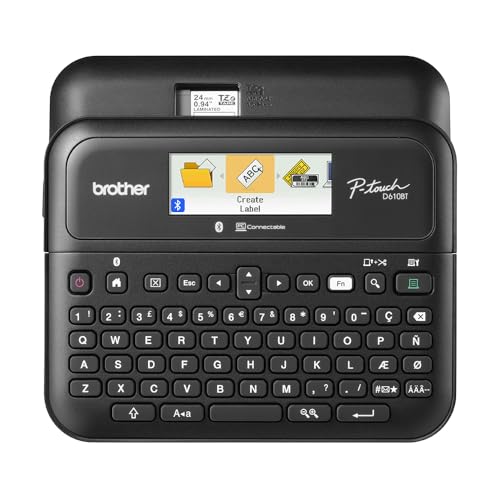
Brother P-Touch PT-D610BT keyboard label maker
Laminated TZe tapeUp to 24 mm wideBluetooth and USBStores 90 labels
Check price on Amazon
Best for: Teams that tag tools and cables with sealed laminated tape.

Brother's keyboard machine is the choice when the tag has to survive mechanical abuse. TZe tape is laminated, so the print is sealed between films and resists water, scuffs and many cleaners, which is why it appears on tool cases and server racks. The PT-D610BT works from its own keyboard or from Bluetooth and USB, with a memory for up to 90 frequently used labels.

The memory is useful for asset work, where the same prefix and a running number repeat. The design menu is larger than an asset tag needs, with 17 fonts and 900 symbols. The limit is width, about 24 millimeters, which is narrow for a tag with a QR code and text, and the tape costs more per inch than thermal rolls.

Keep spare cassettes and clean the cutter. The tape's strength is that you can print on the job, apply and move on with no ribbon to thread. For tool rooms, a wrap-around label on a handle survives gloves and solvent wipes better than a flat sticker on a case. If you need a larger tag, such as an asset plate with text and a code, this width will feel cramped, and a 2-inch printer is the better pairing.

What works

  • Laminated tape resists water and scuffs
  • Standalone keyboard with Bluetooth and USB
  • Stores 90 labels for repeats
  • No ribbon to manage

Watch out for

  • About 24 mm maximum width
  • Tape costs more per inch

Spec sheet

Tape type
Brother TZe laminated tape
Maximum width
About 1 inch (24 mm)
Connection
Bluetooth and USB
Memory
Up to 90 frequently used labels
Design
17 fonts, 17 styles, 160 frames, 900 symbols
03
REEKON P1L Tagger construction label printer
Jobsite portableBOLDR Pro appBluetooth QR codesBattery powered
Check price on Amazon
Best for: Contractors who track tools and equipment with scannable labels.

REEKON built the P1L for the tool crib on a jobsite, where a label that falls off in a week is a lost tool. It pairs by Bluetooth with the BOLDR Pro app, which sends one-click labels, and it runs on a battery so there is no cord to find. The listing says it is portable and rugged, aimed at tools, equipment and materials.

The pitch is error reduction: label a drill and its case with a code, scan it out and back in and know who has what. That workflow depends on the app, so the printer's value is tied to the maker's software. Next to the MakeID EP53, it is more focused on one trade and less flexible about materials.

Charge before the shift, keep spare labels in the box and test a QR code with the phone before sticking a hundred of them on equipment. Because the workflow lives in the app, export your tool list now and then so the records are not trapped if the service changes. Gloves are the other consideration: pick a tag size you can peel and apply with work gloves on.

What works

  • Built for jobsite tools and equipment
  • One-click labels from the BOLDR Pro app
  • Battery powered and portable
  • Prints QR codes for tracking

Watch out for

  • Value depends on the maker's app
  • Less flexible about label materials

Spec sheet

Use
Construction tool and equipment labeling
Connection
Bluetooth to a phone
App
BOLDR Pro app
Power
Battery powered and portable
Codes
Prints QR codes for tracking
04
LabelTac LTPX industrial thermal transfer label printer
Industrial transferColor LCD screenDesktopLabelTac supplies
Check price on Amazon
Best for: Facilities that tag many assets at a fixed workstation.

LabelTac's LTPX is the desk-bound option for a facility that tags a lot of assets in one place. It is an industrial thermal transfer printer with a color LCD screen that makes status and settings easy to read, and the maker pitches it as a way to turn any office or warehouse workstation into an in-house print shop.

It is designed around the maker's supply range, so you combine the printer with LabelTac materials chosen for the application. That gives matched ribbon and label pairs, which removes a lot of guessing, but it also ties you to one supplier. In exchange you get an industrial build and a screen that a new operator can understand.

Treat it as a station rather than a toolbox item. Keep it near the work, store the supplies cool and follow the maker's ribbon and label pairings. A facility that tags a whole building will appreciate a fixed station where a trained person prints every tag, since consistent numbering and placement matter more than speed. Keep a log of ribbon and label lot numbers so a bad batch can be traced.

What works

  • Industrial thermal transfer build
  • Color LCD screen for easy settings
  • Matched supplies reduce guessing
  • Suits a fixed workstation

Watch out for

  • Tied to the maker's supply range
  • Not portable

Spec sheet

Print method
Industrial thermal transfer
Display
Color LCD screen
Use
On-demand in-house labeling
Supplies
LabelTac supply range
Setting
Office desk or warehouse workstation
05
MakeID D50 industrial 2-inch desktop label maker with auto cutter
2 in print headThermal transferAuto cutter2600 mAh battery
Check price on Amazon
Best for: Installers who print long runs of cable and rack labels.

The D50 turns the same idea into a small desktop machine with an automatic cutter. It prints on a 2-inch head using thermal transfer, so cable labels and data and telecom labels come out clear, and the cutter handles bulk jobs without hand tearing. A 2600 milliamp-hour battery lets it move off the bench when needed.

The cutter is its practical edge over the EP53 for a long run of labels, such as a rack of patch cables. It is bulkier than a handheld, and, like all thermal transfer printers, it needs ribbons. The sample roll listed at 1.97 inches by 26.24 feet gives you a sense of the stock size.

Check the cutter for adhesive build-up, keep ribbons matched to the roll and charge the battery before long runs. When labeling a server room, print the full rack in order and apply from top to bottom, because the cutter makes that sequence fast and the numbering stays consistent. Keep the offcuts out of the feed path, since they curl and jam the exit slot.

What works

  • Automatic cutter for bulk labels
  • Thermal transfer prints stay clear
  • 2-inch print head
  • Battery lets it leave the bench

Watch out for

  • Bulkier than a handheld
  • Ribbons add running cost

Spec sheet

Print head
2-inch
Print method
Thermal transfer
Cutter
Automatic cutter
Power
2600 mAh battery
Roll supplied
1.97 inch by 26.24 feet
06
NIIMBOT M2 thermal transfer label printer, 300 dpi
Thermal transfer300 dpi50x30 mm rollBlack ribbon
Check price on Amazon
Best for: Small offices tagging laptops, monitors and furniture.

NIIMBOT's M2 gives thermal transfer in a small body, with 300 dpi and a ribbon in the box along with a 50x30 millimeter label roll. For a small office tagging a few dozen laptops and monitors, that is a light, inexpensive way to get smudge-resistant labels.

Its materials are less specialized than the MakeID machines, and the listing does not mention PET or nylon stock, so confirm what labels fit before counting on a rough surface. The app works over Bluetooth with phone and PC editing. For indoor office assets it is plenty; for a pump house it is not.

Seat the ribbon flat, test the adhesive on the actual surface and store spare ribbons away from heat.

What works

  • Thermal transfer at 300 dpi
  • Ribbon and roll included
  • Compact body
  • App with phone and PC editing

Watch out for

  • Fewer specialized label materials
  • Small label width

Spec sheet

Print method
Thermal transfer with a ribbon
Resolution
300 dpi
In the box
A 50x30 mm roll and a black ribbon
Ribbon options
Color ribbon support
Editing
NIIMBOT app over Bluetooth

Spec sheet decoder

What the numbers on the box really mean

The specs manufacturers lead with, translated into what they tell you about real-world performance.

Thermal transfer

A heated head transfers ink from a ribbon onto the label. The print lasts much longer than direct thermal.

Watch forFive of the six printers here use it, and the Brother uses laminated tape instead.

PET label

Polyester film that resists heat, chemicals and abrasion. It is the standard for rugged asset tags.

Watch forThe MakeID EP53 lists PET among its supported materials.

Self-laminating label

A label with a clear tail that wraps over the printed area to protect it.

Watch forThe EP53 supports it, which helps for wrap-around cable tags.

300 dpi

Three hundred dots per inch, finer than the common 203 dpi. It sharpens small codes.

Watch forThe EP53, D50-class and NIIMBOT M2 are described this way.

Flag label

A label that wraps around a cable and leaves two printed tails that stand out like a flag.

Watch forThe MakeID EP53 lists flag labels, which suits patch cables and power leads.

Methodology

How We Evaluated These Asset Label Printers

Label permanence

We looked at the printing method behind each tag. Thermal transfer and laminated tape both score well. The MakeID EP53's PET and self-laminating options placed it first on permanence.

Code legibility

Resolution was compared. The 300 dpi machines scored higher for small QR codes and serial text. We also looked at whether each printer's app handles barcodes and incrementing numbers.

Portability and workflow

We separated portable machines from desktop ones. The REEKON P1L and MakeID EP53 can tag at the asset, and the LabelTac LTPX cannot. The D50's cutter scored for long runs.

Supply ecosystem

Open and closed supply chains were compared. The LabelTac and Brother are tied to maker supplies, and the MakeID range uses its own. We weighed availability and the risk of a discontinued line.

Ownership and cost

Ribbon cost, cleaning and app dependence were considered. Laminated tape costs more per inch, and ribbon machines have a second consumable. We scored total running cost for a few thousand tags.

Decision guide

How to Choose the Right Asset Label Printers

By Tagging Environment

EnvironmentPickWhy
Mixed plant with cables and plasticMakeID EP53PET, nylon and self-laminating labels.
Tools exposed to wash and abrasionBrother PT-D610BTSealed laminated tape.
Construction tool cribREEKON P1LBuilt for jobsite tracking.
Office laptops and monitorsNIIMBOT M2Compact thermal transfer.

By Budget Position

PositionPickWhy
Lower tierNIIMBOT M2Entry thermal transfer.
Middle tierMakeID EP53Materials and battery.
Higher tierLabelTac LTPXIndustrial workstation.

Ribbon vs Laminated Tape

Ribbon

The MakeID machines, REEKON, LabelTac and NIIMBOT use ribbons. They print on many materials. The ribbon must match the label.

Laminated tape

The Brother PT-D610BT seals print in a film. There is no ribbon to match. It is narrower and costs more per inch.

Choose ribbon for variety of materials and tape for simplicity.

Portable vs Station

PreferencePickWhy
Tag at the assetMakeID EP53Battery powered.
Long cable label runsMakeID D50Automatic cutter.
Fixed tagging stationLabelTac LTPXColor LCD and industrial build.

For Equipment Audits Specifically

Look for

Incrementing numbers, QR or barcode support, and tags that survive years. A printer that can import a list speeds the audit.

In this comparison

The Brother PT-D610BT stores up to 90 labels, and the REEKON P1L uses an app built around tracking.

When to Spend More

Spend more if

You will tag thousands of items or need labels to last years outdoors. The LabelTac LTPX and MakeID EP53 fit.

Save if

You tag a few dozen office items. The NIIMBOT M2 is enough.

Ownership

Maintenance schedule

The upkeep that decides whether this machine lasts two seasons or ten.

TaskIntervalWhy it matters
Match ribbon to labelEach new stockWax suits paper, and resin suits synthetics. A wrong pair smudges or fails to bond.
Clean the print headEvery roll or twoRibbon residue and adhesive build up. Alcohol keeps codes crisp.
Test adhesion on the real surfaceBefore each large batchSurface texture and oils change adhesion. Wait a day before judging.
Charge the batteryBefore site workPortable printers stop mid-run if the battery is low.
Clean the cutterQuarterlyAdhesive scraps dull the blade and ruin cuts on long runs.

FAQ

Frequently Asked Questions

What printing method is best for asset tags?

Thermal transfer with a resin or wax-resin ribbon on PET, or laminated tape. Direct thermal fades in a year or two and is a poor choice for permanent tags.

Do I need 300 dpi?

For small QR codes and fine serial numbers, yes. For large barcodes and big text, 203 dpi works. Test a scan with a cheap phone camera.

Can I print serial numbers automatically?

Most apps support incrementing numbers, and the Brother PT-D610BT stores repeated labels. Confirm the feature in your app before starting a long run.

Which printer works on a job site?

The REEKON P1L is built for it, with a battery and a phone app. The MakeID EP53 also runs on a battery and prints on rugged materials.

How long should an asset tag last?

Five years or more in normal indoor conditions with the right material and ribbon. Outdoor or chemical exposure shortens it, so test samples.

Is a keyboard label maker enough?

For tools and cables, often yes. The Brother PT-D610BT prints sealed tape, but its width is limited to about 24 millimeters.

Bottom line

The short version

Browse more asset label printerson Amazon →
James Miller, Lead Machine Editor

About the author

James Miller

Lead Machine Editor, MachineFanatic

James Miller leads MachineFanatic's buying guides, turning spec sheets, manuals and owner feedback into clear verdicts on power tools, outdoor power equipment, shop machines and kitchen machines.

More from James →

Keep reading

Related guides