
Amazon affiliate links - we earn a commission.Affiliate disclosure

Buying guide · 13 min read · Updated 2026-11-18

Best Bluetooth Label Printers (2026)

Six Bluetooth label printers compared on pairing stability, range, app dependence and whether a standalone keyboard or USB gives you a fallback.

James MillerBy James MillerLead Machine Editor6 machines comparedSpec-sheet verified
Best Bluetooth Label Printers

At a glance

Our top picks

Side by side

Spec comparison

Bluetooth turned the label printer from a desk appliance into something a phone controls. That is a real convenience, and it brings a new failure mode: the printer is only as dependable as the pairing, the range and the app. Choosing among Bluetooth printers is mostly choosing which of those risks you can live with.

Some designs add a keyboard or a cable so the machine still works if the radio or the app lets you down. Others lean entirely on the phone. This guide ranks six printers on that resilience, along with label type, battery life and the ordinary question of what each is actually good at.

Before you buy

6 Criteria to Look For Before Buying a Bluetooth Label Printer

  1. 01

    Fallback when the radio fails

    Bluetooth links drop, phones update and apps get retired. The SUPVAN E11 and Brother PT-D610BT both have keyboards, and the Brother and KNAON add USB. The Phomemo, Nelko and TYPONOS have neither. If you rely on a label printer for work, a second route is worth more than any single feature, so choose one with a fallback. People often discover this on the day a phone is lost or an operating system update arrives, when the whole label workflow depends on a single small app. A printer you can still use with a keyboard or cable that day is a printer that has earned its place on the desk.

  2. 02

    Range and pairing

    The Phomemo M110 quotes Bluetooth 4.0 with up to about 33 feet, which is typical of this class and shrinks quickly through walls. Printers that remember a paired phone reconnect fast, but multi-user pairing is harder. The Brother lists multi-user connection, which helps an office. Test the link from where you will actually stand. Concrete and metal shelving cut the signal hard, so a printer in a stockroom may need to be within sight of the phone. A quick test is to print a label from the farthest spot you plan to work and see whether the link holds for ten labels in a row.

  3. 03

    App dependence

    Most of these printers need an app to print, and the app is a product with its own lifespan. If the maker stops updating it, a phone upgrade can break the printer. Keyboard models keep working. Look at how long the app has been maintained and whether it works offline once paired. Apps that demand an account or constant internet access are a warning, since the printer's usefulness then depends on a server you do not control. A good sign is an app that keeps your templates on the phone and prints with the airplane mode on.

  4. 04

    Battery and charging

    The SUPVAN E11 claims up to about a month per charge from a 1200 milliamp-hour cell. Small printers that need charging every few days become annoying quickly. A printer used in the field should charge by a common cable and show battery state clearly. A claim of a month per charge assumes light use, so if you print hundreds of labels a day expect far less. Keeping a spare cable in the same bag as the printer is the cheapest insurance against a dead battery.

  5. 05

    Label type and cost

    Tape cassettes, as on the Brother, give sealed labels and a higher price per inch. Thermal rolls on the Phomemo, Nelko and TYPONOS cost less and fade. The KNAON uses 4x6 stock. Think about the year-long cost of supplies, and check that rolls will still be sold in the shapes you need.

  6. 06

    What Bluetooth is for

    Bluetooth suits a printer that follows a phone: a stall, a classroom, a field job. A printer that sits on a desk next to a computer is better served by USB, which is more reliable. If you are buying Bluetooth for a desk, ask whether you really need it. Many people buy a Bluetooth printer and then use it exactly where a cable would have been simpler. If the printer will never leave the desk, a USB model removes the radio from the list of things that can go wrong.

Detailed reviews

The 6 best bluetooth label printers, explained

01
SUPVAN E11 keyboard and Bluetooth label maker with 4 tapes
Keyboard and app1200 mAh battery0.2 in margins4 tapes included
Check price on Amazon
Best for: People who want Bluetooth convenience with a fallback that needs no phone.

What makes the E11 the best Bluetooth printer here is the thing that is not Bluetooth: a keyboard. You can type a label and print it with no phone, and when you do want the app you get fonts and symbols over the radio. That means a pairing glitch, a dead phone or a discontinued app never strands the printer.

The listing claims a 1200 milliamp-hour battery that lasts up to about a month per charge, and it prints with only a 0.2-inch margin, a fraction of what most tape machines waste at the start of each label. Over hundreds of labels, that saves a noticeable amount of tape. The bundle includes four tapes, so printing starts on day one.

The weaknesses are the usual ones for a small tape printer: narrow label width and a tape-cassette cost per inch. Charge it regularly, store spare tapes in a drawer and clean the cutter if it drags. The standalone keyboard also helps a shared household, since a child or a visiting relative can type a label without installing anything on their phone. For repeated labels such as spice names or file categories, the keyboard is often faster than opening an app, finding a template and waiting for the radio to connect.

What works

  • Keyboard works with no phone or pairing
  • Battery claims up to a month per charge
  • Minimal 0.2 inch margins save tape
  • Four tapes in the bundle

Watch out for

  • Narrow label width
  • Tape cassettes cost more per inch

Spec sheet

Input
Built-in keyboard plus phone app
Battery
1200 mAh, up to about a month per charge
Margins
About 0.2 inch, saving tape
Fonts and symbols
30+ fonts and 660+ symbols
In the bundle
Four tapes
02
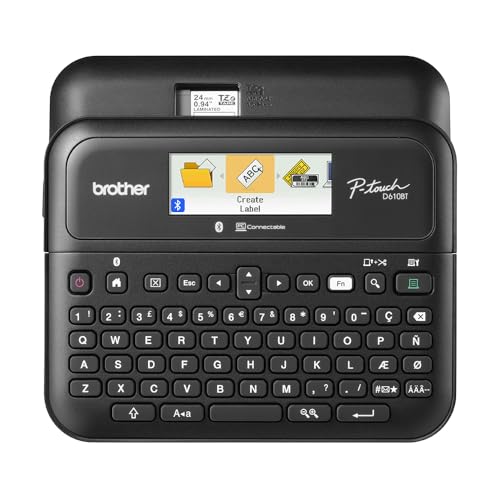
Brother P-Touch PT-D610BT keyboard label maker
Laminated TZe tapeBluetooth and USBStores 90 labelsUp to 24 mm
Check price on Amazon
Best for: Offices that want durable labels and several ways to connect.

Brother's PT-D610BT also has a keyboard, and it adds a USB cable, so a failed Bluetooth link costs you a minute rather than a job. The listing mentions that multiple users can connect, a useful trait for an office where several people print to a shared machine. Bluetooth handles phones and USB handles computers.

The lasting advantage is laminated TZe tape, which seals the print inside a film and resists water and scuffs better than any of the direct thermal Bluetooth machines here. It stores up to 90 frequently used labels for reprints. The price of that quality is the cost per inch of the tape and a width limited to about 24 millimeters.

Keep a spare cassette in the case and clean the cutter now and then. If you want a Bluetooth printer that lasts a decade, this is the safe choice. The sealed cassette means no loose roll to unwind and no ribbon to thread, and the memory means a tool room can reprint a numbered series without a computer. In an office, the multi-user feature saves each person from pairing and unpairing a shared printer all day.

What works

  • Laminated tape resists water and scuffs
  • Keyboard plus Bluetooth plus USB
  • Memory stores 90 labels
  • Multiple users can connect

Watch out for

  • Narrow 24 mm maximum width
  • Tape costs more per inch

Spec sheet

Tape
Brother TZe laminated tape up to about 24 mm
Connection
Bluetooth and USB
Memory
Up to 90 frequently used labels
Design
17 fonts, 17 styles, 160 frames, 900 symbols
Users
Multiple users can connect
03
KNAON Y41BT 4x6 Bluetooth shipping label printer
4x6 direct thermalBluetooth and USBiOS AndroidTemplates
Check price on Amazon
Best for: Sellers who need shipping-size labels from a phone.

Almost every Bluetooth label printer prints small stickers, and the KNAON is the large-format exception. It prints 4x6 labels, the size carriers want, from an iOS or Android phone, with a USB cable for macOS, Windows 7 and later and ChromeOS. A seller who packs from a phone can print a shipping label at the shelf.

The USB route is the fallback that keeps Bluetooth honest: if pairing fails mid-batch, plug in. The template library covers non-carrier labels. The cost is size and weight compared with the sticker printers, and a roll or stack of labels to manage.

Keep the cable in the drawer, re-pair after phone updates and wipe the head after a few rolls. A 4x6 printer is the exception that proves the Bluetooth rule: because it is bigger and mains-friendly, you can leave it on a shelf, but the radio still dislikes distance, so keep the phone within a few meters of the printer while a batch runs. If the batch is large, plug in rather than trusting the link.

What works

  • Prints 4x6 labels over Bluetooth
  • USB fallback for several systems
  • Template library for extras
  • Supports ChromeOS over USB

Watch out for

  • Larger and heavier than sticker printers
  • Pairing may need repeating

Spec sheet

Label size
4x6 inch labels
Print method
Direct thermal, no ink
Wireless
Bluetooth for iOS and Android
Wired
USB for macOS, Windows 7 and up, ChromeOS
Extras
Pre-designed DIY templates
04
TYPONOS PM240 Bluetooth label maker with 3 rolls
203 dpi thermal3 rolls includedLabelnize appRound and rectangular
Check price on Amazon
Best for: Beginners who want to try several label shapes right away.

TYPONOS sells the PM240 with three different rolls in the box: a 40 by 30 millimeter white rectangle, a 50 by 50 pink round and a 50 by 80 white. That bundle lets a buyer try several label shapes before buying more, which is a thoughtful touch for a first printer. It prints inkless thermal at 203 dpi.

The Labelnize app lists more than 3800 templates, and it is the same app family used by other budget printers. The tradeoff is that you are dependent on that app and on the maker's roll shapes. Next to the SUPVAN E11, it has no keyboard and no standalone mode.

Keep the app current and check that spare rolls in the same sizes remain easy to find before buying many. Round and pink labels are fun for a craft table, but a printer with unusual shapes may stock them from only one seller, so a quick search for a second source is worthwhile. For plain rectangular labels, open competition keeps prices honest.

What works

  • Three roll types in the box
  • 203 dpi inkless printing
  • 3800+ templates in the app
  • Round and rectangular labels

Watch out for

  • No keyboard or standalone mode
  • Depends on the maker's roll shapes

Spec sheet

Print method
Inkless thermal at 203 dpi
Rolls included
40x30 mm white, 50x50 mm pink round and 50x80 mm white
App
Labelnize with 3800+ templates
Connection
Bluetooth
Shapes
Rectangular and round labels
05
Phomemo M110 Bluetooth 2-inch thermal printer with display
Up to 2 in labelsBluetooth 4.0DisplayPrint Master app
Check price on Amazon
Best for: People who want a simple 2 inch printer with a clear status screen.

The M110 is the Bluetooth printer for someone who just wants one-click connection and a decent range. The listing gives Bluetooth 4.0 with up to about 33 feet, which is enough to print from across a typical room. A built-in display shows the printer's state so you know whether it is ready.

Print Master carries multiple templates and lets you design your own. It prints up to 2 inch labels, which handles barcodes, shelf tags and small address labels. It has no keyboard, so the app is the only path, and thermal prints fade as with every direct thermal sticker machine.

Charge before use, keep rolls dry and re-pair if the phone updates. The status display is the feature that matters on a busy day, because it tells you at a glance whether the printer is on, connected and out of paper. Printers that stay silent leave you guessing, and a quiet failure shows up later as a stack of blank labels.

What works

  • Bluetooth 4.0 with about 33 feet of range
  • Display shows printer state
  • Templates and custom designs
  • Up to 2 inch labels

Watch out for

  • App is the only way to print
  • Direct thermal prints fade

Spec sheet

Width
Up to 2 inch labels
Bluetooth
Version 4.0, up to about 33 feet
Display
Screen showing printer state
App
Print Master with templates
Connection style
One-click connection and printing
06
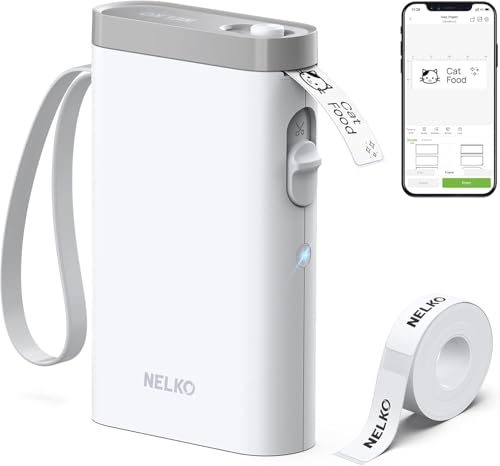
Nelko P21 handheld Bluetooth label printer
BPA-free thermalHalf the weightiOS AndroidApp templates
Check price on Amazon
Best for: Travelers and tidy-minded users who want the lightest Bluetooth printer.

Nelko's P21 is built to be the lightest in the room: the listing says it has half the weight and size of traditional label makers. It pairs with iOS and Android phones through the Nelko app, a three-step process that the listing spells out for first-time users.

It prints BPA-free direct thermal and the listing mentions high-speed chips, so short labels come out quickly. Like the Phomemo, it depends entirely on its app and cannot print on its own. Its strength is that it travels easily in a bag.

Store the unit with a spare roll and keep the app on your phone updated. A light printer is easy to knock off a shelf, so keep it in a small pouch and avoid leaving it on a windowsill where heat will darken the paper inside. If you plan to carry it daily, a short charging cable in the same pouch saves a lot of frustration.

What works

  • About half the weight of traditional machines
  • BPA-free direct thermal
  • Simple three-step pairing
  • Works with iOS and Android

Watch out for

  • No keyboard or standalone mode
  • Prints fade over time

Spec sheet

Print method
BPA-free direct thermal
Weight
About half the weight and size of traditional label makers
Connection
Bluetooth with iOS and Android
App
Nelko app with many templates
Printing
High-speed chips

Spec sheet decoder

What the numbers on the box really mean

The specs manufacturers lead with, translated into what they tell you about real-world performance.

Bluetooth 4.0

A low-energy version of Bluetooth common in small printers. It offers modest range and low power use.

Watch forThe Phomemo M110 lists it with about 33 feet of range.

mAh battery rating

Milliamp-hours measure how much charge a battery holds. A larger number means more labels per charge.

Watch forThe SUPVAN E11 lists 1200 mAh.

Label margin

The blank leader before the first printed character on each label. Small margins save material.

Watch forThe SUPVAN E11 states about 0.2 inch.

Multi-user connection

The ability for several phones or computers to use the same printer.

Watch forThe Brother PT-D610BT lists it.

203 dpi

A common print grid for small thermal labels. It is sharp enough for text and codes.

Watch forThe TYPONOS PM240 lists it.

Methodology

How We Evaluated These Bluetooth Label Printers

Resilience to link failure

We looked at whether each printer can print without Bluetooth. The SUPVAN E11 and Brother PT-D610BT have keyboards, and the KNAON and Brother have USB. The three app-only printers scored lower.

Range and connection experience

Stated Bluetooth versions and range were compared, with the Phomemo M110 at about 33 feet. We also looked at pairing instructions and multi-user options.

Battery and portability

The SUPVAN's 1200 mAh claim and the Nelko's lightweight design were compared. Printers that charge by a common cable and show battery state scored higher.

Label type and running cost

Tape, thermal rolls and 4x6 stock were compared for cost and durability. We weighed the Brother's laminated tape against cheaper direct thermal rolls.

App maturity

We considered how much each printer relies on its app and how mature the app is. Keyboard models lost less to this. Apps with large template libraries scored well for usability.

Decision guide

How to Choose the Right Bluetooth Label Printers

By Resilience

NeedPickWhy
Works with no phoneSUPVAN E11Built-in keyboard.
Keyboard plus USB fallbackBrother PT-D610BTThree ways to connect.
Shipping labels from a phoneKNAON Y41BT4x6 plus USB backup.
Simple app-only printerPhomemo M110Display and 33 ft range.

By Budget

TierPickWhy
Lower tierNelko P21Lightweight sticker printer.
Middle tierSUPVAN E11Keyboard and battery.
Higher tierBrother PT-D610BTLaminated tape and multi-user.

Tape vs Thermal Roll

Tape

The SUPVAN E11 and Brother PT-D610BT use cassettes. They are durable and neat. They cost more per inch.

Thermal roll

The Phomemo, Nelko and TYPONOS use rolls. They are cheap and flexible. They fade.

Choose tape for lasting labels and rolls for low cost.

Keyboard vs App-Only

PreferencePickWhy
Type directlySUPVAN E11Keyboard on the body.
Design with templatesTYPONOS PM2403800+ templates.
Lightest in a bagNelko P21Half the weight.

For Classroom Use Specifically

Look for

Fast pairing for several users, a lightweight body and cheap rolls. A printer that works for many phones helps.

In this comparison

The Brother PT-D610BT lists multi-user connection, and the TYPONOS PM240 includes three roll types.

When to Spend More

Spend more if

You need labels to last years or you hate app dependence. The Brother and SUPVAN fit.

Save if

You print occasional stickers from a phone. The Nelko or Phomemo is enough.

Ownership

Maintenance schedule

The upkeep that decides whether this machine lasts two seasons or ten.

TaskIntervalWhy it matters
Charge on a scheduleMonthly or before big jobsA flat battery stops a job halfway. A monthly top-up avoids it.
Re-pair after phone updatesAs neededSystem updates can drop saved pairings. Remove and add the printer again.
Clean the print headEvery few rollsDust causes pale lines on thermal printers. Use alcohol and a swab.
Clean the cutterQuarterlyAdhesive builds up on tape cutters and ruins cuts.
Keep the app updatedAs updates arriveApps are the printer's brain. An old version can lose its link.

FAQ

Frequently Asked Questions

Are Bluetooth label printers reliable?

Reliable enough for most jobs, but the radio and app add failure points. A model with a keyboard or USB gives you a fallback when pairing fails.

What range does Bluetooth give?

Around 33 feet in open air for Bluetooth 4.0, and much less through walls. Keep the phone near the printer for long jobs.

Can several people use one printer?

Some can. The Brother PT-D610BT lists multi-user connection. Most app-only printers pair with one phone at a time.

What happens if the app is discontinued?

App-only printers lose function, while keyboard models keep printing. This is the main argument for choosing a keyboard machine.

Which Bluetooth printer prints shipping labels?

The KNAON Y41BT prints 4x6 labels over Bluetooth. The small sticker printers cannot.

Do Bluetooth printers need a charger?

Most have rechargeable batteries. The SUPVAN E11 lists up to about a month per charge. Charge before long jobs.

Bottom line

The short version

Browse more bluetooth label printerson Amazon →
James Miller, Lead Machine Editor

About the author

James Miller

Lead Machine Editor, MachineFanatic

James Miller leads MachineFanatic's buying guides, turning spec sheets, manuals and owner feedback into clear verdicts on power tools, outdoor power equipment, shop machines and kitchen machines.

More from James →

Keep reading

Related guides