
Amazon affiliate links - we earn a commission.Affiliate disclosure

Buying guide · 13 min read · Updated 2026-11-07

Best Bottle Label Printers (2026)

Compact thermal label printers that handle bottle, jar and vial labels, with width, adhesive and app limits explained for five models compared in detail.

James MillerBy James MillerLead Machine Editor5 machines comparedSpec-sheet verified
Best Bottle Label Printers

At a glance

Our top picks

A bottle label printer is really a small thermal label maker that happens to be used on curved glass, plastic and metal. The machine prints flat; the bottle is what makes the job hard. Surface curvature, condensation and oils decide whether a label survives a month in a pantry or a week in a fridge.

That shifts the buying question away from print quality and toward width, label shape and adhesive. A strip that is too tall will lift at the edges as it wraps, and a roll with weak glue will peel off wet glass. The five machines below were weighed on those practical points first.

Before you buy

6 Criteria to Look For Before Buying a Bottle Label Printer

  1. 01

    Label width versus bottle size

    A flat label on a curved bottle only sticks well when the label height is small compared with the bottle diameter. As a rule of thumb, keep the printed height under about a third of the circumference or the corners lift. The NIIMBOT D110 at 15 millimeters suits tubes and spice jars, while the SUPVAN T50M Pro at up to two inches suits a wine or sauce bottle face. Many buyers pick the widest machine and then find large labels peel at the edges.

  2. 02

    Adhesive and surface match

    Glass, plastic, coated metal and waxed paper all hold adhesive differently, and a label that sticks to a clean jar may fail on an oily bottle. Permanent acrylic glue handles most room-temperature jobs, but refrigerators and freezers need a freezer-grade adhesive. The SUPVAN T50M Pro leans on waterproof tape, and the NIIMBOT B1 uses die-cut rolls in several finishes. Always test one label on a spare bottle before printing a batch.

  3. 03

    Direct thermal fade

    Direct thermal printing darkens heat-sensitive paper with no ink, so labels fade with heat, sunlight and time. A bottle on a sunny counter can lose contrast in a few months, while a dark cupboard keeps it for years. The TYPONOS PM240 and NIIMBOT B1 are both direct thermal at around 203 dpi. If you need longer life, choose thermal transfer media or laminate, and keep sunlit bottles out of the plan.

  4. 04

    Phone app dependence

    All five printers run best through an app, and the app is part of the product. If the maker stops updating it, features can disappear. The SUPVAN E11 reduces that risk with a keyboard, while the NIIMBOT B1 and the PM240 do not. Check whether the app supports your phone version and whether you can print from a desktop as a fallback. A bottle project with fifty labels is painful on a dead app.

  5. 05

    Roll supply and cost per label

    The printer is cheap and the rolls are the real spend. Die-cut rolls such as the NIIMBOT B1's 50 by 30 millimeter size print identical labels with no waste, while continuous tape like the SUPVAN T50M Pro's gives freedom but wastes a short leader each time. Compare the cost of a roll and the number of labels it yields, not the printer price. Buying a roll size that is out of stock is a common mistake with newer brands.

  6. 06

    Portability and battery

    A rechargeable battery lets you label bottles at a market stall or in a lab without an outlet. The SUPVAN E11 claims up to a month of use per charge from a 1200 mAh cell, and the NIIMBOT D110 weighs only 149 grams. Larger machines such as the T50M Pro are less pocket friendly but handle wider labels. Pick for where you actually print, since a bench printer does not need a tiny body.

Detailed reviews

The 5 best bottle label printers, explained

01
SUPVAN T50M Pro Bluetooth label printer, wide waterproof tape
Prints 3/4 to 2 inBluetooth appWaterproof tape30+ fonts
Check price on Amazon
Best for: People labeling many bottle sizes who want wide, waterproof labels.

The T50M Pro prints on tape from three quarters of an inch up to two inches wide, which is the range that actually suits bottles. A wide strip gives room for a name, a date and a small logo, while the narrow end fits a spice jar neck. The app handles fonts, images and layout, so the printer itself stays a simple thermal engine with no ink to manage.

The tradeoff is that everything runs through a phone app. If you want to type a quick label without opening anything, the SUPVAN E11 in this lineup has a keyboard and the T50M Pro does not. The wide print head also means the machine is larger than the NIIMBOT D110, so it lives on a shelf rather than in a drawer.

In year three, expect to buy waterproof tape more often than the printer. The thermal head is the only wear part, and wiping it with isopropyl alcohol when text goes streaky is the main upkeep. Compared with the NIIMBOT B1, it gives a similar two inch ceiling but leans harder on its waterproof tape for wet bottles.

What works

  • Wide tape range covers neck and body labels
  • Waterproof tape suits damp bottle surfaces
  • App editing handles images and many fonts
  • No ink or cartridges, thermal head only

Watch out for

  • Needs a phone app for every label
  • Bulkier than the compact NIIMBOT D110
  • Tape cost adds up with heavy use

Spec sheet

Label width
3/4 to 2 in
Connection
Bluetooth app
Media
Waterproof tape
Editing
30+ fonts plus images
Best surface
Jars and flat bottle faces
02
NIIMBOT B1 2 inch Bluetooth thermal label printer
2 inch wideAuto size detectiOS and AndroidInkless thermal
Check price on Amazon
Best for: Small makers labeling identical bottles in batches of fifty or more.

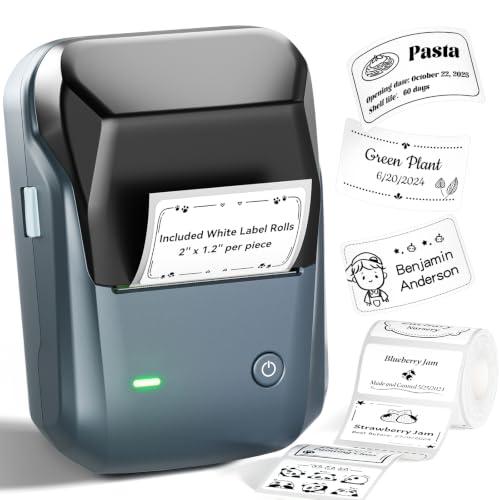
The B1 prints on die-cut rolls such as 50 by 30 millimeter rectangles, 50 by 80 millimeter strips and 50 millimeter rounds. Die-cut rolls are the reason it suits bottles: each label is pre-sized, so a batch of fifty comes out identical with no trimming. The app reads the roll size automatically, which removes the most common mistake with these printers, a layout that does not match the media.

The weakness is flexibility. Round or rectangular die-cut labels sit well on a flat jar lid or a pump bottle, but a long wrap label for a curved bottle needs a different roll. Against the SUPVAN T50M Pro, which uses continuous tape you cut to length, the B1 trades freedom for speed on repeat jobs.

Ownership is simple. Rolls are the running cost, and they are sold in many sizes. Keep the lid closed so dust does not reach the print head, and treat the app as part of the product, since the printer cannot do much without it.

What works

  • Die-cut rolls give identical labels in batches
  • App auto-detects the loaded roll size
  • Wide roll catalog from 40 to 80 mm
  • Large library of borders and symbols

Watch out for

  • Die-cut sizes limit curved bottle wraps
  • Fully dependent on the NIIMBOT app
  • Rolls are brand-specific for best results

Spec sheet

Max width
2 in class
Media
Die-cut rolls
App
iOS and Android
Fonts
30+ fonts, 100 borders
Symbols
1500 symbols
03
TYPONOS PM240 Bluetooth label maker, 203 dpi, Labelnize app
203 dpi3800+ templatesInkless40x30 and 50x80 rolls
Check price on Amazon
Best for: Beginners who want ready-made templates for jars and bottles.

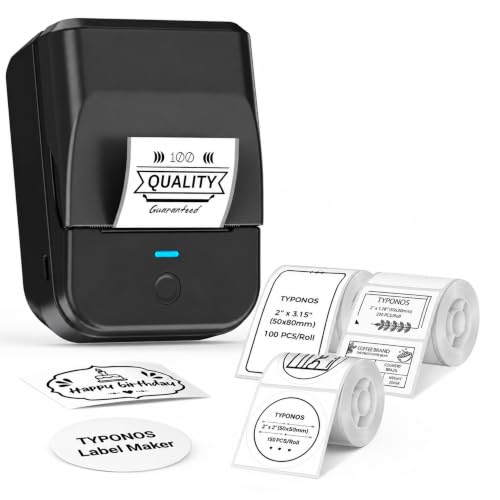
The PM240 prints at 203 dpi, the standard resolution for small thermal labels, which is plenty for a bottle name in ten point text and a basic barcode. Its Labelnize app ships with thousands of templates, so a spice, sauce or tincture label is a pick and edit job rather than a design job. The starter set includes a 50 by 30 millimeter roll, a 50 millimeter round and a 50 by 80 millimeter strip, which covers most bottle faces.

The cost of that convenience is a newer ecosystem. The app and roll supply are younger than NIIMBOT's, so check that the roll size you want is available before buying. Next to the NIIMBOT D110, which is much smaller, the PM240 gives a larger label area at the price of desk space.

In use, the weak point is the same as any direct thermal printer: prints fade in heat and sunlight. Bottles kept in a sunny kitchen window will show it first. Store the spare rolls in their sleeves and away from warm windows.

What works

  • Thousands of ready templates save design time
  • 203 dpi gives crisp small text
  • Starter rolls include round and strip sizes
  • Inkless direct thermal, no ribbon to replace

Watch out for

  • Newer roll supply than established brands
  • Direct thermal prints fade in sunlight
  • Needs the Labelnize app to print

Spec sheet

Resolution
203 dpi
Templates
3800+
Starter rolls
50x30, 50x50 round, 50x80
Print method
Direct thermal
App
Labelnize
04
NIIMBOT D110 mini Bluetooth label maker, 15 mm width
149 g weight15 mm max widthAuto rewindPocket size
Check price on Amazon
Best for: Small jars, tubes and vials where a narrow label is enough.

At 149 grams and a 15 millimeter print width, the D110 is the smallest machine here and the cheapest to run. A 12 by 40 millimeter label fits a spice jar, a lip balm tube or a small vial cleanly. The upgraded auto rewind positions the first label correctly each time, which cuts the wasted label that older mini printers spit out at start-up.

The limit is plain size. A label that narrow cannot carry a wrap-around bottle design, and a two line name plus date is about the ceiling. If you want a bigger face, the SUPVAN T50M Pro or the NIIMBOT B1 is the right step up. As a second printer for tiny containers, it earns its place.

Upkeep is minimal: wipe the head occasionally, keep the roll dry and charge it when the app warns you. Its small roll holds fewer labels than the larger machines, so expect to reload more often on a big project.

What works

  • Pocket-size body at 149 g
  • Auto rewind reduces wasted first label
  • Narrow rolls suit spice jars and tubes
  • Lowest running cost in this lineup

Watch out for

  • 15 mm width limits label design
  • Small roll holds fewer labels per load
  • Cannot wrap a larger bottle

Spec sheet

Weight
149 g
Max width
15 mm
Label sizes
12x40 mm and similar
Feature
Auto label rewind
Best use
Small jars and tubes
05
SUPVAN E11 keyboard and Bluetooth label maker, rechargeable
Built-in keyboard1200 mAh battery0.2 in margin30+ fonts
Check price on Amazon
Best for: Frequent labelers who want to type without a phone.

The E11 is the only machine here with its own keyboard, so a frequent labeler can type a name and print without touching a phone. It also supports the app for fonts and images, which gives both paths. The 1200 mAh rechargeable battery is rated for up to a month of use per charge, and the small 0.2 inch margin wastes less tape than older printers.

The cost is width. It uses narrow tape, so it behaves more like the NIIMBOT D110 than the SUPVAN T50M Pro, with the added keyboard. For a pantry full of spice jars that need quick edits, that matters. For a wide bottle face, it does not.

The battery is the long-term concern. Rechargeable cells fade over a few years, and tape cassettes are the recurring cost. Keep it charged around half when stored for months, and clean the head the same way as any thermal unit.

What works

  • Built-in keyboard prints without an app
  • Rechargeable cell lasts about a month
  • Small margin wastes less tape
  • App adds fonts and images when needed

Watch out for

  • Narrow tape limits bottle label size
  • Tape cassettes cost more per label
  • Battery capacity fades over several years

Spec sheet

Input
Keyboard or app
Battery
1200 mAh rechargeable
Margin
0.2 in
Battery life
Up to a month per charge
Fonts
30+ in app

Spec sheet decoder

What the numbers on the box really mean

The specs manufacturers lead with, translated into what they tell you about real-world performance.

Print width

The widest label the head can print, usually listed in millimeters or inches. It sets the tallest label you can put on a bottle.

Watch forThe D110 stops at 15 mm while the T50M Pro reaches 2 inches.

DPI

Dots per inch of the print head. 203 dpi is standard for small labels and 300 dpi gives sharper tiny text.

Watch forThe PM240 lists 203 dpi, which is fine for names but not for tiny codes.

Direct thermal

Printing by heating special paper with no ink or ribbon. Cheap and simple, but prints fade with heat and light.

Watch forAll the printers here use it, so sunlit bottles will fade faster.

Die-cut roll

A roll of pre-cut labels with a fixed size and shape. It prints identical labels with no trimming.

Watch forThe NIIMBOT B1 and PM240 use die-cut rolls, so check your size exists.

Battery capacity

Measured in mAh, it sets how long the printer runs away from an outlet. Higher means longer between charges.

Watch forThe E11's 1200 mAh cell is rated for about a month of light use.

Methodology

How We Evaluated These Bottle Label Printers

Bottle fit

We evaluated how each printer's label width and shape suit curved surfaces, using the spec sheet and owner feedback patterns. Wide strips scored higher for bottle faces and narrow strips for tubes. The T50M Pro at up to 2 inches and the D110 at 15 millimeters sit at opposite ends.

Media and adhesive

We looked at what rolls each machine accepts and how easy those rolls are to find. Waterproof and die-cut options earned credit. Machines locked to one brand of tape lost points for cost.

App and editing

We compared fonts, templates and the ability to print without the app. The E11's keyboard and the PM240's template library both scored well here. Machines with no standalone input were marked down.

Portability and power

We checked battery type, weight and charge life from the listed specs. The 149 gram D110 and the E11's month-long cell stood out. Heavier bench units scored lower on carry-around use.

Ownership cost

We weighed printer price against roll cost and expected head life. Die-cut batches cut waste, while continuous tape gave freedom. The lineup spans the cheapest mini machine to a wide waterproof model.

Decision guide

How to Choose the Right Bottle Label Printers

By Bottle Size

SituationPickWhy
Spice jars and tubesNIIMBOT D11015 mm strip fits small containers
Wine or sauce bottle faceSUPVAN T50M ProTape up to 2 inches wide
Flat jar lids, pump bottlesNIIMBOT B1Die-cut 50 by 30 mm and round rolls
Mixed sizes with templatesTYPONOS PM240Three starter rolls plus many templates
Quick edits without a phoneSUPVAN E11Built-in keyboard

By Budget

Budget tierPickWhy
Lowest costNIIMBOT D110Cheapest machine and rolls here
Mid rangeTYPONOS PM240Starter rolls and templates included
Mid rangeSUPVAN E11Keyboard and rechargeable battery
HigherNIIMBOT B1Wider rolls for batch work
HighestSUPVAN T50M ProWidest tape and waterproof media

Die-Cut Rolls vs Continuous Tape

Die-cut rolls

Pre-sized labels print identical results with no trimming. The NIIMBOT B1 and TYPONOS PM240 use them, so a batch of fifty bottles looks uniform. The downside is that the size you need must exist as a roll.

Continuous tape

The SUPVAN T50M Pro and E11 print on tape you size in the app. You get any length, from a neck strip to a full wrap. The cost is a short wasted leader and a slightly slower workflow.

Pick die-cut for repeat batches and continuous tape for one-off mixed bottles.

App vs Keyboard Workflow

PreferencePickWhy
Design-heavy labelsSUPVAN T50M ProImage editing and 30+ fonts
Templates and speedTYPONOS PM2403800+ templates
Type and printSUPVAN E11Keyboard works without an app
Pocket useNIIMBOT D110App-driven but tiny
Large icon libraryNIIMBOT B11500 symbols and 100 borders

For Fridge and Wet Bottles Specifically

Look for

Waterproof or freezer-rated tape and a clean, dry surface at application. Direct thermal prints survive moisture better when laminated or sealed. A label that is pressed on a cold, wet bottle will not bond, so wipe and dry first.

In this comparison

The SUPVAN T50M Pro is the strongest fit because its waterproof tape is a core feature. The SUPVAN E11 follows with similar tape. The NIIMBOT B1's die-cut rolls work well in a pantry but need a test before refrigerator use.

When to Spend More

Spend more if

You label many bottle sizes or need wide, waterproof strips. The SUPVAN T50M Pro and NIIMBOT B1 justify their size and roll cost for batches and wet storage.

Save if

You label spice jars or small vials only. The NIIMBOT D110 covers that job at the lowest cost, and the SUPVAN E11 adds a keyboard for modest extra spend.

Ownership

Maintenance schedule

The upkeep that decides whether this machine lasts two seasons or ten.

TaskIntervalWhy it matters
Swab the thermal headEvery 2 to 3 rollsDust and adhesive build up on the thermal head and cause streaks. Wipe it gently with isopropyl alcohol on a lint-free swab.
Store rolls sealedAfter each sessionHeat and sunlight darken thermal paper before you use it. Keep rolls in their sleeve in a cool drawer.
Check the platen rollerEvery few monthsA dirty or worn roller feeds labels crookedly. Clean it with alcohol and replace the printer if grooves form.
Charge and discharge the batteryEvery few monthsLithium cells age faster when stored empty or full. Keep them around half charge during long breaks.
Update the appQuarterlyFirmware and app updates fix Bluetooth bugs and add roll support. Skipping them can break pairing after a phone update.

FAQ

Frequently Asked Questions

Should I choose die-cut rolls or continuous tape for bottles?

Die-cut rolls suit repeat batches because every label is identical and pre-sized. Continuous tape suits mixed bottle sizes where you want custom lengths. For one-off projects, a tape machine like the SUPVAN T50M Pro is more flexible.

How much should I budget for a bottle label printer?

The printer itself is a small share of the total cost. The NIIMBOT D110 is the cheapest to start and run, while the SUPVAN T50M Pro costs more but gives wider labels. Always include roll cost in your plan.

Do thermal bottle labels last in the fridge?

Waterproof or laminated media lasts much longer than plain thermal paper. Moisture and cold can lift standard labels, so wipe the bottle dry first. Test a sample label for a week before printing a full batch.

Is a higher dpi worth it for bottle labels?

203 dpi is enough for names, dates and simple barcodes. 300 dpi only matters for tiny text or small two-dimensional codes. The machines here run around 203 dpi, which suits bottle work.

Can I use the printer without a phone?

Only the SUPVAN E11 has a keyboard for direct typing. The NIIMBOT and TYPONOS machines need their apps, so keep a compatible phone or tablet nearby. Check the app's update history before buying.

Why do my bottle labels peel at the edges?

Curvature and moisture are the usual causes. Use a shorter label, press it on from the center outward, and make sure the bottle is clean and dry. Switching to a stronger adhesive roll also helps.

Bottom line

The short version

Browse more bottle label printerson Amazon →
James Miller, Lead Machine Editor

About the author

James Miller

Lead Machine Editor, MachineFanatic

James Miller leads MachineFanatic's buying guides, turning spec sheets, manuals and owner feedback into clear verdicts on power tools, outdoor power equipment, shop machines and kitchen machines.

More from James →

Keep reading

Related guides