
Amazon affiliate links - we earn a commission.Affiliate disclosure

Buying guide · 12 min read · Updated 2026-11-18

Best Brady Label Printers (2026)

Six Brady label printers compared by label width, print speed, battery life and connectivity, from the pocket M210 to the M710 and the S3100 sign printer.

James MillerBy James MillerLead Machine Editor6 machines comparedSpec-sheet verified
Best Brady Label Printers

At a glance

Our top picks

Side by side

Spec comparison

Industrial handheld label printers are built for contractors, electricians and facility crews who label wires, panels, pipes and equipment on site. They use drop-in cartridges that pair the ribbon and label stock, so the media choice is made by chemistry and not by guesswork.

What separates one model from the next is label width, print speed, battery capacity and how files reach the printer. Most buying mistakes come from picking a keypad-only model when the work needs Bluetooth files, or paying for wireless when a keypad would have done.

Before you buy

6 Criteria to Look For Before Buying a Brady Label Printer

  1. 01

    Label width you really need

    Most wire markers and equipment tags fit within 1 inch, which is the M410's limit. Panel schedules, placards and warning labels push toward the 1.5 inch M511. Buying a wide printer for narrow work wastes media and weight, and buying a narrow one for placards means splicing labels together.

  2. 02

    Battery rating in labels

    Brady quotes battery life in labels per charge, which is more useful than hours. The M610 and M710 are listed at 4,500 labels, while the M511 is listed at about 1,000. A crew printing 300 labels a day can go all week on the first two, and the M511 needs a midweek charge.

  3. 03

    Speed that matters on long runs

    The M710 is rated at 3 inches per second and the M511 at 1.5. For a 20 label job the difference is a few seconds, but a 500 label wire marking run is where speed saves real minutes. Printing in short bursts all day makes speed matter less than battery.

  4. 04

    How files reach the printer

    Keypad entry works anywhere and needs no app. USB and flash drive, as on the M610, move lists without radios, and Bluetooth or Wi-Fi on the M710 lets a phone push designs. Pick by what your site allows, because a wireless printer is no help in a shielded plant.

  5. 05

    Cartridge materials and cost

    Drop-in cartridges pair ribbon and label in one unit, so the material is chosen by installing the right cartridge. The M410 lists 110+ cartridges in 12+ materials and the M510 family lists 250+ cartridges in 26+ materials. A wider material range matters for outdoor, chemical or high heat labels.

  6. 06

    Handheld or desktop format

    A handheld such as the M210 goes where the work is, while the S3100 sits on a bench and uses continuous tape. Handhelds win for wire and panel labeling in tight spaces. The desktop wins when signs and larger multi-line labels are designed on a PC.

Detailed reviews

The 6 best brady label printers, explained

01
Brady M710 Bluetooth and Wi-Fi handheld printer kit
3 in/secBluetooth + Wi-Fi4,500 labelsAuto cutter
Check price on Amazon
Best for: Crews who print long runs and move files by Bluetooth or Wi-Fi.

Speed is the M710's headline: the listing quotes 3 inches per second with automatic cutting, double the 1.5 in/sec of the M511. On a job with long runs of wire markers or panel labels, that is the difference between waiting by the printer and walking away from it. Bluetooth and Wi-Fi let it receive designs from a phone or laptop on the same network, and the keypad stays available when no device is around.

A 4,500 label battery rating matches the M610, which is high for a handheld thermal transfer printer and gets a crew through a week of casual use between charges. The kit ships in a hard case, a practical touch because the printer will ride in a truck with tools. Because it is the most advanced in the family, it also has the most settings, and a first-time user will spend a short session in the menus learning the cartridge choices.

Expect to buy cartridges as a continuing cost; the printer is the entry fee and the media is the habit. Keep the cartridge window clean, store spare cartridges flat and out of heat, and remove the battery for long storage. If you only print short wire tags, the M610 does the same work for less money and without the Wi-Fi radio.

What works

  • Fastest here at 3 inches per second
  • Bluetooth and Wi-Fi for file transfer
  • 4,500 labels per full battery charge
  • Automatic cutting saves hand trimming

Watch out for

  • Top of the handheld range in cost
  • Wireless menus take time to learn
  • Cartridge media is a continuing expense

Spec sheet

Print speed
3 inches per second
Connectivity
Bluetooth and Wi-Fi
Battery rating
4,500 labels per full charge
Cutting
Automatic cut
Kit
Hard case included
02
Brady M610 handheld label maker with hard case
4,500 labelsUSB 2.0Keypad entryHard case
Check price on Amazon
Best for: Teams that rely on wired file transfer and a long-lasting battery.

Wired, rugged and flexible: that sums up the M610. You can type on the keypad, design labels in desktop software or move lists and graphics by USB cable or a flash drive. A site with no wireless coverage, or an IT department that blocks new radios, is exactly where that wired path matters.

The enhanced Gen3 Li-ion battery is rated for 4,500 labels per charge, which puts it level with the M710 and far ahead of the 1,000 labels quoted for the M511. Its main trade is speed, since the M710 is listed at 3 in/sec and the M610 is the older, calmer sibling. For wire markers and equipment tags, you will rarely feel the difference on a normal workday.

Ownership is the same as for all cartridge printers: drop-in cartridges, a roller that wears and a cutter blade that dulls on heavy materials. Charge the pack before long trips, keep the hard case latched, and import label files from a flash drive rather than retyping them in the field. For crews that want the M710's battery without paying for wireless, this is where the money should go.

What works

  • 4,500 label battery rating
  • USB and flash drive file transfer
  • Keypad or desktop software entry
  • Hard case protects it in the truck

Watch out for

  • No Wi-Fi like the M710
  • Slower than the top model
  • More expensive than the keypad-only M210

Spec sheet

Battery rating
4,500 labels per full charge
Battery type
Gen3 Li-ion
File transfer
USB type A, type B, flash drive
Data entry
Keypad or desktop software
Kit
Hard case
03
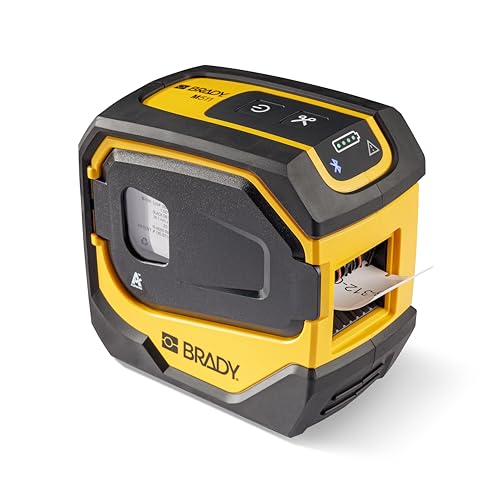
Brady M511 wireless industrial printer, 1.5 inch labels
1.5 inch labelsBluetooth8+ hour batteryEdge to edge
Check price on Amazon
Best for: Facilities crews who print larger placards and need wireless design transfer.

A 1.5 inch label width puts the M511 in a different bracket from the 1 inch M410. Panel schedules, equipment placards and larger warning labels fit here, and edge to edge printing means no wasted margin on the cartridge. The wireless design lets a phone push designs to it, and military-grade shock resistance is part of the pitch.

Battery numbers are modest next to the M610 and M710. The internal Li-ion pack is rated for roughly 8 hours of work or about 1,000 labels per charge, so a day with heavy printing means a top-up at lunch. Speed is also lower, at 1.5 in/sec, which is half the M710's rate.

The pack is built in, so you cannot swap a spare mid-shift the way you can with removable batteries. Plan to charge overnight, carry the cable and avoid leaving the printer in a hot cab, since heat shortens lithium cells. Cartridge changes are drop-in, but keep dust out of the cartridge bay, because grit under the ribbon causes streaks across wider labels.

What works

  • 1.5 inch labels for bigger placards
  • Edge to edge printing wastes less media
  • Bluetooth for phone-based designs
  • Shock-resistant industrial housing

Watch out for

  • About 1,000 labels per charge is modest
  • Only 1.5 in/sec print speed
  • Built-in battery cannot be swapped in the field

Spec sheet

Maximum label width
1.5 inches
Printing
Edge to edge text and graphics
Battery
Internal Li-ion, 8+ hours
Battery rating
About 1,000 labels per charge
Connectivity
Bluetooth compatible
04
Brady M410 handheld printer kit, 1 inch labels
1 inch labels110+ cartridgesEdge to edgeKit with case
Check price on Amazon
Best for: Electricians and installers labeling wires and small equipment up to 1 inch.

The M410 is the quiet middle of the lineup: it prints pre-sized or continuous labels up to 1 inch wide and works with a library of more than 110 cartridges in over 12 materials. For wire, cable and small equipment marking, 1 inch is generous, which is why this model suits electricians and low-voltage installers better than its wider siblings.

The cartridge door has a locking mechanism and a window, so you can see how much media is left before a job runs short. The M511 offers 1.5 inch labels and more materials, but at a steeper media and printer cost, so decide whether you really print that wide. Edge to edge printing helps here because a 1 inch label has little margin to waste.

The kit includes the carrying case, charger and a starter cartridge, and that is enough to begin work on day one. Keep a second cartridge of your most-used material on hand, because switching between vinyl and polyester mid-job is a cartridge swap and not a setting. Wipe the contacts occasionally and store cartridges away from direct sun.

What works

  • 110+ cartridges across 12+ materials
  • Locking, windowed cartridge door
  • Edge to edge printing on narrow labels
  • Complete kit with case and charger

Watch out for

  • Limited to 1 inch labels
  • No wireless file transfer
  • Fewer materials than the wider models

Spec sheet

Maximum label width
1 inch
Media
Pre-sized or continuous
Cartridge range
110+ cartridges, 12+ materials
Printing
Edge to edge
Kit
Carrying case, charger, cartridge
05
Brady M210 portable label printer kit, backlit keypad
6 to 40 pt textBacklit LCDKeypadSingle color
Check price on Amazon
Best for: Apprentices and small crews who want a no-app label printer for wires and panels.

Skip the radios and the app, and the M210 shows what a Brady keypad printer is for. It prints multi-line labels for wires, panels and circuit boards in six text sizes between 6 and 40 point, in a single color, and a backlit graphics display makes it usable in a dim electrical closet.

Most of what the M210 lacks is deliberate. It does not have the Bluetooth of the M211 or M511, and it does not carry the 4,500 label battery of the M610. Instead you get a straightforward keypad machine that a new apprentice can use in minutes, which is a real advantage on a crew where phones stay in the truck.

Treat it as a tool and not a gadget: keep the cartridge cavity clean, avoid leaving the printer in direct sun and charge it before long days. Since it is single color, jobs that need red warning labels will still need a different workflow. A manual or app comparison with the M211 is worth a minute, because the M211 trades some simplicity for Bluetooth.

What works

  • Simple keypad with backlit LCD
  • Six text sizes from 6 to 40 point
  • Multi-line labels for wire and panels
  • Lowest-cost Brady handheld in this list

Watch out for

  • No wireless file transfer
  • Single color printing only
  • Lower battery rating than the M610

Spec sheet

Text sizes
6 point to 40 point, 6 sizes
Colors
Single color
Display
Backlit LCD graphics
Entry
Keypad, letters and numbers
Label style
Multi-line
06
Brady S3100 desktop sign and label printer
DesktopB30 continuous tapeAuto setupSafety software
Check price on Amazon
Best for: Facility managers who make signs and labels at a bench with PC software.

The S3100 is the only desktop machine here, and it exists for a different kind of job: making multi-line signs and facility labels at a bench. A workstation software package is bundled for safety and facility ID work, so it is closer to a sign shop than to a handheld marker.

It uses B30 series continuous tape, and automatic label setup removes the sensor calibration that trips up many desktop printers. That is a real convenience when you switch between tape widths, as the sign printer expects. Compared with the M610, the S3100 trades portability for the ability to design on a PC and print larger, more varied signs.

This is an older design, so check availability of media and software drivers for your operating system before committing. Keep it on a stable bench, store tapes sealed and clean the print path when switching materials. It is a niche choice, and for jobs that happen in a ceiling or a manhole a handheld is the better answer.

What works

  • Desktop design for signs and larger labels
  • Automatic label setup, no calibration
  • Safety and facility ID software included
  • Continuous B30 tape in multiple styles

Watch out for

  • Not portable for field work
  • Older platform, check driver support
  • Fewer media options than handheld cartridges

Spec sheet

Format
Desktop sign and label printer
Media
B30 series continuous tape
Setup
Automatic label calibration
Software
Workstation safety and facility ID
Output
Multi-line signs and labels

Spec sheet decoder

What the numbers on the box really mean

The specs manufacturers lead with, translated into what they tell you about real-world performance.

Inches per second

How fast media moves through the printer while a label is being made. A faster rate shortens long runs but does not change quality.

Watch forThe M710 quotes 3 in/sec versus 1.5 for the M511, so the gap shows on long runs.

Labels per charge

Brady rates the pack in labels, which varies with label length and temperature. Cold weather cuts the number.

Watch forThe M610 and M710 list 4,500 labels, while the M511 lists roughly 1,000.

Edge to edge printing

The print head covers the whole label width, so text and graphics reach the border. It reduces waste on narrow labels.

Watch forThe M410 and M511 both advertise it, which helps on a 1 inch stock.

Drop-in cartridge

Ribbon and labels come together in one cartridge that locks into the printer. It removes loading errors.

Watch forCartridge counts differ: 110+ for the M410 versus 250+ for the M510 family.

Connectivity set

Keypad, USB, Bluetooth and Wi-Fi are different input routes. More routes add flexibility and complexity.

Watch forThe M710 offers Bluetooth and Wi-Fi, the M610 offers USB, and the M210 is keypad only.

Methodology

How We Evaluated These Brady Label Printers

Label width fit

We matched maximum label width to typical jobs, from 1 inch wire tags on the M410 to 1.5 inch placards on the M511. Width was weighed against media cost. The desktop S3100 was assessed on a different scale.

Battery and speed

We compared rated labels per charge and inches per second. The M610 and M710 at 4,500 labels set the top end, and the M511 at about 1,000 set the lower one. Speed was weighted for long runs, not short ones.

Input and connectivity

We looked at keypad, USB, Bluetooth and Wi-Fi support and whether a model needs an app. A site with no coverage was treated as a valid use case. Wireless was a plus, not a requirement.

Media ecosystem

Cartridge counts and material ranges were compared between families. A larger range was scored higher only when the work needs harsh-environment labels. We judged from spec sheets and owner feedback patterns.

Field durability

Hard cases, shock resistance claims and locking cartridge doors were noted. The M511 advertises military-grade shock resistance, and the M610 and M710 ship in hard cases. We did not assume ratings beyond what listings state.

Decision guide

How to Choose the Right Brady Label Printers

By Primary Use

SituationPickWhy
Long runs and phone design transferBrady M7103 in/sec and Bluetooth with Wi-Fi
Wired site, long shiftsBrady M6104,500 labels and USB file transfer
Larger placardsBrady M5111.5 inch label width
Wire and panel tagsBrady M4101 inch labels and wide material range
Keypad-only simplicityBrady M210Backlit LCD and no app

By Budget

Budget tierPickWhy
Lowest cost handheldBrady M210Keypad-only and single color
Mid tierBrady M410Kit with case and wider cartridge range
Upper-midBrady M511Wide labels and wireless
HighestBrady M710Fastest and most connected

Wired vs Wireless

Wired and keypad

The M610 and M210 do not depend on a phone app or radio. USB and flash drives on the M610 move lists reliably. This is safer on sites with strict device rules.

Wireless

Bluetooth on the M710 and M511 sends designs from a phone and saves typing. It adds dependence on pairing and app support. The M710 adds Wi-Fi as well.

Choose wired if your site restricts radios; choose wireless if label content changes daily.

Handheld vs Desktop

PreferencePickWhy
Field work in tight spacesBrady M410Small kit with a locking cartridge
Bench sign makingBrady S3100Desktop with safety software
Both on one crewBrady M610 plus S3100Handheld for work, desktop for signs

For Electrical Wire Marking Specifically

Look for

A 1 inch maximum width is enough, the printer should cut cleanly and the label should wrap a wire without lifting. Battery life matters over a day of marking.

In this comparison

The M410 is the matched tool, and the M210 is the budget route. The M610 adds a larger battery, and the M710 saves time on very long runs.

When to Spend More

Spend more if

You print hundreds of labels in a day or move files by Wi-Fi. The M710 earns its cost there, and the M610 is the right middle step.

Save if

You label a few dozen items a week. The M210 or M410 covers that, and the M511 is only useful if you need the wider label.

Ownership

Maintenance schedule

The upkeep that decides whether this machine lasts two seasons or ten.

TaskIntervalWhy it matters
Charge before long daysEvery shift or weeklyLithium packs last longer when not run flat. The M511 has a built-in pack, so plan its charge around shifts.
Clean cartridge contacts and bayMonthlyDust under the ribbon causes streaks. A dry swab keeps the contacts clean.
Replace the cutter or roller when marks appearAs neededA dull cutter tears labels and a worn roller feeds unevenly. Replace parts before they cause misprints.
Store cartridges flat and coolOngoingHeat curls ribbon and softens adhesive. Keep cartridges in their packaging until needed.
Update firmware and softwareQuarterlyWireless models rely on app and firmware updates for pairing. Skipping them can cause connection drops.

FAQ

Frequently Asked Questions

Should I buy the M610 or the M710?

Pick the M710 if you print long runs and want Bluetooth and Wi-Fi, since it is rated at 3 in/sec. Pick the M610 for the same 4,500 label battery with USB transfer at a lower cost.

Do I need the 1.5 inch M511?

Only if you print larger placards or panel labels. For wire and small equipment markers, the 1 inch M410 does the job and its media is cheaper.

How long does a Brady printer last?

Handheld thermal transfer printers commonly last for years if the cartridge bay and cutter are maintained. The battery is the first part to wear, so keep it cool and avoid leaving it fully drained.

Is the M210 good enough for a working electrician?

Yes for wire and panel labels, because it prints multi-line text up to 40 point on a backlit screen. It lacks wireless file transfer, so every label is typed on its keypad.

Can I use third-party tape?

These printers use cartridges that pair ribbon and label, so media choice is tied to the cartridge. Check compatibility lists before buying anything not made by the printer's maker.

Is the S3100 a good replacement for a handheld?

No. It is a desktop sign and label printer using B30 continuous tape, so it suits bench work and not field marking.

Bottom line

The short version

Browse more brady label printerson Amazon →
James Miller, Lead Machine Editor

About the author

James Miller

Lead Machine Editor, MachineFanatic

James Miller leads MachineFanatic's buying guides, turning spec sheets, manuals and owner feedback into clear verdicts on power tools, outdoor power equipment, shop machines and kitchen machines.

More from James →

Keep reading

Related guides