
Amazon affiliate links - we earn a commission.Affiliate disclosure

Buying guide · 12 min read · Updated 2026-11-18

Best Brother Label Printers (2026)

Six Brother label printers compared, from the wide QL-1110NWB and QL-820NWBC desktop units to the P-Touch handhelds, with real speeds, widths and tape types.

James MillerBy James MillerLead Machine Editor6 machines comparedSpec-sheet verified
Best Brother Label Printers

At a glance

Our top picks

Side by side

Spec comparison

MachineSpeedConnectivityMedia
Brother QL-820NWBC network label printer, 300 dpiBest OverallBrother QL-820NWBC network label printer, 300 dpiUp to 110 address labels per minuteWi-Fi, Bluetooth, Ethernet, USBDK drop-in rolls
Brother QL-1110NWB wide format label printer, 4 inchBest for Wide LabelsBrother QL-1110NWB wide format label printer, 4 inchn/aBluetooth, Ethernet, 802.11b/g/nDK rolls
Brother QL-810W label printer, black and red, Wi-FiBest for Two-Color LabelsBrother QL-810W label printer, black and red, Wi-FiUp to 110 labels per minuteUSB and Wi-FiDK paper rolls
Brother QL-600 desktop label printer, 2.4 inch widthBest Value DesktopBrother QL-600 desktop label printer, 2.4 inch widthUp to 44 labels per minuten/aDK drop-in rolls
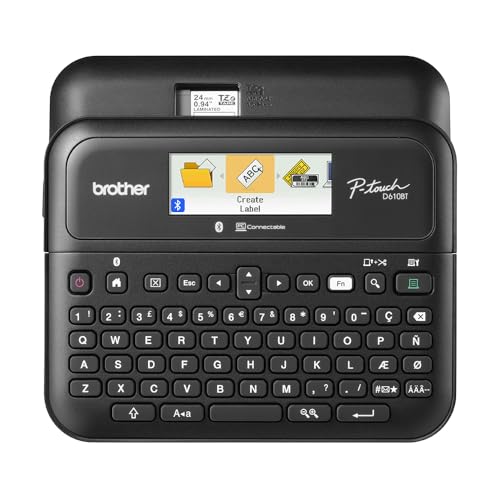
Brother P-Touch PT-D610BT Bluetooth label makerBest Connected HandheldBrother P-Touch PT-D610BT Bluetooth label makern/aBluetooth and USBn/a
Brother P-Touch PT-M95 QWERTY label maker bundleBest Pocket LabelerBrother P-Touch PT-M95 QWERTY label maker bundlen/an/an/a

Two very different machines hide under one brand name. One is a desktop roll printer that makes address, shipping and barcode labels on drop-in rolls with no ink or ribbon. The other is a handheld tape labeler that prints laminated strips for cables, files and shelves.

Choosing between them is the first decision, and it is worth making before comparing speeds. The roll printers fit offices and small shops. The tape makers fit home organizing and field work, and each family has a distinct running cost.

Before you buy

6 Criteria to Look For Before Buying a Brother Label Printer

  1. 01

    Roll printer or tape labeler

    Desktop roll printers like the QL-600 and QL-820NWBC use DK paper rolls and print 2.4 inch wide labels at most, with the QL-1110NWB reaching 4 inches. Handhelds such as the PT-D610BT use TZe tape up to about 18 mm to 24 mm. Rolls cost less per label and tapes survive moisture, which is why mixing them up is the most common buying mistake.

  2. 02

    Label width and postage use

    A 4x6 shipping label needs the 4 inch QL-1110NWB, because the 2.4 inch printers cannot reach that width. If your labels are address-sized, you are paying for width you will not use. Measure your largest label before buying.

  3. 03

    Speed ratings in context

    The QL-820NWBC and QL-810W are rated up to 110 labels per minute, while the QL-600 is rated 44. Ratings assume short labels and a quick data feed, so real output is lower. For occasional use the gap is invisible, and for batches of hundreds it is not.

  4. 04

    Connectivity and sharing

    Ethernet, as on the QL-820NWBC and QL-1110NWB, lets several computers share one printer without cable swaps. Wi-Fi is enough for two people, and USB-only works for one. A Bluetooth handheld like the PT-D610BT depends on an app being maintained.

  5. 05

    Laminated or plain tape

    TZe tapes sandwich the print under a film, so labels resist water, fading and abrasion. M tape on the PT-M95 is non-laminated and cheaper but wears faster. For outdoor or workshop labels, laminated tape is the safer purchase.

  6. 06

    Running cost per label

    A printer is a one-off cost and the media is the habit. DK rolls give a low per-label cost for addresses, while TZe cartridges cost more per inch and last longer on an object. The QL-810W also needs the two-color DK-2251 roll for red output.

Detailed reviews

The 6 best brother label printers, explained

01
Brother QL-820NWBC network label printer, 300 dpi
300 dpi110 labels/minWi-Fi, BT, EthernetLCD screen
Check price on Amazon
Best for: Small offices that share one label printer over a network.

Three connection routes set the QL-820NWBC apart: Wi-Fi, Bluetooth and Ethernet, plus USB. A small office can put it on the network once and print from every computer, while a phone can still send a quick address label. The monochrome LCD means a standalone user can check status without opening software.

On throughput it is rated up to 110 standard address labels a minute at 300 dpi, which is more than double the 44 labels a minute listed for the QL-600. That headline assumes short labels and a fast data feed, so treat it as a ceiling. The 300 dpi head gives crisp small text and barcodes on a 2 inch wide label.

It uses DK drop-in rolls, so there is no ink or ribbon to manage, only roll stock to buy. Keep the cutter path clear of adhesive, clean the head with a swab when prints streak and avoid leaving it in a hot shipping area, because direct thermal DK paper fades over time. For wide 4 inch postage, the QL-1110NWB is the machine to look at instead.

What works

  • 300 dpi crisp small text and codes
  • Wi-Fi, Bluetooth, Ethernet and USB
  • Up to 110 labels per minute rating
  • LCD supports standalone use

Watch out for

  • Larger and costlier than the QL-600
  • Prints up to 2.4 inch labels, not 4 inch
  • Roll stock is a continuing expense

Spec sheet

Resolution
300 dpi
Speed
Up to 110 address labels per minute
Connectivity
Wi-Fi, Bluetooth, Ethernet, USB
Display
Monochrome LCD for standalone use
Media
DK drop-in rolls
02
Brother QL-1110NWB wide format label printer, 4 inch
4 inch labelsBarcode cropWi-Fi + EthernetBluetooth
Check price on Amazon
Best for: Sellers who print full-size postage and mailing labels at a desk.

Wide labels are the whole point here. The QL-1110NWB prints up to 4 inches across, so it can make full-size shipping and postage labels that the 2.4 inch QL-820NWBC and QL-600 cannot. It is the Brother roll printer to buy if you ship parcels from a desk.

A barcode crop function stops you printing a whole page of barcodes and lets you select one and print it by itself, a time-saver for UPC and inventory labels. Bluetooth, Ethernet and wireless are all listed, so it fits a shared bench. The extra width makes the printer physically bigger than the other roll units, which matters on a crowded desk.

Plan on direct thermal DK rolls and keep them out of warm shipping areas. The wide platen needs the same upkeep as the narrow ones, but a streak on a 4 inch label ruins more of the surface, so clean the head promptly. A sealed shelf for the wide rolls helps too, since a roll left standing open collects dust that shows up as specks along the label edge. If you do not ship parcels, the narrower QL-820NWBC is cheaper to feed and quicker to load.

What works

  • Prints labels up to 4 inches wide
  • Barcode crop saves paper
  • Bluetooth, Ethernet and Wi-Fi
  • Suits parcel and postage work

Watch out for

  • Physically larger than other Brother roll printers
  • Wide rolls cost more to stock
  • Overkill for address labels only

Spec sheet

Maximum label width
4 inches
Use
Mailing, address, postage, barcodes
Connectivity
Bluetooth, Ethernet, 802.11b/g/n
Special feature
Barcode crop function
Media
DK rolls
03
Brother QL-810W label printer, black and red, Wi-Fi
Black + red110 labels/minUSB + Wi-Fi300,000 cuts
Check price on Amazon
Best for: Offices that need red-and-black labels for flagging or sales tags.

Red and black on a roll, without ink or ribbon, is the QL-810W's trick. Using the DK-2251 two-color roll, it prints red highlights beside black text, which helps with warnings, priority flags and promotional tags where one color is not enough.

The cutter life rating is generous: up to 300,000 die-cut labels or 150,000 continuous ones before the blade is spent, according to the listing. Speed is rated up to 110 labels a minute, the same as the QL-820NWBC, though it lacks Ethernet and Bluetooth, offering USB and Wi-Fi only. That is enough for a home office with one or two computers.

Two-color printing needs the special roll, so you cannot switch back and forth freely without changing media. Keep spare rolls sealed since DK paper is heat-sensitive, and clean the head if the red layer prints faint. Compared with the QL-600, this is the choice when color accent matters more than minimum cost.

What works

  • Black and red printing on DK-2251 rolls
  • Cutter rated 300,000 die-cut labels
  • Wi-Fi and USB for home office use
  • Up to 110 labels per minute

Watch out for

  • No Ethernet or Bluetooth
  • Two-color needs special roll stock
  • Direct thermal paper fades with heat

Spec sheet

Colors
Black and red with DK-2251 roll
Speed
Up to 110 labels per minute
Connectivity
USB and Wi-Fi
Cutter life
300,000 die-cut, 150,000 continuous
Media
DK paper rolls
04
Brother QL-600 desktop label printer, 2.4 inch width
2.4 inch width44 labels/minNo inkDK rolls
Check price on Amazon
Best for: Home desks that print addresses and file labels occasionally.

Compact and fuss-free describes the QL-600. It fits in small spaces, uses drop-in DK rolls and prints up to 44 labels a minute, so it covers address labels, file folder tabs and mailing labels without a setup ritual.

What you give up against the QL-820NWBC is speed and networking: the rated rate is well under half of 110 labels per minute, and it connects as a simple desktop unit with no network port. For a single computer at a home desk that is no loss, because nobody addresses a thousand envelopes before lunch.

Treat DK rolls as the running cost, and choose continuous or die-cut by the job. Clean the head with a swab if text goes pale, and leave a margin around the roll so the label can feed without scuffing. Because it is a basic, low-rated machine, expect it to stay useful for years of light work but not high-volume shipping. If your label work grows into a daily routine, the move to the QL-820NWBC is a straightforward upgrade because both use the same DK roll family, so your existing stock keeps working.

What works

  • Fits small desks and shelves
  • No ink or toner to buy
  • Up to 44 labels per minute
  • DK drop-in rolls load easily

Watch out for

  • No Ethernet or Bluetooth
  • Slower than the QL-820NWBC
  • Narrower labels than the QL-1110NWB

Spec sheet

Maximum label width
2.4 inches
Speed
Up to 44 labels per minute
Media
DK drop-in rolls
Consumables
No ink or toner
Format
Compact desktop
05
Brother P-Touch PT-D610BT Bluetooth label maker
Bluetooth + USB90 label memory17 fontsTZe tape
Check price on Amazon
Best for: Offices and workshops that want a keyboard, memory and Bluetooth in one handheld.

A real keyboard and a phone link make the PT-D610BT the most capable handheld in the lineup. You can type a label directly, or send one from the app over Bluetooth, and USB connects it to a computer for bulk work.

The design toolbox is generous: 17 fonts, 17 styles, 160 frames and 900 symbols, and a memory for up to 90 frequently used labels. That memory is a practical feature, because reprinting a standard asset tag takes two presses instead of retyping it. Against the PT-M95, it trades pocket-size simplicity for these features.

It prints on TZe laminated tape, the kind with a protective film over the print, so labels resist water and abrasion. Each cartridge costs more per inch than a thermal roll, so heavy use on wide tapes adds up. Keep spare cartridges, trim the cutter edge clean and charge or replace the batteries before a long labeling day.

What works

  • Bluetooth and USB connectivity
  • 17 fonts and 900 symbols
  • Memory for up to 90 reusable labels
  • Laminated TZe tape resists wear

Watch out for

  • TZe tape is costlier per inch than rolls
  • Bigger than the pocket models
  • App dependence for Bluetooth features

Spec sheet

Connectivity
Bluetooth and USB
Fonts and styles
17 fonts, 17 styles
Frames and symbols
160 frames, 900 symbols
Memory
Stores up to 90 labels
Tape
TZe laminated tape
06
Brother P-Touch PT-M95 QWERTY label maker bundle
QWERTY keys9 and 12 mm M tapeLightweight4 tapes
Check price on Amazon
Best for: Households labeling files, jars and bins indoors.

Light, cheap-to-start and QWERTY-keyed: the PT-M95 is the one to leave in a kitchen drawer. It prints on M tape in 9 mm and 12 mm widths, which suits file folders, spice jars and storage bins.

M tape is not laminated, so prints are more vulnerable to rubbing and water than TZe tape. That is the trade for a lower running cost, and it is a good fit for indoor labels that nobody scrapes. If you need a label to survive a wash or a garage shelf, the PT-D610BT or PTD210 with TZe tape is the sounder choice.

Because there is no app or Bluetooth, nothing dies when a phone update lands, and the keyboard makes it simple for anyone in a household. Keep the tape compartment clean, replace the batteries before they leak and store spare cartridges flat. The bundle includes four tapes, enough to get started and learn the widths. One habit pays off early: print a test strip on the first inch of each new cartridge to confirm the tape has seated and the cutter trims cleanly, because a crooked first label wastes more tape than any later one.

What works

  • Light enough to keep in a drawer
  • QWERTY keyboard, no app needed
  • M tape in 9 mm and 12 mm
  • Bundle includes four tapes

Watch out for

  • Non-laminated tape wears faster
  • Only two tape widths
  • No connectivity for bulk designs

Spec sheet

Keyboard
QWERTY
Tape type
M tape, non-laminated
Tape widths
9 mm and 12 mm
Weight class
Lightweight portable
Bundle
Four tapes included

Spec sheet decoder

What the numbers on the box really mean

The specs manufacturers lead with, translated into what they tell you about real-world performance.

dpi

Dots per inch of the print head. More dots give sharper small text and smaller barcodes.

Watch forThe QL-820NWBC is listed at 300 dpi, a useful edge for barcodes.

Labels per minute

A rated output assuming short labels and a fast data feed. Real throughput falls with longer labels and slow networks.

Watch for110 on the QL-820NWBC and QL-810W versus 44 on the QL-600.

DK rolls

Drop-in paper or film rolls used by Brother's desktop QL printers. They need no ink or ribbon.

Watch forThe QL-810W needs the DK-2251 black and red roll for color.

TZe laminated tape

A tape cartridge in which the print is sealed beneath a protective film. It is used by P-Touch handhelds.

Watch forThe PT-M95 uses non-laminated M tape instead.

Cutter life

The rated number of cuts before the blade needs replacing. Heavy shipping use eats into this first.

Watch forThe QL-810W lists 300,000 die-cut or 150,000 continuous cuts.

Methodology

How We Evaluated These Brother Label Printers

Format fit

We separated roll printers from tape labelers before anything else, because they solve different jobs. The QL-1110NWB, QL-820NWBC, QL-810W and QL-600 were judged as desk printers. The PT-D610BT and PT-M95 were judged as handhelds.

Speed and resolution

Rated labels per minute and dpi were compared. The QL-820NWBC at 300 dpi and 110 labels per minute sets the top end here. We treated ratings as ceilings.

Connectivity

Ethernet, Wi-Fi, Bluetooth and USB support were checked for each model. A shared office needs different ports than a single desk. Handhelds that depend on an app were noted for the risk.

Media cost and durability

We looked at DK rolls versus TZe tape and the difference between laminated and non-laminated prints. Cost per label and resistance to water and wear both shape the verdict. Two-color output was treated as a special need.

Ownership reality

Based on owner feedback patterns, cutter life, head cleaning and tape cost were weighed. The QL-810W's cutter rating stood out. A printer that is cheap to buy but costly to feed was marked down.

Decision guide

How to Choose the Right Brother Label Printers

By Label Type

SituationPickWhy
Full-size postage and 4 inch labelsBrother QL-1110NWBOnly model here that prints 4 inches wide
Shared office address labelsBrother QL-820NWBCEthernet, Wi-Fi and 110 labels per minute
Red-and-black flagsBrother QL-810WDK-2251 two-color rolls
Occasional file labelsBrother QL-600Compact, 44 labels per minute
Durable tags for tools and cablesBrother PT-D610BTLaminated TZe tape with memory

By Budget

Budget tierPickWhy
Lowest costBrother PT-M95Pocket handheld with M tape
Entry desktopBrother QL-600Simple roll printer
MidBrother QL-810WFast with color option
HighBrother QL-820NWBCNetwork and 300 dpi
HighestBrother QL-1110NWBWide-format capability

Roll Printer vs Tape Labeler

Roll printer

The QL-600, QL-810W, QL-820NWBC and QL-1110NWB print on DK paper, cheap per label, ideal for addresses and shipping. The prints are direct thermal and fade with heat.

Tape labeler

The PT-D610BT and PT-M95 print on tape. TZe laminated tape resists water and abrasion, while M tape is cheaper but plain. Tape costs more per inch.

Choose a roll printer for volume mail, and a tape labeler for objects that get wet or handled.

Connectivity Axis

PreferencePickWhy
Network shared by manyBrother QL-820NWBCWi-Fi, Bluetooth and Ethernet
Wireless desk with USB backupBrother QL-810WUSB and Wi-Fi
Phone-driven handheldBrother PT-D610BTBluetooth and USB
No connection at allBrother PT-M95QWERTY keyboard only

For Online Sellers Specifically

Look for

A label width that matches your carrier's stock, a barcode function that crops a single code and a connection your shipping software supports. Sheets of barcodes waste labels.

In this comparison

The QL-1110NWB is the full-size answer and the QL-820NWBC handles address-size labels faster. The QL-600 covers a low-volume seller.

When to Spend More

Spend more if

You print daily batches or share the printer. The QL-820NWBC buys speed and networking, and the QL-1110NWB buys width.

Save if

You print a few labels a week. The QL-600 or PT-M95 meets the need at the lowest cost.

Ownership

Maintenance schedule

The upkeep that decides whether this machine lasts two seasons or ten.

TaskIntervalWhy it matters
Clean the print headWhen prints streakAdhesive and dust cause pale lines on thermal labels. A swab with isopropyl alcohol clears it.
Clear the cutter pathMonthlySticky residue from cut labels builds up on the blade. A clean path extends the rated cutter life.
Store DK rolls and tape away from heatOngoingDirect thermal paper darkens and fades in warm rooms. Keep spares in their packaging.
Check batteries on handheldsBefore long jobsWeak batteries cause light prints and cutter jams. Replace them before they leak.
Update drivers and appsQuarterlyNetwork and Bluetooth units need current software to keep pairing. Outdated drivers cause connection drops.

FAQ

Frequently Asked Questions

Should I buy a QL roll printer or a P-Touch?

Choose a QL roll printer for address and shipping labels in volume. Choose a P-Touch for labeling objects such as cables, files and shelves, where tape durability matters.

Is the QL-1110NWB worth it over the QL-820NWBC?

Only if you print 4 inch postage labels. For address-size labels the QL-820NWBC is faster and cheaper to feed.

How long will the labels last?

DK roll labels are direct thermal and can fade in heat and sun. TZe laminated tape holds up much longer because the print is sealed under a film.

Can the QL-600 print in red?

No, it is monochrome. For black and red, the QL-810W with a DK-2251 roll is the option here.

Do I need an app?

The PT-M95 works without one. The PT-D610BT uses Bluetooth for app features but also has a keyboard and USB, and the QL printers work with desktop software.

What is the running cost like?

Rolls and tapes are the ongoing cost. DK rolls are cheaper per label, while TZe tape costs more per inch but lasts longer on objects.

Bottom line

The short version

Browse more brother label printerson Amazon →
James Miller, Lead Machine Editor

About the author

James Miller

Lead Machine Editor, MachineFanatic

James Miller leads MachineFanatic's buying guides, turning spec sheets, manuals and owner feedback into clear verdicts on power tools, outdoor power equipment, shop machines and kitchen machines.

More from James →

Keep reading

Related guides