
Amazon affiliate links - we earn a commission.Affiliate disclosure

Buying guide · 13 min read · Updated 2026-11-18

Best Commercial Label Printers (2026)

Six commercial label printers for shops, sellers and offices compared on speed, label size, connectivity and running cost, with clear picks for each workload.

James MillerBy James MillerLead Machine Editor6 machines comparedSpec-sheet verified
Best Commercial Label Printers

At a glance

Our top picks

Side by side

Spec comparison

MachineTechnologySoftwareSpeed
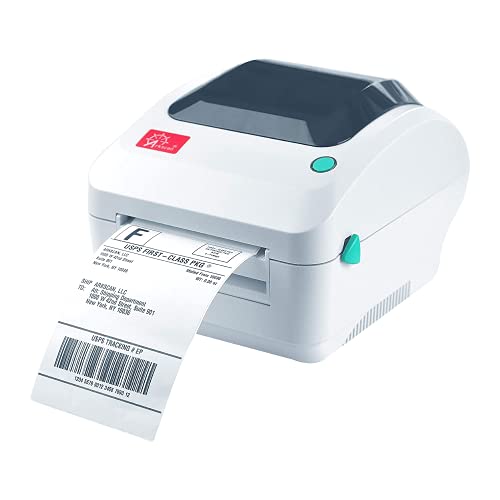
Rollo USB 4x6 direct thermal shipping label printerBest OverallRollo USB 4x6 direct thermal shipping label printerDirect thermal, no ink or tonerFree shipping app includedn/a
Arkscan 2054A shipping and barcode label printerBest Platform CompatibilityArkscan 2054A shipping and barcode label printern/aBarTender UltraLite (Windows only)n/a
Rollo Wireless Wi-Fi 4x6 direct thermal label printerBest WirelessRollo Wireless Wi-Fi 4x6 direct thermal label printerDirect thermalRollo Ship Manager app150 mm per second
Brother QL-820NWB network label printer, 300 dpiBest for Address LabelsBrother QL-820NWB network label printer, 300 dpin/an/aUp to 110 address labels per minute
Arrvel A42BT Bluetooth 4x6 thermal label printer with standBest Portable ShippingArrvel A42BT Bluetooth 4x6 thermal label printer with standDirect thermaln/a150 mm per second, 72 labels per minute
Makeid D50 2 inch thermal transfer label printer with cutterBest for Cable LabelingMakeid D50 2 inch thermal transfer label printer with cutterThermal transfern/an/a

Commercial label printers are the machines a business runs every day: shipping benches, retail stockrooms, small warehouses and busy offices. They trade the novelty features of consumer label makers for speed, steady output and a roll of labels that lasts all week.

The meaningful differences are label width, how the printer connects and what it costs to feed. A wide shipping printer and a narrow cable labeler are both commercial, yet they solve entirely different jobs, so the right choice starts with the label you actually print.

Before you buy

6 Criteria to Look For Before Buying a Commercial Label Printer

  1. 01

    Label size you print daily

    A 4x6 shipping label needs a 4 inch printer such as the Rollo USB, Rollo Wireless, Arkscan 2054A or Arrvel A42BT. Address and file labels fit the narrower Brother QL-820NWB, and the 2 inch Makeid D50 is for cable work. Buying the wrong width is the one mistake that cannot be fixed by a setting. Hold a printed sample against the printer's stated maximum before ordering, because a label that is a quarter inch too wide will simply be cropped at the edge. Also check the core size of your roll against the printer's holder, since a printer built for fanfold stock and one built for rolls are not always interchangeable.

  2. 02

    Direct thermal or transfer

    Direct thermal printers like the Rollos use heat-sensitive paper, with no ribbon. Labels last weeks to months and darken in heat and sun. The Makeid D50 uses thermal transfer, which needs a ribbon but produces labels that last years. For a shipping bench the choice is easy because a parcel label has a life of days, yet for a pallet tag or a freezer shelf label the ribbon cost is repaid quickly in fewer reprints.

  3. 03

    Connection and sharing

    USB, as on the Rollo USB, suits one computer. Wi-Fi with AirPrint on the Rollo Wireless suits shared Apple devices, and Ethernet on the Brother QL-820NWB suits an office network. Bluetooth on the Arrvel A42BT suits phones, though pairing can be fussy. If several people share one printer, give it a fixed network address so it does not move around, and keep a wired option in reserve for the days when wireless misbehaves.

  4. 04

    Speed in labels per minute

    The Rollo printers list 150 mm per second, and the Arrvel lists 72 labels per minute at that speed. The Brother QL-820NWB lists up to 110 short address labels per minute. These are not comparable numbers because label length changes everything.

  5. 05

    Software and platform fit

    The Arkscan 2054A names Windows, Mac, Chromebook and Android and a long list of selling platforms. Check that your shipping tool lists your printer. A printer that your platform does not recognize still works through a generic driver, but with more setup.

  6. 06

    Cost per label

    A thermal printer has no ink, so the cost is rolls. Brother's DK rolls and generic 4x6 rolls differ in price per label, and third-party 4x6 stock is usually cheaper. A transfer printer adds ribbon cost on top of labels.

Detailed reviews

The 6 best commercial label printers, explained

01
Rollo USB 4x6 direct thermal shipping label printer
4x6 labelsDirect thermalUSBWindows + Mac
Check price on Amazon
Best for: Small online sellers who print a steady stream of 4x6 parcel labels.

Busy shipping benches are the reason this printer exists. It prints 4x6 labels with a direct thermal head, so there is no ink or toner to run out of, and it works with both Windows and Mac systems. A free shipping app lets you connect common marketplaces and carriers, which makes it a quick start for a new seller.

The printer's value is in reliability and low running cost, not features. A USB connection keeps it simple: plug it in, install the driver and print from a browser or shipping tool. Compared with the Rollo Wireless, you give up network printing but avoid the setup and the occasional Wi-Fi drop that a shared printer can bring.

Ownership centers on the thermal head and the label roll. Wipe the head with alcohol every few rolls, use labels sized to the printer's guides and keep stock out of hot rooms, since direct thermal labels darken with heat. A fanfold stack and a roll both work, but a roll is easier to keep aligned on a busy bench. If the volume ever grows past a few hundred labels a day, a heavier industrial unit becomes the sensible next step.

What works

  • No ink or toner to buy
  • Works on Windows and Mac
  • Free shipping app included
  • Simple USB setup

Watch out for

  • USB only, no network port
  • Direct thermal labels fade in heat
  • Not built for 24/7 warehouse duty

Spec sheet

Label size
4x6 inch shipping labels
Technology
Direct thermal, no ink or toner
Connection
USB
Compatibility
Windows XP and newer, Mac 10.9 and newer
Software
Free shipping app included
02
Arkscan 2054A shipping and barcode label printer
4x6 labelsCross-platformBarTender UltraLiteBarcode labels
Check price on Amazon
Best for: Sellers who mix FBA, barcode and shipping labels across several devices.

Platform support is the headline of the 2054A. The listing names Windows, Mac, Chromebook and Android, plus a long list of selling and shipping platforms including Amazon merchant fulfillment, FBA and FNSKU labels, eBay, Etsy and others. If your workflow mixes devices, this printer reduces the number of drivers you have to fight.

It is a multi-purpose machine that handles product and barcode labels as well as shipping labels, which makes it more than a parcel printer. The free BarTender UltraLite design tool is for Windows only, so a Mac user does the design elsewhere. Compared with the Rollo USB, the 2054A is the one to choose when barcodes and FBA labels are as important as postage.

Plan the same upkeep as any direct thermal printer: clean the head, keep the platen roller free of adhesive and match the roll width to the guides. Check your selling platform's supported printer list before ordering, because carriers update requirements over time. Spares such as platen rollers are worth stocking if the printer will run daily.

What works

  • Works with Windows, Mac, Chromebook and Android
  • Handles FBA and FNSKU labels
  • Prints barcode and product labels
  • Free BarTender UltraLite on Windows

Watch out for

  • Design software is Windows only
  • Direct thermal labels darken with heat
  • Fewer wireless options than newer models

Spec sheet

Label types
Shipping, product and barcode labels
Platforms
Windows, Mac, Chromebook, Android
Marketplaces
Amazon, eBay, Etsy, Shopify and others
Software
BarTender UltraLite (Windows only)
Use
FBA, FNSKU and shipping labels
03
Rollo Wireless Wi-Fi 4x6 direct thermal label printer
Wi-FiAirPrint150 mm/s4x6 labels
Check price on Amazon
Best for: Teams that print from iPads, iPhones and Macs on a shared Wi-Fi network.

Cutting the cable is what the wireless Rollo adds. It uses AirPrint to print directly from an iPhone, iPad or Mac, so a packer can send a label from a tablet without installing a driver. That matters on a bench shared by several people.

Speed is listed at 150 mm per second, which is about 5.9 inches per second and matches the wired Rollo USB. A free Ship Manager app helps with postage. The extra cost over the USB model is the convenience of wireless, not a faster engine, so decide whether you really want to share it.

Wi-Fi printers need a stable network and a fixed address, or the printer can vanish from a device's list after a router restart. Keep the firmware current, wipe the head with alcohol and store labels dry. In year three, the wireless radio is the part most likely to cause support questions, so a wired fallback cable is a sensible backup.

What works

  • AirPrint from iPhone, iPad and Mac
  • 150 mm per second print speed
  • Free Ship Manager app included
  • No ink or toner needed

Watch out for

  • Wi-Fi can drop after router changes
  • Costs more than the USB model
  • Heat-sensitive labels darken with age

Spec sheet

Connection
Wi-Fi with AirPrint
Speed
150 mm per second
Label size
4x6 inch
Technology
Direct thermal
Software
Rollo Ship Manager app
04
Brother QL-820NWB network label printer, 300 dpi
110 labels/min300 dpiEthernet + Wi-FiUSB host
Check price on Amazon
Best for: Offices and clinics printing hundreds of address, file and ID labels.

Where the Rollo models chase postage, the QL-820NWB chases address and office labels. It is rated at up to 110 standard address labels a minute at 300 dpi, with Bluetooth, Ethernet and Wi-Fi as connection options, so it fits a shared office network.

A USB host port lets you attach a scanner, which turns it into a point-of-use label station: scan a barcode, print a label. That is a practical commercial feature that the Rollo printers do not advertise. Its label width is narrower than a 4x6 shipping printer, so it is not the right choice for full postage labels.

You buy Brother's DK rolls for it, and the cost per label depends on the roll you choose. Keep rolls out of warm spots, clear the cutter path when adhesive builds up and clean the head if text looks faint. For a mail room, a clinic or a front desk, it is the quieter, faster answer to constant small labels.

What works

  • Up to 110 labels per minute at 300 dpi
  • Bluetooth, Ethernet and Wi-Fi
  • USB host for a barcode scanner
  • Standalone-friendly desktop design

Watch out for

  • Too narrow for 4x6 postage labels
  • Requires DK-branded rolls
  • Direct thermal paper fades over time

Spec sheet

Speed
Up to 110 address labels per minute
Resolution
300 dpi black text
Connectivity
Bluetooth, Ethernet, Wi-Fi, USB host
USB host
Supports a scanner peripheral
Format
Desktop roll printer
05
Arrvel A42BT Bluetooth 4x6 thermal label printer with stand
Bluetooth150 mm/s72 labels/minStand included
Check price on Amazon
Best for: Mobile sellers printing 4x6 labels from a phone or tablet.

The Arrvel A42BT targets people who print from a phone. A FlashLabel app on iOS and Android supports wireless printing, while a USB-C adapter covers macOS and other systems cover Windows, ChromeOS and Linux. The included stand holds a roll or fanfold stack so it sits tidily on a desk.

The listing quotes 150 mm per second or 72 labels per minute, the practical figure, which is lower than the headline speed would suggest. That distinction matters: labels per minute depends on label length and feed time, and 72 is a more honest planning number than a raw mm per second rating. Next to the Rollo Wireless, the Arrvel relies on Bluetooth and an app rather than AirPrint.

Because it is a newer brand, check the supply chain for labels and the app's update history before you commit a business to it. Keep the head clean, store labels away from heat and keep a USB cable on hand as a fallback for when the Bluetooth link misbehaves.

What works

  • Bluetooth printing from a phone app
  • Works with macOS, Windows, ChromeOS and Linux
  • Stand holds roll or fanfold stock
  • 72 labels per minute rating

Watch out for

  • Bluetooth and app dependence
  • Newer brand with a shorter track record
  • Heat-sensitive labels darken with age

Spec sheet

Speed
150 mm per second, 72 labels per minute
Wireless
Bluetooth with FlashLabel app
Computers
Windows 7+, macOS, ChromeOS, Linux
Adapter
USB-C adapter included for macOS
Technology
Direct thermal
06
Makeid D50 2 inch thermal transfer label printer with cutter
2 inch headThermal transferAuto cutter2600 mAh
Check price on Amazon
Best for: Installers and technicians labeling cables, panels and equipment on site.

A 2 inch thermal transfer printer with an automatic cutter and its own battery is a different animal from the shipping printers. The D50 is built for cable labels and telecom jobs, where you need a label that survives years on a cable and a printer you can carry up a ladder.

Thermal transfer uses a ribbon to melt ink onto the label, which gives much better durability than direct thermal paper. The auto cutter makes bulk labeling quick, and a 2600 mAh battery means it works away from a socket. Compared with the QL-820NWB, the D50 is more rugged and narrower, aimed at installers instead of front desks.

Expect ribbon and label cartridge costs as the running expense. Keep spare ribbon rolls, clean the head with alcohol and avoid dust in the cutter. If your commercial need is shipping, skip this and buy the Rollo or Arkscan, which are far better at 4x6.

What works

  • Thermal transfer for durable labels
  • Auto cutter for bulk work
  • 2600 mAh battery for portable use
  • 2 inch head for cable and data labels

Watch out for

  • Cannot print 4x6 shipping labels
  • Ribbon and labels add running cost
  • Narrower than the shipping printers

Spec sheet

Print head
2 inches wide
Technology
Thermal transfer
Cutting
Automatic cutter
Battery
2600 mAh
Uses
Cable, data and telecom labeling

Spec sheet decoder

What the numbers on the box really mean

The specs manufacturers lead with, translated into what they tell you about real-world performance.

mm per second

Linear print speed of the head. 150 mm per second is about 5.9 inches per second.

Watch forThe Rollo printers and Arrvel list 150 mm per second, but real throughput depends on label length.

Labels per minute

A rate that depends on label size. Short address labels print far faster than 6 inch shipping labels.

Watch forThe QL-820NWB lists up to 110 and the Arrvel lists 72, for different label sizes.

AirPrint

Apple's driverless printing protocol that lets iPhones, iPads and Macs print without installing software.

Watch forThe Rollo Wireless uses it, while the Arrvel relies on its own app.

Direct thermal

Heat on special paper produces the image. There is no ribbon, but the print fades with heat and time.

Watch forAll the shipping printers here use it; the Makeid D50 does not.

Thermal transfer

A ribbon melts onto the label under a heated head. It gives more durable prints than direct thermal.

Watch forThe Makeid D50 uses it and needs ribbon rolls.

Methodology

How We Evaluated These Commercial Label Printers

Label size fit

We matched each printer to the labels it prints, from 4x6 on the Rollo and Arkscan to 2 inch on the Makeid. Width was judged against real commercial use. Size was the first filter.

Speed and workflow

Rated mm per second and labels per minute were compared with the caveat that label length matters. The Rollo at 150 mm per second and the QL-820NWB at 110 labels per minute sit at the top. We treated headline speeds as ceilings.

Connectivity

USB, Wi-Fi, Ethernet and Bluetooth support was checked. A shared bench needs more than a USB cable. AirPrint on the Rollo Wireless was weighted for Apple households.

Platform and software

We reviewed supported operating systems and marketplace compatibility. The Arkscan 2054A's long platform list was noted. Windows-only software was marked as a limit.

Running cost and durability

Based on owner feedback patterns, rolls and ribbons were treated as the main ongoing cost. Direct thermal fading and thermal transfer durability shaped the verdicts. We did not quote prices.

Decision guide

How to Choose the Right Commercial Label Printers

By Label Size

SituationPickWhy
4x6 parcel labels, one computerRollo USBSimple USB, no ink, 150 mm per second
4x6 labels from tabletsRollo WirelessAirPrint over Wi-Fi
FBA, barcode and shipping labelsArkscan 2054AWide platform and barcode support
Address and file labelsBrother QL-820NWB110 labels per minute, 300 dpi
Cables and panelsMakeid D502 inch thermal transfer with cutter

By Budget

Budget tierPickWhy
Lowest costArrvel A42BTBluetooth 4x6 printer
Entry commercialRollo USBSimple, proven shipping printer
Mid tierArkscan 2054APlatform and barcode flexibility
Upper tierRollo WirelessWi-Fi and AirPrint convenience
Highest tierBrother QL-820NWBNetwork and scanner support

Wired vs Wireless

Wired

The Rollo USB and Arkscan 2054A connect by cable. They avoid network problems and work on a single computer. The Brother QL-820NWB adds Ethernet for office sharing.

Wireless

The Rollo Wireless uses AirPrint and the Arrvel A42BT uses Bluetooth. Both save a cable but depend on the network or the app.

Choose wired for one bench; choose wireless for several people or a tablet workflow.

Shipping vs Office Labeling

PreferencePickWhy
Parcel shippingRollo USB4x6 direct thermal
Mixed barcode workArkscan 2054ABarcode and FBA support
Mail roomBrother QL-820NWBFast address labels
Field installationMakeid D50Battery and ribbon durability

For Marketplace Sellers Specifically

Look for

A 4x6 printer your shipping platform lists, a roll you can buy anywhere and a connection that suits how you work.

In this comparison

The Rollo USB covers most sellers, the Arkscan 2054A handles FBA, and the Rollo Wireless suits tablet workflows.

When to Spend More

Spend more if

You share the printer or need network and scanner features. The Brother QL-820NWB and Rollo Wireless justify it.

Save if

You print under a hundred labels a week from one computer. The Rollo USB is enough.

Ownership

Maintenance schedule

The upkeep that decides whether this machine lasts two seasons or ten.

TaskIntervalWhy it matters
Clean the print headEvery few rollsAdhesive and dust cause faint lines. Wipe it with isopropyl alcohol on a swab.
Wipe the platen rollerMonthlyLabel adhesive builds up and causes misfeeds. A clean roller keeps labels aligned.
Store labels dry and coolOngoingHeat-sensitive paper darkens when stored warm. Keep spare rolls in their bags.
Update drivers and firmwareQuarterlyWi-Fi and Bluetooth models rely on updates for stable connections. Old versions cause dropouts.
Keep ribbon rolls sealedOngoingThermal transfer ribbon collects dust that shows as specks. Open it only when ready to use.

FAQ

Frequently Asked Questions

Rollo USB or Rollo Wireless?

Choose the USB model for one computer and a simpler setup. Choose the Wireless if you print from tablets or share one printer between people.

Are thermal labels good enough for commercial use?

Yes for shipping, where labels last weeks. They fade in heat and sun, so use thermal transfer for tags that must last years.

How fast are these really?

Headline figures such as 150 mm per second are ceilings. A 4x6 label takes about as long to feed as it does to print, so expect lower sustained rates than the spec.

Can the Brother QL-820NWB print shipping labels?

Not at 4x6, because its label width is narrower. It is better for addresses, file labels and ID tags.

Do I need special labels?

The 4x6 printers use generic thermal rolls. The Brother uses DK rolls, and the Makeid needs matched labels and ribbon.

What breaks first on a commercial printer?

The platen roller and the print head are the wear parts. Regular cleaning and clean label stock extend both.

Bottom line

The short version

Browse more commercial label printerson Amazon →
James Miller, Lead Machine Editor

About the author

James Miller

Lead Machine Editor, MachineFanatic

James Miller leads MachineFanatic's buying guides, turning spec sheets, manuals and owner feedback into clear verdicts on power tools, outdoor power equipment, shop machines and kitchen machines.

More from James →

Keep reading

Related guides