
Amazon affiliate links - we earn a commission.Affiliate disclosure

Buying guide · 12 min read · Updated 2026-11-18

Best Direct Thermal Label Printers (2026)

Four direct thermal 4x6 label printers compared on dpi, connectivity, label width range and upkeep, for sellers who want ribbon-free printing that just works.

James MillerBy James MillerLead Machine Editor4 machines comparedSpec-sheet verified
Best Direct Thermal Label Printers

At a glance

Our top picks

Direct thermal printing is the simplest way to make a label: a heated head darkens special paper, and that is all. There is no ink, toner or ribbon to buy, and that is why almost every parcel label on a packing bench comes from this family.

The catch is that the paper itself is the image. It fades with heat, light and time, so direct thermal suits labels with a short life. If you accept that, the buying decision comes down to resolution, how the printer connects and how forgiving it is about label width and roll holders.

Before you buy

6 Criteria to Look For Before Buying a Direct Thermal Label Printer

  1. 01

    Fade and shelf life

    Direct thermal labels turn dark when heated and when exposed to light, which is the same mechanism that prints them. A parcel label lasts the weeks it takes to deliver, but a bin label on a sunny shelf can fade within months. If your labels must be readable for a year or more, a thermal transfer printer is the safer choice.

  2. 02

    Resolution for scanners

    The Zebra ZD220 prints at 203 dpi, which is standard for shipping labels and typical barcodes. That resolution is enough for any carrier scanner. Higher dpi matters only for very small codes, which none of these printers are sold for. If your codes are crowded, increase the module size in software before you chase a higher-resolution printer. A scanner reads a wide, clean bar far more reliably than a narrow bar printed at higher dpi on stock with poor contrast, so label quality and print darkness matter as much as the printer.

  3. 03

    Label width range

    A fixed 4x6 machine such as the Rollo USB is simple but limited. The Bluetooth printer with the built-in bin lists a range from 1.57 to 4.1 inches, which is helpful if you print more than parcel labels. Check that the narrowest and widest label you use fit the guides. A label that is slightly narrower than the head can leave the outer dots printing against the platen with no paper, which wears the roller and leaves a groove. If you switch between sizes, adjust the guides each time and recalibrate so the sensor learns the new gap.

  4. 04

    Connection and sharing

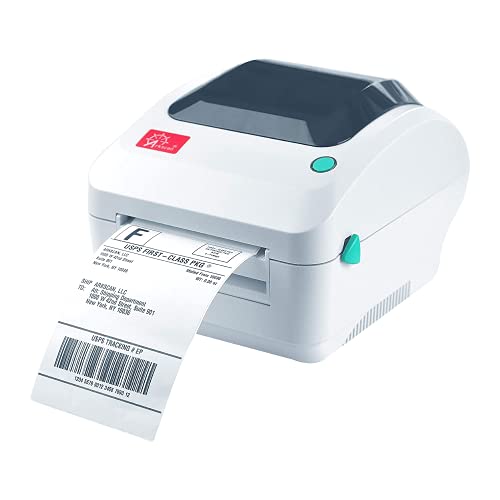
    The Rollo USB and Zebra ZD220 are straightforward desk printers. The Bluetooth model suits phone-based printing, and the Arkscan 2054A suits mixed devices. For a shared bench, a USB printer that every computer can reach through a hub is often the least troublesome answer. Wireless printers are fine when a single person uses them, but every added user multiplies the chances of a pairing conflict. Test your intended workflow with a real shipping label on day one so you learn about driver quirks while returns are still open.

  5. 05

    Software and platform support

    The Arkscan 2054A names a long list of marketplaces and shipping tools, including FBA and FNSKU. Zebra's driver ecosystem is widely recognized, which helps when you move to a new computer or a new shipping tool in a year. Cheaper printers that rely on one vendor's driver can leave you stranded if that driver is not updated for a new operating system. Before buying, check that your shipping platform lists the printer or supports generic 4x6 output.

  6. 06

    Label stock availability

    Direct thermal rolls and fanfold stacks are sold by many suppliers at a fraction of branded label prices. A printer with a built-in roll bin may restrict you to rolls. Buying a case of labels is the biggest long-term saving on any direct thermal machine. Look for labels described as direct thermal with a perforation between labels if you use fanfold, and check the core size on rolls so the holder fits. Mixing thermal transfer labels into a ribbon-free printer is a mistake that produces blank labels and wastes a roll.

Detailed reviews

The 4 best direct thermal label printers, explained

01
Zebra ZD220 direct thermal 4x6 label printer, 203 dpi
203 dpiDirect thermalOne-button feedDual-wall frame
Check price on Amazon
Best for: Shared packing benches that want a simple, widely supported 4x6 printer.

Minimal controls define the ZD220. It has one button for feed and pause and one LED to show status, and that austerity is a feature on a packing bench where three people share the machine and nobody wants to read a manual. The dual-wall frame is Zebra's way of saying the housing is built for repeated use rather than for a desk drawer.

Its 203 dpi head is the standard resolution for shipping labels and common barcodes, and the printer works for receipts and general labels as well. Unlike the budget printers in this guide, it belongs to a family with a long record of driver support, so shipping software and warehouse systems generally recognize it without much coaxing. The tradeoff is that its feature list is plain: do not expect Wi-Fi or Bluetooth baked into this entry model.

In ownership, treat the print head and platen roller as consumables. Wipe the head with isopropyl alcohol after every few rolls, keep the label path free of adhesive and use stock that is rated for direct thermal printing. Because direct thermal labels darken with heat, a hot truck or a sunny window will ruin a stack, so store rolls cool and dry. If you ship a few hundred labels a week, this is a very comfortable long-term machine.

What works

  • 203 dpi suits shipping labels and barcodes
  • One-button operation for shared use
  • Dual-wall frame for busy benches
  • Broad driver and software support

Watch out for

  • Plain feature set, no wireless in this model
  • Direct thermal labels fade with heat
  • Roll width stops at the 4x6 standard

Spec sheet

Resolution
203 dpi
Technology
Direct thermal, ink free
Controls
Single button and single LED
Frame
Dual-wall, space-saving
Use
Labels, barcodes, receipts
02
Rollo USB 4x6 direct thermal shipping printer
4x6 labelsUSBWindows + MacFree ship app
Check price on Amazon
Best for: New online sellers printing parcel labels from one computer.

Value in this category means a printer that gets out of the way, and the Rollo USB does it. The listing stresses no ink or toner, a Windows and Mac driver set going back years and a free shipping app that connects to common marketplaces. That is enough to take a new seller from unboxing to a printed parcel label in one evening.

Where the Zebra ZD220 sells on pedigree, the Rollo sells on price and speed of setup. It does not offer network ports, so it serves one computer, and it lacks the barcode and warehouse polish of the Arkscan 2054A. For someone who ships under a few hundred parcels a week, those are acceptable omissions.

Owners do well to keep a few habits. Use labels sized to the printer's guides so they do not skew, wipe the head with alcohol at regular intervals and keep the roll away from heat. Replace the platen roller if you see faint vertical lines. The printer is a consumer of labels, so buy a bulk case of stock to bring the cost per label down.

What works

  • No ink or toner to buy
  • Windows and Mac drivers included
  • Free shipping app for marketplaces
  • Quick setup for first-time sellers

Watch out for

  • USB only, no network port
  • Fewer barcode tools than the Arkscan
  • Not built for round-the-clock duty

Spec sheet

Label size
4x6 inch
Connection
USB
Windows
XP and newer
Mac
10.9 and newer
Software
Complimentary shipping app
03
Arkscan 2054A direct thermal shipping and barcode printer
Barcode labelsFBA + FNSKUBarTender LiteCross-platform
Check price on Amazon
Best for: Amazon sellers printing FBA, FNSKU and shipping labels across mixed devices.

Barcode and FBA work is what the Arkscan 2054A does better than a basic shipping printer. The listing names Amazon merchant fulfillment, FBA and FNSKU labels, EasyPost, eBay, Etsy and similar platforms, so a seller moving inventory into a fulfillment center can print product labels as well as postage.

A free copy of BarTender UltraLite helps with product and warehouse labels, though it runs on Windows only, and a Mac user will design labels with another tool. Across the lineup, this is the printer with the broadest platform story, extending to Chromebook and Android. That makes it a good fit for a mixed office where each person uses a different device.

Direct thermal means the same care as any machine here: clean the head, keep the platen roller free of residue and store stock away from warm places. FNSKU labels in particular need to scan cleanly, so check the print darkness setting against a handheld scanner after changing label stock. Spare platen rollers are cheap insurance for a printer that runs daily.

What works

  • Handles FBA and FNSKU label formats
  • Windows, Mac, Chromebook and Android
  • Free BarTender UltraLite design tool
  • Prints shipping and product labels

Watch out for

  • Design software is Windows only
  • Direct thermal prints fade over time
  • Older design with fewer wireless options

Spec sheet

Platforms
Windows, Mac, Chromebook, Android
Selling tools
Amazon, eBay, Etsy, EasyPost and more
Label types
Shipping, product, barcode, warehouse
Design software
BarTender UltraLite on Windows
Technology
Direct thermal
04
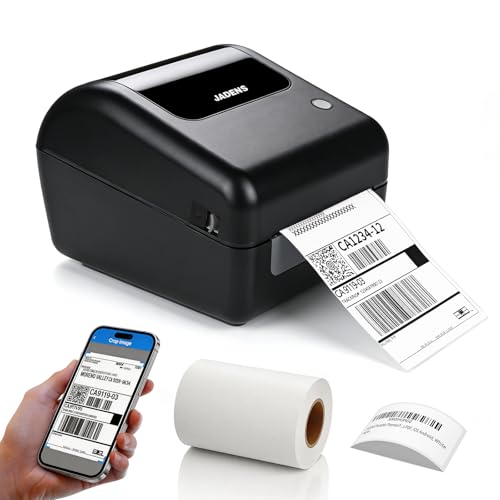
Bluetooth thermal shipping printer with built-in label bin
BluetoothLabel bin1.57 to 4.1 inchUSB
Check price on Amazon
Best for: Home sellers who want a tidy, wireless printer that also takes narrower labels.

A built-in label holder is the practical detail on this printer. Instead of a separate stand or an external spindle, the roll sits inside the body, so the printer occupies one clean footprint on a crowded desk. That, plus Bluetooth to iPhone, iPad, Android and Windows, makes it the tidiest option here for a home seller.

The label width range is the other differentiator: from 1.57 up to 4.1 inches, it accepts shipping labels, barcode labels and narrower stock, where a fixed 4x6 machine would not. That flexibility is useful if you print both parcel and shelf labels. As a model with less published detail than the Zebra ZD220, check its supported shipping platforms and its driver notes before you rely on it for a business.

Because Bluetooth links can be fussy, keep the USB cable in the drawer for the days a pairing fails. Wipe the head with alcohol, store labels dry and avoid leaving a half-used roll in a hot car. The built-in bin makes roll loading quick, but it also limits you to roll stock, so fanfold stacks need another approach. If you buy labels in bulk cases, check that the roll's outer diameter fits inside the bin, because an oversized roll rubs the housing and feeds unevenly.

What works

  • Built-in label holder saves desk space
  • Bluetooth to phones and Windows computers
  • Handles 1.57 to 4.1 inch labels
  • USB available as a fallback

Watch out for

  • Fewer published specs than Zebra or Rollo
  • Bluetooth pairing can be fussy
  • Roll stock only, no external fanfold

Spec sheet

Wireless
Bluetooth to iPhone, iPad, Android, Windows
Wired
USB also supported
Label width range
1.57 to 4.1 inches
Label holder
Built-in, supports roll labels
Technology
Direct thermal

Spec sheet decoder

What the numbers on the box really mean

The specs manufacturers lead with, translated into what they tell you about real-world performance.

203 dpi

About 8 dots per millimeter. It is the common resolution for shipping labels and standard barcodes.

Watch forThe Zebra ZD220 states it, and the others rely on the same standard.

Direct thermal

A heated head blackens coated paper. It needs no ribbon but the paper darkens with heat and age.

Watch forEvery printer in this guide uses it, so storage conditions matter.

Label width range

The narrowest and widest label the guides can hold. It decides which stock you can use.

Watch forThe Bluetooth printer lists 1.57 to 4.1 inches, while the others focus on 4x6.

Bluetooth

A short-range wireless link to phones and some computers. It saves a cable but needs the app and good pairing.

Watch forOnly the label-bin model lists it here.

FNSKU

Amazon's product label code used on inventory sent to fulfillment centers. It must scan reliably.

Watch forThe Arkscan 2054A lists FNSKU support.

Methodology

How We Evaluated These Direct Thermal Label Printers

Print resolution and output

We looked for listed dpi, label size support and any mention of barcode or receipt use, since a printer that handles several jobs has more value than a single-purpose one. The Zebra ZD220 at 203 dpi represents the standard that carriers expect. We did not reward higher numbers unless the job needs them.

Connectivity

USB, Bluetooth and cross-platform support were compared. A Bluetooth model was assessed on convenience and risk of pairing problems. A printer that supports several devices scored well for mixed offices.

Label handling

We checked label width ranges and roll holders. The Bluetooth printer's 1.57 to 4.1 inch range stands out. Fixed 4x6 printers were assessed for simplicity.

Platform support

We looked at named shipping and marketplace support. The Arkscan 2054A's list is the longest. Windows-only design tools were noted as a limit.

Ownership and consumables

Based on owner feedback patterns, head cleaning, platen roller wear and label fade were weighed. All printers here need no ink. The practical cost is labels, so a printer that accepts cheap generic stock earned more than one tied to a specific supplier. We also considered how easy each machine is to clean, since a printer that is awkward to open tends to go uncleaned.

Decision guide

How to Choose the Right Direct Thermal Label Printers

By Workload

SituationPickWhy
Shared bench with several packersZebra ZD220One-button operation and sturdy frame
One seller, one computerRollo USBSimple USB setup and free shipping app
FBA and FNSKU product labelsArkscan 2054APlatform and barcode support
Phone-driven home setupBluetooth printer with label binWireless and tidy footprint

By Budget

Budget tierPickWhy
Lowest costRollo USBBasic 4x6 printer
Mid tierBluetooth printer with label binWireless and flexible width
Upper-midArkscan 2054ABarcode and platform breadth
Highest tierZebra ZD220Brand pedigree and build

Wired vs Wireless

Wired

The Zebra ZD220, Rollo USB and Arkscan 2054A rely on a cable. They are less likely to drop out and work well for shared benches. They tie the printer to a desk.

Wireless

The Bluetooth printer with the label bin works from phones and Windows. It suits a small space but depends on pairing. Keep a USB cable as a backup.

Choose wired for steady output; choose wireless if you print from a phone. A seller who ships from a table at a market or a garage will value the cable-free option, while a desk-bound seller gains nothing from it and takes on the pairing risk.

Parcel Labels vs Product Labels

PreferencePickWhy
Postage onlyRollo USB4x6 labels with minimal setup
Barcode and FBA labelsArkscan 2054AFNSKU and BarTender support
Mixed narrow and wide stockBluetooth printer with label bin1.57 to 4.1 inch range
Receipts and general labelsZebra ZD220Standard 203 dpi and broad driver support

For Small Online Sellers Specifically

Look for

A printer your shipping tool supports, labels you can buy in bulk and a connection that matches your workflow. Do not pay for network ports you will not use.

In this comparison

The Rollo USB handles most starts, the Arkscan 2054A suits FBA, and the Zebra ZD220 suits shared use. The Bluetooth printer is best for a phone-only seller.

When to Spend More

Spend more if

More than one person prints, or you run daily batches. The Zebra ZD220 is the most dependable of the four.

Save if

You print under a hundred labels a week. The Rollo USB covers it with the least cost.

Ownership

Maintenance schedule

The upkeep that decides whether this machine lasts two seasons or ten.

TaskIntervalWhy it matters
Wipe the print headEvery few rollsDust and adhesive cause pale streaks. Isopropyl alcohol on a swab clears them.
Clean the platen rollerMonthlyA sticky roller misfeeds labels. Wipe it and replace it when streaks persist.
Store labels cool and dryOngoingDirect thermal paper darkens in heat. Keep spare rolls sealed in their bags, and rotate stock so the oldest roll is used first, since coated paper slowly loses sensitivity even in a drawer.
Check drivers after OS updatesAfter each updateOperating system updates can break printer drivers. Keep installers on hand.
Clear the label sensorEvery roll changeDust makes the gap sensor misread. A blast of air keeps it accurate.

FAQ

Frequently Asked Questions

How long do direct thermal labels last?

Parcel labels last the weeks needed for delivery. Prints can darken in months in heat or sun, so use thermal transfer for long-term tags. Storing finished labels in a cool drawer and away from windows will stretch their useful life considerably, and a label printed on fresh stock keeps its contrast longer than one printed on an old roll.

Is the Zebra ZD220 worth the extra cost?

If several people print or you run daily batches, yes. Its build, one-button controls and driver support matter more than any feature. A printer that several people touch every day benefits from simple controls, because the common failure is someone pressing the wrong button mid-job. For a solo seller who prints at home, the extra cost is harder to justify.

Can the Rollo USB print barcodes?

Yes, as any 203 dpi class thermal printer can. For FBA and FNSKU workflows, the Arkscan 2054A is more tailored.

Do I need ink or ribbon?

No. These printers use heat on coated labels, so there is no ink, toner or ribbon. Labels are the only consumable.

Is Bluetooth reliable enough for business?

It works for casual use, but pairing can fail and range is limited. Keep USB as a fallback if you ship every day.

Why are my prints faint?

Usually a dirty head, a low darkness setting or old stock. Clean the head, raise the darkness a step and try a fresh roll. If faint lines run down the label, a dirty or worn print head is the usual cause, while a pale band on one edge often points to a roll that is not sitting flat against the guides.

Bottom line

The short version

Browse more direct thermal label printerson Amazon →
James Miller, Lead Machine Editor

About the author

James Miller

Lead Machine Editor, MachineFanatic

James Miller leads MachineFanatic's buying guides, turning spec sheets, manuals and owner feedback into clear verdicts on power tools, outdoor power equipment, shop machines and kitchen machines.

More from James →

Keep reading

Related guides