
Amazon affiliate links - we earn a commission.Affiliate disclosure

Buying guide · 13 min read · Updated 2026-11-18

Best Dymo Label Printers (2026)

Six Dymo label printers compared, from LabelWriter desktops to LabelManager and LetraTag handhelds, with the locked-label catch.

James MillerBy James MillerLead Machine Editor6 machines comparedSpec-sheet verified
Best Dymo Label Printers

At a glance

Our top picks

Side by side

Spec comparison

MachineTechnologyRecognitionMedia
Dymo LabelWriter 550 Turbo, USB and LAN direct thermalBest OverallDymo LabelWriter 550 Turbo, USB and LAN direct thermalDirect thermal, no ink or tonerAutomatic label size, type and countAuthentic Dymo labels
Dymo LabelWriter 5XL extra-wide shipping label printerBest for ShippingDymo LabelWriter 5XL extra-wide shipping label printern/aAutomatic Label RecognitionDymo-branded labels only
Dymo LabelWriter 450 Twin Turbo, dual-roll printerBest Two-Roll SetupDymo LabelWriter 450 Twin Turbo, dual-roll printerDirect thermaln/an/a
Dymo LabelWriter 550 series direct thermal printerBest Standard DesktopDymo LabelWriter 550 series direct thermal printerDirect thermalAutomatic label recognitionBPA-free authentic Dymo labels
Dymo LabelManager 160 QWERTY label maker bundleBest Keyboard HandheldDymo LabelManager 160 QWERTY label maker bundlen/an/an/a
Dymo LetraTag 100H handheld label maker, 12 mm tapeBest Basic HandheldDymo LetraTag 100H handheld label maker, 12 mm tapen/an/an/a

This category holds two very different kinds of label maker, and the name on the box hides the difference. Desktop printers use rolls of direct thermal labels for addresses, shipping and file folders, while handheld LabelManager and LetraTag models print on small tape cassettes.

Before comparing features, decide which family you need. Then check a detail that catches many buyers off guard: some newer desktop models only read the maker's own labels, which changes the running cost for years.

Before you buy

6 Criteria to Look For Before Buying a Dymo Label Printer

  1. 01

    Desktop roll or handheld tape

    LabelWriters such as the 550 Turbo and 5XL print on rolls of direct thermal labels for addresses and parcels. LabelManager and LetraTag handhelds print on small cassettes meant for files, shelves and gear. The two families share a brand but not a job, and mixing them up is the most common purchase mistake.

  2. 02

    Locked versus open label stock

    The 550 series, including the 550 Turbo, the 550 and the 5XL, only accepts authentic Dymo labels because the printer reads the roll. The 450 Twin Turbo is an older platform without that lock. If you print hundreds of labels a month, the difference in label cost can outweigh the price of the printer.

  3. 03

    Label size and shipping needs

    Standard LabelWriters handle address and file labels but not full parcel labels. The 5XL prints the extra-wide labels used by UPS, FedEx and USPS. Decide up front whether you ship parcels, because the wrong model cannot be fixed with software.

  4. 04

    Connectivity and sharing

    The 550 Turbo lists both USB and LAN, which lets a team share one printer. The 450 Twin Turbo and other older models rely on USB. A handheld like the LabelManager 160 needs no computer at all.

  5. 05

    Speed in practice

    Turbo models in the LabelWriter family print faster than standard ones, and the 450 Turbo lists up to 71 four-line labels a minute. Real throughput depends on label length and software. For a few dozen labels a day, standard speed is plenty.

  6. 06

    Keyboard and display on handhelds

    The LabelManager 160 has a QWERTY keyboard, over 20 text formats and 200 plus symbols. The LetraTag 100H keeps it simple with 12 mm tape and a slim body. Typing speed matters if you label more than a few items at a time.

Detailed reviews

The 6 best dymo label printers, explained

01
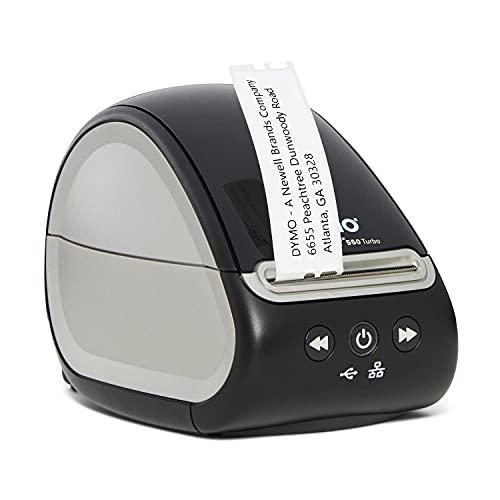
Dymo LabelWriter 550 Turbo, USB and LAN direct thermal
USB + LANAuto label recognitionDirect thermalTurbo speed
Check price on Amazon
Best for: Offices and sellers who share one desktop printer over a network.

Network printing is what puts the 550 Turbo ahead of the older LabelWriters. A LAN port next to the USB port lets an office share one printer without a host computer left on, and automatic label recognition reads the size, type and remaining count of the roll you load. That recognition cuts down on jams and saves labels, because the printer knows how much stock sits in the holder.

The cost of that cleverness is lock-in. The 550 series is calibrated to authentic Dymo labels, so third-party rolls that work in older models will not be accepted. That raises the per-label cost, and you should weigh it against how many labels you print before you buy. Against the 450 Twin Turbo, you lose the second roll but gain the network port and the recognition.

It is a quiet, dependable tool for address labels, shipping labels, file folders and barcode tags. Wipe the head with a lint-free cloth and alcohol when prints fade, keep the roll holder free of adhesive and store spare rolls away from heat. For a mail room that prints all day, the turbo engine is the right choice, and for a front desk that prints twenty labels, the standard 550 is enough.

What works

  • USB and LAN network connectivity
  • Automatic label recognition reduces jams
  • High-speed direct thermal printing
  • No ink or toner to replace

Watch out for

  • Only authentic Dymo labels work
  • Label cost per sheet stays high
  • Larger than a handheld labeler

Spec sheet

Technology
Direct thermal, no ink or toner
Connectivity
USB and LAN network
Recognition
Automatic label size, type and count
Media
Authentic Dymo labels
Class
Desktop LabelWriter, turbo
02
Dymo LabelWriter 5XL extra-wide shipping label printer
Extra-wide labelsUPS FedEx USPSAuto recognitionBranded labels
Check price on Amazon
Best for: Shippers who already use Dymo software and need extra-wide carrier labels.

Shipping labels are the whole purpose of the 5XL. It prints the wide labels used by UPS, FedEx and USPS, which the standard LabelWriters cannot, so it takes the place of a 4x6 thermal printer for people who already live in the Dymo software ecosystem. If your current LabelWriter handles address labels and you now need parcel labels as well, this is the cleaner upgrade.

Automatic Label Recognition is the engine of its pitch: the maker claims up to 65 percent less label waste because the printer reads the roll and optimizes the feed. Treat that figure as a marketing ceiling, since waste depends on how you print. The lock to branded labels applies here as it does on the 550 Turbo, so parcel label rolls cost more than generic 4x6 stock.

In use, it is a desk printer that wants a reliable USB connection and a clean label path. Wipe the head regularly, keep the stack of rolls in a cool cupboard and expect to replace the platen roller if the feed gets uneven after heavy use. Compared with the Rollo-style printers on the market, you give up cheap third-party labels in exchange for Dymo's software and recognition.

What works

  • Prints extra-wide UPS, FedEx and USPS labels
  • Automatic Label Recognition feed control
  • Claims up to 65 percent less label waste
  • No ink or toner

Watch out for

  • Dymo-branded labels only
  • Higher per-label cost than generic 4x6
  • Bigger footprint than the standard models

Spec sheet

Label format
Extra-wide shipping labels
Carriers
UPS, FedEx, USPS
Recognition
Automatic Label Recognition
Waste claim
Up to 65 percent fewer wasted labels
Media
Dymo-branded labels only
03
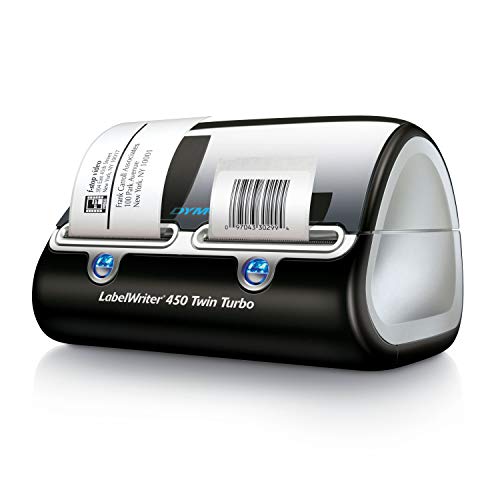
Dymo LabelWriter 450 Twin Turbo, dual-roll printer
Two rollsDirect thermalTurboNo ink
Check price on Amazon
Best for: Small businesses that rotate between two standing label types.

Two rolls loaded at once is the unusual trick here. The twin turbo lets you keep, say, a return-address roll and a shipping roll in the printer and switch between them from the software, so you stop the swap-and-realign dance each time a different label is needed. For a small business with two standing label types, that convenience beats extra speed.

It is the older 450 platform, which means it does not carry the automatic label recognition of the 550 series. It also means the label stock is not locked to a single brand the way the 550 family is, so compatible rolls are generally easier to source. The turbo designation points to the faster engine of the family, and the sibling 450 Turbo lists up to 71 four-line address labels a minute.

Expect the usual direct thermal care: clean the head, keep the roll guides snug and store labels cool. Because the platform is older, check driver support for your operating system before you buy, and keep the installer handy. The two-roll holder is the only feature you will feel every day, so decide whether you really switch between two label types.

What works

  • Two rolls ready at once
  • No ink or toner to buy
  • Turbo-class engine
  • Wider label stock choices than locked models

Watch out for

  • Older platform, no network port
  • No automatic label recognition
  • Driver support needs checking

Spec sheet

Rolls
Two label rolls loaded at once
Technology
Direct thermal
Speed class
Turbo
Label types
Address, shipping, file and more
Consumables
No ink or toner
04
Dymo LabelWriter 550 series direct thermal printer
Auto recognitionLow-wasteBPA-free labelsDirect thermal
Check price on Amazon
Best for: Front desks and home businesses printing dozens of labels a day.

Think of this as the 550 Turbo without the speed premium. It has the same automatic recognition and low-waste behavior and the same direct thermal engine, but it is aimed at users who print a few dozen labels a day, not hundreds. For a front desk, a clinic or a home-based seller, the standard speed will rarely be the limit.

The listing is explicit about the lock: it uses only authentic, BPA-free Dymo labels, and third-party paper labels will not work. That is the main thing to weigh. If you want maximum choice of label stock, an older LabelWriter or a different brand is the better fit.

Ownership is simple. Keep the label path clean, wipe the head and platen with alcohol every few rolls and store rolls out of the sun. Compared with the Turbo, you save on the printer and lose some speed on long runs, and compared with the Twin Turbo, you gain recognition and lose the second roll.

What works

  • Automatic label recognition
  • Low-waste feed behavior
  • BPA-free authentic labels
  • No ink or toner

Watch out for

  • Locked to authentic Dymo labels
  • Slower than the Turbo on long runs
  • No dual-roll option

Spec sheet

Technology
Direct thermal
Recognition
Automatic label recognition
Waste
Low-waste operation
Media
BPA-free authentic Dymo labels
Class
Standard speed desktop
05
Dymo LabelManager 160 QWERTY label maker bundle
QWERTY20+ formats200+ symbolsD1 cassettes
Check price on Amazon
Best for: Workshops and offices that type short labels all day.

A full QWERTY keyboard and one-touch smart keys are the reason to pick the LabelManager 160 over a basic labeler. You type a label like a text message, edit it on the screen and choose from more than 20 text formats and over 200 symbols. For a workshop or an office where labels are typed in the moment, that speed makes the difference.

It prints on D1 tape cassettes, a thermal-transfer style tape that is sealed and more durable than direct thermal labels, and the bundle includes three cassettes. The compact body travels well. Next to the LetraTag 100H, which uses a different 12 mm tape and an on-screen graphical display, the 160 is the more capable of the two.

Expect the tape cassette to be the running cost, and note that each cassette holds a fixed length, so chatty labelers burn through them. Keep spare cassettes in a drawer, clean the cutter if labels tear and replace the batteries before they leak. This is a quiet workhorse for home and small office use.

What works

  • Full QWERTY keyboard
  • Over 20 text formats and 200+ symbols
  • Compact and portable
  • Bundle includes three cassettes

Watch out for

  • Tape cassettes cost more per inch
  • Narrow labels only
  • Not suited to shipping labels

Spec sheet

Keyboard
QWERTY with one-touch smart keys
Text formats
Over 20
Symbols
200 plus
Tape
D1 label cassettes
Bundle
Machine and 3 cassettes
06
Dymo LetraTag 100H handheld label maker, 12 mm tape
12 mm tapePaper, clear, textileSlimPink
Check price on Amazon
Best for: Casual home users who label a few items a month.

Plain and pocketable is the whole story here. The LetraTag 100H is a slim handheld that supports 12 mm LetraTag tapes in paper, clear, opaque plastic and textile finishes, so it can label a folder, a lunchbox or the inside of a clothing tag. It is the lowest-commitment machine in this guide.

The sibling 100H Plus adds a graphical display and more font choices, with five font sizes, seven print styles and eight box styles. The plain 100H keeps things simpler, which is exactly what some people want. It will not do shipping labels or long runs, and it lacks the QWERTY keys of the LabelManager 160.

Because the tape is a proprietary LetraTag cassette, plan to buy it from the same source as the printer. Keep a spare cassette, replace the batteries before they leak and wipe the cutter occasionally. For a few labels a month, it is perfectly adequate and almost impossible to misuse.

What works

  • Slim and easy to carry
  • Takes paper, clear, plastic and textile tapes
  • Simple operation
  • Low commitment handheld

Watch out for

  • No QWERTY keyboard
  • Only 12 mm tape
  • Not suited to heavy use

Spec sheet

Tape width
12 mm LetraTag
Tape finishes
Paper, clear, opaque plastic, textile
Form
Slim, compact, lightweight
Color
Pink
Use
Home and office labeling

Spec sheet decoder

What the numbers on the box really mean

The specs manufacturers lead with, translated into what they tell you about real-world performance.

Automatic Label Recognition

The printer reads a chip or code on the roll to learn the label size, type and count remaining. It reduces jams and wasted labels.

Watch forIt comes with the lock to authentic labels on the 550 series.

Turbo

A faster print engine within the LabelWriter family. It matters for long runs, not occasional use.

Watch forThe 550 Turbo and 450 Twin Turbo carry it, while the standard 550 does not.

LAN connectivity

A wired network port that lets several computers print to one printer. It removes the need for a host machine.

Watch forThe 550 Turbo lists it alongside USB.

D1 cassette

The tape format used by LabelManager handhelds. The tape is sealed in a cassette that holds a fixed length.

Watch forThe LabelManager 160 uses D1 and the LetraTag 100H uses 12 mm LetraTag tape.

Extra-wide label

A label large enough for carrier shipping labels, wider than a standard address label.

Watch forOnly the 5XL here prints UPS, FedEx and USPS sizes.

Methodology

How We Evaluated These Dymo Label Printers

Family fit

We separated desktop LabelWriters from handheld LabelManager and LetraTag models before comparing anything else. Each family was judged on its own job. This prevented a keyboard labeler from being compared against a parcel printer.

Label lock-in

We noted which models only accept authentic Dymo labels and which accept more stock. The 550 series is locked, and the 450 Twin Turbo is not. Running cost was treated as part of the verdict, without quoting any prices.

Connectivity and speed

USB and LAN support, along with turbo-class engines, were compared. The 550 Turbo's network port sets it apart. The 450 Turbo's listed 71 labels per minute was used as a reference for the family.

Handheld features

Keyboard layout, text formats and tape variety were compared on the LabelManager 160 and LetraTag 100H. The 160's QWERTY keys and 200 plus symbols lead. The 100H was judged for simplicity.

Ownership reality

Based on owner feedback patterns, head cleaning, tape cassettes and driver support were weighed. Older models need a driver check. Newer models need a plan for label cost.

Decision guide

How to Choose the Right Dymo Label Printers

By Primary Job

SituationPickWhy
Shared office address labelsLabelWriter 550 TurboUSB and LAN with auto recognition
Carrier shipping labelsLabelWriter 5XLExtra-wide UPS, FedEx and USPS format
Two standing label typesLabelWriter 450 Twin TurboTwo rolls loaded at once
Occasional desk labelsLabelWriter 550Standard speed with recognition
Typed labels on the goLabelManager 160QWERTY keyboard and 200+ symbols

By Budget

Budget tierPickWhy
Lowest costLetraTag 100HBasic 12 mm handheld
Low-midLabelManager 160Keyboard handheld
Mid desktopLabelWriter 550Standard desktop with recognition
Upper desktopLabelWriter 450 Twin TurboDual roll convenience
HighestLabelWriter 550 Turbo or 5XLNetwork speed or wide labels

Locked vs Open Labels

Locked

The 550 Turbo, 550 and 5XL read the roll and only accept authentic labels. You gain recognition and fewer jams. You pay a higher cost per label.

Open

The 450 Twin Turbo is an older design that accepts a wider range of stock. It lacks recognition. Label cost is lower but driver support needs checking.

Choose locked if you value fewer jams; choose open if you print many labels and want cheaper stock.

Desktop vs Handheld

PreferencePickWhy
Labels for packages and mailLabelWriter 550 TurboRoll labels in volume
Labels for files and shelvesLabelManager 160Tape cassettes with keyboard
A few labels a monthLetraTag 100HSimple and slim
Wide parcel labelsLabelWriter 5XLCarrier-sized output

For Home Offices Specifically

Look for

A printer that fits your label volume. A few labels a month does not justify a networked turbo printer.

In this comparison

The LabelWriter 550 covers mailing labels and the LabelManager 160 covers file and shelf labels. The LetraTag 100H is the minimal choice.

When to Spend More

Spend more if

You print daily or share the printer. The LabelWriter 550 Turbo and Twin Turbo pay back in time saved.

Save if

You print occasionally. The LetraTag 100H or LabelManager 160 meets the need at a lower cost.

Ownership

Maintenance schedule

The upkeep that decides whether this machine lasts two seasons or ten.

TaskIntervalWhy it matters
Wipe the print headEvery few rollsDust and adhesive cause faint lines. A swab with alcohol clears them.
Clean the roll pathMonthlyLabel residue gathers on guides and causes skew. A dry cloth keeps the path clear.
Replace handheld batteriesBefore they run lowWeak cells cause light prints and jams. Remove them for long storage to avoid leaks.
Store labels away from heatOngoingDirect thermal paper darkens in heat. Keep spare rolls in their packaging.
Verify drivers after an OS updateAfter each updateOlder LabelWriter models can lose driver support. Keep an installer on hand.

FAQ

Frequently Asked Questions

Why will my third-party labels not work?

The 550 series is built to read authentic Dymo labels and rejects others. Older LabelWriters such as the 450 family accept a wider range.

Is the 550 Turbo worth the extra over the standard 550?

Only if you print hundreds of labels a day or share the printer. The 550 Turbo adds speed and, in this listing, LAN networking.

Can a LabelWriter print shipping labels?

Standard models print address labels, and the 5XL prints the extra-wide UPS, FedEx and USPS format. Check your carrier before buying.

What is the difference between LabelManager and LetraTag?

The LabelManager 160 has a QWERTY keyboard and uses D1 cassettes. The LetraTag 100H is a slimmer, simpler handheld with 12 mm tape.

Do Dymo printers need ink?

No. LabelWriters use direct thermal technology, so there is no ink or toner. Handhelds use tape cassettes.

How long will the labels last?

Direct thermal labels fade with heat and sun. Handheld tape cassettes are sealed and resist handling better.

Bottom line

The short version

Browse more dymo label printerson Amazon →
James Miller, Lead Machine Editor

About the author

James Miller

Lead Machine Editor, MachineFanatic

James Miller leads MachineFanatic's buying guides, turning spec sheets, manuals and owner feedback into clear verdicts on power tools, outdoor power equipment, shop machines and kitchen machines.

More from James →

Keep reading

Related guides