
Amazon affiliate links - we earn a commission.Affiliate disclosure

Buying guide · 14 min read · Updated 2026-11-07

Best Embroidery Machines (2026)

Seven embroidery-only machines compared by hoop size, needle count, file transfer and software needs, from entry units to multi-needle machines.

James MillerBy James MillerLead Machine Editor7 machines comparedSpec-sheet verified
Best Embroidery Machines

At a glance

Our top picks

Side by side

Spec comparison

An embroidery machine moves a hoop under the needle while the controller follows a stitch file, which is why hoop size, file format and stabilizer matter as much as the motor. The sewing skills you already have help very little here; the new skill is preparing fabric and files.

Single-needle machines stitch one color, then stop for you to change thread. Multi-needle machines hold several colors and change automatically, which saves hours on logos but costs far more and needs more space. Decide which workflow you are buying before you compare feature lists.

Before you buy

6 Criteria to Look For Before Buying an Embroidery Machine

  1. 01

    Hoop size and field

    The embroidery field limits design size. The Brother PE545 offers 4 by 4 inches, the PE900 offers 5 by 7 inches and the Poolin EOC06 offers 11 by 7.9 inches. Buy for the largest design you expect to stitch regularly. A field is a maximum, and the hoop you can use depends on the fabric: a 5 by 7 inch design on a baby bib hoops differently from the same design on a thick jacket. Measure your usual blanks before you decide, and remember that a larger field means a larger hoop that is harder to keep taut.

  2. 02

    Single versus multi-needle

    A single-needle machine stops for every color change, so a four-color design takes four threadings. Multi-needle machines such as the Smartstitch S-1001 with ten needles and the Poolin EOM with fifteen change colors automatically. The price and footprint rise with needle count. For a hobbyist doing a few gifts a month, color changes are tolerable, but for twenty shirts with a four-color logo they eat an afternoon. Calculate your weekly volume before deciding, because a multi-needle machine only repays its cost if it keeps running unattended.

  3. 03

    File formats and software

    Machines read specific formats. The Skitch imports PES, PHC, PHX and DST, and the Poolin EOC06 exports DST or DSB. Check that your design software saves in a format the machine accepts.

  4. 04

    Connectivity and app

    Wireless LAN on the Brother PE545 and PE900 and Bluetooth on the Skitch send files without USB sticks. An app-driven machine like the Skitch is convenient but depends on the app. Make sure files can also move by USB or from a computer.

  5. 05

    Stabilizer and hooping

    The machine is only half the system. Cutaway, tearaway and water-soluble stabilizers decide how the design looks. A machine with a bigger hoop needs more careful hooping, because fabric slack causes puckering.

  6. 06

    Support and learning

    The Skitch and Brother PE machines have big communities, while Smartstitch offers manuals, video training and a user group. For commercial machines, training matters more than any spec.

Detailed reviews

The 7 best embroidery machines, explained

01
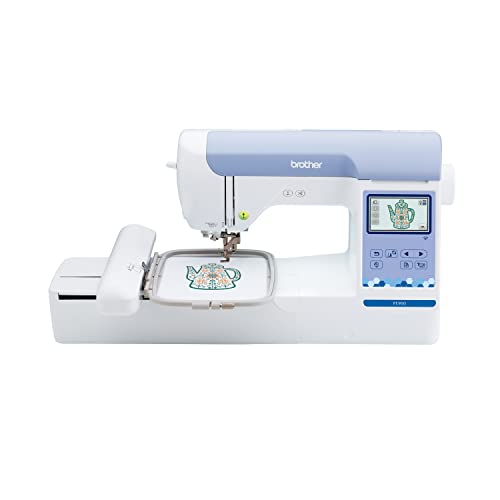
Brother PE900 wireless embroidery machine, 5x7 field
5x7 inch fieldWLANArtspira app50 free designs
Check price on Amazon
Best for: Home embroiderers who want a larger single-needle field.

The PE900 gets the size right for home use. A 5 by 7 inch field handles pocket logos, pillow motifs and towel borders without forcing you to split designs, and it is a clear step up from the 4 by 4 inch field of the smaller Brother.

Wireless LAN transfer sends files from a computer without a USB stick, and the Artspira app supplies 50 free designs and a way to draw your own on a phone. Against the PE545 it adds hoop area and keeps the same ecosystem, and against the Poolin EOC05 it trades a taller but narrower field for a standard, well-supported one.

Single-needle ownership has a rhythm: stitch one color, stop, rethread, continue. Keep a stabilizer assortment on hand, use a fresh embroidery needle for every few projects, and clean the bobbin area after every design, since dense fills shed lint. Park the machine on a table with room for the hoop arm to travel, and never pull the fabric while the hoop is moving. A common first-year lesson is that stabilizer choice shapes the result more than the machine does: cutaway for knits that stretch, tearaway for stable wovens and water-soluble topping for towels and fleece so stitches do not sink into the pile. Keep a notebook of which combination worked for each fabric, because a good record saves wasted garments.

What works

  • Five by seven inch field fits larger designs
  • Wireless transfer of files from a computer
  • Artspira app includes 50 free designs
  • Established brand with broad accessory support

Watch out for

  • Single needle means manual color changes
  • Embroidery only, with no sewing function

Spec sheet

Type
Single-needle, embroidery only
Embroidery field
5 x 7 inches
File transfer
Wireless LAN
App
Artspira with 50 free designs
Use
Home embroidery
02
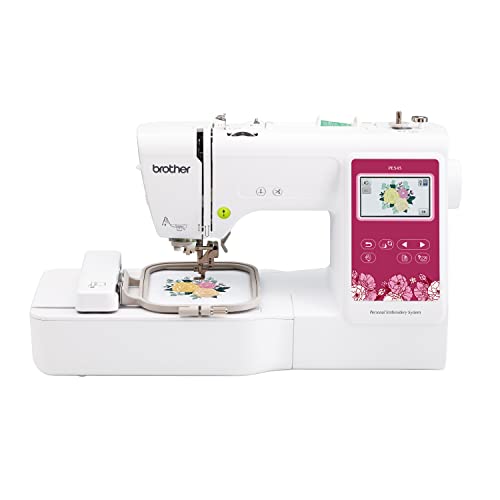
Brother PE545 wireless embroidery machine, 4x4 hoop
4x4 inch field3.7 inch LCDWLANArtspira app
Check price on Amazon
Best for: Monograms, small logos and gifts.

The PE545 is the smaller sibling of the PE900, with a 4 by 4 inch field and a 3.7 inch color LCD. It shares the wireless file transfer and the Artspira app, so a design you create on a phone reaches the machine the same way on both.

Four by four inches is enough for monograms, chest logos and appliqué, though it limits larger fills. Compared with the PE900 it sits lower in the price tiers and gives up 5 by 7 area, so it suits someone who will mainly stitch small items and gifts.

Care is the same as any single-needle machine. Wipe lint from the hook area after each design, rethread properly with the presser foot up, and watch the thread path since tension errors on embroidery are loud. Keep the hoop clean, because adhesive from stabilizers builds up on the inner ring and leaves marks on delicate fabric. With a 4 by 4 field, plan designs to fit the hoop rather than shrinking a large file, because scaling a design by a large amount changes stitch density and often makes the result stiff or sparse. Use the built-in lettering for names and keep decorative fills for the center of a design where the hoop holds the fabric best.

What works

  • Lower position in the price tiers
  • Color LCD with wireless transfer
  • Artspira app compatibility
  • Compact for small work areas

Watch out for

  • Four by four field limits larger designs
  • Single-needle color changes

Spec sheet

Type
Single-needle, embroidery only
Embroidery field
4 x 4 inches
Display
3.7 inch color LCD
File transfer
Wireless LAN
App
Artspira
03
Brother Skitch single-needle machine, Bluetooth
Single needleBluetoothArtspira requiredImports PES DST
Check price on Amazon
Best for: A low-cost first try at embroidery through a phone app.

The Skitch is built around the phone. Its Artspira app is required, you draw or choose designs on a mobile device, and Bluetooth sends them to the machine. The unpaid version can import PES, PHC, PHX and DST files, which matters because a machine locked to one vendor format is limiting.

It sits in the lowest price tier here, which makes it the cheapest way to try embroidery with a known brand. The compromise is control: with no large on-machine screen, everything runs through the app, and a software change on the phone side can change how the machine behaves.

Treat it as a gateway machine. Keep the app updated, practice on cotton squares with medium stabilizer, and clean the bobbin area frequently, since a small machine collects lint quickly. If you outgrow it, the files you made carry over to a bigger machine. Because a small embroidery unit has a small motor and a light body, put it on a heavy table and keep the hoop arm path clear, since vibration shifts designs on delicate fabric. Test designs on scrap felt first, then on the final garment with the same stabilizer.

What works

  • Lowest price tier among the machines here
  • Bluetooth link to the Artspira app
  • Imports PES, PHC, PHX and DST files
  • Known brand support

Watch out for

  • Control runs through the app
  • Small design area limits larger projects

Spec sheet

Type
Single-needle, embroidery only
Connection
Bluetooth
Control
Artspira app required
Imports
PES, PHC, PHX, DST
Position
Lowest tier here
04
Poolin EOC05 embroidery machine, 4x9.25 field
4x9.25 inch field7 inch touchscreenWiFi and USBEmbroidery only
Check price on Amazon
Best for: Beginners who stitch long designs on shirts and bags.

The EOC05 is built for beginners who want a longer field, 4 by 9.25 inches, suited to shirt fronts, hoodies, bags and gifts. A 7 inch touchscreen shows designs, and files arrive by WiFi or USB.

The listing is clear that it is an embroidery-only machine and does not sew, which is helpful honesty. Against the Brother PE900 it has a narrower but longer field and a larger screen, but it lacks the support network a major brand brings.

Be prepared to learn from community groups and videos rather than a store. Use stabilizer on every project, keep the needle fresh and clean the bobbin area, and check that your design software exports a format the machine reads before you buy digitizing tools. A tall, narrow field is great for a design that runs down a sleeve or across a shirt front, but a tall design in a hoop that size needs careful placement or it drifts off the garment. Use the template and a ruler to center the hoop and rehearse the layout before you stitch.

What works

  • Long 4 by 9.25 inch field
  • Seven inch touchscreen
  • WiFi and USB file transfer
  • Clearly designed for beginners

Watch out for

  • Smaller support network than the major brand
  • Does not sew

Spec sheet

Type
Single-needle, embroidery only
Embroidery field
4 x 9.25 inches
Display
7 inch touchscreen
Transfer
WiFi and USB
Function
Does not sew
05
Poolin EOC06 large hoop machine, 11x7.9 field
11x7.9 field200 designs4 hoopsDST/DSB files
Check price on Amazon
Best for: Embroiderers who want large designs and digitizing software.

The EOC06 is the roomiest single-needle machine here, with an embroidery area of 11 by 7.9 inches and 200 built-in designs on a 7 inch touchscreen. Four hoops are included: two 5.5 by 5.5 inch, one 7.9 by 7.9 inch and one 7.9 by 11 inch.

DST and DSB export means it works with common digitizing software, which makes it a good bridge for someone who wants to make their own designs. Compared with the Brother PE900 it gives more area and more hoops but a more modest brand pedigree.

Large hoops need care: hoop fabric flat and evenly, use a heavier stabilizer under dense designs and check that nothing near the machine catches the moving arm. Cleaning the bobbin area regularly is critical, since large fills use a lot of thread. Always test a new design on scrap before committing a garment. Big hoops also exaggerate a hooping mistake, because a loose corner moves further than a small hoop would, and a design that fills the area pulls the fabric inward during stitching. Choose the smaller of the included hoops that still holds the design to reduce that pull.

What works

  • Large 11 by 7.9 inch embroidery area
  • Four hoops included
  • Two hundred built-in designs
  • Works with DST and DSB files

Watch out for

  • Less established brand support
  • Single-needle means manual color changes

Spec sheet

Type
Single-needle, computerized
Embroidery area
11 x 7.9 inches
Built-in designs
200
Hoops
Two 5.5-inch, one 7.9-inch, one 7.9 x 11 inch
File formats
DST or DSB
06
Smartstitch S-1001 10-needle machine, 9.5x14.2 field
10 needles1,200 SPM7 inch touchscreen9.5x14.2 field
Check price on Amazon
Best for: Small-business owners moving beyond single-needle machines.

The S-1001 is a step into multi-needle territory with ten needles, a 1,200 stitches per minute top speed and a 9.5 by 14.2 inch area. Ten needles hold ten colors, so a multi-color logo runs without stopping to rethread.

The maker emphasizes training, with manuals, video training and a user group, which is the right way to approach a machine of this class. Against the Poolin EOM with 15 needles it has fewer colors but a smaller footprint and a lower position in the price tiers.

A commercial machine demands commercial habits: oil as the manual directs, keep spare needles and bobbins, and put it on a stable table. Learn to hoop quickly and use cap frames and backing for production work. Do not expect to learn it in an afternoon; plan a few weeks of test stitching. Needle choice also changes with fabric and thread, so keep sizes for caps, knits and dense twill. Digitizing quality dominates the result, so start with files made for machines of this class and avoid shrinking commercial logos below their intended size. Learn to read the thread-break sensor and the trimming signals on the screen, since they tell you what failed before a run is ruined.

What works

  • Ten needles hold ten colors for logos
  • Top speed of 1,200 stitches per minute
  • Large 9.5 by 14.2 inch area
  • Training videos and a user group

Watch out for

  • Steeper learning curve than home machines
  • Takes more space than a single-needle unit

Spec sheet

Type
10-needle commercial
Max speed
1,200 stitches per minute
Display
7 inch touchscreen
Embroidery area
9.5 x 14.2 inches
Support
Manuals, videos, user group
07
Poolin EOM 15-needle commercial machine, 14.2x9.5 area
15 needles14.2x9.5 area9 inch touchscreenAuto color change
Check price on Amazon
Best for: Businesses that need many colors on garments.

The EOM offers 15 needles, a 14.2 by 9.5 inch area and a 9 inch touchscreen, and it is pitched at single-needle owners and home studios growing into a business. Fifteen colors ready with automatic color changes reduce stopping and rethreading.

The large area suits polos, uniforms, sweatshirts, jackets and totes, which is what customers actually order. Compared with the Smartstitch S-1001 it holds five more colors and a larger touchscreen, at a higher tier.

This class of machine needs a plan: a sturdy table, a stock of stabilizers and a maintenance routine. Brush lint from the hook, oil as the manual says and keep needles of the right size ready. Test every new design and thread brand before running a paid order. Fifteen colors also lets you leave a stock of the most common shades threaded permanently, such as black, white and navy, so routine orders skip the threading step entirely. Keep a log of needles used and thread changes, because on a production machine small habits compound into hours saved each week.

What works

  • Fifteen needles for many colors
  • Large 14.2 by 9.5 inch area
  • Nine inch touchscreen
  • Automatic color changes save time

Watch out for

  • Needs space and a learning period
  • Higher tier than home machines

Spec sheet

Type
15-needle commercial
Needles
15
Embroidery area
14.2 x 9.5 inches
Display
9 inch touchscreen
Target
Growing business and home studio

Spec sheet decoder

What the numbers on the box really mean

The specs manufacturers lead with, translated into what they tell you about real-world performance.

Embroidery field

The maximum design size the hoop allows.

Watch forThe PE545 lists 4 x 4 and the PE900 lists 5 x 7 inches.

Needle count

How many colors the machine holds at once.

Watch forThe S-1001 holds 10, the EOM holds 15, and the single-needle machines hold one.

DST and DSB

Common embroidery file formats used by many digitizing programs.

Watch forThe Poolin EOC06 lists DST and DSB.

Stitches per minute

Maximum stitching speed. Real speed drops on dense or small designs.

Watch forThe S-1001 lists 1,200 stitches per minute.

WLAN or Bluetooth

Wireless file transfer from a computer or phone.

Watch forThe Brother PE models list WLAN and the Skitch uses Bluetooth.

Methodology

How We Evaluated These Embroidery Machines

Embroidery area

We compared the stated field: 4 x 4, 5 x 7, 4 x 9.25, 11 x 7.9, 9.5 x 14.2 and 14.2 x 9.5 inches. We favored machines whose field matches common projects.

Workflow

We separated single-needle machines from the 10-needle S-1001 and 15-needle EOM. Color changes are the biggest time cost in embroidery.

File handling

We checked formats and transfer: WLAN on the Brothers, Bluetooth on the Skitch, WiFi and USB on the Poolin EOC05 and DST or DSB on the EOC06.

Brand support

We weighed the support from Brother against newer brands, and noted training offered by Smartstitch.

Space and learning

We considered footprint and learning curve, since a commercial machine needs more room and practice than a home unit.

Decision guide

How to Choose the Right Embroidery Machines

By Project Size

SituationPickWhy
Monograms and small logosBrother PE5454 x 4 field
Pillows and towelsBrother PE9005 x 7 field
Shirt fronts and hoodiesPoolin EOC054 x 9.25 field
Large designsPoolin EOC0611 x 7.9 area
Multi-color logosSmartstitch S-100110 needles
Production workPoolin EOM15 needles

By Budget

TierPickWhy
Lowest tierBrother SkitchApp-driven starter
Low tierBrother PE545Entry Brother
Low-middle tierPoolin EOC05Tall field
Middle tierBrother PE900Larger field
Upper tierPoolin EOC06Large hoop
Top tiersSmartstitch S-1001 and Poolin EOMMulti-needle

Single vs Multi-Needle

Single-needle

The Brother PE545, PE900, Skitch and Poolin EOC05 and EOC06 stitch one color then stop. They suit hobby and gift work.

Multi-needle

The Smartstitch S-1001 and Poolin EOM hold 10 and 15 colors. They suit orders and logos.

Pick single-needle for gifts and learning; pick multi-needle if you will sell embroidery.

Control Method

PreferencePickWhy
Phone appBrother SkitchArtspira required
Color LCDBrother PE5453.7 inch
Large touchscreenPoolin EOM9 inch
Mid touchscreenPoolin EOC067 inch

For Selling Embroidery Specifically

Look for

Multiple needles, a large field and reliable support. Color changes and hooping time decide your profit.

In this comparison

The Smartstitch S-1001 and Poolin EOM are the only multi-needle options, and the EOM holds 15 colors in a 14.2 by 9.5 inch area.

When to Spend More

Spend more if

You want larger designs or automatic color changes: the PE900, EOC06, S-1001 or EOM.

Save if

You are trying embroidery. The Skitch or PE545 is enough.

Ownership

Maintenance schedule

The upkeep that decides whether this machine lasts two seasons or ten.

TaskIntervalWhy it matters
Clean the bobbin areaAfter each designDense stitching sheds lint. Packed lint causes tension errors.
Replace the needleEvery few projectsEmbroidery needles dull fast on dense fills and cause breaks.
Oil as directedPer manualMulti-needle machines have oiling points. Dry parts wear quickly.
Clean the hoopAfter each useAdhesive from stabilizers builds on the inner ring and marks fabric.
Check thread pathBefore each runThread caught on a spool causes breaks and tension errors.

FAQ

Frequently Asked Questions

Can an embroidery machine also sew?

Not the embroidery-only machines here. The Brother PE545, PE900, Skitch and Poolin units embroider only.

What is the best embroidery machine for beginners?

The Brother PE900 is a good fit, with a 5 by 7 inch field and wireless transfer. The Skitch is the cheapest way to try.

Do I need digitizing software?

Not to begin, because built-in designs and apps cover many needs. For custom logos you need software that exports the right format.

What is stabilizer for?

It supports the fabric under dense stitching. The wrong stabilizer is a common cause of puckering.

Is a multi-needle machine worth it?

Only if you stitch multi-color designs often or sell work. For gifts, a single-needle machine is enough.

Why does my design pucker?

Usually slack hooping or the wrong stabilizer. Hoop the fabric taut and use a suitable backing. If puckering persists, reduce stitch density or add a second layer of stabilizer, and check that the design was digitized for the fabric type. Knits and stretchy fabrics need cutaway backing, while firm cotton tolerates tearaway.

Bottom line

The short version

Browse more embroidery machineson Amazon →
James Miller, Lead Machine Editor

About the author

James Miller

Lead Machine Editor, MachineFanatic

James Miller leads MachineFanatic's buying guides, turning spec sheets, manuals and owner feedback into clear verdicts on power tools, outdoor power equipment, shop machines and kitchen machines.

More from James →

Keep reading

Related guides