

Amazon affiliate links - we earn a commission.Affiliate disclosure

Buying guide · 14 min read · Updated 2026-11-28

Best Embroidery Machines Under $1000 (2026)

Three sewing and embroidery combo machines under $1000, compared on hoop size, built-in designs, stitch count, file transfer and what each really suits.

James MillerBy James MillerLead Machine Editor3 machines comparedSpec-sheet verified
Best Embroidery Machines Under $1000

At a glance

Our top picks

Side by side

Spec comparison

MachineTypeSewingEmbroidery
Brother SE700 Sewing and Embroidery Machine With Wireless LANBest OverallBrother SE700 Sewing and Embroidery Machine With Wireless LANCombo sewing and embroideryn/an/a
Caydo ES200 2-in-1 Sewing and Embroidery Machine, 4.3 Inch TouchscreenBest ValueCaydo ES200 2-in-1 Sewing and Embroidery Machine, 4.3 Inch Touchscreen2-in-1 combo machine207 stitches, up to 7 layers168 designs, 8 fonts
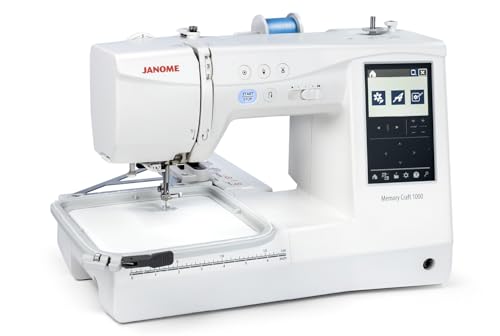
Janome Memory Craft 1000 Sewing and Embroidery ComboBest Premium BuildJanome Memory Craft 1000 Sewing and Embroidery ComboComputerized combo machine300 built-in stitches241 built-in designs

An embroidery combo machine is a sewing machine with a detachable embroidery arm that moves a hooped fabric under a single needle, guided by a stored design. The hoop size sets the largest design you can stitch, and everything else is detail around that limit.

Prices move, and the $1000 cap reflects listing prices when this guide was updated. In this band there are only a few real combo machines, so the useful questions are hoop size, how designs get onto the machine, how much sewing capability you get alongside the embroidery, and what you will need to buy beyond the machine itself.

Before you buy

6 Criteria to Look For Before Buying an Embroidery Machine Under $1000

  1. 01

    Hoop size and design area

    The hoop sets the largest single design. The Caydo ships with a 4 by 4 inch and a 4 by 9.25 inch hoop, which suits names and borders but not large back designs. The Brother uses a larger area suitable for most hobby work, and any design larger than the hoop must be split into parts. Decide on the biggest design you want before you buy, because the hoop is the one limit you cannot change later. Remember that a design must fit inside the hoop with a margin, and that the sewing field is smaller than the outer frame. If you plan to stitch jacket backs or large quilt blocks, a hoop of this size is not enough, and you would need to split designs or step up to a larger machine. Plan around names, logos, small florals and borders, which is where these machines shine.

  2. 02

    How designs get onto the machine

    Designs arrive by USB, wireless or built-in memory. The Brother SE700 sends files over a home network and pairs with the Artspira app, which removes the need to carry a stick. The Janome stores 241 designs and lets you edit them on the machine. A machine with few built-in designs and no easy transfer becomes limiting quickly. A practical habit is to keep a folder of designs sorted by hoop size and thread count. Check each file's dimensions before sending it to the machine, because a design that is a quarter inch too wide will be rejected or cropped. Embroidery file formats also differ by brand, so confirm which formats your machine reads before downloading designs.

  3. 03

    Single needle limitations

    All three machines are single needle, so each color change means stopping, cutting and rethreading. A four color design on a single needle machine can take much longer than the stitching time alone suggests. Multi-needle machines cost far more and are built for production. Be realistic about how many multi-color designs you will stitch. When you stitch a multi-color design, the machine stops at each color change and waits for you to rethread. Cutting thread tails between colors keeps the front clean, and a simple color chart on the screen helps you track the sequence. If you stitch many multi-color pieces, count the stops and decide whether the time is acceptable.

  4. 04

    Sewing capability

    A combo machine is also your sewing machine. Compare stitch counts, presser feet and layer capacity. The Caydo lists 207 stitches and up to seven layers, the Janome 300 stitches and the Brother 135 stitches with eight feet. Useful stitches matter more than a long catalog, so check for stretch stitches, blind hem and buttonhole. Test the sewing side with the fabrics you use. Light cotton, denim and stretch knit each ask for a different needle, and a combo machine that sews well but embroiders poorly, or the reverse, is a disappointment. Buy ballpoint needles for knits and denim needles for thick weaves so skipped stitches do not blame the machine.

  5. 05

    Stabilizer, thread and running cost

    Embroidery needs stabilizer under almost every project, embroidery thread and bobbin thread. These consumables cost money and affect results. Cheap polyester thread is fine for practice, while rayon and polyester embroidery thread give better sheen. Stitch quality problems are often caused by wrong stabilizer, not the machine. Budget for supplies when you buy the machine. A starter kit of cut-away and tear-away stabilizer, a spool set of embroidery thread, bobbin thread, extra needles and a small pair of curved scissors will run well into the cost of the machine's first year, and good supplies make a larger difference to results than a more expensive body.

  6. 06

    Screen and controls

    A larger touchscreen, like the Caydo's 4.3 inches, makes editing and previewing easier. Small screens force you to guess at placement. If you edit on the machine, as on the Janome, screen size matters more than for a machine you only load files into. Support also covers the boring parts: needle plates, bobbin cases and presser feet. A brand with a nearby dealer can service the machine, supply parts and answer questions, while a newer brand may rely on mail-in repair and online chat. Check the warranty period before you buy. Screen size also changes how well you can preview placement. With a larger screen you can nudge a design, rotate it and see the hoop outline clearly, which avoids wasting stabilizer on test stitches. If you mostly load finished files and press go, the screen is less important than the transfer method.

Detailed reviews

The 3 best embroidery machines under $1000, explained

01
Brother SE700 Sewing and Embroidery Machine With Wireless LAN
Sewing and embroideryWireless LANArtspira app8 included feet
Check price on Amazon
Best for: Hobbyists who want a trusted brand, wireless file transfer and a phone design app.

The SE700 is a combo machine: a computerized sewing machine with a removable embroidery unit that stitches designs from a hoop. The title lists 135 built-in stitches and eight included presser feet, which cover garment sewing, hems, buttonholes and basic quilting without buying extras. The embroidery arm clips on when you want to stitch designs and off again when you sew.

Wireless LAN is the standout. Instead of loading designs from a stick, you send files from a computer over your home network using the free software, and the Artspira app lets you draw or download designs on a phone. Compared with the Caydo, the Brother has a more established ecosystem of designs, support and accessories, while the Caydo offers a larger touchscreen and a long hoop.

Expect a single needle. Color changes are manual, so a four color design means stopping to rethread. You also need stabilizer, embroidery thread and bobbin thread rated for the job. Keep the bobbin area free of lint, change the needle every project and always use the correct hoop for the fabric. For someone who wants a reputable machine, easy file transfer and a mobile design workflow, this is the best fit.

What works

  • Wireless LAN sends designs from a computer
  • Artspira app for drawing and downloading designs
  • Eight included presser feet cover most sewing
  • Strong ecosystem of designs and parts

Watch out for

  • Single needle means manual color changes
  • Hoop size limits design dimensions
  • Embroidery thread and stabilizer add running cost

Spec sheet

Type
Combo sewing and embroidery
Stitches
135 built-in sewing stitches
Transfer
Wireless LAN to PC
App
Artspira mobile app
Feet
8 included
02
Caydo ES200 2-in-1 Sewing and Embroidery Machine, 4.3 Inch Touchscreen
4.3 in touchscreen207 sewing stitches168 designs4x4 and 4x9.25 hoops
Check price on Amazon
Best for: Beginners who want a large screen, a long hoop and many built-in options at a low price.

The Caydo ES200 combines sewing and embroidery in a single body and ships with two hoops, a 4 by 4 inch and a 4 by 9.25 inch. The long hoop is unusual: it allows borders and name lettering that a square hoop cannot fit. A 4.3 inch touchscreen is easier to read than the small LCDs on many beginner machines.

The listing counts 207 sewing stitches and says the machine can sew up to seven layers of fabric, which is useful for light denim and quilted pieces. Embroidery includes 168 built-in designs and eight fonts. Compared with the Brother, the Caydo gives more built-in sewing stitches and a larger screen, but it is a newer brand with less proven long-term support and a smaller design community.

The trade-off is the same as any single needle combo. Color changes are manual and speed is modest. Use stabilizer on every project and keep spare needles on hand. If you want the most hardware for the price and are comfortable with a newer brand, it is a good value. Register the purchase and keep packaging in case you need to return it.

What works

  • 4.3 inch touchscreen is easy to read
  • Long 4 x 9.25 inch hoop for borders and names
  • 207 sewing stitches with up to 7 layers
  • Lowest tier among the three

Watch out for

  • Newer brand with less proven support
  • Hoop areas are smaller than many hobby machines
  • Single needle and manual color changes

Spec sheet

Type
2-in-1 combo machine
Screen
4.3 inch touchscreen
Sewing
207 stitches, up to 7 layers
Embroidery
168 designs, 8 fonts
Hoops
4 x 4 and 4 x 9.25 inches
03
Janome Memory Craft 1000 Sewing and Embroidery Combo
300 built-in stitches241 designsEasy hoop leverComputerized
Check price on Amazon
Best for: Experienced sewers who want a robust combo with on-machine editing.

The Janome Memory Craft 1000 is the most capable machine in the guide. It lists 300 built-in stitches and 241 embroidery designs, and you can edit designs on the machine itself instead of needing a computer. A lever-based, two-stage hoop tightening system helps you center and secure the fabric, which is the step that causes most puckering for beginners.

The tool set is fuss free and aimed at people who want to garment sew and embroider with the same machine. Compared with the Brother, it offers more built-in stitches and on-machine editing, but no wireless LAN is listed, so file transfer relies on other methods. Compared with the Caydo, it is a more established name with a stronger service network.

It costs the most in this guide, and it also asks the most of you in learning time. Plan on a class or a series of tutorials. Maintenance is the usual routine: clean lint from the bobbin area, change needles often and keep the hoop clean. If you want a machine that grows with your skills and you value service access, this is the strongest choice.

What works

  • 300 built-in stitches and 241 embroidery designs
  • Edit designs directly on the machine
  • Lever hoop tightening reduces puckering
  • Established brand with service access

Watch out for

  • Highest price tier in the guide
  • Steeper learning curve
  • No wireless transfer listed

Spec sheet

Type
Computerized combo machine
Sewing
300 built-in stitches
Embroidery
241 built-in designs
Hoop
Lever two-stage tightening
Editing
On-machine design editing

Spec sheet decoder

What the numbers on the box really mean

The specs manufacturers lead with, translated into what they tell you about real-world performance.

Hoop size

The embroidery area the machine can stitch in one pass. It sets design size. Stitch inside the hoop, never at its edge, because the foot can strike the frame.

Watch forThe Caydo lists 4 x 4 and 4 x 9.25 inches, the others have their own hoops.

Built-in designs

Designs stored in the machine. More designs help if you rarely import files. Built-in designs are good for learning, but most people soon want to import files.

Watch forThe Janome lists 241, the Caydo 168.

Stitch count

The number of built-in sewing stitches. Useful stitches matter more than the total. A long catalog of decorative stitches is less useful than a reliable straight, zigzag and buttonhole.

Watch forThe Janome lists 300, the Caydo 207, the Brother 135.

File transfer

How designs move to the machine: USB, wireless or app. Check that the file format your design source uses is supported by the machine.

Watch forThe Brother lists wireless LAN and the Artspira app.

Layer capacity

How many fabric layers the sewing needle can pierce. More layers do not mean heavy duty, since the motor and needle still limit what you can sew.

Watch forThe Caydo lists up to seven layers.

Methodology

How We Evaluated These Embroidery Machines Under $1000

Hoop and design area

We compared hoop sizes and noted how much each limits design size, including the Caydo's long 4 x 9.25 inch hoop. We judged this from the spec sheets and owner feedback patterns, because the fine detail of thread and fabric behavior varies from project to project.

Design workflow

We looked at how designs reach the machine, from the Brother's wireless LAN and app to the Janome's on-machine editing. We judged this from the spec sheets and owner feedback patterns, because the fine detail of thread and fabric behavior varies from project to project.

Sewing capability

We compared stitch counts and presser feet, from 135 on the Brother to 300 on the Janome. We judged this from the spec sheets and owner feedback patterns, because the fine detail of thread and fabric behavior varies from project to project.

Support and ecosystem

We considered brand reach and service access, based on owner feedback patterns and listing details. We judged this from the spec sheets and owner feedback patterns, because the fine detail of thread and fabric behavior varies from project to project.

Value inside the cap

We ranked picks using relative price tier only. The Brother sits lowest, the Janome highest. We judged this from the spec sheets and owner feedback patterns, because the fine detail of thread and fabric behavior varies from project to project.

Decision guide

How to Choose the Right Embroidery Machines Under $1000

By Primary Use

SituationPickWhy
Beginner wanting an easy workflowBrother SE700Wireless LAN and the Artspira app
Names, borders and letteringCaydo ES200Long 4 x 9.25 inch hoop
Growing skills and on-machine editingJanome Memory Craft 1000300 stitches and design editing
Garment sewing plus embroideryBrother SE700Eight included presser feet
Quilted or layered projectsCaydo ES200Up to seven layers listed

By Budget

SituationPickWhy
Lowest tierBrother SE700Cheapest of the three with a trusted brand
Low-to-mid tierCaydo ES200Large screen and two hoops
Use the full capJanome Memory Craft 1000Most stitches and editing

Established Brand vs Newer Brand

Established brand

The Brother and Janome have long service networks, active design communities and clear documentation. They suit buyers who want support.

Newer brand

The Caydo packs more hardware for the money, with a bigger screen and a long hoop, but with less proven support.

Choose established for support and newer for hardware per dollar.

Design Transfer Method

SituationPickWhy
Send files from a computerBrother SE700Wireless LAN
Draw designs on a phoneBrother SE700Artspira app
Edit on the machineJanome Memory Craft 1000On-machine editing
Pick from built-insCaydo ES200168 designs and 8 fonts

For Beginners Specifically

Look for

A simple transfer workflow, a clear screen, included presser feet and good documentation. Add stabilizer and thread on day one.

In this comparison

The Brother SE700 is the easiest start, the Caydo ES200 is the cheapest with a big screen, and the Janome rewards patience.

When to Spend More

Spend more if

You want on-machine editing, a larger stitch library and a long service network. The Janome offers all three.

Save if

You mainly stitch names and small designs. The Brother or Caydo covers it for less.

Ownership

Maintenance schedule

The upkeep that decides whether this machine lasts two seasons or ten.

TaskIntervalWhy it matters
Clean the bobbin areaEvery few bobbinsLint builds up fast when stitching dense designs. Use a brush, not canned air, which packs lint deeper. Open the hook area, brush out lint and check for stray thread that can jam the bobbin.
Change the needleEvery project or 8 to 10 hoursA dull needle causes skipped stitches and thread breaks. Match needle size to thread and fabric, using embroidery needles for decorative work.
Oil only as the manual saysPer manualMany modern machines are not owner oiled. Use only light sewing machine oil if the manual calls for it. Never oil a machine that calls for no owner oiling, because oil attracts lint and stains fabric.
Inspect the hoopMonthlyHoops loosen and warp. A loose hoop causes puckering. Check the inner ring for burrs, and replace any hoop that does not close firmly.
Update softwareTwice a yearUpdates fix bugs and improve file compatibility, particularly on networked machines. Back up your designs before updating, and follow the maker's instructions closely.

FAQ

Frequently Asked Questions

Can a combo machine embroider hats?

Usually not well. Hats need a special cap frame and a machine designed for it. A single needle combo can embroider flat items such as shirts, towels and bags. Treat this as a general guide and follow your machine's manual, since hoop size, thread and stabilizer choices change from project to project.

Do I need stabilizer?

Yes for almost every project. Stabilizer supports the fabric so stitches do not pucker. Choose the type that matches your fabric weight. Treat this as a general guide and follow your machine's manual, since hoop size, thread and stabilizer choices change from project to project.

How long does a design take?

It depends on stitch count and speed. A small design can take ten to thirty minutes, while a dense one takes an hour or more. Color changes add time. Treat this as a general guide and follow your machine's manual, since hoop size, thread and stabilizer choices change from project to project.

Is embroidery software included?

Built-in designs and basic editing are included. Advanced digitizing is usually a separate purchase. Treat this as a general guide and follow your machine's manual, since hoop size, thread and stabilizer choices change from project to project.

Can I sell items I embroider?

Yes, but avoid copyrighted designs. Use designs you own or have a license for. Treat this as a general guide and follow your machine's manual, since hoop size, thread and stabilizer choices change from project to project.

How long do these machines last?

With cleaning and needle changes, many years of hobby use. Newer brands may have limited parts and service. Treat this as a general guide and follow your machine's manual, since hoop size, thread and stabilizer choices change from project to project.

Bottom line

The short version

Browse more embroidery machines under $1000on Amazon →
James Miller, Lead Machine Editor

About the author

James Miller

Lead Machine Editor, MachineFanatic

James Miller leads MachineFanatic's buying guides, turning spec sheets, manuals and owner feedback into clear verdicts on power tools, outdoor power equipment, shop machines and kitchen machines.

More from James →

Keep reading

Related guides