
Amazon affiliate links - we earn a commission.Affiliate disclosure

Buying guide · 14 min read · Updated 2026-11-18

Best Ethernet Label Printers (2026)

Six label printers with a wired Ethernet port compared on network setup, fixed addressing, shared printing, label width and what each does beyond the jack.

James MillerBy James MillerLead Machine Editor6 machines comparedSpec-sheet verified
Best Ethernet Label Printers

At a glance

Our top picks

Side by side

Spec comparison

MachineConnectionsSpeedLabel sizePrint method
Brother QL-820NWB multi-connectivity label printerBest OverallBrother QL-820NWB multi-connectivity label printerEthernet, Wi-Fi, Bluetooth and USBUp to 110 standard address labels per minuten/an/a
iDPRT iD880 4x6 industrial label printer, USB and EthernetBest Wired Shipping PrinteriDPRT iD880 4x6 industrial label printer, USB and EthernetUSB cable and Ethernet cord includedUp to 6 inches per second4x6 shipping labels, wider than 4 inches possibleDirect thermal, no ink
Zebra ZD411D 2.2-inch direct thermal printer, Ethernet and BLEBest Compact ZebraZebra ZD411D 2.2-inch direct thermal printer, Ethernet and BLEUSB 2.0, USB host, Ethernet and Bluetooth Low Energy 5Up to 6 inches per second at 203 dpin/aDirect thermal, no ink or ribbon
Omezizy D550 Pro 4x6 label printer with built-in paper binBest for Roll and Folded StockOmezizy D550 Pro 4x6 label printer with built-in paper binBluetooth, Ethernet and USBn/a4x6 inch shipping labelsDirect thermal, no ink
Arkscan 2054A-LAN Ethernet 4x6 shipping label printerBest for Shared Marketplace SellersArkscan 2054A-LAN Ethernet 4x6 shipping label printern/an/a4x6 shipping labelsDirect thermal, no ink
Zebra GX420d direct thermal printer, USB Ethernet serialBest Legacy Network ZebraZebra GX420d direct thermal printer, USB Ethernet serialn/an/an/aDirect thermal, no ribbon, ink or toner

An Ethernet jack on a label printer solves one problem well: many computers, one printer, no drama. A wired network link does not roam, sleep or drop when someone microwaves lunch, and it lets a printer live in the corner of a warehouse while every desk sends it jobs.

That convenience comes with small setup chores, such as giving the printer a fixed address and making sure the driver points at the right place. This guide compares six printers that offer a network jack, and separates the ones that are built for a shared office from the ones that merely list the port.

Before you buy

6 Criteria to Look For Before Buying an Ethernet Label Printer

  1. 01

    Fixed address and discovery

    A network printer that changes address every few days looks broken to every desk that used it. Reserve the printer's address on the router, or set a fixed one in its menu, and write it on the printer. The Brother QL-820NWB and iDPRT iD880 both accept this setup. Doing it once at installation saves a lot of troubleshooting. Many small offices skip this step because the printer works on day one, and then wonder why it vanishes after a power cut. Take five minutes to note the address, the router login and the driver version on a card taped inside the printer's lid.

  2. 02

    Label width on the network

    The Brother QL-820NWB and Zebra ZD411D print narrow labels, while the iDPRT, Omezizy and Arkscan print 4x6 shipping labels. A shared printer must match the widest label anyone in the office needs. If the packing room and the front desk have different needs, two printers may beat one. A narrow-label printer and a 4x6 printer on the same network, each at its own fixed address, cost less than a single large machine forced to do both jobs badly. The cost of the second printer is often recovered in saved label stock within a year.

  3. 03

    Beyond the jack

    Ethernet is rarely the only connection. The Brother adds Wi-Fi, Bluetooth and a USB host port for a scanner, the Zebra ZD411D adds Bluetooth Low Energy 5, and the Omezizy adds Bluetooth. A phone route is useful for walk-up printing. Check what else the printer offers so a cable failure does not stop work.

  4. 04

    Speed against queue depth

    The Brother lists up to 110 address labels a minute, and the iDPRT and Zebra ZD411D list up to 6 inches per second. A shared printer can build a queue when several benches print at once, so a faster head shortens waits. Count peak simultaneous users, not total daily labels. Three people pressing print within the same ten seconds is the situation that exposes a slow printer, and it happens at every shift change. A quick test is to send thirty labels from two computers at once and see how long the second person waits.

  5. 05

    Driver and software support

    Inventory and shipping software list supported printers, and Zebra and Brother appear often. Lesser-known makers rely on their own drivers. If your software has a supported printer list, check it before buying, since a missing driver is an expensive surprise.

  6. 06

    Consumable lock-in

    The Brother uses genuine DK rolls, while the Zebra, iDPRT, Omezizy and Arkscan accept standard thermal rolls and stacks. In a shared office that prints all day, supply cost over a year matters more than the purchase price. Compare roll costs before you commit. A single locked roll costing slightly more adds up when a shared printer burns through a roll a day. Ask whether a second supplier exists for the size you need, and keep a few rolls of backup stock on the shelf.

Detailed reviews

The 6 best ethernet label printers, explained

01
Brother QL-820NWB multi-connectivity label printer
Ethernet Wi-Fi BluetoothUSB host port110 labels a minute300 dpi
Check price on Amazon
Best for: Offices that share one label printer across wired and wireless devices.

Brother built the QL-820NWB to be the printer that fits whatever network an office has. It offers Ethernet, Wi-Fi and Bluetooth, plus a USB host port that accepts a peripheral such as a barcode scanner. That last feature allows a scan-and-print workflow without a computer, a rare trick in this class.

The listing says up to 110 standard address labels per minute at 300 dpi, the fastest quoted rate in this lineup, and it includes a monochrome LCD for standalone use. The limit is label width: it is a narrow-label machine using Brother DK rolls, so it prints addresses, file labels and name badges but not full 4x6 parcel labels.

Give it a fixed address on the router, load genuine DK rolls and keep the head clean. In a shared office it earns its keep within a week. The scanner port deserves a trial: plug in a handheld scanner, scan a product code and print its label without touching a computer, which is handy at a returns table or a goods-in desk. Keep a spare DK roll of each size you use on the shelf beside it, because a shared printer that runs dry stops several people at once.

What works

  • Ethernet, Wi-Fi, Bluetooth and USB in one body
  • USB host port for a scanner
  • Up to 110 address labels a minute
  • Monochrome LCD for standalone work

Watch out for

  • Does not print 4x6 parcel labels
  • Tied to Brother DK rolls

Spec sheet

Connections
Ethernet, Wi-Fi, Bluetooth and USB
USB host
Port for a peripheral such as a scanner
Speed
Up to 110 standard address labels per minute
Resolution
300 dpi black text
Display
Monochrome LCD for standalone use
02
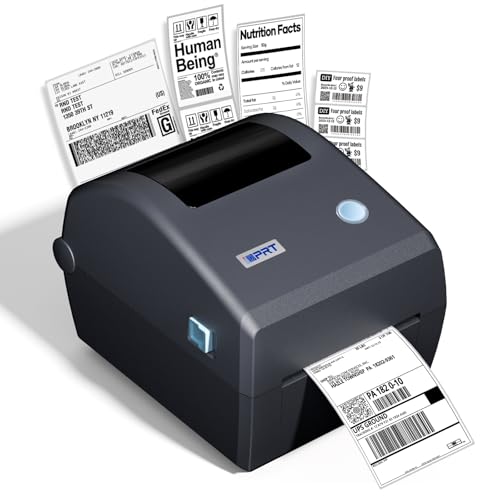
iDPRT iD880 4x6 industrial label printer, USB and Ethernet
4x6 direct thermalUSB and Ethernet6 ips at 203 dpiQR-code driver
Check price on Amazon
Best for: Packing rooms where several benches share a wired 4x6 printer.

The iD880 is a commercial-grade direct thermal printer that brings a wired network jack to the 4x6 shipping class. The listing says to connect the included USB cable or Ethernet cord and download the driver via a QR code, so the cabling is in the box. It runs up to 6 inches per second at 203 dpi.

For a packing room that needs several benches to share a label printer, that wiring matters more than any app. Against the Brother QL-820NWB, it prints full shipping labels but has no Wi-Fi or Bluetooth listed. Against the Zebra options, it is a newer, less proven design with a faster listed speed.

Reserve its address on the router so benches never lose it, wipe the head and keep the stack square. If the printer sits near the router, a short patch cable is enough, and if it sits across the room, run the cable along the baseboard where chairs cannot snag it. A cable that is tugged loose three times a month is the commonest reason a wired printer gets a bad reputation.

What works

  • Ethernet and USB cables are included
  • 6 inches per second at 203 dpi
  • Prints 4x6 shipping labels
  • Commercial-grade direct thermal build

Watch out for

  • No wireless connection listed
  • Newer design with less history

Spec sheet

Label size
4x6 shipping labels, wider than 4 inches possible
Print method
Direct thermal, no ink
Speed
Up to 6 inches per second
Resolution
203 dpi
Connections
USB cable and Ethernet cord included
03
Zebra ZD411D 2.2-inch direct thermal printer, Ethernet and BLE
2.2 in print widthUSB Ethernet BLE 56 ips at 203 dpiUSB host
Check price on Amazon
Best for: Shops printing product and shelf labels over a wired network.

Zebra's ZD411D is the small desktop printer for product, shelf and small shipping labels, with a 2.2 inch print width and 203 dpi. It lists USB 2.0, a USB host port, Ethernet and Bluetooth Low Energy 5, so a wired network and a phone can both reach it. Speeds up to 6 inches per second are plenty for most label work.

The narrow width is the limit, as it cannot print a 4x6 parcel label. Its strength is the platform: Zebra drivers, parts and firmware are widely supported, and inventory software tends to list it. Against the Brother QL-820NWB, it is more industrial and less address-label focused.

Give it a fixed address, set the media type and keep a spare roll beside it. Because it is compact, it fits on a shelf above a workbench, which keeps the labels near the products they describe. Print a test from each computer that will use it, and note which driver version each one runs, since mixed versions are a classic source of misaligned labels.

What works

  • Ethernet plus Bluetooth Low Energy 5
  • USB host port
  • 6 ips at 203 dpi
  • Zebra driver and parts support

Watch out for

  • 2.2 inch width cannot print 4x6 labels
  • Direct thermal prints fade

Spec sheet

Print method
Direct thermal, no ink or ribbon
Print width
2.2 inch
Speed
Up to 6 inches per second at 203 dpi
Connections
USB 2.0, USB host, Ethernet and Bluetooth Low Energy 5
Output
Barcodes, text and graphics
04
Omezizy D550 Pro 4x6 label printer with built-in paper bin
4x6 direct thermalBluetooth Ethernet USBRoll and folded paperBuilt-in bin
Check price on Amazon
Best for: Sellers who want Ethernet and Bluetooth in one 4x6 printer.

Omezizy's D550 Pro goes one better than most Ethernet printers by also offering Bluetooth and USB, so a wired bench and a phone can use the same machine. The listing says its design allows both roll and folded paper loading in a built-in bin, so a seller can buy whichever stock is cheaper.

A starter pack of 30 labels is included. It is a lesser-known maker, so owner history is thin, and the listing offers no speed figure, unlike the iDPRT. Against the Brother, it prints full shipping labels but is a hobbyist-priced newcomer.

Wire it, reserve the address and test both stock types before relying on it. A seller who changes stock suppliers often will like the flexibility, but should still recalibrate whenever the stock type changes. Because the maker is new, keep the receipt and warranty details somewhere you can find them in six months, when you will have a better sense of how it ages.

What works

  • Bluetooth, Ethernet and USB connections
  • Built-in bin for roll or folded paper
  • Prints 4x6 labels
  • Starter labels included

Watch out for

  • No speed figure listed
  • Thin owner history

Spec sheet

Label size
4x6 inch shipping labels
Print method
Direct thermal, no ink
Connections
Bluetooth, Ethernet and USB
Stock
Built-in bin for roll and folded paper
In the box
Thirty starter labels
05
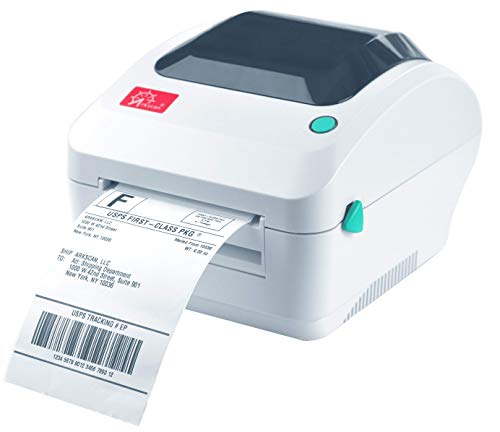
Arkscan 2054A-LAN Ethernet 4x6 shipping label printer
4x6 direct thermalEthernet LANWindows Mac ChromebookBarTender UltraLite
Check price on Amazon
Best for: Small offices with several marketplace sellers sharing one printer.

Arkscan's LAN model is the Ethernet version of a long-running shipping printer. The listing names a long roll call of platforms and postage services, and it prints product and barcode labels as well, so a shared bench can serve several sellers. Phones and tablets are mentioned in its title, which suggests network printing support through other devices.

BarTender UltraLite is bundled for Windows only, which leaves Mac users to pick another design tool. Against the iDPRT it has a longer history, and against the Omezizy it lacks Bluetooth. The jack makes it a sensible fixture in a small office.

Assign it a fixed address, keep the stack square and clean the head every few rolls. A small trick for multi-seller benches is to save one print profile per marketplace on each computer, so a label for one site does not inherit the page settings of another. The printer itself does not care, but the driver settings on each desk do.

What works

  • Ethernet LAN port for shared use
  • Names many platforms and postage tools
  • Prints product and barcode labels
  • Supports Windows, Mac and Chromebook

Watch out for

  • Designer software is Windows only
  • No Bluetooth listed

Spec sheet

Label size
4x6 shipping labels
Print method
Direct thermal, no ink
Network
Ethernet LAN port
Platforms named
Amazon FBA, EasyPost, eBay, Etsy, Endicia and others
Software
BarTender UltraLite, Windows only
06
Zebra GX420d direct thermal printer, USB Ethernet serial
Direct thermalUSB Ethernet serialAddress and barcodeNo ribbon
Check price on Amazon
Best for: Back offices that want a long-standing Zebra on the network.

The GX420d has been a fixture of back offices for years, and its USB, Ethernet and serial interfaces explain why. It prints direct thermal with no ribbon and handles address, shipping and barcode labels. In a network it sits quietly at a fixed address and takes jobs from every desk.

The design is older than the iDPRT and the ZD411D, but the age brings a long list of driver and software support. Zebra's tools expect it, and inventory software often lists it. Where the newer models add wireless, this one stays with cables.

Set the media type, keep the platen clean and reserve its address on the router. Because the platform is so widely used, replacement heads and platens are easy to source, and a technician who has worked on one can fix almost any other in the family. That, rather than its looks, is the reason these printers keep turning up in storerooms a decade after they were bought.

What works

  • USB, Ethernet and serial interfaces
  • Long driver and software history
  • No ribbon, ink or toner
  • Rapid energy-efficient printing

Watch out for

  • Older design with no wireless
  • Direct thermal prints fade

Spec sheet

Print method
Direct thermal, no ribbon, ink or toner
Interfaces
USB, Ethernet and serial
Output
Address, shipping and barcode labels
Media
Direct thermal label rolls
Operation
Rapid, energy-efficient printing

Spec sheet decoder

What the numbers on the box really mean

The specs manufacturers lead with, translated into what they tell you about real-world performance.

Ethernet LAN

A wired network connection that gives the printer an address on the office network.

Watch forAll six printers list a network jack in some form.

USB host

A port that lets the printer accept a device such as a scanner, instead of acting as a device itself.

Watch forThe Brother QL-820NWB and Zebra ZD411D list it.

Bluetooth Low Energy 5

A modern low-power Bluetooth version with better range and stability than older versions.

Watch forThe Zebra ZD411D lists it.

Fixed IP address

A network address that stays the same, so every computer can find the printer.

Watch forSet it on the printer or reserve it on the router.

Roll and folded stock

Labels may come on a wound roll or a folded stack, and some printers take both.

Watch forThe Omezizy D550 Pro takes both.

Methodology

How We Evaluated These Ethernet Label Printers

Network readiness

We read each listing for Ethernet and extra connections. The Brother QL-820NWB leads with Ethernet, Wi-Fi, Bluetooth and a USB host port. The Zebra GX420d offers Ethernet and legacy ports.

Label width

Widths were compared: narrow for the Brother and Zebra ZD411D, 4x6 for the iDPRT, Omezizy and Arkscan. We weighed width against the jobs a shared printer must handle.

Speed under shared load

The Brother's 110 labels a minute and the 6 ips rating of the iDPRT and Zebra ZD411D were compared. Shared printers queue jobs, so speed counted for more than in single-user use.

Ecosystem and drivers

Zebra and Brother scored high for software support. The newer brands scored lower. We weighed the risk of a missing driver.

Running costs

Locked and open stock were compared. The Brother's DK rolls lock you in, and the others accept standard stock. We scored the yearly supply cost for a busy office.

Decision guide

How to Choose the Right Ethernet Label Printers

By Shared Job

JobPickWhy
Address and file labels for an officeBrother QL-820NWBEthernet, Wi-Fi and Bluetooth.
Shipping labels at several benchesiDPRT iD8804x6 with Ethernet and 6 ips.
Product and shelf labelsZebra ZD411DCompact Zebra with Ethernet.
Phone and wired bench togetherOmezizy D550 ProBluetooth, Ethernet and USB.

By Budget

TierPickWhy
Lower tierOmezizy D550 ProThree connections in a newcomer.
Middle tieriDPRT iD880Wired shipping printer.
Higher tierZebra GX420dEstablished industrial platform.

Wired vs Wi-Fi Network Printing

Wired

The iDPRT, Arkscan, Zebra GX420d and ZD411D use a cable. It is steady and ignores signal strength. It needs a cable run.

Wi-Fi

The Brother QL-820NWB can also use Wi-Fi. It is easy to place. It drops when the signal is weak.

Choose wired for a fixed bench and Wi-Fi for flexible placement.

By Label Width

WidthPickWhy
Narrow address labelsBrother QL-820NWBDK rolls and 110 labels a minute.
Medium product labelsZebra ZD411D2.2 inch width.
Full 4x6 parcel labelsArkscan 2054A-LANNames many platforms.

For a Packing Room Specifically

Look for

A fixed address, a 4x6 width and a speed that keeps up with several benches. A bin or stack path helps keep the table tidy.

In this comparison

The iDPRT iD880 lists 6 ips and a bundled Ethernet cord, and the Omezizy D550 Pro adds a built-in bin.

When to Spend More

Spend more if

Several benches print all day or your software expects Zebra or Brother. The ZD411D and QL-820NWB cover those.

Save if

One bench shares a printer with a laptop. USB models are enough.

Ownership

Maintenance schedule

The upkeep that decides whether this machine lasts two seasons or ten.

TaskIntervalWhy it matters
Reserve a fixed addressOnce at installationA moving address makes a working printer look dead. Reserve it on the router.
Clean the head and platenEvery few rollsShared printers run more labels, so dust and adhesive build faster.
Check the network cableQuarterlyA loose connector looks like a printer fault. Reseat both ends.
Update drivers on every deskYearlyOld drivers can fail after system updates and cause mysterious jobs.
Keep spare stock near the printerOngoingA shared printer that runs out blocks everyone. A labeled spare shelf avoids it.

FAQ

Frequently Asked Questions

Why choose Ethernet over Wi-Fi for a label printer?

A wired link does not roam or drop. It is the safer choice when several computers share the printer and the work cannot stop.

How do I set up a network label printer?

Connect the cable, give the printer a fixed address and install the driver on each computer pointing at that address. Print a test label from every desk.

Do any of these print 4x6 labels over Ethernet?

Yes. The iDPRT iD880, Omezizy D550 Pro and Arkscan 2054A-LAN print 4x6 labels. The Brother and Zebra ZD411D print narrower labels.

Can I also print from a phone?

The Brother QL-820NWB, Omezizy D550 Pro and Zebra ZD411D add Bluetooth. The wired-only models need a computer.

What happens if the router changes?

A printer with a fixed address on the old network may need reconfiguring. Keep the setup notes on a card beside it.

Is a Zebra worth it over cheaper brands?

For driver support and long service life, often yes. For a single small bench, a cheaper model works well.

Bottom line

The short version

Browse more ethernet label printerson Amazon →
James Miller, Lead Machine Editor

About the author

James Miller

Lead Machine Editor, MachineFanatic

James Miller leads MachineFanatic's buying guides, turning spec sheets, manuals and owner feedback into clear verdicts on power tools, outdoor power equipment, shop machines and kitchen machines.

More from James →

Keep reading

Related guides