
Amazon affiliate links - we earn a commission.Affiliate disclosure

Buying guide · 13 min read · Updated 2026-11-18

Best Godex Label Printers (2026)

Six Godex desktop barcode label printers compared by dpi, ips, print width and ports, from the compact DT2x to the 300 dpi G530 and the RT700i+.

James MillerBy James MillerLead Machine Editor6 machines comparedSpec-sheet verified
Best Godex Label Printers

At a glance

Our top picks

Side by side

Spec comparison

MachineResolutionSpeedPortsPrint widthTechnology
Godex RT700i+ 4 inch thermal transfer and direct thermal printerBest OverallGodex RT700i+ 4 inch thermal transfer and direct thermal printer203 dpiUp to 7 ipsEthernet, RS232, USBn/an/a
Godex GE300 4 inch thermal transfer printer, 5 ipsBest Value 4 InchGodex GE300 4 inch thermal transfer printer, 5 ips203 dpi5 ips (127 mm per second)USB, Ethernet, SerialUp to 4.25 inchesn/a
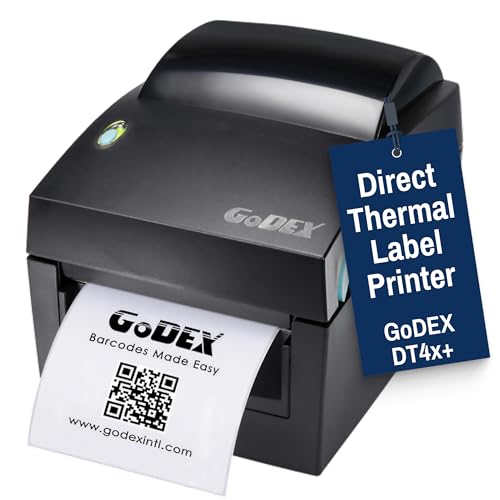
Godex DT4X+ 4 inch direct thermal shipping printerBest Ribbon-Free 4 InchGodex DT4X+ 4 inch direct thermal shipping printer203 dpin/aUSB 2.0, RS-232, EthernetUp to 4 inchesDirect thermal, no ribbon
Godex G530 4 inch 300 dpi thermal transfer printerBest for Small CodesGodex G530 4 inch 300 dpi thermal transfer printer300 dpiUp to 7 ipsn/a4 inch classThermal transfer
Godex RT200i 2 inch printer with color display, 7 ipsBest Compact 2 InchGodex RT200i 2 inch printer with color display, 7 ips203 dpiUp to 7 ipsUSB host and device, RS232, Ethernet2 inch classn/a
Godex DT2x 2 inch direct thermal printer, 203 dpi, 7 ipsBest Entry Direct ThermalGodex DT2x 2 inch direct thermal printer, 203 dpi, 7 ips203 dpiUp to 7 ipsn/an/aDirect thermal

Desktop barcode printers from this maker sit between hobby label makers and heavy industrial units. They use a metal-based print mechanism, standard barcode languages and a full set of ports, and they are sold to warehouses, clinics, retailers and service shops.

What changes from model to model is the print width, the resolution, whether a ribbon is supported and how much of the machine can be run from its own screen. Reading those four columns tells you more than any marketing line about speed.

Before you buy

6 Criteria to Look For Before Buying a Godex Label Printer

  1. 01

    Print width you need

    The GE300, DT4X+, G530 and RT700i+ are 4 inch class machines for shipping and large labels. The RT200i and DT2x are 2 inch class for small tags and shelf labels. Choose width before anything else, since a 2 inch head cannot print a 4x6 label. Measure the widest label you plan to print, including any liner, and confirm it sits within the head's printable area, since labels at the very edge of the head can lose a few dots and cut off the border of a barcode.

  2. 02

    Transfer or direct thermal

    The GE300 and G530 are thermal transfer and need ribbon, producing labels that last. The DT4X+ and DT2x are direct thermal, with no ribbon but labels that fade. The RT700i+ supports both, which is why it leads. A shop that ships parcels today and may need durable asset tags next year is better served by that flexibility than by buying two printers. Remember that the ribbon must match the label stock, so ask your supplier which ribbon grade pairs with the labels you intend to use.

  3. 03

    Resolution for small codes

    Most models here print at 203 dpi, but the G530 prints at 300 dpi. That extra detail only shows on small text and 2D codes. For shipping labels, 203 dpi is enough and the extra cost buys nothing.

  4. 04

    Speed in ips

    The RT700i+, G530, RT200i and DT2x are rated up to 7 ips, while the GE300 is rated 5 ips. A 40 percent speed difference matters on long runs and is invisible on short ones. Real throughput also depends on label length and the host computer. A tall label at 7 ips still takes noticeably longer than a short one, and a slow USB hub or a busy network can leave the printer waiting for data. Test with your real label format before judging a printer by its headline speed.

  5. 05

    Ports and standalone use

    The GE300 lists USB, Ethernet and serial, and the RT700i+ adds stand-alone operation with a color screen. Optional wireless on the DT4X+ needs an add-on. Match the ports to your software, since many warehouse systems still use serial or Ethernet. If your software speaks a Zebra-style label language, confirm that the Godex emulation mode supports your commands, because some older programs send commands that need a specific mode selected in the printer menu.

  6. 06

    Display and ease of setup

    A color LCD on the RT700i+ and RT200i lets you change settings without a driver. Plain models rely on software. A display helps most when several people share a printer and settings drift.

Detailed reviews

The 6 best godex label printers, explained

01
Godex RT700i+ 4 inch thermal transfer and direct thermal printer
203 dpi7 ips2.4 inch color LCDTT + DT
Check price on Amazon
Best for: Warehouses and clinics that want one printer for ribbon and ribbon-free labels.

A color screen with navigation buttons is the first thing that sets the RT700i+ apart from the plainer models. You can set darkness, speed and media type from the front panel instead of digging into a driver, and stand-alone use is supported for sites where the printer feeds from a scale or scanner rather than a PC. That matters in a stockroom where nobody wants to open software to change a setting.

The engine supports both thermal transfer and direct thermal at 203 dpi and up to 7 ips, which means one machine covers short-life parcel labels and long-life ribbon labels. Ethernet, RS232 and USB are standard, so it plugs into legacy and modern systems alike. Compared with the GE300, which runs at 5 ips, the RT700i+ is a faster, more capable unit at a higher price.

Year-three ownership is the usual desktop barcode routine. Clean the head with alcohol each ribbon roll, replace the platen roller when it glazes and keep spare ribbons sealed. Because the printer has a color display and a stand-alone mode, set a locked password after you configure it, otherwise anyone passing by can change the darkness and ruin a batch.

What works

  • 7 ips with 203 dpi output
  • Color LCD with navigation buttons
  • Thermal transfer and direct thermal modes
  • Ethernet, RS232 and USB included

Watch out for

  • Costs more than entry 4 inch units
  • Larger than a hobby printer
  • Needs ribbon care in transfer mode

Spec sheet

Resolution
203 dpi
Speed
Up to 7 ips
Display
2.4 inch color LCD with navigation buttons
Print methods
Thermal transfer and direct thermal
Ports
Ethernet, RS232, USB
02
Godex GE300 4 inch thermal transfer printer, 5 ips
4.25 inch width5 ipsUSB + Ethernet + Serial203 dpi
Check price on Amazon
Best for: Small warehouses and clinics that need an economical 4 inch printer.

Economy in this class means a printer that does the standard job at 203 dpi and 5 ips and does not ask for extras. The GE300 handles labels up to 4.25 inches wide and arrives with USB, Ethernet and serial ports, so it connects to almost anything in a small warehouse or clinic. The listing names product labels, postal slips and healthcare uses.

Against the RT700i+, you lose the color screen and some speed. Against the DT4X+, you gain thermal transfer, which gives longer-lasting prints when you need them. Because the platform is simpler, there is less to configure and less to break, which suits a shared bench with several operators.

Care is routine. Keep ribbon rolls covered, wipe the head, and check the platen roller if lines appear. Check driver and label software compatibility before you commit, since a barcode printer is only as good as the system sending jobs to it. For a team that wants predictable results, this is the sensible default.

What works

  • Up to 4.25 inches wide at 5 ips
  • USB, Ethernet and serial ports
  • Thermal transfer for lasting labels
  • Straightforward setup

Watch out for

  • No color display
  • Slower than the RT700i+
  • Less refined than higher-end Godex models

Spec sheet

Resolution
203 dpi
Print width
Up to 4.25 inches
Speed
5 ips (127 mm per second)
Ports
USB, Ethernet, Serial
Uses
Product labels, postal slips, healthcare
03
Godex DT4X+ 4 inch direct thermal shipping printer
Direct thermal203 dpi4x6 labelsWi-Fi optional
Check price on Amazon
Best for: Parcel desks that print short-life 4x6 labels without ribbon.

Skipping the ribbon is the defining choice here. The DT4X+ prints directly onto heat-sensitive labels, which means no ribbon to load and a simpler maintenance routine for everyday 4x6 shipping labels. For a retail back room or a parcel desk, that is one less consumable to stock.

It prints at 203 dpi on media up to 4 inches wide and includes USB 2.0, RS-232 and Ethernet ports, with optional Wi-Fi and Bluetooth available on the maker's side. That optional wireless is worth noting: it is not built in, so the version in the box may need an add-on for cable-free use. If you want one printer that can also run ribbon, the RT700i+ or GE300 are the better route.

Direct thermal labels darken with heat and sunlight, so keep finished labels away from windows and hot trucks. Wipe the head with alcohol and clean the roller to keep prints sharp. Plan on label stock rated for direct thermal printing, and avoid mixing in transfer labels that need a ribbon.

What works

  • No ribbon to buy or load
  • 203 dpi at up to 4 inches wide
  • USB, RS-232 and Ethernet included
  • Wi-Fi and Bluetooth available as options

Watch out for

  • Direct thermal prints fade with heat
  • Wireless is optional, not built in
  • No ribbon mode for durable labels

Spec sheet

Technology
Direct thermal, no ribbon
Resolution
203 dpi
Print width
Up to 4 inches
Ports
USB 2.0, RS-232, Ethernet
Options
Wi-Fi and Bluetooth optional
04
Godex G530 4 inch 300 dpi thermal transfer printer
300 dpiUp to 7 ipsThermal transfer4 inch
Check price on Amazon
Best for: Product and lab labeling where small codes must stay readable.

Finer detail than the 203 dpi models is what this printer offers. A 300 dpi head places 12 dots per millimeter, which helps with small text, tiny 2D codes and logo-heavy product labels that look soft at 203 dpi. The speed rating of up to 7 ips shows that you do not give up throughput to get it.

The tradeoff is cost and the narrower sweet spot. For plain parcel labels and standard barcodes, the extra resolution does nothing, and the GE300 or DT4X+ is the smarter buy. If your labels carry small QR or Data Matrix codes, or you print on small tags, the G530 is where the money goes.

Thermal transfer means a ribbon, so plan on wax or resin ribbon rolls to match your label stock. Calibrate the media sensor whenever you change labels, wipe the head and keep an eye on the platen roller. The finer head is more sensitive to dust, so keep the lid closed between jobs.

What works

  • 300 dpi for small text and codes
  • Up to 7 ips speed
  • Thermal transfer durability
  • Plug and play setup

Watch out for

  • Extra dpi is wasted on parcel labels
  • Needs ribbon and matching stock
  • Fine head needs a clean environment

Spec sheet

Resolution
300 dpi
Speed
Up to 7 ips
Technology
Thermal transfer
Print width
4 inch class
Setup
Plug and play
05
Godex RT200i 2 inch printer with color display, 7 ips
2 inch width7 ipsColor LCDEthernet
Check price on Amazon
Best for: Shops that print small product, tube or shelf labels.

A 2 inch printer with a color screen is a different tool from the 4 inch models. The RT200i is meant for small labels such as product tags, jewelry labels, specimen tubes and shelf edges, where a full 4 inch head would waste space and ribbon. The colorful LCD and work panel make menu changes quick.

It runs at up to 7 ips, the same top speed as the RT700i+, and includes USB host and device, RS232 and Ethernet. That is a lot of connectivity for a small body. The lineup includes an RT200i kit packaged for oil change stickers, which shows how flexible the platform is in a service shop.

Because the head is narrower, ribbon rolls and labels are also smaller and cheaper. Keep the ribbon seated, clean the head and replace the roller when the feed gets uneven. If you ever need a 4x6 label, this is the wrong printer.

What works

  • Color LCD and work panel
  • Up to 7 ips on a small body
  • USB host, device, RS232 and Ethernet
  • Cheaper small ribbons and labels

Watch out for

  • Too narrow for 4x6 parcel labels
  • Narrow media only
  • Ribbon still needed for transfer mode

Spec sheet

Print width
2 inch class
Resolution
203 dpi
Speed
Up to 7 ips
Display
Colorful LCD and work panel
Ports
USB host and device, RS232, Ethernet
06
Godex DT2x 2 inch direct thermal printer, 203 dpi, 7 ips
2 inch width203 dpi7 ipsNo ribbon
Check price on Amazon
Best for: Retail counters printing small price and barcode labels.

Small, ribbon-free and fast is the DT2x in three words. A 32-bit RISC CPU drives 203 dpi printing at up to 7 ips on 2 inch media, so a counter can spit out price tags and shelf labels without a pause. The body is compact and light, which suits a crowded counter.

It shares the 2 inch class with the RT200i but drops the ribbon and the color screen. For retail and basic barcode work, direct thermal is enough, and the printer becomes simpler to maintain. If you want long-lived labels, the RT200i with a ribbon is the better pick.

Keep the heat-sensitive labels away from sun and warm shelves, and wipe the head and roller at regular intervals. A direct thermal 2 inch printer costs little to run, as long as you accept that labels fade over time.

What works

  • No ribbon to stock
  • 7 ips for a compact printer
  • 32-bit CPU for responsive printing
  • Light and space-saving

Watch out for

  • Narrow 2 inch media only
  • Labels fade in heat and sun
  • No ribbon option for durable tags

Spec sheet

Technology
Direct thermal
Resolution
203 dpi
Speed
Up to 7 ips
CPU
32-bit RISC
Design
Compact, space-saving

Spec sheet decoder

What the numbers on the box really mean

The specs manufacturers lead with, translated into what they tell you about real-world performance.

ips

Inches per second is the maximum rate the label moves under the head. Graphics and data transfer can slow it.

Watch forThe GE300 is rated 5 ips while the RT700i+ and G530 reach 7 ips.

300 dpi

Twelve dots per millimeter, finer than the standard 203 dpi. It helps with small codes and logos.

Watch forOnly the G530 in this lineup runs at 300 dpi.

Thermal transfer

A ribbon melts onto the label under a heated head. Prints last far longer than direct thermal.

Watch forThe GE300, G530 and RT200i need ribbon.

Direct thermal

Heat darkens coated paper with no ribbon. Prints fade with heat and light.

Watch forThe DT4X+ and DT2x use it, and the RT700i+ can run in this mode.

Stand-alone mode

The printer runs formats from internal memory and external devices without a PC. It suits scale and scanner workflows.

Watch forThe RT700i+ lists it alongside its color LCD.

Methodology

How We Evaluated These Godex Label Printers

Width and format fit

We sorted models into 4 inch and 2 inch classes first. The GE300, DT4X+, G530 and RT700i+ were judged on shipping and product label use. The RT200i and DT2x were judged on small tags.

Resolution and speed

Listed dpi and ips were compared. The G530 at 300 dpi and the RT700i+ at 7 ips set the high marks. We treated ips as a ceiling and not a sustained rate.

Print method flexibility

We looked at whether a model offers thermal transfer, direct thermal or both. The RT700i+ offers both. Ribbon-free models were scored on simplicity.

Connectivity and interface

Ports and displays were compared. The GE300's three ports and the RT700i+'s color screen stand out. Optional wireless on the DT4X+ was treated as an add-on.

Ownership reality

Based on owner feedback patterns, ribbon, head cleaning and platen wear were weighed. Direct thermal fade was noted. We did not quote prices.

Decision guide

How to Choose the Right Godex Label Printers

By Label Size

SituationPickWhy
4x6 shipping labels, ribbon-freeGodex DT4X+Direct thermal 4 inch
4 inch labels that must lastGodex GE300Thermal transfer at 5 ips
One printer for both modesGodex RT700i+Transfer and direct with color LCD
Small tags and shelf labelsGodex RT200i2 inch with ribbon
Counter price tagsGodex DT2x2 inch direct thermal

By Budget

Budget tierPickWhy
Lowest costGodex DT2xCompact direct thermal
Low-midGodex GE300Economical 4 inch
MidGodex DT4X+4 inch ribbon-free
UpperGodex G530300 dpi detail
HighestGodex RT700i+Both modes with color screen

Ribbon vs Ribbon-Free

Ribbon (transfer)

The GE300, G530 and RT200i use ribbon for durable prints. They suit tags and product labels. They add a consumable to manage.

Ribbon-free (direct)

The DT4X+ and DT2x print on heat-sensitive labels. They suit short-life labels. They are simpler to run but fade with heat.

Choose ribbon for long-life labels; choose direct for parcels and shelf labels.

Speed and Resolution

PreferencePickWhy
Fastest throughputGodex RT700i+Up to 7 ips
Finest printGodex G530300 dpi
Balanced and cheapGodex GE300203 dpi at 5 ips
Small and quickGodex DT2x7 ips in a compact body

For Small Warehouses Specifically

Look for

A 4 inch head, Ethernet, a language your software supports and enough speed for peak days. Standalone use helps when scales feed the printer.

In this comparison

The GE300 is the economical default, the RT700i+ is the upgrade and the DT4X+ is the ribbon-free option.

When to Spend More

Spend more if

Several users share the printer or small codes matter. The RT700i+ and G530 are where the extra goes.

Save if

You print standard shipping labels. The GE300 or DT4X+ is enough.

Ownership

Maintenance schedule

The upkeep that decides whether this machine lasts two seasons or ten.

TaskIntervalWhy it matters
Clean the print headEvery ribbon rollResidue causes faint lines. Use alcohol on a swab.
Inspect the platen rollerMonthlyA glazed roller feeds unevenly. Replace it when cleaning fails.
Calibrate the media sensorOn every stock changeThe sensor learns the gap. Skipping this shifts prints.
Store ribbon sealedOngoingDust shows up as specks. Open it only when needed.
Set a panel lockAfter setupSettings drift when several people touch them. A lock keeps darkness and speed stable.

FAQ

Frequently Asked Questions

RT700i+ or GE300?

The RT700i+ adds a color screen, 7 ips and both print modes. The GE300 is simpler and cheaper at 5 ips with ribbon.

Is 300 dpi worth it?

Only for small codes and fine text. The G530 is the one for that, while shipping labels print well at 203 dpi.

Do I need a ribbon?

For thermal transfer models, yes. The DT4X+ and DT2x are direct thermal and need none.

Can I print 4x6 labels on the DT2x?

No. It is a 2 inch printer. Use the DT4X+ or GE300 for 4x6.

How long do the labels last?

Direct thermal labels fade in heat and sun, often within months in a bright window. Thermal transfer labels, printed with a wax or resin ribbon, last much longer and survive handling, which is why asset tags and outdoor labels should use them.

Is wireless built in?

Not on the DT4X+, where Wi-Fi and Bluetooth are options. Check each listing before you assume, and ask the seller which interface cards are in the box, since a printer sold as a base unit may leave the wireless module for you to buy separately.

Bottom line

The short version

Browse more godex label printerson Amazon →
James Miller, Lead Machine Editor

About the author

James Miller

Lead Machine Editor, MachineFanatic

James Miller leads MachineFanatic's buying guides, turning spec sheets, manuals and owner feedback into clear verdicts on power tools, outdoor power equipment, shop machines and kitchen machines.

More from James →

Keep reading

Related guides