
Amazon affiliate links - we earn a commission.Affiliate disclosure

Buying guide · 14 min read · Updated 2026-11-07

Best Heat Shrink Label Printers (2026)

Handheld printers that mark heat shrink tubing for wires and cables, compared on tube sizes, battery life, keyboards, apps and tape costs for electricians.

James MillerBy James MillerLead Machine Editor5 machines comparedSpec-sheet verified
Best Heat Shrink Label Printers

At a glance

Our top picks

A heat shrink label printer prints text directly onto heat shrink tubing, so the identification slides over a conductor and shrinks tight with a heat gun. Unlike a wrap label, it cannot unwind or slide off, which is why panel builders and network installers use it for permanent wire marking.

The buying question is about tube sizes and workflow rather than print quality. Each printer feeds a limited range of tube diameters, and the tape cost per marker varies widely. Battery life, keyboard layout and app support decide how pleasant a day of marking wires will be.

Before you buy

6 Criteria to Look For Before Buying a Heat Shrink Label Printer

  1. 01

    Tube diameter range

    Heat shrink tubing comes in many diameters, and each printer feeds a limited range. The VolenGo E1000 uses 12 millimeter tape with a 2 to 1 shrink ratio, while the Brother PT-E310BT accepts HSe tubing across several sizes. A tube that is too small cannot slide over a connector, and one that is too large will not grip. Check your wire gauges before buying. Measure the largest connector or lug the tube must pass over, then add a small margin, because a sleeve that will not slide on is wasted tape and a wasted label.

  2. 02

    Shrink ratio

    A 2 to 1 tube shrinks to half its diameter, which grips most conductors. Higher ratios such as 3 to 1 handle bigger connector heads. The E1000 uses 2 to 1, and the SUPVAN machines list heat shrink support without a stated ratio in the data. Match the ratio to the largest part the tube must pass over. A tube that shrinks to only half its diameter will not seal around a bulky crimp, so for ring terminals and large connectors look for a higher ratio or a larger tube.

  3. 03

    Keyboard versus app

    A built-in keyboard, as on the SUPVAN G15M Keyboard, lets you type a wire number without a phone. App-only machines such as the Vixic DM170 and the G15M Mini need a device for every label. Apps help with long lists, but a dead phone stops work. Decide how much you import compared with how much you type. A crew that works from a printed schedule benefits from a keyboard, while a team that exports a spreadsheet from a design tool gains more from an app with bulk import.

  4. 04

    Battery life and charging

    A battery that lasts a shift matters in a panel room. The G15M Mini lists up to three months of light use per charge, the Keyboard version is rated near a month, and the DM170 charges by USB-C. USB-C is easy to top up from a power bank. Cheap units with proprietary chargers are a nuisance. Battery life figures come from the maker and assume light use, so a day of continuous printing will drain a cell far faster than the headline number suggests.

  5. 05

    Cassette cost and supply

    The printer is cheap and the cassettes are the real spend. Brother HSe cassettes are widely stocked but cost more per marker. Generic cassettes cost less but may disappear. Count the number of wires you mark per year and multiply by the cost per marker to find the true cost. Remember to include the waste from the leader at the start of each cassette, since a short sleeve at the end of a run is often unusable.

  6. 06

    Layout shortcuts

    Cable wrap, flag, patch panel and punch-down layouts differ in orientation and repeat. The Brother PT-E310BT has quick keys for several layouts, and the E1000 has one-touch shortcuts. These save menu steps over dozens of labels. If you only mark heat shrink, fewer shortcuts matter. Network installers who label patch panels and faceplates gain the most from these keys, because the layout repeats across dozens of ports.

Detailed reviews

The 5 best heat shrink label printers, explained

01
SUPVAN G15M keyboard Bluetooth printer with heat shrink tube
11 label typesBuilt-in keyboard1200 mAh battery0.2 in margin
Check price on Amazon
Best for: Wiring crews who type wire numbers on site.

The G15M Keyboard supports eleven label types, including heat shrink tubes, cable wraps, cable flags, marking tags and continuous labels. A built-in keyboard lets you type a wire number straight onto the machine, while the Bluetooth app handles longer lists. The 1200 mAh battery is rechargeable and the 0.2 inch print margin wastes less tube than older designs.

The tradeoff is bulk compared with the Mini, which is the same engine without the keyboard. For a technician who types more than they import, the keyboard is worth the weight. Against the Brother PT-E310BT, the SUPVAN is cheaper to start but lacks Brother's long record of tape supply.

In ownership, heat shrink tape cassettes are the recurring cost. Keep spare cassettes in the case, and charge the battery before a long job, since running out of tube halfway through a rack is the classic way to lose an afternoon. Label the cassettes themselves with the tube size so you do not load the wrong one. Swab the print head if text streaks and store the printer away from heat guns, since a hot tool nearby can warp the cassette. On a long panel job, print the numbers in sequence and sleeve each wire as you go, so a missed number does not force you to trace a cable back through the loom.

What works

  • Eleven label types including heat shrink
  • Built-in keyboard avoids a phone
  • Rechargeable 1200 mAh battery
  • Small 0.2 in margin saves tube

Watch out for

  • Heavier than the keyless Mini
  • Newer tape supply than Brother
  • Cassettes are the main running cost

Spec sheet

Label types
11 including heat shrink
Input
Keyboard plus Bluetooth app
Battery
1200 mAh rechargeable
Margin
0.2 in
Use
Wiring, network, terminal blocks
02
SUPVAN G15M Mini portable printer with heat shrink tube
Up to 3 months battery0.19 in marginHeat shrinkFixed-size labels
Check price on Amazon
Best for: Technicians who value a pocket printer and phone-based lists.

The G15M Mini is the pocket version of the G15M, with a built-in 1200 mAh battery the maker rates for up to three months of light use per charge. It supports heat shrink tubes, continuous labels, fixed-size labels and cable labels, and a 0.19 inch margin halves the waste of many older printers. It runs from the Bluetooth app only, so there is no keyboard to type on.

The tradeoff is that every label goes through a phone. On a job with a hundred wire numbers, the app's import saves time, but a dead phone means no labels. Compared with the G15M Keyboard, it is lighter and cheaper but less independent.

Ownership is about keeping the app and printer paired, and storing cassettes cool. The mini body is easy to lose in a toolbox, so keep it in a case. Because it can print fixed-size labels too, one machine can serve both heat shrink and general labeling. That flexibility is useful for a small shop that marks wires on Monday and labels storage bins on Tuesday, though the lack of a keyboard still means carrying a phone.

What works

  • Up to three months of battery per charge
  • 0.19 in margin wastes little tape
  • Prints heat shrink and general labels
  • Pocket size fits a tool pouch

Watch out for

  • No keyboard, needs a phone to print
  • App dependence is a risk
  • Small body is easy to misplace

Spec sheet

Battery
1200 mAh, up to 3 months
Margin
0.19 in
Label types
Heat shrink, continuous, fixed-size, cable
Connection
Bluetooth app
Form
Mini
03
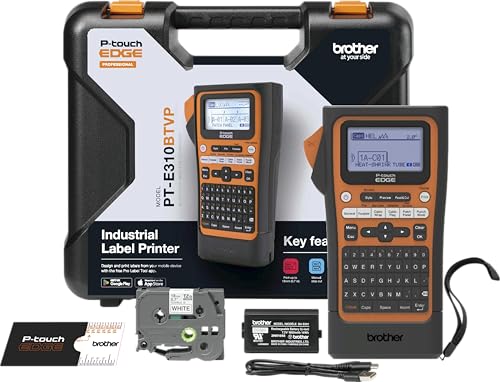
Brother PT-E310BT industrial label printer, Bluetooth, USB-C
Bluetooth and USB-CQuick application keysPatch panel layoutsTemplate storage
Check price on Amazon
Best for: Installers who mix laminated flags and heat shrink on the same job.

The PT-E310BT is a mid-size industrial label printer with Bluetooth and USB-C, quick application keys for cable wrap, cable flag and patch panel layouts, and storage for databases and templates. It prints Brother's laminated TZe tapes and takes the company's heat shrink HSe tubing, so it covers both flat and tube marking. USB-C charging and file import make it practical for panel work.

The tradeoff is cost. It is a pricier unit than the SUPVAN machines and uses Brother cassettes that cost more per marker than generic tape. Against the G15M Keyboard, it has stronger layout tools and an established supply chain but fewer label types in one body.

Ownership is easy because tape is widely sold. Keep HSe cassettes in their sleeves, update the app and wipe the head occasionally. For mixed jobs where you need laminated flags and heat shrink in the same day, this is the most flexible pick. The USB-C port also makes it easy to push templates from a laptop, which matters when a contract specifies a numbering scheme that you must follow label for label.

What works

  • Takes both TZe tape and HSe heat shrink
  • Quick keys for wrap, flag and patch panel
  • Stores templates and databases
  • Established tape supply

Watch out for

  • Higher cost than generic units
  • Brother cassettes cost more per marker
  • Heavier than the mini printers

Spec sheet

Connection
Bluetooth and USB-C
Quick keys
Wrap, flag, patch panel
Storage
Databases and templates
Media
TZe tape and HSe tubing
Class
Mid-size industrial
04
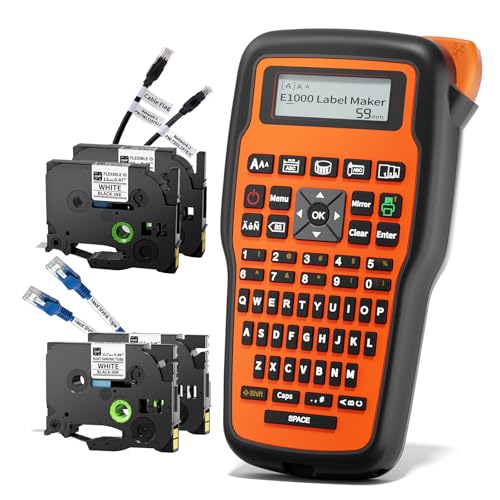
VolenGo E1000 heat shrink wire label maker, 12 mm tapes
12 mm heat shrink2:1 shrink ratioThree cable modesOne-touch keys
Check price on Amazon
Best for: Electricians marking single conductors at low cost.

The E1000 prints on 12 millimeter heat shrink tape with a 2 to 1 shrink ratio, plus flexible ID tapes for wrap labels. It offers three cable modes and one-touch shortcut keys for common layouts, and the kit includes two packs of tape. The maker lists a 2024 tape upgrade for print quality.

The tradeoff is fixed width. At 12 millimeters it fits mid-size conductors but not the smallest or the largest tubes. Compared with the SUPVAN G15M Mini, it has more keys but a less modern battery pitch, and its brand is newer than Brother.

Ownership centers on tape supply. Heat shrink needs a heat gun at the right distance and temperature, and over-shrinking can smear the print. Keep spare cassettes and clean the head regularly to avoid streaks across the text. For a home lab or a hobby panel build, the starter tapes in the box cover the first few dozen wires, which is often all a weekend project needs.

What works

  • 2:1 shrink ratio grips wires tightly
  • One-touch keys speed common layouts
  • Starter tapes included in the kit
  • Three cable modes cover wrap and tube

Watch out for

  • Fixed 12 mm width limits tube sizes
  • Newer brand with less tape history
  • Needs a heat gun step

Spec sheet

Tape width
12 mm
Shrink ratio
2:1
Modes
Three cable modes
Keys
One-touch shortcuts
Kit
Heat shrink and flexible ID tapes
05
Vixic DM170 Bluetooth heat shrink wire label maker, 320 g
320 g weight1200 mAh USB-CSmart tape detectPrint Master app
Check price on Amazon
Best for: Field technicians who want the lightest Bluetooth unit.

The DM170 weighs about 320 grams and uses a 1200 mAh rechargeable battery with USB-C charging. It connects through the Print Master app and detects the loaded tape automatically, which prevents layouts that do not match the cassette. It prints heat shrink wire labels and fits easily into a tool pouch.

The tradeoff is brand recognition and support. The app and tape ecosystem are newer than Brother's, so confirm tape availability before buying a stock. Against the SUPVAN G15M Mini, it offers a similar lightweight format with different software and supplies.

Ownership is simple: charge by USB-C, keep cassettes dry and update the app. Wipe the head when prints streak. A light body is comfortable on long jobs, but it also means less stable handling on a workbench. Pair it with a small stand or a cassette case so it does not slide while you cut tube, and keep a USB-C cable in the same pouch.

What works

  • Light at about 320 g
  • USB-C charging for easy top-ups
  • Smart tape detection avoids layout errors
  • Free app for list printing

Watch out for

  • Newer app and tape ecosystem
  • No built-in keyboard
  • Light body is less stable on a bench

Spec sheet

Weight
320 g
Battery
1200 mAh
Charging
USB-C
App
Print Master
Detection
Smart tape detection

Spec sheet decoder

What the numbers on the box really mean

The specs manufacturers lead with, translated into what they tell you about real-world performance.

Shrink ratio

How much the tube contracts when heated, such as 2:1 for half its diameter. It sets grip on the wire.

Watch forThe E1000 uses 2:1 tube.

Margin

The blank leader before and after the printed text. Smaller margins waste less tube.

Watch forThe G15M models print with margins near 0.2 inches.

mAh

Battery capacity in milliamp hours. Higher means more printing between charges.

Watch forThe G15M Mini, Keyboard and DM170 all list 1200 mAh.

HSe tubing

Brother's heat shrink cassette family. It fits compatible Brother industrial printers.

Watch forThe PT-E310BT uses it, and third-party HSe-compatible tube exists.

Smart tape detection

The printer reads the loaded cassette and adjusts the layout. It prevents mismatched widths.

Watch forThe DM170 lists it.

Methodology

How We Evaluated These Heat Shrink Label Printers

Tube compatibility

We checked which tube diameters and ratios each printer accepts. The E1000 is fixed at 12 mm with a 2:1 ratio, while the Brother accepts several HSe sizes. Wider range scored higher.

Workflow speed

We compared keyboards, shortcuts and import options. The G15M Keyboard and PT-E310BT stood out, while app-only machines needed a phone. We weighed typical jobs of fifty wires.

Battery and portability

We compared weight and battery claims. The G15M Mini's three-month rating and the DM170's 320 g body earned credit. Heavier units lost points on long jobs.

Cassette supply

We looked at how easy it is to find replacement cassettes. Brother's supply is widest, while newer brands need checking. We favored machines that also print general labels.

Cost of ownership

We weighed printer price against cost per marker. Generic cassettes cost less, but supply risk offsets savings. The lineup spans the low-cost E1000 to the Brother.

Decision guide

How to Choose the Right Heat Shrink Label Printers

By Job Type

SituationPickWhy
Panel wiring, many wire numbersSUPVAN G15M KeyboardBuilt-in keyboard
Pocket kit, list importsSUPVAN G15M MiniMonths of battery
Mixed tube and laminated flagsBrother PT-E310BTTZe and HSe support
Single conductor markingVolenGo E10002:1 tube tape
Lightweight field workVixic DM170320 g body

By Budget

Budget tierPickWhy
Lowest costVolenGo E1000Starter tapes included
Low to midVixic DM170Light Bluetooth unit
Mid rangeSUPVAN G15M MiniLong battery and many label types
Upper midSUPVAN G15M KeyboardKeyboard and app
HighestBrother PT-E310BTEstablished brand and tape supply

Keyboard vs App-Only

Keyboard models

The SUPVAN G15M Keyboard and the VolenGo E1000 let you type wire numbers directly. They keep working when a phone is dead or the app changes, and suit crews that edit labels on site.

App-only models

The SUPVAN G15M Mini and the Vixic DM170 use Bluetooth apps with list import. They are lighter and cheaper, and they excel when a spreadsheet drives the job.

Pick a keyboard for field edits and an app for long imported lists.

Generic Tape vs Brother HSe

PreferencePickWhy
Widest supplyBrother PT-E310BTEstablished HSe line
Lowest cassette costVolenGo E1000Generic 12 mm tapes
Many label typesSUPVAN G15M Keyboard11 label types
Long batterySUPVAN G15M MiniUp to 3 months
USB-C top-upsVixic DM170Power bank friendly

For Panel Wiring Specifically

Look for

A keyboard or fast import, tube sizes that match your conductors and a battery that lasts a shift. Patch panel and punch-down shortcuts help for network work.

In this comparison

The SUPVAN G15M Keyboard suits panel building, while the Brother PT-E310BT adds patch panel layouts and the widest tape supply.

When to Spend More

Spend more if

You mark hundreds of wires monthly or mix tube and laminated labels. The Brother PT-E310BT and SUPVAN G15M Keyboard justify their cost in time and supply.

Save if

You mark wires occasionally. The VolenGo E1000 or Vixic DM170 handles light work at a much lower cost.

Ownership

Maintenance schedule

The upkeep that decides whether this machine lasts two seasons or ten.

TaskIntervalWhy it matters
Service the print headEvery few cassettesResidue on the head streaks the text. Wipe it with isopropyl alcohol on a swab.
Store cassettes coolAlwaysHeat can shrink or warp tube cassettes before use. Keep them in sleeves away from heat guns.
Charge the batteryMonthlyLithium cells age when stored empty. Top up at least monthly.
Clean the cutterMonthlyAdhesive and plastic dust dull the blade and leave ragged cuts. Wipe it with alcohol.
Update the appQuarterlyBluetooth pairing and tape detection depend on current software. Updates add cassette support.

FAQ

Frequently Asked Questions

Is heat shrink better than wrap labels for wires?

Heat shrink grips the conductor and cannot slide off, so it suits permanent wire marking. Wrap labels are faster and fit bundles. Many printers here, including the SUPVAN G15M, do both.

How much should I budget for a heat shrink label printer?

The printer itself is a small share of the cost. Cassettes are the recurring expense, and Brother HSe cassettes cost more per marker. Count your yearly wire marks to estimate spend.

Do I need a heat gun?

Yes. A heat gun or a hot-air tool shrinks the tube. Keep it at a moderate distance to avoid smearing the print, and let the tube cool before handling.

What size tube should I buy?

Choose a tube that slides over the largest part, such as a connector, and shrinks to grip the wire. A 2 to 1 ratio handles most cases, while 3 to 1 suits large connectors.

Can these printers also make normal labels?

The SUPVAN G15M models print fixed-size, continuous and cable labels, and the Brother PT-E310BT prints TZe tape. The E1000 prints flexible ID tapes. Check each model's media list.

Do I need a phone?

The SUPVAN G15M Keyboard and the E1000 have keyboards. The G15M Mini and DM170 rely on apps. Keep a phone charged if you use app-driven units.

Bottom line

The short version

Browse more heat shrink label printerson Amazon →
James Miller, Lead Machine Editor

About the author

James Miller

Lead Machine Editor, MachineFanatic

James Miller leads MachineFanatic's buying guides, turning spec sheets, manuals and owner feedback into clear verdicts on power tools, outdoor power equipment, shop machines and kitchen machines.

More from James →

Keep reading

Related guides