
Amazon affiliate links - we earn a commission.Affiliate disclosure

Buying guide · 12 min read · Updated 2026-11-18

Best iDPRT Label Printers (2026)

Four iDPRT thermal label printers compared on ips, dpi, label width and connectivity: the iD880, the SP310, a 3 inch LAN unit and a wireless 4x6 model.

James MillerBy James MillerLead Machine Editor4 machines comparedSpec-sheet verified
Best iDPRT Label Printers

At a glance

Our top picks

Side by side

Spec comparison

MachineSpeedResolutionLabel widthConnectivityTechnology
iDPRT iD880 4x6 direct thermal printer, 6 ips, USB and EthernetBest OveralliDPRT iD880 4x6 direct thermal printer, 6 ips, USB and EthernetUp to 6 inches per second203 dpi1 to 4.64 inchesUSB and EthernetDirect thermal
iDPRT SP310 desktop thermal label printer, 80 labels per minuteBest for Address and FBA LabelsiDPRT SP310 desktop thermal label printer, 80 labels per minute4 ips, up to 80 2x3 inch labels per minute203 dpi1 to 3.35 inches (25 to 85 mm)n/an/a
iDPRT 3 inch thermal label printer, USB and LANBest 3 Inch Network UnitiDPRT 3 inch thermal label printer, USB and LANn/an/an/aUSB or LAN networkDirect thermal, no bound consumables
iDPRT 4x6 wireless thermal printer, HereLabel app, BluetoothBest Wireless 4x6iDPRT 4x6 wireless thermal printer, HereLabel app, Bluetoothn/an/an/an/an/a

A newer group of thermal printer makers has built a following with online sellers by pairing a fast engine with open label stock and a simple driver. These printers skip the ribbon, accept third-party labels and aim at the packing bench rather than the industrial dock.

What to compare is width range, speed, how the printer connects and how well the drivers cover your operating system. Those four points decide whether a printer fits a small shipping operation or becomes a weekly nuisance.

Before you buy

6 Criteria to Look For Before Buying an iDPRT Label Printer

  1. 01

    Label width range

    The iD880 handles 1 to 4.64 inches, the SP310 handles 1 to 3.35 inches and the 3 inch model stays within its own width class. Only the iD880 and the wireless 4x6 model print standard parcel labels. Measure your widest label before choosing, and include the liner edge, because the printable area is slightly smaller than the stated media width. A seller who also prints return labels or product tags on narrower stock should look for a printer that moves its guides smoothly, since constant resetting is where skewed prints come from. If you only ever print one size, the narrower machine is usually the better value.

  2. 02

    Speed and what it means

    The iD880 is rated up to 6 ips and the SP310 up to 4 ips, but the SP310 lists 80 small labels per minute because small labels print quickly. The two are not comparable without label length. For a mixed workload, count your real label sizes. A shop that prints three hundred 2x3 inch labels in an hour is well served by the SP310's rating, while a shop that prints three hundred parcel labels will wait on the longer 4x6 feed whatever the headline number says. Also leave headroom, since a printer working at its limit all day wears its head and roller faster.

  3. 03

    Open versus chipped labels

    The SP310 states it accepts third-party labels, which keeps label cost down. Printers that read a chip on the roll can lock you into the maker's stock. Always confirm label compatibility before buying a roll. Open stock also lets you shop for the best price per thousand labels and order a few sample rolls from different suppliers, since adhesive strength and paper sensitivity vary between brands. A label that prints dark but peels off a poly mailer is a worse buy than a slightly pricier one that sticks.

  4. 04

    Wired or wireless

    The iD880 and SP310 are wired, with USB and Ethernet on the iD880. The wireless 4x6 model uses Bluetooth and an app. A busy shipper is better with a wired link, while a phone-based seller may prefer the cable-free workflow. Wired connections do not care about router restarts, phone updates or battery saver settings, which is why shipping benches overwhelmingly use them. If you pick wireless, keep the app and the phone's operating system current and test a label after every update.

  5. 05

    Driver coverage

    The SP310 lists separate drivers for Windows, macOS, Linux and ChromeOS, and the iD880 installs from a QR code download. Mixed offices need a printer whose driver actually runs on every computer. Test on your system during the return window. Install the driver, print a real label from your shipping platform and check the alignment on the first label, since a driver that installs cleanly can still shift the print by a few millimeters. If the print is off, the fix is usually a page-size setting in the shipping tool, not a faulty printer.

  6. 06

    Label durability

    All of these are direct thermal, so labels fade in heat, light and time. That is fine for parcels but not for long-term tags. If you need durable labels, a ribbon printer is the right tool. Parcels that ride in a hot delivery van for a day are fine, but a product label on a boxed item that sits in a sunlit shop window will gray out over a season. Printing a spare and keeping it in a drawer is a useful way to see how your stock ages.

Detailed reviews

The 4 best idprt label printers, explained

01
iDPRT iD880 4x6 direct thermal printer, 6 ips, USB and Ethernet
6 ips203 dpiUSB + Ethernet1 to 4.64 inch
Check price on Amazon
Best for: Sellers and small warehouses who print 4x6 parcel and narrower labels on one machine.

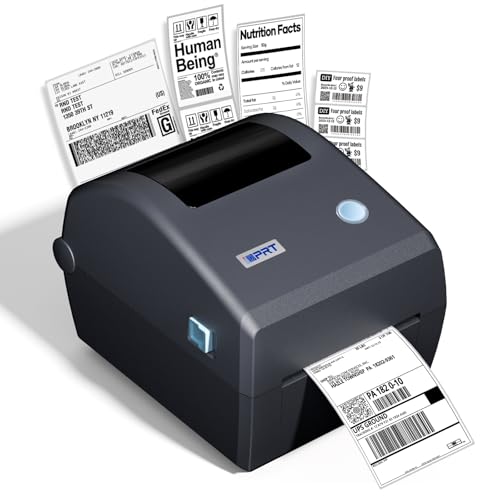
Width flexibility gives the iD880 an edge over fixed 4x6 machines. It accepts labels from 1 inch to 4.64 inches wide, so a seller can print a parcel label in the morning and a narrow product label in the afternoon without changing printers. The listing describes it as a commercial-grade direct thermal desktop printer for high-volume operations.

Speed is up to 6 inches per second at 203 dpi, which the maker says prints a standard 4x6 label in about one second. That figure assumes a short data job and a fast host, so treat it as a ceiling. Both a USB cable and an Ethernet cord are included, and the driver downloads through a QR code, which keeps setup short. Compared with the SP310 and the 3 inch unit, this is the widest and fastest of the three wired models.

As with every direct thermal machine, label fade is the cost of convenience. Keep finished labels out of hot rooms, wipe the head with alcohol and stock labels that match the roll holder. A second iD880 listing in the same family adds a built-in paper compartment and USB-only connection, so check which version you are ordering.

What works

  • Prints about one 4x6 label per second at 6 ips
  • 1 to 4.64 inch label width range
  • USB and Ethernet in the box
  • QR code driver download

Watch out for

  • Printed labels dim in heat and light
  • Speed is a ceiling, not a sustained rate
  • Two listings with different connection options

Spec sheet

Speed
Up to 6 inches per second
Resolution
203 dpi
Label width
1 to 4.64 inches
Connectivity
USB and Ethernet
Technology
Direct thermal
02
iDPRT SP310 desktop thermal label printer, 80 labels per minute
4 ips80 labels/min1 to 3.35 inchOpen label stock
Check price on Amazon
Best for: Sellers printing address, file folder and FBA product labels in volume.

Small labels, many of them, is the job this printer is built for. It prints 2x3 inch labels at up to 80 per minute at 4 ips and 203 dpi, which the listing aims at FBA and address label work. Labels from 1 to 3.35 inches wide fit, so it cannot print a 4x6 parcel label.

The listing stresses third-party label compatibility, so you are free to buy stock from any supplier, unlike printers that read a chip on the roll. Plug-and-play USB with separate drivers for Windows, macOS, Linux and ChromeOS is a practical selling point for mixed offices, and the maker says there are no wireless dropouts, since the connection is wired.

Because it is a narrower head, labels cost less per piece, and the whole printer is smaller than the iD880. Wipe the head every few rolls, keep the roll guides snug and store labels cool. If you ever need to ship a parcel, you will need a second printer, so decide on your main job before buying.

What works

  • Up to 80 small labels per minute
  • Accepts third-party label brands
  • Drivers for Windows, macOS, Linux and ChromeOS
  • Wired USB, no wireless dropouts

Watch out for

  • Cannot take full 4x6 postage stock
  • Maximum width 3.35 inches
  • Direct thermal labels fade

Spec sheet

Speed
4 ips, up to 80 2x3 inch labels per minute
Resolution
203 dpi
Label width
1 to 3.35 inches (25 to 85 mm)
Media
Third-party labels accepted
Drivers
Windows, macOS, Linux, ChromeOS and more
03
iDPRT 3 inch thermal label printer, USB and LAN
3 inchUSB + LANLabel varietySmall business
Check price on Amazon
Best for: Small offices sharing a printer for address and barcode labels.

A 3 inch machine with a LAN port fills a gap between the narrow address printer and the full 4x6 model. The listing says you can print a variety of label types over USB or the network, and it eliminates the need for ink or ribbon. For a small office where several people need address and barcode labels, the network option is the reason to consider it.

The listing makes broad claims about speed and cost savings, so judge it by its specifications and not its slogans: 3 inch width, direct thermal technology and USB or LAN. Next to the SP310, the 3 inch unit offers a network port, while the SP310 offers a published speed figure and a wide driver list. Next to the iD880, it gives up the 4x6 capability.

Treat it as a small-office printer and keep supplies simple. Wipe the head, keep guides snug and check that your label roll core fits the holder. If your volume grows, the iD880 is the natural step up.

What works

  • USB or LAN connection
  • No ink, toner or ribbon
  • Handles address and barcode labels
  • Compact 3 inch class

Watch out for

  • Cannot print full 4x6 labels
  • Listing gives few measured specs
  • Direct thermal fade applies

Spec sheet

Width class
3 inch
Connectivity
USB or LAN network
Technology
Direct thermal, no bound consumables
Labels
Address, barcode, mailing and more
Audience
Small business
04
iDPRT 4x6 wireless thermal printer, HereLabel app, Bluetooth
4x6Bluetooth appUSB tooNo ink
Check price on Amazon
Best for: Occasional sellers who ship from a phone or tablet.

Printing from a phone is what this model is about. It uses the HereLabel app over Bluetooth on iPhone, Android, Windows 10 and 11, and macOS, and it also connects by USB. The listing says you can print UPS and USPS labels by downloading the standard 4x6 PDF from the carrier and sending it to the printer.

That workflow is practical for occasional sellers who do not want a desktop printer on the packing table. Against the iD880, you give up Ethernet and the extra width range, but gain a wireless workflow aimed at phones. The usual caution about Bluetooth applies: pairing can fail, range is short and the app must be kept current.

It is a direct thermal printer, so there is no ink or ribbon, and labels fade with heat. Keep a USB cable at hand, wipe the head and use 4x6 labels sized to the guides. If you ship daily, the wired iD880 will be steadier.

What works

  • Bluetooth printing from phones
  • USB and Windows, macOS support
  • Prints UPS and USPS 4x6 PDFs
  • No ink or ribbon

Watch out for

  • Bluetooth pairing can be fussy
  • No Ethernet
  • Fewer width options than the iD880

Spec sheet

Label size
4x6 inch
Wireless
Bluetooth via HereLabel app
Systems
iPhone, Android, Windows 10/11, macOS
Wired
USB connection
Carriers
UPS and USPS via PDF download

Spec sheet decoder

What the numbers on the box really mean

The specs manufacturers lead with, translated into what they tell you about real-world performance.

ips

Inches per second is the feed rate. Real speed depends on label length and data transfer.

Watch forThe iD880 lists 6 ips and the SP310 lists 4 ips.

80 labels per minute

A rate quoted for small 2x3 inch labels. Longer labels reduce it.

Watch forThe SP310 lists 80 per minute, which does not apply to 4x6 stock.

Third-party label compatibility

The printer accepts rolls from any supplier. It lowers running cost.

Watch forThe SP310 states it.

HereLabel app

The vendor's app for Bluetooth printing from phones and computers. The printer depends on it.

Watch forThe wireless 4x6 model needs it.

LAN port

A wired network connection that lets several computers share the printer.

Watch forThe iD880 and the 3 inch model list it.

Methodology

How We Evaluated These iDPRT Label Printers

Label size and format

We compared width ranges and the label sizes each printer supports. The iD880's 1 to 4.64 inch range is the widest. The SP310 and the 3 inch model were judged as narrower tools.

Speed and workload

We read the stated ips and label counts per minute. The iD880 at 6 ips and the SP310 at 80 labels per minute represent different workloads. We treated them as ceilings, and we gave more weight to the stated label width range than to speed, since a printer that cannot take your label is useless however fast it is.

Connectivity and drivers

USB, Ethernet and Bluetooth support, plus listed operating systems, were checked. The SP310's four-platform driver list stands out. The Bluetooth model was judged on convenience and risk.

Consumables and openness

We checked whether the printer takes third-party labels. Direct thermal labels fade, and that was a shared limit. We did not quote prices.

Ownership reality

Based on owner feedback patterns, we weighed head cleaning, roller wear and app dependence. Wired printers scored for steadiness. Wireless models were judged for convenience against the risk of pairing issues. Because this is a newer brand with a thinner long-term record than older barcode makers, we put extra weight on how clearly each listing states its specifications and driver support.

Decision guide

How to Choose the Right iDPRT Label Printers

By Label Size

SituationPickWhy
4x6 parcel labels at volumeiDPRT iD8806 ips and 1 to 4.64 inch range
Address and FBA labelsiDPRT SP31080 labels per minute on 2x3 inch stock
Shared small office printeriDPRT 3 inch LAN modelUSB or network connection
4x6 labels from a phoneiDPRT wireless 4x6HereLabel app over Bluetooth

By Budget

Budget tierPickWhy
Lowest costiDPRT wireless 4x6App-driven basic printer
Low-midiDPRT 3 inch LAN modelSmall network printer
MidiDPRT SP310Fast narrow label machine
HighestiDPRT iD880Widest and fastest

Wired vs Wireless

Wired

The iD880 and SP310 use USB, and the iD880 adds Ethernet. They are steady and fast. They tie the printer to a desk.

Wireless

The 4x6 model uses Bluetooth and an app. It works from a phone. It depends on pairing and app support.

Choose wired for volume; choose wireless for phone shipping. A seller who prints more than a few dozen labels a day will feel every dropped Bluetooth link, so the cable on the iD880 or SP310 pays for itself in saved minutes.

Parcel vs Product Labels

PreferencePickWhy
Postage labelsiDPRT iD880Prints 4x6 in about a second
Product and barcode labelsiDPRT SP310Open stock and driver coverage
Mailing and addressiDPRT 3 inch LAN modelFits a small office
Occasional postage from a phoneiDPRT wireless 4x6PDF printing via app

For E-Commerce Shipping Specifically

Look for

A printer that handles your label size, accepts cheap stock and has drivers for your computer.

In this comparison

The iD880 covers parcels and narrow labels, the SP310 covers FBA, and the wireless 4x6 covers occasional phone shipping. The 3 inch LAN model suits a small office that mails letters and packages from several desks, and it should not be bought as a parcel printer.

When to Spend More

Spend more if

You print hundreds of labels a day. The iD880 is the strongest here, because its wide label range lets it absorb a change in what you sell without a second purchase, and its Ethernet port lets a second packer share it.

Save if

You print occasionally. The wireless 4x6 model or the 3 inch unit is enough, and either one can be replaced later without regret if your volume grows into the iD880.

Ownership

Maintenance schedule

The upkeep that decides whether this machine lasts two seasons or ten.

TaskIntervalWhy it matters
Wipe the print headEvery few rollsDust and adhesive dim prints. A swab dampened with alcohol removes them.
Clean the platen rollerMonthlyResidue causes misfeeds. A clean roller stops labels skewing. Use a swab damp with alcohol, rotate the roller by hand while you wipe and let it dry fully before feeding labels, because a damp roller can pull a label off its liner.
Set the roll guidesOn each roll changeLoose guides skew prints. Snug guides keep the print on the label. After a roll change, feed one blank label and confirm it exits straight, because a roll that sits slightly crooked will drift further as it unwinds.
Keep drivers and app currentQuarterlyOperating system updates can break drivers. The Bluetooth model needs its app updated. Keep the installer file on a shared drive so a replacement computer can be set up in minutes without hunting for a download link.
Store labels cool and dryOngoingWarm storage darkens thermal rolls. Keep spare rolls sealed.

FAQ

Frequently Asked Questions

iD880 or SP310?

Choose the iD880 if you print 4x6 parcel labels. Choose the SP310 for address, FBA and small labels, where it prints up to 80 per minute.

Can I use third-party labels?

The SP310 states it accepts them. Check the other listings before ordering, and match roll size to the guides. Buy one test roll from a new supplier before a bulk order, because adhesive and paper sensitivity differ and a bad batch wastes more than the roll.

Is the wireless model reliable?

It works for occasional use, but Bluetooth pairing can fail and range is short. Keep a USB cable ready as a backup, and avoid relying on it for a deadline-driven shipment where a dropped link costs you a carrier pickup.

Do these printers need ink?

No. They are direct thermal printers, so there is no ink, toner or ribbon.

How durable are the printed labels?

Labels printed this way dim in sun and heat. They suit parcels, and ribbon printers suit long-term tags. Storing spare labels in a cool cupboard and printing shortly before shipping gives the longest practical life.

Does the iD880 come in more than one version?

Yes. One listing is USB with a built-in paper compartment, and another adds Ethernet. Read the listing carefully before ordering, and confirm the connection options and label width range match what you expect, because the title alone does not always show the difference.

Bottom line

The short version

Browse more idprt label printerson Amazon →
James Miller, Lead Machine Editor

About the author

James Miller

Lead Machine Editor, MachineFanatic

James Miller leads MachineFanatic's buying guides, turning spec sheets, manuals and owner feedback into clear verdicts on power tools, outdoor power equipment, shop machines and kitchen machines.

More from James →

Keep reading

Related guides