
Amazon affiliate links - we earn a commission.Affiliate disclosure

Buying guide · 13 min read · Updated 2026-11-18

Best Industrial Label Printers (2026)

Six industrial label printers for electricians, data-comm and facility crews compared on tape width, dpi, cutters, connectivity and database printing.

James MillerBy James MillerLead Machine Editor6 machines comparedSpec-sheet verified
Best Industrial Label Printers

At a glance

Our top picks

Side by side

Spec comparison

Industrial label printers are the portable and bench machines that electricians, data-comm installers, facility technicians and lab staff use to mark cables, panels, pipes and equipment. They print durable laminated or cartridge labels that survive heat, solvents and handling in a way that office labels do not.

Choosing one comes down to label width, resolution, how many labels you print per job and whether the printer must work from a database. A handheld that fits a belt and a networked desktop that serves a whole shop are both industrial, but they answer different questions.

Before you buy

6 Criteria to Look For Before Buying an Industrial Label Printer

  1. 01

    Tape width and range

    The PT-P950NW prints up to 36 mm, the PT-E560BT runs 3.5 to 24 mm and the Rhino 5200 uses 3/4 inch (19 mm) labels. Cable and wire work needs narrow tapes, while equipment placards need wide ones. Match the printer to your widest and narrowest labels. A common mistake is buying for the occasional wide placard and then paying for bulky wide tape on every routine job, so decide what you print most of the week, not what you print once a year. Wire wrap labels need the label long enough to overlap itself, which is a layout setting rather than a width limit.

  2. 02

    Resolution and small text

    The PT-P950NW lists 360 dpi and the MakeID P31S lists 300 dpi. Higher resolution matters on narrow cable labels with small text. Lower dpi is fine for large text and barcodes. A one-dimensional barcode on a narrow cable flag still scans well at 300 dpi, but tiny QR codes lose their edges below that, so look at the smallest code you intend to print. Printing a sample on the actual tape before a large batch is the cheapest quality test available.

  3. 03

    Handheld or bench

    The PT-E920BT, PT-E560BT, Rhino 5200, M410 and P31S are portable. The PT-P950NW is a bench printer with a network port. A crew on ladders needs portable, and a shop with many users needs the bench model. Handheld batteries also age, so a printer that works only on a charged pack is a risk on a long job, which is why a spare pack or a wall adapter is worth checking before you buy. Weight matters too, since a printer carried all day gets left behind when it is heavy.

  4. 04

    Database and app printing

    The PT-E920BT prints from existing databases and works with Pro Label Tool. The P31S offers bulk data import. For jobs with hundreds of labels, typing each one is a recipe for mistakes. A spreadsheet of port names or asset numbers can feed the printer directly, and the labels come out in order, which also makes it easy to reprint one that gets damaged. Check that your database format, such as a spreadsheet file, is one the software can import.

  5. 05

    Standards compliance

    The Rhino 5200 meets ANSI and TIA/EIA-606-A labeling standards and prints Code 39 and Code 128 barcodes. If an inspector checks your cabling labels, compliance matters more than features. Check your project specification before you buy, and ask the client or inspector which label format they expect. A compliant printer does not make a label compliant on its own, since the content and placement also have to follow the standard.

  6. 06

    Media system and durability

    Brother uses laminated tapes and heat shrink, Brady uses drop-in cartridges, and Dymo uses its own tapes. Each system has different materials for heat, solvents and outdoor use. Check that the material you need exists for the printer you choose. A freezer, a hot roof space or an outdoor mast each demand a different adhesive and film, and not every system offers all of them. Ask for the material's temperature and chemical ratings before ordering a roll.

Detailed reviews

The 6 best industrial label printers, explained

01
Brother PT-E920BT industrial printer, Bluetooth and dual cutter
BluetoothUSB-CDual cutterDatabase print
Check price on Amazon
Best for: Data-comm and electrical crews printing from databases with strip-style half-cuts.

A dual cutter with half-cut support is the practical headline. The E920BT prints strips of labels and half-cuts them so the backing stays in one piece, which turns a hundred cable flags into a peel-and-apply strip rather than a pile of loose labels. For a crew labeling a patch panel or a rack, that saves minutes on every job.

It works with the Pro Label Tool app and can print directly from existing databases, including barcodes and QR codes, which cuts typing errors on large jobs. Bluetooth and USB-C cover phone and laptop use, and the high-resolution print engine suits small text on cable labels. Next to the E560BT in this guide, the E920BT is the higher-resolution, higher-throughput choice.

In year three, the wear parts are the cutter blades and the platen roller, and the battery pack ages with use. Keep a spare cutter, clean the head with alcohol and store tapes flat. It is an investment machine, and a small crew that labels a few items a month will not use its strengths.

What works

  • Dual cutter with half-cuts for strips
  • Prints from databases, barcodes and QR codes
  • Bluetooth and USB-C connection
  • High-resolution print for small text

Watch out for

  • Costly for light users
  • Needs the app and software learning
  • Cutter blades are a wear item

Spec sheet

Connectivity
Bluetooth and USB-C
Cutter
Dual auto-cutter with half-cuts
Software
Pro Label Tool app
Data
Prints from existing databases
Resolution
High-resolution industrial print
02
Brother PT-P950NW network printer, 36 mm labels, 360 dpi
36 mm tape360 dpi3.1 ipsWi-Fi + network
Check price on Amazon
Best for: Facility and lab benches that print wide, sharp laminated labels from several computers.

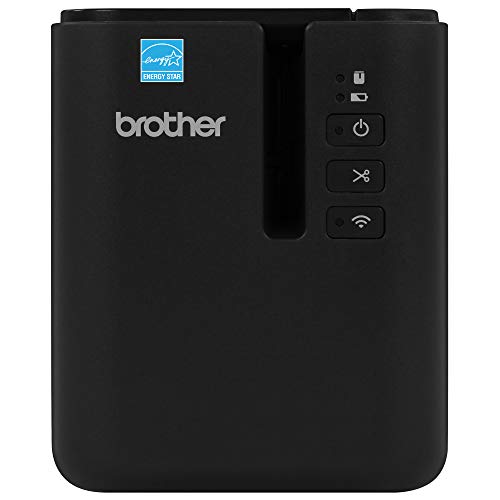
Desktop industrial is the right frame for the P950NW, and it is a different tool from the handheld units. It prints laminated labels up to 36 mm wide at 360 dpi and up to 3.1 ips, which makes it the sharpest and widest in this group. A wired network port and Wi-Fi let several people print from their own computers.

That resolution matters on small cable labels, where 360 dpi gives clearer text than the 300 dpi class of the Makeid P31S. The width matters for equipment placards and pipe markers that a 24 mm handheld cannot reach. The price of those gains is size and power: this printer lives on a bench and plugs into a wall.

Expect to buy matching laminated tapes and keep spares for the common widths. Clean the head and cutter edge occasionally, and keep the tape compartment closed against dust. If your crew works on a ladder, choose a handheld instead, and if your shop labels at a bench, this is the stronger option.

What works

  • 36 mm labels, the widest here
  • 360 dpi sharp small text
  • Wired network and Wi-Fi
  • Durable laminated tapes

Watch out for

  • Bench machine, not portable
  • Needs mains power and space
  • Matching tape costs add up

Spec sheet

Maximum tape width
36 mm
Resolution
360 dpi
Speed
Up to 3.1 ips
Connectivity
Wired network and Wi-Fi
Labels
Durable laminated tape
03
Brother PT-E560BTBP industrial kit, Bluetooth, dual cutter
3.5 to 24 mm6 tapesDual cutterHeat shrink
Check price on Amazon
Best for: Contractors who label cables with flat labels and heat shrink tubes from one case.

Variety is what this kit offers. The E560BT handles tapes from 3.5 mm up to 24 mm, takes laminated labels and heat shrink tubes and ships with six tapes and a carrying case, so a technician can start a job immediately. It is a good fit for cabling work where both flat labels and shrink tubing are needed.

Quick application keys for cable wrap, cable flag, patch panel, punch block and faceplate labels speed layout, because the printer formats the label for the job rather than asking you to measure. Bluetooth connects it to a phone for larger designs. Compared with the E920BT, you get a lower resolution and fewer database features, but you get the full kit for the job.

Keep the tapes in their case, since heat shrink tube cartridges curl in a hot truck. Replace the cutter blade when edges turn ragged and recharge or replace the battery before long days. For a contractor who wants one printer and one case, it is hard to beat.

What works

  • 3.5 to 24 mm tape range
  • Heat shrink tube support
  • Six-tape kit with carrying case
  • Quick keys for cabling layouts

Watch out for

  • Lower resolution than the E920BT
  • Kit tapes run out and need reordering
  • Heavier than a pocket labeler

Spec sheet

Tape range
3.5 mm to 24 mm
Kit
6 tapes, carrying case and more
Cutter
Dual cutter
Supplies
Laminated labels and heat shrink tubes
Quick keys
Cable wrap, flag, patch panel, punch block, faceplate
04
Dymo Rhino 5200 industrial label maker with case
Code 39 / 12819 mm labelsANSI TIA-606-AHot keys
Check price on Amazon
Best for: Telecom and electrical crews who label to ANSI and TIA/EIA-606-A standards.

Standards compliance is the point of the Rhino 5200. It prints Code 39 and Code 128 barcodes on 3/4 inch labels for asset management and meets ANSI and TIA/EIA-606-A labeling standards, which matter in structured cabling and telecom jobs where an inspector checks the labels. One-touch Hot Keys size, space and format text for electrical work automatically.

The tradeoff is that this is an older design with a keyboard and no app, so it lacks Bluetooth and database features. Against the E920BT, you give up modern connectivity and gain a rugged, familiar tool that a crew can use without training. It ships with a carry case and two rolls.

Keep a stock of its proprietary tapes, since the printer only uses its own cartridges. Replace the batteries before they leak and clean the cutter with a dry swab. If your work is about a clean cable standard, not about databases, this remains a practical choice.

What works

  • Prints Code 39 and Code 128 barcodes
  • Meets ANSI and TIA/EIA-606-A labeling
  • One-touch Hot Keys for electrical work
  • Rugged case and two rolls included

Watch out for

  • No Bluetooth or app
  • Proprietary tapes only
  • Older platform, fewer features

Spec sheet

Barcodes
Code 39 and Code 128
Label width
3/4 inch (19 mm)
Standards
ANSI and TIA/EIA-606-A
Controls
One-touch Hot Keys
Kit
Carry case and 2 rolls
05
Brady M410 handheld industrial printer, 1 inch labels
1 inch labels110+ cartridgesSingle colorDataCom
Check price on Amazon
Best for: DataCom and electrical crews who want quick cartridge changes and tough materials.

Cartridges do the work in the M410. Each drop-in cartridge pairs ribbon and label, so there is nothing to thread, and the locking door has a window to show how much media remains. More than 110 cartridges in over 12 materials means you can match a label to heat, solvents or outdoor exposure without changing printers.

It prints pre-sized or continuous labels up to 1 inch wide in a single color with edge to edge printing. Compared with the Brother E-series, the cartridge system is faster to swap but limits you to the maker's media, and you have fewer widths. For DataCom and electrical labeling, 1 inch is generous.

Plan for cartridge cost as an ongoing expense and store spare cartridges flat. Keep the cartridge bay clean and the battery charged. It is a robust, simple tool that suits crews who value a quick media change over width flexibility.

What works

  • Drop-in cartridges, no threading
  • 110+ cartridges in 12+ materials
  • Edge to edge printing up to 1 inch
  • Locking door with media window

Watch out for

  • Single color only
  • Limited to 1 inch labels
  • Cartridges are an ongoing cost

Spec sheet

Label width
Up to 1 inch
Printing
Single color thermal, edge to edge
Media
Pre-sized or continuous
Cartridges
110+, 12+ materials
Fit
DataCom and electrical work
06
MakeID P31S portable industrial label maker, 300 dpi
300 dpi1 inchBluetoothBulk import
Check price on Amazon
Best for: Small shops labeling wires, tool bins and parts boxes at modest volume.

Low cost and modern software define the P31S. It prints at 300 dpi on tape up to 1 inch wide, connects by Bluetooth and lets you create and edit labels in an app or PC software, with bulk data import for larger jobs. QR code stickers for tool bins and parts boxes are among its listed uses.

It is aimed at wiring, tool organization and parts bins, and it does not claim the standards compliance or the heavy duty build of the Rhino 5200 or the Brother E-series. That makes it a sensible choice for a shop that wants industrial-style labels without a professional price.

The usual cautions apply to a newer brand: check tape availability and the app's update history. Keep spare tape, clean the head and charge the battery before use. For occasional jobs, it is good value.

What works

  • 300 dpi print at a small size
  • Bluetooth with app and PC software
  • Bulk data import for bigger jobs
  • QR code labels for organization

Watch out for

  • Newer brand, check tape supply
  • Not rated to formal standards
  • Narrower tape range than Brother

Spec sheet

Resolution
300 dpi
Label width
1 inch (0.75 inch tape in kit)
Connectivity
Bluetooth
Software
App and PC software
Features
Bulk data import, QR codes

Spec sheet decoder

What the numbers on the box really mean

The specs manufacturers lead with, translated into what they tell you about real-world performance.

360 dpi

Dots per inch of the print head. Higher dpi makes small text on narrow tape sharper.

Watch forThe PT-P950NW lists 360 dpi, and the P31S lists 300 dpi.

Half-cut

The cutter cuts through the label but not the backing, so a strip of labels stays together for peel and apply.

Watch forThe PT-E920BT lists dual cutters with half-cuts.

Heat shrink tube

Tubing that shrinks over a wire when heated, with the label printed on it. It is permanent.

Watch forThe PT-E560BT supports heat shrink tubes.

TIA/EIA-606-A

A standard for labeling in telecom and structured cabling. It sets how cables and pathways are identified.

Watch forThe Rhino 5200 lists compliance.

Drop-in cartridge

A cartridge that holds ribbon and label stock together. It locks in without threading.

Watch forThe M410 uses them, with 110 plus options.

Methodology

How We Evaluated These Industrial Label Printers

Width and range

We compared maximum widths and tape ranges. The PT-P950NW at 36 mm and the PT-E560BT at 3.5 to 24 mm set the range. Width was weighed against portability.

Print quality

We compared listed dpi and print method. The PT-P950NW at 360 dpi leads, and the P31S at 300 dpi follows. Small text on cable labels drove the weighting.

Workflow and software

Database printing, bulk import and apps were assessed. The PT-E920BT and P31S offer them, while the Rhino 5200 relies on hot keys. We judged by how much typing a large job requires.

Compliance and materials

We noted standards claims and material ranges. The Rhino 5200 states ANSI and TIA/EIA-606-A compliance, and the M410 lists 110 plus cartridges. We did not assume claims beyond the listing.

Ownership reality

Based on owner feedback patterns, cutter blades, batteries and tape supply were weighed. Newer brands were noted for supply risk. We did not quote prices. Because an industrial printer is bought for the media as much as the machine, we looked at how many material options each system lists and how easy they are to find.

Decision guide

How to Choose the Right Industrial Label Printers

By Job

SituationPickWhy
Rack and patch panel labels from databasesBrother PT-E920BTDatabase print and half-cut strips
Wide placards at a benchBrother PT-P950NW36 mm at 360 dpi over a network
Contractor cabling with heat shrinkBrother PT-E560BTBP3.5 to 24 mm and shrink tubes
Standards-checked telecom workDymo Rhino 5200ANSI and TIA/EIA-606-A
Fast media swaps in the fieldBrady M410Drop-in cartridges

By Budget

Budget tierPickWhy
Lowest costMakeID P31SPortable and app-driven
Low-midBrady M410Cartridge system
MidDymo Rhino 5200Compliance-focused kit
UpperBrother PT-E560BTBPContractor kit
HighestBrother PT-E920BT or PT-P950NWDatabase or bench power

Handheld vs Bench

Handheld

The PT-E920BT, PT-E560BT, Rhino 5200, M410 and P31S go to the job. They run on batteries and fit a belt or case. They are limited to narrower tapes.

Bench

The PT-P950NW stays on a bench with mains power and a network connection. It prints wide, sharp labels. It cannot travel to a ladder.

Choose handheld for field work; choose the bench model for shared wide-label work.

Tape vs Cartridge Systems

PreferencePickWhy
Widest tape varietyBrother PT-E560BTBPTapes from 3.5 to 24 mm
Fast media changeBrady M410Locking drop-in cartridge
Proprietary compliance kitDymo Rhino 5200Own tapes, standards-focused
Open software and bulk importMakeID P31SApp and PC software

For Cabling and Data-Comm Specifically

Look for

Quick layout keys for cable wrap and flags, half-cut strips and a tape that survives handling. Standards claims help on inspected jobs.

In this comparison

The PT-E920BT and PT-E560BT lead, the Rhino 5200 covers compliance, and the P31S covers light jobs.

When to Spend More

Spend more if

You label hundreds of cables per job or print from databases. The PT-E920BT pays back in time saved.

Save if

You label a few items a week. The P31S or M410 is enough.

Ownership

Maintenance schedule

The upkeep that decides whether this machine lasts two seasons or ten.

TaskIntervalWhy it matters
Replace cutter bladesWhen edges turn raggedA dull blade crushes tape and leaves frayed edges. Spare blades keep jobs moving.
Clean the print headEvery few tape changesResidue causes faint print. Use alcohol on a swab.
Charge or swap batteriesBefore each jobA weak pack causes light prints and cutter errors. Remove the pack for long storage.
Store tapes flat and coolOngoingHeat curls tape and shrink tubes. Keep them in their case.
Update the app and firmwareQuarterlyBluetooth printers rely on current software. Old versions cause connection errors.

FAQ

Frequently Asked Questions

E920BT or E560BT?

The E920BT adds database printing and higher resolution. The E560BT is a contractor kit with a wide tape range and heat shrink support.

Why choose the PT-P950NW?

It prints the widest labels here at 36 mm and 360 dpi and works over a network. It is a bench printer.

Does the Rhino 5200 print barcodes?

Yes, Code 39 and Code 128 on 3/4 inch labels. It is built for asset labeling.

Are cartridges better than tape?

Cartridges such as the M410's change fast. Tape systems offer more widths.

Are these labels durable?

Laminated and cartridge labels resist heat, water and abrasion better than office labels. Always check the material rating for your use.

Do I need an industrial printer?

Only if labels must survive harsh conditions or meet standards. A basic labeler is enough for home and office. The test is simple: if a failed label means rework, a failed inspection or a dangerous mix-up, pay for the industrial system, and if it only means a messy shelf, do not.

Bottom line

The short version

Browse more industrial label printerson Amazon →
James Miller, Lead Machine Editor

About the author

James Miller

Lead Machine Editor, MachineFanatic

James Miller leads MachineFanatic's buying guides, turning spec sheets, manuals and owner feedback into clear verdicts on power tools, outdoor power equipment, shop machines and kitchen machines.

More from James →

Keep reading

Related guides