
Amazon affiliate links - we earn a commission.Affiliate disclosure

Buying guide · 13 min read · Updated 2026-11-18

Best Inkless Label Printers (2026)

Seven inkless Bluetooth label printers compared by label width, resolution, app features and label stock, so you know what you will keep buying.

James MillerBy James MillerLead Machine Editor7 machines comparedSpec-sheet verified
Best Inkless Label Printers

At a glance

Our top picks

Inkless printers use heat on special paper, so there is no ink cartridge to dry out, no toner to buy and no ribbon to rethread. For a home organizer or a small seller, that removes the part of printing that normally goes wrong first.

The trade is that the label stock becomes the running cost and the label itself is the image, which means it fades with heat and age. Looking at roll size, sticker shape and app quality will tell you which inkless printer you will still enjoy using a year from now.

Before you buy

6 Criteria to Look For Before Buying an Inkless Label Printer

  1. 01

    Label width and stock type

    The SUPVAN T50M Pro handles 3/4 to 2 inch labels, and the NIIMBOT B1 and TYPONOS PM240 use sticker rolls such as 50x30 and 50x80 mm. The Phomemo D30 and Nelko P21 use narrow labels. Decide what you label before choosing, because the roll format is a lasting commitment.

  2. 02

    Running cost after the printer

    An inkless printer has no ink, but the label roll is the ongoing cost. Proprietary rolls can cost more per label than generic stock. Check how many rolls come in the bundle and where to buy more. A printer that ships with three rolls looks generous, but if a replacement roll of the same size costs a large share of the printer's price, the bundle is a loss leader. Work out the cost of a hundred labels before you decide, and favor printers whose rolls are sold by several shops, since a single-seller roll can vanish and leave you with a dead printer.

  3. 03

    Fade and waterproofing

    Direct thermal labels darken with heat and light. The T50M Pro lists a waterproof label finish, which is useful for bottles and kitchen use. A label that gets wiped often needs that coating. Even so, a waterproof finish is not the same as a heat-proof one, so a label on a dishwasher-safe container or a hot-car box will still fail. Test one label by rubbing it with a wet thumb and by leaving it on a sunny sill for a few days before you commit to a hundred.

  4. 04

    App quality and templates

    The PM240 lists 3800+ templates, the B1 lists 1500 symbols and 100 borders, and the T50M Pro lists 30+ fonts and image import. A strong app helps non-designers, but depends on the maker maintaining it. Check recent app reviews. Look for comments about pairing failures after phone updates, because that is the commonest complaint, and for whether the app asks for an account or location permission you are not comfortable giving. A printer with a modest app that works reliably beats one with a huge library that crashes.

  5. 05

    Resolution and clarity

    The PM240 is rated at 203 dpi, standard for this class. Text under about 6 point can blur on small labels at that resolution. Use larger fonts and bold styles on small stickers. Avoid thin decorative fonts and light borders, which break up on a thermal head, and leave a little white space around the text so a scanner or a tired eye can find it. A QR code on a small label needs at least a modest size to scan, so test one with your phone camera.

  6. 06

    Display and standalone use

    The Phomemo M110 has a small display, which makes it easier to use. Most others have no screen. Without a screen, troubleshooting depends on the app. A blinking light is the only clue on many pocket printers, and you end up consulting a manual to decode it. A display saves that time, which matters most for a shared printer in a household or small shop.

Detailed reviews

The 7 best inkless label printers, explained

01
SUPVAN T50M Pro Bluetooth label maker, 3/4 to 2 inch
3/4 to 2 inchWaterproof labels30+ fontsApp editing
Check price on Amazon
Best for: Households and small sellers who want wide, waterproof inkless labels with a strong app.

Width is the first strength: the T50M Pro prints labels from 3/4 inch up to 2 inches wide, which covers storage bins, jars, bottles and shipping tags with a single machine. Most pocket inkless printers stop at about 1.5 inches. A waterproof label finish is also listed, which is the difference between a pantry label that survives a wipe-down and one that smears.

The app lets you pull in images from a phone, tablet or PC and style a label with more than 30 fonts, and the listing describes processed images as high resolution and clear. That app depth makes the T50M Pro more of a design tool than a plain label maker. Compared with the Phomemo M110, you gain width and a waterproof stock, and give up the built-in display.

The cost of an inkless printer is the label roll, so buy rolls in bulk once you know your sizes. Wipe the head with alcohol if labels pale, keep spare rolls out of heat and keep the app updated. The bundle with three tapes is a sensible starting set.

What works

  • Prints 3/4 to 2 inch labels
  • Waterproof label finish
  • App with 30+ fonts and picture import
  • Suits bins, jars and shipping tags

Watch out for

  • Phone or PC needed for design
  • Labels still fade in heat
  • Larger than pocket printers

Spec sheet

Label width
3/4 inch to 2 inches
Finish
Waterproof label
Fonts
30+ in the app
Images
Add pictures from phone, tablet or PC
Use
Home organization and small business
02
Phomemo M110 portable thermal label printer with display
2 inch labelsDisplayBluetooth 4.033 ft range
Check price on Amazon
Best for: Home and small shop users who want a screen and sticker-style labels.

A small screen on the body is the unusual feature of the M110. It shows status so you are not guessing whether a roll is loaded or a job is queued, which cuts the trial-and-error that frustrates first-time users of screenless printers. The printer uses Bluetooth 4.0 with a stated range of up to 33 feet, and it connects to a phone with one tap.

The companion app is called Print Master, and it carries many label templates plus the option to design your own. The M110 works with sticker and barcode label rolls of about 2 inches wide, which suits shipping stickers, price tags and kitchen labels. It is more flexible about shapes than the narrower tape-style models in this guide.

With roll-fed sticker printer, label cost depends on how many shapes and sizes you stock. Keep rolls dry, wipe the head when prints pale and recharge before long sessions. It is a dependable all-round pick that sits just behind the T50M Pro on width and finish.

What works

  • Built-in display shows printer status
  • Bluetooth 4.0 up to 33 feet
  • Print Master app with many templates
  • Handles sticker and barcode rolls

Watch out for

  • Narrower than the T50M Pro
  • Labels fade in heat
  • App needed for design

Spec sheet

Label width
2 inch class
Display
Electronic display on the body
Bluetooth
4.0, range up to 33 feet
App
Print Master with templates
Format
Sticker and barcode labels
03
Phomemo D30 mini Bluetooth label maker with tape
Mini sizeTape and fixed labelsRechargeablePrint Master
Check price on Amazon
Best for: People who want the smallest possible inkless printer for cables and jars.

Mini is the right word for the D30. It is a pocket-sized printer that accepts both continuous label tape and fixed-length labels, an upgrade over versions that handled only one. That means you can print a long strip for a cable or a small sticker for a spice jar without changing machines.

The Print Master app supplies a large library of free design materials, and the printer uses BPA-free direct thermal printing, so there is no ink. The tradeoff is label width: it is a narrow-tape machine, so it does not match the T50M Pro or the M110 on size. It is the easiest of the group to carry.

Keep a couple of spare tape cartridges in a drawer, wipe the head if text pales and recharge before an organizing session. It is a good first inkless printer, and a poor choice for anything large.

What works

  • Pocket-sized and rechargeable
  • Takes continuous and fixed-length labels
  • Print Master app with free materials
  • BPA-free direct thermal printing

Watch out for

  • Narrow tape only
  • No display
  • Labels fade over time

Spec sheet

Label types
Continuous tape and fixed-length labels
App
Print Master with free materials
Technology
BPA-free direct thermal
Power
Rechargeable battery
Size
Mini pocket
04
NIIMBOT B1 label maker with three rolls of labels
50x30 mm labels3 rolls30+ fonts1500 symbols
Check price on Amazon
Best for: First-time buyers who want rectangles and round stickers in one box.

A starter bundle with three different roll shapes is how the B1 introduces itself. The box includes 50x30 mm white labels, 50x80 mm white labels and 50x50 mm round labels, so you can test rectangles and circles before choosing a favorite. That variety is handy for a seller who labels both boxes and small jars.

The NIIMBOT app supports iOS and Android and offers more than 30 fonts and languages, 100 borders and 1500 symbols, and it auto-identifies label size when you load a roll. That auto-detect feature cuts a common mistake, which is printing a layout sized for the wrong label. Compared with the D30, the B1 prints on wider sticker rolls and is a bit larger.

The ongoing cost is NIIMBOT-compatible label rolls, so check availability in the sizes you use. Keep rolls cool, clean the head occasionally and update the app. It is a friendly option for first-time buyers.

What works

  • Three roll shapes in the bundle
  • Auto-identifies label size
  • 30+ fonts, 100 borders, 1500 symbols
  • iOS and Android apps

Watch out for

  • Needs matching roll sizes
  • Labels fade in heat
  • App dependence

Spec sheet

Included rolls
50x30, 50x80 and 50x50 round labels
Systems
iOS and Android
Fonts
30+ fonts and languages
Design extras
100 borders, 1500 symbols
Detection
Auto-identifies label size
05
TYPONOS PM240 label maker, 203 dpi, Labelnize app
203 dpi3800+ templates3 rollsLabelnize app
Check price on Amazon
Best for: Casual users who want thousands of ready-made label designs.

A giant template library is the PM240's pitch: the Labelnize app lists more than 3800 templates, which is a lot of ready-made layouts for a printer in this class. For people who dislike designing from scratch, that matters more than raw speed.

The printer produces inkless prints at 203 dpi and ships with three rolls, including 40x30 mm white rectangles, 50x80 mm white labels and 50x50 mm pink round labels. 203 dpi is the standard for this class, and it gives clear text and simple barcodes on small labels. Against the NIIMBOT B1, the PM240 offers a bigger template pool.

A newer brand means checking roll availability and the app's longevity. Keep the rolls dry, wipe the head and update the app. It is best used for household and shop labels where the design effort should be low.

What works

  • 3800+ templates in the app
  • 203 dpi clear small text
  • Three mixed roll shapes in the box
  • Inkless printing

Watch out for

  • Newer brand, check roll supply
  • Labels fade in heat
  • App dependence

Spec sheet

Resolution
203 dpi
Templates
3800 plus
Bundle
3 rolls of mixed shapes
App
Labelnize
Print
Inkless, high definition
06
NDYIN N12 portable Bluetooth thermal sticker printer
PortableBluetoothBPA-freeTemplates
Check price on Amazon
Best for: Shoppers who want a small, simple Bluetooth printer to try inkless labeling.

Plain and light, the N12 is a small Bluetooth sticker printer that uses BPA-free direct thermal printing, so there is no ink to maintain. It pairs with a phone for printing, and the app offers templates and creative functions.

The listing is modest on numbers, so the case for it is cost and portability, not specifications. The bundle includes one tape, which is enough to try it. Compared with the T50M Pro, it lacks the wide labels and waterproof finish, and compared with the M110, it lacks a display.

Because published details are thin, check the label roll sizes and app reviews before buying. Keep the tape in a cool place and wipe the head when prints dim. It is a low-commitment way to try inkless printing.

What works

  • Small and portable
  • BPA-free direct thermal
  • App with templates
  • Low-commitment bundle

Watch out for

  • Few published specifications
  • Narrow label range
  • Labels fade in heat

Spec sheet

Technology
BPA-free direct thermal
Connection
Bluetooth to phone
Software
App with templates
Form
Portable mini sticker printer
Bundle
Machine with one tape
07
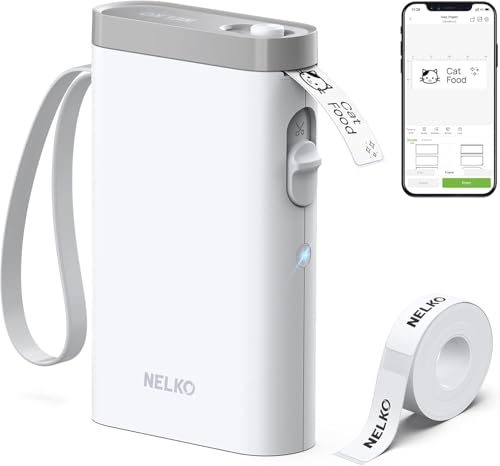
Nelko P21 inkless Bluetooth handheld label maker
Half the weightDirect thermaliOS + AndroidTemplates
Check price on Amazon
Best for: Households that want a light, simple phone-driven label maker.

Light weight is the P21's identity, and the maker says it is about half the size and weight of a traditional label maker. It prints on BPA-free direct thermal stock using high-speed chips, with a Bluetooth link to iOS and Android phones. For a household organizer, that translates to a printer you do not mind picking up.

Setup is a short sequence: download the Nelko app, pair over Bluetooth and choose a template. It uses small labels, so it does not match the wide-label capability of the T50M Pro. That puts it in the same group as the D30 and the N12, with an easier setup than either.

Store the labels cool, keep the printer out of sun and wipe the head when prints weaken. Check label availability in your preferred size before you stock up.

What works

  • About half the weight of older makers
  • No ink to dry out
  • Short Bluetooth setup
  • App templates for quick labels

Watch out for

  • Small label sizes only
  • Labels fade in heat
  • No keyboard backup

Spec sheet

Weight and size
Half that of traditional makers
Technology
BPA-free direct thermal
Connection
Bluetooth to iOS and Android
App
Nelko app with templates
Ink
None

Spec sheet decoder

What the numbers on the box really mean

The specs manufacturers lead with, translated into what they tell you about real-world performance.

Direct thermal

Heat darkens coated paper, so no ink or ribbon is used. The label is also the image, so it fades.

Watch forAll printers in this guide use it.

BPA-free

The thermal paper coating does not contain bisphenol A. It is a consumer safety claim, not a performance one.

Watch forThe D30, N12 and P21 state it.

203 dpi

About 8 dots per millimeter. It is standard for small label printers.

Watch forThe PM240 lists it, and others rely on the same class.

Bluetooth range

How far the phone can be from the printer. Walls and distance cut it.

Watch forThe M110 lists up to 33 feet with Bluetooth 4.0.

Auto-identify label size

The printer reads the roll and tells the app which size is loaded. It prevents layout mismatches.

Watch forThe NIIMBOT B1 lists it.

Methodology

How We Evaluated These Inkless Label Printers

Label format and width

We compared supported label widths and shapes, from narrow tape to 2 inch sticker rolls. The T50M Pro's 3/4 to 2 inch range sets the top. Format drove the ranking.

Running cost logic

We considered label roll availability and the cost of proprietary stock. Bundles with several rolls counted for convenience. We did not quote prices.

App and design tools

We compared fonts, templates and image import. The PM240 and B1 lead on libraries, and the T50M Pro leads on image handling. We judged by how much design effort a beginner needs.

Durability of the label

We noted waterproof claims and the limits of direct thermal paper. The T50M Pro stands out for waterproofing. Others share the fade risk.

Ownership reality

Based on owner feedback patterns, we weighed app updates, pairing stability and roll supply. Newer brands carry more risk on supply. The ranking balances capability against that risk.

Decision guide

How to Choose the Right Inkless Label Printers

By Label Type

SituationPickWhy
Bins, jars and shipping tagsSUPVAN T50M Pro3/4 to 2 inch waterproof labels
Sticker and barcode labels with a screenPhomemo M110Display and Print Master app
Cables and small jarsPhomemo D30Mini tape and fixed labels
Mixed shapes to testNIIMBOT B1Three roll shapes in the bundle
Lots of ready-made designsTYPONOS PM2403800+ templates

By Budget

Budget tierPickWhy
Lowest costNDYIN N12Basic portable printer
Low-midNelko P21Light handheld
MidPhomemo D30Mini with tape variety
Upper-midNIIMBOT B1Starter bundle
HighestSUPVAN T50M ProWide and waterproof

Tape vs Sticker Rolls

Tape style

The D30, P21 and N12 favor narrow tapes. They suit cables and small jars. They are the smallest to carry.

Sticker rolls

The M110, B1, PM240 and T50M Pro use wider sticker rolls. They suit bins and shipping tags. They cost more to stock.

Choose tape for small items; choose sticker rolls for bins and parcels.

App Strength

PreferencePickWhy
Image import and fontsSUPVAN T50M ProPictures from phone or PC
Huge template poolTYPONOS PM2403800 plus templates
Symbols and bordersNIIMBOT B11500 symbols and 100 borders
Simple setupNelko P21Short Bluetooth steps

For Home Organizing Specifically

Look for

Quick setup, labels that stick to plastic bins, and a roll you can reorder. Waterproofing helps in the kitchen.

In this comparison

The T50M Pro handles bins and jars, the P21 and D30 handle small items, and the B1 is the easiest starter.

When to Spend More

Spend more if

You label weekly and want waterproof labels. The T50M Pro repays the cost in durability and width.

Save if

You label rarely. The N12 or P21 is enough.

Ownership

Maintenance schedule

The upkeep that decides whether this machine lasts two seasons or ten.

TaskIntervalWhy it matters
Wipe the print headWhen prints paleDust and residue weaken heat transfer. Use a swab with alcohol.
Store label rolls cool and dryOngoingHeat darkens thermal paper before use. Keep spare rolls in their bag.
Recharge the batteryBefore long sessionsA low battery causes light prints. Charge fully before a big job.
Update the appQuarterlyBluetooth pairing depends on current software. Old versions can drop connections.
Check the roll alignmentOn each roll changeA crooked roll feeds unevenly. Seat it flat against the guides.

FAQ

Frequently Asked Questions

Are inkless labels waterproof?

Not by default. The SUPVAN T50M Pro lists a waterproof label finish, and other labels may smear when wet.

Will the labels fade?

Yes, direct thermal labels fade with heat and sun. Keep them indoors and out of direct light.

Which printer has the widest labels?

The SUPVAN T50M Pro prints 3/4 to 2 inch labels, which is the widest in this guide.

Do I need a phone?

Yes, for design on all of these. The printers pair by Bluetooth with an app.

What is the running cost?

Label rolls are the only consumable. Proprietary rolls cost more per label than generic ones. Buying a case of rolls in the size you use most brings the per-label cost down noticeably, so settle on one or two sizes and stick to them.

Can I use any brand of label?

Usually only matching rolls fit. Check sizes before you stock up.

Bottom line

The short version

Browse more inkless label printerson Amazon →
James Miller, Lead Machine Editor

About the author

James Miller

Lead Machine Editor, MachineFanatic

James Miller leads MachineFanatic's buying guides, turning spec sheets, manuals and owner feedback into clear verdicts on power tools, outdoor power equipment, shop machines and kitchen machines.

More from James →

Keep reading

Related guides