
Amazon affiliate links - we earn a commission.Affiliate disclosure

Buying guide · 13 min read · Updated 2026-11-18

Best iPad Label Printers (2026)

Six label printers for iPad users compared on AirPrint, Bluetooth apps, tablet-sized layouts and the quirks of printing from iPadOS in a shop or classroom.

James MillerBy James MillerLead Machine Editor6 machines comparedSpec-sheet verified
Best iPad Label Printers

At a glance

Our top picks

An iPad changes how a label printer has to behave. There is no driver folder, no print queue to manage and no cable in the usual place, so a printer either speaks AirPrint, ships an app that runs on iPadOS, or does not work. That narrows the field quickly.

The tablet also changes where printers live. An iPad on a counter, a stand or a classroom cart wants a printer within Bluetooth or Wi-Fi reach, and an app that suits a larger screen. This guide separates printers with a clearly stated iPad route from those that rely on a phone app running in a tablet window.

Before you buy

6 Criteria to Look For Before Buying an iPad Label Printer

  1. 01

    How the iPad reaches the printer

    An iPad has three real routes to a printer: AirPrint over Wi-Fi, a maker's app over Bluetooth, or a cable adapter. The Rollo Wireless uses AirPrint, and the SUPVAN, Nelko and NIIMBOT printers use apps over Bluetooth. AirPrint is the lowest-maintenance route because it is built into the operating system. App routes depend on the maker keeping the app current for each iPadOS release.

  2. 02

    App layout on a tablet

    Some iPhone apps run on an iPad in a small window or stretched layout. The Nelko P21 lists iOS and may show a phone-sized interface on a larger screen. A label editor designed for a tablet shows more tools at once. Open the app on your iPad before a busy day and make sure the buttons are reachable and the label preview is readable. Landscape mode is a good test, since some apps lock to portrait and leave the tablet awkward in a stand. If the app cannot rotate, the printer's convenience is cancelled by the way the iPad has to be held.

  3. 03

    Where the printer sits

    A Bluetooth printer should be within a few meters of the iPad, while an AirPrint printer needs the same Wi-Fi network. A kiosk stand holds an iPad in a fixed position, so choose a printer you can put within reach. The Brother QL-820NWB offers Bluetooth, Wi-Fi and Ethernet, which gives several placement choices. Iron stands and thick walls can block Bluetooth, so test the link with the iPad in its final position. If the printer must sit behind a counter, a Wi-Fi or Ethernet route is more dependable than Bluetooth.

  4. 04

    Label size for the job

    A shipping bench wants 4x6 labels, and only the Rollo Wireless prints them here. A check-in desk wants narrow badge labels, which the Brother QL-820NWB handles. A classroom wants small name stickers, which the SUPVAN, Nelko and NIIMBOT print. Pick the size before the brand.

  5. 05

    Keeping working when the tablet is away

    A shared iPad leaves the room with someone. The SUPVAN E11 has a keyboard and the Brother QL-820NWB has its own LCD for standalone use. A printer that needs the iPad for every job stops when the iPad does. If the tablet is shared, favor a standalone-capable printer.

  6. 06

    Network rules

    Many shops put guest devices on an isolated network that blocks printer discovery. AirPrint relies on discovery, so an iPad on an isolated network will not see the Rollo Wireless. Bluetooth ignores the network entirely. Ask whoever manages your Wi-Fi before you buy a network printer. In a school or a larger office, the printer may need its address registered with the network manager before it appears at all. A quick message before purchase can save a week of confusion.

Detailed reviews

The 6 best ipad label printers, explained

01
Rollo Wireless Wi-Fi 4x6 label printer with AirPrint
4x6 direct thermalWi-Fi and AirPrintiPad iPhone Mac150 mm/s
Check price on Amazon
Best for: iPad-run shipping benches that want driverless printing.

The Rollo Wireless is the only printer in this lineup whose listing names iPad outright. It joins the Wi-Fi network and uses AirPrint, Apple's built-in printing system, so an iPad can find it and send a label with no app or driver. At 150 millimeters per second it prints a 4x6 shipping label in about a second.

That makes it the cleanest answer for a bench run from a tablet. The Rollo Ship Manager app is a bonus, and AirPrint keeps working if the app is ever neglected. The tradeoff is that it needs a Wi-Fi network, and the printer and the iPad must be on the same one, so a guest network that isolates devices will block it.

Give it a stable shelf, keep the router in range and wipe the head every few rolls. If you change routers, rejoin the printer from its own buttons. A good habit is to print a test label from the iPad each morning before the first order, because AirPrint discovery occasionally takes a moment to wake up after the tablet has been asleep. If the iPad cannot find the printer, switching Wi-Fi off and on usually fixes it faster than restarting anything else.

What works

  • AirPrint prints from iPad with no app or driver
  • 150 mm per second keeps pace with packing
  • Wi-Fi lets it sit away from the tablet
  • Companion app for other devices

Watch out for

  • Needs the iPad and printer on the same Wi-Fi network
  • Router changes mean rejoining the network

Spec sheet

Label size
4x6 inch shipping labels
Print method
Direct thermal, no ink
Apple route
AirPrint from iPhone, iPad and Mac
Speed
150 mm per second
Software
Rollo Ship Manager app
02
Brother QL-820NWB label printer with Bluetooth, Wi-Fi and Ethernet
Bluetooth Wi-Fi Ethernet110 labels a minuteUSB host300 dpi
Check price on Amazon
Best for: Front desks and visitor check-in stations built around an iPad.

Brother's QL-820NWB gives an iPad three wireless or wired ways in: Bluetooth, Wi-Fi and Ethernet through a network. That variety lets it sit in a kiosk, on a counter or in a back room, and it still prints 110 address labels a minute at 300 dpi. The listing does not name iPad itself, so confirm the maker's current iPadOS app support before buying.

It prints narrow DK labels, so it handles addresses, name badges and file labels but not full parcel labels. The USB host port lets it take a scanner, which makes a standalone check-in station possible. Compared with the Rollo, it is a different tool for a different job.

Keep spare DK rolls, wipe the head and note which network it joined, since an iPad that changes Wi-Fi will lose it. For a front desk, a kiosk stand that holds the iPad at eye level pairs naturally with a printer on the counter beside it, and the scanner port means a visitor's code can be read and a badge printed without staff touching a keyboard. Test the whole check-in flow from the visitor's side before opening day.

What works

  • Bluetooth, Wi-Fi and Ethernet connections
  • 110 labels a minute at 300 dpi
  • USB host port for a scanner
  • Drop-in DK rolls

Watch out for

  • iPad support is not named on the listing
  • Prints narrow labels only

Spec sheet

Connections
Bluetooth, Wi-Fi, Ethernet and USB
Speed
Up to 110 address labels per minute
Resolution
300 dpi black text
USB host
Port for a scanner or other peripheral
Media
Brother DK rolls
03
SUPVAN T50M Pro Bluetooth label maker with 3 tapes
3/4 to 2 in widePhone tablet PC app30+ fontsWaterproof labels
Check price on Amazon
Best for: People who design labels with logos on an iPad and print small waterproof stickers.

SUPVAN's T50M Pro states that its app can add images from a phone, tablet or PC, and a tablet in that sentence is as close as this price class comes to saying iPad. A bigger screen matters for label design, where dragging an icon or a logo into place is easier with a finger than a thumb.

The printer itself prints labels from 3/4 to 2 inches wide on tape that the listing calls waterproof. Image processing is advertised as precise, which suits logos. The limits are the usual ones: it is a small-label machine, not a shipping printer, and it depends on a Bluetooth link to the tablet.

Keep the tablet's Bluetooth on, store spare tapes in a drawer and wipe the head occasionally. Tablet design has one more benefit: you can zoom into a label to check a tiny logo before printing, which a phone screen makes awkward. Save finished layouts as templates so a repeat job takes seconds, and back up the template folder if the app offers it.

What works

  • App editing on phone, tablet or PC
  • Prints 3/4 to 2 inch wide labels
  • Waterproof label material
  • Three tapes in the bundle

Watch out for

  • Does not print shipping labels
  • Relies on the maker's app

Spec sheet

Label width
3/4 to 2 inch
Label type
Wide waterproof label
Editing
App on phone, tablet or PC
Fonts
30+ fonts and image import
In the bundle
Three tapes
04
SUPVAN E11 keyboard and Bluetooth label maker
Keyboard and app1200 mAh battery0.2 in margins4 tapes included
Check price on Amazon
Best for: Classrooms and workrooms where an iPad is shared and the printer should still work alone.

The E11 is the printer that keeps working when the iPad is in another room. Its keyboard prints on its own, and the Bluetooth app handles fonts and symbols when the tablet is nearby. For a classroom cart, that means a teacher can print a name label without waking a shared tablet.

The battery claim of up to about a month per charge suits a printer that sits in a drawer between jobs. The 0.2 inch margins save tape. The listing does not name iPad, so test pairing before relying on it for an iPad workflow.

Charge it monthly and keep spare tapes with it. Classrooms are hard on small electronics, so a pouch or a drawer with a latch keeps it from rolling off a desk. If several teachers share it, tape a card with the pairing steps inside the lid, because the one person who knows the routine is always on leave when it is needed.

What works

  • Keyboard prints with no tablet
  • Battery claims up to a month per charge
  • Minimal 0.2 inch margins
  • Four tapes included

Watch out for

  • iPad is not named on the listing
  • Narrow tape width

Spec sheet

Input
Keyboard plus Bluetooth app
Battery
1200 mAh, up to about a month per charge
Margins
About 0.2 inch
Fonts and symbols
30+ fonts and 660+ symbols
In the bundle
Four tapes
05
Nelko P21 handheld Bluetooth label printer
BPA-free thermaliOS and AndroidHalf the weightApp templates
Check price on Amazon
Best for: Teachers and field workers who carry an iPad and print small stickers.

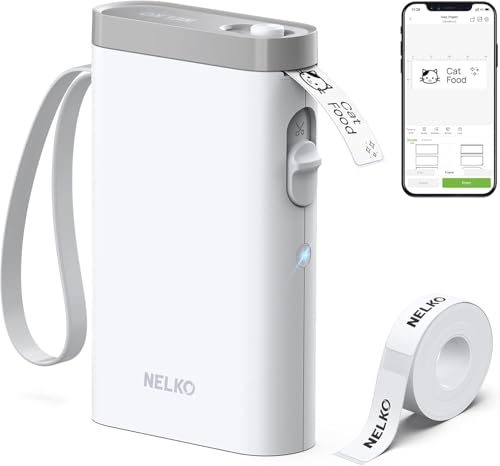
Nelko's P21 lists iOS support, and an iOS app can usually run on an iPad, though a phone-sized layout may appear on the larger screen. The printer is half the weight of a traditional label maker and prints BPA-free direct thermal stickers from templates.

It is the lightest option here, which suits a tablet that travels with a person, such as a teacher or a field technician. It has no keyboard and no standalone mode, so everything depends on the app. Compared with the Rollo, it prints tiny labels and does not touch shipping.

Store it with a spare roll and confirm that the app opens cleanly on your iPad before a busy day. Field technicians will like how little it adds to a bag, and a label on a cable or a toolbox takes under a minute. The trade is that a small thermal sticker fades in sunlight, so it suits indoor tags better than anything left outside.

What works

  • About half the weight of traditional machines
  • iOS app works with a tablet
  • BPA-free direct thermal
  • Many templates

Watch out for

  • App layout may be phone-sized on an iPad
  • No standalone mode

Spec sheet

Print method
BPA-free direct thermal
Apps
iOS and Android through the Nelko app
Weight
About half that of traditional label makers
Pairing
Download the app and connect over Bluetooth
Templates
Multiple app templates
06
NIIMBOT D110 mini Bluetooth label maker, 149 g
149 g bodyUp to 15 mm wideAuto rewindBluetooth app
Check price on Amazon
Best for: Anyone who wants the smallest label printer to pair with a tablet.

At 149 grams the NIIMBOT D110 is the smallest machine here and prints labels up to 15 millimeters wide, such as 12 by 40 millimeter stickers. An automatic rewind positions the first label so the roll does not waste the leader. It pairs with the NIIMBOT app over Bluetooth.

The listing does not mention iPad, so treat tablet use as a test you run yourself. The narrow width suits cable tags, storage bins and small shelf labels, not anything that needs a long line of text. Against the SUPVAN, it is smaller and cheaper to carry and less capable.

Keep a spare roll, update the app and pair it before a job. A printer this small is easy to lose in a bag, so keep it in a labeled pouch with a spare roll and the charging cable. Because the narrow roll runs out fast on busy days, ordering a few spares at once is cheaper than a rush replacement.

What works

  • 149 gram body
  • Automatic rewind saves the leader
  • Several small label styles
  • Bluetooth app control

Watch out for

  • 15 mm maximum width
  • iPad support is not stated

Spec sheet

Weight
149 grams
Maximum width
Up to 15 mm
Paper handling
Automatic rewind positions the first label
Connection
Bluetooth with the NIIMBOT app
Tape styles
Several, such as 12x40 mm labels

Spec sheet decoder

What the numbers on the box really mean

The specs manufacturers lead with, translated into what they tell you about real-world performance.

AirPrint

Apple's driverless printing protocol that lets an iPad find and use a network printer.

Watch forOnly the Rollo Wireless advertises it.

Bluetooth app printing

The printer pairs with an app that designs and sends labels over a short-range radio link.

Watch forThe SUPVAN, Nelko and NIIMBOT printers rely on it.

USB host

A port that lets the printer accept a scanner or similar device.

Watch forThe Brother QL-820NWB lists it.

Automatic rewind

A feature that pulls the roll back after printing so the first label starts at the cutting position.

Watch forThe NIIMBOT D110 lists it.

Standalone use

The ability to print without a phone, tablet or computer attached.

Watch forThe SUPVAN E11 has a keyboard, and the Brother has an LCD.

Methodology

How We Evaluated These iPad Label Printers

Stated iPad route

We looked for iPad or AirPrint wording in each listing. Only the Rollo Wireless names iPad directly, and the SUPVAN T50M Pro mentions a tablet. The others rely on iOS apps.

Tablet usability

We considered how an app might look and work on a larger screen. Apps with image import and fonts, like the SUPVAN's, benefit from a tablet. Phone-sized apps lost points.

Placement flexibility

Connection types were compared with typical iPad setups on a counter or stand. The Brother's Bluetooth, Wi-Fi and Ethernet give the most freedom. AirPrint needs the same network.

Standalone ability

We checked whether each printer works with the tablet away. The SUPVAN E11's keyboard and the Brother's LCD score well. App-only printers scored lower.

Label fit

We matched label size to jobs: 4x6 for shipping, narrow DK for badges, small tape for stickers. No printer covers all three, so fit counted heavily.

Decision guide

How to Choose the Right iPad Label Printers

By iPad Job

JobPickWhy
Shipping bench run from an iPadRollo WirelessAirPrint and 4x6 labels.
Visitor check-in with badgesBrother QL-820NWBNarrow DK labels and a scanner port.
Logo stickers designed on a tabletSUPVAN T50M ProTablet app and image import.
Classroom name labelsSUPVAN E11Keyboard fallback.

By Budget

TierPickWhy
Lower tierNIIMBOT D110Smallest and simplest.
Middle tierSUPVAN E11Keyboard and battery.
Higher tierBrother QL-820NWBThree connection routes.

AirPrint vs Bluetooth App

AirPrint

The Rollo Wireless uses Apple's built-in printing. No app is needed. It needs the same Wi-Fi network.

Bluetooth app

The SUPVAN, Nelko and NIIMBOT printers use an app. They work without Wi-Fi. They depend on the app staying current.

Choose AirPrint for a fixed bench and Bluetooth for mobile work.

By Mobility

PreferencePickWhy
Carry everywhereNIIMBOT D110149 gram body.
Lightweight with templatesNelko P21Half the weight of traditional machines.
Fixed kioskBrother QL-820NWBMultiple connections.

For a Classroom Cart Specifically

Look for

A printer that works when the iPad is away, a rechargeable battery and cheap labels.

In this comparison

The SUPVAN E11 has a keyboard and a battery rated up to about a month per charge, so it suits a shared cart.

When to Spend More

Spend more if

You print shipping labels or run a check-in desk. The Rollo Wireless and Brother QL-820NWB cover those jobs.

Save if

You print a few small stickers a week. The NIIMBOT D110 or Nelko P21 is enough.

Ownership

Maintenance schedule

The upkeep that decides whether this machine lasts two seasons or ten.

TaskIntervalWhy it matters
Re-pair after iPadOS updatesAfter each major updateSystem updates can drop Bluetooth pairings. Remove and add the printer again.
Check the Wi-Fi networkAfter router changesAirPrint needs the iPad and printer on the same network. A new router may need a rejoin.
Clean the print headEvery few rollsDust causes pale lines. Alcohol on a swab clears it.
Charge the batteryMonthly or before tripsA flat battery stops a job halfway through a class.
Update the label appAs updates arriveApp updates track iPadOS changes. An old app can lose its link.

FAQ

Frequently Asked Questions

Which label printer works best with an iPad?

The Rollo Wireless names iPad and uses AirPrint, so it needs no driver. For small labels, the SUPVAN T50M Pro mentions tablet editing. Others rely on iOS apps.

Do iPhone apps work on an iPad?

Usually they run, sometimes in a phone-sized window. Open the app before relying on it and check the buttons are reachable.

Can I print shipping labels from an iPad?

Yes with the Rollo Wireless through AirPrint. The small sticker printers cannot print 4x6 labels.

Why can my iPad not see the printer?

The most common cause is a different Wi-Fi network or a guest network that blocks discovery. Bluetooth printers avoid that problem.

Do I need an app for AirPrint?

No. AirPrint is built into iPadOS. The Rollo Ship Manager app is optional.

What happens if the app is discontinued?

App-dependent printers lose function. Printers with a keyboard or AirPrint keep working, which is a reason to choose them.

Bottom line

The short version

Browse more ipad label printerson Amazon →
James Miller, Lead Machine Editor

About the author

James Miller

Lead Machine Editor, MachineFanatic

James Miller leads MachineFanatic's buying guides, turning spec sheets, manuals and owner feedback into clear verdicts on power tools, outdoor power equipment, shop machines and kitchen machines.

More from James →

Keep reading

Related guides